For a macOS and ProRes editing workflow, our best Thunderbolt 5 laptop is the Apple 16-inch MacBook Pro M5 Max MGEE4LL/A. Apple documents dedicated ProRes media engines, three TB5 ports, a 16.2-inch Liquid Retina XDR display, and the exact 48GB/2TB configuration. If your software requires Windows or NVIDIA graphics, the Razer Blade 16 RTX 5090 is the portable alternative and the MSI Titan 18 is the maximum-spec desk choice.
This order rests on documented media features, GPU and retail configuration, display, memory, storage, ports, and mobility. No benchmarks or personal tests were used. Your application, codec, plug-ins, operating system, display needs, and delivery format can reverse it. The complete Thunderbolt laptop list covers broader laptop roles.
Quick picks
- MacBook Pro M5 Max: Best macOS and ProRes workflow.
- Razer Blade 16 RTX 5090: Best portable Windows power.
- MSI Titan 18 HX AI: Best maximum-spec Windows desk.
- ASUS ROG Strix SCAR 18: Best Mini LED Windows alternative.
- MSI Raider 18 HX AI: Best included-storage alternative.
- Alienware 18 Area-51: Best 300Hz large-screen crossover.
| Image | Product | Details | Check Price |
|---|---|---|---|
 | Apple 16-inch MacBook Pro M5 Max MGEE4LL/A | OS / workflow: macOS; Apple documents ProRes media engines GPU: M5 Max 40-core GPU TB5 ports: Three Display: 16.2-inch Liquid Retina XDR Memory / storage: 48GB / 2TB Mobility boundary: Apple lists 4.7 lb; fixed memory and storage | Check Price on Amazon |
 | Razer Blade 16 RTX 5090 RZ09-05819EN9-R3U1 | OS / workflow: Windows and NVIDIA workflow path; application support controls GPU: GeForce RTX 5090 TB5 ports: One TB5 plus one TB4 Display: 16-inch QHD+ 240Hz OLED family path Memory / storage: 64GB / 2TB Mobility boundary: Family physical ceiling around 4.7 lb | Check Price on Amazon |
 | MSI Titan 18 HX AI A2WJ-1258US | OS / workflow: Maximum-spec Windows desk GPU: GeForce RTX 5090 TB5 ports: Two Display: 18-inch 3840x2400 240Hz Mini LED Memory / storage: 64GB / 4TB Mobility boundary: MSI lists 7.94 lb | Check Price on Amazon |
 | ASUS ROG Strix SCAR 18 G835LX-XS97 | OS / workflow: Windows Mini LED alternative; no editing benchmark GPU: Exact RTX 5090 retail identity TB5 ports: Two on the G835LX family Display: Family path: 18-inch 2560x1600 240Hz Mini LED Memory / storage: Not frozen; verify exact variation Mobility boundary: ASUS 7.28 lb versus Amazon 6.28 lb conflict | Check Price on Amazon |
 | MSI Raider 18 HX AI A2XWIG-014US | OS / workflow: Windows included-storage choice GPU: GeForce RTX 5080 TB5 ports: Two on the A2XWX family Display: Exact panel details not retained Memory / storage: 64GB / 4TB Mobility boundary: Exact selected-unit weight not retained | Check Price on Amazon |
 | Dell Alienware 18 Area-51 AA18250 | OS / workflow: Windows editing and high-refresh gaming crossover GPU: Exact RTX 5090 retail identity TB5 ports: Two on RTX 5070 Ti and higher configurations Display: 18-inch 2560x1600 300Hz Memory / storage: Not frozen for the exact retail configuration Mobility boundary: Dell family maximum 9.56 lb; not exact-unit weight | Check Price on Amazon |
1. Apple 16-inch MacBook Pro M5 Max MGEE4LL/A – Best macOS and ProRes workflow

MGEE4LL/A is the pick when your workflow is built around macOS and ProRes media. Apple specifies that the exact retail configuration includes an M5 Max with a 40-core GPU, 48GB of unified memory, and 2TB of storage. Apple documents dedicated ProRes encode and decode media engines, which is a workflow-specific fact rather than a generic claim that the laptop wins every editor or codec.
Apple specifies three Thunderbolt 5 ports and a 16.2-inch Liquid Retina XDR display, plus a 100Wh battery and a 4.7 lb weight for the M5 Max model. Three same-generation ports leave room for direct storage, a dock, capture hardware, or displays without stacking every device behind one upstream connection.
The platform is the decisive limitation. Windows-only applications, plug-ins, device drivers, or company images can rule it out regardless of the hardware. Memory and storage are also fixed at purchase.
Our Take
MGEE4LL/A is the clearest ProRes and macOS choice, because its media engines and its exact 48GB/2TB configuration are documented. Move to a Windows pick when application or device support demands it.
- Apple documents ProRes media engines
- Three Thunderbolt 5 ports
- Exact 48GB memory and 2TB storage configuration
- macOS may not support a required Windows-only tool or plug-in
- Memory and storage are not upgradeable after purchase
- Battery capacity does not predict render runtime
2. Razer Blade 16 RTX 5090 RZ09-05819EN9-R3U1 – Best portable Windows power
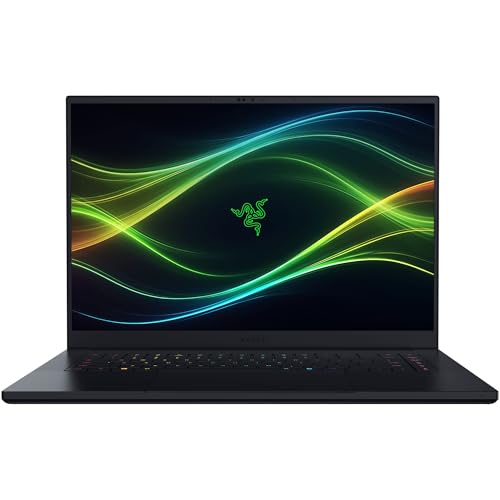
This Blade 16 answers a specific bind: a Windows application or NVIDIA workflow is required, but an 18-inch chassis is too cumbersome. Razer ties RZ09-05819EN9-R3U1 to GeForce RTX 5090 graphics, 64GB of memory, and 2TB of storage. Its family specification supplies a 16-inch QHD+ 240Hz OLED display path and a listed weight around 4.7 lb.
Razer documents one Thunderbolt 5 port plus one Thunderbolt 4 port. The mixed layout still allows a high-bandwidth direct device alongside a second certified connection, though only one of them is TB5. The family also carries a 90Wh battery. Neither the GPU name nor the OLED panel proves behavior in a particular NLE, codec, effect, export, or color pipeline.
Set against the MacBook Pro, the Razer trades dedicated Apple ProRes media-engine evidence and macOS for Windows, NVIDIA graphics, and real mobility. Confirm your software’s GPU and driver requirements before treating either path as universally better.
Our Take
As a portable Windows alternative, the RTX 5090 Blade 16 is the strongest here. Its one-TB5 layout is less flexible than the dual-port desk systems, but its documented configuration is much easier to carry.
- Exact RTX 5090, 64GB, and 2TB configuration
- 16-inch QHD+ 240Hz OLED family display
- About 4.7 lb listed weight boundary
- Only one Thunderbolt 5 port
- No application or codec benchmark in our sources
- OLED and GPU labels do not prove color or export behavior
3. MSI Titan 18 HX AI A2WJ-1258US – Best maximum-spec Windows desk
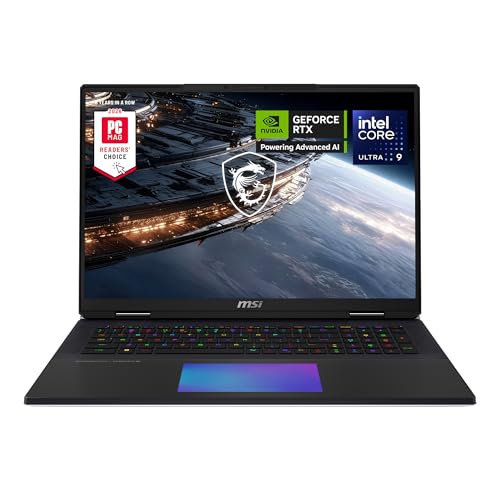
The Titan suits a Windows workstation that normally stays put on a substantial desk. MSI lists A2WJ-1258US with a Core Ultra 9 290HX, GeForce RTX 5090, 64GB of memory, and 4TB of storage. That exact capacity is useful for large local media sets, though it does not replace an archive or backup plan.
MSI specifies two Thunderbolt 5 ports and an 18-inch 3840×2400 240Hz Mini LED display, along with a 99.9Wh battery and a 7.94 lb weight. The two-port layout can keep a direct external SSD separate from a dock, subject to the complete device and host path. The large internal panel gives you workspace, but its specifications are not proof of calibrated color behavior for your delivery standard.
This is the fullest Windows desk configuration here, not a universal performance winner. Application acceleration, codec support, source media, thermals, power mode, and project structure still decide the real job.
Our Take
For buyers who want 64GB, 4TB, RTX 5090 graphics, and two TB5 ports in one exact package, the Titan is the maximum-spec Windows desk pick. Its 7.94 lb weight makes portability secondary.
- Exact 64GB memory and 4TB storage
- Two Thunderbolt 5 ports
- 18-inch 3840×2400 Mini LED display
- MSI lists a 7.94 lb weight
- Display specification is not a calibration result
- No common editing benchmark supports a universal lead
4. ASUS ROG Strix SCAR 18 G835LX-XS97 – Best Mini LED Windows alternative

The SCAR 18 makes sense when the ASUS Mini LED path and exact RTX 5090 retail identity matter more than a fully confirmed memory and storage specification. ASUS documents an 18-inch 2560×1600 240Hz Mini LED ROG Nebula HDR display for the G835LX family and two Thunderbolt 5 ports with DisplayPort and power-delivery support.
The family surface includes several configurations, so the exact G835LX-XS97 retail identity and the family technical facts stay separate. Our sources do not bind a memory or SSD capacity to this listing. There is also a material weight conflict: ASUS lists 7.28 lb, while the Amazon record lists 6.28 lb. Confirm the selected variation if carry weight changes the decision.
On an editing desk, the ASUS earns its position through its documented panel family, RTX 5090 identity, and dual TB5 topology. It does not inherit a creator benchmark merely because the same hardware class can run editing software.
Our Take
The SCAR is the Mini LED Windows alternative, provided you verify the exact memory, storage, and weight at checkout. The Titan is easier to specify, while the ASUS may suit a buyer who prefers its 2560×1600 family panel path.
- Exact RTX 5090 retail identity
- ASUS documents two Thunderbolt 5 ports
- 18-inch 2560×1600 240Hz Mini LED family path
- Memory and storage are not confirmed for this exact listing
- Manufacturer and marketplace weights conflict
- No application-specific creator result is retained
5. MSI Raider 18 HX AI A2XWIG-014US – Best included storage

The Raider is for the buyer who wants 4TB of included storage and 64GB of memory without needing the Titan’s RTX 5090 configuration. MSI lists the exact A2XWIG-014US with a Core Ultra 9 285HX, GeForce RTX 5080, 64GB, and 4TB. According to MSI’s A2XWX family specification, the laptop includes two Thunderbolt 5 ports.
Our sources do not preserve enough exact display detail to rank the Raider by panel resolution or refresh rate, and family weight or power figures do not become exact selected-unit facts. That narrower evidence is what makes its role precise: it is the included-storage pick for a Windows editing desk, not an unsupported display, mobility, or benchmark winner.
Large local capacity can cut down on immediate media shuffling, but storage size proves nothing about sustained transfer speed, data protection, or application response. Plan separate backup and archive paths.
Our Take
The Raider is the 64GB and 4TB RTX 5080 alternative. Buy it for the exact capacity and the dual TB5 record, and verify its panel and physical details separately.
- Exact 64GB and 4TB configuration
- Two TB5 ports on the manufacturer family matrix
- RTX 5080 is tied to the selected retail part
- Exact panel details are not retained
- Exact weight is not retained
- Capacity does not guarantee sustained-workflow performance
6. Dell Alienware 18 Area-51 AA18250 – Best 300Hz large-screen crossover

The Alienware belongs here when one 300Hz 18-inch screen has to serve both editing and gaming. Dell’s exact display page specifies 2560×1600 at 300Hz. The exact retail identity selects RTX 5090 graphics, and Dell’s AA18250 port manual documents two Thunderbolt 5 ports on RTX 5070 Ti and higher configurations.
Dell’s broader family sheet lists Core Ultra 9 275HX and RTX 5090 options, a 96Wh battery, and a 9.56 lb maximum configuration weight. Those values stay family options or ceilings. Our sources do not bind exact memory, storage, adapter, battery, or weight to this selected unit.
The 300Hz panel is a gaming crossover feature, not proof that this is the best screen for color-managed finishing. Take it only when the high-refresh large display and the Dell platform fit both sides of your workload.
Our Take
The Alienware is the large 300Hz crossover rather than the safest pure editing recommendation. Verify its exact memory, storage, and display requirements before choosing it over the fully specified Titan.
- Exact 18-inch 2560×1600 300Hz display page
- RTX 5090 configuration qualifies for two TB5 ports
- Clear editing-and-gaming crossover role
- Memory and storage are not confirmed
- Family maximum weight is not an exact-unit fact
- High refresh does not prove color-work suitability
How to choose a TB5 video-editing laptop
Start with software and codec support. Apple documents ProRes media engines for the MacBook Pro, which is what makes it the evidence-led macOS choice. Another application, plug-in, accelerator, or company environment may require NVIDIA graphics and Windows instead. A GPU tier on its own establishes neither export time nor playback quality.
Next, separate exact configurations from family specifications. The MacBook Pro, Razer, Titan, and Raider have confirmed memory and storage capacities. ASUS and Alienware do not. A family panel, battery, or weight ceiling can mark a boundary, but it cannot fill a missing exact-SKU field.
Port topology matters when an editor is connecting storage, capture hardware, a dock, and displays. Two or three TB5 ports give you more direct routes than one TB5 port, though shared controllers and the complete device chain still count. For storage choices, use our Thunderbolt 5 external SSD guide. Interface bandwidth is not sustained media throughput.
Treat the internal display as one stage in a color pipeline. Resolution, refresh rate, OLED, Mini LED, and XDR labels describe the panel, but they prove nothing about calibration, coverage, reference-mode suitability, or delivery accuracy. The photo and video editing monitor guide covers the external-display decision.
Finally, account for mobility and power. A 4.7 lb system and an 18-inch desktop replacement solve different jobs. High-power Windows systems may need their supplied adapters during demanding work even when a dock handles data and displays. Battery capacity is not an editing-runtime promise.
Video-editing laptop FAQ
Is Thunderbolt 5 required for video editing?
No. It earns its keep when a qualified external storage, capture, dock, or display path can use it. The application, codec, GPU support, memory, storage, and color workflow can matter more than the port generation.
Does 80Gbps mean an external SSD will sustain that speed?
No. Link bandwidth and manufacturer sequential ceilings are not sustained workflow results. The host, bridge, SSD, file system, free space, cable, cache behavior, thermals, and workload all constrain the real transfer.