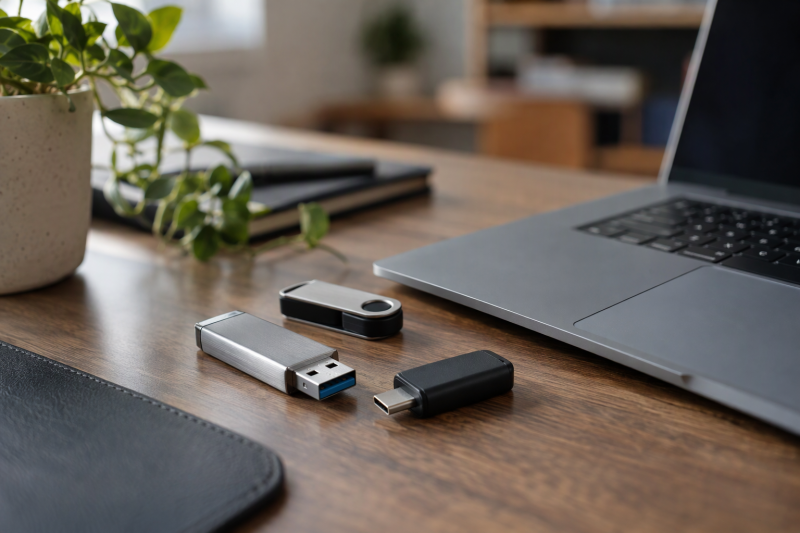
A 512GB flash drive can carry a sizeable collection of photos, documents, and video without the cable of a portable SSD. The right choice depends on the ports at both ends of the transfer, because some drives have USB-A, some use USB-C, and others carry both. The six models below also differ in their stated read speeds, physical designs, and software options.
| Image | Product | Best fit | Connection | Listed speed | Design | Watch-outs | Check Price |
|---|---|---|---|---|---|---|---|
 | Samsung Type-C 512GB | USB-C devices | USB-C, USB 3.2 Gen 1 | Up to 400 MB/s read, up to 110 MB/s write (Samsung) | Reversible plug | USB-A needs an adapter | Check Price on Amazon |
 | SanDisk Phone Drive 512GB | Android to computer transfers | USB-C and USB-A | 100 MB/s read, up to | Keyring attachment | Backup app requires setup | Check Price on Amazon |
 | PNY Attaché X 512GB | Sliding USB-A drive | USB-A, USB 3.2 Gen 1 | 130 MB/s read, up to | Sliding collar | Footnote ties speed to a USB 3.2 Gen 2 device | Check Price on Amazon |
 | PNY Elite-X Fit 512GB | Low-profile USB-A connection | USB-A, USB 3.1 Gen 1 | 200 MB/s read, up to | Micro-sized, plug-and-stay body | USB-A connector only | Check Price on Amazon |
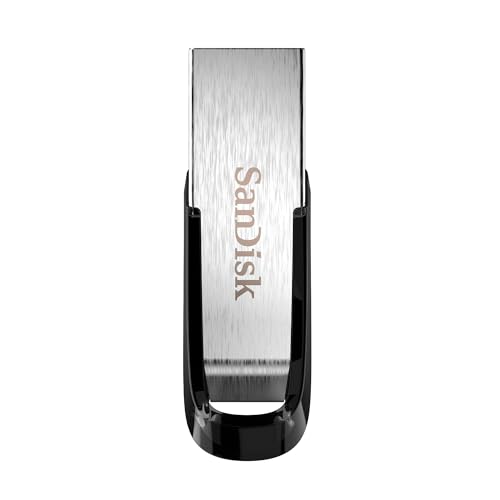 | SanDisk Ultra Flair 512GB | Metal USB-A drive | USB-A; Amazon says USB 3.0, SanDisk says USB 3.2 Gen 1 | 150 MB/s read, up to; write lower | Metal casing | Password software needs a download | Check Price on Amazon |
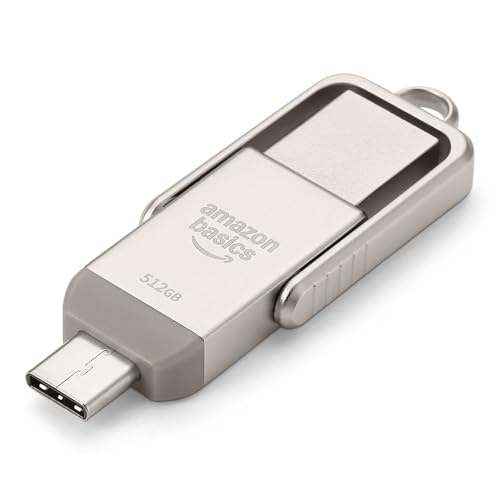 | Amazon Basics Dual Port 512GB | Moving between USB-A and USB-C | USB-C and USB-A | Not specified numerically | Rotating metal body | Listing says incompatible with Lightning | Check Price on Amazon |
1. Samsung Type-C 512GB — Best for USB-C Devices
The Samsung Type-C MUF-512DA4/AM is a 512GB USB-C flash drive in Titan Gray. Samsung’s data sheet lists the MUF-512DA4 as its 512GB Titan Gray model with a USB 3.2 Gen 1 interface. The data sheet and the Amazon listing both state read speeds up to 400 MB/s.
The Amazon listing describes a reversible USB-C plug and protection against water and extreme temperatures. Samsung’s data sheet rates the water protection at up to 72 hours in 1 meter of salt water and gives operating temperatures of 0 to 60 degrees C. The same sheet lists up to 110 MB/s write for the 512GB drive, a figure the Amazon feature bullets leave out. Samsung says its speeds come from internal testing and vary with the host device and test conditions.
Limit: Samsung’s drive has a single USB-C connector, so a destination with only USB-A needs an adapter or a different drive.Our Take Choose Samsung Type-C when both devices have USB-C ports and you want Samsung’s 400 MB/s read ceiling alongside its stated 110 MB/s write figure.
- Samsung’s data sheet and the Amazon listing both state read speeds up to 400 MB/s over USB 3.2 Gen 1.
- Samsung’s data sheet lists up to 110 MB/s write for the 512GB drive, a figure the Amazon feature bullets leave out.
- The Amazon listing describes a reversible USB-C plug and protection against water and extreme temperatures.
- Samsung’s Type-C drive has no USB-A plug, so an older USB-A computer needs an adapter.
- Samsung’s data sheet states up to 110 MB/s for writes, below the up to 400 MB/s it states for reads.
2. SanDisk Phone Drive for Android 512GB — Best for Phone-to-Computer Transfers
SanDisk’s Phone Drive SDDDC6-512G-G46 has USB-C and USB-A connectors. SanDisk’s product page describes moving files between a USB Type-C smartphone, tablet or Mac and a USB Type-A computer, and states read speeds up to 100 MB/s. SanDisk and the Amazon listing both say that speed needs a USB-C port with USB 3.2 Gen 1 support.
The Amazon listing describes automatic backup through the SanDisk Memory Zone app, which must be downloaded, installed and set up in its settings. The listing also names the included RescuePRO Deluxe recovery software, which requires registration and download under SanDisk’s terms. SanDisk’s page adds that a mobile device needs a USB Type-C port and On-The-Go support, and it describes a weighted design with a keyring hole.
Limit: SanDisk’s backup feature needs the app and setup, and its 100 MB/s figure is a read speed.Our Take Pick the SanDisk Phone Drive when one drive has to connect a USB-C Android phone and a USB-A computer, and the Memory Zone backup app is a plus.
- SanDisk gives the Phone Drive both USB-C and USB-A connectors, and its page describes moving files between a USB Type-C smartphone, tablet or Mac and a USB Type-A computer.
- SanDisk and the Amazon listing state up to 100 MB/s read with a USB-C port that supports USB 3.2 Gen 1.
- The Amazon listing describes automatic backup through the Memory Zone app once it is installed and set up.
- SanDisk describes a weighted design with a keyring hole.
- SanDisk’s automatic backup requires a separate app download and setup.
- SanDisk’s RescuePRO recovery software requires registration and download under its terms.
- SanDisk states 100 MB/s as a read speed and does not state a write figure.
3. PNY Attaché X 512GB — Best for a Sliding USB-A Drive
PNY’s sheet lists P-FD512ATTX-GE as the 512GB Attaché X, with a USB-A connector and a USB 3.2 Gen 1 interface. PNY and the Amazon listing both state up to 130 MB/s read, and both describe a sliding collar in place of a separate cap. PNY says the drive works with USB 3.2 Gen 1 or USB 3.0 PC and Mac laptops and desktops and is backward compatible with USB 2.0.
PNY’s sheet gives write speed only as up to 10 times faster than a PNY USB 2.0 drive rated at 3 MB/s write, not as its own MB/s figure. PNY’s speed footnote says the stated speed requires a USB 3.2 Gen 2 device, while the same sheet names the interface USB 3.2 Gen 1. Read 130 MB/s as a maximum under that footnote, not as a result to expect from every port.
Limit: A USB-C-only laptop needs an adapter for the USB-A plug, and PNY’s footnote ties the 130 MB/s figure to a USB 3.2 Gen 2 device.Our Take Choose Attaché X when the computers on both ends have USB-A ports and you prefer a sliding collar to a separate cap.
- PNY’s sheet lists up to 130 MB/s read for the 512GB P-FD512ATTX-GE.
- PNY and the Amazon listing both describe a sliding collar in place of a separate cap.
- PNY states that the Attaché X is backward compatible with USB 2.0.
- PNY’s Attaché X has a USB-A plug only, so a USB-C-only device needs an adapter.
- PNY’s footnote ties the 130 MB/s speed to a USB 3.2 Gen 2 device, although the sheet names the interface USB 3.2 Gen 1.
4. PNY Elite-X Fit 512GB — Best for Low-Profile USB-A Storage
PNY’s page lists P-FDI512EXFIT-GE as the 512GB Elite-X Fit, with a USB-A connector and a USB 3.1 Gen 1 interface that is backward compatible with USB 2.0. PNY and the Amazon listing both state up to 200 MB/s read, the second-highest of the five read figures on this page, behind the 400 MB/s Samsung lists.
The Amazon listing describes a micro-sized, low-profile, plug-and-stay body meant to stay connected to host devices. PNY’s page names computers, in-car stereos, game consoles, printers and TVs as hosts and also mentions a removable cap for the connector. PNY’s footnote says the stated speeds require USB 3.1 Gen 1 devices, and PNY gives write speed only as up to 30 times faster than a PNY USB 2.0 drive.
Limit: The Elite-X Fit has a single USB-A connector, so a USB-C-only computer needs an adapter.Our Take Pick Elite-X Fit for a USB-A port, car stereo or game console where PNY describes the drive as able to stay plugged in.
- The Amazon listing describes a micro-sized, low-profile body designed to stay connected to host devices.
- PNY states up to 200 MB/s read for the Elite-X Fit and backward compatibility with USB 2.0.
- PNY names computers, in-car stereos, game consoles, printers and TVs as compatible hosts.
- PNY’s Elite-X Fit has a USB-A connector only, so a USB-C-only device needs an adapter.
- PNY’s footnote says the stated speeds require a USB 3.1 Gen 1 device.
- PNY gives write speed only relative to a USB 2.0 drive, not in MB/s.
5. SanDisk Ultra Flair 512GB — Best for Metal USB-A Construction
The SanDisk Ultra Flair SDCZ73-512G-G46 is a USB-A drive with a metal casing, and the Amazon listing gives its model code. SanDisk’s Ultra Flair data sheet lists 512GB among its capacities, a USB 3.2 Gen 1 interface, and up to 150 MB/s read with lower write speeds. The Amazon listing calls the drive USB 3.0 and says a USB 3.0 port is required for the stated speed.
The Amazon listing states that password protection uses 128-bit AES encryption, lists Windows 7, 8 and 10 and Mac OS X v10.9 or later, and says Mac needs a software download. SanDisk’s data sheet lists Windows 10 or later and macOS 12 or later for the same feature and says a software download is required. The listing also says writes are up to 15 times faster than a standard USB 2.0 drive.
Limit: SanDisk’s data sheet says writes are slower than reads, and a USB-C-only device needs an adapter for the USB-A plug.Our Take Choose Ultra Flair when you want a metal USB-A drive with 128-bit AES password protection and your operating systems appear on SanDisk’s list.
- SanDisk’s data sheet and the Amazon listing state up to 150 MB/s read, and the listing says a USB 3.0 port is required.
- The Amazon listing describes a sleek, durable metal casing.
- SanDisk and the Amazon listing state that password protection uses 128-bit AES encryption.
- SanDisk’s data sheet says write speeds are lower than reads and does not state a write figure.
- SanDisk’s password feature requires a software download, and its data sheet lists Windows 10 or later and macOS 12 or later.
6. Amazon Basics Dual Port 512GB — Best for a Simple Dual-Connector Drive
The Amazon Basics LS25USBC512G1 combines USB-C and USB-A connectors in a metal case with a rotating open-and-close design and a hanging hole. The Amazon listing states 512 GB nominal capacity, available capacity higher than 460 GB, and an exFAT default format. The listing adds that the operating system may show less than the label because measurement standards differ.
The listing gives no numerical read or write speed, only a disclaimer that speeds come from internal tests and vary with the device and file. It does not state a USB generation or mention a backup app. The listing’s note that the drive is incompatible with a “lighting port” reads as a misspelling of Lightning, so an iPhone with a Lightning connector is not a direct fit.
Limit: The Amazon listing gives no numerical read or write speed and says the drive is incompatible with a lighting (Lightning) port.Our Take Pick the Amazon Basics drive for two connectors and a stated exFAT format when a published speed figure is not required.
- The Amazon listing describes both USB-C and USB-A connectors on one drive.
- The Amazon listing states 512 GB nominal capacity, more than 460 GB available, and an exFAT default format.
- The Amazon listing describes a metal case with a rotating open-and-close design and a hanging hole.
- The Amazon listing gives no numerical read or write speed for comparison.
- The Amazon listing says the drive is incompatible with a “lighting port”, apparently meaning Lightning.
- The Amazon listing says the capacity an operating system shows may be less than the 512 GB label.
Buying Guide: Choosing a 512GB USB Flash Drive
Match the connector to both devices
Start with the ports on the computer that sends files and the device that receives them. The Samsung Type-C has a USB-C plug that fits compatible USB-C ports directly, while the PNY drives and SanDisk Ultra Flair use USB-A. A small adapter can bridge a connector mismatch, but it is another part to carry.
For frequent transfers between the two port types, SanDisk Phone Drive and Amazon Basics carry both USB-C and USB-A connectors, so you don’t switch adapters. Check clearance around each port as well as its shape, especially on a phone with a thick case or a laptop with tightly spaced sockets.
Read the speed claim in the right direction
Samsung states up to 400 MB/s read. PNY states up to 200 MB/s for Elite-X Fit and 130 MB/s for Attaché X. SanDisk’s data sheet gives Ultra Flair up to 150 MB/s read, and SanDisk gives the Phone Drive up to 100 MB/s read with a USB-C port that supports USB 3.2 Gen 1. Each figure is a stated maximum for reading from the drive, not a measurement from a particular computer. PNY’s footnotes tie the Attaché X figure to a USB 3.2 Gen 2 device and the Elite-X Fit figure to a USB 3.1 Gen 1 device.
Copying a large video onto a flash drive depends on its write speed, which cannot be inferred from the read number. Samsung’s data sheet lists up to 110 MB/s write for its 512GB drive. SanDisk’s data sheet says Ultra Flair writes more slowly than it reads, and the Amazon Basics listing does not give a numerical speed. PNY gives write speed only relative to a USB 2.0 drive. SanDisk and PNY both say the host device and other conditions can change results.
Check capacity and the file system
The label 512GB is a nominal capacity, and the amount shown by a computer can differ because storage makers and operating systems report capacity differently. Amazon Basics states more than 460GB available for its model and does not say that a device will display the full number on the package.
The Amazon Basics listing names exFAT as its default format. Before transferring files between a laptop, phone, console, or television, check that each device supports the drive’s file system and capacity. Reformatting may help with compatibility, but it erases the drive, so copy any files elsewhere first.
Decide whether the drive will stay plugged in
The Amazon listing for PNY Elite-X Fit describes a low-profile plug-and-stay design that can stay connected to host devices. PNY’s page names computers, in-car stereos, game consoles, printers and TVs as hosts and says the drive is compatible with most PC and Mac computers, so check a specific stereo or console before relying on it.
PNY Attaché X uses a sliding collar, Amazon Basics uses a rotating metal body with a hanging hole, and SanDisk Phone Drive has a keyring hole. Choose the physical arrangement that fits how you carry or leave the drive.
Treat software features as separate choices
The Amazon listing for the SanDisk Phone Drive describes Memory Zone automatic backup after downloading and configuring the app. The drive’s recovery software also has separate registration and download requirements. SanDisk’s page points to its own compatibility list for USB-C devices, so check it for your phone before making the app part of a workflow.
The password protection on SanDisk Ultra Flair uses 128-bit AES encryption, according to SanDisk and the Amazon listing. SanDisk’s data sheet lists Windows 10 or later and macOS 12 or later, while the Amazon listing lists Windows 7, 8 and 10 and Mac OS X v10.9 or later, so check the destination system against SanDisk’s list. A password does not replace a separate backup of important files. Keep another copy in a different location.
Frequently Asked Questions
Is 512GB enough for a laptop backup?
A 512GB nominal drive can hold a substantial collection of documents and media, but whether it fits a backup depends on how much data is actually used on the laptop. Compare the size of the folders you need to protect with the free space shown by the drive after formatting.
Amazon Basics says its model has more than 460GB available, while the amount a computer reports can vary with measurement conventions. Keep an additional copy elsewhere if the files are important, and check that the backup can be opened on the intended device.
Can one flash drive connect to USB-C and USB-A?
Yes. The SanDisk Phone Drive and Amazon Basics Dual Port models each have both connectors. One drive then works with devices that have different port shapes, without a separate connector adapter.
Port shape alone does not prove that a phone or computer supports the drive’s capacity and file system. The Amazon Basics listing names exFAT as its default and says the drive is incompatible with a “lighting port”, apparently meaning Lightning, so confirm the destination device’s requirements before buying.
Is 400 MB/s the speed for copying files onto the drive?
No. Samsung’s 400 MB/s claim is a read figure for data coming from the drive, stated as up to that speed under Samsung’s test conditions. Samsung’s data sheet gives a separate write figure of up to 110 MB/s for the 512GB drive.
SanDisk’s Ultra Flair data sheet makes the same distinction, with up to 150 MB/s read and lower writes. SanDisk says performance may vary with the host device and usage conditions, so compare read and write figures separately.
Which drive is described as made to stay plugged in?
The Amazon listing describes the PNY Elite-X Fit as a micro-sized, long-stay, low-profile drive that can stay connected to host devices. The PNY Attaché X uses a sliding collar.
Make sure the laptop has a USB-A port and room beside it for the drive. PNY states the Elite-X Fit speeds for USB 3.1 Gen 1 devices.
Do these drives back up or protect files automatically?
The SanDisk Phone Drive listing describes automatic backup through Memory Zone, but the app must be downloaded and configured first. The Phone Drive’s recovery software has separate registration and download requirements, so those functions involve setup.
SanDisk Ultra Flair lists 128-bit AES password protection with operating-system requirements. Protection and backup are separate jobs, so keep another copy of important files and check that you can open it on the devices you use.
For a broader connector-focused selection, see our USB-C flash drive guide. If you need more capacity, compare the 1TB flash drives and 2TB flash drives.
Bottom Line
Samsung Type-C is the direct USB-C choice, with up to 400 MB/s read stated by Samsung, the highest figure on this page. SanDisk Phone Drive and Amazon Basics add USB-A when you move between different port types. PNY Elite-X Fit is a micro-sized USB-A drive, Attaché X has a sliding collar, and Ultra Flair has a metal casing.