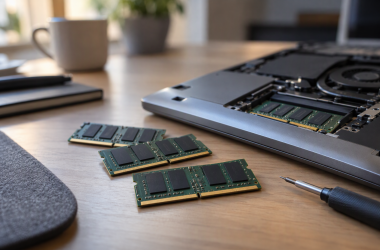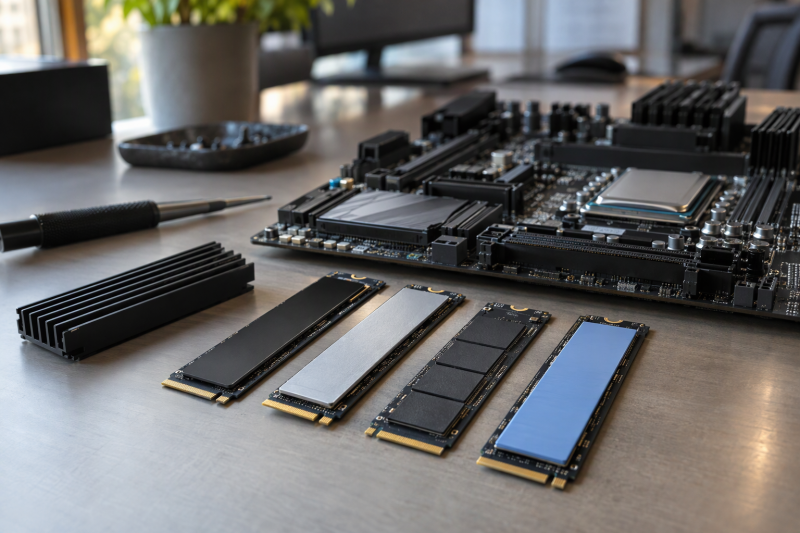
A 4TB NVMe SSD is an internal M.2 drive, and the five here are all 4TB M.2 2280 models. Lexar’s page and Crucial’s page give PCIe 5.0 drives with up to 14,000 and 14,100 MB/s read. Samsung, Sandisk and Silicon Power give PCIe 4.0 drives at 7,450, 7,000 and 5,000 MB/s read. The first decision is which PCIe generation your slot supplies. The second is whether you can cool a Gen 5 drive. Crucial is the one maker here that states a heatsink need.
| Image | Product | Best fit | Capacity | Form factor | Interface | Read/write | Check Price |
|---|---|---|---|---|---|---|---|
 | Lexar NM1090 PRO 4TB | Highest PCIe 5.0 write speed | 4TB | M.2 2280 | PCIe 5.0 | 14,000 / 13,000 MB/s | Check Price on Amazon |
 | Crucial T705 4TB | Gen 5 slot with a heatsink | 4TB | M.2 2280 | PCIe 5.0 | 14,100 / 12,600 MB/s | Check Price on Amazon |
 | Samsung 990 PRO 4TB | Fastest PCIe 4.0 speeds | 4TB | M.2 2280 | PCIe 4.0 | 7,450 / 6,900 MB/s | Check Price on Amazon |
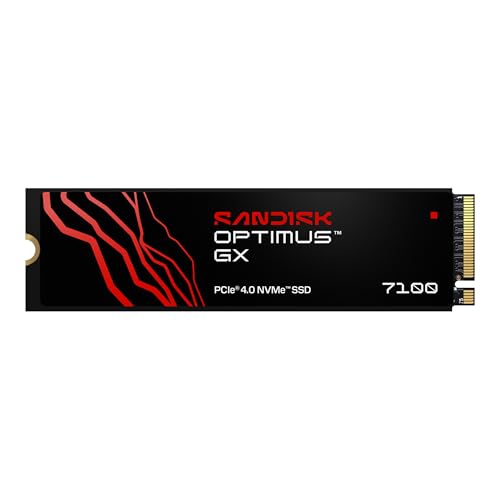 | SANDISK Optimus GX 7100 4TB | PCIe 4.0 game-library capacity | 4TB | M.2 2280 | PCIe 4.0 x4 NVMe 2.0 | 7,000 / 6,700 MB/s | Check Price on Amazon |
 | Silicon Power UD90 4TB | PCIe 4.0 with RAID and E2E protection | 4TB | M.2 2280 | PCIe 4.0 | 5,000 / 4,500 MB/s | Check Price on Amazon |
1. Lexar Professional NM1090 PRO 4TB — Best for the Highest Listed PCIe 5.0 Write Speed
Lexar’s product page gives the 4TB NM1090 PRO as an M.2 2280, PCIe 5.0 drive with up to 14,000 MB/s read and 13,000 MB/s write. The same page lists 232-layer 3D TLC NAND, a 6nm controller, DRAM and SLC caches and DirectStorage support. It also gives a 2,800 TBW endurance rating for the 4TB size. The Amazon listing gives the model code as LNM109P004T-RNNNU.
Lexar’s 13,000 MB/s write figure is the highest on this page. The Crucial page gives 12,600 MB/s, and the fastest write figure among the PCIe 4.0 drives is the 6,900 MB/s Samsung gives. Lexar’s page also states a five-year limited warranty and names its DiskMaster tool for firmware updates and drive health checks.
Limit: Lexar’s page and the Amazon listing do not list a heatsink or say what speed a PCIe 4.0 slot delivers. Lexar states its 14,000/13,000 MB/s figures for the PCIe 5.0 interface.Our Take Choose the NM1090 PRO for a PCIe 5.0 slot when the highest write figure on this page is the goal.
- Lexar states 14,000 MB/s read and 13,000 MB/s write for the 4TB model, the highest write figure on this page.
- Lexar lists 2,800 TBW for the 4TB size and a five-year limited warranty.
- Lexar lists DRAM and SLC caches and a 6nm controller.
- Lexar names its DiskMaster tool for firmware updates and drive health checks.
- Lexar states its speeds for PCIe 5.0 and does not say what a PCIe 4.0 slot delivers.
- Lexar’s page and the Amazon listing do not list a heatsink.
2. Crucial T705 4TB — Best for a Gen 5 Slot That Has a Heatsink
Crucial’s page for the CT4000T705SSD3 gives a 4TB M.2 2280 PCIe Gen 5 x4 drive with up to 14,100 MB/s read and 12,600 MB/s write, 2,400 TBW and a five-year limited warranty. The page says the T705 works with Intel Core 13th and 14th Gen and AMD Ryzen 7000 CPUs and is backward compatible with Gen 3 and Gen 4 systems. The Amazon listing says Micron TLC NAND and a bundle that includes Acronis cloning software.
Crucial’s 14,100 MB/s read is the highest read figure on this page, 100 MB/s above the 14,000 MB/s Lexar gives, while its 12,600 MB/s write is below Lexar’s 13,000 MB/s. Cooling is the detail Crucial spells out. The T705 page says non-heatsink versions must be installed with a motherboard or alternate heatsink to achieve optimal performance, and the Amazon listing tells buyers to install the drive with a compatible heatsink for sustained gaming and demanding workloads.
Limit: Crucial gives its 14,100/12,600 MB/s figures for a PCIe Gen 5 x4 connection and says non-heatsink versions need a motherboard or alternate heatsink for optimal performance.Our Take Pick the T705 for a documented Gen 5 slot that already has, or can take, a heatsink.
- Crucial states 14,100 MB/s read, the highest read figure on this page.
- Crucial lists 2,400 TBW and a five-year limited warranty for the 4TB model.
- Crucial says the T705 is backward compatible with Gen 3 and Gen 4 systems.
- The Amazon listing names Intel 13th/14th Gen and AMD Ryzen 7000 systems with M.2 Gen 5 slots.
- Crucial says non-heatsink versions need a motherboard or alternate heatsink for optimal performance.
- Crucial’s 12,600 MB/s write figure is below the 13,000 MB/s Lexar gives.
3. Samsung 990 PRO 4TB — Best for the Fastest Listed PCIe 4.0 Speeds
Samsung’s page for the 990 PRO 4TB MZ-V9P4T0B/AM gives a PCIe 4.0 NVMe M.2 SSD with up to 7,450 MB/s read and 6,900 MB/s write, and the Amazon listing title adds the M.2 2280 size. Samsung’s page also offers a separate 990 PRO w/ Heatsink model, so confirm the model code when you order. The Amazon listing quotes Samsung for a more than 55% improvement in random performance over the 980 PRO and up to 50% better performance per watt.
Samsung’s pair is the fastest PCIe 4.0 pair on this page, ahead of the 7,000/6,700 MB/s Sandisk’s data sheet gives for its 4TB drive and the 5,000/4,500 MB/s Silicon Power gives. The Samsung drive sits well below the 14,000 MB/s and 14,100 MB/s read the Lexar and Crucial pages give for their PCIe 5.0 drives.
Limit: Samsung’s 7,450/6,900 MB/s figures describe a PCIe 4.0 drive, and the Amazon listing is for MZ-V9P4T0B/AM, not the heatsink model.Our Take Choose the 990 PRO for a PCIe 4.0 slot when you want the fastest figures Samsung, Sandisk and Silicon Power give.
- Samsung gives 7,450 MB/s read and 6,900 MB/s write for MZ-V9P4T0B/AM, the fastest PCIe 4.0 pair on this page.
- The Amazon listing quotes Samsung for a more than 55% random-performance improvement over the 980 PRO.
- The Amazon listing title gives the M.2 2280 size.
- Samsung’s 7,450 MB/s read is below the 14,000 MB/s Lexar and 14,100 MB/s Crucial give for PCIe 5.0.
- Samsung’s page also offers a separate 990 PRO w/ Heatsink model, so confirm the model code when you order.
4. SANDISK Optimus GX 7100 4TB — Best for PCIe 4.0 Game-Library Capacity
Sandisk’s data sheet lists the 4TB SDSP71400TAN as an M.2 2280 PCIe 4.0 x4 NVMe 2.0 drive with up to 7,000 MB/s read and 6,700 MB/s write, up to 900K random read and 1.35M random write IOPS, 8th-generation BiCS TLC 3D CBA NAND and nCache 4.0 SLC cache. Its DRAM cache entry reads Host Memory Buffer. The sheet states a 5-year or TBW-limit warranty, whichever comes first.
The sheet also gives 2,400 TBW for this size, average active power of 4.1 W reading and 4 W writing, and TCG Pyrite 2.01 with ATA Security passthrough over NVMe. Sandisk’s 7,250/6,900 MB/s figure, which the Amazon bullets repeat, belongs to the 1TB and 2TB models and not to this drive.
Limit: Sandisk’s 4TB figures of 7,000/6,700 MB/s are below the 7,250/6,900 MB/s it gives the 1TB and 2TB models and below the 7,450/6,900 MB/s Samsung gives the 990 PRO 4TB.Our Take Choose the GX 7100 for a PCIe 4.0 system when Sandisk’s published 4TB endurance, power and cache figures help your decision.
- Sandisk’s data sheet gives separate 4TB figures of 7,000 MB/s read and 6,700 MB/s write.
- Sandisk lists 2,400 TBW for the 4TB drive.
- Sandisk lists average active power of 4.1 W reading and 4 W writing for the 4TB drive.
- Sandisk lists TCG Pyrite 2.01 and ATA Security passthrough over NVMe.
- Sandisk’s 4TB speeds are below the 7,250/6,900 MB/s it gives the 1TB and 2TB models.
- The Amazon listing’s headline speed bullet quotes the 1TB and 2TB figures, not the 4TB figures.
5. Silicon Power UD90 4TB — Best for PCIe 4.0 With RAID and End-to-End Data Protection
Silicon Power’s UD90 page lists the 4TB SP04KGBP44UD9005 as a PCIe Gen4 x4 M.2 2280 drive with up to 5,000 MB/s read and 4,500 MB/s write. The Amazon listing is for SP04KGBP44UD9005AY, a model code the page also lists for 4TB. The page’s headline write figure of 4,800 MB/s belongs to the 1TB and 2TB sizes, and the 4TB row gives 4,500 MB/s.
The page lists NVMe 1.4, Host Memory Buffer, SLC caching, LDPC coding, RAID support and built-in E2E data protection, with dimensions of 22.0 x 80.0 x 3.5 mm and a weight of 8 g. Silicon Power states a 5-year limited warranty based on TBW or the warranty period, and the Amazon listing says up to 1,200 TBW, whichever comes first.
Limit: Silicon Power’s 5,000/4,500 MB/s are the lowest figures on this page, and the 1,200 TBW the Amazon listing gives is below the 2,400 TBW Sandisk gives and the 2,800 TBW Lexar gives.Our Take Choose the UD90 for a PCIe 4.0 slot when its RAID and end-to-end data protection features count for more than speed.
- Silicon Power’s page lists LDPC coding, SLC caching, RAID support and built-in E2E data protection.
- Silicon Power states a 5-year limited warranty based on TBW or the warranty period.
- Silicon Power gives separate 4TB figures of 5,000 MB/s read and 4,500 MB/s write.
- Silicon Power’s 4TB speeds are the lowest on this page.
- The Amazon listing gives up to 1,200 TBW, below the 2,400 TBW Sandisk gives for its 4TB drive.
Buying Guide: Choosing a 4TB NVMe SSD
Confirm the physical M.2 slot before comparing interface generation
The Lexar, Crucial and Silicon Power pages and the Sandisk data sheet each give M.2 2280 for these drives, and the Samsung Amazon title gives the same size. Check the laptop or motherboard manual for the M.2 length, NVMe support and maximum capacity.
A slot that takes only 2230 drives, a SATA-only M.2 slot, or a lower capacity limit does not become compatible because a drive says 4TB. Silicon Power’s page says the 2280 size allows easy installation in laptops, small form factor PCs and some ultrabooks, and Sandisk’s data sheet describes the GX 7100 as power-efficient for laptops and handheld gaming consoles. Neither statement replaces the slot’s own documentation.
Match PCIe 4.0 or 5.0 to the host path
Lexar and Crucial state their drives as PCIe 5.0. Samsung, Sandisk and Silicon Power state PCIe 4.0. The generation is the main performance split among these five.
The 14,000 MB/s Lexar gives and the 14,100 MB/s Crucial gives are stated for a Gen 5 connection, and Crucial’s page adds that the T705 is backward compatible with Gen 3 and Gen 4 systems. A Gen 4 system can compare Samsung’s 7,450/6,900 MB/s, Sandisk’s 7,000/6,700 MB/s and Silicon Power’s 5,000/4,500 MB/s, because those makers state the figures for the same interface.
Read the speed figures with each maker’s test conditions
Lexar gives 14,000/13,000 MB/s and Crucial gives 14,100/12,600 MB/s. Samsung gives 7,450/6,900 MB/s, Sandisk gives 7,000/6,700 MB/s for the 4TB drive, and Silicon Power gives 5,000/4,500 MB/s. Read and write figures come as pairs, so compare both.
Each is an up-to figure under the maker’s own conditions. Crucial’s page says its figures were measured with CrystalDiskMark at a queue depth of 512, and Sandisk’s data sheet gives its figures at queue depth 8 with one thread. Neither set of figures is a promise for every file size, cooling arrangement or host.
Plan cooling for the drive you pick
Crucial’s page says non-heatsink versions of the T705 must be installed with a motherboard or alternate heatsink for optimal performance. Lexar says its 6nm controller improves heat control. Lexar’s and Silicon Power’s pages give an operating temperature of 0 to 70 degrees C, and Sandisk’s data sheet gives 0 to 85 degrees C as the temperature the drive reports.
Check the computer’s manual for heatsink clearance and thermal pad arrangements before adding anything over an M.2 SSD. A thin laptop and a desktop motherboard can differ in clearance and padding. Samsung’s page offers a heatsink model of the 990 PRO as a separate choice.
Treat 4TB as an internal-upgrade decision
All five are internal drives, not USB drives or external enclosures. Sandisk’s data sheet says its software includes Acronis True Image for SANDISK for migrating to the new drive, and the Amazon listing for the Crucial T705 says it comes with Acronis cloning software.
Back up the existing drive before an internal storage replacement. A new 4TB SSD does not carry over an operating system, encryption keys or files by itself, so decide between cloning and a clean installation before removing a working drive.
FAQ
Which 4TB SSD has the highest stated read speed?
The Crucial T705 does. Crucial’s page gives 14,100 MB/s read, and Lexar’s page gives 14,000 MB/s for the NM1090 PRO. Both are stated for PCIe 5.0 M.2 2280 drives.
A PCIe 4.0 system can compare the 7,450 MB/s Samsung gives, the 7,000 MB/s Sandisk gives and the 5,000 MB/s Silicon Power gives instead.
Is a PCIe 5.0 SSD better for every computer?
No. Lexar and Crucial state their speeds for PCIe 5.0, and Samsung, Sandisk and Silicon Power state PCIe 4.0. A Gen 5 figure applies to a Gen 5 connection.
Confirm the slot’s generation, M.2 2280 support, capacity limit and cooling first. Crucial’s page says the T705 is backward compatible with Gen 3 and Gen 4 systems but gives its speeds for Gen 5.
Do I need a heatsink for a 4TB NVMe SSD?
Crucial is the one maker here that says so directly. Its page says non-heatsink versions of the T705 must be installed with a motherboard or alternate heatsink to achieve optimal performance, and the Amazon listing says to install the drive with a compatible heatsink.
Lexar’s page, Sandisk’s data sheet and Silicon Power’s page do not list a heatsink for these drives. Samsung’s page offers a separate 990 PRO w/ Heatsink model. Check the computer’s manual for existing thermal pads, a motherboard cover and the clearance around the slot.
Are these SSDs compatible with a laptop?
Only if the laptop documents a compatible M.2 2280 NVMe slot and supports the capacity. Silicon Power’s page says the 2280 size allows easy installation in laptops, small form factor PCs and some ultrabooks, and Sandisk’s data sheet describes the GX 7100 as power-efficient for laptops.
Check whether the slot is spare or replaceable, whether it accepts NVMe rather than SATA, and whether the computer maker limits module length, thickness or capacity.
What should I do before replacing an internal SSD?
Back up the files you need, and find out whether the existing system uses encryption or a recovery partition. A new 4TB drive may need initialization, partitioning, a fresh operating system installation or a cloning tool such as the Acronis software Sandisk’s data sheet and the Crucial Amazon listing mention.
Power down before opening the device and follow the computer maker’s service instructions. Keep the original drive intact until the replacement boots or mounts as intended.
Bottom Line
Choose the Lexar NM1090 PRO for the 13,000 MB/s write figure Lexar gives on a PCIe 5.0 slot. Choose the Crucial T705 for the 14,100 MB/s read Crucial gives when the slot has a heatsink or takes one. Choose the Samsung 990 PRO for the 7,450/6,900 MB/s Samsung gives on PCIe 4.0. Choose the SANDISK Optimus GX 7100 for the 4TB endurance and power figures its data sheet publishes. Choose the Silicon Power UD90 for the RAID and E2E data protection its page lists.
Related reading: PCIe 4.0 NVMe SSDs and PCIe M.2 adapter cards.