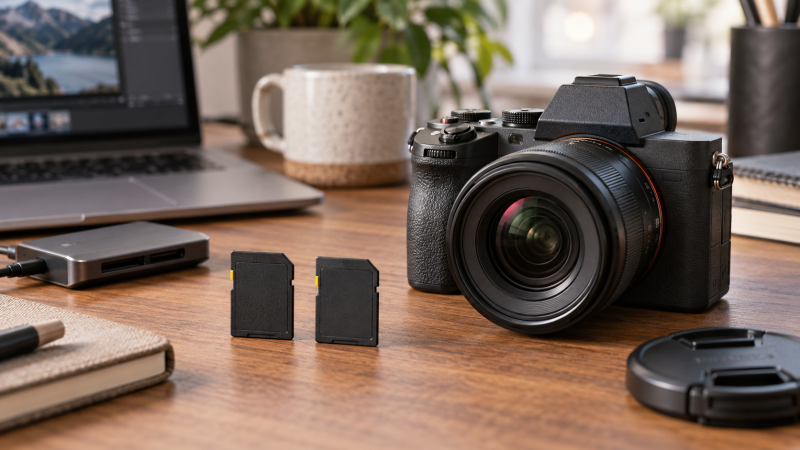
V60 is a class for sustained video recording, not a guarantee that every camera mode works with every card. Your camera’s card slot, codec, bitrate and media settings decide the requirement. Check the camera manual before choosing capacity or a large read-speed number.
These six UHS-II SD cards carry V60 in their listed names or specifications. A card reader’s link and the computer’s port affect off-camera transfer, while the V60 class concerns a minimum sustained-write category for recording. Neither is a measurement of your camera.
Choose the recording class first, then capacity, then the reader used to ingest footage. The card, camera and reader are one workflow, so a strong number in only one part does not settle the decision.
Use the card format procedure in the camera after backing up files. Do not rely on a PC format as proof that a recording mode will accept the card.V60 SD Cards Compared
| Image | Product | Details | Check Price |
|---|---|---|---|
 | Lexar Silver PRO | Best fit: 128GB V60 start Capacity: 128GB Class: V60, U3, UHS-II Listed read: Up to 280MB/s | Check Price on Amazon |
 | PNY EliteX-PRO60 | Best fit: 256GB capacity step Capacity: 256GB Class: V60, U3, UHS-II Listed write: Up to 180MB/s | Check Price on Amazon |
 | ProGrade Gold | Best fit: Simple V60 rotation Capacity: 128GB Class: V60, UHS-II Listed write: Up to 130MB/s | Check Price on Amazon |
 | Delkin Prime Two-Pack | Best fit: Two-card workflow Capacity: 2 x 128GB Class: V60, U3, UHS-II Listed write: Up to 150MB/s | Check Price on Amazon |
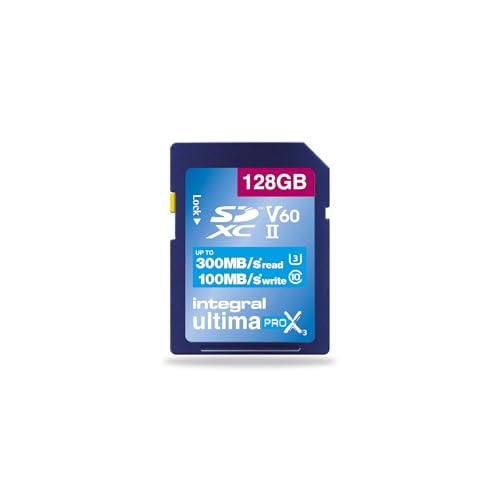 | Integral V60 | Best fit: Listed 300MB/s read Capacity: 128GB Class: V60, UHS-II Listed write: Up to 100MB/s | Check Price on Amazon |
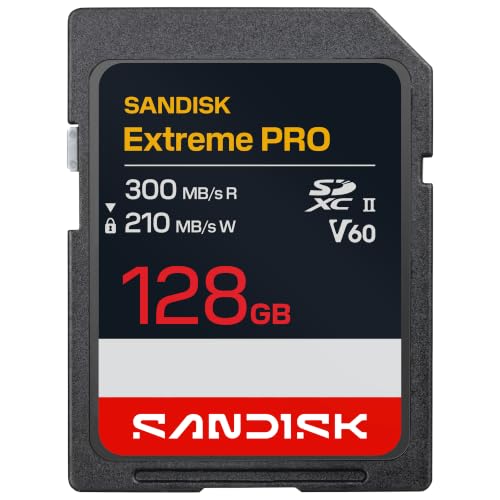 | SanDisk Extreme PRO | Best fit: 300MB/s read alternative Capacity: 128GB Class: V60, U3, UHS-II Listed read: Up to 300MB/s | Check Price on Amazon |
1. Lexar Silver PRO — Best 128GB V60 Start
Lexar lists the Silver PRO as a 128GB UHS-II V60 SD card with up to 280MB/s read speed. It is the straightforward choice at the low end of capacity for a hybrid camera that documents V60 support and does not need a longer shooting day on one card.
Read speed is mainly relevant when copying footage through a suitable reader. Check the camera’s manual for its required recording class and keep a second card available rather than filling the only card on an important shoot.
Our Take Buy the Lexar if you want a basic 128GB V60 card. It is a sensible starting capacity when you offload media frequently.
- V60 and UHS-II listed.
- 128GB capacity.
- Smaller shooting capacity.
- Read claim is not camera recording proof.
2. PNY EliteX-PRO60 — Best 256GB Capacity Step
PNY lists the EliteX-PRO60 as a 256GB U3 V60 UHS-II SDXC card. The capacity step is useful when a hybrid camera creates many stills and clips during a day, but a larger card also makes a single missed backup more costly.
Use a known-good reader and make at least two copies after the shoot. Capacity does not change the camera’s slot capability or make an unsupported high-bitrate mode work.
Our Take Buy the PNY if 256GB means fewer card swaps in a compatible camera. Budget for a backup routine at the same time.
- 256GB capacity listed.
- V60 and UHS-II listed.
- One larger card concentrates footage.
- Camera compatibility still matters.
3. ProGrade Gold — Best Plain V60 Workflow
ProGrade lists this Gold card as a 128GB SDXC UHS-II V60 model. It is a direct choice when the camera’s requirement is V60 and the buyer wants a conventional 128GB card for rotation between shoots.
Use several labelled cards if the project cannot tolerate all footage residing on one card. V60 describes the card class, not the camera’s maximum recording mode or a delivery-quality result.
Our Take Buy the ProGrade if you want a simple 128GB V60 rotation. Confirm the specific camera mode first.
- UHS-II V60 designation.
- 128GB format.
- May require frequent offload.
- Does not establish camera support.
4. Delkin Prime Two-Pack — Best Two-Card Kit
Delkin lists two 128GB UHS-II U3 V60 SDXC cards in this Prime pack. Two cards can make it easier to rotate media or keep a spare ready, but both still need their own formatting and backup discipline.
The listing references still and video use. Match the card class to the exact camera mode, then copy footage before reusing either card.
Our Take Buy the Delkin pack if you want a two-card workflow. It is useful when a spare is a higher priority than one larger capacity card.
- Two 128GB cards listed.
- V60 UHS-II designation.
- Both cards still need backup.
- Two-card pack is not dual recording.
5. Integral V60 — Best Listed 300MB/s Read Option
Integral lists a 128GB UHS-II V60 card with up to 300MB/s read and 100MB/s write. The read and write numbers are maker figures. The camera and reader determine what happens in an actual recording and ingest workflow.
It is an option for a camera that requires V60 and a computer setup with a suitable UHS-II reader. Confirm slot and codec requirements before choosing it by the read number alone.
Our Take Buy the Integral if its listed read and write specifications fit the whole compatible workflow, not just the card label.
- V60 UHS-II listed.
- 100MB/s write figure listed.
- Maker figures are conditional.
- Needs a suitable reader for fast ingest.
6. SanDisk Extreme PRO — Best 300MB/s Read Alternative
SanDisk lists this Extreme PRO as a 128GB UHS-II SD card with read up to 300MB/s. The listing title does not itself establish every camera recording class, so check the package and camera documentation before using it for a V60-specific mode.
Treat it as an alternative for fast ingest only with a compatible reader. Maintain two copies of camera media before reformatting.
Our Take Buy the SanDisk if the exact V60 requirement and packaging check out. Do not infer video class from read speed alone.
- 128GB UHS-II listing.
- Up to 300MB/s read claim.
- Confirm video-class marking.
- Read speed alone is not V60 proof.
Buying Guide
Check the camera’s exact recording requirement
V60 is a card speed class. It can suit modes that document a V60 requirement, but hybrid cameras can have different demands by resolution, frame rate and codec. Read the manual for the exact mode you intend to use.
Do not replace a required V90 card with V60 just because both are UHS-II. The label and a fast reader number cannot override the camera maker’s documented media requirement.
A V60 marking indicates a 60MB/s minimum sustained-write class. The class applies to the card, not the camera, so it narrows a media choice without proving that a particular camera, firmware version or codec setting will accept the card. Treat the camera’s own requirement as the final compatibility check.
Match capacity to the backup plan
128GB and 256GB change the number of card swaps, not the recording class. More capacity can simplify a long day, but it increases the amount of work at risk if the card is misplaced before backup.
Use a USB-C SD card reader that supports the card’s interface, then make two copies before formatting. Label cards so a full card is not returned to the camera accidentally.
A second card is a workflow safeguard, not extra recording bandwidth. A two-card pack can make rotation simpler, while a single 256GB card reduces swaps. Decide which failure mode is easier to manage before a long shoot, then label and offload the media consistently.
Separate camera write needs from computer ingest
Read speed primarily affects the copy from card to computer through a compatible reader. It does not prove the camera can record a chosen bitrate or that the reader will reach the same figure.
Test one noncritical clip with the camera’s normal settings, then inspect the copied file. Keep the camera’s format and error messages as the deciding evidence if a mode refuses the card.
UHS-II hardware is part of the ingest path. A UHS-I reader can still read a UHS-II card, but it may not use the same interface performance. Verify the reader and laptop connection before basing a turnaround plan on a listed maximum read speed.
Frequently Asked Questions
Is V60 enough for every 4K camera mode?
No. Some modes require a higher video class, while others may work with less. The exact camera manual and recording setting decide the required card.
Use V60 only where the camera documents it as suitable. A card title mentioning 4K does not replace a model-specific media table.
A video resolution label is not a specification for a recording mode. The storage requirement can change with frame rate, compression and bit depth, so check the manual for the exact mode rather than choosing from a generic 4K label.
Does a 300MB/s read rating make files copy at 300MB/s?
Not necessarily. The reader, cable, port, computer storage and the card’s own conditions all affect transfer. The seller figure is a maximum specification.
Use a compatible UHS-II reader and verify the copied footage before formatting. A USB-C laptop dock can add ports, but the reader and card interface still determine the media path. A file backup comes before chasing a peak transfer number.
300MB/s is a listed maximum read figure, not a promise for every setup. Storage speed and the connection to the computer can limit the result too. Build the ingest plan around a verified copy and a second backup.
Bottom Line
Choose PNY EliteX-PRO60 for 256GB capacity, Delkin Prime for a two-card rotation or Lexar Silver PRO for a basic 128GB V60 start. Check the camera’s exact mode before recording paid work.