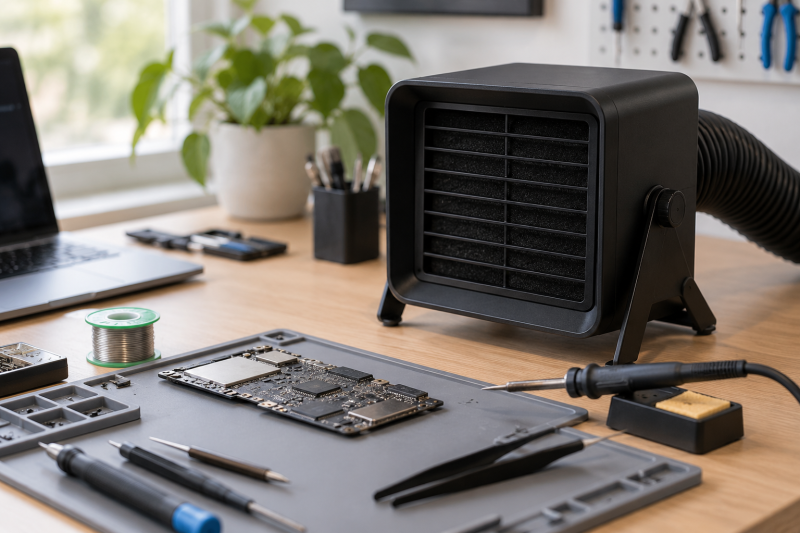
A laptop repair bench does not need a large fabrication-shop extractor to benefit from a better smoke path. When a connector, charging port, or wire needs soldering, a compact fume extractor helps pull the visible plume away from the work area instead of letting it rise past your face and settle around the desk.
The right choice depends on how close it can sit to the joint, how the filter is described, and whether its setup fits a laptop repair routine. The six Amazon US models below range from simple absorber fans to units with dual filters, adjustable angles, helping hands, or H13 HEPA and activated-carbon wording. Their listings describe local bench tools, not a room-wide air-quality system. Pair the extractor with a USB-C electric screwdriver and a USB microscope for repair work when the job needs both disassembly and close inspection.
Place the extractor near the solder joint before heating it. A desk fume extractor is most useful when the smoke has a short path to the intake.Solder Fume Extractors Compared
| Image | Product | Details | Check Price |
|---|---|---|---|
 | KOTTO Solder Smoke Absorber | Best fit: Simple bench absorber Role: Smoke absorber Use: Soldering filter | Check Price on Amazon |
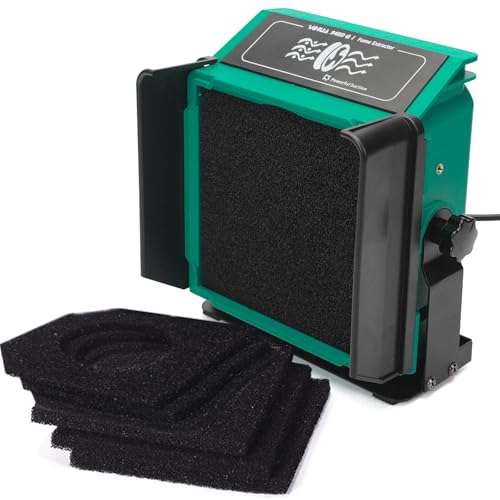 | YIHUA 948DQ-I | Best fit: Adjustable desk extractor Angle: Tiltable Filtering: Dual-filtering | Check Price on Amazon |
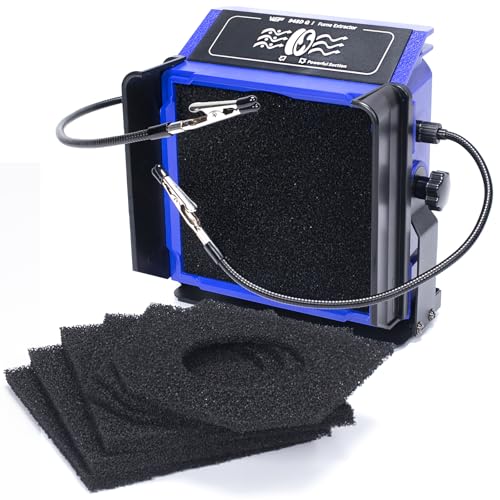 | WEP 948DQ-I | Best fit: Extractor with helping hands Filtering: Double filtering Positioning: Helping hands and tilt | Check Price on Amazon |
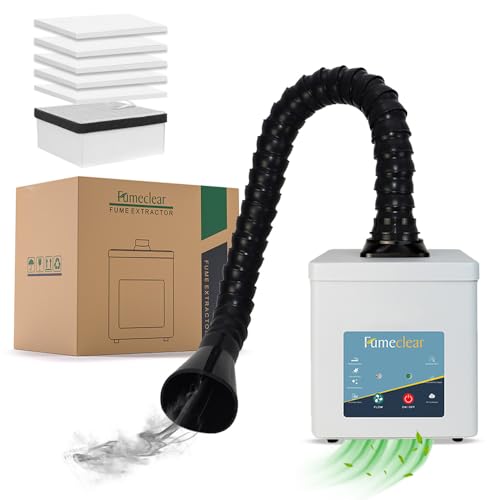 | FumeClear FC-2001A | Best fit: H13 HEPA and carbon option Filters: H13 HEPA and activated carbon Control: Three speeds | Check Price on Amazon |
 | ToolBud Solder Fume Extractor | Best fit: Flexible intake positioning Positioning: Removable magnetic flaps Use: Solder fume extractor | Check Price on Amazon |
 | Hakko FA400-04 | Best fit: Simple established option Role: Smoke absorber Brand: Hakko | Check Price on Amazon |
1. KOTTO Solder Smoke Absorber Remover Fume Extractor Soldering Filter — Best Simple Bench Absorber
A laptop repair bench that wants a compact tool beside the iron, without extra positioning hardware or an elaborate filter description, suits a simple dedicated absorber. KOTTO calls this a solder smoke absorber, remover, fume extractor, and soldering filter.
Use it for occasional connector work when you can place the intake close to the smoke source. The title makes the basic extraction role clear but does not state a filter class, airflow number, or adjustable arm, so do not treat it as equivalent to the more specifically described YIHUA, WEP, or FumeClear options below.
Our Take Buy KOTTO when your bench needs a plain solder smoke absorber as a simple dedicated intake near small repair work. Step up when a listed filter arrangement or adjustable angle decides the purchase.
- The listing explicitly identifies it as a solder smoke absorber, remover, fume extractor, and filter.
- A dedicated bench extractor gives solder smoke a nearer path than leaving it to room airflow.
- The simple category suits occasional laptop connector or wire repair beside an iron.
- Its listing makes no claim that it must replace a full-room ventilation solution.
- The focused smoke-absorber format keeps the purchase decision centered on local bench extraction.
- The title does not state a filter class comparable with FumeClear’s H13 HEPA wording.
- No listed tiltable angle or helping hands distinguish it from the YIHUA or WEP layouts.
- The listing gives no airflow figure for comparing smoke capture across models.
- A simple intake still needs deliberate placement close to the joint during soldering.
- The product title does not establish room-wide ventilation or a specific coverage area.
2. YIHUA 948DQ-I Solder Fume Extractor with Tiltable Angle, Dual-filtering — Best Adjustable Desk Extractor
A small repair bench where the work moves between a flat board, a raised laptop edge, and a cable held near the iron wants an intake with an adjustable direction. YIHUA gives this extractor a tiltable angle and dual-filtering in its title, so the intake direction can be part of the setup instead of an afterthought.
The dual-filtering description separates it from KOTTO’s generic soldering-filter wording. It does not establish a particular filter class or extraction result, so judge it by the stated configuration and keep the unit near the solder point rather than expecting a distant desk position to capture every plume.
Our Take Buy the YIHUA 948DQ-I when a tiltable intake and dual-filtering are the two features that make the bench easier to arrange. Look at WEP instead when you also want helping hands.
- The listing names a tiltable angle for aiming the intake toward a changing solder position.
- Dual-filtering gives the product a clearer listed filter arrangement than a generic absorber.
- An adjustable desktop form suits close work on ports, wires, and small laptop board sections.
- The two named features make it easy to compare with the similar WEP 948DQ-I option.
- Its extractor role remains focused on local bench smoke rather than an unsupported whole-room promise.
- The listing title does not name an H13 HEPA or activated-carbon class like FumeClear.
- Dual filtering does not remove the need to position the intake close to the solder joint.
- The title gives no stated airflow figure or coverage area for a numerical comparison.
- A tiltable desktop unit still needs bench space beside the laptop and soldering tools.
- The box lists eight filtration adsorbers, while the listing does not describe helping hands.
3. WEP 948DQ-I Fume Extractor Tool with Double Filtering — Best Extractor with Helping Hands
A repairer who regularly needs to hold a small wire or board steady while keeping the intake aimed at the smoke wants helping hands built into the extractor. WEP describes a double-filtering extractor with helping hands, adjustable tilt angle, fenders, and six filtration adsorbers, a more involved bench layout than a plain absorber.
The helping-hands detail is valuable for connector and cable repairs where both of your hands would otherwise be occupied. It does not turn the tool into a soldering station, and the listing does not establish an airflow result, so organize the work around the stated holding and positioning features rather than a performance number.
Our Take Buy WEP when helping hands, tilt adjustment, and double filtering make one compact bench tool more useful than a basic fan. It suits a repair workflow that needs an extra set of holders.
- The listing names helping hands for holding small repair parts near the soldering area.
- An adjustable tilt angle supports positioning the extractor around laptop ports and small wires.
- Double filtering is explicitly listed for a more defined setup than a generic smoke absorber.
- The title names six filtration adsorbers as part of the product’s listed filtering arrangement.
- Fenders and helping hands make it a more complete bench fixture than the basic KOTTO option.
- Extra holders and fenders can take more desk space than a simple smoke absorber.
- The listing does not state an H13 HEPA filter class or activated-carbon wording like FumeClear.
- Helping hands do not guarantee every laptop connector can be held in the needed orientation.
- No airflow figure is listed for comparing capture strength with the other extractors.
- The multiple accessories add setup decisions for a short repair that only needs local extraction.
4. FumeClear FC-2001A Solder Fume Extractor — Best H13 HEPA and Carbon Option
A buyer who wants a listed filter material and more than one stated speed setting should look at FumeClear first. Its title names a 2-in-1 H13 HEPA activated-carbon filter arrangement and three-speed adjustment, the most specific filter and control terms in this group.
Use the speed control to set up the bench around the actual joint rather than relying on the maximum setting from across the desk. The listing describes filter materials and three speeds, but it does not establish a particular room size, measured capture rate, or safety outcome.
Our Take Buy FumeClear when H13 HEPA and activated carbon are the listing details you want to prioritize, with three-speed adjustment as the control. It has the clearest filtration wording of the six extractors.
- The title specifically names a 2-in-1 H13 HEPA and activated-carbon filter arrangement.
- Three-speed adjustment gives the operator more listed control than a single described fan setting.
- The filter terminology is more specific than the generic absorber wording on the KOTTO listing.
- A dedicated solder fume extractor is appropriate for local smoke capture at a repair bench.
- Its listed three speeds help distinguish it from the similarly named dual-filter options above.
- The listing gives an air-purification capacity of 120-180m³/h, but that figure does not establish a particular room size or capture result.
- Three speeds do not make a distant extractor as useful as one placed near the joint.
- The title does not list helping hands for holding a wire or small board during repair.
- H13 HEPA and carbon wording does not establish a complete substitute for room ventilation.
- A more feature-specific extractor can add decisions when a basic local absorber would suffice.
5. Upgraded ToolBud Solder Fume Extractor with Removable Magnetic Flaps — Best for Flexible Intake Positioning
When the bench setup benefits from changing the intake shape around a small laptop board, cable, or connector, ToolBud’s removable magnetic flaps are the detail to examine, rather than one fixed opening in front of the fan.
The flaps appear in the listing, but their exact capture outcome and any particular filter class do not. Treat them as a positioning feature. Set the extractor close to the joint, then adjust the work area around the task instead of assuming the flaps are enough for smoke from across the desk.
Our Take Buy ToolBud when removable magnetic flaps are the setup detail that best fits your work. It offers a different physical approach from units that only tilt and from basic absorbers.
- The listing names removable magnetic flaps for changing the extractor’s physical intake arrangement.
- A flexible intake setup can suit small connector and wire jobs on a crowded laptop bench.
- The product remains a dedicated solder fume extractor rather than a general desk fan.
- Magnetic flaps distinguish the ToolBud layout from the tiltable YIHUA and WEP models.
- The listed upgrade framing gives buyers a clear feature to verify on the current Amazon page.
- The title does not name a filter class, airflow number, or multiple speed setting.
- Removable flaps still require a short smoke path from the solder joint to the intake.
- The listing does not establish helping hands for holding parts during a repair operation.
- A physical intake feature does not provide evidence of a particular room-size coverage result.
- Buyers should confirm the current flap arrangement before making it central to their workflow.
6. Hakko FA400-04 Smoke Absorber — Best Simple Established Option
A bench that wants a named local extraction category without a title full of filter stages, tilt hardware, or accessory holders suits the Hakko FA400-04, which Hakko calls a smoke absorber.
That simplicity can suit a bench where the extractor is placed in the same location for each short soldering task. The available listing title does not establish technical details beyond its smoke-absorber role, so compare the current Amazon page carefully if a filter type, speed setting, or physical adjustment is essential.
Our Take Buy the Hakko FA400-04 when a straightforward local bench tool is enough and you want a simple named smoke absorber. Choose a more specifically described model if filter arrangement or positioning hardware decides the purchase.
- The listing identifies a dedicated smoke absorber for local soldering work at a repair bench.
- Its straightforward product category is easy to understand for occasional laptop repair tasks.
- A simple bench tool can be positioned close to a recurring solder point without accessory setup.
- The Hakko name gives buyers a distinct alternative to the newer feature-heavy extractor listings.
- The smoke-absorber role keeps the comparison focused on capture near the soldering operation.
- The available listing title does not state filter class, airflow, speed settings, or tilt adjustment.
- No listed helping hands or magnetic flaps support part positioning during detailed repair work.
- A basic smoke absorber can be less suitable when a buyer needs an explicitly described filter system.
- The product title does not prove room-wide ventilation performance or a specific capture distance.
- Verify the current listing details before choosing it over a feature-specific FumeClear or WEP unit.
Buying Guide: Choosing a Solder Fume Extractor for a Laptop Repair Bench
Put the intake near the solder joint
Every product here is a local bench extractor or smoke absorber, so placement comes before feature shopping. KOTTO and Hakko are directly named smoke absorbers, while the other listings add positioning or filter terms. Set the intake close enough that the rising plume has a short route into it.
Do not turn a local tool into a room-wide claim. A short smoke path is the practical decision point, and a compact extractor needs to be moved as the repair moves from a charging port to a cable or board edge.
Choose positioning hardware for the work you actually do
YIHUA names a tiltable angle, WEP names adjustable tilt plus helping hands, and ToolBud names removable magnetic flaps. Those listed physical features serve different jobs at the bench, so they do not rank on one scale.
Use helping hands when a wire or small part needs holding. Use an adjustable intake when the joint changes height or direction, and reserve extra hardware for repairs that genuinely need it rather than filling a small bench with attachments.
Compare stated filter descriptions without overclaiming them
FumeClear names H13 HEPA and activated carbon, while YIHUA and WEP name dual or double filtering. Those phrases are useful ways to compare the listings, but they do not establish measured capture, room size, or a complete ventilation result.
Pick the filter description you can verify in the current listing, then keep the extractor close to the source. The filter words in a listing are a configuration detail and are no proof that any unit removes the need for appropriate overall workspace practices.
Keep the extractor inside the bench workflow
An extractor competes for space with the laptop, iron, drivers, and parts mat. WEP’s helping hands and fenders can replace a separate holder, while a simpler KOTTO or Hakko setup can suit a bench that only needs a nearby intake.
Arrange the bench before heating the joint. Leave a clear route between the smoke source and the intake, and avoid burying the fan behind the laptop or tool stand where the plume must travel farther.
Verify the current listing before buying replacement parts
Titles can identify an extractor, but the product page shows the current included items and replacement details. WEP’s six filtration adsorbers and ToolBud’s removable magnetic flaps are examples of features buyers should confirm before they make them part of a routine.
Check the exact product listing, included accessories, and replacement availability directly on Amazon. Do not assume that two similar-looking extractor names share the same filters or holders, especially when the feature wording differs between listings.
FAQ
How close should a solder fume extractor sit to the work?
Put the intake as close to the joint as the repair allows, without blocking the iron, your hands, or the board. KOTTO and Hakko are listed as smoke absorbers, so their most direct job is local capture rather than pulling smoke across an entire desk.
Move the extractor when the repair moves. A charging port, a wire, and a small board edge may need different placement, and the smoke path should remain short from the heated joint to the intake.
Which extractor has the most specific listed filter description?
FumeClear FC-2001A has the most specific wording in this group: 2-in-1 H13 HEPA activated carbon. YIHUA and WEP instead name dual or double filtering, a different listed configuration.
Those terms help compare the product pages, but they do not establish a measured capture rate or a complete workspace ventilation result. Confirm the current filter details before buying replacements.
Are helping hands useful with a fume extractor?
Yes, they can be useful when a connector, wire, or small board needs holding while you solder. WEP explicitly names helping hands, adjustable tilt, and fenders, so it is a more complete bench setup than a simple fan.
Helping hands are not necessary for every repair. If you already use a holder, a simpler absorber may leave more room beside the laptop and still provide a nearby intake.
Should I choose tilt adjustment or magnetic flaps?
Choose the feature that matches how you position the work. YIHUA and WEP name tiltable or adjustable angles, while ToolBud names removable magnetic flaps. Each changes the local intake setup in a different way.
Neither feature replaces close placement. Use tilt when the joint changes height or direction, and consider flaps when the physical opening around the work is the decision you want to control.
Can a desk fume extractor replace room ventilation?
No listing here presents a room-wide ventilation system. All six products are described as local smoke absorbers or solder fume extractors, which is the limited bench role this guide evaluates.
Use the extractor as one part of a suitable workspace setup. Its strongest role is pulling smoke away from a nearby solder point, not proving an outcome for an entire room.
Bottom Line
Buy YIHUA for its listed tiltable angle and dual filtering, WEP when you want helping hands, FumeClear for its H13 HEPA and activated-carbon wording, and ToolBud for removable magnetic flaps. For a simple nearby intake, KOTTO and Hakko keep the decision focused on the basic smoke-absorber role.