Each keyboard and mouse here has its own connection and Chrome OS statement on its Amazon listing. A 2.4 GHz receiver needs an available USB port, and a keyboard that says wireless is not automatically Bluetooth. The practical differences come from shared receivers, battery types, touchpads, full-size layouts, and mouse size.
The six products cover a touchpad keyboard, full-size combos, a compact combo, and portable mice. None of the six listings states Bluetooth. For a keyboard that pairs over Bluetooth, see the multi-device Bluetooth keyboards guide. A comparison of quieter pointers is in the quiet wireless mice guide.
Before you choose a combo, a touchpad keyboard, or a mouse, confirm the ChromeOS statement and a physical USB-A receiver path.Keyboards and Mice for Chromebook Compared
| Image | Product | Details | Check Price |
|---|---|---|---|
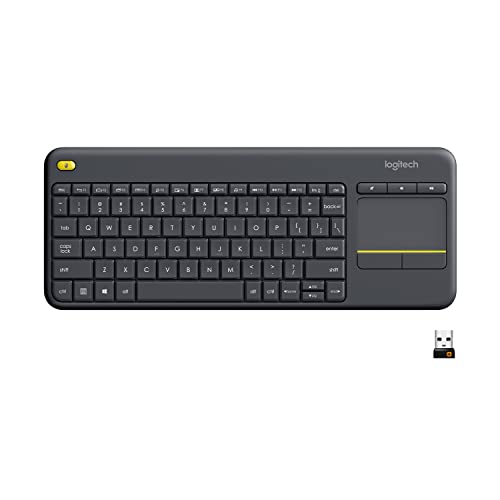 | Logitech K400 Plus | Best fit: One keyboard with a built-in touchpad Type: Wireless keyboard with large touchpad and quiet keys Connection: Unifying USB receiver; up to 33 ft ChromeOS statement: Chrome OS in listing bullets and title Power: Up to 18 months stated; on/off button | Check Price on Amazon |
 | MOFII Wireless Keyboard and Mouse Combo | Best fit: Full-size pair sharing one receiver Type: 104-key keyboard with number pad and ambidextrous mouse Connection: 2.4 GHz; one USB receiver; up to 35 ft ChromeOS statement: Chromebook in listing bullets and title Power: One AA in each device; up to 18 months stated; not included | Check Price on Amazon |
 | ONE-UP Wireless Mouse | Best fit: Small silent mouse Type: Ambidextrous mouse; 800, 1200, 1600 DPI Connection: 2.4 GHz USB nano receiver; up to 33 ft ChromeOS statement: Chromebook in title only Power: One AA, not included; sleep after 10 minutes | Check Price on Amazon |
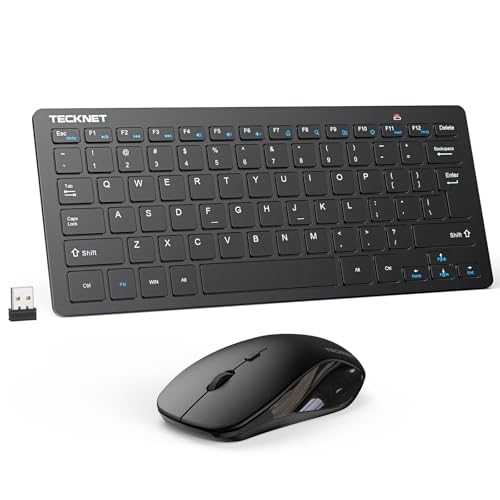 | TECKNET Mini Keyboard and Mouse Combo | Best fit: Compact pair sharing one receiver Type: Mini scissor-switch keyboard with 12 multimedia keys and mouse to 1600 DPI Connection: 2.4 GHz shared USB-A nano receiver; up to 49 ft; no Bluetooth ChromeOS statement: Chrome OS in title only Power: Four AAA batteries total; not included | Check Price on Amazon |
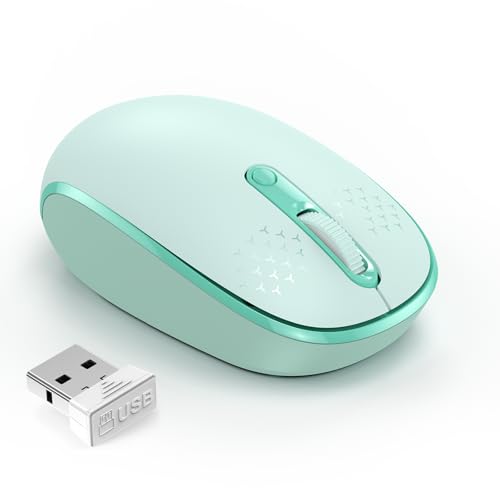 | TECKNET Mint Green Mouse | Best fit: Small four-button mouse Type: Four buttons; 800, 1200, 1600 DPI Connection: 2.4 GHz USB receiver; up to 49 ft ChromeOS statement: Chromebook in title only Power: One AA, not included; up to 15 months stated | Check Price on Amazon |
 | EDJO Full-Size Keyboard and Mouse Combo | Best fit: Full-size pair with keyboard tilt angles Type: 104-key keyboard with two tilt angles and a mouse with no clicking sound Connection: 2.4 GHz shared receiver; up to 33 ft ChromeOS statement: Chrome OS in listing bullets; Chromebook in title Power: Keyboard two AAA; mouse one AA or AAA; not included | Check Price on Amazon |
1. Logitech K400 Plus — Best ChromeOS Keyboard With a Built-In Touchpad
Logitech K400 Plus is a keyboard with a built-in touchpad. The Amazon listing sells it as a wireless touch TV keyboard for a PC-connected TV, and its compatibility bullet names Windows 7, 8, 10 and later, Android 7 or later, and Chrome OS. The listing gives quiet keys, a large touchpad 2.99 inches high and 1.85 inches wide, and a Unifying receiver that plugs into a USB port.
The listing states up to 33 feet of wireless range and up to 18 months of battery life, with an on/off button for longer life. It also describes a spill-resistant design and says the keyboard removes the clutter of a separate keyboard and mouse. The listing mentions no number pad and no Bluetooth.
The Amazon listing states Chrome OS, a 2.99 by 1.85 inch touchpad, quiet keys, a Unifying USB receiver, up to 33 feet of range, and up to 18 months of battery life.Our Take Choose K400 Plus when you want one keyboard with a built-in touchpad to replace a separate mouse. Skip it if you need a number pad, Bluetooth, or a separate mouse.
- The K400 Plus compatibility bullet names Chrome OS among its supported systems.
- The Amazon listing pairs quiet keys with a large built-in touchpad on the K400 Plus.
- The K400 Plus listing states a Unifying receiver, 33 feet of range, and up to 18 months of battery life.
- The Amazon listing describes the K400 Plus as a TV keyboard and mentions no number pad.
- The K400 Plus listing does not state Bluetooth.
2. MOFII Wireless Keyboard and Mouse Combo — Best Full-Size Combo With Number Pad and Round Keycaps
MOFII Wireless Keyboard and Mouse Combo pairs a full-size 104-key keyboard, in a retro typewriter style with round keycaps, with a symmetrical mouse shaped like a sports car. The Amazon title and bullets name Chromebook, and the listing adds a number pad and multimedia keys. Both devices use one 2.4 GHz USB receiver, and the listing says it is stored on the bottom of the mouse.
The listing states a connection range of up to 35 feet. It says the keyboard and mouse can be used separately, though both work through that one receiver. Each device uses one AA battery, which the listing says is not included. The listing gives 18 months of battery life for both and says the figure varies with usage. It says both devices sleep after 5 minutes of inactivity. The listing does not state Bluetooth, so the receiver needs a free USB port.
Our Take Pick MOFII for a full-size Chromebook desk pair that shares one receiver. Pass if the Chromebook has no free USB port, if you want a compact keyboard, or if you want rechargeable devices.
- The MOFII listing names Chromebook, a 104-key keyboard, and a number pad.
- The MOFII keyboard and mouse share one 2.4 GHz receiver, which the listing says is stored on the bottom of the mouse, and they can be used separately.
- MOFII’s listing states up to 35 feet of range and sleep after 5 minutes of inactivity for both devices.
- Each MOFII device uses one AA battery, and the listing says batteries are not included.
- The MOFII listing does not state Bluetooth, so the receiver needs a free USB port.
3. ONE-UP Wireless Mouse — Best Small Silent Chromebook Mouse
ONE-UP Wireless Mouse is a small ambidextrous mouse. The Amazon title names Chromebook, while the bullets list Windows XP, Vista, 7 and Mac OS X 10.4 and do not repeat it. The bullets state a USB nano receiver, up to 33 feet of range, a silent design, and DPI settings of 800, 1200, and 1600.
The listing says the mouse takes one AA battery, which is not included, and goes to sleep after 10 minutes of inactivity. It describes the body as small enough to toss in a bag, with item dimensions of 4.5 by 2.5 inches. ONE-UP is a mouse only, so typing needs a separate keyboard. The listing does not state Bluetooth or a USB-C receiver.
ONE-UP’s Amazon title names Chromebook, and the listing states a 2.4 GHz USB nano receiver, silent clicks, three DPI levels, a 33-foot range, and sleep after 10 minutes.Our Take Choose ONE-UP for a small mouse the listing calls silent if you have a spare USB port for its receiver. Skip it for Bluetooth, a larger grip, rechargeable power, or a shared keyboard-and-mouse receiver.
- The Amazon title for the ONE-UP mouse names Chromebook.
- The ONE-UP listing states a small ambidextrous body, silent clicks, and three DPI levels.
- ONE-UP’s listing states a 2.4 GHz receiver, 33 feet of range, and sleep after 10 minutes.
- The ONE-UP bullets name Windows and Mac OS X and do not repeat Chromebook.
- The ONE-UP listing does not state Bluetooth or USB-C receiver support.
4. TECKNET Mini Keyboard and Mouse Combo — Best Compact Chromebook Combo With One Receiver
TECKNET Mini Keyboard and Mouse Combo is the compact shared-receiver pair on this page. The Amazon title names Chrome OS, though the compatibility bullet lists Windows and Android smart TVs and does not repeat it. The bullets describe a mini keyboard that is not full-size, with scissor-switch keys and quiet keys and mouse clicks. Both devices share one nano receiver, which is stored in the mouse battery compartment. The listed range is up to 49 feet.
The listing tells buyers to confirm a USB-A port before purchase and says the combo does not support Bluetooth. It lists 12 multimedia hotkeys, and the title states a mouse adjustable to 1600 DPI. The combo needs four AAA batteries in total, two for the keyboard and two for the mouse, and the listing says they are not included. The listing says the multimedia shortcuts are not fully compatible with Mac OS and says nothing about how they behave on Chrome OS.
Our Take Pick TECKNET Mini for a compact Chromebook pair if you have one free USB-A port for its receiver. Pass if Bluetooth, a full-size keyboard, or included batteries are requirements.
- The Amazon title for the Mini names Chrome OS, and the listing says the pair shares one receiver.
- The TECKNET Mini listing states a mini scissor-switch keyboard, quiet controls, 49 feet of range, and 12 multimedia keys.
- The TECKNET Mini listing says the receiver is stored in the mouse battery compartment.
- The TECKNET Mini listing says the combo does not support Bluetooth.
- The listing says the Mini needs four AAA batteries in total and does not include them.
5. TECKNET Mint Green Mouse — Best Small Four-Button Chromebook Mouse
TECKNET Mint Green Mouse is a small four-button USB mouse. The Amazon title names Chromebook, while the compatibility bullet lists Windows 11, 10, 8.1 and 7 and Mac OS and does not repeat it. The listing gives a body of 3.94 by 2.28 by 1.52 inches and describes it as sized for kids and for small to medium hands. It says the buttons and scroll wheel click softly.
The listing states a 2.4 GHz connection with a range up to 49 feet, and three DPI levels of 800, 1200, and 1600. The mouse takes one AA battery, which is not included, and the listing states up to 15 months of battery life. The listing says the USB receiver is stored inside the back compartment. It does not state Bluetooth or keyboard pairing, so the Mint Green is a mouse only. The Amazon listing also offers other colors.
TECKNET Mint Green Mouse is listed at 3.94 by 2.28 by 1.52 inches with four buttons, soft clicks, three DPI levels, a 49-foot range, and up to 15 months from one AA battery.Our Take Choose the TECKNET Mint Green mouse if you want a small four-button mouse for small to medium hands. Skip it for Bluetooth, a larger grip, or a keyboard-and-mouse combo.
- The Amazon title for the Mint Green mouse names Chromebook and four buttons.
- The Mint Green listing states soft clicks and DPI levels of 800, 1200, and 1600.
- The listing gives the Mint Green a 3.94 by 2.28 by 1.52 inch body, a stored receiver, 49 feet of range, and up to 15 months from one AA battery.
- The listing describes the Mint Green mouse as sized for small to medium hands.
- The Mint Green listing does not state Bluetooth, and it says the AA battery is not included.
6. EDJO Full-Size Keyboard and Mouse Combo — Best Full-Size Combo With Two Keyboard Tilt Angles and a Silent Mouse
According to the Amazon listing, EDJO Full-Size Keyboard and Mouse Combo has a 104-key American QWERTY keyboard with a foldable stand that gives two tilt angles and a 3 mm key travel. The title names Chromebook, and the compatibility bullet names Chrome OS. The listing says the mouse makes no clicking sound and that the keyboard is not super quiet but is more than 95 percent quieter than similar keyboards.
The listing says the pair shares one 2.4 GHz receiver stored in the mouse, with a listed range of up to 33 feet. It says the keyboard sleeps after 6 minutes and the mouse after 15. The keyboard needs two AAA batteries, the mouse needs one AA or AAA battery, and the listing says batteries are not included. The listing says the 12 shortcuts are not fully compatible with the Mac system and does not say how they behave on Chrome OS.
EDJO’s Amazon listing states Chrome OS, a 104-key full-size layout, two tilt angles, one shared receiver, a 33-foot range, and separate keyboard and mouse sleep times.Our Take Choose EDJO for a full-size keyboard with tilt angles and a mouse the listing calls silent. Skip it for Bluetooth, a compact travel keyboard, or included batteries.
- The EDJO listing names Chrome OS and a 104-key full-size keyboard.
- EDJO’s listing states two tilt angles, a mouse with no clicking sound, and one shared receiver stored in the mouse.
- The EDJO listing gives the keyboard and mouse separate sleep times.
- The EDJO listing says the keyboard is not super quiet.
- EDJO’s listing says batteries are not included and does not state Bluetooth.
Buying Guide
Check ChromeOS wording and the receiver path
Each listing states Chrome OS support in a different place. The Amazon bullets for K400 Plus and EDJO state Chrome OS in their compatibility text. The Amazon titles for MOFII, ONE-UP, TECKNET Mini, and TECKNET Mint name Chromebook or Chrome OS, and the MOFII bullets name Chromebook as well. The ONE-UP, TECKNET Mini, and TECKNET Mint bullets list other systems and do not repeat it.
A receiver needs a USB port on the Chromebook. Each Amazon listing describes a 2.4 GHz or Unifying USB receiver, and none mentions a USB-C receiver. Only TECKNET Mini names USB-A. A Chromebook with only USB-C ports would need an adapter that none of these listings supplies.
Decide whether one receiver should control both inputs
A combo uses one receiver for two devices. The Amazon listings for MOFII, TECKNET Mini, and EDJO state one receiver shared by the keyboard and mouse, stored in the mouse.
The K400 Plus is one device instead of two. Its listing says it removes the clutter of a separate keyboard and mouse. Choose a shared-receiver combo for a keyboard plus a mouse, or K400 Plus for one keyboard with a touchpad.
Pick full-size or compact layout deliberately
MOFII and EDJO are full-size. Their Amazon listings state 104 keys, and MOFII’s listing also names a number pad.
TECKNET Mini is not full-size. Its listing says so and describes it for laptop bags and backpacks. A buyer who needs a number pad should look at the MOFII, whose listing names one.
Keep mouse fit and controls product-specific
The TECKNET Mint Green mouse is small. The Amazon listing gives 3.94 by 2.28 by 1.52 inches for small to medium hands and DPI levels of 800, 1200, and 1600.
ONE-UP is another small mouse. Its listing states an ambidextrous shape, silent clicks, three DPI levels, and a 33-foot range. Compare body size, button count, and listed receiver range, not only the color or the word Chromebook.
Plan batteries as a separate requirement
Battery arrangements vary. The K400 Plus listing states up to 18 months of battery life, MOFII’s listing says one AA in each device, and TECKNET Mini’s listing says four AAA batteries in total. The listings for MOFII, TECKNET Mini, EDJO, ONE-UP and TECKNET Mint say batteries are not included.
Mouse figures come with conditions. The TECKNET Mint listing states up to 15 months from one AA, MOFII’s listing says its 18 months varies with usage, and ONE-UP’s listing says it sleeps after ten minutes. Battery count, size, and stated condition differ by product.
FAQ
Can these connect by Bluetooth?
None of the six Amazon listings states Bluetooth support. TECKNET Mini’s listing says it does not support Bluetooth, and the others describe USB receiver connections.
Plan how the receiver connects first. TECKNET Mini’s listing names USB-A and tells buyers to confirm a USB-A port before purchase.
Which option uses one receiver for keyboard and mouse?
MOFII, TECKNET Mini, and EDJO list one receiver shared by the keyboard and mouse. Each listing says it is stored in the mouse.
K400 Plus is different. Its listing describes one Unifying receiver for a keyboard with a built-in touchpad and says the keyboard removes the need for a separate mouse.
Which keyboard includes a touchpad?
The Amazon listing for Logitech K400 Plus describes a large touchpad. It also states quiet keys, Chrome OS, a Unifying receiver, and a 33-foot range.
The other keyboards here come in combos with a mouse. Choose K400 Plus when you want one device on the desk instead of a keyboard and a mouse.
What happens with a USB-C-only Chromebook?
The listings describe USB receivers, and none states a USB-C receiver. TECKNET Mini’s listing tells buyers to confirm a USB-A port before purchase.
An adapter is a separate purchase. None of the listings mentions one, so add it to the hardware plan instead of assuming a receiver plugs into USB-C directly.
Which products are compact for travel?
TECKNET Mini is the compact keyboard-and-mouse combo. Its listing says it is not full-size and fits laptop bags and backpacks.
Two mice are small. ONE-UP’s listing says it is small enough to toss in a bag, and the TECKNET Mint listing calls its mouse portable and easy to store in a bag. Whether you also need a keyboard decides between the combo and the mice.
Bottom Line
Logitech K400 Plus is the Chrome OS keyboard with a built-in touchpad. MOFII Wireless Keyboard and Mouse Combo is the full-size pair with a number pad and one receiver. ONE-UP Wireless Mouse is a small mouse the listing calls silent. TECKNET Mini Keyboard and Mouse Combo is the compact combo. TECKNET Mint Green Mouse is the small four-button option. EDJO Full-Size Keyboard and Mouse Combo is the full-size pair with tilt angles and a mouse the listing calls silent.