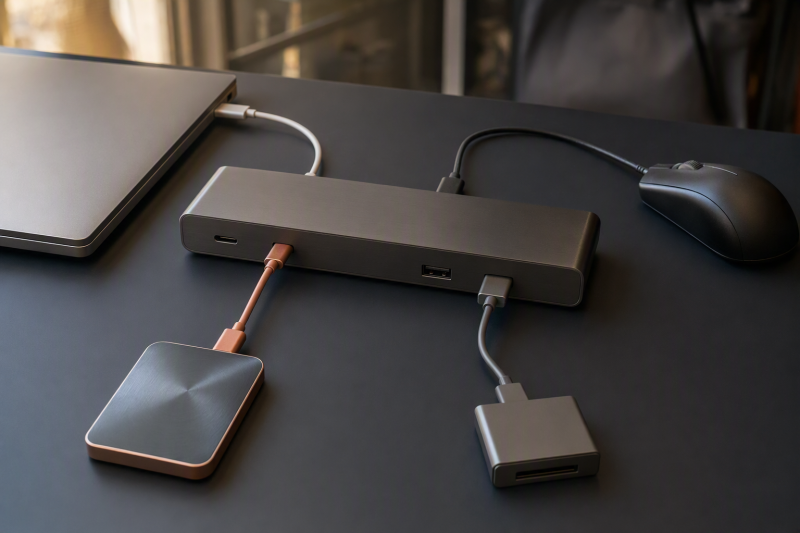
Port choice follows the device’s interface, whether its work is sustained, and what else runs alongside it. A 10Gbps label is not automatically better for every peripheral, and each downstream port is not necessarily a private end-to-end channel.
| Exact device model | Documented USB interface | Sustained or occasional workload | Runs at the same time as | Candidate port role |
|---|---|---|---|---|
Fill the first two columns from the device’s own documentation, not from connector shape. Then note whether the workload is sustained, such as ongoing storage traffic, or occasional. Fill in the simultaneous-use column too, because several ports can share one upstream path.
Rank devices by the interface their own documentation states and the work they do at the same time, not by price or age. A device with no stated need for the 10Gbps role should not displace one whose interface and sustained workload can use it. If the device interface is unknown, leave its candidate role open rather than inventing a label.
Map the exact dock before assigning a device
Use the dock manual or product specification to write down front and rear port positions, signaling labels, the host connection mode, and any controller group it names. Never copy a port map from a similar model.
| Dock position | Connector | Documented signaling label | Other restriction | Shared group |
|---|---|---|---|---|
| Front | ||||
| Front | ||||
| Rear | ||||
| Internal function |
“USB 5Gbps” and “USB 10Gbps” are USB-IF product signaling labels. They do not promise a file-copy result, payload rate, or universal efficiency. The device, cable, host mode, dock controller, and simultaneous traffic can all constrain the route. Do not divide a signaling label into an invented MB/s number.
The useful question is narrower: does the device have a documented interface and workload that can use the faster downstream port, and does the dock provide a host path that preserves that role?
Worked port map: Plugable TBT3-UDZ
Plugable’s TBT3-UDZ product page provides a bounded example. It lists five rear USB-A ports at 5Gbps, one front USB-A port at 10Gbps, and one front USB-C port at 10Gbps. The front USB-C port is data-only, which is not a charging-output claim.
The dock’s Thunderbolt 3 host connection is labeled 40Gbps. In USB-C host mode, Plugable warns that the front ports labeled 10Gbps may be limited to 5Gbps. Moving a device between those front ports cannot restore a 10Gbps role when the host mode imposes the lower limit.
| TBT3-UDZ location | Exact port group | Product label or condition |
|---|---|---|
| Front | One USB-A downstream port | USB 10Gbps |
| Front | One USB-C downstream port | USB 10Gbps, data-only |
| Rear | Five USB-A downstream ports | USB 5Gbps |
| Host link | Thunderbolt 3 connection | 40Gbps label |
| Host-mode caveat | Front 10Gbps ports while using a USB-C host | May be limited to 5Gbps |
This map belongs only to the TBT3-UDZ. Another dock can place, label, or group its ports differently.
Keep the shared upstream ceiling visible
A Plugable product owner states that all external USB ports on the TBT3-UDZ, plus its internal Ethernet, audio, and card-reader devices, share one USB 3.2 Gen 2 10Gbps hub path. That topology changes how the port labels should be read.
The five rear ports and two front ports are not seven independent paths that can each deliver their label through the same hub at once. A fast storage device, Ethernet traffic, a card read, and another USB transfer can contend on that one group. The product records do not quantify each device’s share or give an application throughput result, so there is no figure to calculate.
The same ceiling explains why moving a storage device from a rear 5Gbps port to a front 10Gbps port can still be the right move without guaranteeing a particular copy speed. It removes the downstream 5Gbps port label as one possible limit, while the shared hub, host mode, and other simultaneous traffic remain.
For simultaneous work, read the group as a whole rather than each connection alone:
| Simultaneous condition on the TBT3-UDZ | What the documentation supports | What remains unknown |
|---|---|---|
| Front storage transfer plus Ethernet activity | Both use functions attached to the documented shared 10Gbps USB hub path | The bandwidth received by either device |
| Front storage transfer plus card-reader activity | Both remain visible in the same documented group | The resulting copy time or payload rate |
| Several rear USB devices active together | Their external USB traffic reaches the same documented hub path | Any exact division among the ports |
| USB-C host mode with a device on a front 10Gbps port | The front port may be limited to 5Gbps | A guaranteed application result |
Treat this as a ceiling and topology check, not a calculation. Do not add the port labels together or divide the shared label among devices. The product records support placement decisions and contention awareness, not an allocation formula.
If Ethernet and storage will run together and you need the adjacent shared-traffic decision, use the USB-C hubs and docks with 2.5GbE guide. For slow USB ports built into a monitor, keep that separate topology with the USB-C monitor USB-port diagnosis.
Assign ports from highest documented demand down
Use this order after the device ledger and dock map are complete:
- Identify the device with the highest documented interface requirement and sustained workload.
- Give that device a dock port whose label can preserve the role, subject to host mode.
- Place devices that do not need the faster port on the 5Gbps group.
- Mark every device that can run at the same time inside the same shared group.
- Recheck the host connection. A lower USB-C host mode can make the front 10Gbps labels unavailable on the TBT3-UDZ.
After the first placement, test the logic two ways. First, check whether moving the highest-demand device to a 5Gbps port would introduce a lower documented downstream role. Second, check whether moving a low-demand device to the 10Gbps port would remove any documented limit it can use. If the first answer is yes and the second is no, the faster port has a clear placement without claiming a measured gain.
Then check simultaneous traffic. If the high-demand device runs while Ethernet, card-reader, audio, or other USB activity uses the same documented TBT3-UDZ hub, note that contention beside the placement. Moving between ports inside the group cannot bypass the group itself.
Reserve the faster port on the device’s own documented interface, not on its product category. A storage device documented only for a lower rate gains no supported performance claim from the 10Gbps port. A device documented for 10Gbps may deserve the faster port, and even then the placement is not a throughput promise.
If the dock and device rates are clear but the connecting cable’s capability is not, move that separate question to how to test USB-C cable speed. Cable testing is a separate job from port placement.
A USB-C docking-station guide is the right next step only when the completed placement shows that the current dock lacks the required port role or documented host path. A replacement dock is not the default response to shared traffic.
Documentation used for this port assignment
- USB-IF USB Data Performance establishes USB 5Gbps and USB 10Gbps as signaling labels, not application results.
- Plugable TBT3-UDZ product page supplies the exact front and rear port map, data-only front USB-C condition, Thunderbolt 3 host label, and USB-C host-mode caveat.
- Plugable support statement on TBT3-UDZ USB controllers supplies the exact shared 10Gbps hub path for external USB plus internal Ethernet, audio, and card-reader functions.
Completed device-to-port assignment
| Device and documented role | Assigned TBT3-UDZ port | Host and shared-path check | Assignment |
|---|---|---|---|
| Highest-demand device explicitly documented for USB 10Gbps, used for sustained traffic | Front USB-A 10Gbps or front USB-C 10Gbps data-only port, matching the device connector | Keep it in the shared USB hub group; in USB-C host mode, record that the front port may be limited to 5Gbps | Faster downstream role assigned, with no throughput promise |
| Devices whose documented interfaces and workloads do not require the 10Gbps role | Rear USB-A 5Gbps ports | Record simultaneous Ethernet, audio, card-reader, storage, and other USB traffic on the same shared hub | 5Gbps downstream roles assigned without treating them as private channels |