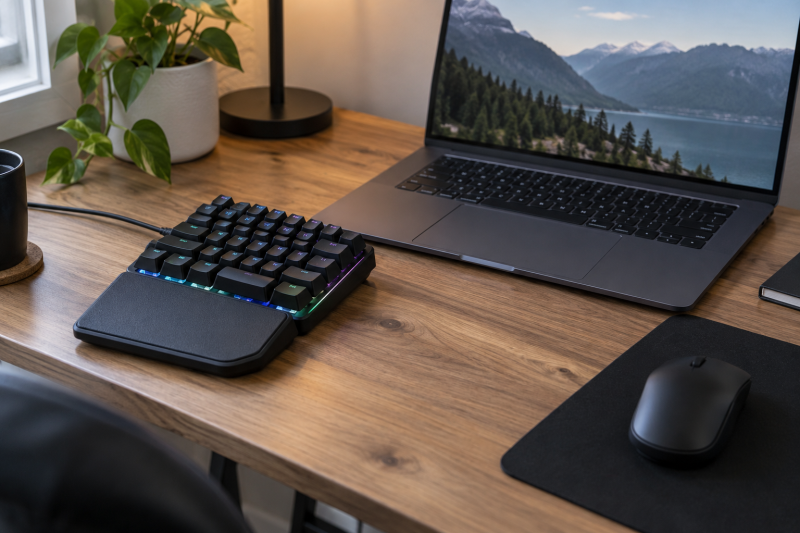
A gaming keypad can put movement keys, abilities, macros, and shortcuts under one hand without giving a full keyboard permanent space beside a laptop. Skipping a full keyboard helps on a narrow desk, but the term “gaming keypad” covers very different devices. A 42-key board can replace the left side of a keyboard for PC games, while a four-key pad is better for repeated actions, rhythm games, or push-to-talk controls.
The best fit depends on key count, layout, macro storage, switch feel, cable placement, and wrist support. Wireless placement can clear the desk, but battery life becomes another constraint. Hot-swappable sockets help buyers who want to change switches, but they do not make up for missing keys or awkward software.
The Redragon K585 Wired is the best overall fit because it has 42 keys, seven dedicated macro keys, four profiles, hot-swap sockets, a USB pass-through port, and a removable wrist rest. Redragon states the K585 PRO has a similar layout and is wireless. Buyers with very little space should look at the 19-key JOMAA or four-key aikeec, provided their smaller control sets match the intended games.
| Image | Product | Details | Check Price |
|---|---|---|---|
 | Redragon K585 Wired | Keys: 42 Macros: 7 keys; 28 slots across 4 profiles Connection: Wired USB Switches: 3-pin and 5-pin hot-swap sockets Extras: USB pass-through; detachable wrist rest | Check Price on Amazon |
 | Redragon K585 PRO | Keys: 42 Macros: 7 keys; 28 slots across 4 profiles Connection: Bluetooth and 2.4GHz Battery: 15 to 20 hours claimed Switches: Hot-swappable red switches | Check Price on Amazon |
 | RedThunder G30 | Keys: 35 anti-ghosting Macros: 2 onboard recordings Connection: Wired USB Lighting: 7 colors; static and breathing Wrist support: Integrated rest | Check Price on Amazon |
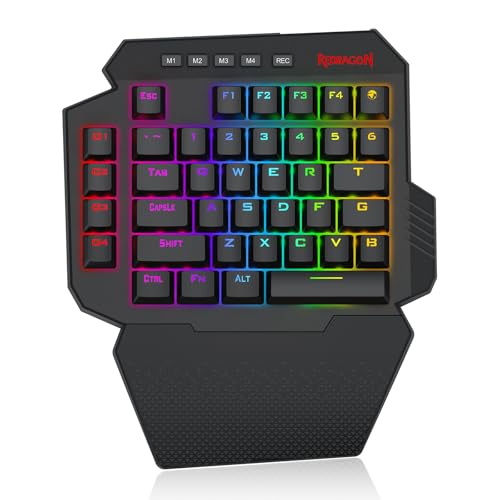 | Redragon K758 | Keys: 39 Macros: 4 programmable keys Connection: USB-C wired Switches: Hot-swappable blue switches Extras: USB pass-through; dedicated wrist rest | Check Price on Amazon |
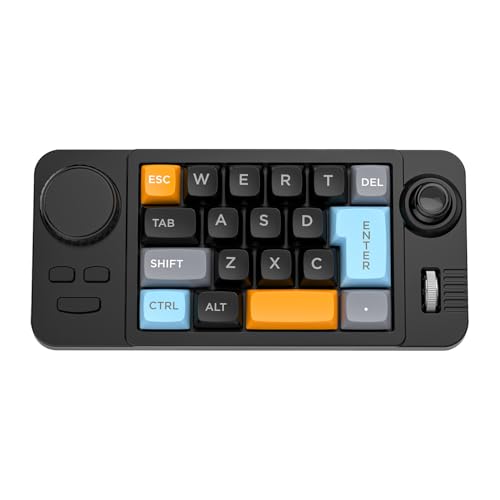 | JOMAA 19-Key Keypad | Keys: 19 programmable Size: 202 x 94 x 38mm stated Weight: 235g stated Connection: Detachable USB-C Controls: Rollers, joystick, and dial | Check Price on Amazon |
 | MOTOSPEED K27 | Keys: 27 Connection: Wired USB Switches: Mechanical; listing conflicts on blue versus red Lighting: 9 modes Functions: Numpad, calculator, and utility keys | Check Price on Amazon |
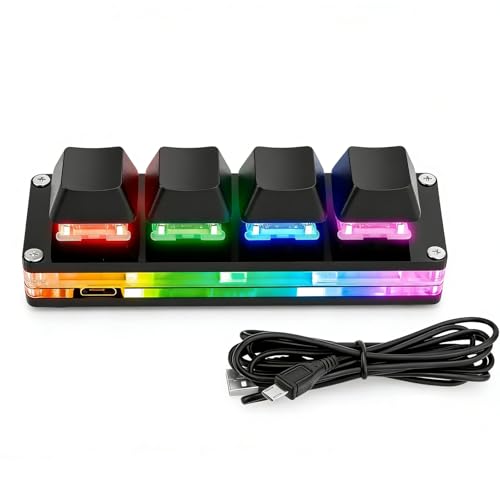 | aikeec 4-Key Keypad | Keys: 4 programmable Connection: USB-C with 1.5m cable Switches: Hot-swappable mechanical Lighting: RGB Functions: Macros, media, scripts, and mouse simulation stated | Check Price on Amazon |
 | MageGee MK-Axe | Keys: 35 anti-conflict Macros: 6 onboard recording keys Connection: Wired USB Switches: Blue mechanical Wrist support: Integrated palm rest | Check Price on Amazon |
Quick Picks
- Best overall: Redragon K585 Wired for 42 keys, 28 macro slots across four profiles, hot-swap sockets, and USB pass-through.
- Best wireless: Redragon K585 PRO for movable placement and a claimed 15 to 20 hours of play.
- Best simple budget layout: RedThunder G30 for 35 anti-ghosting keys and driver-free macro recording.
- Best clicky 39-key layout: Redragon K758 for hot-swappable blue switches and four macro keys.
- Best tiny macro controller: JOMAA 19-Key Keypad for its listed 202 x 94mm footprint and per-key macros.
- Best four-key control pad: aikeec 4-Key Keypad for four keys and programmable functions.
1. Redragon K585 Wired — Best Overall
The Redragon K585 features a 42-key tactical layout intended to concentrate common left-hand game controls. Redragon states that seven dedicated macro keys can hold 28 combinations across four onboard profiles. The four profiles help when one keypad serves several games or when combat, building, and productivity bindings need separate layers.
Its upgraded sockets accept most three-pin and five-pin switches, so you can replace individual switches without soldering. The supplied description does not identify the stock switch type, so buyers who care about noise and actuation should confirm the variant they are buying. Hot-swap support is most useful for tuning high-use keys or replacing a failed switch rather than changing the layout itself.
A USB pass-through port can host a mouse or headset adapter, potentially shortening cable runs on a compact desk. The magnetic wrist rest detaches when you need space more than palm support. The RGB lighting features five modes and 16.8 million colors, according to the manufacturer, and you set macro sequences and custom lighting in software. Check any software-dependent functions against the laptop’s operating system.
Best for: Players who want a full one-handed layout, multiple macro profiles, and a wired connection that never needs charging.
Pros
- 42 keys with seven dedicated macro keys
- 28 macro slots across four profiles
- Hot-swap sockets, USB pass-through, and removable rest
Cons
- Wired placement only
- Advanced customization depends on software compatibility
2. Redragon K585 PRO — Best Wireless
The K585 PRO keeps the 42-key shape and seven macro keys of the wired model but adds Bluetooth and 2.4GHz wireless operation. You can position it beside a laptop, pull it closer for play, and remove it without routing another permanent cable. Redragon describes the 2.4GHz connection as zero-delay, but wireless performance still depends on interference and receiver placement.
Redragon claims 15 to 20 hours of continuous play. That battery life can cover several sessions, though it is much shorter than the battery life of a typical wireless office keyboard. A charging habit is therefore part of owning it. The product title mentions a USB pass-through port. Buyers should confirm whether that port functions in the desired wireless or cabled mode.
The hot-swap sockets accept three-pin and five-pin switches, and the included red switches are rated for 50 million presses. Removing the detachable magnetic wrist rest reduces the footprint. The four profiles hold 28 total macro assignments, and you can make deeper macro and lighting changes in software. The PRO is the better K585 for placement freedom, not for avoiding all cables forever.
Best for: A compact laptop desk where the keypad needs to move between gaming and work positions.
Pros
- Bluetooth and 2.4GHz placement freedom
- Seven macro keys with four profiles
- Hot-swap sockets and removable wrist rest
Cons
- Redragon claims 15 to 20 hours, which means regular charging
- Wireless performance can vary with desk interference
3. RedThunder G30 — Best Simple Budget Layout
The RedThunder G30 provides 35 keys in a portable wired layout, with all-key anti-ghosting and a claimed 3ms response from its built-in game chip. Those claims are not independently measured latency results, but the wired, plug-and-play design means no battery or pairing to manage. Its OS list is broad and includes Windows, macOS, Linux, and older systems.
RedThunder specifies two macro recordings are available through FN+F1 and FN+F2. Recording happens on the keypad itself. Start with FN+ESC, enter the sequence, then assign it to a macro combination. The setup is less extensive than the dedicated keys and four profiles listed for the Redragon K585 models, but it needs no configuration software for basic sequences.
The large integrated wrist rest supports the palm but cannot be detached to shrink the footprint further. Lighting includes static and breathing modes with seven colors. The listing does not specify mechanical switches or hot-swap support, so buy this for the compact layout and straightforward controls rather than switch customization.
Best for: Buyers who want a familiar 35-key gaming cluster with simple onboard macro recording.
Pros
- 35 anti-ghosting keys
- Two driver-free macro recordings
- Wide stated operating-system support
Cons
- Fixed wrist rest uses more depth
- No hot-swap support or switch type stated
4. Redragon K758 — Best Clicky 39-Key Layout
Redragon specifies 39 keys for the K758, which puts it between the larger K585 design and smaller 35-key boards. It connects with USB-C and includes four programmable macro keys. Four macro keys are enough for weapon swaps, build commands, or repeated ability sequences without dedicating a large strip of the desk to macros.
Its stock blue switches give audible clicks and tactile feedback. The clear response may suit a private gaming space, but it can be distracting during shared-room calls or late-night play. The upgraded hot-swap sockets let you replace switches, although you should still check compatibility before ordering a replacement set.
A fixed wrist-rest section supports the palm, and the USB pass-through port can take a mouse, headset adapter, or another USB device. The manufacturer provides five RGB modes and 16.8 million stated colors to cover lighting preferences. The main tradeoff is that the rest and pass-through port add comfort and connectivity but keep the footprint from being as small as possible.
Best for: Players who prefer tactile clicky switches and need only four dedicated macro keys.
Pros
- 39-key layout with four macros
- USB-C connection and USB pass-through
- Hot-swappable blue switches
Cons
- Clicky switches can be loud
- Fixed rest is less packable than detachable designs
5. JOMAA 19-Key Keypad — Best Tiny Macro Controller
The JOMAA fits 19 keys, rollers, a joystick, and a dial into a stated 202 x 94 x 38mm body weighing 235g. It works as a compact programmable controller, not as a full replacement for the left side of a keyboard. It puts selected commands, media adjustments, and game actions in a very small area.
All 19 key positions support macro programming through a Windows driver. The listing also mentions a web driver for Edge and Chrome and says macOS can call presets configured elsewhere. Because web-based keyboard configuration may require device permissions, use only the address the maker provides and verify the requested permissions before granting access.
Every key socket supports three-pin and five-pin mechanical switches, and the package includes a spare switch and puller. A detachable USB-C braided cable is easier to pack, and eight lighting effects can be changed without a driver. Basic use is stated for Windows and macOS, but advanced programming should be assumed to need Windows until confirmed on the target laptop.
Best for: A very small desk that needs selected macros and rotary controls rather than a WASD-sized key field.
Pros
- 202 x 94mm stated footprint and 235g weight
- 19 programmable keys plus rollers, joystick, and dial
- Full hot-swap support and detachable USB-C cable
Cons
- Too few keys for many complete game-control layouts
- Advanced programming has platform and permission considerations
6. MOTOSPEED K27 — Best Gaming-and-Numpad Hybrid
The MOTOSPEED K27 has 27 keys and includes functions such as Num Lock, Escape, Tab, Delete, and a calculator shortcut. It is a hybrid, useful as a compact mechanical numpad for laptop work and potentially useful for games whose bindings fit its grid. It lacks the familiar 35- to 42-key one-handed layout of the larger picks.
The listing is internally inconsistent about switches. Its heading says blue switches and describes a tactile bump and audible click, but the same bullet also calls them red switches. Buyers should confirm the shipped switch type rather than choosing it on the color label alone. The manufacturer states a 50-million-keystroke durability claim and ABS construction.
Motospeed specifies nine lighting modes that can be adjusted with FN combinations. The wired connection is plug-and-play, and support is listed for several Windows versions, Android, and Linux. macOS appears in the product title but not the detailed compatibility bullet. No dedicated macro count or hot-swap support is clearly stated, despite the phrase “fully programmable keys.”
Best for: A laptop owner who wants a small mechanical numpad that can also handle a limited set of game commands.
Pros
- 27-key compact mechanical layout
- Numpad and utility functions suit work as well as play
- Nine stated backlight modes
Cons
- Switch description conflicts between blue and red
- Not a conventional WASD gaming-keypad layout
7. aikeec 4-Key Keypad — Best Four-Key Control Pad
The aikeec keypad has only four keys, the fewest of any pick here, which makes it the most specialized option. It suits rhythm games, push-to-talk, media commands, repetitive shortcuts, or a few actions that need large physical targets. It cannot replace a one-handed movement cluster, so its tiny footprint is useful only when four controls are enough.
Hot-swappable mechanical switches let you change the feel without soldering. The listing specifies the pad uses USB-C data through an included 1.5m cable and has RGB lighting. The listing says macros can cover shortcuts, media controls, scripts, and mouse simulation.
Configuration is the concern. The listing details point to downloadable Windows software and runtime files, and say Mac use requires setting the pad in Windows first. Download software only from a destination independently confirmed as belonging to the product maker, scan it with up-to-date security tools, and avoid installing an unverified runtime merely to configure four keys.
Best for: Four repeated controls where minimum footprint is more important than a game-ready key field.
Pros
- Four-key footprint takes very little desk space
- Hot-swappable switches and RGB
- Supports macros, media controls, and mouse simulation as stated
Cons
- Windows setup is required for Mac presets
- Configuration software requires careful source verification
8. MageGee MK-Axe — Best Six-Macro 35-Key Layout
MageGee specifies 35 anti-conflict keys and six macro positions labeled G1 through G6. It has more direct macro keys than the RedThunder G30 without expanding to the K585’s listed 42-key format. Macros are recorded through FN combinations, so the essential function does not depend on a separate desktop program.
Blue mechanical switches give a crisp tactile step and an audible click. The click can help confirm actuation during games, but it is the wrong sound for a desk shared with someone sleeping or joining calls. The listing does not state hot-swap sockets, so users should assume the factory switches are a fixed choice.
The integrated palm rest is meant to reduce wrist fatigue but adds desk depth. The RGB lighting has static and dynamic effects with brightness and color controls. Direct USB operation is stated as driver-free across Windows, Linux, and Mac, so the MK-Axe is a straightforward option when you need onboard macros and broad basic compatibility more than software layers.
Best for: A 35-key layout with six onboard macro keys and no need for configuration software.
Pros
- Six onboard macro recording keys
- 35 anti-conflict mechanical keys
- Driver-free stated support across several systems
Cons
- Blue switches are loud
- Integrated palm rest cannot shrink for travel
Buying Guide: Choosing a Gaming Keypad for a Compact Laptop Desk
Start with the commands the left hand actually needs
Count movement keys, modifiers, number-row actions, inventory controls, and push-to-talk before comparing products. A 35- to 42-key layout can cover many PC games, while 19 or four keys usually supplement a keyboard rather than replace its left side.
Map the intended commands on paper and check the physical positions. A high key count is not helpful if an essential modifier is awkward. Smaller pads work best when every required action fits without constant layer switching.
Measure width and depth with the wrist rest attached
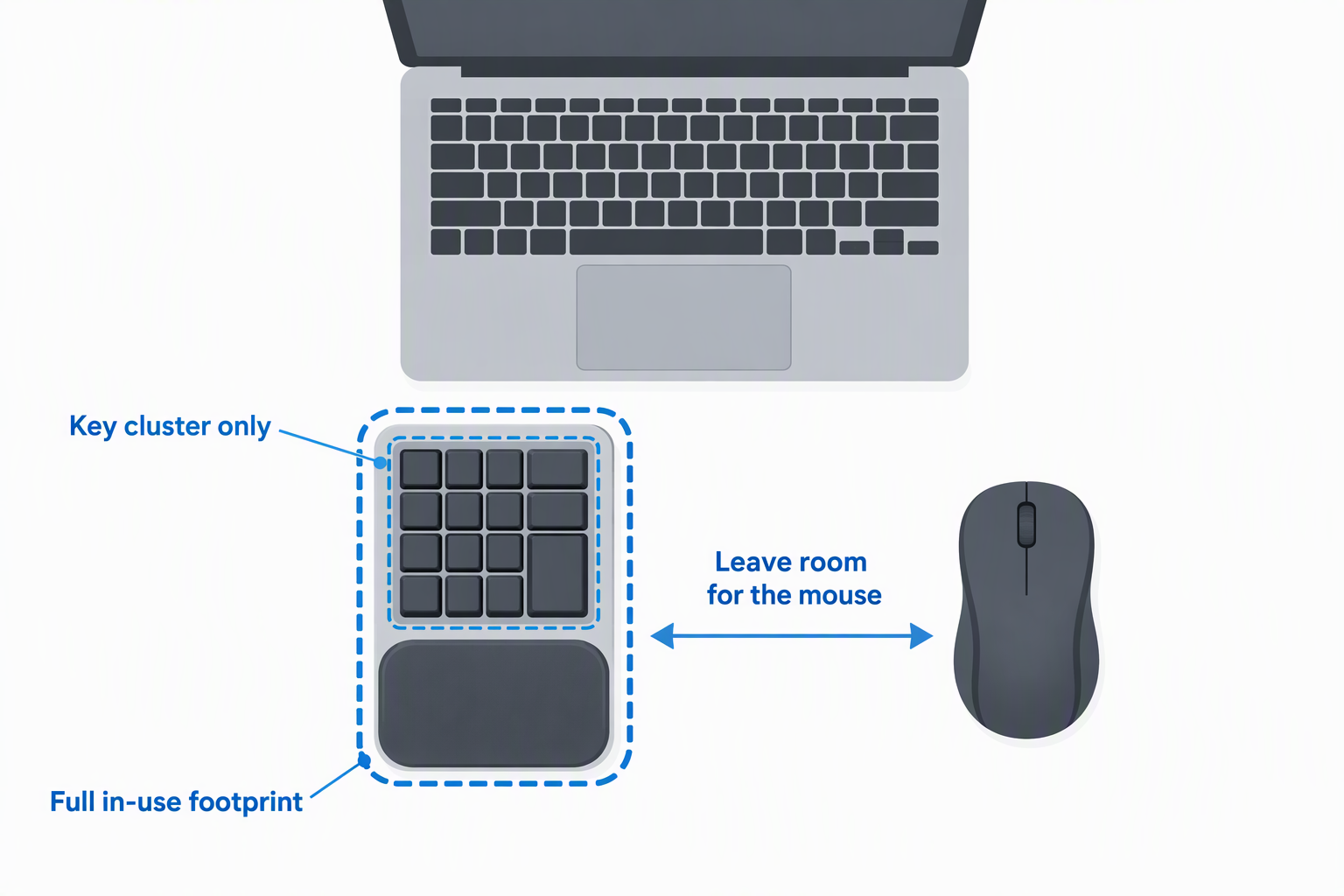
Manufacturers often emphasize the compact key field, but an integrated palm rest can add substantial depth. Measure the usable desk area beside the laptop and leave room for the mouse. Base the decision on the full in-use footprint, not only the key cluster.
Detachable rests on the Redragon K585 models allow a smaller travel setup. The RedThunder, K758, and MageGee specifications list fixed rests that cannot be removed. Removing a rest saves space but may leave the wrist bent upward if the keypad case is tall.
Decide between wired reliability and wireless placement
A wired keypad avoids charging and pairing, and it is usually the simplest choice when the device stays in one place. A detachable USB-C cable is easier to replace and pack than a permanently attached cable. Check cable exit direction and laptop port position so the wire does not cross the mouse area.
The K585 PRO adds Bluetooth and 2.4GHz positioning according to Redragon, but the manufacturer’s claimed 15 to 20 hours means regular charging. Put the receiver where the laptop chassis does not block it, and test latency in the actual wireless environment before depending on it for competitive play.
Match macro depth to the game and platform
Macro support ranges from two onboard sequences on the RedThunder to 28 slots across four profiles on the K585 models. Determine whether macros must survive moving the keypad to another computer. Onboard recording or memory is more portable than a profile stored only in Windows software.
Some games and competitive services restrict automated sequences. Follow the game’s rules and use macros for permitted bindings only. For work laptops, confirm that installing driver software or granting a web configurator device access is allowed.
Choose switch sound and feel deliberately
Blue switches are clicky and tactile. Red switches are typically smoother and quieter, though the exact spring and sound vary. On a compact home desk, noise during calls and shared-room use can be as important as game feel. The MOTOSPEED listing contradicts itself on switch color, so it needs confirmation.
Hot-swap sockets let users replace switches without soldering, provided the pin format fits. They help tune frequently used keys and simplify repair. They do not guarantee compatibility with every switch height, LED orientation, or keycap.
Check rollover and key placement
Anti-ghosting means the keypad can register multiple simultaneous inputs, which is important for movement plus modifiers. RedThunder and MageGee explicitly state all-key non-conflict behavior. For other models, verify the manufacturer’s rated multi-key combinations used in the target game.
Layout is just as important as rollover. Look for a reachable spacebar, Shift, Control, Tab, Escape, and number row where the game needs them. A numpad-shaped board such as the K27 may have enough keys but place them differently from a familiar WASD cluster.
Treat lighting and pass-through ports as secondary
RGB can make legends visible in a dark room and help mark profiles, but it should not outweigh layout or software stability. A hardware lighting shortcut is useful when configuration software is unavailable. Excess brightness can also distract on a small desk close to the screen.
A USB pass-through port can shorten a mouse or receiver cable, but it occupies upstream bandwidth and may require the keypad cable to carry more power. Use it for low-power accessories and connect storage devices directly to the laptop or dock.
Test ergonomics with the laptop in its normal position
Place the keypad, laptop, and mouse as they will be used, then check shoulder width and wrist angle. The hands should not be forced inward by the laptop body. A neutral wrist and relaxed shoulder position is more important than keeping every device perfectly centered.
Try a full session during the return period. Note palm pressure, reach to outer macro keys, accidental presses, cable drag, and whether the mouse still has adequate travel. Short breaks remain necessary even with a comfortable rest.
Related Compact-Desk Guides
A keypad works best when the rest of the desk leaves room for it. Compare compact keyboards, gaming mice, laptop stands, and USB-C hubs when planning the layout.
For cable and display planning, see guides to Thunderbolt docks, USB-C docking stations, monitor arms, and laptop chargers. These accessories solve different constraints, but each affects the space and ports available to the keypad.
Frequently Asked Questions
Can a gaming keypad replace a full keyboard?
For gameplay, a 35- to 42-key keypad can replace the left-side controls of a full keyboard when every required command fits. Text chat, function keys, and many menu shortcuts will still need the laptop keyboard.
A 19-key or four-key pad is usually an extra controller, not a replacement. List the required controls before buying rather than assuming layers will feel natural during play.
Are gaming-keypad macros stored on the device?
It depends on the model. The K585 products state onboard macro keys and profiles, while RedThunder and MageGee describe direct FN-key recording. JOMAA and aikeec rely more heavily on configuration tools.
Confirm whether assignments remain after unplugging the device or moving it to another laptop. Software profiles may not follow the hardware, and managed computers may prevent driver installation.
Is a wireless keypad fast enough for games?
It can be, especially over a dedicated 2.4GHz receiver, but performance depends on interference, receiver placement, and implementation. A maker’s zero-delay phrase is not an independent latency measurement.
Test the K585 PRO in the intended game and desk setup. Wired remains the simpler choice when charging and radio conditions are unwanted variables.
Do hot-swappable sockets accept every mechanical switch?
Not necessarily. The Redragon and JOMAA listings state support for common three-pin and five-pin switches, but physical clearance, LED position, and keycap compatibility can still vary.
Check the socket and switch specifications before ordering a full set. Power off and unplug a wired keypad before changing switches, and support the plate while pulling them.
Are blue switches suitable for a shared room?
Blue switches have a tactile bump and an audible click. Some players enjoy the feedback, but the repeated sound can be intrusive during voice calls, streaming, or late-night use near another person.
Choose a quieter switch type or a hot-swappable model if noise is a concern. Keycap and case construction also affect sound, so switch color alone does not predict the complete result.
Final Verdict
The Redragon K585 Wired offers the strongest overall balance for a compact laptop desk. It has enough keys for a full one-handed layout, seven macros, four profiles, hot-swap sockets, pass-through USB, and a removable wrist rest. Choose the K585 PRO when you need to reposition or put away the keypad and can manage the manufacturer’s 15- to 20-hour claimed battery.
The RedThunder G30 and MageGee MK-Axe are simpler 35-key alternatives, with two and six onboard macro controls respectively. The JOMAA 19-Key and aikeec 4-Key save much more space but serve narrower control jobs. Measure the full footprint, map required keys first, and verify software permissions before choosing the smallest device on appearance alone.