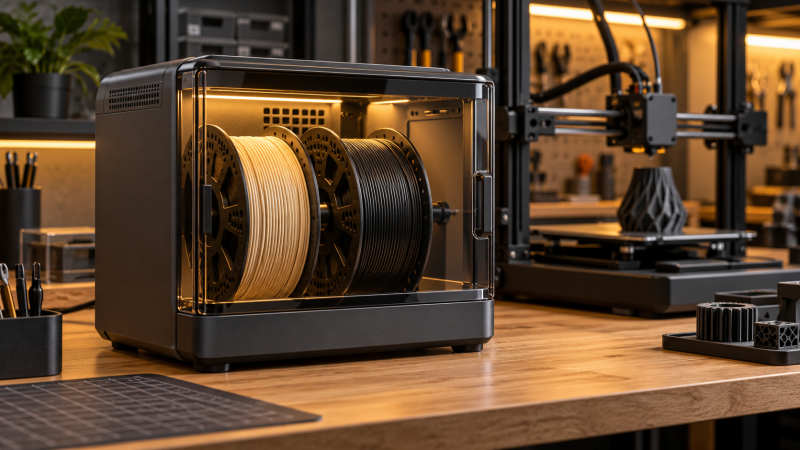
Engineering filament can absorb moisture while it waits beside the printer, then show bubbling, stringing, or inconsistent layers during a long job. A dryer with enough capacity and a suitable temperature ceiling helps keep material ready beside the printer. Capacity alone is not enough, because the maximum temperature, timer, airflow, and physical spool size decide whether the box suits the materials you run.
Choose the spool layout and temperature ceiling first, then compare independent controls, airflow, timer limits, and how the dryer fits your printer workflow.Best Filament Dryers for High-Temperature Printing Compared
| Image | Product | Details | Check Price |
|---|---|---|---|
 | Creality Space Pi Plus | Best fit: Two standard spools Capacity: 2 spools Heat: 110W PTC; 45-70C | Check Price on Amazon |
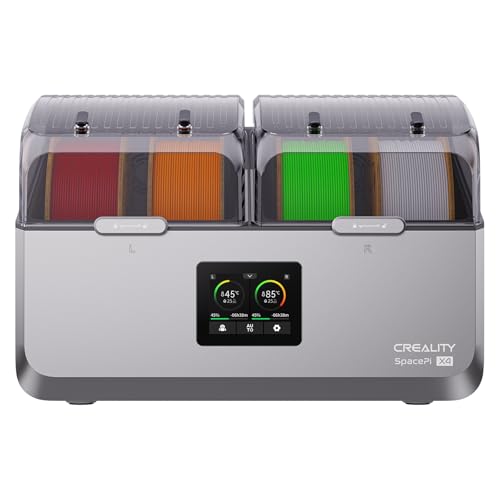 | Creality Space Pi X4 | Best fit: 85C four-spool drying Capacity: 4 x 1kg or 2 x 2kg Heat: Dual chambers; 85C max | Check Price on Amazon |
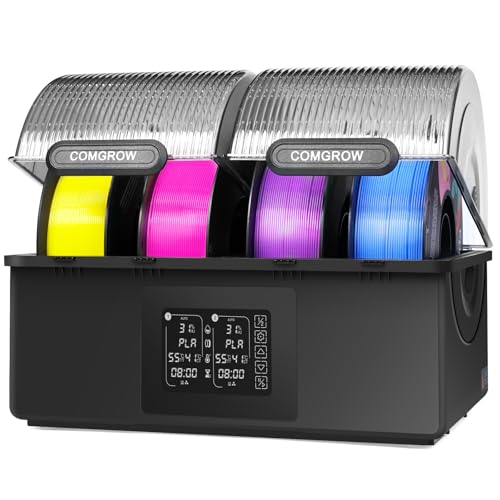 | Comgrow SH03 | Best fit: Independent chambers Capacity: 2+2 x 1kg Heat: 45-85C; 98h timer | Check Price on Amazon |
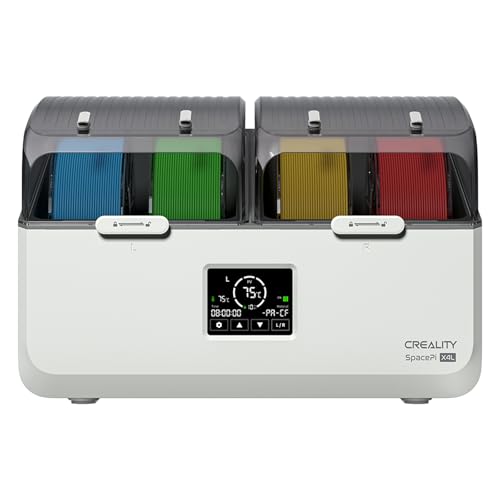 | Creality Space Pi X4L | Best fit: Two large spools Capacity: 4 x 1kg or 2 x 2kg Heat: Dual chambers; 75C max | Check Price on Amazon |
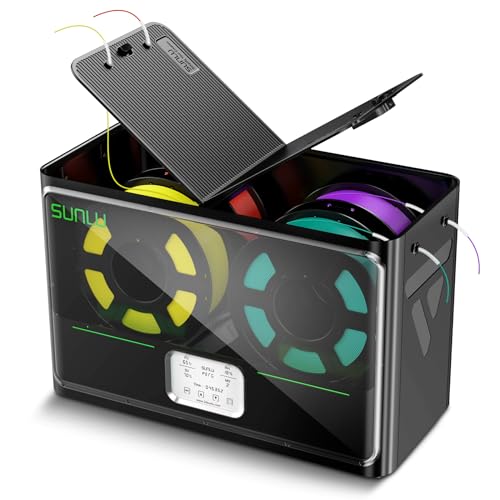 | SUNLU S4 | Best fit: High-power four-spool drying Capacity: 4 x 1kg Heat: 350W PTC; 70C max | Check Price on Amazon |
1. Creality Space Pi Plus — Best for Two Standard Spools
The Creality Space Pi Plus is the straightforward choice for a printer that normally works with two standard rolls at once. Its listing specifies a dual-spool box with a 110W PTC heater, 360-degree hot-air circulation, and an adjustable 45C to 70C temperature range. A 3.7-inch touch screen and presets for twelve filament types let you set the temperature directly instead of using a box with one fixed temperature.
The 48-hour timer is useful when a workday does not line up with a drying cycle. It also lets you keep both rolls inside the same enclosure while you prepare a dual-color or support-material job. For a workspace that pairs a compact printer with a laptop, see our USB-C hub guide.
Decision point: Two-spool capacity, 110W PTC heating, a 45C-to-70C range, and a 48-hour timer suit standard dual-roll printing routines. Our TakeBuy Creality Space Pi Plus when two standard spools and a 70C maximum cover the materials you use most. Check each spool’s outside diameter before assuming the dual-spool capacity fits oversized rolls.
- The stated 110W PTC heater and 360-degree airflow are meant to heat two enclosed spools more evenly.
- An adjustable 45C-to-70C range gives PLA, PETG, TPU, and selected composite materials separate listed settings.
- The 48-hour timer lets a buyer plan longer drying sessions without repeatedly restarting a short cycle.
- A 3.7-inch touch screen gives the two-spool box a direct way to track drying conditions.
- Twelve listed filament presets mean fewer setup steps when switching between common materials and high-performance composites.
- The 70C maximum is lower than the 75C and 85C ceilings listed by several four-spool alternatives.
- The listing describes two spools, so large two-kilogram rolls need a separate physical-fit check.
2. Creality Space Pi X4 — Best for 85C Four-Spool Drying
Creality Space Pi X4 is for a two-roll user who wants room to grow without buying a second dryer. The enclosure holds four standard 1kg spools or two large 2kg spools, so it can run a pair of large material rolls or stage multiple ordinary rolls. Its dual independent heating chambers have a stated maximum of 85C, which ties for the highest temperature figure in this comparison.
The listing also describes a touch interface and temperature capability for materials including ABS, PET, PC, ASA, PA, and PAHT. A print bench that keeps several materials on hand gets more from this dryer than someone who only dries one compact spool at a time. For compact storage beside the printer, see our under-desk cable-management tray guide.
Buy Creality Space Pi X4 when you need both an 85C ceiling and room for two large rolls. It is a four-spool enclosure, so measure the bench before choosing it over a smaller two-spool dryer.
- The enclosure holds four one-kilogram or two two-kilogram spools, so it suits both multi-roll storage and larger rolls of engineering filament.
- The stated 85C maximum is a higher listed ceiling for ABS, PC, ASA, PA, and PAHT.
- Dual independent heating chambers give the enclosure two separate drying areas.
- The 200W PTC heating figure is rated for faster drying than a small single-roll passive storage box.
- Sealed storage is described as limiting moisture re-absorption during print pauses and between jobs.
- The four-spool enclosure takes more desk or shelf space than a compact dedicated two-spool dryer.
- Its 85C capability still requires checking the material maker’s recommended drying temperature before every cycle.
3. Comgrow SH03 — Best for Independent Dual Chambers
The Comgrow SH03 is for a maker who needs to dry different material types without putting every roll on one setting. It uses two independent chambers that hold two plus two 1kg rolls, with separate temperature control and on-off control for each section. The stated adjustable range is 45C to 85C, and the listing gives a maximum continuous operating time of 98 hours.
It also specifies a 360-degree hot-air circulation fan, separate airflow channels, and automatic dehumidification behavior. Those features give a buyer a reason to choose it over a simple shared box when the two chambers need different temperatures or timing. For moving design files and print profiles between machines, see our portable SSD guide.
Decision point: Two independently controlled 2+2 spool chambers, a 45C-to-85C range, and a 98-hour limit suit mixed-material drying plans. Our TakeBuy Comgrow SH03 when two chambers must run different material plans at the same time. Its four-spool format is best when the desk can accommodate the enclosure and you will use the independent controls.
- Two independent chambers hold two plus two one-kilogram rolls for separate material groups and drying plans.
- The stated 45C-to-85C adjustment range covers both ordinary filament and higher-temperature listed materials.
- A 98-hour maximum continuous run supports longer drying plans without a daily restart routine.
- Separate temperature and on-off controls allow one chamber to run while the other remains unused.
- 360-degree airflow and independent channels give each chamber a stated route for temperature distribution.
- It holds four rolls, which is excess capacity if only one or two standard spools ever need drying.
- The 98-hour run limit is a maximum timer figure, not a reason to use one setting for every polymer.
4. Creality Space Pi X4L — Best for Two Large Spools
The Space Pi X4L is for a buyer who runs two bulky 2kg rolls rather than two compact 1kg rolls. The listing says it holds four standard 1kg spools or two large 2kg spools, and it uses dual heating chambers. Its maximum listed temperature is 75C, which is between the 70C dual-spool box and the 85C X4 or SH03 models.
The X4L is a useful fit when roll size drives the purchase but the application does not need the highest temperature ceiling. It also describes humidity-resistant storage during printing pauses, which can help when a large roll will remain at the printer for several jobs. For a second work display beside the printer controls, see our portable monitor guide.
Buy Creality Space Pi X4L when the physical size of two large rolls is the deciding issue. Check the 75C maximum against the temperature your material needs before letting capacity decide the purchase.
- The enclosure holds two large two-kilogram spools, which suits buyers who outgrow standard one-kilogram roll storage.
- The same dryer holds four standard spools, so it stays useful if the workflow changes to smaller rolls.
- Dual heating chambers divide the enclosure into two spool groups for the two-large-roll or four-standard-roll layout.
- A 75C maximum is a higher stated ceiling than the 70C of the two-spool Space Pi Plus.
- The listing describes sealed storage that helps limit moisture returning during pauses between print jobs.
- The 75C maximum is lower than the 85C maximum listed for the Space Pi X4 and Comgrow SH03.
- Large capacity means the buyer should confirm bench depth and clearance before committing to this four-spool enclosure.
5. SUNLU S4 — Best High-Power Four-Spool Option
The SUNLU S4 is for a setup that wants a large shared enclosure and a named high-output heater. SUNLU states it dries up to four 1kg spools and includes eight filament outlets, which lets two active spools sit ready while others stay inside. Its 350W PTC heater is rated at a 70C maximum, and three circulation fans are intended to spread heat around the chamber.
The S4 is the better fit when capacity and air movement count for more than independent chamber settings. Plan its footprint before you place it beside a printer or desktop workstation, since SUNLU lists the external dimensions at 460 by 220 by 310mm. For keeping that work area connected with fewer adapters, see our Thunderbolt dock guide.
Buy SUNLU S4 when four standard spools, eight outlets, and a 350W heater suit a shared printing setup. Its 70C ceiling is the key limit to compare if high-temperature materials are the reason for buying.
- The S4 holds four one-kilogram spools in one shared drying and storage enclosure for a multi-material printer station.
- Eight filament outlets offer multiple stated routing positions for different printer locations and loading angles.
- A 350W PTC heater is the largest named heater-output figure among the compared dryer listings.
- Three circulation fans support the listing’s stated goal of more even heat across the large chamber.
- The 460 by 220 by 310mm external dimensions give a buyer a concrete bench-space measurement before purchase.
- The 70C maximum is below the 75C and 85C ceilings on several other large-capacity choices.
- One shared four-spool chamber does not provide the separate heat controls of the Comgrow SH03.
Buying Guide: Choosing a Filament Dryer for High-Temperature Printing
Start with roll size and active spool count
Two rolls can mean two standard 1kg spools or two large 2kg spools, and those formats can require very different enclosures. Creality Space Pi Plus is built around a dual-spool layout, while Creality Space Pi X4 and Creality Space Pi X4L state capacity for two large rolls.
Measure the full spool, not only the filament weight printed on its label. Outside diameter, width, and hub shape determine whether a roll can sit on the holder and whether the lid closes without rubbing. Leave room for the filament to exit without sharply bending against a hole or guide.
Match the temperature ceiling to the material plan
A dryer with a higher maximum does not make every material a high-temperature candidate. The Comgrow SH03 and Space Pi X4 each list an 85C maximum, while the Space Pi Plus and SUNLU S4 list 70C. Select the ceiling only after checking the drying recommendation supplied for the exact material.
Set one deliberate target and duration instead of assuming the highest number is better. The material maker’s specified temperature is the decision point, especially for filament that can soften or deform under unnecessary heat. A higher ceiling is useful only when the material and the job need it.
Decide whether separate chambers solve a real problem
Independent chambers help when two material groups need different heat or timing plans. Comgrow SH03 provides separate temperature and on-off control for its two chambers, unlike a shared large-capacity enclosure.
For two identical rolls, a shared chamber can be simpler to operate. Independent control earns its space when nylon and PLA, or another two-material workflow, need separate handling. Otherwise, a large box with shared controls can cost bench space without improving the daily routine.
Plan drying time and storage between jobs
The timer determines who must return to the printer room and when. Creality Space Pi Plus lists a 48-hour timer, while Comgrow SH03 lists up to 98 continuous hours. Those figures give different scheduling options, but neither replaces choosing a duration appropriate for the particular material.
Storage behavior is the next thing to check after the cycle ends, because a dry roll can take on moisture again. Humidity monitoring or sealed storage can help a roll stay protected while it waits for the next print. The Space Pi X4 describes sealed storage during pauses, while a timer still needs a material-appropriate setting.
Check outlet routing, power, and bench clearance
Count the printer feeds before treating extra holes as automatically useful. SUNLU S4 lists eight filament outlets. Eight outlets can support several routing choices, but every route still needs enough clearance around the printer and dryer.
Plan the enclosure as a powered desktop appliance, not an accessory that can sit anywhere. The SUNLU S4’s 460 by 220 by 310mm dimensions show why width, depth, height, cable reach, and ventilation should be measured first. Keep controls visible and make sure a loaded lid can open without hitting shelves or monitor arms.
Frequently Asked Questions
Can a four-spool dryer replace a dual-spool dryer?
It can when the four-spool enclosure physically fits the rolls you use and the shared controls suit the workflow. A larger box can hold two active rolls plus backup material, which may reduce the need to reload the dryer before every print.
It is not automatically the better choice. A compact two-spool box can be easier to place near one printer, use less desk space, and give a more direct fit when two standard rolls are all you need.
Is the highest temperature setting always the right setting?
No. Choose the setting from the recommendation for the exact material, then use the dryer only within that material’s stated limit. A box that reaches 85C gives more headroom than a 70C model, but it does not change what a roll should receive.
Higher temperature can be useful for materials that call for it, but it should never replace a material-specific plan. Check the product maker’s instructions before loading a roll, especially when the filament includes additives or composite fibers.
Do independent chambers let me dry any two materials together?
Independent chambers give you separate temperature and power controls, which makes mixed-material storage more practical. They are useful when one side of the dryer needs a different schedule from the other side.
You still need to follow the drying guidance for each material and check that its spool fits the chamber. Separate chambers address control and organization, not every physical or material-compatibility limit.
Should I leave filament in a dryer while printing?
Some of these models describe filament outlets and storage behavior intended for active printing or pauses. That can reduce handling when the spool must stay close to the printer during a long job.
Check the tube route, outlet position, and spool movement before you begin. The filament should feed cleanly without scraping, sharp bends, or a lid that cannot close around the chosen path.
How much desk space does a four-spool dryer need?
Use the listed external dimensions where available, then add space for opening the lid, routing filament, reaching controls, and plugging in power. The dryer needs more than its footprint because a loaded roll and its feed path extend the working area.
Before ordering, mark the required width and depth on the intended bench with paper or tape. That small check shows whether the dryer will block printer access, a monitor arm, or the normal path to the machine.
Bottom Line
Choose Creality Space Pi Plus for a focused setup with two standard spools, a 70C maximum, and a 48-hour timer. Choose Comgrow SH03 when independent dual chambers, a 45C-to-85C range, and a 98-hour limit support different material plans. Choose Creality Space Pi X4 when two large 2kg rolls or four standard spools, plus an 85C maximum, are the better match for a high-temperature printing bench.