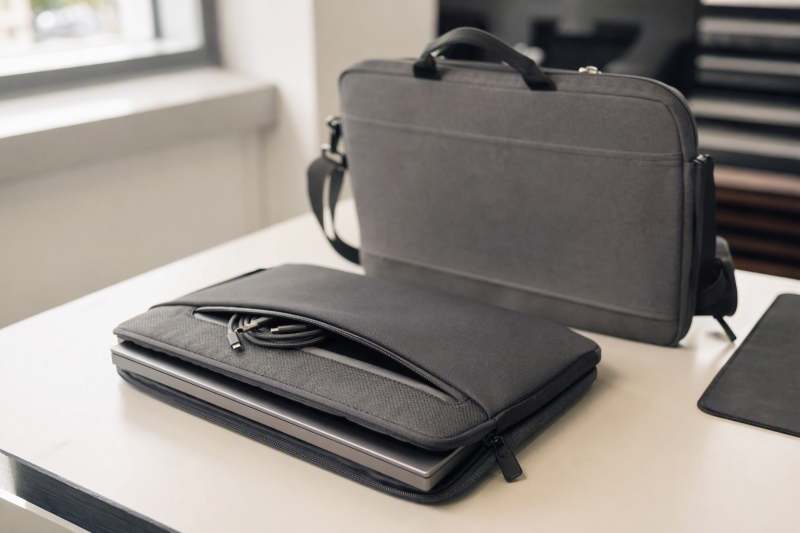
A portable monitor is easy to scratch in a crowded laptop bag. The right sleeve should fit the whole display body, not just its advertised diagonal, and keep connectors or a stand from pressing into the screen. Some portable monitors already include a cover. Inspect it before buying another pouch.
These five exact Amazon US sleeves range from slip cases made for particular models to padded bags with accessory pockets. Screen fit, water resistance and drop protection were not independently tested. Measure your monitor’s width, height and thickest point, including any cover you will leave attached. For screens themselves, see our portable monitor guide.
Compare the monitor’s body to the sleeve’s usable interior dimensions. A 15.6-inch panel may not fit a “15.6-inch” sleeve once its bezel, stand or connector bump is included.Portable Monitor Sleeves Compared
| Image | Product | Details | Check Price |
|---|---|---|---|
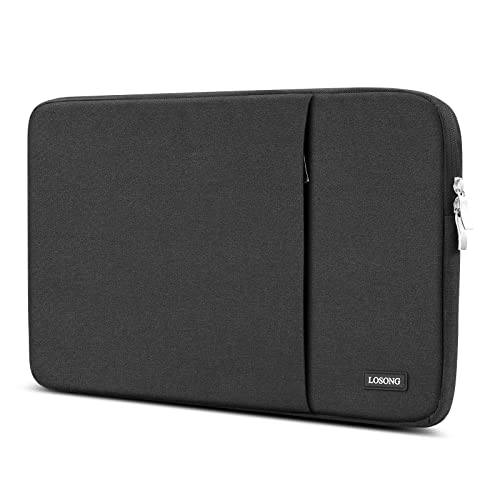 | Losong 15.6-inch case | Stated size: 15.3 x 9.8 x 0.65 in; interior not explicit Carry: Slim sleeve Extras: Side pockets Best fit: Close-fit screen with cables separate | Check Price on Amazon |
 | 16.1-inch canvas case | Stated interior: 14.37 x 10.24 x 0.78 in Carry: Side handle Extras: Front pocket Best fit: Measured monitor needing a handle | Check Price on Amazon |
 | ARZOPA 16.1-inch sleeve | Stated size: Under 16.1 in; interior not given Carry: Slim PU slip sleeve Extras: Tight closure Best fit: Listed ARZOPA models after fit check | Check Price on Amazon |
 | Padded Oxford sleeve | Stated interior: 14.77 x 10.43 x 0.79 in Carry: Backpack sleeve Extras: Large front compartment Best fit: Screen and compact accessories | Check Price on Amazon |
 | Roomy laptop/monitor sleeve | Stated interior: 15 x 10.7 x 0.8 in Carry: Sleeve or hand bag Extras: Front pocket Best fit: Longer portable display body | Check Price on Amazon |
1. Losong 15.6-inch Case — Best Slim Screen-First Carry
Losong describes a slim sleeve for many 15.6- and 16.1-inch portable displays and lists its case size as 15.3 by 9.8 by 0.65 inches. The listing does not clearly label that as usable interior space in the checked bullets. Do not assume a 15.3-inch-wide monitor body will slide inside. Ask the seller or leave a fit margin. The broad model list is a starting point, not a measurement of every revision.
Side pockets can hold a short USB-C cable or earphones away from the screen. Keep hard chargers and plug ends from resting against the display face. The seller calls the sleeve waterproof and shockproof, but those claims were not tested here. Treat it as a layer against scratches and light bumps inside a larger bag, not a hard case. Our USB-C portable monitor guide helps identify what display and cable you need, while the physical sleeve fit still needs a ruler.
Our Take Losong makes sense for a light, close-fitting travel kit after you confirm its interior. Skip it if the monitor is nearly as wide as the stated outside dimensions or the attached stand makes the panel thick.
- Thin profile is easier to slide into another bag.
- Side pockets separate small cables from the panel.
- Seller names many common portable display lines.
- Checked size is not clearly an interior dimension.
- Water and impact protection are seller claims, not tested results.
2. 16.1-inch Canvas Case — Best Measured Fit With Handle
This listing provides both 14.37 x 10.24 x 0.78-inch interior and 15 x 10.8 x 1.2-inch exterior measurements. The interior figure is useful when a 16-inch display has a tall body or a slim built-in stand. It also describes a side handle, soft lining and front pocket. The handle is convenient when moving between meeting rooms without carrying a full backpack.
Check the monitor’s actual width before trusting the “16.1-inch” headline. A screen that is 14.5 inches wide would exceed the stated interior even if its diagonal is 16.1. The seller describes water-resistant canvas and cushioning, but not a tested waterproof seal or drop rating. Keep the front pocket’s cables flat so the bag does not bulge onto the screen. A folding stand may need a separate pouch.
The stated interior, not the diagonal in the title, is the useful compatibility number here.Our Take Choose this case when your measured display fits inside 14.37 x 10.24 x 0.78 inches and you want a side handle. It is still a soft case. Pack it in a safer part of the larger travel bag.
- Both interior and exterior dimensions are stated.
- Side handle helps short-distance carry.
- Front pocket can separate slim accessories.
- 14.37-inch interior width excludes some wide 16-inch bodies.
- Soft lining and water resistance are not hard-case protection.
3. ARZOPA 16.1-inch Sleeve — Best Listed ARZOPA Model Fit
ARZOPA’s slim PU sleeve names several of its own portable monitors, including S1 Table, A1 and Z1-series models, as intended fits. The model list is more specific than “any 16.1-inch display,” but manufacturers can revise housings. Compare the exact screen model and dimensions before purchase. The listing describes a soft interior, a close-fitting closure and a body that can slip into a backpack.
It does not provide an interior width, height and depth in the checked bullets, so do not use it as a universal sleeve based on diagonal. The seller says the PU outer resists water and scratches. The claim is not an independently tested weather rating. A tight closure may be awkward if the monitor is left in a thick folding cover. For screens like ARZOPA’s in a laptop kit, our USB-C portable monitor guide covers signal and power considerations, not bag fit.
The listed compatible model is the clue; verify its current housing size before treating this as a universal case.Our Take The ARZOPA sleeve is the candidate for an owner of a matching ARZOPA screen who wants a minimal sleeve. If your display is from another maker or has an attached stand, choose a case with published usable interior dimensions.
- Specific ARZOPA screen families are named.
- Slim slip format adds little bulk.
- Checked listing lacks usable interior dimensions.
- No dedicated accessory compartment is described.
- Water resistance is not a tested waterproof seal.
4. Padded Oxford Sleeve — Best Large Accessory Pocket
This sleeve states a 14.77 x 10.43 x 0.79-inch interior for a 15.6- or 16.1-inch portable display. It also describes Oxford fabric, a soft lining and a large front compartment. The front compartment is useful if the travel kit includes a mouse, cable and small charger, provided bulky objects do not press into the display face. Compared with the canvas case above, its stated interior is a little wider.
The seller lists many monitor brands, but width, height and thickness should decide. A panel with a projecting joystick or attached folio may need more than 0.79 inch of depth. The listing uses broad water and impact language without independent test evidence here. Keep liquids in another compartment, and place a rigid item between this soft sleeve and heavy luggage if the bag will be compressed. Our USB-C hub guide can help plan the accessories that belong in the pocket.
Our Take Choose this padded sleeve when the monitor fits the stated interior and you need modest accessory storage. Avoid packing hard plugs directly against the screen, even if the pocket is large enough to hold them.
- Interior width, height and depth are stated.
- Large front compartment fits a compact travel kit.
- Soft lining is described to reduce scratches.
- Bulky accessories can press on the panel if packed poorly.
- Not a tested hard or waterproof case.
5. Roomy Laptop/Monitor Sleeve — Best Longer Display Body
This sleeve is primarily a general 15.6-inch laptop sleeve, not a monitor-specific shell, but its published 15 x 10.7 x 0.8-inch interior can be useful for a portable display with a longer body. The extra width may count for more than the case title if the screen has broad bezels or a side-mounted control block. The listing also gives exterior dimensions of 15.8 x 11.4 x 1 inches.
It describes neoprene padding and a front pocket for small accessories. A larger interior may allow the screen to shift, so check whether a soft wrap or the monitor’s own cover keeps it from sliding. Do not claim that being listed for laptops proves screen protection. The water-resistant wording is not a tested spill or immersion guarantee. If the monitor travels with a laptop, our portable monitor guide covers the second-screen decision. Pack the two devices in separate padded layers.
Our Take This sleeve is a practical fallback for a portable monitor body that is too wide for the tighter monitor sleeves. Its general laptop design makes an actual packing test essential.
- 15-inch stated interior width suits some longer panels.
- External and internal dimensions are both listed.
- Front pocket separates small accessories.
- General laptop sleeve, not a monitor-shaped hard case.
- Loose fit may let a thin screen slide inside.
Buying Guide
1. Measure the Display Body and Usable Interior
Use a ruler on the monitor’s full width, height and thickest point, including any hinge, cover or port bump you will leave attached. Compare those numbers to the sleeve’s usable interior, not its exterior or the diagonal printed on the box. The canvas, Oxford and roomy laptop sleeves above state interior dimensions. Losong and ARZOPA’s checked bullets do not clearly give all three usable measurements.
Allow a little room for insertion without letting the screen rattle around. A close fit should not require force at the zipper. Try the case during the return window with the display powered off and protected by its normal cover. If the product supplies only a vague list of compatible brands, ask the seller for the internal opening before buying.
2. Separate Screen Padding From Accessory Storage
The screen compartment should prevent abrasion and direct pressure on the panel. A soft lining helps with scratches, but a sleeve is not a rigid impact case. Do not pack a charger, folding stand or USB plug directly against the display glass. Front or side pockets are useful only when the bag’s structure keeps their contents from bulging into the screen.
Consider where the sleeve sits inside a backpack. Heavy books and another laptop can still compress a soft case. Put the panel against a flatter part of the bag, use the display’s included cover if it helps, and test how the zipper closes when all cables are packed. A separate monitor support may need its own carry space.
3. Treat Water and Drop Claims Carefully
Several sellers call their fabrics water-resistant or waterproof and claim shock protection. Without a test method or rating, do not treat those words as a guarantee against rain, spills or luggage handling. A zipper, seam and open pocket can still admit water. These sleeves are better understood as everyday barriers against scratches and light bumps.
If the monitor will travel through rough handling, look for a purpose-built rigid case with a specified fit and protection level. Your display’s warranty may not cover transport damage. No case here was independently tested with a drop, rain or crush load, so read the seller’s actual return and warranty terms before relying on them.
FAQ
Can a laptop sleeve safely carry a portable monitor?
It can be a workable soft protective layer if its usable interior fits the display and the panel does not slide or rub against hard objects. The roomy fifth option is a general laptop sleeve with a stated 15 x 10.7 x 0.8-inch interior. A stated interior does not make it a screen-specific hard case.
Try your own monitor inside it and check where the zipper and pocket contents land. Keep a rigid charger or stand separate. For air travel or crowded luggage, a soft sleeve alone may not provide enough crush protection.
Should I carry the USB-C cable in the same pocket as the screen?
Prefer a separate front or side pocket so the metal plug cannot scratch or press into the display. Losong, the canvas case, Oxford sleeve and general laptop sleeve describe accessory pockets. Check that the pocket does not bulge inward when loaded.
Coil the cable loosely, protect sharp adapters and test the packed sleeve in the larger bag. A thick charger belongs elsewhere unless the case has a rigid divider designed for it.
Does water-resistant mean the monitor is safe in rain?
No. Fabric resistance is not a waterproof enclosure. Even a water-resistant outer may have seams, zippers or pockets that admit moisture. The product listings here do not establish independent immersion or prolonged-rain performance.
Keep electronics inside a more protective bag in bad weather and dry the outer sleeve before putting the monitor away. We have not tested the materials or closures under rain or spills.
Bottom Line
Choose by internal width, height and depth first, then pocket layout and carry style. The canvas and Oxford cases provide useful interior dimensions. ARZOPA is best evaluated against its named monitor models. The roomy generic sleeve may fit a longer body but needs a movement check. Do not mistake a soft sleeve for a hard case.