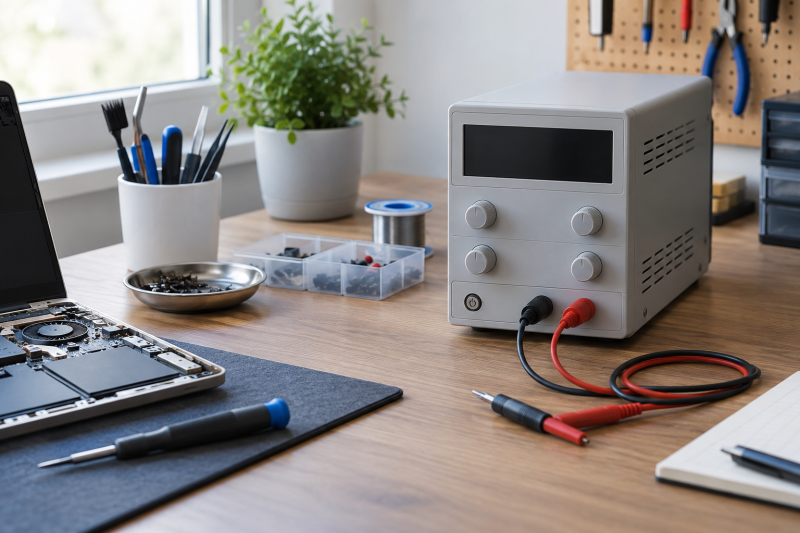
A controllable bench supply lets you set a DC voltage and current limit before you connect a small board, accessory, or repair project. Unlike a USB-C charger, which supplies a negotiated USB-C output, a bench supply gives you direct, adjustable DC settings at its output terminals.
All six models below list adjustable output, but their displays, adjustment controls, ports, and stated power limits are not interchangeable. Choose the one whose range, current limit, and physical controls match the work you do, then treat the listed limits and protection features as operating boundaries. They do not replace understanding the circuit.
For small electronics work, an output-enable control, a readable voltage/current display, and deliberate current settings matter more than a USB charging port.Bench Power Supplies Compared




1. Jesverty SPS-3010 — Best Clear 30V/10A Bench Readout
Jesverty lists a 0-30V, 0-10A adjustable output with a four-digit LED display that shows volts, amps, and watts live. Its stated display resolution reaches 0.01V, 0.001A, and 0.1W, so the set output is easy to read without a complicated memory or menu system.
The SPS series automatically switches between constant-voltage and constant-current modes as the load changes. Jesverty also lists coarse and fine adjustment, short-circuit and overload protection, a grounding terminal, a temperature-regulated fan, a 5V/2A USB port, test leads, and a power cord. Its compact 7.1-by-3.35-by-6.1-inch body is useful when the supply must share a laptop repair desk.
Our TakeBuy the Jesverty when a clear four-digit V/A/W display and 30V/10A stated range are the main decision. It covers the core bench-supply job without adding a dense set of secondary controls, but its USB port is only listed at 5V/2A rather than a fast-charge output.
- A four-digit display states volts, amps, and watts with 0.01V and 0.001A resolution.
- The listed 0-30V and 0-10A range covers a broad conventional adjustable-output bench role.
- Automatic constant-voltage and constant-current switching responds to listed load changes without a manual mode swap.
- Short-circuit protection, overload protection, grounding, and a temperature-regulated fan are explicitly listed safeguards.
- The USB port is listed at 5V/2A, below the fast-charge ports named by NANKADF and WANPTEK.
- Jesverty recommends separate leads with sufficient current capacity for long high-current use.
2. NANKADF 30V 10A — Best Output Enable and Digit Control
NANKADF focuses its listed controls on setting a number deliberately before letting output reach the load. With its encoder knob, you press to select a digit and turn to change that digit. The output enable/disable button is a direct, separate control for connecting or cutting the output.
Its four-digit display lists 0.01V and 0.001A resolution, automatic CV/CC operation, adjustable brightness, OCP protection that stops output and sounds a buzzer during a stated short circuit, and an 18W USB fast-charging port. That combination suits a bench where you frequently set a limit, connect a board, and want an obvious output switch rather than treating the adjustment knob as the only control.
Our TakeBuy NANKADF when an output enable button and digit-by-digit encoder adjustment make the setup easier to control. Its stated 30V/10A format matches Jesverty’s range, but the separate output button and 18W USB port are the practical differences.
- A separate output enable/disable button provides a stated control before connecting power to a load.
- The encoder selects individual digits, making deliberate voltage or current setting easier than a generic knob.
- Its four-digit display lists 0.01V and 0.001A resolution with automatic CV and CC indication.
- OCP stops output and sounds a buzzer when the listed short-circuit condition occurs.
- An 18W USB fast-charging port adds a higher stated auxiliary output than Jesverty’s 5V/2A port.
- The listing names 30V and 10A but does not offer the HYELEC model’s stated 50V range.
- Digit-selection controls can take more setup attention than coarse and fine knobs for quick adjustments.
- Its USB port is an auxiliary charging feature, not a replacement for the adjustable terminal output.
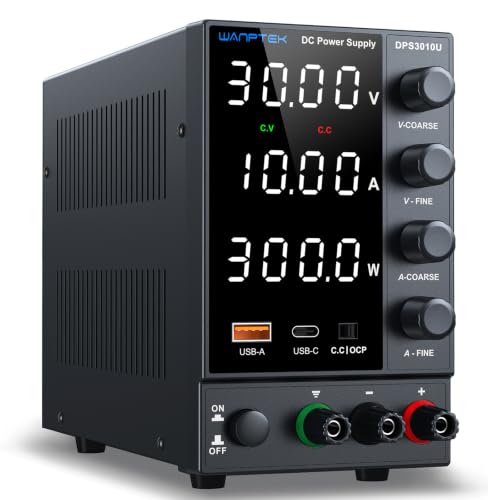
3. WANPTEK POWER 30V 10A — Best USB-C Charging Port
WANPTEK combines a listed 0-30V, 0-10A adjustable supply with 5V/3.6A USB and Type-C fast-charging ports. The Type-C port does not turn the variable terminals into a USB-C power-delivery source, but the port can keep a phone or another device charged without taking a separate desk outlet.
The listing names coarse and fine encoder knobs, a four-digit display, OCP short-circuit alerts, grounding, leakage, overheating, voltage-overload, and power-overload protection. It also says the model automatically adapts to 110V and 220V ±10% AC input, without a rear voltage-toggle switch. Choose it when you will use the Type-C port beside the adjustable output.
Our TakeBuy WANPTEK when the 5V/3.6A Type-C charging port adds value next to a conventional 30V/10A variable output. Its coarse and fine encoder controls suit frequent adjustments, while its USB-C port remains a separate listed charging convenience rather than the repair power source itself.
- A stated 5V/3.6A Type-C port gives this supply a directly relevant auxiliary USB-C charging option.
- Coarse and fine encoder knobs separate whole-number and decimal adjustment for quicker listed control changes.
- OCP alerts and multiple listed protection features give the operator explicit output-protection options.
- The 30V maximum is lower than the HYELEC HY50-06A’s stated 50V output range.
- The listed USB-C port supplies 5V/3.6A, not an adjustable voltage negotiated through USB-C Power Delivery.
- It ships with output and input cords rather than the fine probe details listed by a dedicated meter.
- A feature-rich front panel can be more than a simple bench needs for one repeated voltage setting.
4. NICE-POWER SPS-E3010 — Best Compact 150W Supply
NICE-POWER makes the tradeoff explicit. Its fixed 150W limit allows either 15V/10A or 30V/5A. The listing says it prevents settings beyond 150W. That limit is easier to understand than treating 30V and 10A as a simultaneous output claim.
At 10 by 18.5 by 8cm and under 1kg, it is the most compact stated option. Its three-digit display lists 0.1V and 0.01A resolution, while encoder controls select each number. Choose it for a smaller desk where the stated output ceiling fits the work, not for a job needing the 30V/10A range of Jesverty, NANKADF, WANPTEK, and Kungber.
Our TakeBuy NICE-POWER when small size and a clear 150W ceiling come before maximum 30V/10A flexibility. It is the compact choice, but the 15V/10A and 30V/5A limits need to match the output you intend to set.
- A fixed 150W limit clearly frames the stated 15V/10A or 30V/5A operating choices.
- The 10-by-18.5-by-8cm body and under-1kg weight suit a crowded laptop repair desk.
- Encoder controls select individual digits for voltage and current adjustments.
- A temperature-started cooling fan is listed for the compact enclosure.
- It cannot supply 30V and 10A together because the listed supply is limited to 150W.
- Its three-digit display lists 0.1V resolution, coarser than the four-digit models’ stated 0.01V resolution.
5. Kungber SPS3010B — Best for Charging Display
Kungber lists a 30V/10A adjustable supply with an intelligent charging mode that displays charging power in Ah and stops charging when its listed full-battery detection triggers. Its OCP button stops output and sounds an alarm on listed short circuits and overcurrent conditions.
The 7.59-by-3.35-by-6.1-inch, under-2.3-pound supply also has an 18W USB interface, precision encoder knob, grounding, leakage, thermal, voltage-overload, power-overload, and short-circuit protection. The size and feature set fit a buyer who wants a compact conventional supply and values the charging display. The terminal output and the auxiliary USB port are separate features.
Our TakeBuy Kungber when the charging display and OCP button fit the work you do beside routine adjustable output. It shares the 30V/10A class with Jesverty and NANKADF, but the listed charging mode is what sets it apart.
- Its intelligent charging mode lists Ah display and full-battery stopping behavior.
- An OCP button provides a named way to stop output after listed short-circuit or overcurrent detection.
- The compact 7.59-by-3.35-by-6.1-inch body weighs under 2.3 pounds according to the listing.
- An 18W USB port adds a stated auxiliary charging output beside the adjustable terminals.
- Grounding, leakage, thermal, voltage-overload, power-overload, and short-circuit protections are all listed.
- The listing does not state three recalled voltage/current memories like the HYELEC HY50-06A.
- Its 30V range is lower than HYELEC’s stated 50V maximum.
- A charging-mode display does not determine whether a connected battery or board suits the settings chosen.
6. HYELEC HY50-06A — Best 50V Range and Memory Presets
HYELEC lists 0-50V, 0-6A, maximum 150W, so 50V is the highest voltage on this page. Its four-digit display lists 0.01V and 0.001A resolution, automatic CV/CC operation, and coarse/fine encoder adjustment. Three memory buttons, M1 through M3, let you save and recall settings when a bench repeats a few known jobs.
The listing also names a 5V/2A USB interface, output enable/disable switch, temperature-control fan, short-circuit, over-voltage, and over-current protection. It explicitly says the version has 110V input only, so choose it for its higher stated voltage range and presets only when that input requirement fits the workspace.
Our TakeBuy HYELEC when 50V range and three saved presets fit repeated work on a bench. Its maximum stays 150W, so the higher voltage comes with a 6A ceiling. It is not automatically the broadest choice for every current requirement.
- A stated 0-50V range is the highest voltage range among the six supplies here.
- M1, M2, and M3 memory buttons save and recall three output settings for repeated tasks.
- The four-digit display lists 0.01V and 0.001A resolution with automatic CV/CC operation.
- An output switch, temperature-control fan, and multiple listed protections support deliberate bench use.
- Its 0-6A stated current ceiling is lower than the 0-10A range listed by several alternatives.
- The listing says this version has 110V input only, excluding workspaces that need a 220V option.
Buying Guide: Choosing a Bench Power Supply for Small Electronics Repairs
Set voltage and current as separate decisions
The listed output range tells you what a supply can set, not what every board should receive. Jesverty, NANKADF, WANPTEK, and Kungber list 30V/10A formats. HYELEC reaches 50V at up to 6A, while NICE-POWER’s 150W supply switches between 15V/10A and 30V/5A. Start with the voltage and current requirements of the specific device.
Constant-voltage and constant-current modes appear in the Jesverty, NANKADF, and HYELEC listings. A current setting is part of the setup, so set it before the load is connected. Use the supply only within its listed limits and the requirements of the circuit.
Choose a control that prevents an avoidable connection mistake
NANKADF and HYELEC list dedicated output enable/disable controls, while Kungber names an OCP button. An output switch is useful when you want the settings established before connecting a board. Jesverty’s coarse and fine adjustments instead make the value changes easy to see.
Encoders that select digits on NANKADF and NICE-POWER are useful when you need a precise number. WANPTEK separates coarse and fine controls. Pick the control style that keeps you deliberate, rather than buying a busier front panel for a simple recurring setup.
Read the power limit before comparing voltage and current headlines
NICE-POWER and HYELEC both state a 150W maximum, but their ranges differ. NICE-POWER explicitly limits 15V/10A or 30V/5A, while HYELEC lists 50V/6A. Because of the power ceiling, the largest voltage and current figures cannot always occur together.
Jesverty, NANKADF, WANPTEK, and Kungber state 30V/10A in their titles. Compare the exact listed range and output behavior for the project, then leave headroom rather than assuming a supply should run at its most demanding setting for every job.
Keep USB charging separate from adjustable terminal output
WANPTEK lists 5V/3.6A USB and Type-C charging ports. NANKADF and Kungber list 18W USB. Jesverty and HYELEC list 5V/2A USB. The USB ports are convenience outputs for supporting devices, separate from the adjustable bench terminals.
Do not read a Type-C port as an adjustable USB-C Power Delivery source. A bench supply controls its terminal output. A USB-C PD trigger board follows its own connection rules. Keep those roles distinct so you do not select a supply based on the wrong kind of port.
Match size and input requirements to the actual desk
NICE-POWER is listed at 10 by 18.5 by 8cm and under 1kg, while Jesverty and Kungber list compact bodies around seven inches deep. Small supplies leave more room for a laptop, tools, leads, and a parts tray, but their output limits still count for more than footprint alone.
HYELEC’s listing says 110V input only. WANPTEK says it adapts to 110V and 220V ±10%. NICE-POWER lists 100V to 240V input. Check the stated input before buying, especially when the bench may move between regions or power systems.
Use protection features as boundaries, not permissions
The listings name OCP, short-circuit, overload, thermal, grounding, leakage, or over-voltage protections in different combinations. Those features can help stop a listed fault condition, but they do not establish that an unknown board is safe to power.
Set the correct output before connecting the load, use leads appropriate for the current, and follow the circuit’s own documentation. The product listing tells you what the supply claims to include, and it does not replace a repair procedure. For wall-side measurements, outlet power meters address a different question.
Frequently Asked Questions
Is a bench power supply the same as a USB-C charger?
No. A bench supply provides adjustable DC output through its terminals, while a USB-C charger follows the rules of the USB-C connection. WANPTEK’s Type-C port is listed as a 5V/3.6A charging port, not an adjustable terminal output.
Use a bench supply when the repair calls for its direct adjustable output and listed current control. Use a proper USB-C charger or inline tool when the question is about a USB-C connection.
Why does a 150W supply show different voltage/current limits?
Power is related to voltage and current, so a fixed 150W ceiling limits which pairs can be selected together. NICE-POWER explicitly says 15V/10A and 30V/5A, while HYELEC lists 0-50V and 0-6A with its own 150W maximum.
Read the product’s stated combinations before choosing it. The largest separate voltage and current numbers do not automatically describe one simultaneous output setting.
Should I look for an output enable button?
It can be useful when you want to set voltage and current before connecting a load. NANKADF and HYELEC list output enable/disable controls, and Kungber lists an OCP button that stops output after its stated detection condition.
The button is one control. It is not a safety guarantee. You still need to select the appropriate terminal settings and connect the leads correctly.
Do USB ports on these supplies charge a laptop?
The listed USB ports vary. Jesverty and HYELEC list 5V/2A, WANPTEK lists 5V/3.6A USB and Type-C, and NANKADF and Kungber list 18W USB. These figures identify auxiliary ports and are not a universal laptop-charging claim.
Check the requirements of the device you want to charge. Do not assume the presence of a USB or Type-C port establishes a particular laptop charging capability.
Which supply is best for repeated settings?
HYELEC is the only model here that lists M1, M2, and M3 memory buttons for saving and recalling three settings. Saved presets are useful when a bench returns to a small number of known voltage/current setups.
For a different workflow, NANKADF’s encoder that selects digits or WANPTEK’s coarse and fine controls may be more useful. Choose the control that shortens your repeated setup without hiding the settings you need to verify.
Bottom Line
Pick the supply by the feature you will use most.
Jesverty for a clear four-digit readout.
NANKADF for a separate output button.
WANPTEK for its Type-C auxiliary port.
NICE-POWER for compact 150W use.
Kungber for its charging display.
HYELEC for 50V range plus memories.