A keyboard case for a Galaxy Tab has to fit the exact tablet before its trackpad, stand or backlight helps. The model names are easy to confuse. Dexnor’s listing says its S10+ case is not for the S10 FE, S10 FE+ or S10 Ultra, and INFILAND’s listing says its case is designed exclusively for the A11+ and A9+.
The five cases below are for Samsung’s Android Galaxy Tab line: Samsung’s own S10+ Book Cover Keyboard and four cases from Fintie, INFILAND, ProCase and Dexnor. None of the five listings names a tablet from another brand. Find the SM model number in the tablet’s Settings and compare it with each listing. Dexnor’s listing says the tablet and S Pen are not included, and the other four listings do not list a tablet or stylus in the box.
Galaxy Tab Keyboard Cases Compared
| Image | Product | Best fit | Tablet fit | Case and stand | Keyboard features | Watch-outs | Check Price |
|---|---|---|---|---|---|---|---|
 | Samsung Book Cover Keyboard S10+ | Samsung keyboard with adjustable hinge | S10+, S9+, S9 FE+ | Detachable back cover; hinge to 150 degrees | Keyboard and trackpad; wireless sharing | Check exact Galaxy Tab compatibility | Check Price on Amazon |
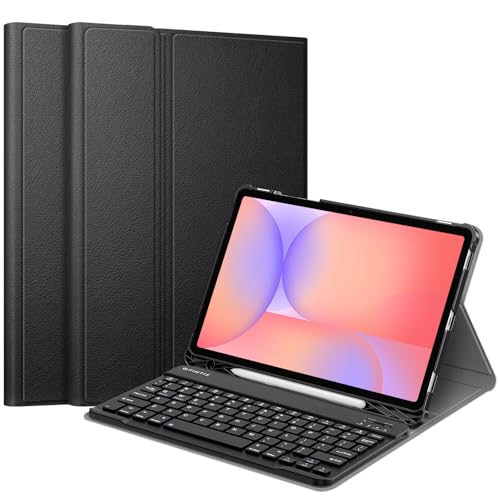 | Fintie Galaxy Tab Keyboard Case | Detachable Bluetooth keyboard that doubles as the stand | S10 Lite, S10 FE, S9 FE and S9 models | Removable keyboard; three angle grooves | Bluetooth keyboard; S Pen holder; no touchpad listed | Confirm listed SM model before ordering | Check Price on Amazon |
 | INFILAND Galaxy Tab A11+/A9+ Keyboard Case | Touchpad and backlight for A-series tablets | A11+ and A9+ listed models | Folding case; detachable keyboard | Touchpad; seven-color backlight | Listing states up to four hours of backlit use | Check Price on Amazon |
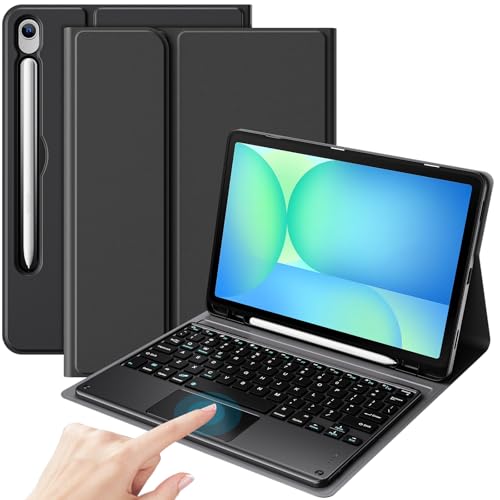 | ProCase Galaxy Tab Keyboard Case | Touchpad with three viewing angles | S10 Lite, S10 FE, S9 FE and S9 models | Magnetic detachable keyboard; three angles | Touchpad; stylus slot | Confirm listed SM model before ordering | Check Price on Amazon |
 | Dexnor S10+ Keyboard Case | Floating stand for listed 12.4-inch models | S10+, S9+, S9 FE+ and listed S8/S7 models | Magnetic floating stand; horizontal only | Touchpad; seven-color backlight; pen storage | Seller warns One UI 8.5 may stop trackpad | Check Price on Amazon |
1. Samsung Book Cover Keyboard AI Key — Samsung-Made Cover for the S10+
Samsung’s EF-DX825UBEGUJ is the Book Cover Keyboard with an AI key, and Samsung’s product page names the Galaxy Tab S10+, S9+ and S9 FE+ as the tablets it fits. The Amazon listing describes full-size keycaps, function keys and a trackpad used with DeX Mode, plus wireless keyboard sharing with compatible Galaxy devices. It also says the magnetic back cover detaches and reattaches.
The Amazon listing says the rear hinge opens to 150 degrees. In a reply to a customer review on its product page, Samsung says this model does not include backlit keys, and the Amazon listing does not mention a backlight. Samsung’s page names the S10+, S9+ and S9 FE+ and does not name the S10 FE, so an S10 FE owner should look at the Fintie or ProCase cases below.
Decision point: choose the Samsung EF-DX825UBEGUJ when the tablet is an S10+, S9+ or S9 FE+ and you want the tablet maker’s own cover. Our TakeSamsung’s is the only case here made by the tablet’s own maker, and its Amazon listing describes a trackpad and a hinge that opens to 150 degrees. Samsung says it has no backlit keys, so a buyer who wants a backlight should look at INFILAND or Dexnor.
- Samsung, the tablet’s own maker, names the S10+, S9+ and S9 FE+ as the tablets this cover fits.
- Samsung’s Amazon listing describes full-size keycaps, function keys and a trackpad used with DeX Mode.
- Samsung’s Amazon listing says the rear hinge opens to 150 degrees.
- Samsung’s Amazon listing says the magnetic back cover detaches and reattaches.
- Samsung says in a reply on its product page that this model does not include backlit keys, so a buyer who wants a backlight should look at INFILAND or Dexnor.
- Samsung’s page does not name the S10 FE, so an S10 FE owner should look at the Fintie or ProCase cases.
2. Fintie Keyboard Case — Keyboard That Doubles as the Stand
Fintie’s page and the Amazon listing both name four tablets: the Galaxy Tab S10 Lite (SM-X400/X406B), S10 FE (SM-X520/X526B/X528U), S9 FE (SM-X510/X516B/X518U) and S9 (SM-X710/X716B/X718U). Both say the case does not work with any other model. The Amazon model field gives the code CSBH013-C.
Fintie’s page says the Bluetooth keyboard is magnetically detachable and is used as part of the stand, which gives three viewing angles when the keyboard moves forward or backward along the cover. The page gives up to 230 hours of keyboard use. The Amazon listing says a USB-C charge takes two hours and that the keyboard switches to energy saving after ten minutes of inactivity. The listing also describes a built-in S Pen holder, which Fintie’s page does not mention. Fintie’s page and the listing do not list a touchpad.
The Fintie suits a buyer who mainly types on the four tablets it names, with a keyboard that lifts off and sets the stand angle. ProCase covers the same four tablets and describes a touchpad, which Fintie’s page and listing do not.
- Fintie’s page gives the SM numbers for the S10 Lite, S10 FE, S9 FE and S9 it fits.
- Fintie’s page says the magnetically detachable keyboard is part of the stand, with three viewing angles.
- Fintie’s page gives up to 230 hours of keyboard use, and the Amazon listing says a USB-C charge takes two hours.
- Fintie’s Amazon listing describes a built-in S Pen holder, which Fintie’s page does not mention.
- Fintie’s page and the Amazon listing do not list a touchpad, and ProCase’s page describes one on the same four tablets.
- Fintie’s page and the listing say the case does not work with any model outside the four named tablets.
3. INFILAND A11+/A9+ Keyboard Case — Backlit Touchpad Case for A-Series Tablets
The INFILAND listing says the case is designed exclusively for the 11-inch Galaxy Tab A11+ (SM-X230/X236/X238) and A9+ (SM-X210/X216/X218), and it tells buyers to confirm the model in Settings. The listing describes a folding design that switches between laptop and tablet mode and soft cushion pads on the keyboard corners. It also describes a touchpad with multi-finger gestures that Fn + Spacebar turns off or on.
The listing also describes a seven-color backlight with three brightness levels. INFILAND says a full charge of two to three hours gives up to four hours of backlit use or five to seven days of standard use, and it gives a 30-day standby time. The listing separates backlit use from standard use, so the four-hour figure is the one that applies with the backlight on.
Decision point: choose the INFILAND for an A11+ or A9+ when you want a touchpad and a backlight. Our TakeINFILAND is the only case here for the A11+ and A9+, and its listing describes both a touchpad and a seven-color backlight. The four hours of backlit use is the shorter of the two runtime figures in the listing.
- INFILAND’s Amazon listing names the A11+ and A9+ with their SM-X230/X236/X238 and SM-X210/X216/X218 numbers.
- INFILAND’s listing describes a touchpad with multi-finger gestures that Fn + Spacebar turns off or on.
- INFILAND’s listing describes a seven-color backlight with three brightness levels.
- INFILAND’s Amazon listing says a two- to three-hour charge gives up to four hours of backlit use, the shorter of its two runtime figures.
- INFILAND’s listing says the case is designed exclusively for the A11+ and A9+, not the S10+ or S10 FE.
4. ProCase Keyboard Case — Touchpad With Three Stand Angles
The Amazon listing for the ProCase PC-08367496 names the Galaxy Tab S10 Lite (SM-X400/X406/X406B), S10 FE (SM-X520/X526B/X528U), S9 FE (SM-X510/X516B/X518U) and S9 11-inch (SM-X710/X716B/X718U). ProCase’s own page names the first three and does not name the S9, so the S9 fit comes from the Amazon listing alone.
ProCase’s page describes a detachable magnetic keyboard, a multi-gesture touchpad for browsing, app switching and file management, and three viewing angles. It also describes two S Pen options, a magnetic slot that supports charging and a built-in holder, while the Amazon listing describes one built-in slot for the stylus. ProCase’s page and the Amazon listing do not give a keyboard runtime or charging time.
Decision point: choose the ProCase for an S10 FE, S10 Lite, S9 FE or S9 when you want a touchpad with a detachable keyboard. Our TakeProCase offers S10 FE and S9 owners a touchpad on a detachable keyboard, a pairing Fintie’s page and listing do not describe. Without a runtime figure from ProCase, there is nothing to set beside the 230 hours on Fintie’s page or the four backlit hours in INFILAND’s listing.
- ProCase’s page names the S10 Lite, S10 FE and S9 FE, and the Amazon listing adds the S9.
- ProCase’s page describes a multi-gesture touchpad for browsing, app switching and file management.
- ProCase’s page describes a detachable magnetic keyboard and three viewing angles.
- ProCase’s page describes a magnetic S Pen slot that supports charging plus a built-in holder, while the Amazon listing describes one built-in slot for the stylus.
- ProCase’s page and the Amazon listing do not give a keyboard runtime or charging time, which leaves nothing to set beside the runtime figures from Fintie and INFILAND.
- ProCase’s page does not name the S9 that the Amazon listing includes, so the S9 fit rests on the Amazon listing alone.
5. Dexnor S10+ Keyboard Case — Floating Stand for 12.4-Inch Tablets
The Amazon listing for the Dexnor DK001 names six 12.4-inch tablets: the Galaxy Tab S10+ (SM-X820/SM-X826B), S9 FE+ (SM-X610/X616B), S9+ (SM-X810/X816B), S8+ (SM-X800/X806), S7 FE (SM-T730/T733/T736B) and S7+ (SM-T976B/T975). Dexnor’s own page names only the S10+. The listing also says the case is not for the S10 FE+, S10 FE, S10 Lite, S11, S11 Ultra, S10 Ultra, S9 Ultra, S9 FE or S9.
Dexnor’s page and the listing describe a floating cantilever stand with customizable angles and an aluminum alloy hinge. They also describe a multi-touch trackpad, two S Pen holders, and a seven-color backlight with three brightness levels. Dexnor says an 800mAh battery gives up to 320 hours of working time and takes four hours to recharge. Dexnor’s page says the stand holds the tablet horizontally only and gives the case’s weight as 2.03 pounds.
The first line of the Amazon listing is a warning that a One UI 8.5 update may stop the trackpad working. The warning tells buyers not to update to One UI 8.5 manually and to turn off auto-update. Dexnor’s own page does not carry the warning, so it comes from the Amazon listing alone.
Dexnor is the only case here built around a floating stand, and its Amazon listing carries the only software warning among the five. The trackpad is the feature to check first.
- Dexnor’s page names the S10+ (SM-X820/SM-X826B), and the Amazon listing adds the S9+, S9 FE+, S8+, S7 FE and S7+.
- Dexnor’s page and the listing describe a multi-touch trackpad and a seven-color backlight with three brightness levels.
- Dexnor’s page and the listing describe two S Pen holders, one of them a cut-out slot on the back cover for charging and storage.
- Dexnor’s listing names the tablets it excludes, including the S10 FE, S10 FE+ and S10 Ultra.
- Dexnor’s Amazon listing opens with a warning that a One UI 8.5 update may stop the trackpad from working.
- Dexnor’s page says the stand holds the tablet horizontally only, which rules out upright use.
- Dexnor’s listing says the case is not for the S10 FE or S10 FE+.
Buying Guide: Match the Keyboard Case to Your Tablet
Start with the exact model number
A similar screen size does not confirm a fit. Fintie’s page lists SM-X520/X526B/X528U for the S10 FE and separate SM numbers for the S10 Lite, S9 FE and S9, while Samsung’s page names the S10+, S9+ and S9 FE+ for the Samsung Book Cover Keyboard. The INFILAND listing names the A11+ and A9+.
Open the tablet’s Settings and compare its SM number with the listing before ordering. ProCase’s listing and INFILAND’s listing both tell buyers to check the model in Settings, and Dexnor’s listing excludes the S10 FE and S10 FE+ from its S10+ case. The Fintie page says its case does not work with any model outside its four named tablets.
Decide how the keyboard attaches
Fintie’s page and ProCase’s page both describe a magnetically detachable keyboard. Fintie’s page adds that the removable keyboard is part of the stand, so moving the keyboard along the cover sets the angle. The ProCase page also describes three viewing angles.
The Samsung listing says the magnetic back cover detaches and reattaches, and INFILAND’s listing describes a folding design that switches between laptop and tablet mode. The Dexnor page and listing describe a magnetic floating stand, and the page says it holds the tablet horizontally only.
Compare trackpads and software support
Samsung, INFILAND, ProCase and Dexnor each describe a trackpad or touchpad, and Fintie’s page and listing do not mention one. INFILAND’s listing says Fn + Spacebar turns its touchpad off or on, and ProCase’s page describes gestures for browsing, app switching and file management.
Dexnor’s Amazon listing warns that a One UI 8.5 update may stop its trackpad working. Ask Dexnor which software versions the case supports before relying on the trackpad, and check the tablet’s software version first.
Check viewing positions and pen storage
Fintie’s page and ProCase’s page both describe three viewing angles. The Samsung listing describes a hinge that opens to 150 degrees, and Dexnor describes a floating cantilever stand with customizable angles. Which one suits a desk or a lap depends on where the tablet will sit, and Dexnor’s horizontal-only stand rules out upright use.
Fintie’s listing, ProCase’s page and Dexnor’s page and listing describe S Pen or stylus storage, and the Samsung and INFILAND listings do not mention it. Dexnor’s listing says the tablet and S Pen are not included. ProCase’s page says its magnetic slot supports charging, and Dexnor’s listing says a cut-out slot on the back cover is for charging and storage. Our cleaning kit comparison covers keeping the screen and keyboard clean.
Plan charging and backlight use
Fintie’s page gives up to 230 hours of keyboard use, and its Amazon listing says a USB-C charge takes two hours. INFILAND’s listing says a two- to three-hour charge gives up to four hours of backlit use or five to seven days of standard use. Dexnor’s page gives up to 320 hours of working time from an 800mAh battery with a four-hour recharge. The figures come from different makers and describe different conditions, so they do not rank the cases against one another.
INFILAND and Dexnor describe seven-color backlights with three brightness levels. Samsung says in a reply on its product page that its model has no backlit keys, and the Fintie and ProCase pages and listings do not mention backlighting.
Frequently Asked Questions
Does an S10+ case fit an S10 FE?
Do not assume it does. Samsung’s page names the S10+, S9+ and S9 FE+ for its Book Cover Keyboard, while Fintie’s and ProCase’s pages name S10 FE models (SM-X520/X526B/X528U). Dexnor’s listing says its S10+ case is not for the S10 FE or S10 FE+.
Look up the tablet’s SM model number and compare it with the maker’s list. Each maker’s list of named tablets decides the fit, and the Plus and FE labels name different tablets.
Which cases have a touchpad?
Samsung’s listing, INFILAND’s listing, ProCase’s page and Dexnor’s page and listing describe a trackpad or touchpad. INFILAND’s listing says Fn + Spacebar turns its touchpad off or on, and ProCase’s page describes gestures for browsing, app switching and file management. Fintie’s page and listing do not mention a touchpad.
Dexnor’s Amazon listing warns that a One UI 8.5 update may stop its trackpad working, so check the tablet’s software version if that feature is the reason to buy.
Is the S Pen included with a keyboard case?
Do not assume a pen holder means a pen is included. Fintie’s listing, ProCase’s page and Dexnor’s page and listing describe storage for a stylus, and Dexnor’s listing says the tablet and S Pen are not included.
Check the package contents in the listing and the tablet’s stylus compatibility before ordering. Fintie’s page lists the case, keyboard, USB-C charging cable and manual in the box.
Can the keyboards be removed?
Fintie’s page and ProCase’s page describe a magnetically detachable keyboard, and the Samsung listing describes a detachable magnetic back cover. The two are different parts, so read each description before treating the detachments as the same.
Fintie’s page also says its removable keyboard is part of the stand for the tablet. Dexnor’s stand and INFILAND’s folding design are described separately in their listings.
Do these cases fit an iPad or a non-Samsung Android tablet?
Each listing names Samsung Galaxy Tab models, and Fintie’s page says its case does not work with any other model. A case for an iPad or another brand’s Android tablet is a separate purchase.
If you also shop for an iPad, the iPad keyboard case comparison covers that tablet line. Use the SM model number and the case maker’s list for each Galaxy Tab.