A laptop keyboard can be a compact travel model, a full desk keyboard with backlighting, or an ergonomic model with a palm rest and a number pad. Logitech separates those jobs by key layout, connection method, device switching, battery type, and wrist support rather than by one label such as wireless.
The five Logitech models here cover the full-size MX Keys S, the compact MX Keys Mini and K250, and two ergonomic approaches in ERGO K860 and Wave Keys. Match the keyboard to the desk space, operating systems, and connection ports you use before treating backlighting or a palm rest as the deciding feature. For broader illumination options, see our backlit wireless keyboard guide. For a different mix of brands, see our multi-device Bluetooth keyboard picks.
Choose the layout and connection first, then compare lighting, battery type, portability, and ergonomic support.Logitech Keyboards for Laptops and Mac Compared
| Image | Product | Details | Check Price |
|---|---|---|---|
 | Logitech MX Keys S | Best fit: Full-size backlit desk keyboard Layout: Full-size, 16.94 in wide Connection: Bluetooth or included Logi Bolt Power: USB-C rechargeable Limit: Wider than MX Keys Mini | Check Price on Amazon |
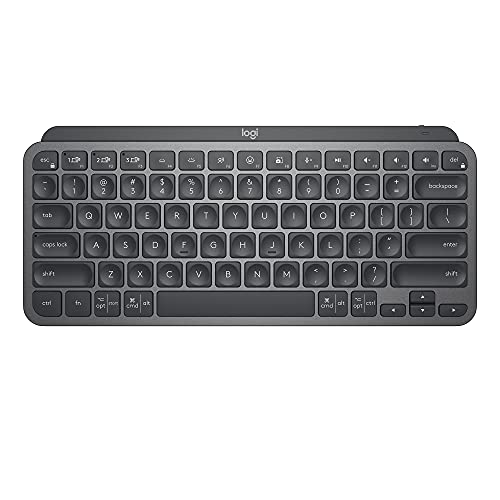 | Logitech MX Keys Mini | Best fit: Compact backlit Mac and laptop keyboard Layout: Compact, 11.65 in wide Connection: Bluetooth LE, 3 devices Power: USB-C rechargeable Limit: Logi Bolt receiver not included | Check Price on Amazon |
 | Logitech K250 | Best fit: Compact Bluetooth keyboard with a number pad Layout: Compact with number pad Connection: Bluetooth, no dongle Power: 2 AAA, 12 months Limit: No backlighting or switching listed | Check Price on Amazon |
 | Logitech ERGO K860 for Business | Best fit: Split keyboard with number pad Layout: Split, wrist rest, numpad Connection: Bluetooth or Logi Bolt Power: 2 AAA, up to 24 months Limit: 17.95 in wide, AAA batteries | Check Price on Amazon |
 | Logitech Wave Keys | Best fit: Compact ergonomic keyboard Layout: Wave shape, numpad, palm rest Connection: Bluetooth or Logi Bolt, 3 devices Power: 2 AAA, up to 3 years Limit: No backlighting listed | Check Price on Amazon |
1. Logitech MX Keys S — Best Full-Size Backlit Keyboard
The MX Keys S is the full-size illuminated keyboard of the five. Logitech describes spherically dished keys, a low-profile design, backlit keys that light up when your hands approach, and Smart Actions set up in the Logi Options+ app. Logitech lists a 1500 mAh rechargeable battery rated for up to 10 days, or up to 5 months with backlighting off. The Amazon listing names the Graphite 920-011558 model, USB-C charging, an included Logi Bolt receiver, and pairing with up to three devices.
Logitech lists a connection over Bluetooth Low Energy or the Logi Bolt receiver, Easy-Switch for three devices, and compatibility with Windows, macOS, ChromeOS, Linux, and iPadOS, with basic functions on other systems. Logitech’s MX Keys Mini page points to a full-size version with an integrated numpad, and Logitech’s MX Keys S page presents the S as the full-size choice next to the Mini. Logitech lists MX Keys S at 16.94 inches wide, so it needs more desk room than the 11.65 inches Logitech lists for MX Keys Mini.
MX Keys S has a full-size low-profile layout, hand-proximity backlighting, USB-C charging, and three-device switching.Our Take Choose MX Keys S for a permanent desk where a full-size layout and smart illumination count for more than minimum width. It suits a Mac or laptop desk where a compact board would leave too little room for data entry.
- Logitech lists spherically dished keys and a low-profile design for the MX Keys S, the full-size model of the five.
- Logitech says hand-proximity sensors turn the backlighting on when your hands approach, and ambient light sensors adjust its brightness.
- Logitech lists two ways to connect MX Keys S, Bluetooth Low Energy or the Logi Bolt receiver, and the Amazon listing says the receiver is included.
- The Amazon listing gives USB-C charging for MX Keys S, and Logitech rates a full charge at up to 10 days, or up to 5 months with backlighting off.
- Logitech lists the MX Keys S at 16.94 inches wide, against the 11.65 inches it lists for MX Keys Mini, so it takes more desk room.
- Logitech says Smart Actions work only on recent versions of Windows and macOS through the Logi Options+ app.
2. Logitech MX Keys Mini — Best Compact Backlit Mac and Laptop Keyboard
MX Keys Mini keeps the MX-style backlit, spherically dished keys in a smaller form. Logitech calls it a minimalist wireless illuminated keyboard, lists it at 11.65 inches wide, and says the compact form lets you place a mouse closer to the keyboard. Logitech also lists dictation, mic mute, and emoji keys. The Amazon listing gives USB-C charging, Bluetooth pairing for up to three devices, and compatibility with macOS, iOS, Windows, Linux, and Android.
Logitech lists Bluetooth Low Energy as the connection and says the Logi Bolt receiver is compatible but not included. Logitech rates a full charge at up to 10 days, or up to 5 months with backlighting off. Logitech’s page points to a full-size version for an integrated numpad, so spreadsheet work or frequent numeric entry may favor MX Keys S, K250, or ERGO K860. The Mini suits a MacBook desk that needs illumination and multi-device switching without a full-width keyboard.
MX Keys Mini is a compact illuminated keyboard with USB-C charging and three-device Bluetooth pairing, without the full-size layout.Our Take Pick MX Keys Mini when your desk is short on space and you want backlit keys, Mac compatibility, and a rechargeable keyboard. If you rely on a number pad, look at MX Keys S instead.
- Logitech lists MX Keys Mini at 11.65 inches wide and says its compact form lets you place a mouse closer.
- Logitech describes hand-proximity backlighting and spherically dished keys for the MX Keys Mini.
- The Amazon listing gives USB-C charging and Bluetooth pairing for up to three devices on the MX Keys Mini.
- Logitech’s MX Keys Mini page points to a full-size version for an integrated numpad, so frequent numeric entry may favor MX Keys S.
- Logitech lists Bluetooth Low Energy for the MX Keys Mini and says the Logi Bolt receiver is compatible but not included.
- Logitech rates the MX Keys Mini at up to 10 days per charge, against up to 5 months with backlighting off.
3. Logitech K250 — Best Compact Bluetooth Keyboard With a Number Pad
Logitech K250 is the compact Bluetooth keyboard with a number pad in this group. Logitech lists a compact layout with number pad, a width of 14.56 inches, tilt legs for a 7 degree typing angle, and two included AAA batteries. The Amazon listing for the Graphite 920-013442 model describes deep-profile keys, a spill-resistant design, and Bluetooth that connects without a dongle or USB port.
Logitech rates battery life at 12 months, varying with use, and the Amazon listing gives 12 months of daily use before changing batteries. Logitech lists Bluetooth Low Energy and compatibility with Windows 10 and 11, macOS 12, ChromeOS, Linux, iPadOS 15, iOS 15, and Android 12 or later. Neither Logitech’s page nor the Amazon listing mentions device switching or backlighting for K250.
Our Take Choose K250 when a number pad has to fit on a compact keyboard that connects over Bluetooth without a receiver. Look at MX Keys S or MX Keys Mini for backlit keys, or at ERGO K860 or Wave Keys for ergonomic shapes.
- Logitech lists a compact layout with number pad for the K250.
- The Amazon listing says the K250 connects over Bluetooth without a dongle or USB port, so it needs no receiver.
- Logitech lists two included AAA batteries for the K250 and rates battery life at 12 months, varying with use.
- Logitech lists tilt legs for a 7 degree typing angle.
- Neither Logitech nor the Amazon listing mentions backlighting or device switching for the K250.
- Logitech lists alkaline AAA batteries for the K250 rather than a rechargeable cell.
4. Logitech ERGO K860 for Business — Best Split Keyboard With a Number Pad
ERGO K860 for Business is the dedicated ergonomic full-size model. Logitech’s page for 920-010175 describes a split, curved keyframe, an included wrist rest, arrow keys, customizable F-keys, and an integrated numpad, with tilt legs at 0, negative 4, and negative 7 degrees. Logitech also says it is certified ergonomic by United States Ergonomics. The Amazon listing says it connects to up to three devices, names secured Logi Bolt and Bluetooth, and gives a two-year battery life.
Logitech lists Bluetooth Low Energy and the Logi Bolt receiver, and rates two AAA batteries at up to 24 months. Over Bluetooth, Logitech names Windows, macOS, Linux, ChromeOS, iPadOS, iOS, and Android. The receiver path names Windows, macOS, Linux, and ChromeOS and requires an available USB-A port. Logitech lists ERGO K860 at 17.95 inches wide, wider than the 16.94 inches Logitech lists for MX Keys S, so check that width against a small laptop stand or a shallow pull-out tray.
Our Take Pick ERGO K860 when you want a split layout, wrist support, and a number pad on a fixed work desk. Choose MX Keys S instead when backlit keys count for more than a split shape.
- Logitech lists a split, curved keyframe and an included wrist rest for the ERGO K860.
- Logitech lists tilt legs at 0, negative 4, and negative 7 degrees for the ERGO K860.
- Logitech lists an integrated numpad, arrow keys, and customizable F-keys.
- Logitech lists Bluetooth Low Energy and the Logi Bolt receiver, and the Amazon listing says it connects to up to three devices.
- Logitech lists the ERGO K860 at 17.95 inches wide, against the 16.94 inches it lists for MX Keys S, so check that width against a small laptop stand or a shallow pull-out tray.
- Logitech lists two AAA batteries for the ERGO K860 rather than USB-C charging.
- Logitech says the Logi Bolt receiver for the ERGO K860 requires an available USB-A port.
5. Logitech Wave Keys — Best Compact Ergonomic Keyboard
Wave Keys is Logitech’s compact ergonomic keyboard. Logitech’s page for 920-012276 lists a compact layout with number pad, dual printed for Windows and Mac, and describes a cushioned palm rest with 3 layers of memory foam. Logitech says Wave Keys was developed and tested with the Logi Ergo Lab and is certified ergonomic by United States Ergonomics. The Amazon listing for the Rose color describes a wave-shaped keyboard that connects over Bluetooth or the Logi Bolt receiver, with Easy-Switch for up to three devices.
Logitech lists two included AAA batteries rated for up to 36 months and an included Logi Bolt receiver, which requires an available USB port. Over Bluetooth Low Energy, Logitech names Windows 10 and 11, macOS 11, iPadOS 14, ChromeOS, Linux, and Android 9.0 or later. Logitech lists dimensions of 14.8 by 8.62 inches, and the Amazon listing says the compact size lets you bring a mouse closer to your body than a full-size keyboard would. Neither Logitech nor the Amazon listing mentions backlighting.
Our Take Choose Wave Keys when a compact ergonomic layout with a number pad and a cushioned palm rest suits a laptop desk better than a full split keyboard. Compare ERGO K860 if you want a split keyframe.
- Logitech lists a compact layout with number pad, dual printed for Windows and Mac, for Wave Keys.
- Logitech specifies a cushioned palm rest with 3 layers of memory foam.
- Logitech says Wave Keys is certified ergonomic by United States Ergonomics.
- Logitech lists an included Logi Bolt receiver and Bluetooth Low Energy, and the Amazon listing says Easy-Switch covers up to three devices.
- Neither Logitech nor the Amazon listing mentions backlighting for Wave Keys.
- Logitech lists two AAA batteries for Wave Keys rather than USB-C charging.
Buying Guide
Decide whether a number pad belongs on the desk
Logitech’s pages list an integrated numpad or a number pad on ERGO K860, Wave Keys, and K250, which helps when data entry, finance work, or spreadsheet navigation happens throughout the day. Logitech’s MX Keys Mini page points to a full-size version with an integrated numpad, and the MX Keys S page presents the S as the full-size choice. ERGO K860 adds a split curved keyframe, wrist rest, and tilt legs for a buyer who wants a more specialized desk setup.
The Mini is the smallest footprint of the five, at the 11.65 inches wide Logitech lists, against 14.56 inches for K250, 16.94 inches for MX Keys S, and 17.95 inches for ERGO K860. The narrow width leaves more room beside a laptop, and Logitech says the compact form lets you place a mouse closer. Choose the smaller layouts when desk width or portability counts for more than a full-size board.
Match the wireless path to the laptop
The Amazon listing for K250 says it connects over Bluetooth without a dongle or USB port, and Logitech lists Bluetooth Low Energy as the connection for MX Keys Mini, with the Logi Bolt receiver not included according to Logitech. MX Keys S, ERGO K860, and Wave Keys connect through Bluetooth or Logi Bolt according to Logitech, so a desk that needs a receiver has that option. Logitech’s requirements name an available USB port for the receiver, and for ERGO K860 specifically a USB-A port, so an all-USB-C laptop may need a dock or adapter for that connection method.
Logitech and its Amazon listings give up to three devices for MX Keys S, MX Keys Mini, ERGO K860, and Wave Keys. Neither Logitech’s K250 page nor the Amazon listing mentions device switching for K250. Confirm the operating systems in each product section before buying, since Logitech’s supported-system lists differ by model.
Choose backlighting only when it solves a need
Logitech lists hand-proximity backlighting with ambient light adjustment for MX Keys S and MX Keys Mini. Backlighting suits a desk used in dim conditions. It separates the two MX boards from K250, ERGO K860, and Wave Keys, for which Logitech and Amazon do not mention backlighting. Both MX boards also use USB-C charging, which suits a desk already organized around USB-C power.
Logitech rates both MX boards at up to 10 days per charge, or up to 5 months with backlighting off. Skip illumination when the keyboard will mostly be used in a well-lit room and compact size or wrist support is the priority.
Separate ergonomic shape from portable size
ERGO K860 is the larger ergonomic choice because Logitech lists a split curved keyframe, an included wrist rest, an integrated numpad, and tilt legs at 0, negative 4, and negative 7 degrees. It suits a stable desk with room for its 17.95 inches of width. Wave Keys takes a different approach. Logitech lists a compact layout with number pad and a cushioned palm rest with 3 layers of memory foam.
Logitech describes the MX boards as illuminated keyboards with dished keys, and its pages do not describe a palm rest for either. K250 is the compact option with a number pad, and Logitech does not list a wrist-support feature for it, while Wave Keys and ERGO K860 each list a palm or wrist rest.
Check charging and battery maintenance
MX Keys S and MX Keys Mini are USB-C rechargeable according to their Amazon listings, and Logitech lists a 1500 mAh battery for each. They fit a desk where a charging cable is already available and where backlighting is useful.
ERGO K860 uses two AAA batteries that Logitech rates at up to 24 months, Wave Keys uses two AAA batteries rated at up to 36 months, and K250 uses two AAA batteries rated at 12 months, all varying with use. Replaceable cells can be convenient away from a charging cable, but they need a spare-battery plan. Compare the connection method, layout, and lighting alongside the advertised duration.
Frequently Asked Questions
Which Logitech keyboard is best for MacBook and laptop use?
MX Keys S is the full-size backlit option, and MX Keys Mini is the compact backlit option. Logitech lists macOS support for both, and Logitech lists Bluetooth Low Energy for the Mini and either Bluetooth or the Logi Bolt receiver for the S. MX Keys Mini suits a desk that does not need a number pad, while MX Keys S gives the wider layout and an included Logi Bolt receiver according to the Amazon listing.
K250 is the simpler Bluetooth choice with a number pad. ERGO K860 and Wave Keys add ergonomic features, so their value depends on whether the desk needs a split layout or a cushioned palm rest.
Do these keyboards switch between several devices?
Logitech and the Amazon listings give up to three devices for MX Keys S, MX Keys Mini, ERGO K860, and Wave Keys. Their connection methods differ by product, with Bluetooth only for the Mini and Bluetooth or Logi Bolt for the others.
Neither Logitech nor the Amazon listing mentions device switching for K250. Check whether a receiver is included and whether the laptop has a USB port before choosing the Logi Bolt path.
Which model has a number pad?
Logitech lists a number pad or numpad for ERGO K860, Wave Keys, and K250. ERGO K860 places its integrated numpad beside a split curved keyframe and wrist rest, while Wave Keys and K250 pair the number pad with a compact layout.
Logitech’s MX Keys Mini page points to a full-size version with an integrated numpad, and the MX Keys S page presents the S as the full-size choice. Logitech does not state a number pad on the MX Keys Mini itself.
Are any of these Logitech keyboards backlit?
Logitech lists backlit keys that light up as hands approach and adjust to ambient light for MX Keys S and MX Keys Mini. MX Keys S and MX Keys Mini are the choices for an illuminated Mac or laptop desk.
Neither Logitech nor the Amazon listing mentions backlighting for K250, ERGO K860, or Wave Keys.
Should I choose Wave Keys or ERGO K860?
Choose Wave Keys for a compact ergonomic keyboard with a number pad and a cushioned palm rest with 3 layers of memory foam, which Logitech lists. Its 14.8 by 8.62 inch dimensions can suit a laptop desk that cannot spare room for a full-size board.
Choose ERGO K860 for a split curved keyboard with an integrated numpad and three tilt-leg positions. Logitech lists it at 17.95 inches wide and lists AAA batteries for it. Its layout does a different job than the compact wave form of Wave Keys.
Bottom Line
MX Keys S is the choice for a full-size backlit keyboard, while MX Keys Mini keeps illumination and USB-C charging in a smaller form. Pick K250 for a compact Bluetooth keyboard with a number pad, ERGO K860 for a split full-size ergonomic layout, or Wave Keys for compact ergonomic support.