An iPad keyboard case fits specific iPad models, so choose by your iPad model before you look at any feature. Apple lists separate Magic Keyboards for the iPad Air 11-inch and the iPad Pro 13-inch, and a Magic Keyboard Folio for the standard iPad (A16 and 10th generation). Logitech’s listings name a Combo Touch for the iPad Air 11-inch and another for the standard iPad.
All five keyboards below have a trackpad. They differ in which iPads they list, whether the keyboard detaches, how they connect and charge, and whether the keyboard has a USB-C connector. Compare your iPad against the compatibility list in each section before you look at features.
Keyboard Cases and Keyboards for iPad Compared
| Image | Product | Best fit | Compatibility | Keyboard and trackpad | Power and connection | Watch-outs | Check Price |
|---|---|---|---|---|---|---|---|
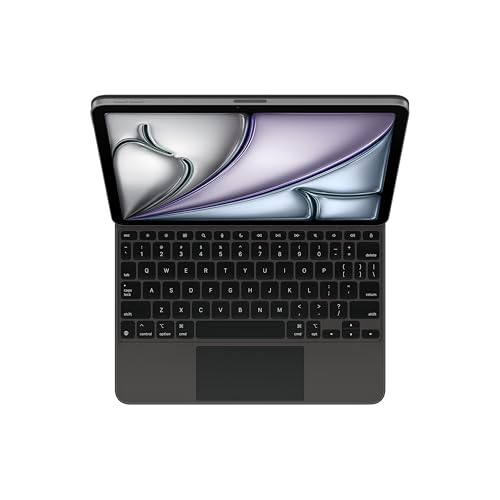 | Apple Magic Keyboard for iPad Air 11-inch | iPad Air 11-inch owners who want to charge through the keyboard | iPad Air 11-inch (M2, M3, M4); iPad Air 4th and 5th generation (Apple) | Scissor keys, 14-key function row, large glass trackpad | USB-C pass-through charging; no pairing or charging required (Amazon listing) | Folds into a case; Apple does not describe a detachable keyboard | Check Price on Amazon |
 | Apple Magic Keyboard for iPad Pro 13-inch | iPad Pro 13-inch owners who want a haptic trackpad | iPad Pro 13-inch (M4 and M5) (Apple) | Backlit scissor keys, glass trackpad with haptic feedback | USB-C pass-through charging through the aluminum hinge | Apple lists a 14-key function row, the Amazon listing says 10-key | Check Price on Amazon |
 | Logitech Combo Touch for iPad Air 11-inch | iPad Air owners who want a detachable keyboard with a kickstand | iPad Air 11-inch (M2, M3, M4); iPad Air 5th generation (Amazon listing) | Backlit detachable keyboard, large Multi-Touch trackpad | Smart Connector, powered by the iPad | The listing does not mention USB-C pass-through charging | Check Price on Amazon |
 | Logitech Combo Touch for iPad A16 and 10th Gen | Standard iPad owners who want four modes and shortcut keys | iPad (10th gen and A16) (Logitech) | Backlit keyboard, Multi-Touch trackpad, Screenshot and Dictation shortcut keys | Smart Connector, no charging required | Logitech's page and listing do not mention USB-C pass-through charging | Check Price on Amazon |
 | Apple Magic Keyboard Folio for iPad A16 and 10th Gen | Standard iPad owners who want Apple's two-piece case | iPad (A16) and iPad (10th generation) (Apple) | 14-key function row, click-anywhere trackpad, 1 mm key travel | No pairing or charging required (Amazon listing) | Apple's page and the listing do not mention USB-C pass-through or a backlight | Check Price on Amazon |
1. Apple Magic Keyboard for iPad Air 11-inch — Floating Keyboard With USB-C Pass-Through
Apple’s product page lists this Magic Keyboard for the iPad Air 11-inch (M4, M3 and M2), the iPad Air 5th generation and the iPad Air 4th generation. The Amazon listing for model MGYX4LL/A gives the same list. Apple describes a floating cantilever design that adjusts to multiple viewing angles and a large glass trackpad. The keys use a scissor mechanism with 1 mm key travel, and Apple lists a 14-key function row for screen brightness, volume and other controls. Apple says the keyboard provides front and back protection for the iPad Air.
Apple says the keyboard’s USB-C connector charges the iPad Air and frees the iPad’s own connector for other accessories. The Amazon listing adds that no pairing or charging is required. Neither Apple’s page nor the listing names a Smart Connector or mentions backlit keys, so confirm the backlight before ordering if you type in the dark.
Decision point: Apple lists the iPad Air 11-inch (M2, M3 and M4) and the iPad Air 4th and 5th generation for this keyboard, which has a USB-C connector for pass-through charging. Our TakePick this keyboard if you own one of the iPad Air models Apple lists and want to charge the tablet through the keyboard. Apple’s compatibility list names no iPad Pro and no standard iPad, so owners of those need a different model.
- Apple lists a 14-key function row that covers brightness, volume and other controls.
- Apple says the keyboard’s USB-C connector charges the iPad Air and frees the iPad’s own connector for other accessories.
- The Amazon listing says this keyboard needs no pairing or charging.
- Apple’s compatibility list names iPad Air models only, with no iPad Pro and no standard iPad.
- Apple describes front and back protection and does not describe a keyboard that detaches, unlike the Logitech Combo Touch cases and Apple’s Magic Keyboard Folio.
2. Apple Magic Keyboard for iPad Pro 13-inch — Haptic Trackpad and Aluminum Hinge
Apple’s product page lists this Magic Keyboard for the iPad Pro 13-inch (M5) and iPad Pro 13-inch (M4). The Amazon listing for model MWR53LL/A names the same M4 and M5 models and adds that compatibility varies by generation. Apple’s compatibility list for the 13-inch keyboard names no 11-inch iPad Pro and no iPad Air.
Apple describes a larger glass trackpad with haptic feedback and backlit keys on a scissor mechanism with 1 mm travel. Apple also lists an aluminum palm rest and a machined aluminum hinge that includes the USB-C connector for pass-through charging. Apple’s page lists a 14-key function row, while one bullet of the Amazon listing says 10-key. The two disagree, so treat the key count as unconfirmed. Apple’s page says the keyboard requires iPadOS 17.4 or later.
Choose this keyboard when the tablet is a 13-inch iPad Pro with an M4 or M5 chip and you want a haptic trackpad and backlit keys. Confirm the iPad’s size and chip first, because Apple lists no other iPad for it.
- Apple describes a larger glass trackpad with haptic feedback and Multi-Touch gesture support.
- Apple lists backlit keys on a scissor mechanism with 1 mm travel.
- Apple says the machined aluminum hinge includes a USB-C connector for pass-through charging.
- Apple’s compatibility list names only the iPad Pro 13-inch (M4) and (M5), and no iPad Air.
- Apple’s page lists a 14-key function row but the Amazon listing says 10-key, so the key count is unconfirmed.
3. Logitech Combo Touch for iPad Air 11-inch — Detachable Keyboard With a Kickstand
Logitech’s Amazon listing for part 920-012837 names the iPad Air 11-inch (M2, M3 and M4) and the iPad Air 5th generation, with iPad model numbers A2902, A2903, A2904, A3266, A3267, A3270, A2588, A2589 and A2591. Logitech describes a flexible kickstand and a detachable keyboard. You can detach the keyboard to sketch, watch or read, or leave the iPad in the case to type, sketch, watch videos, read or join a video call.
The listing describes an adjustable backlit keyboard and a large Multi-Touch trackpad with swipe, pinch and double-tap gestures. It also describes a case that protects the iPad from scuffs and scratches. Logitech’s listing says the Smart Connector powers the keyboard from the iPad, so there is nothing to charge. The listing does not mention USB-C pass-through charging.
Decision point: Logitech lists the iPad Air 11-inch (M2, M3 and M4) and the 5th generation iPad Air for a keyboard that detaches while the kickstand case stays on the iPad. Our TakePick this Combo Touch if you own a listed iPad Air and expect to take the keyboard off for drawing, reading or video. Apple’s Air Magic Keyboard is the model here that states a USB-C connector for charging through the keyboard.
- Logitech’s listing says the keyboard detaches for sketching, watching or reading.
- Logitech’s listing describes a backlit keyboard that the iPad powers through the Smart Connector, so no keyboard charging is needed.
- Logitech’s listing names a large Multi-Touch trackpad with swipe, pinch and double-tap gestures.
- Logitech’s listing names the iPad Air 11-inch (M2, M3 and M4) and the 5th generation iPad Air only.
- Logitech’s listing does not mention USB-C pass-through charging.
4. Logitech Combo Touch for iPad A16 and 10th Gen — Four Modes and 50-Degree Kickstand
Logitech’s product page lists this Combo Touch for the iPad (10th gen and A16). The Amazon listing for part 920-011433 adds model numbers A2696, A2757, A2777, A3162, A3354, A3355 and A3356. Logitech describes four use modes, Type, Read, Sketch and View, which you reach by adjusting the kickstand, and a keyboard you detach when you are done typing.
The Amazon listing gives the kickstand 50 degrees of tilt and describes a backlit keyboard with a full row of iPadOS shortcut keys, including Screenshot and Dictation keys. Logitech says the Smart Connector pairs the keyboard with the iPad and powers it, so no charging is required. Logitech’s page also describes a scissor mechanism under each key and a high-precision trackpad that supports Multi-Touch gestures.
Decision point: Logitech lists the iPad (10th gen and A16) for this Combo Touch, which adds a shortcut row with Screenshot and Dictation keys and a kickstand with 50 degrees of tilt. Our TakePick this Combo Touch for an iPad 10th generation or A16 when you want the keyboard to detach and the case to hold the iPad at an angle. Apple’s Magic Keyboard Folio is the other detachable option for the same iPads.
- Logitech lists four use modes: Type, Read, Sketch and View.
- The Amazon listing gives the kickstand 50 degrees of tilt.
- The Amazon listing describes a row of iPadOS shortcut keys that includes Screenshot and Dictation keys.
- Logitech says the Smart Connector powers the keyboard from the iPad, so there are no batteries to charge.
- Logitech’s page and listing name the iPad (10th gen and A16), and neither names an iPad Air or iPad Pro.
- Neither Logitech’s page nor the Amazon listing mentions USB-C pass-through charging.
5. Apple Magic Keyboard Folio for iPad A16 and 10th Gen — Two-Piece Apple Case
Apple’s product page lists the Magic Keyboard Folio for the iPad (A16) and the iPad (10th generation) and says it requires iPadOS 18.3 or later. Apple describes a two-piece design: a detachable keyboard and a protective back panel that both attach magnetically. The back panel carries an adjustable stand for flexible viewing angles.
Apple lists a scissor mechanism with 1 mm travel and a 14-key function row. Apple also lists a large click-anywhere trackpad that supports Multi-Touch gestures and the cursor. The Amazon listing says no charging or pairing is required, so you attach the keyboard and start typing. Neither Apple’s page nor the listing mentions USB-C pass-through charging or a backlight.
Choose the Folio for an iPad A16 or 10th generation when you prefer Apple’s two-piece design with a click-anywhere trackpad and a 14-key function row. Logitech’s listing states a backlit keyboard, which neither Apple source states for the Folio.
- Apple describes a detachable keyboard and a protective back panel that attach magnetically.
- Apple lists a 14-key function row and a scissor mechanism with 1 mm travel.
- Apple describes a large click-anywhere trackpad that supports Multi-Touch gestures.
- The Amazon listing says the Folio needs no charging or pairing.
- Apple’s page lists the iPad (A16) and iPad (10th generation) only.
- Neither Apple’s page nor the Amazon listing mentions USB-C pass-through charging or a backlight.
Buying Guide: Find the Right iPad Keyboard Case
Confirm the iPad model before comparing features
Start with the iPad. Apple lists the iPad Air 11-inch (M2, M3 and M4) plus the 4th and 5th generation iPad Air for its Air keyboard, and the iPad Pro 13-inch (M4 and M5) for its Pro keyboard. Logitech’s Amazon listing for the Air Combo Touch names the iPad Air 11-inch (M2, M3 and M4) and the 5th generation. The standard-iPad Combo Touch and Apple’s Folio both list the iPad (10th generation and A16).
A matching screen size does not make two cases interchangeable. Apple’s Air keyboard list names no Pro or standard iPad, and its Pro keyboard list names no Air or standard iPad. Compare your iPad generation and chip with each list, and check the model numbers the Amazon listings give for the Logitech cases before ordering.
Decide whether the keyboard should detach
Apple describes the Air and Pro Magic Keyboards as floating cantilever designs that adjust to multiple viewing angles and fold into a case for travel. Apple’s pages for them do not describe a detachable keyboard.
Logitech’s Combo Touch cases and Apple’s Folio use a keyboard that detaches instead. Logitech’s standard-iPad page lists four use modes, Type, Read, Sketch and View, and Logitech’s Amazon listing for the Air version lists typing, sketching, watching videos, reading and video calls. Apple’s Folio is a two-piece design with a detachable keyboard and a back panel that carries the adjustable stand. Pick a detachable model if the keyboard will come off often.
Compare trackpads and function rows
Apple lists a glass trackpad on both Magic Keyboards and describes haptic feedback only on the Pro model. The Folio has a large click-anywhere trackpad, and Logitech describes Multi-Touch gesture trackpads on both Combo Touch cases. Apple’s Air page does not mention haptic feedback.
On function rows, Apple’s pages list a 14-key function row for the Air keyboard, the Pro keyboard and the Folio, although a bullet in the Amazon listing for the Pro keyboard says 10-key. Logitech’s listing for the standard-iPad Combo Touch describes a full row of iPadOS shortcut keys with Screenshot and Dictation keys, and gives no key count. If function keys are part of your routine, compare the rows before you buy.
Plan around power, charging and the iPad’s port
Logitech says the Smart Connector powers the Combo Touch from the iPad, so there is no keyboard to charge. The Amazon listings for the three Apple keyboards say no pairing or charging is required. Apple’s pages for them do not name the Smart Connector, so this guide does not say how the Apple keyboards connect.
Of the five, only the Air and Pro Magic Keyboards have a USB-C connector for pass-through charging on Apple’s pages. Apple says the Air keyboard’s connector charges the iPad and frees the iPad’s own connector for other accessories, such as a USB-C hub. Apple’s pages do not say what a hub can do through the keyboard connector. Apple’s description of charging implies a USB-C cable and a charger for that connector.
Choose a stand style for the places you work
Logitech’s Amazon listing gives the standard-iPad Combo Touch a kickstand with 50 degrees of tilt and describes the Air version’s kickstand as ultra-flexible. Apple’s Folio has a back panel with an adjustable stand. The Air and Pro Magic Keyboards adjust through the floating cantilever design Apple describes.
Match the stand to the way you work. Apple describes the floating Magic Keyboard as front and back protection for the iPad. A kickstand case or Folio lets you take the keyboard away, as Logitech and Apple both describe, and keep the iPad propped up for sketching, reading or video.
FAQ
Can an iPad Air Magic Keyboard fit an iPad Pro?
No. Apple lists the iPad Air 11-inch (M2, M3 and M4) plus the 4th and 5th generation iPad Air for its Air keyboard, and the iPad Pro 13-inch (M4 and M5) only for its Pro keyboard. Apple’s Air list names no iPad Pro.
Check the iPad size and generation before choosing a color or key layout. An iPad Air owner can compare the Air Magic Keyboard with the Air Combo Touch, while a 13-inch iPad Pro owner has only Apple’s Pro keyboard among these five.
Do these keyboard cases need Bluetooth pairing?
Logitech says the Smart Connector pairs the Combo Touch with the iPad and powers it, so no charging is required. The Amazon listings for Apple’s Air keyboard, Pro keyboard and Folio say no pairing or charging is required.
Apple’s pages for those three do not name the Smart Connector or a Bluetooth mode, so this guide does not label how they connect. Each product lists specific iPad models, so compatibility is the first check either way.
Which pick is best for drawing or reading without the keyboard?
Logitech’s Combo Touch cases are the clearest choice for taking the keyboard off. Logitech says to detach the keyboard to sketch, read or watch videos, and its standard-iPad page lists Read and Sketch among four use modes.
Apple’s Magic Keyboard Folio is the Apple option for the standard iPad, because Apple describes a detachable keyboard and a back panel with an adjustable stand. Apple describes the Air and Pro Magic Keyboards as floating designs that fold into a case, not as detachable.
Which models have a USB-C connector on the keyboard?
Apple states a USB-C connector for pass-through charging on both the Air and Pro Magic Keyboards. Apple’s Air page says the connector charges the iPad Air and frees the iPad’s own connector for other accessories.
Neither Logitech’s page nor the Amazon listings for the Combo Touch cases mention such a connector, and neither Apple’s Folio page nor its Amazon listing does either. Choose an Apple Magic Keyboard if charging through the keyboard is a requirement.
What is the difference between Magic Keyboard Folio and Combo Touch for the standard iPad?
Both list the iPad (10th generation and A16) and both have a detachable keyboard and a trackpad. Apple’s Folio is a two-piece design with a back panel that carries an adjustable stand, a 14-key function row and a click-anywhere trackpad.
Logitech lists four use modes, a backlit keyboard and a shortcut row with Screenshot and Dictation keys, and its Amazon listing gives the kickstand 50 degrees of tilt. Neither Apple source mentions backlit keys for the Folio. Choose the Combo Touch for the features Logitech lists and the Folio if you prefer Apple’s design.