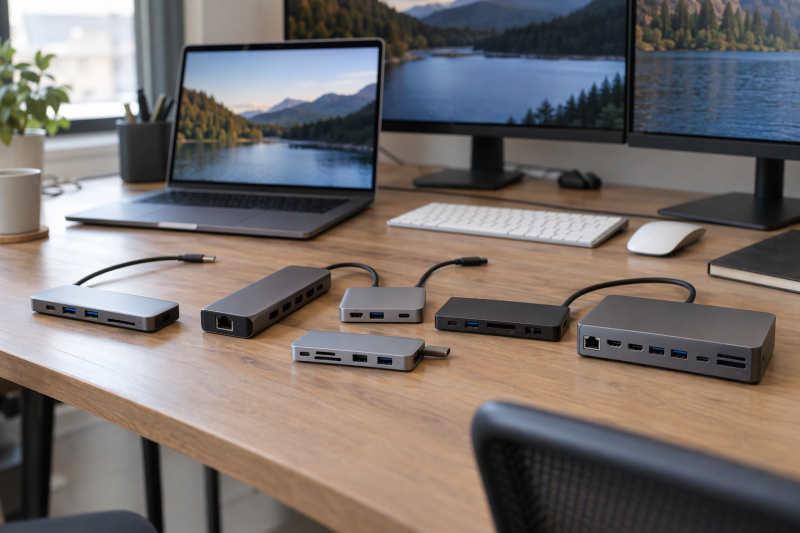
HyperShop lists HyperDrive’s Next hubs for Mac from a 52g four-port hub to a 10-port dock that adds a second display. The six differ in card readers, Ethernet, a headphone jack, charging wattage and display count, and the number in the name does not predict those. HYPER, the maker, sells all six new on Amazon.
HyperDrive Hubs Compared
| Image | Product | Details | Check Price |
|---|---|---|---|
 | HyperDrive Next 10 Port | Best fit: Travel hub with audio and 140W input Ports: 4K60 HDMI, 2 USB-C, 2 USB-A, SD/microSD, Ethernet, audio Data: 10Gbps USB, 5Gbps on one USB-A, 312MB/s cards Charging: Up to 125W with PD 3.1 host Limit: One HDMI output | Check Price on Amazon |
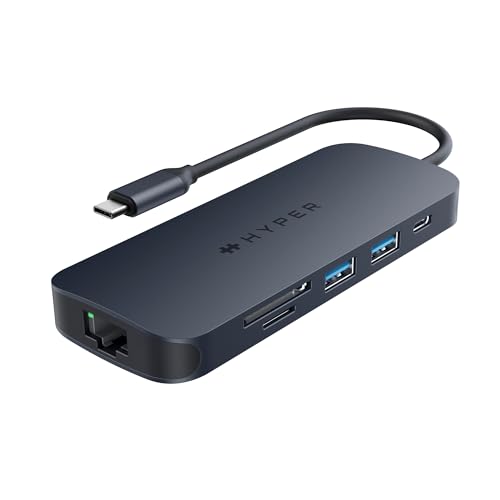 | HyperDrive Next 8 Port | Best fit: Card readers and two 10Gbps USB-A Ports: 4K60 HDMI, USB-C, 2 USB-A, SD/microSD, Ethernet Data: 10Gbps USB, 312MB/s cards Charging: Up to 125W with PD 3.1 host Limit: No headphone jack listed | Check Price on Amazon |
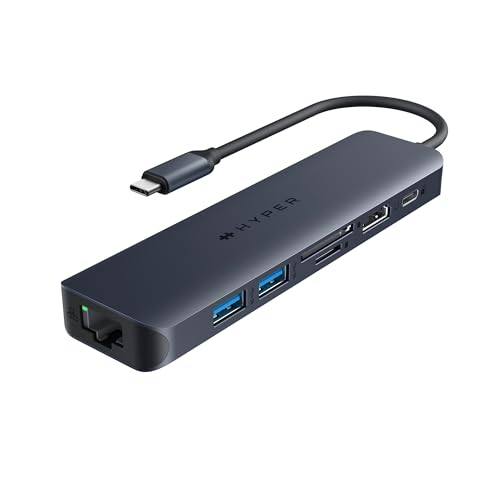 | HyperDrive Next 7 Port | Best fit: Ethernet and card readers under 80g Ports: 4K60 HDMI, 2 USB-A, SD/microSD, Ethernet Data: 10Gbps USB-A, 312MB/s cards Charging: Up to 85W with PD 3.0 host Limit: No USB-C data port listed | Check Price on Amazon |
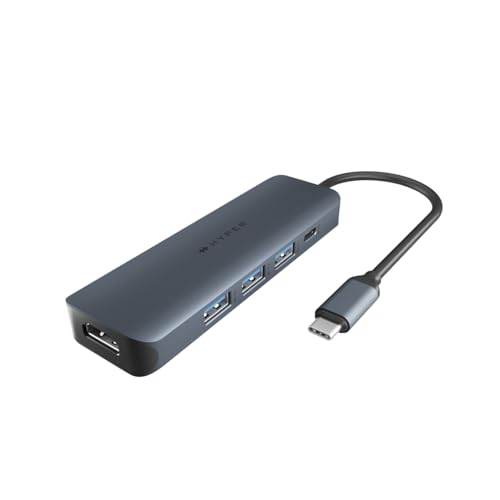 | HyperDrive Next 6 Port | Best fit: Three USB-A ports with 4K60 Ports: 4K60 HDMI, 3 USB-A, USB-C Data: 10Gbps USB Charging: Up to 85W with PD 3.0 host Limit: No Ethernet or card slot listed | Check Price on Amazon |
 | HyperDrive Next 4 Port | Best fit: Smallest hub at 52g Ports: 4K60 HDMI, USB-A, USB-C Data: 10Gbps USB Charging: Up to 85W with PD 3.0 host Limit: USB-A count differs by source | Check Price on Amazon |
 | HyperDrive Next 10 Port Business | Best fit: Two displays at a desk Ports: 4K60 and 4K30 HDMI, 2 USB-A, USB-C, SD, Ethernet, audio Data: 10Gbps USB, 312MB/s SD Charging: Up to 85W with PD 3.0 host Limit: Software download required | Check Price on Amazon |
1. HyperDrive Next 10 Port — Best for Travel Hub With 140W Input
HyperShop lists the 10 Port with two USB-C ports at 10Gbps, one USB-A at 10Gbps and one at 5Gbps, SD and microSD slots at 312MB/s, Gigabit Ethernet, a 3.5mm headphone and microphone jack and one 4K60Hz HDMI output. It weighs 96.5g and measures 4.96 by 1.91 by 0.59 inches.
Amazon’s bullets state the charging limit. With a 140W PD 3.1 charger, the hub passes up to 125W to the laptop, and the bullets attach that figure to a PD 3.1 host. HyperShop names Mac, Windows PC and Chromebook as compatible and gives no MacBook chip.
Travel advantage: the only hub of the six with both a headphone jack and two USB-C data ports. Our Take Choose it for a bag that needs Ethernet, both card slots and a headphone jack in one hub, with a PD 3.1 charger and host.- HyperShop lists SD and microSD slots at 312MB/s, Gigabit Ethernet and a 3.5mm headphone and microphone jack on the 10 Port, so one hub holds the card slots, the wired network and the audio.
- HyperShop lists two USB-C ports at 10Gbps and one USB-A port at 10Gbps, and rates the second USB-A port lower.
- Amazon’s bullets state that a 140W PD 3.1 charger lets the hub pass up to 125W to the laptop.
- HyperShop lists a single HDMI output on the 10 Port, at 4K60Hz.
- Amazon’s bullets attach the 125W figure to a PD 3.1 host, and HyperShop gives no MacBook chip for the hub.
2. HyperDrive Next 8 Port — Best for Card Readers and Two 10Gbps USB-A Ports
The 8 Port keeps the 10 Port’s HDMI, Ethernet, card slots and 140W PD 3.1 charging and drops the headphone jack and one USB-C port. HyperShop lists one USB-C at 10Gbps and two USB-A ports that both run at 10Gbps, where the 10 Port’s second USB-A port is rated 5Gbps. HyperShop gives the 8 Port’s weight as 92.5g, 4g less than the 10 Port.
HyperShop’s own page states the charging figure as up to 125W with a 140W PD 3.1 charger, when connected to a PD 3.1 host. The Amazon bullets say the same, and neither source names a MacBook chip.
Middle option: card readers, Ethernet and two 10Gbps USB-A ports in 4g less weight than the 10 Port. Our Take Pick it when two 10Gbps USB-A devices and a card reader come ahead of a headphone jack.- On the 8 Port, HyperShop lists two USB-A ports at 10Gbps, enough for two USB-A devices to use that speed.
- HyperShop lists SD and microSD slots at 312MB/s and Gigabit Ethernet, the card and network connections the hub keeps from the larger model.
- HyperShop states that the hub passes up to 125W with a 140W PD 3.1 charger on a PD 3.1 host, a figure the Amazon bullets repeat.
- HyperShop lists no headphone jack on the 8 Port, and the hub also has one fewer USB-C port than the larger model.
- The 8 Port has one HDMI output, and HyperShop lists it at 4K60Hz.
3. HyperDrive Next 7 Port — Best for Ethernet and Card Readers Under 80g
At 78.5g and 5.35 by 1.46 by 0.59 inches, the 7 Port is the lightest model here with Ethernet and card slots. HyperShop lists 4K60Hz HDMI, two USB-A ports at 10Gbps, SD and microSD at 312MB/s, Gigabit Ethernet and a USB-C port with 100W PD 3.0.
The charging rule changes at this size. HyperShop and Amazon both say a 100W PD 3.0 charger passes up to 85W to the laptop on a PD 3.0 host, so this hub does not offer the 125W figure of the two 140W models.
- HyperShop lists Gigabit Ethernet, SD and microSD at 312MB/s and two USB-A ports at 10Gbps on the 7 Port, a port set that fits a single monitor, a wired network and card offload.
- HyperShop gives the 7 Port’s weight as 78.5g, the lightest model here with Ethernet and card slots.
- Amazon’s title lists 10Gbps USB-C on the 7 Port, while HyperShop’s port list shows no USB-C data port, so the two sources conflict on whether the hub has one.
- Amazon and HyperShop state that the 7 Port passes up to 85W, while the two 140W models state up to 125W.
4. HyperDrive Next 6 Port — Best for Three USB-A Ports With 4K60 HDMI
The 6 Port (HD4008GL) is built around USB-A. HyperShop lists three USB-A ports at 10Gbps, one USB-C at 10Gbps, one USB-C with 100W PD 3.0 and 4K60Hz HDMI in a 67g body that measures 4.52 by 1.46 by 0.59 inches. HyperShop lists no Ethernet and no card slot.
On Amazon, the 6 Port’s bullets name MacBook chips: M1, M2, M3, M4 and Intel. Its title names MacBook Pro and MacBook Air. The bullets also say the hub launches the HyperDisplay app on connection, with no drivers or extra downloads. HyperShop says a 100W PD 3.0 charger passes up to 85W on a PD 3.0 host.
Peripheral-first pick: three USB-A ports at 10Gbps and chip support spelled out for M1 through M4. Our Take Choose it for one monitor, a keyboard, a drive and a receiver on a MacBook whose chip is among those Amazon names.- HyperShop lists three USB-A ports at 10Gbps and a USB-C port at 10Gbps on the 6 Port, one USB-A port each for a keyboard, a drive and a receiver.
- Amazon’s bullets name M1, M2, M3, M4 and Intel MacBooks, the list a buyer checks a MacBook chip against.
- HyperShop gives the 6 Port’s weight as 67g for a hub with three USB-A ports.
- On the 6 Port, HyperShop lists no Ethernet port and no card slot.
- HyperShop states that the hub passes up to 85W from a 100W PD 3.0 charger on a PD 3.0 host.
5. HyperDrive Next 4 Port — Best for Minimal USB and HDMI Hub
The 4 Port (HD4001GL) is the smallest and lightest of the six at 52g and 3.35 by 1.46 by 0.59 inches. HyperShop lists 4K60Hz HDMI, one USB-A at 10Gbps, one USB-C at 10Gbps and a USB-C port with 100W PD 3.0, and nothing for Ethernet or cards.
Amazon’s title and size field call it a hub with 2x USB-A, while HyperShop’s port list shows one. The two sources disagree, so count the USB-A ports on the listing you buy from before planning around two. Amazon’s bullets and HyperShop agree on charging: up to 85W from a 100W PD 3.0 charger on a PD 3.0 host.
- HyperShop gives the 4 Port’s weight as 52g and its size as 3.35 by 1.46 by 0.59 inches, the smallest and lightest of the six.
- HyperShop lists 4K60Hz HDMI and a USB-C port at 10Gbps on the 4 Port, for a monitor and one USB-C device.
- Amazon’s title lists two USB-A ports on the 4 Port and HyperShop lists one, so the USB-A count should be checked on the listing a buyer orders from.
- HyperShop’s list for the 4 Port shows no Ethernet and no card slot.
6. HyperDrive Next 10 Port Business — Best for Dual-Display Desk Dock
The Business dock (HD7001GL) is the only model here with two HDMI outputs. HyperShop lists one at 4K60Hz and one at 4K30Hz, along with two USB-A ports at 10Gbps, a USB-C port at 10Gbps, an SD slot at 312MB/s, Gigabit Ethernet, a headphone jack and a USB-C port with 100W PD 3.0. It also lists a detachable 6-inch USB-C cable.
HyperShop’s feature heading names M1 through M5 MacBooks, with a note that software must be downloaded and installed. Its FAQ is narrower. The FAQ confirms dual external displays for M1, M2 and M3 MacBooks and says the second HDMI port tops out at 4K30Hz. Amazon’s bullet names M1 and M2.
- HyperShop lists two HDMI outputs on the Business dock, one at 4K60Hz and one at 4K30Hz, the only model of the six with a second display output.
- HyperShop lists Gigabit Ethernet, a headphone jack and an SD slot at 312MB/s on the dock, alongside its two HDMI outputs.
- HyperShop lists a 6-inch detachable USB-C cable and says the dock needs no external power.
- Both HyperShop and Amazon state that software must be downloaded for dual displays on the Business dock.
- HyperShop lists up to 85W to the laptop from a 100W PD 3.0 charger, and the dock includes no power adapter.
Buying Guide
1. Start with how many displays the MacBook has to drive
HyperShop lists one HDMI output at 4K60Hz on five of these six hubs. Only the Business dock lists two, and HyperShop’s FAQ says its second port supports up to 4K30Hz.
Count the monitors on the desk before choosing a port count. A larger hub does not add a display unless it lists a second HDMI output. Amazon’s bullets and HyperShop both say the Business dock needs a software download for its dual-display mode.
2. Read charging input and delivered power separately
HyperShop lists a 140W PD 3.1 charger input for the 10 Port and 8 Port, and states up to 125W delivered to the laptop when the host supports PD 3.1. It lists a 100W PD 3.0 charger input for the 7 Port, 6 Port, 4 Port and Business dock, with up to 85W delivered on a PD 3.0 host. In these listings, the charger’s rating and the wattage passed to the MacBook are two different figures.
The Business dock lists a DC input for an optional 150W adapter and says no adapter is included. Check each listing for an included charger before assuming one ships.
3. Match card slots, Ethernet and audio to the model
HyperShop lists SD and microSD slots at 312MB/s on the 10, 8 and 7 Port, and an SD slot only on the Business dock. The 6 Port and 4 Port list none. HyperShop lists Gigabit Ethernet on the 10, 8, 7 Port and the Business dock. It lists a headphone and microphone jack on the 10 Port and the Business dock.
For other MacBook hubs outside HyperDrive, see the cross-brand MacBook Air hub guide and the MacBook dock guide. Pick a 10, 8 or 7 Port when card offload is part of the routine.
4. Check which MacBook chips each listing names
Only two listings name chips on Amazon: the 6 Port lists M1, M2, M3, M4 and Intel, and the Business dock lists M1 and M2. The other four Amazon titles say Mac, PC and Chromebook without naming a chip. HyperShop’s compatibility lists for the 10, 8, 7, 6 and 4 Port name only Mac, Windows PC and Chromebook.
Weight and size also decide a carry hub, and HyperShop lists weights from 52g for the 4 Port to 220g for the Business dock. HyperShop lists the 10 Port at 96.5g and the 4 Port at 52g. For USB4 hubs and docks, see the USB4 hubs guide.
FAQ
Which HyperDrive has two monitor outputs?
The Business 10 Port dock is the one with two monitor outputs. HyperShop lists one HDMI at 4K60Hz and one at 4K30Hz, and its FAQ confirms dual external displays for M1, M2 and M3 MacBooks.
Plan for software on the Mac and a 4K30Hz second display.
Do all HyperDrive models include Ethernet?
No. HyperShop lists Gigabit Ethernet on the 10 Port, 8 Port, 7 Port and Business dock. HyperShop’s lists for the 6 Port and 4 Port show no Ethernet.
Choose by the port list, not the model name.
Can 140W input charge a MacBook at 140W?
No. HyperShop lists up to 125W for the 10 Port and 8 Port with a 140W PD 3.1 charger on a PD 3.1 host, and up to 85W for the other four models.
Read the input wattage, the delivered wattage and the host condition together.
Bottom Line
Choose the 10 Port for the widest port list and the 8 Port for two USB-A ports that HyperShop lists at 10Gbps, with card readers. Choose the 7 Port for Ethernet, which HyperShop lists at 78.5g, and the 6 Port for three USB-A ports. Choose the 4 Port for the lightest carry and the Business dock for a second display.