A useful gift for someone who writes code or does engineering work on a laptop fixes one shortage, such as screen space, desk connections, portable storage or power. The six products are two docks, a 4K monitor, a portable SSD and two chargers. Each one covers a single job, and the page names the laptop and operating system it assumes.
The operating system decides more than the brand does. Plugable’s system requirements name macOS 11 and Windows 10 or later. Belkin lists Windows, Mac and Chrome OS. SanDisk’s password software lists Windows 10 and macOS 12 or later. None of the three names Linux, so a recipient who runs Linux needs the maker’s answer before anyone buys a dock or a password-protected drive.
| Image | Product | Details | Check Price |
|---|---|---|---|
 | Plugable Thunderbolt 4 Dock TBT-UDM | Best fit: Recent MacBook desk with dual HDMI monitors Key figures: Two HDMI outputs, up to 4K 60Hz on Plugable's listed MacBook chips Connection: Thunderbolt 4 or USB4 host Also lists: 13 ports, downstream 40Gbps Thunderbolt 4, card readers, Gigabit Ethernet, 100W charging Check first: MacBook chip limits, lid-closed base M3 and host OS | Check Price on Amazon |
 | Dell S2725QC 27-inch 4K Monitor | Best fit: One larger USB-C desk display Key figures: 27-inch 3840 x 2160 IPS, 350 nits, up to 120Hz Connection: USB-C (DisplayPort 1.4 Alt Mode) or two HDMI 2.1 ports Also lists: USB-C power delivery up to 65W, two USB-A and one 15W USB-C downstream Check first: Laptop USB-C video output and charging requirement | Check Price on Amazon |
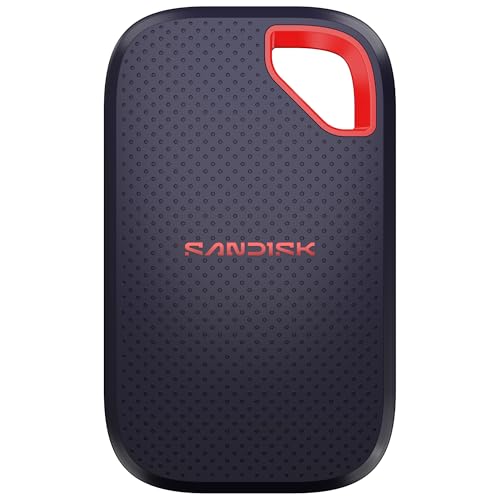 | SanDisk Extreme Portable SSD 1TB | Best fit: Carrying active project files Key figures: 1TB, up to 2000MB/s read, up to 1700MB/s write Connection: USB-C 3.2 Gen 2 (Amazon title) Also lists: IP65, 3-meter drop protection, 256-bit AES with password software Check first: Host port, password software OS support and a backup copy | Check Price on Amazon |
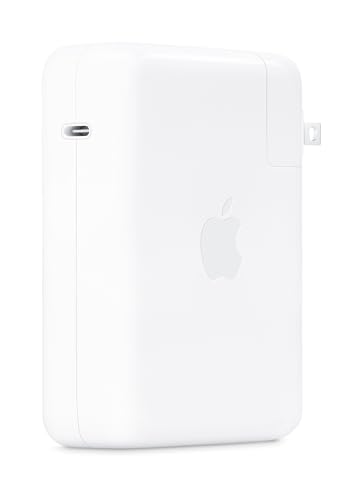 | Apple 140W USB-C Power Adapter | Best fit: Compatible 16-inch MacBook Pro charging setup Key figures: 140W USB-C output Connection: USB-C charging cable sold separately Also lists: Apple recommends it for a 16-inch MacBook Pro from 2021 or later Check first: Laptop compatibility and intended cable | Check Price on Amazon |
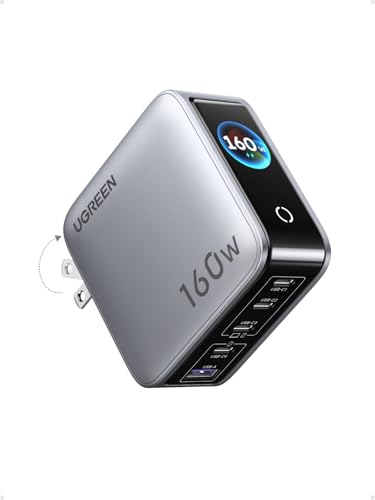 | UGREEN Nexode Pro 160W GaN Charger | Best fit: Laptop plus smaller USB devices Key figures: 160W total, up to 140W from a single C1 or C2 port Connection: Four USB-C and one USB-A Also lists: Touch display for total and per-port power, foldable US plug Check first: Shared total output and laptop charging requirement | Check Price on Amazon |
 | Belkin Thunderbolt 4 Dock INC030ttSGY | Best fit: Windows laptop with three displays Key figures: Three displays on a Windows PC (one 4K 60Hz, two 4K 30Hz), two on a Mac Connection: Thunderbolt 4 host for full performance Also lists: 14 ports, 96W charging, 2.5Gb Ethernet, daisy-chaining Check first: Windows host for three displays | Check Price on Amazon |
1. Plugable Thunderbolt 4 Dock TBT-UDM — Best for a MacBook desk with dual HDMI monitors
Plugable identifies the TBT-UDM as a 13-port Thunderbolt 4 dock for MacBooks. Plugable’s product page lists two HDMI outputs, one downstream Thunderbolt 4 port at 40Gbps, one 10Gbps USB-C port, four USB-A ports, SD and microSD slots, Gigabit Ethernet and audio. It also lists 100W host charging, which Plugable labels 96W certified. Plugable includes a 1m Thunderbolt 4 cable rated for 40Gbps and 240W.
Plugable states that dual HDMI displays at up to 4K 60Hz work on M4 and M5 systems, on Pro or Max M-series Macs, and on a base M3 MacBook with the lid closed, while a base M1 or M2 MacBook supports one external display. Plugable adds that a host with only Thunderbolt 3 or USB-C with DisplayPort supports one external display. Confirm the recipient’s exact MacBook chip before choosing this dock.
Our Take Choose the TBT-UDM for a programmer or engineer who keeps a recent MacBook at one desk with two HDMI monitors. Plugable’s port list suits a permanent workstation more than a laptop bag. Because Plugable’s dual-display claim depends on the chip, the MacBook model is the deciding fact.
- Plugable lists two HDMI outputs, a downstream Thunderbolt 4 port, card readers, Ethernet and audio on one dock, behind a single host cable.
- Plugable includes a 1m Thunderbolt 4 cable and lists 100W host charging with a 96W certified label.
- Plugable states that dual 4K 60Hz HDMI displays work on M4, M5, Pro, Max and lid-closed base M3 MacBooks.
- Plugable limits base M1 and M2 MacBooks to one external display through this dock.
- Plugable’s dual-display support on a base M3 MacBook depends on the lid being closed.
- Plugable’s system requirements name macOS and Windows hosts and do not name Linux, so a Linux recipient needs Plugable’s answer first.
2. Dell S2725QC 27-inch 4K Monitor — Best for a single-cable laptop screen upgrade
Dell lists the S2725QC as a 27-inch IPS monitor with a 3840 x 2160 panel, 163 pixels per inch, 350 nits, 99% sRGB and a refresh rate up to 120Hz. Dell’s port list names two HDMI 2.1 ports and a USB-C upstream port that carries DisplayPort 1.4 Alt Mode and up to 65W of power delivery. Dell also lists two 5W speakers, an anti-glare surface and a stand that adjusts for height, tilt, swivel and pivot.
One USB-C cable can carry video and charge a compatible laptop, but Dell’s port list gives the monitor only a small USB hub: two USB-A ports and one USB-C downstream port at 15W. Dell’s port list shows no Ethernet or card slot. Check the laptop’s USB-C video output and charging requirement before treating the monitor as a one-cable desk.
Dell lists a 27-inch 4K IPS panel, USB-C power delivery up to 65W, two HDMI 2.1 ports and a refresh rate up to 120Hz.Our Take The S2725QC suits a recipient whose problem is workspace, such as an editor, a terminal and documentation that crowd one laptop display. Dell’s 27-inch 3840 x 2160 panel gives that room. A recipient who needs several monitors or Ethernet needs a dock as well.
- Dell lists a 27-inch 3840 x 2160 IPS panel with 163 pixels per inch and 350 nits.
- Dell lists a USB-C upstream port with DisplayPort 1.4 Alt Mode and up to 65W of power delivery for a single-cable connection.
- Dell lists a refresh rate up to 120Hz, 99% sRGB coverage and two 5W speakers.
- Dell lists a stand that adjusts for height, tilt, swivel and pivot.
- Dell’s port list gives the monitor two USB-A ports and one 15W USB-C downstream port and shows no Ethernet or card slot, so Ethernet needs a dock as well.
- Dell lists up to 65W of USB-C power delivery, so the recipient laptop’s charging requirement has to fit inside the monitor’s output.
- Dell’s monitor has one USB-C upstream port, so it serves one laptop at a time.
3. SanDisk Extreme Portable SSD 1TB — Best for carrying active project files
SanDisk’s page for model SDSSDE70-1T00-G25 lists 1TB of storage, read speeds up to 2000MB/s and write speeds up to 1700MB/s. SanDisk also lists an IP65 rating, drop protection up to 3 meters, a 5-year limited warranty and 256-bit AES encryption with password protection. The Amazon listing titles the drive USB-C 3.2 Gen 2, and SanDisk’s page calls it pocket-sized.
SanDisk states that its speeds are measured in internal testing and can be lower depending on the host device, interface and usage. It also states that password protection runs on Windows 10 and macOS 12 or later after a software download. A second copy of important work needs to live somewhere other than this drive.
Our Take Pick the Extreme Portable SSD for a recipient who carries repositories, build output or disk images between a laptop and a desk. The drive adds external space, not laptop storage, and SanDisk’s speed figures are up-to figures that depend on the host device and interface.
- SanDisk lists 1TB of storage for repositories, build output or disk images, with read speeds up to 2000MB/s and write speeds up to 1700MB/s.
- SanDisk lists IP65 water and dust resistance with drop protection up to 3 meters for a drive that travels between a laptop and a desk.
- SanDisk lists 256-bit AES encryption with password protection.
- SanDisk backs the drive with a 5-year limited warranty.
- SanDisk calls the drive pocket-sized.
- SanDisk gives its speeds as up-to figures that can be lower depending on the host device and interface.
- SanDisk’s password protection needs a software download and runs on Windows 10 and macOS 12 or later, so a Linux recipient should treat it as unconfirmed.
- SanDisk’s 1TB is external space and does not add to the laptop’s installed drive.
4. Apple 140W USB-C Power Adapter — Best for a 16-inch MacBook Pro charging setup
Apple’s Amazon listing identifies model MW2M3AM/A as a 140W USB-C power adapter that works with numerous USB-C charging cables. Apple recommends pairing it with a 16-inch MacBook Pro from 2021 or later, using a USB-C to MagSafe 3 cable or a USB-C charge cable, for fast charging from 0 to 50 percent in around 30 minutes.
Apple states that the charging cable is sold separately and is not part of the adapter. Match this adapter to a MacBook Pro that Apple recommends it for, and do not assume that 140W speeds up every USB-C laptop.
Apple recommends the 140W adapter for a 16-inch MacBook Pro from 2021 or later, with the charging cable sold separately.Our Take The Apple adapter suits a recipient who has a 16-inch MacBook Pro and wants a second Apple adapter for a desk or a bag. A recipient who also charges a phone and other gear from one outlet is better served by a multi-port charger.
- Apple’s Amazon listing identifies the adapter as a 140W USB-C power adapter.
- A recipient with a 16-inch MacBook Pro from 2021 or later has an adapter that Apple recommends for that laptop.
- Apple’s Amazon listing says the adapter works with numerous USB-C charging cables.
- Apple states that the charging cable is sold separately and is not part of the adapter.
- Apple’s fast-charge recommendation names the 16-inch MacBook Pro, not other laptops.
- Apple’s Amazon listing does not state a port count.
5. UGREEN Nexode Pro 160W GaN Charger — Best for charging a laptop and smaller devices together
UGREEN’s product page lists a 160W total output, four USB-C ports and one USB-A port. UGREEN states that a single port, C1 or C2, supports up to 140W of PD charging. UGREEN also lists a rotatable touch display for total output, per-port power, charging protocol and internal temperature, and a foldable US plug. The Amazon listing gives the model as X774.
UGREEN lists 160W as the total across all ports, and a laptop that shares the charger with a phone or tablet draws from that same total. UGREEN says automatic power allocation handles that split. Compare the laptop’s charging requirement with the single-port figure before using this as the main charger.
Our Take Choose the Nexode Pro for someone who charges a laptop, a phone and other USB gear at one desk. The Nexode Pro differs from the Apple adapter in purpose. UGREEN’s extra ports share one output, while Apple’s adapter is built around one MacBook Pro.
- UGREEN lists four USB-C ports and one USB-A port for charging a laptop, a phone and other USB gear at one desk.
- UGREEN lists 160W total output, with up to 140W from a single C1 or C2 port.
- UGREEN lists a rotatable touch display for total output, per-port power, protocol and temperature.
- UGREEN lists a foldable US plug and GaN construction.
- UGREEN lists 160W as a total across all five ports, so a laptop that shares the charger with a phone or tablet draws from that same total.
- UGREEN’s 140W figure applies to a single C1 or C2 port, not to the charger’s total output.
- UGREEN lists a foldable US AC plug.
6. Belkin Thunderbolt 4 Dock INC030ttSGY — Best for a Windows laptop driving three displays
Belkin’s product page for INC030ttSGY lists 14 ports, Thunderbolt 4 at 40Gbps, 96W power delivery to the laptop, 2.5Gb Ethernet, SD and microSD slots, a Kensington lock slot and daisy-chaining for up to 6 Thunderbolt devices. Belkin states that the dock works with Windows, Mac and Chrome OS and with Thunderbolt 3, 4 and 5 or USB-C hosts.
The three-display claim is narrower than the heading suggests. Belkin states that triple displays need a compatible Windows PC, with one screen up to 4K 60Hz and the other two up to 4K 30Hz, and that macOS supports up to two extended displays. Belkin adds that full Thunderbolt 4 data, display and 96W charging need a Thunderbolt 4 or USB4 host. Choose this dock only for a Windows laptop, or accept two displays on a Mac.
Our Take Pick the Belkin dock for a recipient with a Windows laptop, a planned multi-screen desk and a wired network. A MacBook owner who meets Plugable’s chip conditions gets the same two displays from the Plugable dock, and Plugable lists Gigabit Ethernet where Belkin lists 2.5Gb.
- Belkin lists 14 ports for video, data, power and Ethernet through one USB-C host cable.
- On a compatible Windows PC, Belkin lists triple displays, and on a Mac it lists two.
- Belkin lists 40Gbps data transfer and 96W power delivery to the laptop.
- Belkin lists daisy-chaining for up to 6 Thunderbolt devices and 2.5Gb Ethernet for a wired network.
- Belkin lists a Kensington lock slot.
- Belkin states that triple displays run one screen at up to 4K 60Hz and two at up to 4K 30Hz.
- Belkin states that macOS supports up to two extended displays, so a MacBook owner gets two screens from this dock.
- Belkin states that full Thunderbolt 4 performance needs a Thunderbolt 4 or USB4 host.
Buying Guide
Start with what the recipient’s desk is short of
A fixed desk with monitors and a network cable calls for a dock. A laptop that moves between rooms gains more from the SanDisk Extreme Portable SSD or the UGREEN Nexode Pro. The jobs do not overlap. SanDisk lists 1TB of external storage, which adds no screen space, and UGREEN’s five charging ports add no display outputs.
The portable SSD guide suits a recipient who needs more external space, and the USB-C charger guide suits one who carries a laptop and smaller USB devices. Give the accessory that removes the shortage the recipient already complains about.
Match a dock to the laptop’s operating system and display limit
The Plugable TBT-UDM is a dual-HDMI dock for MacBooks, and Plugable lists dual 4K 60Hz on M4, M5, Pro, Max and lid-closed base M3 systems. The Belkin INC030ttSGY is the Windows pick, since Belkin lists triple displays only on a compatible Windows PC and two displays on a Mac.
A recipient who runs Linux is a separate case. Plugable’s system requirements name macOS and Windows, Belkin lists Windows, Mac and Chrome OS, and neither names Linux. Ask the maker about the recipient’s distribution and laptop before choosing either dock.
Separate a monitor from a dock
Dell lists the S2725QC as a 27-inch 4K monitor with USB-C power delivery up to 65W, which gives one larger screen and can charge a compatible laptop over the same cable. Dell’s port list shows two USB-A ports and one USB-C downstream port and no Ethernet or card slot, so the monitor does not replace a dock’s connections.
The USB-C monitor guide compares other screens. Choose the Dell when one larger display solves the problem, then add a dock only when the desk also needs several screens or Ethernet. A monitor supplies the panel, and a dock supplies the connections.
Read charger ratings as connection-specific figures
Apple recommends its 140W USB-C adapter for a 16-inch MacBook Pro from 2021 or later, while UGREEN lists a 160W total that its ports share. UGREEN lists the 140W figure for a single C1 or C2 port. The figure covers one connection and not the whole charger. The laptop’s own input rules and the cable also limit charging.
The MacBook charger guide covers Apple-specific choices. Use the Apple adapter for the recommended MacBook Pro, and use the UGREEN when several devices belong to one charging routine. Check the laptop maker’s charging requirement first.
Treat a portable SSD as external working space
SanDisk lists the Extreme Portable SSD at up to 2000MB/s read and up to 1700MB/s write, and SanDisk states that the host device and interface can lower both. The 1TB is external space for repositories and build output, and it leaves the drive inside the laptop unchanged.
The external SSD guide covers more drives. SanDisk states that its password protection supports Windows 10 and macOS 12 or later, and a Linux recipient should treat that feature as unconfirmed. Keep a second copy of anything important elsewhere.
FAQ
Will a dock work with a programmer’s Linux laptop?
Plugable and Belkin do not say. Plugable’s system requirements name macOS 11 and Windows 10 or later, and Belkin states support for Windows, Mac and Chrome OS. Neither statement names Linux, and the answer for a particular laptop has to come from the maker.
Plugable adds that a host with only Thunderbolt 3 or USB-C with DisplayPort supports one external display. Read the laptop maker’s external-display specification before choosing a dock, because a USB-C connector alone does not state the display paths.
Does the Dell monitor replace a charging adapter?
Dell lists USB-C power delivery up to 65W for the S2725QC, so the monitor can charge a compatible laptop over the display cable. One cable suits a one-screen desk, but 65W may fall short of a larger laptop’s charging requirement.
Compare the laptop’s stated input with Dell’s 65W figure. A 16-inch MacBook Pro that Apple recommends the 140W adapter for can keep that adapter and use the Dell for display output.
Why is a multi-port charger not the same as a 140W adapter?
UGREEN lists 160W total output across four USB-C ports and one USB-A port, and it lists 140W for a single C1 or C2 port. Apple’s Amazon listing describes a 140W USB-C adapter recommended for a 16-inch MacBook Pro.
Choose by how many devices charge at once. The Apple adapter is built around one MacBook Pro, and UGREEN’s ports share one output across a mixed set of devices.
Does the SanDisk drive add internal storage to the laptop?
No. The Amazon listing describes a 1TB external USB-C SSD, and files live on the drive, not inside the laptop. It can hold working folders, disk images or a copy of project files.
SanDisk states that its speeds can be lower depending on the host device and interface. Keep important work in two places, because one portable drive is one copy.
Which dock suits a recipient who already has two or three monitors?
The Plugable TBT-UDM fits a recent MacBook with two HDMI monitors, within the chip conditions Plugable lists. Plugable lists Gigabit Ethernet, audio and card readers on the same dock.
For three displays, Belkin states that a compatible Windows PC is required, with one screen at up to 4K 60Hz and two at up to 4K 30Hz. A MacBook owner with three monitors cannot reach that arrangement through the Belkin dock, since Belkin lists two displays on a Mac.
Bottom Line
Pick the Plugable TBT-UDM for a MacBook with two HDMI monitors, the Belkin INC030ttSGY for a Windows laptop with three displays, and the Dell S2725QC for one larger USB-C screen. Choose the SanDisk Extreme Portable SSD to carry project files. Use the Apple 140W adapter for a 16-inch MacBook Pro that Apple recommends it for, and the UGREEN Nexode Pro to charge a mixed set of devices.