A 14-inch gaming laptop is a different choice from a full-size desktop replacement. Compare the GPU, panel, weight and ports of each configuration, because the model name alone says little. The group spans 14- and 14.5-inch screens, RTX 4060 through RTX 5080 graphics, and one Radeon 8060S configuration.
Your pick depends on whether you want a 165Hz panel with a dedicated GPU, an OLED screen, or the lowest listed weight. Ports, charger wattage and memory also differ between these machines, so a similar screen size does not make them interchangeable.
14-Inch Gaming Laptops Compared
| Image | Product | Details | Check Price |
|---|---|---|---|
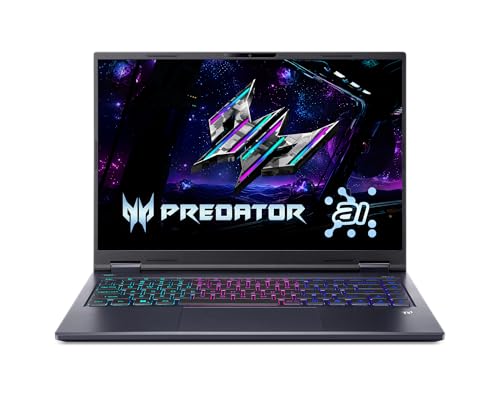 | Acer Predator Helios Neo 14 AI PHN14-71-760T | Best fit: 165Hz gaming with Thunderbolt 4 Display: 14.5-inch 2560 x 1600 IPS, 165Hz Graphics: RTX 5060, 8GB GDDR7 Ports: Thunderbolt 4, USB-C, 2x USB-A, HDMI, microSD Limit: 4.19 lb and 16GB memory | Check Price on Amazon |
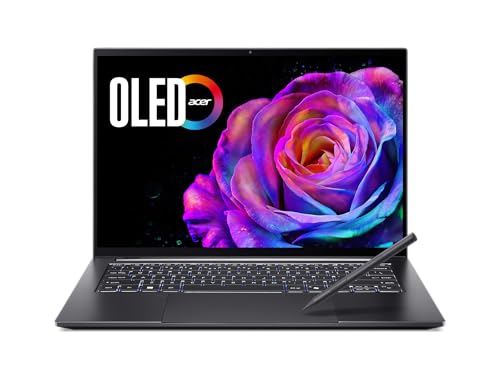 | Acer Swift X 14 SFX14-73G-71XL | Best fit: 3K OLED touch screen Display: 14.5-inch 2880 x 1800 OLED touch, 120Hz Graphics: RTX 5050, 8GB Ports: 2x USB-C with Thunderbolt 4, 2x USB-A, HDMI Limit: 120Hz, 16GB memory, 100W supply | Check Price on Amazon |
 | Acer Predator Helios Neo 14 PHN14-51-797W | Best fit: RTX 4060 with Thunderbolt 4 Display: 14.5-inch 2560 x 1600 IPS, 120Hz Graphics: RTX 4060 Ports: Thunderbolt 4, USB-C, 2x USB 3.2 Gen 2, HDMI 2.1, microSD Limit: 120Hz, Amazon listing is the only source | Check Price on Amazon |
 | ASUS ROG Zephyrus G14 GA403 | Best fit: 3K OLED with RTX 5080 Display: 14-inch 2880 x 1800 OLED, 120Hz Graphics: RTX 5080 Laptop GPU Ports: USB4, USB-C 3.2 Gen 2, 2x USB-A, microSD per ASUS Limit: Third-party seller, no Thunderbolt or HDMI listed by ASUS | Check Price on Amazon |
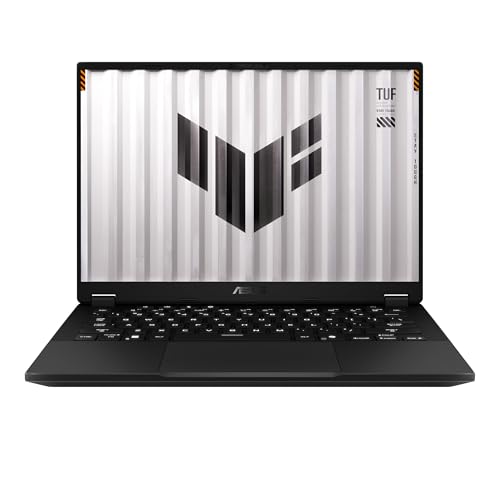 | ASUS TUF Gaming A14 FA401EA-DS96 | Best fit: Ryzen AI Max+ 392 at 3.26 lb Display: 14-inch 2560 x 1600 IPS-level, 165Hz Graphics: Radeon 8060S, shared memory Ports: USB4, USB-C 3.2 Gen 2, 2x USB-A, HDMI 2.1, microSD Limit: No dedicated GPU memory | Check Price on Amazon |
1. Acer Predator Helios Neo 14 AI PHN14-71-760T — Best for 165Hz Gaming With Thunderbolt 4
The PHN14-71-760T is the pick for players who put refresh rate first. Acer’s page lists a 14.5-inch 2560 x 1600 matte IPS screen at 165Hz with NVIDIA G-SYNC, an Intel Core Ultra 7 255H, and GeForce RTX 5060 graphics with 8GB of dedicated GDDR7. It also lists 16GB of LPDDR5X, with 32GB as the maximum supported memory, and a 1TB PCIe NVMe SSD.
Acer’s Amazon listing names one USB-C port with Thunderbolt 4, DisplayPort and Power Delivery, and a second USB-C port with DisplayPort and charging, both up to 90W. Acer’s page adds two USB 3.2 Gen 2 Type-A ports, HDMI, a microSD reader and a 230W power supply.
Why it stands out: One configuration pairs a 165Hz matte 14.5-inch display with RTX 5060 graphics and a Thunderbolt 4 port. Our Take Pick this Acer when refresh rate and a full port selection count for more than an OLED panel or the lightest chassis.- Acer lists NVIDIA G-SYNC with a 165Hz refresh rate on its 14.5-inch 2560 x 1600 panel.
- Acer lists RTX 5060 graphics with 8GB of GDDR7 memory dedicated to the GPU.
- Acer’s listing names a Thunderbolt 4 port, and its page adds a second USB-C port, two Type-A ports and HDMI for a full port selection.
- Acer’s page includes a microSD reader among the ports it lists.
- At the 4.19 pounds Acer lists, this model is heavier than the 3.26 pounds ASUS lists for the TUF A14.
- Acer lists 16GB of memory, less than the 32GB the Zephyrus G14 and TUF A14 listings name.
2. Acer Swift X 14 SFX14-73G-71XL — Best for a 3K OLED Touch Screen
The Swift X 14 is the alternative for buyers who put the screen first. Acer’s page lists a 14.5-inch 2880 x 1800 OLED touch display at 120Hz, a Core Ultra 7 255H and an RTX 5050 with 8GB of dedicated graphics memory. It also lists 16GB of LPDDR5X and a 1TB PCIe SSD for the SFX14-73G-71XL.
Acer lists two USB-C ports with Thunderbolt 4 and DisplayPort over USB-C via the integrated GPU, plus two USB 3.2 Gen 2 Type-A ports and HDMI. The page gives a 3.48-pound weight and a 100W maximum power supply, against the 230W supply Acer lists for the Helios Neo 14 AI. Acer’s page also lists an Active Stylus in the box.
Panel-led option: Acer lists a 3K OLED touch screen at 120Hz with RTX 5050 graphics and two USB-C ports with Thunderbolt 4. Our Take Choose the Swift X 14 when an OLED touch panel suits you better than the Helios Neo’s 165Hz refresh rate.- Acer lists a 2880 x 1800 OLED touch display with more pixels than the 2560 x 1600 Helios Neo panels.
- Acer lists 8GB of dedicated memory with the RTX 5050 graphics.
- Acer lists two USB-C ports with Thunderbolt 4, and DisplayPort over USB-C runs through the integrated GPU.
- The 120Hz refresh rate Acer lists is lower than the 165Hz that Acer lists for the Helios Neo 14 AI and ASUS lists for the TUF A14.
- Acer lists a 100W power supply, lower than the 230W supply on the Helios Neo 14 AI.
- The 16GB of memory Acer lists is less than the 32GB the G14 and TUF listings name.
3. Acer Predator Helios Neo 14 PHN14-51-797W — Best for RTX 4060 With a 14.5-Inch 120Hz Screen
The older Helios Neo differs from the PHN14-71 in its processor, graphics and refresh rate. Amazon’s listing names a 14.5-inch 2560 x 1600 IPS display at 120Hz, Core Ultra 7 155H, RTX 4060 graphics, 16GB LPDDR5X and a 1TB PCIe Gen 4 SSD. Every figure in this section comes from the Amazon listing, whose model field gives the Acer part number NH.QQNAA.002.
The listing names one Thunderbolt 4 port and a USB-C 3.2 Gen 2 port with DisplayPort, USB charging and Power Delivery. It also names two USB 3.2 Gen 2 ports, HDMI 2.1, a headphone jack and a microSD reader. The listing names PredatorSense 5.0 for fan modes and RGB keyboard control, and gives the same 4.19-pound weight as the newer Helios Neo.
- Amazon’s listing names a Thunderbolt 4 port and a second USB-C port with DisplayPort and Power Delivery.
- Amazon’s listing names HDMI 2.1 and a microSD reader along with two USB 3.2 Gen 2 ports.
- Amazon’s listing names a 14.5-inch panel at 2560 x 1600 in a 16:10 ratio.
- Amazon’s listing names PredatorSense 5.0 for fan modes and RGB keyboard control.
- Amazon’s listing names a 120Hz refresh rate, lower than the 165Hz that Acer lists for the Helios Neo 14 AI and ASUS lists for the TUF A14.
- Amazon’s listing names an RTX 4060, the only 40-series GPU on this page.
4. ASUS ROG Zephyrus G14 GA403 — Best for 3K OLED With RTX 5080
The Zephyrus G14 lists the GPU with the highest model number in the group, a GeForce RTX 5080 Laptop GPU, and an AMD Ryzen AI 9 HX 370. Amazon’s listing names a 14-inch 3K OLED at 120Hz with NVIDIA G-SYNC and a 0.2ms response time, 32GB of LPDDR5X and a 2TB PCIe 4.0 SSD. ASUS lists a GA403WW configuration with the same processor, RTX 5080 with 16GB of GDDR7, 32GB of on-board memory that cannot be expanded, and 2TB of storage.
The Amazon listing gives no port list, and the only weight in its data is a shipping figure. ASUS’s page lists one USB4 Type-C port at up to 40Gbps with DisplayPort and Power Delivery, one USB 3.2 Gen 2 Type-C port, two USB 3.2 Gen 2 Type-A ports and a microSD reader. It lists 3.46 pounds and a 200W adapter, and it does not list an HDMI port. The Amazon seller is Citimall llc, and the listing’s model field reads GA403W without the maker’s full part number.
High-GPU option: The G14 pairs an RTX 5080 and a Ryzen AI 9 HX 370 with a 14-inch 3K 120Hz OLED screen, and it lists USB4 in place of Thunderbolt. Our Take Pick this G14 for the GPU with the highest model number and a 3K OLED screen, and ask the seller which GA403 part number ships.- Amazon’s listing names an RTX 5080 Laptop GPU and a Ryzen AI 9 HX 370.
- ASUS lists a 3K OLED at 120Hz for the GA403 line.
- ASUS lists one USB4 port at up to 40Gbps with DisplayPort and Power Delivery.
- ASUS lists a GA403WW with 32GB LPDDR5X and 2TB of storage, as the Amazon listing does.
- ASUS lists a 120Hz refresh rate, lower than the 165Hz that Acer lists for the Helios Neo 14 AI and ASUS lists for the TUF A14.
- ASUS’s page lists no Thunderbolt port and no HDMI port.
- Amazon’s listing names Citimall llc as the seller, not ASUS, and gives no part number beyond GA403W.
5. ASUS TUF Gaming A14 FA401EA-DS96 — Best for 14-Inch Ryzen AI Max+ 392 Gaming
The TUF A14 has a different graphics design from the RTX models. ASUS lists a 14-inch 2560 x 1600 165Hz IPS-level panel, a Ryzen AI Max+ 392 with Radeon 8060S graphics and a 1TB PCIe 4.0 SSD, and gives 32GB as the maximum memory. Amazon’s listing names 32GB of LPDDR5X in a unified quad-channel design in which the system and graphics share memory, while the RTX models list dedicated graphics memory.
ASUS lists a USB4 port with DisplayPort and Power Delivery and a USB 3.2 Gen 2 Type-C port. It also lists two USB 3.2 Gen 2 Type-A ports, HDMI 2.1 and a microSD reader. ASUS gives the A14 a 3.26-pound weight and a 200W adapter, and adds that whether a charger is included varies by country, region and model. Amazon.com is the seller on the New offer.
- ASUS lists a 14-inch 2560 x 1600 165Hz IPS-level panel with 100% sRGB.
- Amazon’s listing names a unified-memory design for the Ryzen AI Max+ 392 and Radeon 8060S.
- ASUS lists USB4 with DisplayPort and Power Delivery, plus HDMI 2.1 and two Type-A ports.
- At 3.26 pounds, the weight ASUS lists is the lowest on this page.
- Amazon’s listing describes shared system memory, where the RTX models list dedicated graphics memory.
- ASUS says whether the 200W charger is included varies by country, region and model, and Amazon’s listing does not name the adapter.
Buying Guide
1. Pick the panel first
A 120Hz OLED and a 165Hz IPS panel answer different priorities. The Swift X 14 and Zephyrus G14 list 120Hz OLED panels at 2880 x 1800. The Helios Neo 14 AI and TUF A14 list 165Hz IPS panels at 2560 x 1600, and the older Helios Neo lists 120Hz at the same 2560 x 1600.
Refresh rate, panel type and resolution are separate facts. Choose the Helios Neo 14 AI or TUF A14 when 165Hz is the priority for the games you play. Choose an OLED option for a 3K panel, or for the touch screen on the Swift X 14. Acer lists the Swift X 14 and both Helios Neo models at 14.5 inches, while ASUS lists the G14 and TUF A14 at 14 inches.
2. Compare graphics designs before model names
The dedicated GPUs run from RTX 4060 to RTX 5080. The older Helios Neo lists an RTX 4060, the Swift X 14 an RTX 5050, the Helios Neo 14 AI an RTX 5060 and the G14 an RTX 5080. The figures are listed configurations, not a performance ranking measured for this guide.
The TUF A14 lists Radeon 8060S instead. Under the unified design Amazon’s listing describes, the system and graphics share memory, and ASUS’s page lists no dedicated GPU. Check the games and software you use against that design before comparing it with an RTX machine. For wider options in this size class, see the thin and light gaming laptop comparison and the OLED gaming laptop comparison.
3. Count each port by its listed interface
USB-C labels are not interchangeable. The Helios Neo 14 AI and older Helios Neo list one Thunderbolt 4 port each. The Swift X 14 lists two USB-C ports with Thunderbolt 4. The G14 and TUF A14 list USB4 at up to 40Gbps and a second 10Gbps USB-C port.
Build the desk around the fastest port. Plug a Thunderbolt dock or drive into the port each maker names, and treat the second USB-C port as a 10Gbps port on the Acer and ASUS models that list one. Acer adds that the Swift X 14 sends DisplayPort over USB-C through its integrated GPU. The USB4 versus Thunderbolt 4 explainer and the USB4 laptop guide explain the difference.
4. Read memory and storage per listing
Memory and storage differ between these listings. The three Acer models list 16GB and 1TB. ASUS lists a GA403WW with 32GB and 2TB, matching the G14 listing, and ASUS gives 32GB as the TUF A14 maximum with a 1TB SSD.
Check what a third-party seller ships. The G14 is sold by Citimall llc, and its listing names no upgrade. The Amazon listing gives no port list or operating system, and the only weight in its data is a shipping figure, so ask the seller for the part number, memory, storage and operating system before ordering, and compare them with ASUS’s page.
5. Match weight to the charger
ASUS lists 3.26 pounds for the TUF A14 and 3.46 for the G14, and Acer lists 3.48 for the Swift X 14. Acer lists 4.19 pounds for both Helios Neo models. The G14 figure comes from ASUS’s GA403WW configurations, since the Amazon listing gives none.
Chargers differ by model. Acer lists a 230W supply for the Helios Neo 14 AI and 100W for the Swift X 14, and ASUS lists 200W adapters for the G14 and TUF A14. ASUS adds that whether a charger is included varies by country, region and model.
FAQ
Is a 14.5-inch laptop a 14-inch gaming laptop?
Yes, as long as you check the diagonal. The Swift X 14 and both Helios Neo models list 14.5-inch panels, while the G14 and TUF A14 list 14-inch panels. The guide includes all five because a shopper looking at 14-inch gaming laptops can compare them.
Both panel resolutions are 16:10. The 2560 x 1600 and 2880 x 1800 panels listed here share the ratio. Compare the maker’s dimensions if bag size or desk space is tight.
Which of these has a dedicated RTX GPU?
Four of the five list RTX graphics. The older Helios Neo lists RTX 4060, the Swift X 14 RTX 5050, the Helios Neo 14 AI RTX 5060 and the G14 RTX 5080.
The TUF A14 lists Radeon 8060S. ASUS lists the Radeon graphics with the Ryzen AI Max+ 392, and Amazon describes a unified memory design. Choose between the TUF A14 and an RTX laptop by the games and software you plan to run.
Which of these has Thunderbolt 4 or USB4?
Three of the five list Thunderbolt 4. The Helios Neo 14 AI and the older Helios Neo list one Thunderbolt 4 port each, and Acer lists two USB-C ports with Thunderbolt 4 on the Swift X 14.
The G14 and TUF A14 list USB4. ASUS states that each USB4 port supports DisplayPort and Power Delivery at up to 40Gbps. Check your dock, display or drive against the port a maker names, since the second USB-C port on these models lists 10Gbps.
Should I choose a 165Hz IPS panel or a 120Hz OLED panel?
Choose by the screen you want. The Helios Neo 14 AI and TUF A14 list 165Hz at 2560 x 1600. The Swift X 14 and G14 list 120Hz at 2880 x 1800 on OLED, and the older Helios Neo lists 120Hz IPS.
Read the panel with its GPU. The Helios Neo 14 AI pairs 165Hz with an RTX 5060, the TUF A14 pairs 165Hz with Radeon 8060S, and the G14 pairs 120Hz OLED with an RTX 5080.
Which of these list 32GB of memory?
Two list 32GB. Amazon’s G14 listing names 32GB and 2TB, and the TUF A14 listing names 32GB and 1TB. ASUS describes the G14 memory as on board with no expansion.
The three Acer models list 16GB and 1TB. Acer lists 32GB as the maximum supported memory for the Helios Neo 14 AI and the Swift X 14. Use the model number in each listing to match it to the maker’s page.
Bottom Line
The Helios Neo 14 AI is the choice for 165Hz, RTX 5060 and Thunderbolt 4. The Swift X 14 lists a 3K OLED touch screen. The older Helios Neo lists an RTX 4060 with Thunderbolt 4. The Zephyrus G14 lists an RTX 5080 with OLED, and the TUF A14 lists USB4 and unified-memory Radeon graphics.