The six gaming laptops here each have an OLED screen and a dedicated NVIDIA GPU stated on their Amazon listings. The screens run from 15.1 to 16 inches, the listings that state a refresh rate run from 120Hz to 240Hz, and the GPUs run from an RTX 5060 to an RTX 5090. The comparison covers ASUS ROG, Lenovo Legion, Acer Predator, GIGABYTE AORUS and Razer Blade, and it sorts them by panel, GPU and the ports each listing names, because a gaming brand name does not tell you which screen or ports a model has.
For a port-first decision, see the gaming laptop guide, the Thunderbolt 5 gaming laptop guide and the Thunderbolt 4 docking station guide.
OLED Gaming Laptops Compared
| Image | Product | Details | Check Price |
|---|---|---|---|
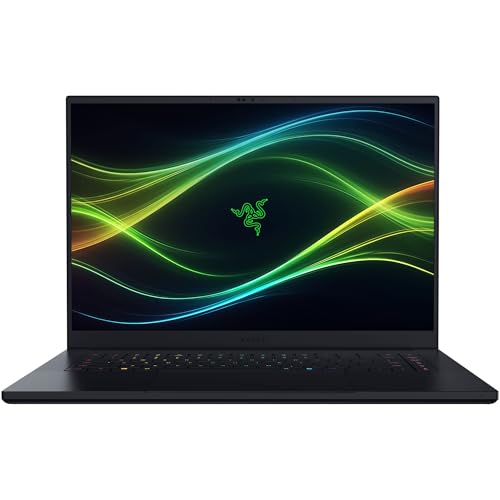 | Razer Blade 16 | Best fit: 240Hz OLED with Thunderbolt 5 Screen: 16-inch 2560 x 1600 OLED 240Hz GPU: RTX 5070 Ti Ports: Thunderbolt 5, HDMI 2.1 Memory and SSD: 32GB LPDDR5X, 1TB SSD | Check Price on Amazon |
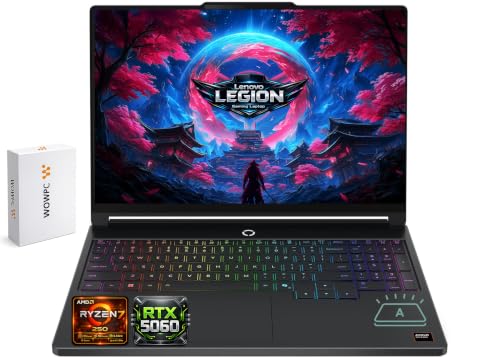 | Lenovo Legion 5a | Best fit: 15.3-inch OLED, Ryzen 7 250 Screen: 15.3-inch WQXGA OLED 165Hz GPU: RTX 5060 Ports: USB4, HDMI 2.1, Ethernet Memory and SSD: 32GB, 1TB (title; possibly seller configuration) | Check Price on Amazon |
 | Acer Predator Helios Neo 16S AI | Best fit: 240Hz OLED, Thunderbolt 4, Ethernet Screen: 16-inch WQXGA OLED 240Hz GPU: RTX 5060 Ports: Thunderbolt 4, HDMI 2.1, RJ-45 Memory and SSD: 16GB, 512GB (title; possibly seller configuration) | Check Price on Amazon |
 | ASUS ROG Zephyrus Duo | Best fit: Two touch screens, RTX 5090 Screen: Two 16-inch 3K OLED touch screens, 120Hz GPU: RTX 5090 Ports: Two Thunderbolt 4 Memory and SSD: 32GB LPDDR5X, 1TB SSD | Check Price on Amazon |
 | GIGABYTE AORUS Master 16 | Best fit: RTX 5080, 240Hz OLED Screen: 16-inch 2560 x 1600 OLED 240Hz GPU: RTX 5080 Ports: Type-C USB4, HDMI 2.1 Memory and SSD: 32GB, 1TB (title; possibly seller configuration) | Check Price on Amazon |
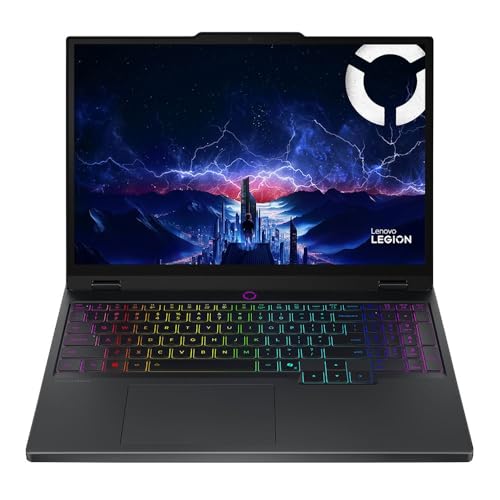 | Lenovo Legion 5 15IRX10 | Best fit: 15.1-inch OLED, Core i9 Screen: 15.1-inch WQXGA OLED, no refresh rate stated GPU: RTX 5070 Ports: Gigabit LAN, no USB-C port named Memory and SSD: 32GB DDR5-5600, 1TB NVMe SSD | Check Price on Amazon |
1. Razer Blade 16 — Best for Thunderbolt 5 and an RTX 5070 Ti
Amazon’s Razer Blade 16 listing states a 16-inch 2560 x 1600 OLED display at 240Hz with a 0.2ms response time, 100% DCI-P3 and DisplayHDR TrueBlack 1000. It pairs a Core Ultra 9 386H with an RTX 5070 Ti (12GB GDDR7, up to 140W TGP), 32GB of LPDDR5X memory and a 1TB PCIe 4.0 SSD. Razer describes the memory as non-upgradeable and names two M.2 NVMe slots for storage up to 8TB in total.
The listing names Thunderbolt 5, HDMI 2.1 and Wi-Fi 7, and no other laptop on this page names Thunderbolt 5. It suits a buyer who wants a 240Hz OLED panel and Thunderbolt 5 in one 16-inch laptop and accepts memory that cannot be upgraded later.
Our Take Choose the Blade 16 for a 240Hz OLED panel, an RTX 5070 Ti and Thunderbolt 5.
- Amazon’s listing states a 16-inch 2560 x 1600 OLED at 240Hz with a 0.2ms response time, a fit for a buyer who wants an OLED panel with a high refresh rate.
- Razer lists a Core Ultra 9 386H and an RTX 5070 Ti with 12GB GDDR7 for a buyer who wants a dedicated NVIDIA GPU in an OLED laptop.
- Razer names Thunderbolt 5, HDMI 2.1 and Wi-Fi 7, and no other listing on this page names that Thunderbolt version.
- Razer describes the 32GB of LPDDR5X memory as non-upgradeable, a limit for a buyer who wants to add memory later.
2. Lenovo Legion 5a — Best for a 15.3-Inch OLED With Ryzen 7 and RTX 5060
Amazon’s Lenovo Legion 5a listing states a 15.3-inch WQXGA 2560 x 1600 OLED display at 165Hz with 100% DCI-P3, NVIDIA G-SYNC and DisplayHDR True Black 1000. It pairs a Ryzen 7 250 (8 cores, 16 threads) with an RTX 5060 (8GB GDDR7, up to 115W TGP). The ports and wireless it names are USB4, HDMI 2.1, Ethernet, multiple USB-A ports and Wi-Fi 7.
The title lists 32GB of DDR5, a 1TB SSD and a 500GB portable drive, while a bullet says the laptop is configurable up to 64GB and 2TB. The title figures are possibly a seller configuration and bundle, so confirm the memory, storage and drive on the page you order from.The Legion 5a suits a buyer who wants a 15.3-inch OLED, an RTX 5060 and a named USB4 port. The port is labeled USB4, not Thunderbolt.
Our Take Consider the Legion 5a for a 15.3-inch 165Hz OLED with an RTX 5060 and USB4. The four 16-inch laptops on this page have larger panels.
- Amazon’s listing states a 15.3-inch 2560 x 1600 OLED at 165Hz with G-SYNC, a smaller panel than the Razer, Acer, ASUS and AORUS screens.
- Amazon’s listing names a Ryzen 7 250 and an RTX 5060 with 8GB GDDR7, a different processor and GPU from the other Legion.
- Amazon’s listing names USB4, HDMI 2.1 and Ethernet, and the port is labeled USB4, not Thunderbolt.
- Amazon’s title lists 32GB, a 1TB SSD and a 500GB portable drive that are possibly a seller configuration and bundle, and a buyer should confirm them on the page they order from.
3. Acer Predator Helios Neo 16S AI — Best for Thunderbolt 4 and Ethernet
Amazon’s Acer Predator Helios Neo 16S AI listing states a 16-inch WQXGA OLED display at 240Hz with a 0.2ms response time, VESA True Black HDR500, 100% DCI-P3 and NVIDIA G-SYNC support. It pairs a Core Ultra 9 275HX (24 cores) with an RTX 5060.
The title lists 16GB of DDR5, a 512GB SSD and an unnamed accessory. The 16GB and 512GB are possibly a seller configuration, and both are less than the 32GB and 1TB that the other five listings state.
Our Take Pick the Predator for a 240Hz OLED panel with Thunderbolt 4 and Ethernet, and check the memory, storage and accessory before ordering.
- Amazon’s listing states a 16-inch WQXGA OLED at 240Hz and an RTX 5060, the refresh rate to compare against the Razer and AORUS.
- Amazon’s listing names Thunderbolt 4, HDMI 2.1 and RJ-45 Ethernet for a buyer who wants a wired connection beside the OLED panel.
- Amazon’s listing names a Core Ultra 9 275HX with 24 cores, the processor the Acer pairs with its GPU.
- Amazon’s title lists 16GB of DDR5 and a 512GB SSD, less than the 32GB and 1TB the other five list, and both are possibly a seller configuration.
4. ASUS ROG Zephyrus Duo — Best for Two Touchscreens and an RTX 5090
Amazon’s ASUS ROG Zephyrus Duo listing states two 16-inch 3K OLED touch screens, and the title names a 120Hz ROG Nebula HDR display. It pairs a Core Ultra 9 386H (16 cores) with an RTX 5090 Laptop GPU, 32GB of LPDDR5X memory and a 1TB PCIe 4.0 SSD. The listing names dual Thunderbolt 4 ports and a detachable magnetic keyboard.
The Duo suits a buyer who wants a second touch screen to keep chats, streams or tools in view beside a game, and who accepts a lower refresh rate than the 165Hz and 240Hz that four other listings state.
Our Take Choose the Zephyrus Duo for two touch screens, dual Thunderbolt 4 ports and an RTX 5090. A single-panel 240Hz laptop on this page suits a buyer who wants a higher refresh rate.
- Amazon’s listing states two 16-inch 3K OLED touch screens and a detachable magnetic keyboard, a fit for a buyer who wants a second touch screen beside a game.
- Amazon’s listing names an RTX 5090 Laptop GPU, the highest GPU named on this page.
- Amazon’s listing names dual Thunderbolt 4 ports for a buyer planning around a dock or monitor.
- Amazon’s title states 120Hz, less than the 165Hz and 240Hz that four other listings state, a trade-off for a buyer who wants a higher refresh rate.
5. GIGABYTE AORUS Master 16 — Best for an RTX 5080 With a 240Hz OLED
Amazon’s GIGABYTE AORUS Master 16 listing states a 16-inch 2560 x 1600 OLED display at 240Hz with a 0.2ms response time, DisplayHDR True Black 1000 and 100% DCI-P3, and describes the panel as Pantone Validated and factory-calibrated. It pairs a Ryzen 9 9955HX3D with an RTX 5080 Laptop GPU (up to 175W max TGP). The ports it names include a Type-C USB4 port with DisplayPort 2.1, HDMI 2.1 and Power Delivery 3.0, plus Wi-Fi 7 and a microSD slot.
The title lists 32GB of DDR5 and a 1TB SSD, which are possibly a seller configuration. The AORUS suits a buyer who wants the RTX 5080 beside a 240Hz OLED panel and a USB4 port.
Our Take Pick the AORUS Master 16 for an RTX 5080 with a 240Hz OLED panel and USB4, and confirm the Windows version, memory and storage first.
- Amazon’s listing states a 16-inch 2560 x 1600 OLED at 240Hz with DisplayHDR True Black 1000.
- GIGABYTE’s listing names an RTX 5080 Laptop GPU and a Ryzen 9 9955HX3D for a buyer who wants this GPU beside an OLED panel.
- GIGABYTE’s listing names a Type-C USB4 port with DisplayPort 2.1 and HDMI 2.1, a port set for a buyer planning around a dock or monitor.
- Amazon’s title says Windows 11 Home while a bullet says Windows 11 Pro, so a buyer should ask the seller which version ships.
- Amazon’s title lists 32GB of DDR5 and a 1TB SSD that are possibly a seller configuration, and a buyer should confirm them first.
6. Lenovo Legion 5 15IRX10 — Best for a 15.1-Inch OLED With a Core i9
Amazon’s Lenovo Legion 5 15IRX10 listing states a 15.1-inch WQXGA OLED glossy display, the smallest screen on this page. It pairs a Core i9-14900HX with an RTX 5070 (8GB GDDR7), 32GB of DDR5-5600 memory and a 1TB PCIe Gen4 NVMe SSD. The listing names Gigabit LAN, 2×2 Wi-Fi 7 and a weight of 4.19 lb, and Amazon’s model field reads Legion 5 15IRX10.
The listing names no Thunderbolt, USB4 or USB-C port and gives no refresh rate, so confirm both with the seller before buying for a dock or a high-refresh monitor plan.The 15IRX10 suits a buyer who wants a small OLED laptop with a Core i9 and wired Gigabit LAN, and who can confirm the ports first.
Our Take Consider the Legion 5 15IRX10 for a 15.1-inch OLED with a Core i9-14900HX and an RTX 5070. It differs from the Legion 5a in screen size, processor and GPU.
- Amazon’s listing states a 15.1-inch WQXGA OLED display and an RTX 5070 with 8GB GDDR7, the smallest screen on this page.
- Amazon’s listing names a Core i9-14900HX, 32GB of DDR5-5600 and a 1TB PCIe Gen4 SSD for a buyer who wants a Core i9 in a small OLED laptop.
- Amazon’s listing names Gigabit LAN and 2×2 Wi-Fi 7, a fit for a buyer who prefers a wired connection.
- Amazon’s listing gives no refresh rate and names no USB-C, USB4 or Thunderbolt port, so a buyer should confirm both with the seller.
Buying Guide
1. Start with panel size and refresh rate together
The OLED screens run from 15.1 inches to 16 inches. The Razer, Acer, AORUS and ASUS list 16-inch panels, the Legion 5a lists 15.3 inches and the Legion 5 15IRX10 lists 15.1 inches. Keep the size beside the model code, because near sizes are different panels.
The listings that state a refresh rate run from 120Hz to 240Hz. The Razer, Acer and AORUS list 240Hz, the Legion 5a lists 165Hz and the ASUS lists 120Hz. The Legion 5 15IRX10 lists no rate, so ask the seller before assuming one.
2. Read the GPU name as a configuration
The listings name an RTX 5060, 5070, 5070 Ti, 5080 and 5090. The Legion 5a and Acer list the RTX 5060, the Legion 5 15IRX10 lists an RTX 5070 with 8GB GDDR7, the Razer lists an RTX 5070 Ti with 12GB GDDR7, the AORUS lists an RTX 5080 and the ASUS lists an RTX 5090.
Amazon states a power limit for only three of the six. The listings give up to 140W for the Razer, up to 115W for the Legion 5a and up to 175W max for the AORUS. The Acer, ASUS and Legion 5 15IRX10 listings state none, so compare the GPU name and the screen together.
3. Keep memory and storage tied to the page you order from
The Razer, ASUS and Legion 5 15IRX10 listings state 32GB of memory and a 1TB SSD in their bullets. The Razer and ASUS name LPDDR5X, and the Legion 5 15IRX10 names DDR5-5600. The Legion 5a, Acer and AORUS give their figures in the title, so those figures are possibly a seller configuration.
Bundles change what arrives. The Legion 5a title adds a 500GB portable drive and the Acer title adds an unnamed accessory. Confirm the contents before ordering.
4. Match the ports to your dock or monitor
Only the Razer names Thunderbolt 5. The Acer names Thunderbolt 4, the ASUS names two Thunderbolt 4 ports, the Legion 5a and AORUS name USB4, and the Legion 5 15IRX10 names no USB-C port. The Thunderbolt 5 gaming laptop guide covers laptops chosen by that connection.
A named port is a starting point for the dock, cable or monitor you plan to use. For a desk setup built on Thunderbolt 4, the Thunderbolt 4 docking station guide lists docks to compare against the port each laptop names.
5. Check each title against its bullets
Two listings differ between title and bullets. The Razer title says 32GB DDR5 while its bullet says 32GB LPDDR5X, and the AORUS title says Windows 11 Home while a bullet says Windows 11 Pro.
Ask the seller which one ships. The Razer section above uses the bullet for memory type, and the AORUS section leaves the Windows version open.
FAQ
Which listings state 240Hz OLED screens?
The Razer Blade 16, Acer Predator Helios Neo 16S AI and GIGABYTE AORUS Master 16 state 240Hz OLED panels. They pair them with an RTX 5070 Ti, an RTX 5060 and an RTX 5080.
A shared refresh rate does not make the laptops interchangeable. Compare the GPU, the ports and the memory each listing states.
Which OLED gaming laptop has two touch screens?
The ASUS ROG Zephyrus Duo listing states two 16-inch 3K OLED touch screens and a detachable magnetic keyboard. The title names a 120Hz display, lower than the 165Hz and 240Hz that four other listings state.
Choose it for the second screen, not for refresh rate. The listing names laptop, dual-screen, book, sharing and tent modes.
Which laptops name Thunderbolt?
The Razer Blade 16 names Thunderbolt 5, the Acer Predator Helios Neo 16S AI names Thunderbolt 4 and the ASUS ROG Zephyrus Duo names two Thunderbolt 4 ports. The Legion 5a and AORUS Master 16 name USB4 instead.
The Legion 5 15IRX10 listing names no USB-C, USB4 or Thunderbolt port. Confirm its ports before pairing it with a dock.
Which laptops state memory and storage outside the title?
The Razer Blade 16, ASUS ROG Zephyrus Duo and Legion 5 15IRX10 state 32GB of memory and a 1TB SSD in their bullets. The Legion 5a, Acer and AORUS list theirs in the title.
Treat title-only figures as possibly a seller configuration. Confirm the memory, storage and any bundle on the page you order from.
Are the two Legion OLED screens the same size?
No. The Legion 5a listing states a 15.3-inch OLED display at 165Hz, while the Legion 5 15IRX10 listing states a 15.1-inch OLED display and no refresh rate. They also differ in processor and GPU.
Keep the model name and size together when you compare them. The Legion 5a lists a Ryzen 7 250 with an RTX 5060, and the Legion 5 15IRX10 lists a Core i9-14900HX with an RTX 5070.
Bottom Line
Choose the Razer Blade 16 for a 240Hz OLED with Thunderbolt 5, the Acer Predator Helios Neo 16S AI for a 240Hz OLED with Thunderbolt 4 and Ethernet, or the AORUS Master 16 for an RTX 5080 with a 240Hz OLED. The ASUS Zephyrus Duo is the two-touch-screen laptop with an RTX 5090, and the two Legion laptops are the 15.3-inch and 15.1-inch OLED options. Match any dock or monitor plan to the ports named on the page you order from.