Apple’s port list for the M4 and M5 MacBook Air is MagSafe 3, a headphone jack and two Thunderbolt 4 ports. A hub earns its place by adding HDMI, an SD card slot, Ethernet, USB-A or pass-through charging to that list.
Apple also lists up to two external displays at 6K and 60Hz for the Air. All six hubs below list less than that, with HDMI at 4K 60Hz at best and 5K 60Hz on one USB-C port of two of them. Four of the six name M4 or M5 in their Amazon listings. MOKiN names MacBook models only from 2017 to 2021, and Acer names MacBook Air without a chip.
Check the Air’s chip against Apple’s display limits first, then pick the hub that adds the connection you lack.MacBook Air USB-C Hubs Compared
| Image | Product | Details | Check Price |
|---|---|---|---|
 | Anker A8354 547 7-in-2 Hub | Best fit: Compact hub using both of the Air's USB-C ports HDMI: 4K 60Hz; 5K 60Hz on the multifunction USB-C port Ports: USB-C 40Gbps multifunction, USB-C data, 2 USB-A SD card: SD and microSD Charging: Up to 100W on the multifunction port | Check Price on Amazon |
 | Melelink 10-in-1 USB-C Hub | Best fit: HDMI, SD/TF reader and many USB ports HDMI: 4K 60Hz; needs DisplayPort Alt Mode or Thunderbolt Ports: USB 3.0, USB 2.0 and USB-C data (listing counts differ) SD card: SD/TF reader Charging: 100W PD | Check Price on Amazon |
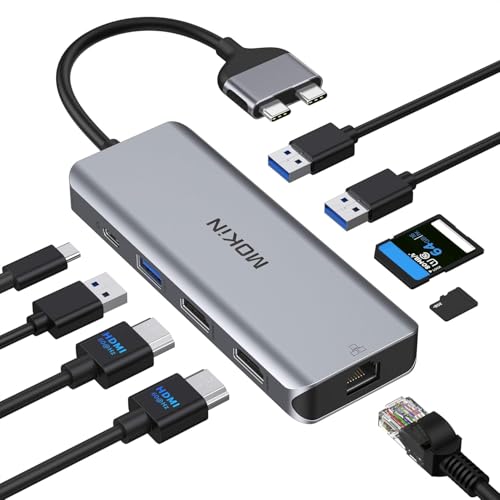 | MOKiN MOUC0306 9-in-2 Hub | Best fit: Two HDMI ports and Ethernet HDMI: 4K 60Hz with one display; 4K 30Hz with two Ports: Gigabit Ethernet and three USB ports SD card: SD and microSD Charging: 100W PD | Check Price on Amazon |
 | Acer ODK4C0 5-in-1 Hub | Best fit: One HDMI display and USB-A devices HDMI: 4K 30Hz; needs DisplayPort Alt Mode or Thunderbolt Ports: One USB 3.0 at 5Gbps and two USB 2.0 SD card: Not listed Charging: 100W PD; the port charges the host only | Check Price on Amazon |
 | Melelink 8-in-2 MacBook Hub | Best fit: SD reader plus a Thunderbolt 3 port HDMI: 4K 60Hz; 5K 60Hz on the Thunderbolt 3 port Ports: Thunderbolt 3, USB 3.0, USB-C and USB 2.0 SD card: SD and microSD Charging: 100W input; 85W output | Check Price on Amazon |
 | UGREEN 15598 Revodok 6-in-1 Hub | Best fit: Gigabit Ethernet and USB-A ports HDMI: 4K 30Hz Ports: Gigabit Ethernet and three USB-A at 5Gbps SD card: Not listed Charging: 100W input; up to 85W pass-through | Check Price on Amazon |
1. Anker A8354 547 7-in-2 Hub — Best Compact Dual-USB-C MacBook Hub
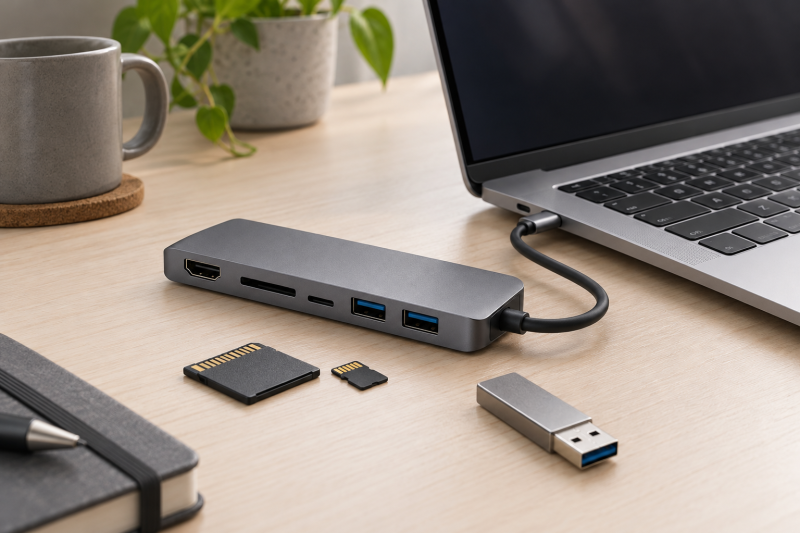
Anker’s listing says the 547 turns the MacBook’s two USB-C ports into a multifunction USB-C port, a USB-C data port, two USB-A ports, HDMI, an SD slot and a microSD slot. It lists HDMI at 4K 60Hz, and 5K 60Hz with up to 40Gbps and 100W charging on the multifunction port.
The listing title names MacBook Air M4 and M5, and the listing says the hub is not compatible with MacBook Neo. It also notes that M1, M2 and M3 MacBooks do not support dual external display. Apple’s M4 and M5 Air specs list two external displays, and the Anker note concerns older chips.
Our Take Choose the Anker 547 when you want SD and microSD slots, HDMI and a fast USB-C port in one compact hub and can give it both of the Air’s USB-C ports.
- Anker lists a fast multifunction USB-C port, up to 40Gbps at 5K 60Hz, next to HDMI at 4K 60Hz.
- Anker lists SD and microSD slots for card import, and two USB-A ports and a USB-C data port for accessories.
- Anker names MacBook Air M4 and M5 in the listing title, the same chips this page covers.
- A buyer must give Anker’s hub both of the two Thunderbolt 4 ports that Apple lists for the Air.
- Anker’s listing does not mention an Ethernet port for wired networking.
2. Melelink 10-in-1 USB-C Hub — Best HDMI, Cards and Many USB Ports
Melelink’s listing describes a 10-in-1 hub with HDMI at 4K 60Hz, an SD/TF card reader, 100W PD charging and a USB-C data port that has no video output. The listing counts its USB ports two ways: one line gives three USB 2.0 ports and another gives two, so confirm the total before buying.
Its listing names MacBook Air models from M1 through M5, and it says HDMI needs a USB-C port with DisplayPort Alt Mode or Thunderbolt. Apple lists DisplayPort and Thunderbolt 4 support on both Air ports. The hub suits a desk with several USB accessories and an SD or TF card to import.
Melelink says the hub connects only one HDD or SSD and does not support Apple’s USB SuperDrive.Our Take Choose the Melelink 10-in-1 when you want HDMI, an SD/TF reader and many USB ports, and can confirm the USB port count first.
- Melelink lists HDMI at 4K 60Hz and an SD/TF card reader, with 100W PD charging in the same hub.
- Melelink lists a USB-C data port, USB 3.0 ports at 5Gbps and USB 2.0 ports for a desk with several USB accessories.
- Melelink’s listing names MacBook Air models from M1 through M5, a range that includes M4 and M5.
- Melelink’s listing gives three USB 2.0 ports in one line and two in another, and a buyer should confirm the total before buying.
- Melelink says a buyer can connect only one HDD or SSD to the hub, and the hub does not support Apple’s USB SuperDrive.
3. MOKiN MOUC0306 9-in-2 Hub — Best Two HDMI and Ethernet Layout
MOKiN’s listing describes a 9-in-2 hub that needs two Thunderbolt ports on the same side of the MacBook. It adds two HDMI ports, Gigabit Ethernet, three USB ports, SD and microSD readers and 100W PD charging. It lists 4K 60Hz with one HDMI display and 4K 30Hz when both HDMI ports are in use.
Apple’s spec page shows both of the Air’s Thunderbolt 4 ports on the left side and lists up to two external displays for the M4 and M5 Air. The listing names MacBook Pro and Air models from 2017 to 2021 and does not say whether the hub works with an M4 or M5 Air.
MOKiN’s listing names no MacBook newer than 2021, so M4 and M5 compatibility is not stated.Our Take Choose MOKiN when you want two HDMI screens and Ethernet from one hub and can confirm it works with your M4 or M5 Air.
- MOKiN lists two HDMI ports and Gigabit Ethernet for two screens and a wired network, along with three USB ports and SD and microSD readers.
- MOKiN lists 4K 60Hz when one HDMI display is in use and 4K 30Hz when both HDMI ports are in use.
- MOKiN’s listing names MacBook models from 2017 to 2021 and does not mention M4 or M5, and a buyer must confirm compatibility with an M4 or M5 Air.
- MOKiN says the hub needs two Thunderbolt ports on the same side of the MacBook, and Apple’s spec page shows both of the Air’s ports on the left side.
4. Acer ODK4C0 5-in-1 Hub — Best Simple HDMI and USB-A Expansion
Acer’s listing describes a 5-in-1 hub with HDMI at 4K 30Hz, a 100W PD port, one USB 3.0 port at 5Gbps and two USB 2.0 ports. It says HDMI needs a USB-C port with DisplayPort Alt Mode or Thunderbolt, and that the PD port only charges the host.
The listing names MacBook Neo, Pro and Air without a chip. It mentions no SD slot, Ethernet port or USB-C data port, so it fits one display plus a keyboard, mouse or drive.
Our Take Choose the Acer ODK4C0 when you need one HDMI display and a few USB-A ports and have no use for an SD slot or Ethernet.
- Acer lists HDMI at 4K 30Hz for one display and a USB 3.0 port at 5Gbps, with 100W PD charging.
- Acer states that HDMI needs DisplayPort Alt Mode or Thunderbolt, and Apple lists both on the Air’s ports.
5. Melelink 8-in-2 MacBook Hub — Best Card Reader with a Thunderbolt 3 Port
Melelink’s listing describes an 8-in-2 hub with HDMI at 4K 60Hz, a Thunderbolt 3 port at 5K 60Hz and up to 40Gbps, SD and microSD readers that Melelink says can be read at the same time, USB-A, USB-C and USB 2.0 ports, and 100W PD input with 85W output. It names MacBook Air models from M1 through M5.
Melelink says the hub will not fit if there is a case on the bottom of the MacBook, that it supports one hard drive, and that buyers should avoid high-power devices for a stable connection. It also says M1 chips cannot show two external monitors, while Apple lists two external displays for the M4 and M5 Air. The listing calls it an 8-in-2 hub, a name that usually means two USB-C plugs, but it does not spell out that it uses both of the MacBook’s ports.
Our Take Choose the Melelink 8-in-2 when you want SD and microSD readers, a 5K Thunderbolt 3 port and HDMI, and your MacBook has no case on its bottom.
- Melelink lists a Thunderbolt 3 port at 5K 60Hz and 40Gbps beside HDMI at 4K 60Hz.
- Melelink says the SD and microSD readers can be read at the same time.
- Melelink lists 85W output beside its 100W PD input, and a buyer can compare the two figures.
- Melelink says the hub will not fit a MacBook that has a case on its bottom.
- Melelink’s 8-in-2 name usually means two USB-C plugs, but the listing does not spell out that the hub uses both of the MacBook’s ports.
6. UGREEN 15598 Revodok 6-in-1 Hub — Best Gigabit Ethernet with HDMI
UGREEN’s listing says the Revodok turns a single USB-C port into six ports: HDMI at 4K 30Hz, Gigabit Ethernet, three USB-A 3.0 ports at 5Gbps and a PD port that accepts 100W. Up to 85W passes through to the laptop and 15W is reserved for the hub’s other ports. UGREEN says the USB-C PD port supports charging only, with no data or video.
The listing title names MacBook Neo, Pro and Air with M1 through M5 chips, and it mentions no SD slot. The hub suits an Air at a desk with a wired network and several USB-A devices, with HDMI limited to 4K 30Hz.
UGREEN lists Gigabit Ethernet and three 5Gbps USB-A ports, with HDMI at 4K 30Hz and no HDR or 3D support.Our Take Choose the UGREEN Revodok when you want Gigabit Ethernet, three USB-A ports and pass-through charging, and can accept HDMI at 4K 30Hz.
- UGREEN lists Gigabit Ethernet for a wired network and three USB-A 3.0 ports at 5Gbps for several USB-A devices.
- UGREEN lists up to 85W of pass-through charging to the laptop and reserves 15W for the hub’s other ports.
- UGREEN names MacBook Air M1 through M5 in the listing title, a range that includes M4 and M5.
- UGREEN lists HDMI at 4K 30Hz and says the HDMI port does not support HDR or 3D.
- UGREEN says its USB-C PD port supports charging only and carries no data or video.
Buying Guide
1. Start with the missing connection
Pick the hub for the connection the Air lacks. Apple lists MagSafe 3, a headphone jack and two Thunderbolt 4 ports. All six hubs list HDMI. Anker 547, Melelink 10-in-1, MOKiN and Melelink 8-in-2 list an SD slot or SD/TF reader, and MOKiN and UGREEN list Gigabit Ethernet.
Match the hub to the desk, not the longest port list. Acer lists one HDMI port and three USB ports, enough for one display and basic accessories. Anyone importing photos needs one of the four hubs with an SD slot or reader. The general USB-C hub guide covers hubs for other laptops.
2. Treat display claims as a full-path check
Apple’s display limit is higher than any hub’s. Apple lists up to two external displays at 6K and 60Hz on the M4 Air, and two at 6K 60Hz or 4K 144Hz on the M5 Air. Anker, Melelink 10-in-1, Melelink 8-in-2 and MOKiN with one screen list HDMI at 4K 60Hz, while Acer and UGREEN list 4K 30Hz.
Both Anker and Melelink tie a second display to the MacBook’s chip. Anker’s listing says M1, M2 and M3 MacBooks do not support dual external display, and the Melelink 8-in-2 listing says M1 chips cannot show two monitors. Apple’s M4 and M5 Air pages list two external displays, so the chip is the first thing to check.
3. Check the USB-C PD port’s role
Some USB-C ports only charge. Acer and UGREEN both say their PD port charges the host only and carries no data or video. Melelink 10-in-1 lists a USB-C data port that has no video output.
Compare input and pass-through separately. Melelink 8-in-2 lists 100W input and 85W output, and UGREEN lists up to 85W pass-through with 15W reserved for its other ports. The other four list 100W without an output figure. Apple lists fast charging with a 70W USB-C power adapter on the M4 Air and a 70W or higher USB PD source on the M5 Air.
4. Check how many USB-C ports the hub takes
Anker and MOKiN both occupy the Air’s two Thunderbolt ports. Anker says its seven connections come from the MacBook’s two USB-C ports, and MOKiN says it needs two Thunderbolt ports on one side. Apple’s spec page shows both of the Air’s ports on the left side.
UGREEN says it turns a single USB-C port into six ports. Acer, Melelink 10-in-1 and Melelink 8-in-2 do not say how many ports they use in their listings. Melelink also says the 8-in-2 will not fit a MacBook with a case on its bottom.
5. Separate hub connectivity from dock needs
The six hubs list HDMI at 4K 60Hz at best, 5K 60Hz on one USB-C port of two of them, and up to 100W charging. A buyer who wants more displays or a permanent desk should look at docks, which are a different category.
See the site’s MacBook Air dock guide and portable dock guide for docks. The hubs here are direct USB-C hubs and list no dock features.
FAQ
Can a USB-C hub give a MacBook Air more external displays?
None of the six lists DisplayLink or any other way to add displays beyond what the MacBook supports. Apple lists up to two external displays at 6K and 60Hz on the M4 Air, and two at 6K 60Hz or 4K 144Hz on the M5 Air.
Each hub lists a lower HDMI figure than Apple’s 6K. Anker and both Melelink hubs list 4K 60Hz, MOKiN lists 4K 30Hz with two screens, and Acer and UGREEN list 4K 30Hz.
Is 100W PD the same as 100W to the MacBook?
No. UGREEN lists up to 85W pass-through with 15W reserved for its other ports, and Melelink 8-in-2 lists 100W input with 85W output. The other four list 100W without an output figure.
Apple lists fast charging with a 70W USB-C power adapter on the M4 Air and a 70W or higher USB PD source on the M5 Air. Compare that with a hub’s output figure, not its input figure.
Which hubs use both of the MacBook Air’s USB-C ports?
Anker says its seven connections come from the MacBook’s two USB-C ports, and MOKiN says it needs two Thunderbolt ports on the same side. UGREEN says it uses a single USB-C port.
The listings for Acer, Melelink 10-in-1 and Melelink 8-in-2 does not say. Check the product photos before buying, and check case fit for the 8-in-2.
Which hub is best for a MacBook Air with Ethernet?
UGREEN lists Gigabit Ethernet, three USB-A ports at 5Gbps, HDMI at 4K 30Hz and pass-through charging. MOKiN lists Gigabit Ethernet with two HDMI ports and SD and microSD readers.
UGREEN says it uses a single port and names M1 through M5 in its title. MOKiN needs two Thunderbolt ports on one side and names MacBook models only from 2017 to 2021.
Do these hubs need Thunderbolt or USB4?
Two of them say so for HDMI. Acer and Melelink 10-in-1 say HDMI needs a USB-C port with DisplayPort Alt Mode or Thunderbolt, and Apple lists DisplayPort and Thunderbolt 4 on both Air ports.
The other four listings do not state that requirement. Anker lists up to 40Gbps on its multifunction port and Melelink 8-in-2 on its Thunderbolt 3 port, and Apple lists Thunderbolt 4 and USB 4 at up to 40Gb/s on the Air.
Bottom Line
Choose Anker 547 for SD and microSD slots with a 40Gbps USB-C port, Melelink 10-in-1 for HDMI and many USB ports, MOKiN for two HDMI ports and Ethernet if it works with your Air, and UGREEN for Gigabit Ethernet from one port. Check your Air’s chip against Apple’s display and charging specs before buying.