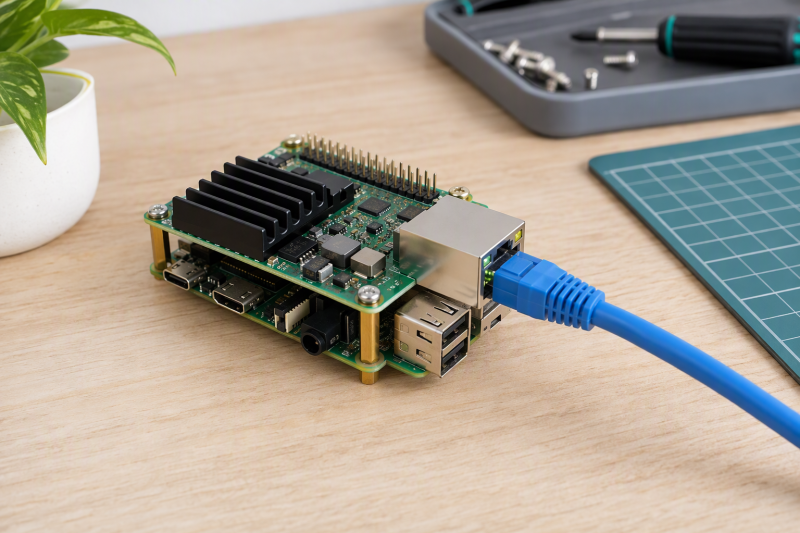
The Short Version
A PoE HAT lets a compatible Raspberry Pi take power through its Ethernet cable, so the Pi needs no separate local power adapter. Before you buy, check the Pi generation, PoE standard, available power, isolation, cooling, case fit, and whether the network switch or injector supplies the required PoE budget.
Choose the Waveshare PoE HAT (F) for an isolated Pi 5 build with a fan and metal heatsink. Choose the Waveshare PoE HAT (G) when 5V 5A output and official-case fit are requirements. The LoveRPi Professional PoE HAT is the specialist choice for a stated 3KV isolated Pi 3B+ or 4B node.
PoE does not make every Ethernet port a power source. Confirm the switch or injector standard, its available per-port budget, and the HAT’s supported Pi before mounting anything on the GPIO header.
Quick Picks
- Best cooled Pi 5 build: Waveshare PoE HAT (F) for isolated 802.3af/at power, a fan, and a metal heatsink.
- Best official-case Pi 5 route: Waveshare PoE HAT (G) for its stated 5V 5A output.
- Best isolated cluster node: LoveRPi Professional PoE HAT for 3KV galvanic isolation.
- Best compact option for an older Pi: Waveshare PoE HAT (E) for a compact isolated 802.3af layout.
How We Picked
Every product here is an Ethernet-powered HAT whose listing identifies Raspberry Pi support and PoE use. We separate Pi 5 options from Pi 3B+/4B options, then compare stated 802.3af/at support, isolation, output, cooling, and physical integration rather than treating every board as interchangeable.
The products here are not Ethernet switches, injectors, USB power adapters, or generic GPIO accessories. A PoE injector can supply a compatible cable run, while a DIN-rail Pi case or rack determines whether the HAT and its cooling hardware can physically fit together.
PoE HATs Compared
| Image | Product | Details | Check Price |
|---|---|---|---|
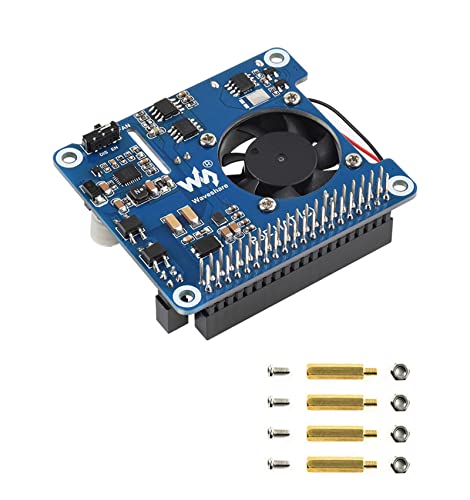 | Waveshare PoE HAT (C) | Best fit: Isolated Pi 3B+ and 4B power Pi support: 3B+, 4B PoE: 802.3af/at Isolation: Isolated SMPS Extras: USB-A, 12V header, fan | Check Price on Amazon |
 | Waveshare PoE HAT (F) | Best fit: Cooled Raspberry Pi 5 Pi support: Pi 5 PoE: 802.3af/at Isolation: Isolated SMPS Cooling: Fan and metal heatsink | Check Price on Amazon |
 | LoveRPi Professional PoE HAT | Best fit: Isolated Pi 3B+ and 4B nodes Pi support: 3B+, 4B PoE: 802.3af/at, passive 48V Isolation: 3KV galvanic Note: Ventilation required | Check Price on Amazon |
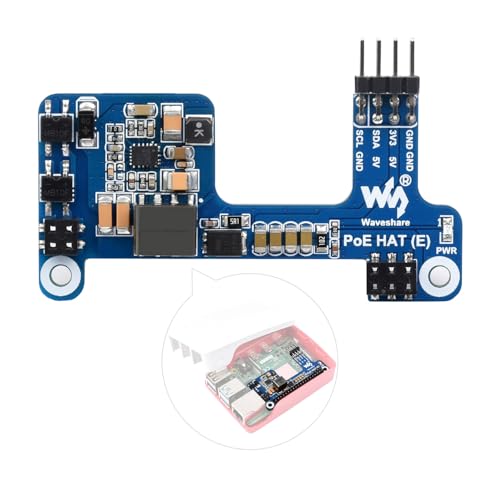 | Waveshare PoE HAT (E) | Best fit: Compact 802.3af Pi 3B+ and 4B Pi support: 3B+, 4B PoE: 802.3af Isolation: Isolated SMPS Case: Official Pi case compatible | Check Price on Amazon |
 | Waveshare PoE HAT (G) | Best fit: Pi 5 official-case build Pi support: Pi 5 Output: 5V 5A PoE: 802.3af/at Case: Official Pi 5 case compatible | Check Price on Amazon |
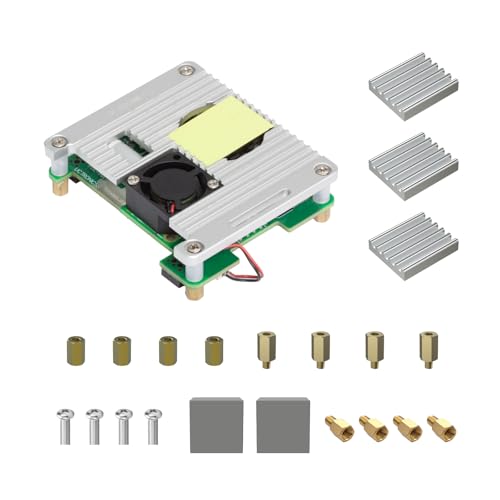 | UCTRONICS Pi PoE HAT | Best fit: Pi 5 rack or cooled build Pi support: Pi 5, 4B, 3B+ Output: 5V 4.5A, 25W PoE: 802.3af/at Size: 65 x 58mm | Check Price on Amazon |
1. Waveshare PoE HAT (C) — Best for Isolated Pi 3B+ and 4B Power
This HAT suits an older Pi project that needs one Ethernet-and-power cable. Waveshare specifies it for Raspberry Pi 3B+ and 4B boards, with 802.3af/at PoE support and an isolated switched-mode supply. Waveshare also lists an onboard fan, USB-A port, and 12V header, so it does more than a basic power-only adapter.
Choose it if the project can use the extra headers. Check the Pi generation first, because the listing does not name Pi 5 support.
Pros
- Stated 802.3af/at support gives a route to compatible standard PoE switches.
- An isolated supply sets this option apart from compact non-isolated approaches.
- USB-A and a 12V header can serve attached project hardware without a separate board.
Cons
- Pi 3B+ and 4B support does not make it a Pi 5 choice.
- Fan clearance needs checking before enclosing the Pi in a tight project case.
2. Waveshare PoE HAT (F) — Best for a Cooled Raspberry Pi 5
The PoE HAT (F) is the isolated option built specifically for the Pi 5. Waveshare lists 802.3af/at support, a standard 40-pin header, a high-speed fan, and a metal heatsink, so you get power delivery and board cooling in one stacked assembly.
Choose it for a Pi 5 project that runs enough load to make active cooling part of the hardware plan. Check HAT height and airflow before choosing an enclosure or rack shelf.
Pros
- Pi 5 support and 802.3af/at compatibility match newer Ethernet-powered deployments.
- Waveshare states a fan for active cooling and a metal heatsink for passive cooling.
- Its isolated supply suits buyers who specifically want that power architecture.
Cons
- The added fan and heatsink increase the space required above the Pi board.
- Its listing names Pi 5 rather than Pi 3B+ or 4B compatibility.
3. LoveRPi Professional PoE HAT — Best for Isolated Cluster Nodes
LoveRPi lists this professional HAT for Raspberry Pi 4B and 3B+ projects, with 3KV galvanic isolation and support for IEEE 802.3af, 802.3at, and passive 48V equipment. Its description presents PoE as a way to power multiple Pi nodes from one switch.
It suits a small cluster or distributed installation built around those Pi generations. The listing also calls for active air circulation in an enclosed case, which makes airflow a setup requirement rather than an optional accessory.
Pros
- 3KV galvanic isolation is the main electrical reason to choose it.
- It lists both 802.3af/at and passive 48V power-source compatibility.
- The cluster-node use case matches installations with several Pi 3B+ or 4B boards.
Cons
- Ventilation is explicitly required for enclosed installation planning.
- It is not listed for the Raspberry Pi 5 generation.
4. Waveshare PoE HAT (E) — Best for a Compact 802.3af Pi 3B+ and 4B Build
Waveshare describes the HAT (E) as a smaller board with a compact layout for Raspberry Pi 3B+ and 4B. It uses an isolated supply and 802.3af PoE, while the listing says it is compatible with the official Raspberry Pi case.
Pick it when the network already provides 802.3af power and physical fit is a higher priority than the added 802.3at flexibility of other boards. It still needs a proper PoE source, not a standard unpowered Ethernet port.
Pros
- Compact component layout is useful when the build uses a standard Pi case and has limited volume.
- Waveshare states official-case compatibility, a direct fit advantage for the supported Pi generations.
Cons
- 802.3af support is narrower than the 802.3af/at boards here.
- Its listing is for Pi 3B+ and 4B rather than Pi 5.
5. Waveshare PoE HAT (G) — Best for a Pi 5 Official-Case Build
The HAT (G) targets Raspberry Pi 5 builds with a stated 5V 5A output and 802.3af/at support. Waveshare also says it suits the official Pi 5 case, so it is the simplest route when the official case is an early requirement.
Its supply is listed as non-isolated, so don’t treat it as equivalent to the isolated HAT (F). Choose between them on power architecture, cooling needs, and enclosure plan, not on output alone.
Pros
- 5V 5A output is meant for the Pi 5 and the power needs of connected peripherals.
- Official Pi 5 case compatibility simplifies a common enclosed build.
- 802.3af/at support works with either compatible standard PoE class.
Cons
- Its non-isolated supply differs from the HAT (F) and several older-Pi options.
- The listing does not position it as a Pi 3B+ or 4B board.
6. UCTRONICS Pi PoE HAT — Best for a Pi 5 Rack or Cooled Build
UCTRONICS lists support for Pi 5, 4B, and 3B+ with an isolated supply, active fan, heatsinks, and 5V 4.5A output. It is the only board here that names all three generations, and its listed 65 by 58mm body and support for certain UCTRONICS rackmounts suit a rack build.
Use it when one PoE HAT needs to move among supported Pi generations or into a compatible rack build. The listing requires all four standoffs during installation to avoid metal contact and electrical arcing.
Pros
- Pi 5, 4B, and 3B+ support offers more stated generation flexibility than the boards listed for fewer Pi generations.
- 5V 4.5A and a 25W source requirement make power planning explicit.
- Fan, thermal tape, and heatsinks provide a complete listed cooling package.
Cons
- Its 65 x 58mm board size still needs checking against the intended case or rack.
- Installation requires the four supplied standoffs, adding a mounting step.
Buying Guide: Choosing a PoE HAT for a Raspberry Pi Project
Match the HAT to the exact Pi generation
Pi 5 is not interchangeable with Pi 4B or Pi 3B+ for this decision. The HAT (F) and HAT (G) specifically name Pi 5, while the HAT (C), HAT (E), and LoveRPi list 3B+ and 4B support. The UCTRONICS board is the one here that names all three generations.
Board-generation compatibility should be the first filter because a 40-pin connector alone does not prove mechanical, electrical, or case compatibility. Start with the board already in the project, then compare cooling and power details.
Confirm the PoE source and standard
Waveshare lists the HAT (E) as supporting 802.3af, while the other listings name 802.3af/at capability or broader power-source support. LoveRPi also lists passive 48V equipment, but do not assume every switch or injector supplies every mode.
Switch budget and PoE standard belong in the same decision. A multi-Pi switch must have enough total capacity as well as a compatible port, especially when several boards and peripherals share the source.
Choose isolation deliberately
The HAT (C), HAT (E), HAT (F), LoveRPi, and UCTRONICS listings describe isolated supplies. The HAT (G) instead states a non-isolated supply. Do not treat all Ethernet-fed Pi boards as the same product, because the supply type differs.
Isolation architecture should match the project’s electrical requirements and established design practice. Do not select a board just because it uses a familiar connector or has a higher listed current figure.
Plan cooling and case clearance together
The HAT (F) combines a fan and metal heatsink, while UCTRONICS includes a fan and heatsinks. LoveRPi explicitly calls for airflow in an enclosed installation. The HAT (G) instead emphasizes official Pi 5 case compatibility.
Cooling clearance determines whether a neat Pi enclosure remains practical after the HAT is installed. Measure the stack height, confirm fan airflow, and keep cable routing accessible before committing a Pi to a rack or wall mount.
Account for output and attached hardware
Waveshare lists the HAT (G) as providing 5V 5A, while UCTRONICS lists 5V 4.5A and a 25W source requirement. Waveshare specifies that the HAT (C) adds USB-A and a 12V header, which can be useful for small attached project hardware.
Power planning extends beyond the Pi board. List every peripheral, check its connection path, and confirm that the PoE source has appropriate budget before relying on one cable for the full project.
Frequently Asked Questions
Does a PoE HAT work with every Raspberry Pi?
No. Each HAT listing names supported models. The HAT (F) and HAT (G) name Pi 5, while the HAT (C), HAT (E), and LoveRPi describe Pi 3B+ and 4B use. UCTRONICS names Pi 5, 4B, and 3B+.
Exact board support is more reliable than judging from the GPIO header. Confirm the Pi model, case, and cooling arrangement before buying a HAT.
Can I use a normal Ethernet switch?
Only if that switch or an injector supplies compatible PoE. A normal data-only Ethernet port carries networking but not the power a HAT expects. The listings here name 802.3af, 802.3at, or both.
Check the per-port power standard and total switch budget. A compatible standard is necessary even when the cable itself is already installed.
Is 802.3at always better than 802.3af?
Not automatically. Waveshare lists the HAT (E) as supporting 802.3af, while other listings name 802.3af/at. The right choice depends on the HAT, Pi, peripherals, and source equipment actually used.
Choose the supported standard rather than treating the newer designation as a replacement for compatibility and a suitable power budget.
Do I need a fan with a PoE HAT?
It depends on the Pi, load, enclosure, and HAT. The HAT (F) and UCTRONICS list active cooling, and LoveRPi says an enclosed case needs active air circulation.
Treat airflow and stack height as part of the installation. A fan-equipped HAT still needs a case that gives it room to move air.
Can a PoE HAT power USB accessories?
Some can support attached hardware, but the details vary. Waveshare lists a USB-A port and 12V header on the HAT (C), while it lists 5V 5A output for the HAT (G). The listed features do not establish a universal accessory budget.
Add every peripheral to the power budget before relying on the HAT. The switch or injector must support the complete installation, not just the Pi alone.
Bottom Line
Choose the Waveshare PoE HAT (F) for an isolated, cooled Pi 5 stack, the Waveshare PoE HAT (G) for a stated 5V 5A official-case build, or the UCTRONICS Pi PoE HAT when Pi 5, 4B, and 3B+ support makes the project easier to maintain.