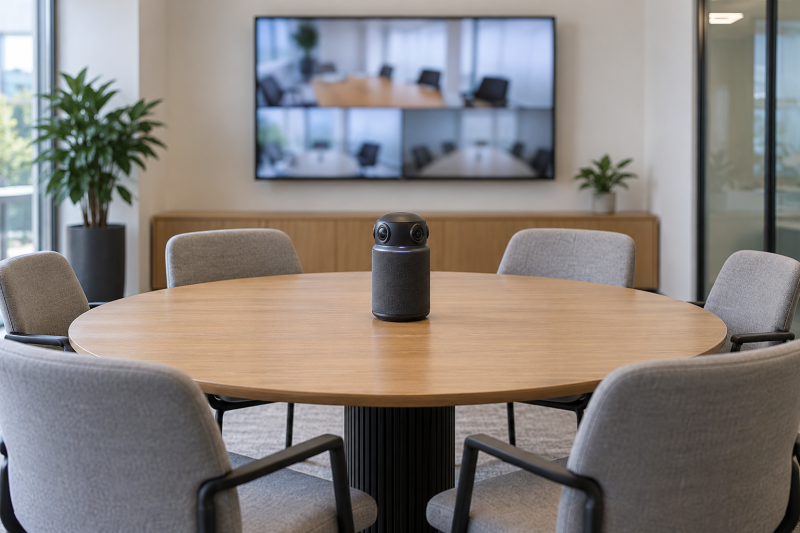
An all-in-one 360-degree meeting camera sits near the center of a table and combines room video, microphones, and often a speaker. It can give remote participants a wider view of the discussion in the room. Resolution, speaker focus, microphone pickup, and platform compatibility vary considerably between models.
Choose the room view, microphone coverage, and meeting platform first, then compare resolution and local recording features.Top 360-Degree All-in-One Meeting Cameras Compared
| Image | Product | Details | Check Price |
|---|---|---|---|
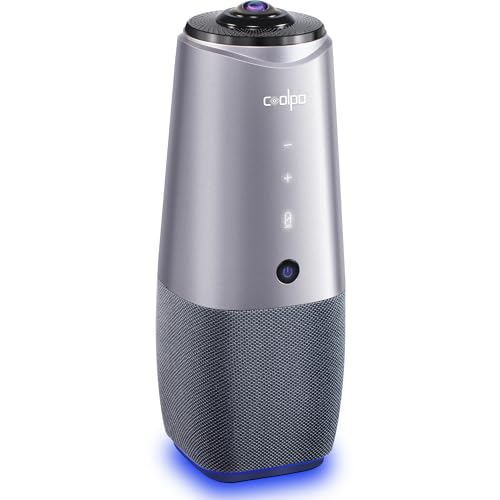 | coolpo DF-HCAM-360 | Best fit: Plug-and-play speaker tracking Video: 360-degree room camera Audio: Microphone; noise cancellation | Check Price on Amazon |
 | TOUCAN SC360 | Best fit: Four-microphone 1080p meeting camera Video: 1080p 360-degree Audio: 4 noise-reduction mics; speaker | Check Price on Amazon |
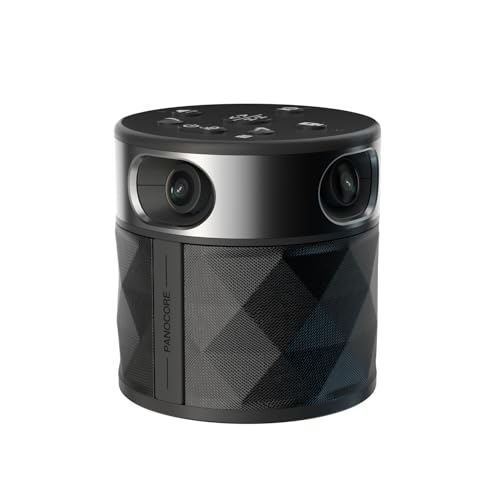 | PANOCORE MB000521 | Best fit: Local-recording 360-degree camera Video: 1080p output; 360-degree Audio: Speaker and mic array; AI voice isolation | Check Price on Amazon |
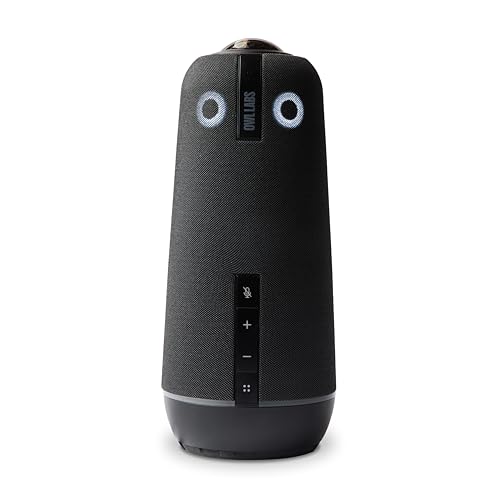 | Owl Labs Meeting Owl 4+ | Best fit: 4K Microsoft Teams room camera Video: 4K 360-degree Audio: Microphone and speaker; noise equalizing | Check Price on Amazon |
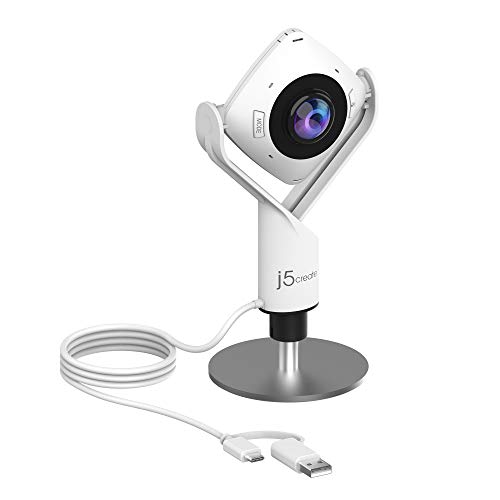 | j5create JVCU360 | Best fit: USB-C 1080p all-around webcam Video: 1080p 360-degree Audio: High-fidelity microphone | Check Price on Amazon |
 | Owl Labs Meeting Owl 3 | Best fit: 18-foot pickup 360-degree camera Video: 1080p 360-degree Audio: 18-foot mic pickup; speaker tracking | Check Price on Amazon |
1. coolpo DF-HCAM-360 — Best Plug-and-Play Speaker Tracking
The coolpo DF-HCAM-360 suits a room that needs a simple camera in the middle of the table instead of a front-facing webcam. It is a 360-degree conference camera and microphone with AI-driven speaker tracking and noise cancellation. Its plug-and-play setup and stated Zoom and Google Meet support fit that kind of room.
Decision point: 360-degree room view, speaker tracking, noise cancellation, and plug-and-play platform support fit an uncomplicated meeting setup with the camera in the middle of the table. Our TakeBuy coolpo DF-HCAM-360 when plug-and-play speaker tracking fits the meeting platform and room layout. Confirm the actual table placement and USB connection path before relying on a central camera for every participant.
For the adjacent laptop endpoint, see our business laptop guide.
- The 360-degree view is designed to capture the discussion in the room from the middle of a conference table.
- The listing states that AI-driven speaker tracking automatically focuses on active meeting participants.
- Noise cancellation is a named audio feature for meetings with typical office or classroom background sound.
- Zoom and Google Meet support covers two common video conferencing platforms.
- Plug-and-play setup can reduce configuration work for a room that needs quick meeting access.
- The stated 15-foot microphone pickup can limit the fit for a longer conference table.
- Useful views from a central 360-degree camera still depend on table placement and participant distance.
2. TOUCAN SC360 — Best Four-Microphone 1080p Meeting Camera
TOUCAN SC360 suits a compact setup where one device should be the camera, the microphones, and the speaker. The manufacturer states it combines a 1080p 360-degree webcam, four noise-reduction microphones, a speaker, and AI tracking. It supports PC, Mac, and tablet use, with listed Zoom, Google Voice, and Microsoft Teams compatibility.
Buy TOUCAN SC360 when four stated microphones and 1080p room video fit the meeting size. Choose a 4K model when resolution and a higher-end workflow for room cameras are the priority.
- Four noise-reduction microphones are a named audio feature for room meetings.
- The 1080p 360-degree webcam is stated to capture an all-around meeting view from the middle of the table.
- An integrated speaker makes it a listed all-in-one device for video, microphone pickup, and audio output.
- According to the listing, AI tracking automatically follows active meeting participants.
- PC, Mac, tablet, Zoom, Google Voice, and Teams support cover common conferencing setups.
- The stated 1080p video has a lower resolution than the 4K stated for Meeting Owl 4+.
- The listing does not state an 18-foot microphone pickup distance for larger table arrangements.
3. PANOCORE MB000521 — Best Local-Recording 360-Degree Camera
PANOCORE MB000521 fits a buyer who wants a central meeting camera with a stated recording feature rather than relying solely on software capture. It combines a 360-degree camera, speaker, microphone array, auto speaker focus, AI voice isolation, 1080p output, and local recording.
Decision point: 360-degree video, 1080p output, a speaker and microphone array, AI voice isolation, and local recording fit workflows that capture meetings. Our TakeBuy PANOCORE when local recording and AI voice isolation fit how the organization captures meetings. Confirm how the camera’s saved recordings and conferencing software fit the organization’s storage and privacy rules.
- Local recording is a stated capture feature in addition to the camera’s live conferencing output.
- AI voice isolation is a named audio feature for a room with competing nearby sound.
- Auto speaker focus is a listed feature for remote participants who are following a discussion.
- A stated speaker and microphone array make it an all-in-one room camera and audio device.
- Compatibility with Webex, Zoom, Teams, and Meet covers several common meeting platforms.
- The listed 1080p output is lower than the stated 4K resolution of Meeting Owl 4+.
- Local recording requires an organization to decide where files belong and who may access them.
4. Owl Labs Meeting Owl 4+ — Best 4K Teams Room Camera
Meeting Owl 4+ is the high-resolution choice when the meeting room needs a central all-in-one camera with a stated Teams validation path. It is a 4K 360-degree room camera with microphone, speaker, automatic focus, zooming, noise equalizing, and Microsoft Teams certification.
Buy Meeting Owl 4+ when 4K video and Microsoft Teams certification fit the room standard. Check the physical table position and expected participant distance before treating any central camera as coverage for the whole room.
- 4K 360-degree video is the highest stated output resolution among the cameras on this page.
- Automatic focus and zooming are listed features for a camera in the center of a meeting table.
- The integrated microphone and speaker make it a stated all-in-one video and audio conferencing device.
- Noise equalizing is a named audio feature for a room with uneven participant speaking levels.
- Microsoft Teams certification suits organizations that are standardizing meeting rooms around Teams.
- The premium 4K feature set can exceed the needs of a small room already using 1080p meetings.
- It does not replace a separate decision about room design for very large tables or difficult acoustics.
5. j5create JVCU360 — Best USB-C 1080p All-Around Webcam
j5create JVCU360 is the simple USB-C choice for a laptop or desktop meeting setup that its listing specifies for a 360-degree view without a larger room camera system. It is listed as a 1080p all-around meeting webcam with a high-fidelity microphone and USB-C connection.
Decision point: 1080p all-around video, a high-fidelity microphone, and USB-C fit a meeting camera that connects directly to a computer. Our TakeBuy j5create JVCU360 when USB-C connection and a 1080p all-around webcam fit the computer and meeting room. Choose a camera with an integrated speaker when the room also needs audio output in the same device.
For display connectivity at the table, see our USB-C dock guide.
- A stated USB-C connection is a direct path to a compatible computer for conferencing or collaboration.
- 1080p all-around video is a view of the room, not a narrow front-facing webcam angle.
- A high-fidelity microphone is a named audio component for voice capture in meetings and online classes.
- A compact webcam can fit a meeting setup built around one computer, without a larger room camera package.
- The listing presents the camera for video conferencing, online classes, and collaboration.
- The listing does not include an integrated speaker for all-in-one meeting room audio playback.
- The stated 1080p output has a lower resolution than the 4K Meeting Owl 4+ camera.
6. Owl Labs Meeting Owl 3 — Best 18-Foot Pickup 360-Degree Camera
Meeting Owl 3 is the fit for a meeting room where microphone reach is a known decision point and the organization uses Zoom, Google Meet, or Microsoft Teams. It combines 1080p 360-degree video, AI-driven speaker tracking, and a stated 18-foot microphone pickup range.
Buy Meeting Owl 3 when its stated 18-foot microphone pickup matches the actual table layout. Choose Meeting Owl 4+ when 4K room video and its newer feature set are more important than the listed pickup figure.
- The stated 18-foot microphone pickup range helps buyers judge fit for a larger discussion area around a conference table.
- AI-driven speaker tracking is a listed automatic feature for remote participants who are following a conversation.
- 1080p 360-degree room video gives an all-around view from one central meeting device.
- Microsoft Teams certification supports standardized deployment in meeting rooms built around Teams.
- Zoom and Google Meet compatibility covers common video conferencing platforms beyond Teams.
- Its listed 1080p video does not offer the 4K output stated for Meeting Owl 4+.
- Check the 18-foot pickup figure against actual room noise and table placement instead of assuming it holds in every room.
Buying Guide: Choosing a 360-Degree All-in-One Meeting Camera
Start with the actual table and seating layout
A central 360-degree camera works best when it can sit near the center of the discussion. The 18-foot microphone pickup on Owl Labs Meeting Owl 3 is a useful stated reference, but room noise and participant distance still determine the result.
Sketch the table, chairs, display, and power route before choosing a model. A 360-degree view does not automatically make every corner of an irregular room equally useful for remote participants.
Separate resolution from meeting behavior
Resolution affects detail, while speaker focus and auto-framing affect how remote attendees follow the conversation. On Owl Labs Meeting Owl 4+, 4K 360-degree video fits a room where resolution is a priority.
For many small rooms, 1080p plus useful microphone and speaker behavior may be the more practical decision. Compare the actual display, bandwidth, and conferencing software before treating 4K as a universal upgrade.
Check microphone and speaker needs separately
An all-in-one camera can simplify a room, but microphone arrays and speaker output vary. TOUCAN SC360 lists four noise-reduction microphones and an integrated speaker for a compact setup.
Choose separate audio equipment when the table is too large or the room is acoustically difficult. Noise cancellation and voice isolation can help, but they do not erase every HVAC sound, side conversation, or distant speaker.
Verify the platform and physical connection
Software compatibility and computer connection should be tested before a scheduled meeting. j5create JVCU360 lists USB-C and 1080p all-around video for a direct connection to a computer.
Teams-certified hardware can help standardize deployment, while Zoom, Meet, and Webex support may be more important in mixed environments. Plug-and-play claims should still be confirmed against the actual room PC and operating system.
Set a recording and privacy policy first
Local recording can be useful for notes, training, or documentation, but it changes who controls meeting files. PANOCORE MB000521 lists local recording alongside its all-in-one camera and microphone array.
Decide where recordings live, who can start them, and how attendees are informed. Meeting privacy is an operational requirement, and a camera feature alone does not meet it.
Frequently Asked Questions
Are 360-degree meeting cameras good for large rooms?
They can be useful when a central table position, microphone pickup, and participant distance fit the camera’s stated design. Owl Labs Meeting Owl 3 states an 18-foot pickup figure to judge that fit against.
Very large rooms may still need separate microphones, cameras, or displays. Evaluate the actual seating and room noise rather than relying only on a 360-degree lens label.
Does a 4K meeting camera always look better?
Not necessarily. 4K can provide more detail, but picture quality also depends on output mode, display size, bandwidth, lighting, and conferencing software. Meeting Owl 4+ is the 4K option in this comparison.
For a small group, a well-placed 1080p all-in-one camera may be sufficient. Prioritize reliable framing and usable audio before paying for resolution that the call workflow cannot preserve.
Can one device replace a room microphone and speaker?
Sometimes. The listed all-in-one models combine camera, microphones, and often a speaker, so a simple table needs less equipment. TOUCAN SC360, for example, lists four microphones and a speaker.
For long tables or noisy rooms, separate audio hardware may still be necessary. Test the farthest seat and the quietest speaker before replacing an existing microphone system.
What is speaker tracking?
Speaker tracking is the camera behavior that identifies or focuses on an active person. The exact behavior differs by model. The coolpo and Meeting Owl models list AI-driven speaker or automatic focus features.
Test speaker tracking with the meeting’s normal pace and seating. Fast discussion, multiple voices, and presentation content can make a fixed room view more useful at times.
Should I use local recording on a meeting camera?
Use it only when the organization has a clear reason, storage location, access policy, and a way to notify attendees. PANOCORE lists local recording, which may simplify capture for compatible meeting workflows.
For sensitive discussions, disabling or tightly controlling recording can be the right decision. The camera feature does not replace policy or consent requirements.
Bottom Line
Owl Labs Meeting Owl 4+ is the premium pick for stated 4K video and Teams certification. Choose TOUCAN SC360 for four microphones and a speaker, or Owl Labs Meeting Owl 3 when its stated 18-foot pickup matches the table.