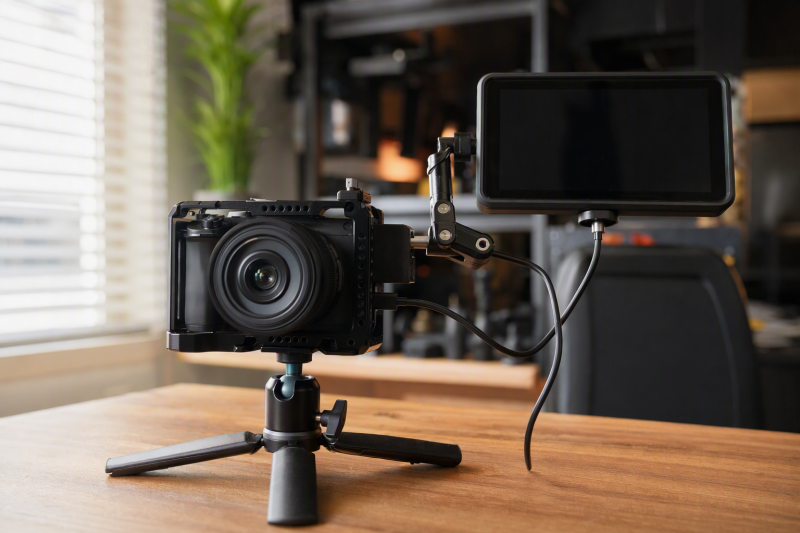
A camera monitor arm holds a field screen where you can see it without blocking camera controls, handles, or cables. The best fit depends less on arm length than on the connection at each end. A monitor may need a plain 1/4-inch screw, an anti-twist locating interface, or a cold-shoe foot, while the rig side may use a cage thread, locating hole, rod, or clamp.
The seven options below cover compact tilt mounts, 7-to-11-inch articulating arms, and clamp kits. NEEWER ST07C is the strongest all-around pick because its 7-inch reach, 4.4-pound limit, retractable locating pins, and super clamp cover both on-cage and off-camera positions. FOCPRO is the lighter direct-on-camera choice, while FEELWORLD is the simplest match for a compatible FEELWORLD screen.
Camera Monitor Arm Comparison
| Image | Product | Details | Check Price |
|---|---|---|---|
 | NEEWER ST07C 7-Inch Magic Arm | Best fit: Compact cage or clamp-mounted monitor Arm length: 7 inches / 18 cm Load limit: 4.4 lb / 2 kg Monitor screw: 1/4 inch with retractable locating pins Rig mount: Super clamp; 1/4 and 3/8 inch holes | Check Price on Amazon |
 | FEELWORLD Swivel Tilt Arm | Best fit: Named FEELWORLD 5-to-5.7-inch monitors Mount: Cold shoe and 1/4 inch Rotation: 360 degrees Weight: 69.2 g Format: Compact tilt arm | Check Price on Amazon |
 | ULANZI R094 Super Clamp Arm | Best fit: Compact rod or handle clamp setup Clamp opening: Up to 60 mm / 2.3 inches Preferred load: 3.3 lb / 1.5 kg Clamp threads: 1/4 and 3/8 inch Adjustment: Dual 360-degree ball heads | Check Price on Amazon |
 | SMALLRIG 2732 9.8-Inch Clamp Kit | Best fit: Longer arm with an included clamp Arm length: 9.8 inches / 25 cm Clamp range: 15-54 mm Arm screws: 1/4 inch at both ends Materials: Aluminum alloy and stainless steel | Check Price on Amazon |
 | NEEWER ST16C 11-Inch Magic Arm | Best fit: Extended reach around crowded rig hardware Arm length: 11 inches / 28 cm Load limit: 4.4 lb / 2 kg Arm weight: 12.9 oz / 366 g Monitor screw: 1/4 inch with retractable locating pins | Check Price on Amazon |
 | SMALLRIG 2066B 9.8-Inch Magic Arm | Best fit: Thread-to-thread cage connection Arm length: 9.8 inches Arm screws: 1/4 inch at both ends Adjustment: Dual 360-degree ball heads Included clamp: No | Check Price on Amazon |
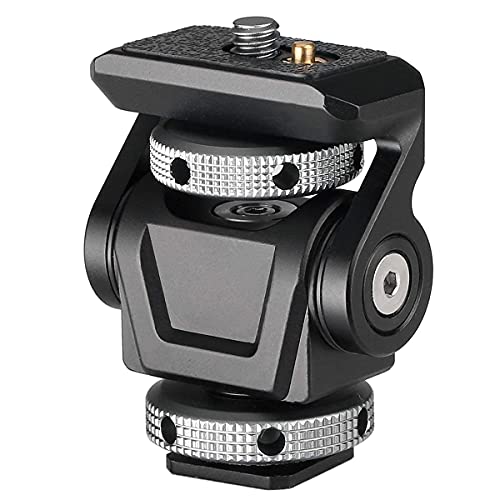 | FOCPRO FB-00 Monitor Holder | Best fit: Lightweight direct shoe or cage mount Supported load: Up to 2 kg Mount weight: 75 g Movement: 360-degree swivel; 90-degree tilt Connection: Cold shoe or 1/4 inch | Check Price on Amazon |
Start with the screen’s mounting hole and total working weight, including cables or adapters. Then inspect the cage, handle, rail, or rod that will carry the arm. A high load rating does not prevent twisting if the monitor has only a plain threaded hole, and a long arm increases force on every joint.
1. NEEWER ST07C 7-Inch Magic Arm — Best Overall
NEEWER’s ST07C has a 7-inch articulating arm, a super clamp, and a 4.4-pound load limit. Two arms meet at a 360-degree friction-gear joint, and the ball heads at the ends rotate through 360 degrees and use U-notches for 90-degree tilt. The short reach suits a field monitor that must sit just above or beside a compact cage.
Both 1/4-inch mounting screws include retractable anti-twist locating pins and silicone pads. The clamp can grip a rod, pole, or table, while its 1/4-inch and 3/8-inch locating holes provide another connection path to cages and rigs. An enlarged lever locks the central joint, and thrust ball bearings support smoother adjustment.
Our Take: Buy the ST07C if one monitor moves between a camera cage and a clamped studio position. It offers the best balance of short reach, a stated load limit, anti-twist hardware, and multiple rigging paths.
[su_box title=”PROS” style=”soft” box_color=”#2e7d32″] – The 4.4-pound limit leaves useful capacity for common 5-to-7-inch field monitors. – Retractable locating pins help resist rotation when the monitor or cage has matching holes. – A 7-inch arm reduces joint strain compared with an 11-inch alternative on compact rigs. – Clamp and threaded mounting paths let one arm serve camera and studio support points. [/su_box] [su_box title=”CONS” style=”soft” box_color=”#c62828″] – The super clamp adds more bulk than a direct cold-shoe tilt mount. – Anti-twist pins provide their full benefit only with compatible locating holes. [/su_box]2. FEELWORLD Swivel Tilt Arm — Best for Compatible FEELWORLD Monitors
FEELWORLD’s compact mount is listed for the F570 5.7-inch monitor and named for F5, S55, and FW568 screens in the product title. It connects through a standard 1/4-inch monitor mount, weighs 69.2 grams, and allows 360-degree rotation for viewing-angle changes.
A cold-shoe connection places the screen directly on a camera or cage shoe, and an additional shoe can carry a light or microphone. The arrangement is much shorter and simpler than a magic arm. The FEELWORLD listing does not state a load limit, so base compatibility on the named monitors and the exact mounting interface. Do not extend it to a heavier screen.
Our Take: Choose the FEELWORLD arm for a named FEELWORLD monitor when minimal rig size is the goal. Its low weight and direct shoe connection suit that job, but it offers less reach and less documented capacity than the NEEWER and ULANZI arms.
[su_box title=”PROS” style=”soft” box_color=”#2e7d32″] – The 69.2-gram weight adds little mass above a handheld camera. – Named FEELWORLD compatibility reduces guesswork for the listed monitor families. – Full rotation supports fast screen-angle changes without a long arm. [/su_box] [su_box title=”CONS” style=”soft” box_color=”#c62828″] – The FEELWORLD listing states no load figure. – The short tilt format cannot move a screen as far as an articulating arm. [/su_box]3. ULANZI R094 Super Clamp Arm — Best Compact Clamp Mount
ULANZI R094 pairs a double-ball-head arm with a clamp that opens to 60 mm or 2.3 inches. It is rated for a preferred load of 3.3 pounds and can grip 15 mm, 25 mm, and 30 mm rods as well as plates or handles within its opening range. Both ball heads rotate for flexible screen placement.
The clamp body supplies 1/4-inch and 3/8-inch female threads, and the arm uses the common 1/4-inch connection for monitors and accessories. A dense rubber pad protects the clamped surface and improves grip. The aluminum-alloy construction is CNC machined. Together, the clamp and arm give a compact path from a rod or handle to a lightweight field screen.
Our Take: Buy the R094 when a 60 mm clamp opening is more useful to you than a long reach. Its 3.3-pound preferred load is lower than the NEEWER arms, so weigh the complete screen setup rather than the bare panel alone.
[su_box title=”PROS” style=”soft” box_color=”#2e7d32″] – A 60 mm maximum opening covers common rig rods, handles, and narrow support plates. – The stated 3.3-pound preferred load gives buyers a concrete compatibility boundary. – Rubber padding protects finished surfaces while increasing clamp friction. [/su_box] [su_box title=”CONS” style=”soft” box_color=”#c62828″] – The 3.3-pound preferred load is lower than the NEEWER arms’ 4.4-pound rating. – Plain ball heads do not provide the retractable locating pins found on ST07C. – A clamp is unnecessary bulk when the cage already has a suitable threaded hole. [/su_box]4. SMALLRIG 2732 9.8-Inch Clamp Kit — Best Longer Clamp Kit
SMALLRIG 2732 has a 9.8-inch articulating arm and a super clamp. SmallRig specifies the clamp opens from 15 to 54 mm and includes 1/4-20 and 3/8-16 threaded holes. The manufacturer provides a 1/4-inch screw at each arm end to connect the monitor to a cage, clamp, NATO accessory, or compatible rod clamp.
SmallRig lists double ball heads that provide 360-degree adjustment at both ends. Rubber cushions on the clamp and arm protect contact surfaces and help the hardware grip. The kit is made of aluminum alloy and stainless steel. The listing does not state a load rating, so its extra reach is not proof of greater carrying capacity.
Our Take: Choose the 2732 as a middle-length kit when a 7-inch arm is too short and an 11-inch arm is more than you need. It brings a flexible clamp connection, but you must establish an appropriate load from SMALLRIG guidance for your exact setup.
[su_box title=”PROS” style=”soft” box_color=”#2e7d32″] – The 9.8-inch length gives a monitor more offset than compact clamp arms. – A 15-to-54 mm clamp range covers many rods, rails, and support edges. – Dual 1/4-inch screws match common monitor and cage threads. – Rubber cushions protect the monitor and clamped support from direct metal contact. [/su_box] [su_box title=”CONS” style=”soft” box_color=”#c62828″] – Extra arm length increases strain on the cage and central lock. – The listing gives no load limit and the screws do not list retractable anti-twist locating pins. [/su_box]5. NEEWER ST16C 11-Inch Magic Arm — Best Extended Reach
ST16C extends the NEEWER design to 11 inches or 28 cm while retaining a 4.4-pound load rating. Two arms meet at a 360-degree friction-gear joint, and the end ball heads rotate through 360 degrees with 90-degree U-notch tilting. That reach can move a screen clear of a top handle, recorder, or other crowded rig hardware.
Both 1/4-inch screws have retractable locating pins and silicone pads. The super clamp can grip rods, poles, or support surfaces, and its 1/4-inch and 3/8-inch locating holes add cage and tripod options. The arm is aluminum alloy and stainless steel, and its total listed weight is 12.9 ounces.
Our Take: Buy the ST16C for a built-out rig or stationary creator setup where reach comes first. It matches ST07C’s stated capacity, but the longer lever requires more careful tightening and balance on a handheld cage.
[su_box title=”PROS” style=”soft” box_color=”#2e7d32″] – An 11-inch reach clears handles and accessories that crowd a compact camera cage. – The 4.4-pound rating matches the shorter ST07C while offering more placement range. – Retractable locating pins help compatible monitor and cage connections resist rotation. – An enlarged central lever supports quick locking after the screen angle is set. – Clamp, 1/4-inch, and 3/8-inch interfaces cover several creator-rig attachment paths. [/su_box] [su_box title=”CONS” style=”soft” box_color=”#c62828″] – Longer reach places more turning force on the cage connection than the 7-inch ST07C. – The 12.9-ounce arm weight is noticeable on a compact handheld camera. [/su_box]6. SMALLRIG 2066B 9.8-Inch Magic Arm — Best Thread-to-Thread Arm
SMALLRIG 2066B is a 9.8-inch friction arm with 1/4-inch screws at both ends. Unlike the 2732 kit, it does not include a super clamp, so it is the cleaner option when the monitor and cage, NATO rail adapter, handle, or rod clamp already provide suitable female threads.
Double ball heads rotate through 360 degrees, and a central control locks the chosen position. An O-ring rubber cushion under the mounting screw helps protect the monitor and tighten the connection. The listing lists compatibility with LCD monitors, LED lights, cages, rails, and handles but gives no load limit.
Our Take: Choose 2066B when the rig already supplies both attachment points and a clamp would be redundant. Its simple thread-to-thread layout keeps the parts count down, though the listing gives no capacity figure.
[su_box title=”PROS” style=”soft” box_color=”#2e7d32″] – Dual 1/4-inch screws connect directly between common monitor and cage threads. – The 9.8-inch span provides useful offset without including a bulky super clamp. – Rubber cushioning protects the monitor contact point and supports a tighter connection. [/su_box] [su_box title=”CONS” style=”soft” box_color=”#c62828″] – Rods, poles, or unthreaded supports need a separate clamp. – The listing does not provide a supported load figure. [/su_box]7. FOCPRO FB-00 Monitor Holder — Best Lightweight Direct Mount
FOCPRO FB-00 is a 75-gram direct monitor holder rated for devices up to 2 kg. It mounts through a cold shoe or a 1/4-inch hole and supports 360-degree swivel with 90-degree tilt. The short format places a 5-to-7-inch screen close to the camera instead of suspending it on a long arm.
A retractable locating pin supports monitors with an ARRI-style locating hole, while a rubber cushion increases friction and protects the monitor. The listing names Atomos Ninja V, Flame 5-inch, and Inferno Flame 7-inch examples. A cold-shoe fit is different from a locking cage thread, so check the rig-side connection as carefully as the monitor screw.
Our Take: Choose the FB-00 for a mobile handheld rig that mounts the screen on a shoe or cage. Of the products here that list both figures, it gives the best ratio of listed capacity to mount weight. It cannot provide the reach of a magic arm, but its short format keeps the screen close to the camera.
[su_box title=”PROS” style=”soft” box_color=”#2e7d32″] – The 2 kg rating at 75 grams is a strong documented ratio of capacity to weight. – Cold-shoe and 1/4-inch mounting cover common direct-on-camera attachment points. – A retractable locating pin helps a compatible monitor resist unwanted twisting. – The short tilt design limits joint strain compared with a 9.8-inch or 11-inch arm. [/su_box] [su_box title=”CONS” style=”soft” box_color=”#c62828″] – The compact holder cannot move a screen around a large top handle or recorder. – A cold-shoe attachment can be less secure than a correctly tightened cage thread. – The listing’s bullet text gives both 180-degree and 90-degree tilt claims, so 90 degrees is the safer stated figure. [/su_box]Buying Guide: Choose the Right Camera Monitor Arm
Match the monitor-side screw and locating pattern
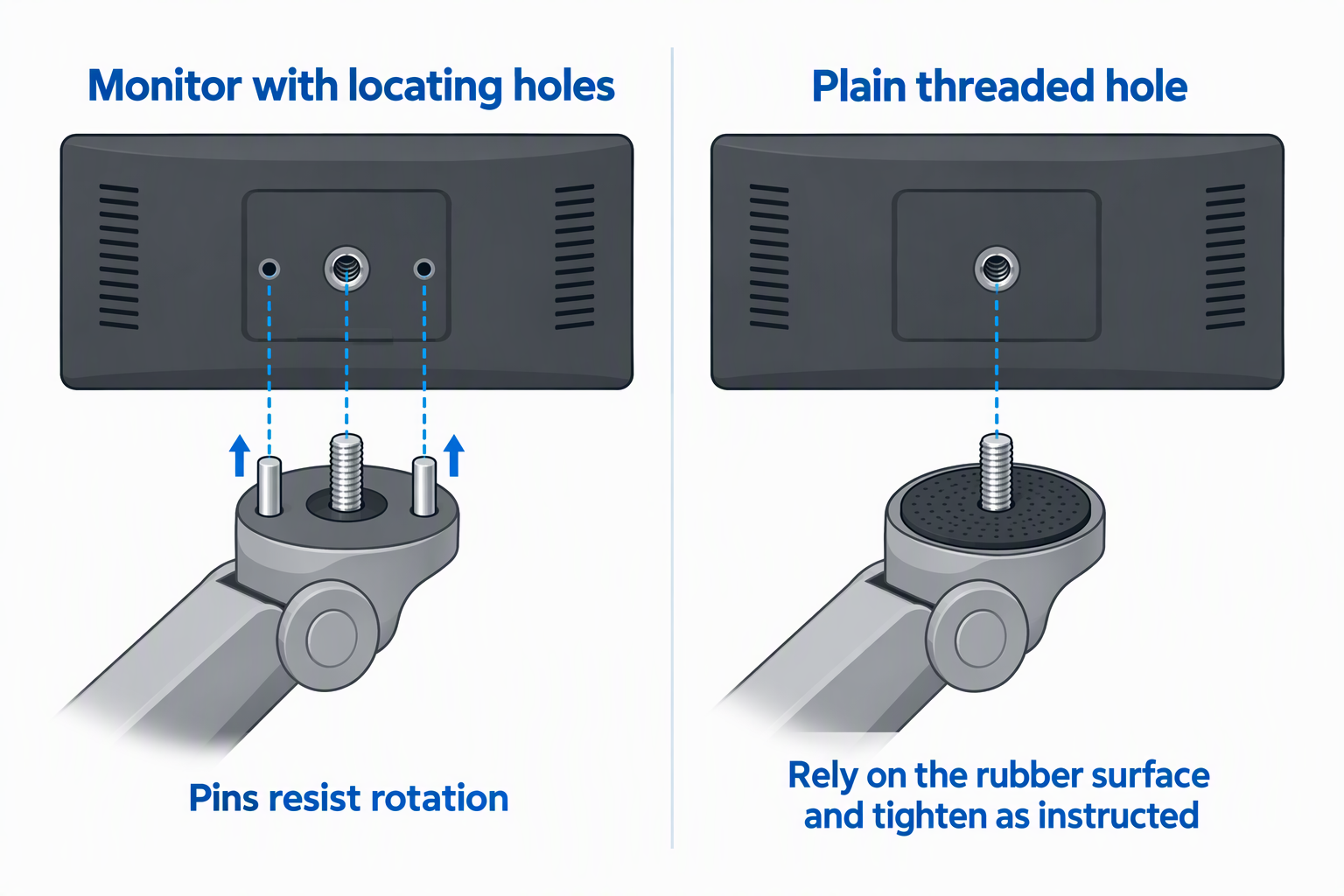
A 1/4-inch thread is the common starting point, but the thread alone does not say whether the screen resists rotation. NEEWER ST07C and ST16C add retractable locating pins, as does FOCPRO FB-00. Those pins help resist rotation only when the monitor has matching holes around its threaded socket.
FEELWORLD’s tilt arm is the specific choice for its named screens. If a monitor has only a plain threaded hole, use the supplied rubber contact surface and tighten according to the product instructions. Do not assume an ARRI-style pattern from the screen size alone.
Retractable pins are a compatibility feature, not a universal upgrade. ST07C, ST16C, and FOCPRO can keep their pins clear for a plain threaded connection, but that configuration relies on the contact pad and a correctly tightened screw. Check the back of the exact monitor before choosing a mount around locating hardware.
Choose a secure rig-side connection
Direct cage threads keep a handheld build compact. SMALLRIG 2066B uses 1/4-inch screws at both ends, while FOCPRO can use a cold shoe or 1/4-inch hole. A mirrorless camera cage with the right thread or locating hole gives these mounts a defined anchor.
Clamp kits solve a rod, handle, or support attachment problem. ULANZI specifies a 60 mm opening, SMALLRIG 2732 is rated to span 15 to 54 mm, and both NEEWER arms include super clamps. They suit studio supports when no threaded anchor is in the right place.
Balance reach against joint strain
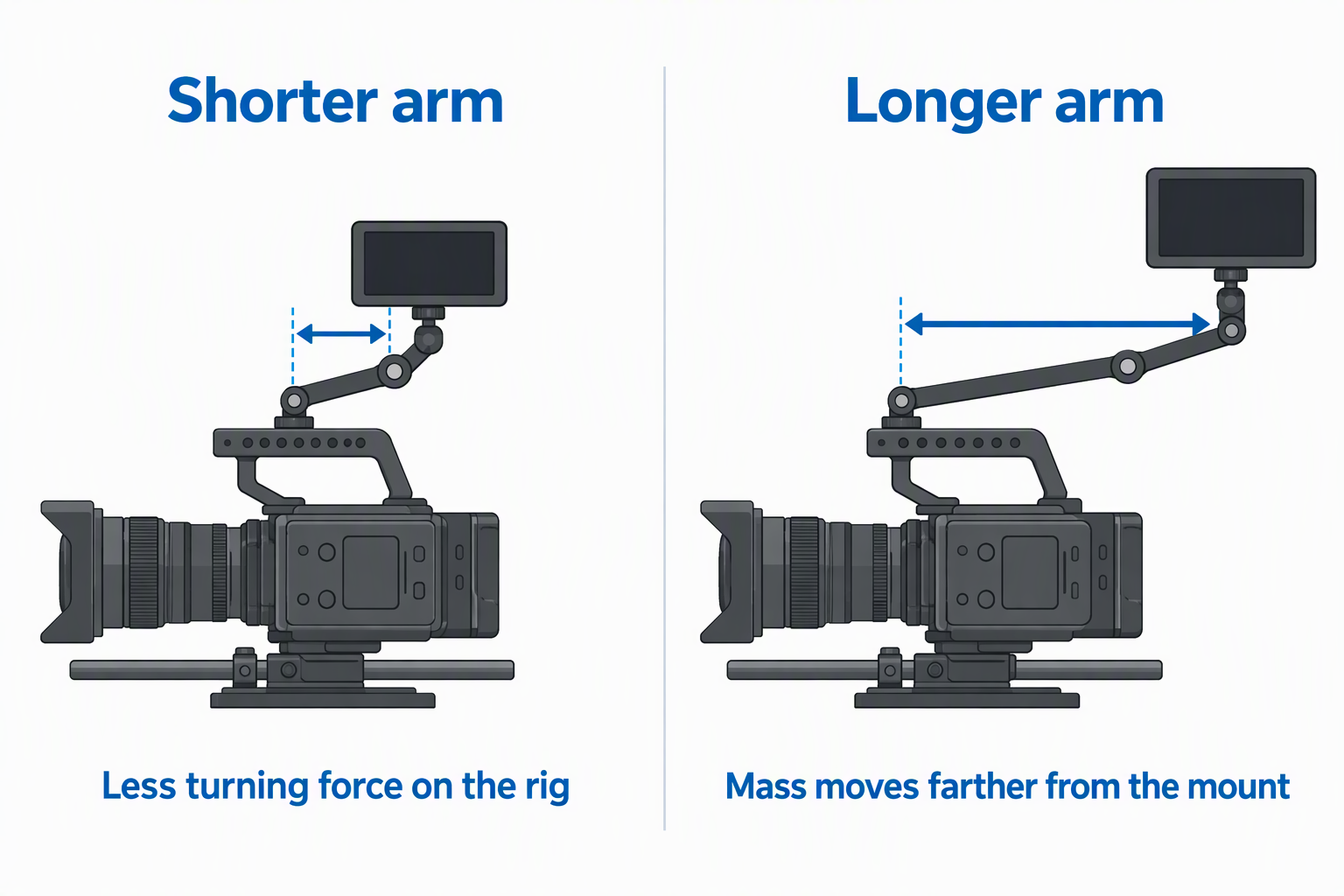
Shorter arms generally place less turning force on the rig. ST07C is rated for a 7-inch reach, the SMALLRIG arms list a 9.8-inch reach, and ST16C specifies 11 inches. Longer models help clear a camera top handle or recorder, but they also move the monitor’s mass farther from the mounting point.
For mobile handheld work, start with the shortest suitable mount. Use ST16C when the extra offset clears an actual obstruction, not merely because it has the longest reach.
Check the complete working load
Use the monitor’s operating weight, not an empty housing estimate. Include the battery, sun hood, cable strain, receiver, or adapter attached to the screen. ST07C and ST16C list 4.4 pounds, ULANZI recommends 3.3 pounds, and FOCPRO rates the load at 2 kg.
Three products lack a stated load figure: SMALLRIG 2732, SMALLRIG 2066B, and the FEELWORLD arm. For those products, confirm the maker’s guidance for the exact monitor instead of transferring a rating from a visually similar arm.
Build the complete screen package before judging the arm. A monitor that seems light on its own can carry a battery plate, sun hood, HDMI adapter, receiver, or cable clamp once the rig is ready to record. NEEWER’s 4.4-pound figure, ULANZI’s 3.3-pound recommendation, and FOCPRO’s stated 2 kg rating are useful comparison points only after every attached item is accounted for. A mirrorless camera cage can keep the connection defined, while a camera top handle changes the available space and the way the complete rig is carried. Test the heaviest normal configuration before a shoot: set the monitor to the framing angle, then move the camera through the pan, tilt, and carry positions the job requires for a complete check. This exposes a cable pull or loose joint while the screen can still be supported by hand. If the build includes an HDMI loop-out capture card or an LED video light, check their clearance during the same motion test rather than treating the arm as an isolated accessory.
Keep cables and nearby accessories clear
Route HDMI and power cables with a service loop so tilting the monitor does not pull its ports. An HDMI loop-out capture card belongs in a supported signal path, not hanging by its cable from the arm.
Check the full movement range before recording. The monitor should not strike a microphone, lens, top handle, or LED video light. After positioning, lock each joint and support the screen with one hand during the first movement check.
Frequently Asked Questions
Is a 7-inch or 11-inch monitor arm better?
A 7-inch arm is usually easier to balance on a compact handheld rig. NEEWER ST07C keeps the monitor closer to the cage while retaining a 4.4-pound rating. It is the safer starting point when the screen only needs to rise above the camera.
Choose the 11-inch ST16C when a handle, recorder, or other accessory requires more offset. Its stated capacity is also 4.4 pounds, but the longer reach increases joint strain and adds a listed 12.9 ounces to the rig.
Do anti-twist pins work with every monitor?
No. Retractable locating pins need matching holes around the monitor’s 1/4-inch socket. ST07C, ST16C, and FOCPRO include locating hardware, but a screen with one plain threaded hole cannot receive the pins in the intended pattern.
Retractable pins may move out of the way for a plain connection, depending on the mount. The rubber pad then becomes important for friction and surface protection, but it does not create a mechanical anti-twist lock.
Can a super clamp attach directly to a camera cage?
Some clamps include threaded holes that can connect through separate cage hardware, while their jaws are intended for rods, poles, handles, or edges. ST07C and ST16C list 1/4-inch and 3/8-inch locating holes on the clamp, and ULANZI provides both thread sizes.
Use a threaded cage connection when possible rather than clamping an unsuitable thin edge. Confirm screw length, hole pattern, and clearance so the fastener tightens the mount without bottoming out or contacting camera components.
How much weight should a monitor arm support?
The arm should exceed the complete working weight with an appropriate margin under the maker’s instructions. NEEWER lists 4.4 pounds, ULANZI lists 3.3 pounds, and FOCPRO rates the load at 2 kg. These figures should not be transferred to models without stated ratings.
Arm length and position also change the force on the joints. A screen at full extension creates more turning force than the same screen held close to the cage. Recheck every lock after changing the reach or adding a battery and sun hood.
Is a cold-shoe monitor mount secure enough?
Security depends on the shoe, locking foot, monitor mass, and camera movement. For an active handheld build, a threaded cage connection with anti-twist support may provide a more defined mechanical interface than a basic shoe.
FEELWORLD and FOCPRO offer compact cold-shoe paths that keep the screen close to the camera. FOCPRO specifies a 2 kg rating and retractable locating pin on the monitor side, while FEELWORLD lists its total mount weight at 69.2 grams.