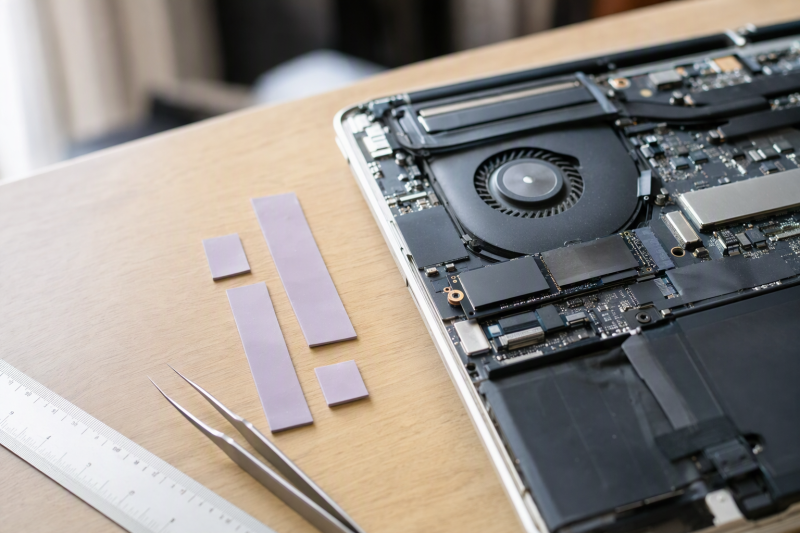
A laptop thermal pad fills a physical gap and carries heat into a shield, heat spreader, or heatsink. Thickness is therefore the first buying decision. A pad that is too thin may not touch both surfaces, and one that is too thick can keep the cooler from sitting correctly on nearby components. Thermal conductivity, softness, sheet size, and electrical insulation come second, after you know the required gap.
The eight options below cover fixed 0.5 mm, 1.0 mm, and 1.5 mm sizes as well as kits ranging from 0.5 mm to 3 mm. They fit common SSD, VRM, VRAM, chipset, IC, and laptop heatsink work, but the original pad or the laptop’s service information must determine the replacement thickness. Do not replace a direct-contact CPU or GPU paste layer with a pad unless the machine was designed that way.
For a repair bench that sees unfamiliar laptops, the OwlTree four-thickness set offers the most practical starting range. ARCTIC TP-3 is the focused choice for a soft 0.5 mm layer, while the three Thermal Grizzly Minus Pad 8 variants let you buy an exact 0.5, 1.0, or 1.5 mm strip. JOYJOM supplies the highest listed conductivity figure here, but its 15 W/mK claim does not override a thickness mismatch.
Thermal Pad Comparison
| Image | Product | Details | Check Price |
|---|---|---|---|
 | OwlTree Four-Thickness Kit | Best fit: Starter kit for several laptop gap sizes Sheet size: 100 x 100 mm Thicknesses: 0.5; 1.0; 1.5; 2.0 mm Listed conductivity: 6.0 W/mK Quantity: 4 sheets | Check Price on Amazon |
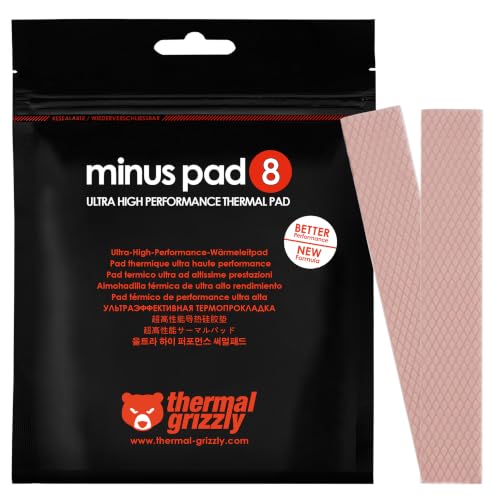 | Thermal Grizzly Minus Pad 8 1.0 mm | Best fit: Confirmed 1.0 mm SSD or component gap Pad size: 120 x 20 x 1.0 mm Quantity: 2 pads Electrical property: Non-conductive Material behavior: Flexible; non-curing | Check Price on Amazon |
 | JOYJOM 15 W Pad Pack | Best fit: 1.0 and 1.5 mm repairs prioritizing listed conductivity Pad size: 120 x 20 mm Thicknesses: 1.0 and 1.5 mm Listed conductivity: Up to 15 W/mK Quantity: 4 pads | Check Price on Amazon |
 | Outus 30-Piece Thermal Pad Set | Best fit: Repeated small component cuts after thickness confirmation Piece size: About 2.6 x 0.8 inches Quantity: 30 pieces Listed conductivity: 6.0 W/mK Thickness: Confirm selected variant | Check Price on Amazon |
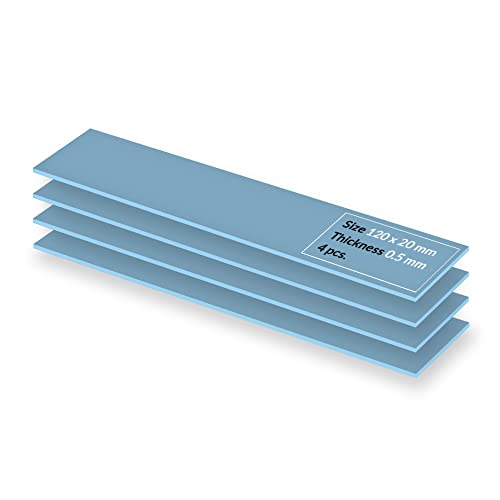 | ARCTIC TP-3 0.5 mm | Best fit: Soft pad for a confirmed thin gap Pad size: 120 x 20 x 0.5 mm Quantity: 4 pads Electrical property: Insulating; non-capacitive Material behavior: Very soft; highly compressible | Check Price on Amazon |
 | Frienda Six-Thickness Kit | Best fit: Bench inventory spanning thin and large gaps Sheet size: 100 x 100 mm Thicknesses: 0.5 to 3.0 mm in 0.5 mm steps Listed conductivity: 6.0 W/mK Quantity: 6 sheets | Check Price on Amazon |
 | Thermal Grizzly Minus Pad 8 0.5 mm | Best fit: Confirmed 0.5 mm SSD or component gap Pad size: 120 x 20 x 0.5 mm Quantity: 2 pads Electrical property: Non-conductive Material behavior: Flexible; non-curing | Check Price on Amazon |
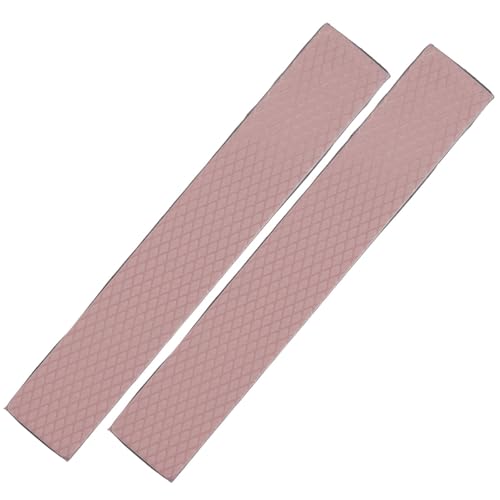 | Thermal Grizzly Minus Pad 8 1.5 mm | Best fit: Confirmed 1.5 mm SSD or component gap Pad size: 120 x 20 x 1.5 mm Quantity: 2 pads Electrical property: Non-conductive Buying check: Confirm displayed variant dimensions | Check Price on Amazon |
Use the table to narrow the choices by thickness and cut area. Conductivity figures come from individual product listings and do not establish a shared cross-brand performance test. A correctly fitted 6 W/mK pad can be more useful than a higher-rated pad that fails to contact the heatsink or changes the cooler’s alignment.
1. OwlTree Four-Thickness Kit — Best Starter Thickness Set
A laptop with several pad heights, or an old pad you must match before ordering a more specialized material, is the case for OwlTree’s four 100 x 100 mm sheets, one each in 0.5, 1.0, 1.5, and 2.0 mm thicknesses. Each sheet can be cut to fit an SSD controller, memory package, VRM row, or other contact area.
The silicone material is listed at 6.0 W/mK and is described as electrically insulating, anti-static, flame-retardant, corrosion resistant, and compressible. OwlTree states an operating range from -40 to 200 degrees Celsius. Those properties support handling around exposed electronics, but you still need to match one of the four thicknesses rather than stack sheets casually.
Our Take: Buy this kit first if you don’t yet know the gap size and want a large cutting area. It covers four common sizes without forcing you to commit to one narrow strip.
[su_box title=”PROS” style=”soft” box_color=”#2e7d32″] – Four thicknesses from 0.5 to 2.0 mm cover several laptop gap sizes. – Each 100 x 100 mm sheet provides room for custom SSD and VRM cuts. – The listed 6.0 W/mK material combines heat transfer with electrical insulation. – OwlTree states a broad -40 to 200 degree operating range for the silicone. [/su_box] [su_box title=”CONS” style=”soft” box_color=”#c62828″] – The set does not include a 2.5 or 3.0 mm sheet for larger gaps. – Multiple thicknesses do not remove the need to identify the original pad height. [/su_box]2. Thermal Grizzly Minus Pad 8 1.0 mm — Best Targeted 1 mm Strip
Long SSD and VRM contact areas call for narrow strips, and this Minus Pad 8 package contains two 120 x 20 x 1.0 mm ones. Thermal Grizzly lists them for GPUs, SSDs, VRAM, laptops, consoles, chipsets, and related components. The narrow format wastes less material than cutting strips from a large square sheet.
The pad is flexible, self-adhesive, non-curing, and electrically non-conductive. Its flexibility is intended to compensate for contact tolerances between components and coolers. The listing does not provide a W/mK number in the supplied details, so the clear buying case is exact 1.0 mm thickness, clean handling, and two matching strips rather than a numerical conductivity comparison.
Our Take: Choose this package when the old pad is confirmed at 1.0 mm and the contact area fits a 20 mm-wide strip. It avoids buying several unused thicknesses for a known repair.
[su_box title=”PROS” style=”soft” box_color=”#2e7d32″] – The exact 1.0 mm thickness suits a confirmed one-millimeter replacement gap. – Two 120 x 20 mm strips fit elongated SSD and VRM contact areas. – Flexible material can accommodate small surface and component-height tolerances. [/su_box] [su_box title=”CONS” style=”soft” box_color=”#c62828″] – The 20 mm width is less convenient for a large square contact area. – No numerical conductivity value appears in the provided product details. – A fixed 1.0 mm pad is unsuitable when the original gap uses another thickness. [/su_box]3. JOYJOM 15 W Pad Pack — Best Listed Conductivity
JOYJOM combines four 120 x 20 mm strips, two at 1.0 mm and two at 1.5 mm. The seller lists thermal conductivity up to 15 W/mK, the highest numerical value on this page. Both thicknesses are frequently relevant to SSD and component-cooler gaps, and each strip can be cut to the required footprint.
The listing identifies uses across NVMe and M.2 2280 SSDs, laptops, CPUs, GPUs, ICs, and consoles. The pads are pink, while the removable protective film may be blue or pink. Remove the film from the working faces and verify the chosen 1.0 or 1.5 mm height before closing the assembly.
Our Take: Pick this pack if the repair is already confirmed to need 1.0 or 1.5 mm material and you want the highest listed conductivity. The 15 W/mK claim is no reason to use the wrong thickness or to assume a guaranteed temperature change.
[su_box title=”PROS” style=”soft” box_color=”#2e7d32″] – The listed 15 W/mK figure is the highest conductivity claim in this group. – Two 1.0 mm and two 1.5 mm strips cover two common repair heights. – A 120 x 20 mm shape is efficient for M.2 SSDs and component rows. – Four strips leave material for repeat cuts or a second matching device. [/su_box] [su_box title=”CONS” style=”soft” box_color=”#c62828″] – The package cannot address 0.5, 2.0, 2.5, or 3.0 mm gaps. – A listing conductivity number alone does not predict laptop temperatures. [/su_box]4. Outus 30-Piece Thermal Pad Set — Best for Repeated Small Cuts
Outus suits a bench that repeatedly needs narrow pads for control boards, ICs, laptop heatsinks, or other small cooling modules. It supplies 30 individual pieces, each about 2.6 x 0.8 inches, and the precut format can reduce measuring and cutting work. The silicone material is listed at 6.0 W/mK and can be cut down further for individual packages.
The pads are described as electrically insulating, anti-static, fire-retardant, wear resistant, and non-corrosive, with a stated -40 to 200 degree Celsius range. The provided listing details tell buyers to select the most suitable thickness but do not identify the exact thickness of this package. Confirm that dimension on the product selection before using it in a laptop.
Our Take: Choose the 30-piece set for repeated small-area work, but the thickness missing from the provided product details is a major buying checkpoint. Do not order it for a known gap until the selected variant shows the required height.
[su_box title=”PROS” style=”soft” box_color=”#2e7d32″] – Thirty precut pieces support repeated small component and control-board jobs. – Each 2.6 x 0.8 inch piece can be trimmed for narrower contact areas. – The listed 6.0 W/mK silicone is electrically insulating around components. [/su_box] [su_box title=”CONS” style=”soft” box_color=”#c62828″] – The listing metadata identifies a 0.098-inch height, about 2.5 mm, so verify it matches the original gap. – Individual pieces offer less freedom than a 100 x 100 mm sheet for large shapes. – Calling pads a paste replacement can mislead buyers about direct-contact interfaces. [/su_box]5. ARCTIC TP-3 0.5 mm — Best Soft Thin Pad
For closely spaced chips with small height differences, ARCTIC TP-3 includes four 120 x 20 x 0.5 mm pads. ARCTIC emphasizes very low hardness and strong compression, which can help the material conform across those chips. The same softness makes installation more demanding, so you need to remove the film, cut the pad, and place it carefully.
The silicone pad is mouldable, vibration damping, electrically insulating, non-capacitive, and free of metal particles. ARCTIC also points out that a thinner pad has lower thermal resistance, but that principle applies only when 0.5 mm is thick enough to maintain contact. A thin pad that leaves an air gap will not serve the repair.
Our Take: Choose TP-3 for a verified 0.5 mm gap that benefits from a very soft, compressible pad. Its softness makes it less forgiving to handle than a firmer material.
[su_box title=”PROS” style=”soft” box_color=”#2e7d32″] – Four 0.5 mm strips provide ample material for thin SSD and chipset gaps. – Very soft material conforms across closely spaced chips with height differences. – Metal-free, non-capacitive insulation supports safer contact near electrical parts. – A 20 mm strip width closely matches many M.2 SSD and narrow VRM layouts. [/su_box] [su_box title=”CONS” style=”soft” box_color=”#c62828″] – Extremely low hardness makes cutting and placement more demanding. – The 0.5 mm thickness cannot bridge a larger one-millimeter or greater gap. – No W/mK figure is given in the supplied listing details. [/su_box]6. Frienda Six-Thickness Kit — Best Broad Thickness Range
A bench that works on laptops with several component-to-shield distances gets the broadest thickness range in the group from Frienda, which provides six 100 x 100 mm sheets at 0.5, 1.0, 1.5, 2.0, 2.5, and 3.0 mm. The large square sheets also let you cut unusual shapes that a 20 mm strip cannot provide.
The silicone is listed at 6.0 W/mK and described as electrically insulating, anti-static, flame-retardant, cushioning, wear resistant, and non-corrosive. Its temperature range is stated as -40 to 200 degrees Celsius. The kit’s value is its thickness coverage and cut area, and the six sheets are not material to stack into arbitrary heights.
Our Take: Choose the Frienda kit when 2.5 or 3.0 mm pads may be needed alongside thinner sizes. It gives you the widest choice of gap sizes here, though much of the material may remain unused after one repair.
[su_box title=”PROS” style=”soft” box_color=”#2e7d32″] – Six thicknesses from 0.5 to 3.0 mm cover the widest range here. – Large 100 x 100 mm sheets support wide shields and irregular custom shapes. – The 6.0 W/mK silicone is listed as electrically insulating and non-corrosive. – Separate 2.5 and 3.0 mm sheets address gaps omitted by most other kits. – The stated -40 to 200 degree range covers a wide span of operating temperatures. [/su_box] [su_box title=”CONS” style=”soft” box_color=”#c62828″] – Six large sheets are excessive for one known, narrow SSD contact area. – Choosing among six thicknesses is guesswork unless the original thickness is measured first. [/su_box]7. Thermal Grizzly Minus Pad 8 0.5 mm — Best Targeted 0.5 mm Strip
For a thin gap over a narrow component row, Thermal Grizzly specifies that this Minus Pad 8 variant supplies two 120 x 20 x 0.5 mm strips. It is listed for SSD controllers, VRAM, GPUs, chipsets, laptops, and consoles. The self-adhesive, flexible material can be placed cleanly over the row without buying a full multi-thickness pack.
Thermal Grizzly describes the pad as non-curing and electrically non-conductive, with flexibility that compensates for contact tolerances. The fixed 0.5 mm height must still match the original material. Do not double the layer just because another part of the laptop uses a thicker pad.
Our Take: Buy this variant when the service information or intact old pad confirms a 0.5 mm replacement and two narrow strips cover the required area. It is more targeted than ARCTIC TP-3 but lacks TP-3’s explicit softness and compression description.
[su_box title=”PROS” style=”soft” box_color=”#2e7d32″] – An exact 0.5 mm height fits verified thin component-to-cooler gaps. – Two 120 x 20 mm strips provide practical coverage for SSDs and VRAM rows. – Non-curing material is intended for stable long-term component contact. [/su_box] [su_box title=”CONS” style=”soft” box_color=”#c62828″] – The fixed 0.5 mm thickness offers no option for a larger gap. – The listing supplies no numerical conductivity value for comparison. – Narrow strips may require joins for a contact surface wider than 20 mm. [/su_box]8. Thermal Grizzly Minus Pad 8 1.5 mm — Best Targeted 1.5 mm Strip
Thermal Grizzly specifies that this package contains two 120 x 20 x 1.5 mm Minus Pad 8 strips for larger gaps. The 1.5 mm height fills a larger gap than the other Thermal Grizzly variants on this page while retaining the same SSD, VRAM, chipset, GPU, and laptop positioning. A pair of narrow strips can cover an M.2 device or a row of power-delivery components efficiently.
The material is self-adhesive, flexible, non-curing, and electrically non-conductive. Its listing says the pad compensates for contact tolerances and supports clean handling. The supplied model token does not describe the same dimensions shown in the title and variant bullet, so check the exact product page and the displayed 120 x 20 x 1.5 mm selection before ordering.
Our Take: Choose this Minus Pad 8 variant for a confirmed 1.5 mm gap. Because the model token conflicts with the listed dimensions, check the variant once more at checkout.
[su_box title=”PROS” style=”soft” box_color=”#2e7d32″] – The 1.5 mm height addresses a common larger SSD or VRM contact gap. – Two 120 x 20 mm strips allow separate cuts for multiple component groups. – Flexible, non-curing material is designed to accommodate contact tolerances. – Electrical non-conductivity supports use around sensitive laptop components. [/su_box] [su_box title=”CONS” style=”soft” box_color=”#c62828″] – The supplied model token conflicts with the listed 120 x 20 x 1.5 mm variant. – No numerical conductivity figure appears in the provided product details. [/su_box]Buying Guide: Choose Thermal Pads for Laptop Repairs
Measure Thickness Before Choosing Conductivity
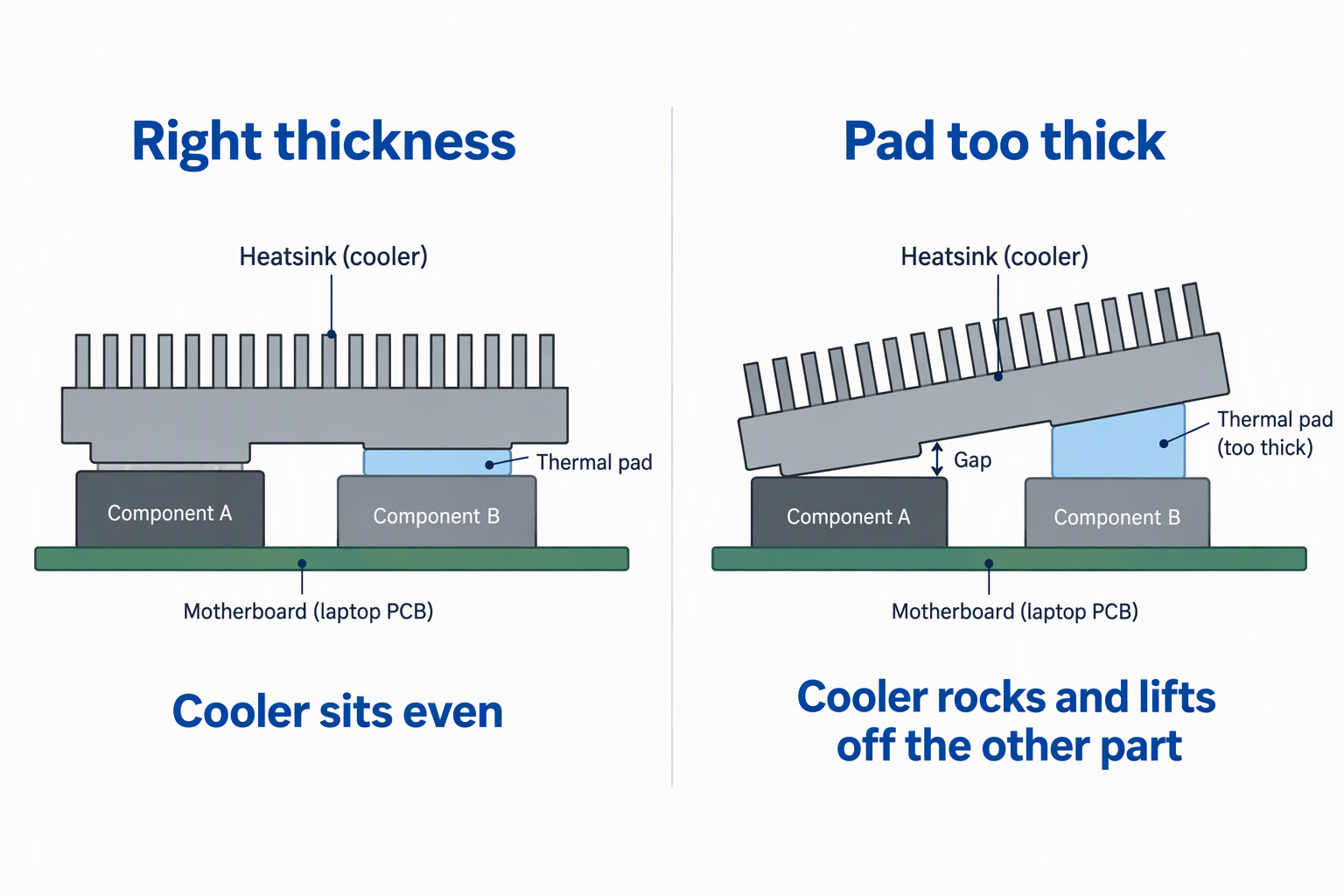
The original compressed thickness is the first reference. OwlTree covers 0.5 through 2.0 mm, while Frienda extends to 2.5 and 3.0 mm. Compare an undamaged area of the old pad or use the laptop’s exact service specification. A crushed edge can understate the original size.
Do not close the laptop if the cooler rocks or bows. A pad that is too thick may lift a shared heatsink away from another component. Keep screws sorted in a magnetic parts tray and tighten the assembly in its documented sequence so contact pressure develops evenly.
Use Thin Pads Only Where Contact Is Certain
A 0.5 mm pad reduces material thickness but bridges only a small gap. ARCTIC TP-3 and Minus Pad 8 0.5 mm are the dedicated thin choices. TP-3 emphasizes very low hardness and compression, while the Thermal Grizzly option emphasizes flexible, non-curing handling.
Inspect the contact impression after a careful test fit when the procedure permits. An untouched pad face can indicate no contact, while severe displacement can indicate excess thickness or pressure. A thermal imaging camera can show external heat patterns after assembly, but it cannot prove the hidden pad is compressed correctly.
Match Sheet Shape to the Components
Narrow 120 x 20 mm strips reduce waste on SSDs and component rows. The three Minus Pad 8 variants and JOYJOM use this shape. The shape is convenient for M.2 2280 devices and linear VRM layouts, provided the required contact is no wider than the strip.
Large 100 x 100 mm sheets allow irregular shapes and broad shields. OwlTree and Frienda can be cut around screw bosses, cable paths, and mixed component groups. Use clean cutting tools and avoid loose fragments near a PCB holder or helping hands that may already hold other repair work.
Keep Pads and Paste in Their Correct Roles
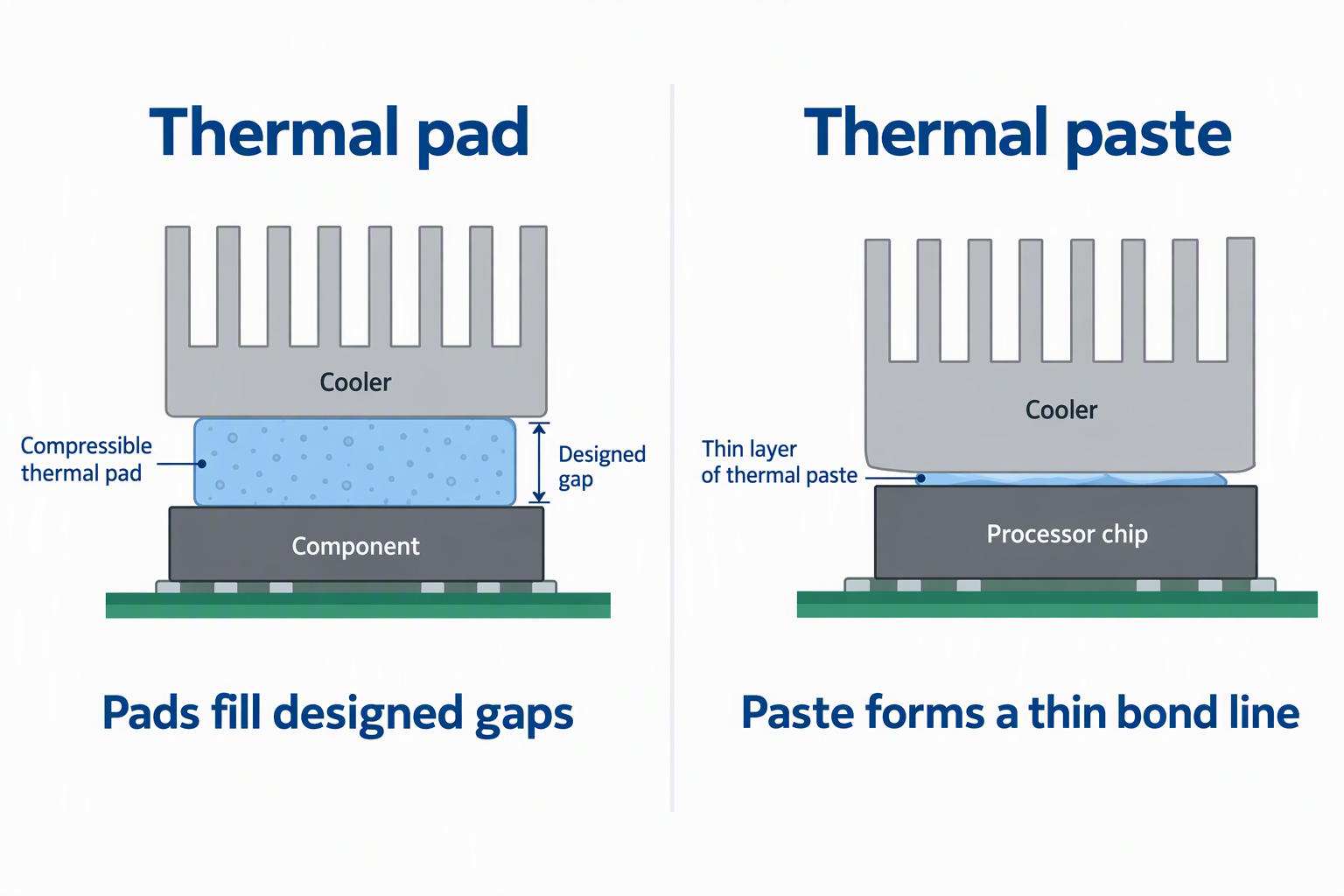
Pads fill designed gaps, and paste forms a thin bond line. The products here suit SSDs, VRMs, VRAM, chipsets, ICs, and other parts that contact a cooler through compressible material. A direct CPU or GPU interface normally needs thermal paste when that is how the laptop was built.
Do not use a seller’s broad compatibility list as permission to redesign the cooler. Outus describes its pads as a paste replacement, but the physical interface still decides. Preserve the original material type, position, and thickness unless exact service instructions say otherwise.
Protect the Repair Area During Installation
Remove protective film from both working faces. JOYJOM notes that its pink pads may carry blue or pink film, which can be easy to miss after cutting. Film left in place blocks the intended contact. Handle very soft TP-3 carefully so it does not stretch, fold, or pick up debris.
Keep thermal material away from unrelated repair consumables. Solder wick, desoldering pumps, and flux residue belong outside the clean fitting area. An ESD wrist strap addresses static handling, but it does not protect an exposed adhesive pad from dust or oils.
Frequently Asked Questions
Can I Stack Thermal Pads to Make a Thicker Layer?
A single pad in the correct thickness is the safer target. Stacking creates an extra interface and makes the final compression harder to predict. The OwlTree and Frienda kits provide separate thicknesses so the replacement can be cut from one matching sheet.
Do not combine layers merely to reach a guessed height. If the original pad is damaged beyond measurement, use exact service information or compare an intact matching location. Confirm that the cooler sits flat before completing reassembly.
Is a Higher W/mK Rating Always Better?
No, conductivity cannot compensate for missing contact. JOYJOM states up to 15 W/mK, while OwlTree, Outus, and Frienda state 6.0 W/mK. Those values come from individual listings and do not provide a shared test across all products.
Thickness, compression, and fit remain part of the thermal path. A correctly fitted pad touches both the component and cooler without distorting the assembly. Choose the necessary height first, then use conductivity and handling details to compare products that fit.
Are Thermal Pads Electrically Safe Around Laptop Components?
Every option here except the JOYJOM pack is described as electrically insulating or non-conductive. The JOYJOM details on this page do not state it. ARCTIC TP-3 is also listed as non-capacitive and free of metal particles. Those properties support use near exposed SSD, VRM, VRAM, and chipset components.
Electrical insulation does not make poor placement harmless. A loose offcut can interfere with a connector or prevent a shield from closing. Cut clean edges, remove unused fragments, and keep the pad inside the intended contact footprint.
Can I Use a Thermal Pad Instead of Paste on a Laptop CPU or GPU?
Only when the original cooler design specifies a pad. Pads are compressible gap fillers, while paste is intended for a very thin direct-contact bond line. Substituting one for the other can change cooler pressure and leave the chip without proper contact.
Preserve each interface separately on a shared heat-pipe assembly. A laptop may use paste on the CPU and GPU while using pads on VRAM and power components. Photograph the layout before removal and return each material to its original role.
How Much Thermal Pad Material Should I Buy?
Known repairs favor fixed strips. Two 120 x 20 mm Minus Pad 8 strips can be enough for a confirmed 0.5, 1.0, or 1.5 mm job, and JOYJOM supplies four strips across 1.0 and 1.5 mm. Measure the total footprint before cutting.
Mixed or repeated repairs favor large kits. OwlTree supplies four 100 x 100 mm sheets, Frienda supplies six, and Outus supplies 30 smaller pieces. More material is useful only when the available thicknesses match the laptops being serviced.
Final Recommendation
OwlTree’s four-thickness kit is the most practical starting choice for laptop repair because it combines 0.5, 1.0, 1.5, and 2.0 mm sheets with a large cutting area. Choose Frienda when 2.5 or 3.0 mm gaps may appear, ARCTIC TP-3 for a confirmed soft 0.5 mm layer, or the matching Thermal Grizzly Minus Pad 8 variant when the repair needs one exact strip thickness. JOYJOM is the option with the highest listed conductivity for verified 1.0 or 1.5 mm gaps.
Do not choose by conductivity alone. Record the original pad layout, match the thickness, cut the footprint cleanly, remove both protective films, and confirm that the heatsink closes without bowing. Whether the pad can do its intended job depends on those checks.