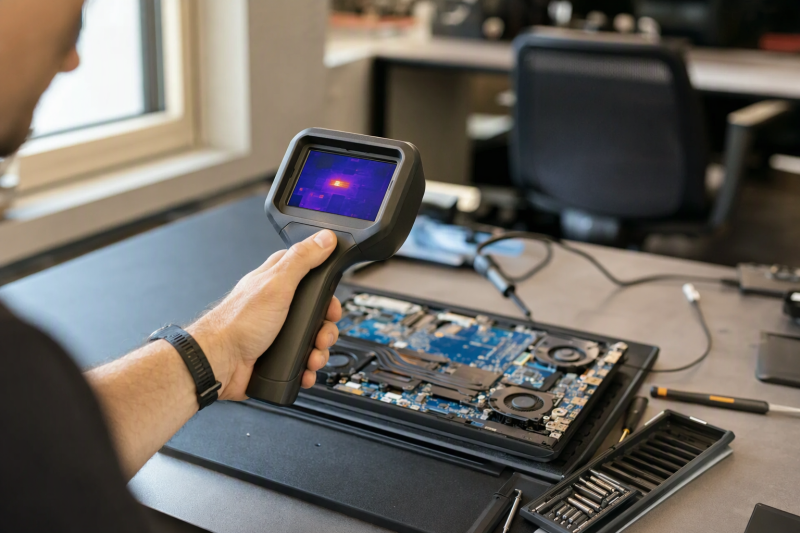
A thermal camera can make an unusual heat pattern visible, but it does not identify the failed component by itself. To troubleshoot electronics, you need a camera that focuses close enough to separate neighboring parts. You also need a stable view of the board, useful temperature tools, and software or a display that fits your bench.
The LAUREII AD16 ShortCam III is our best overall bench analyzer because it combines a stated 256 x 192 infrared image, visible and thermal modes, HDMI output, a folding stand, and PC and mobile analysis clients. Thermal Master’s P1 is the most portable phone-connected option, while the changlinyd ET14C and FOXWELL RT280 are self-contained handheld cameras. Skmiiloy’s MT-TMA03 is the pick for two-board comparison, and it also offers rectangular history analysis for repeatable fault isolation.
Read the published numbers carefully. A 320 x 240 screen is not necessarily a 320 x 240 detector, and software enhancement is not the same as native sensor resolution. The RT280, for example, has a stated 120 x 90 thermal source that is enhanced to 240 x 180, while its LCD is 320 x 240. This guide keeps those layers separate.
| Image | Product | Details | Check Price |
|---|---|---|---|
 | LAUREII AD16 ShortCam III | Best fit: Fixed PCB analysis bench Infrared image: 256 x 192 stated Output: HDMI; 4K display support stated Modes: Thermal; visible; fusion; quick check Mount: Twice-folding desktop base | Check Price on Amazon |
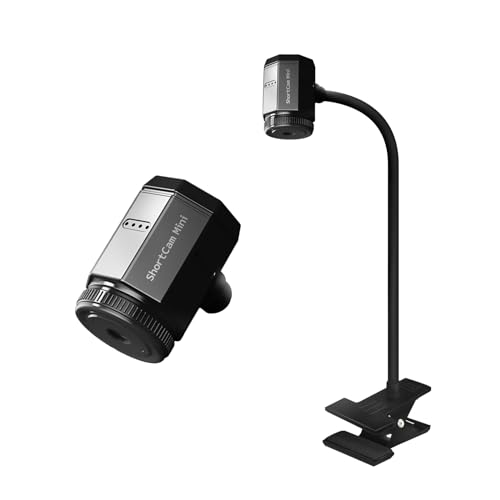 | LAUREII AS21 | Best fit: Compact clamp-on desktop use Infrared resolution: 256 x 192 Temperature range: -20°C to 550°C Viewing distance: 5 to 25 cm optimal stated Connection: USB 2.0 and USB-C; Windows | Check Price on Amazon |
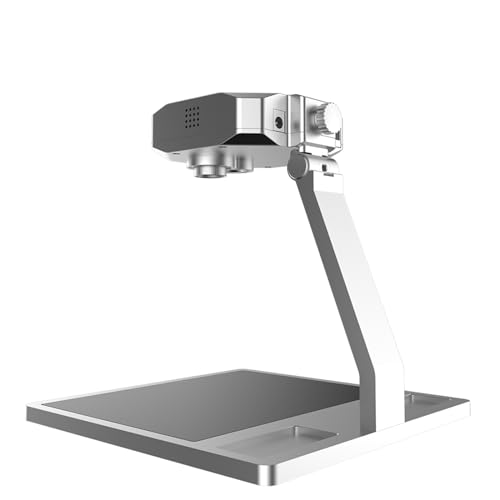 | LAUREII AD11 ShortCam | Best fit: Dual-optical component positioning Modes: Visible; thermal; dual optical Alarm: High temperature Body: All-metal aluminum alloy Infrared resolution: Not stated | Check Price on Amazon |
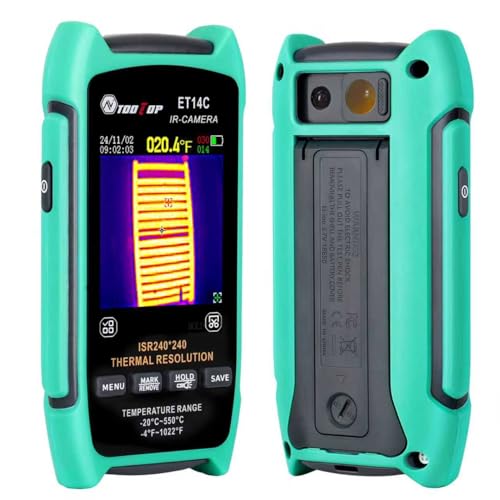 | changlinyd ET14C | Best fit: Standalone handheld macro inspection Thermal image: 240 x 240 stated Frame rate: 25 Hz Temperature range: -4°F to 1022°F Display: 2.8 inches | Check Price on Amazon |
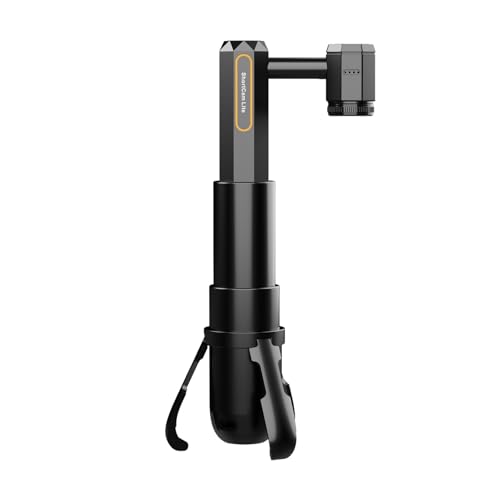 | LAUREII AS20 Lite | Best fit: Retractable desktop alternative Infrared resolution: 256 x 192 Lens: Detachable Body: Height adjustable; retractable Software: Dedicated desktop client stated | Check Price on Amazon |
 | Thermal Master P1 | Best fit: USB-C phone and computer use Thermal image: 160 x 120 source; 320 x 240 enhanced Frame rate: 25 Hz Temperature range: -20°C to 600°C Weight: 17 g | Check Price on Amazon |
 | FOXWELL RT280 | Best fit: Rugged handheld field inspections Thermal image: 120 x 90 source; 240 x 180 enhanced Display: 2.8-inch 320 x 240 LCD Frame rate: 25 Hz Protection: IP54; 6.6-foot drop stated | Check Price on Amazon |
 | Skmiiloy MT-TMA03 | Best fit: Side-by-side board comparison Thermal image: 256 x 192 stated Frame rate: 25 Hz Analysis: 3D; rectangular history; double-board Included: Macro lens; adjustable metal stand | Check Price on Amazon |
How we compared thermal cameras for board work
All eight products have a New offer, and each one lists electronics, PCB, electrical, mechanical, vehicle, or equipment troubleshooting among its uses. We prioritized infrared image detail, close-focus or macro support, frame rate, temperature range, measurement settings, mounting, display path, software, and storage. We also prioritized clear distinctions between sensor, enhanced, and screen resolution.
A hotspot is a clue that must be interpreted within a safe diagnostic procedure. In this guide, seller claims about fault speed, temperature accuracy, image clarity, and durability are attributed to their listings. Powering an exposed board can introduce electrical and thermal hazards, so the device’s service procedure and your test environment come before any camera feature.
1. LAUREII AD16 ShortCam III — Best Overall PCB Bench Analyzer
Our take: The AD16 ShortCam III is the one to buy if you want a fixed bench system, and it is the most complete one here. LAUREII states a 256 x 192 infrared image and 4K HDMI display output, so the analyzer can feed a larger monitor. The monitor’s resolution is not the thermal detector’s resolution.
It supports thermal, visible, dual-light fusion, and one-click quick-check modes. The listing presents those modes as a way to observe temperature rise around small leakage components on phone, computer, and vehicle motherboards. HDMI output also allows a repair station to switch between microscope and thermal views on a display, though the exact input-switching hardware is not described.
The all-metal aluminum-alloy body sits on a base that folds twice for storage. PC and mobile app clients support analysis, simultaneous device connections, and review of fault records. The supplied details do not state temperature range, frame rate, measurement accuracy, or close-focus distance, so we recommend it for the integrated bench workflow, not for the most complete radiometric specification.
Pros
- The stated 256 x 192 infrared image is suited to viewing heat patterns at the component level.
- HDMI output gives you a larger 4K-capable display path at the bench.
- You get several board views from the thermal, visible, fusion, and quick-check modes.
- The folding base and metal body make it a dedicated desktop unit.
Cons
- Temperature range, accuracy, frame rate, and focus distance are not stated.
- A complete bench setup still requires a compatible HDMI display or client device.
2. LAUREII AS21 — Best Compact Clamp-On Desktop Camera
Our take: The AS21 is the pick for a crowded electronics station where a large freestanding base will not fit. LAUREII specifies a detachable 34 mm infrared lens that sits on a 30 cm gooseneck with a clamp-on support. The gooseneck and clamp allow the camera head to approach a board without a large freestanding base.
LAUREII lists a 256 x 192 infrared resolution, a 25 by 18-degree field of view, and an optimal viewing distance of 5 to 25 cm. The temperature range is -20 to 550 degrees Celsius, or -4 to 1022 degrees Fahrenheit. Turn the focus ring to change the focal distance when you move between small PCBA work and a broader inspection.
The lens assembly is listed at 36 grams, and the body at 200 grams. The camera connects by USB 2.0 and USB-C to software for Windows 7, 10, and 11, and it requires a driver installation despite the plug-and-play wording. Mac compatibility is not stated.
Pros
- The 256 x 192 infrared resolution is paired with an adjustable-focus lens.
- The 5 to 25 cm optimal viewing range tells you where to place the camera.
- The 30 cm gooseneck and clamp fit a desk with little open space for a base.
- Windows 7, 10, and 11 compatibility is explicitly listed.
Cons
- Driver installation is required before the USB connection is usable.
- The supplied record does not state macOS support.
- The lens and body have separate 36 g and 200 g weight figures.
3. LAUREII AD11 ShortCam — Best for Dual-Optical Positioning
Our take: The AD11 is for a bench that needs to line up visible board features with thermal data. LAUREII describes dual-spectral interweaving positioning and dual-optical fusion intended to place temperature information over chips, resistors, and capacitors as it happens.
Display modes include visible, infrared thermography, and dual-optical interlacing, plus a one-click quick-check mode. A high-temperature alarm and software recording of motherboard faults are also listed. These functions are useful when you need to return from a heat pattern to a physical component location.
The machine is built from all-metal aluminum alloy. LAUREII provides a download route for the ShortCam PC client but does not state infrared resolution, frame rate, temperature range, accuracy, field of view, or working distance in the supplied record. Choose it for dual-view positioning, and do not assume specifications from another ShortCam model.
Pros
- The visible, thermal, and dual-optical modes help you align heat with board components.
- The high-temperature alarm supports anomaly monitoring during inspection.
- Software can record motherboard fault observations.
Cons
- Infrared resolution, frame rate, temperature range, accuracy, close-focus distance, and operating-system compatibility are not stated in the supplied details.
4. changlinyd ET14C — Best Standalone Handheld Macro Camera
Our take: The ET14C is the strongest self-contained choice for technicians who do not want a phone or computer attached during inspection. It has a 2.8-inch screen, a switchable macro camera, and a stated 240 x 240 thermal image at 25 Hz.
The temperature range runs from -4 to 1022 degrees Fahrenheit, and five color palettes adjust thermal contrast. The listing identifies hot spots, cold spots, and center points and positions the macro mode for electronics as well as larger equipment, vehicles, water, and electrical work. The listing does not publish temperature accuracy or thermal sensitivity.
A built-in rechargeable battery is rated for up to ten hours, while USB-C supports charging and data transfer. Internal storage is described as holding more than 20,000 images and ten hours of video. Exact storage capacity, ingress rating, and drop-test height are not stated, so the case for its portability rests on its battery and capture features, not on a quantified ruggedness standard.
Pros
- A 240 x 240 thermal image and 25 Hz rate are stated.
- The 2.8-inch screen works without a connected phone or computer.
- A switchable macro camera is intended for component inspection.
- Battery life is listed at up to ten hours.
Cons
- Temperature accuracy, thermal sensitivity, and quantified drop or environmental ratings are not published.
- Storage capacity is described by media count rather than gigabytes.
5. LAUREII AS20 Lite — Best Retractable Desktop Alternative
Our take: The AS20 Lite is the simpler LAUREII desktop option for buyers who want a retractable stand and a detachable infrared lens without the AD16’s HDMI and visible-light feature set. Its infrared resolution is listed at 256 x 192.
LAUREII describes an optimized algorithm and one-click diagnosis mode for locating PCBA short-circuit or leakage heat. The detachable lens and height-adjustable body can be adapted to different projects, and the stand retracts for storage. The lens, body, and stand claims describe workflow, not published focus-distance or field-of-view figures.
The camera connects to a desktop or laptop and uses dedicated client software. The listing calls it plug and play but does not identify supported operating systems, connector type, frame rate, temperature range, measurement accuracy, or lens working distance. It suits a compact bench only after you confirm software compatibility.
Pros
- The stated 256 x 192 infrared resolution matches the higher-detail LAUREII options.
- A detachable lens and retractable height support different bench layouts.
- The body retracts for storage after a repair session.
Cons
- Temperature range, accuracy, frame rate, focus distance, and operating-system and connector compatibility are not stated.
- No HDMI output or visible-light mode appears in the supplied details.
6. Thermal Master P1 — Best USB-C Phone and Computer Camera
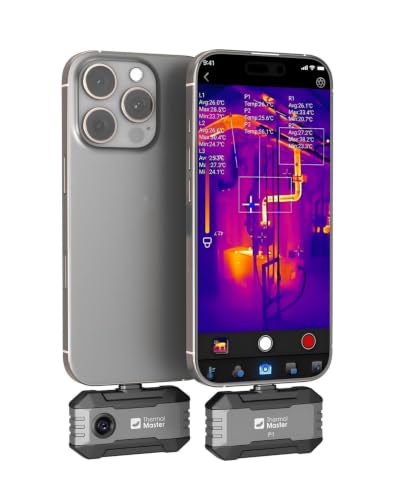
Our take: The P1 is the one to carry in a portable troubleshooting kit. It is the smallest device in the group, which Thermal Master lists as measuring 2.32 x 1.06 x 0.68 inches and weighing 0.62 ounce, and it connects to USB-C iOS, Android, and Windows devices through the Thermal Master app.
The listing describes X3 technology that enhances a 160 x 120 source to a 320 x 240 thermal image. The software toolset is detailed. It includes a 25 Hz rate, a 0.04-degree-Celsius detectable temperature difference, 15X digital zoom, alarms, isotherm mode, and adjustable emissivity, ambient-temperature, and distance settings. Do not read the enhanced number as a native 320 x 240 detector claim.
Temperature coverage is -20 to 600 degrees Celsius, or -4 to 1112 degrees Fahrenheit, with stated accuracy of plus or minus 3.6 degrees Fahrenheit. Power draw is listed at 0.32 watt, which supports five to eight hours of use from a host. A zipper case and a 50 cm extension cable are included. Lightning iPhones require a separately sold adapter.
Pros
- The 17 g body is small enough for a mobile phone or laptop troubleshooting kit.
- A 25 Hz rate and 0.04°C sensitivity are clearly published.
- Adjustable emissivity, distance, and ambient-temperature settings aid measurement setup.
- USB-C support covers iOS, Android, and Windows devices.
Cons
- The 320 x 240 figure is software-enhanced from a stated 160 x 120 source.
- Lightning iPhones require a separately sold adapter.
- Continuous use draws power from the connected host device.
7. FOXWELL RT280 — Best Rugged Handheld Camera
Our take: The RT280 is the field-ready handheld option for technicians who divide time between electronics, electrical panels, HVAC, vehicles, and building inspections. FOXWELL rates it IP54 and for 6.6-foot drops, adds a laser pointer and LED light, and provides a 2.8-inch 320 x 240 LCD.
The thermal source is stated at 120 x 90 and enhanced through TISR to an effective 240 x 180 image at 25 Hz. The effective thermal figure is separate from the LCD’s 320 x 240 pixel count. The 50 by 38-degree field of view, nine palettes, and high, low, and center-point readings suit broad inspection.
The temperature range is -4 to 1022 degrees Fahrenheit, with stated accuracy of plus or minus 3.6 degrees Fahrenheit or two percent. Eight gigabytes of eMMC storage hold more than 20,000 images and videos. Windows software provides point, line, area, 2D, 3D, and report tools, but Mac compatibility is explicitly excluded.
Pros
- IP54 protection and a 6.6-foot drop rating suit field use.
- A 25 Hz image, nine palettes, laser, and LED form a complete handheld toolset.
- The 8 GB storage is stated to hold more than 20,000 images and videos.
Cons
- The 240 x 180 thermal image is enhanced from a 120 x 90 source.
- Windows analysis software is not compatible with Mac.
- A broad handheld field of view may show less component detail than a macro bench lens.
8. Skmiiloy MT-TMA03 — Best for Side-by-Side Board Comparison
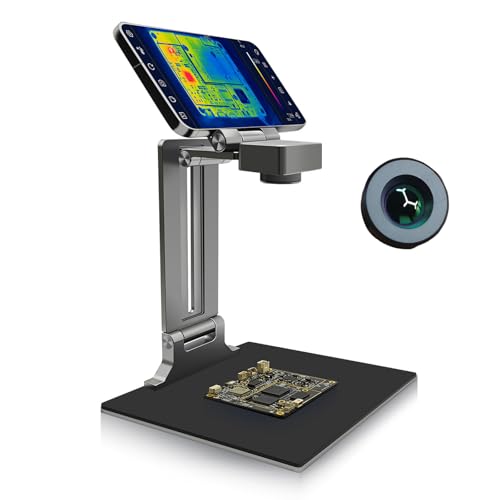
Our take: Skmiiloy’s MT-TMA03 is the pick for anyone who needs to compare two boards, because it offers the most explicit comparison workflow for electronics repair. Its double-board mode places a known-good and faulty board on opposite sides of a dividing line so their thermal behavior can be viewed under the same setup.
The analyzer lists 256 x 192 thermal imaging at 25 Hz, plus a 3D view for temperature variation. Rectangular analysis compares color changes between areas and displays a temperature curve within the selected frame. The software modes can organize observations, but they do not by themselves prove the cause of a hot component.
An adjustable heat-resistant metal stand lets you change measurement distance and rotation. The package includes a macro lens, data cable, manual, and USB disk. The supplied record does not state temperature range, accuracy, operating-system support, field of view, or focus limits, so confirm the analysis environment before choosing it for a fixed bench.
Pros
- Double-board mode supports side-by-side comparison under one setup.
- A stated 256 x 192 thermal image runs at 25 Hz.
- Rectangular analysis can display temperature history inside a selected area.
- An adjustable metal stand and macro lens are included.
Cons
- Temperature range, accuracy, operating-system compatibility, and focus limits are not stated.
Buying Guide: Choosing a Thermal Camera for Electronics
Separate detector, enhanced image, and display resolution
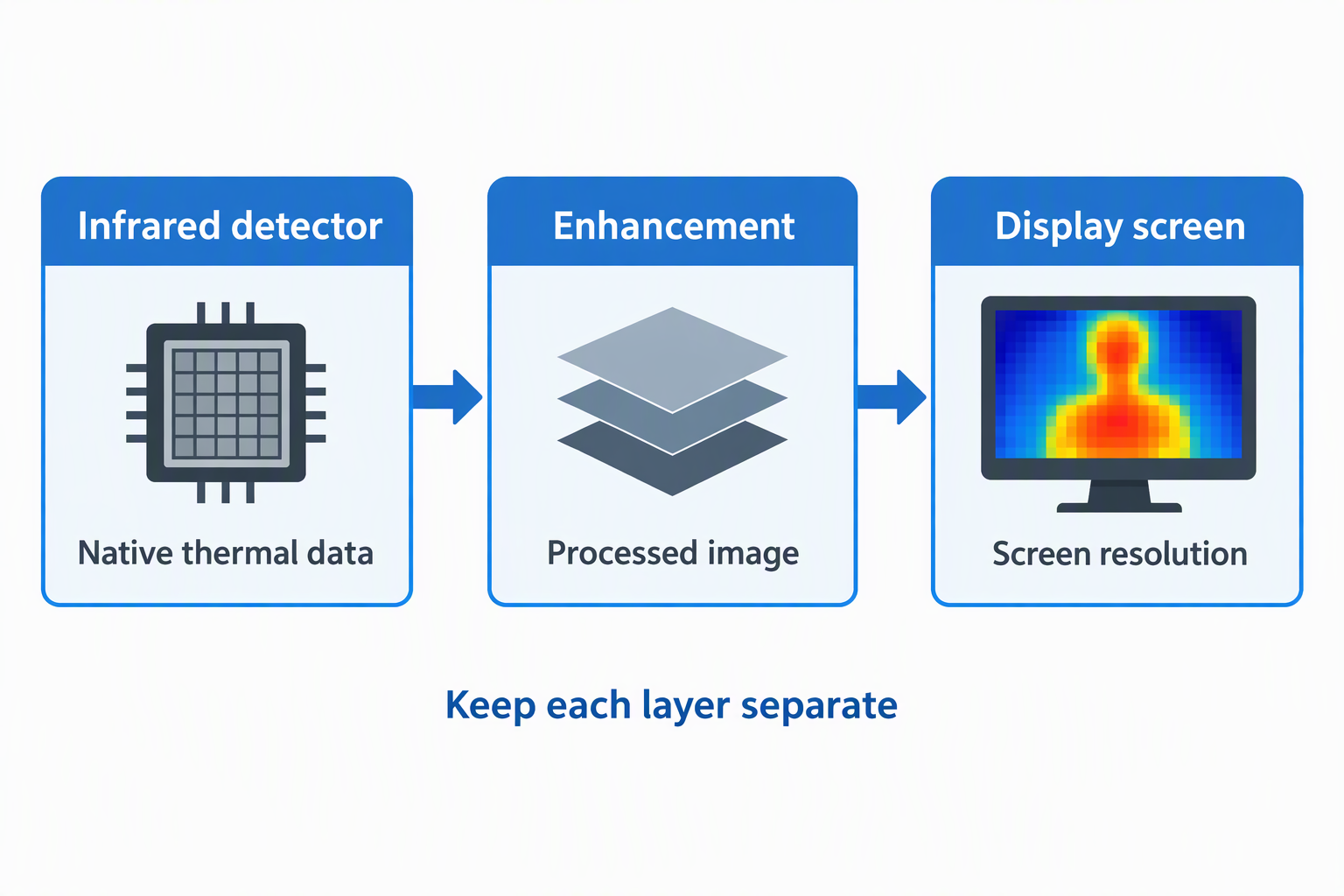
The infrared source determines how much native thermal data the image starts with. LAUREII AD16, AS21, and AS20 Lite list 256 x 192 infrared resolution, while the ET14C states 240 x 240. Skmiiloy lists 256 x 192 at 25 Hz. The infrared figures are more directly comparable than the pixel count of a connected monitor.
Enhancement and screen numbers need their own labels. Thermal Master says P1 X3 processing raises 160 x 120 to 320 x 240. FOXWELL says TISR raises 120 x 90 to 240 x 180 while its LCD is 320 x 240. LAUREII’s AD16 can output to a 4K display, but the thermal image is stated at 256 x 192. If you keep those layers separate, a screen specification does not become an invented sensor claim.
Prioritize close-focus and stable board positioning
Small components need a suitable working distance or macro arrangement. LAUREII gives the AS21 a 5 to 25 cm optimal range and adjustable focus. ET14C includes a switchable macro camera, and Skmiiloy supplies a macro lens. The AD16 uses a dedicated stand, while the AS20 Lite has a retractable, height-adjustable body.
A stable board is as important as a stable camera. A PCB holder can secure the board, and helping hands can hold wires or small parts. Do not balance a powered board on a loose tool or let clips cover the heat pattern being examined.
Choose desktop, handheld, or host-connected operation
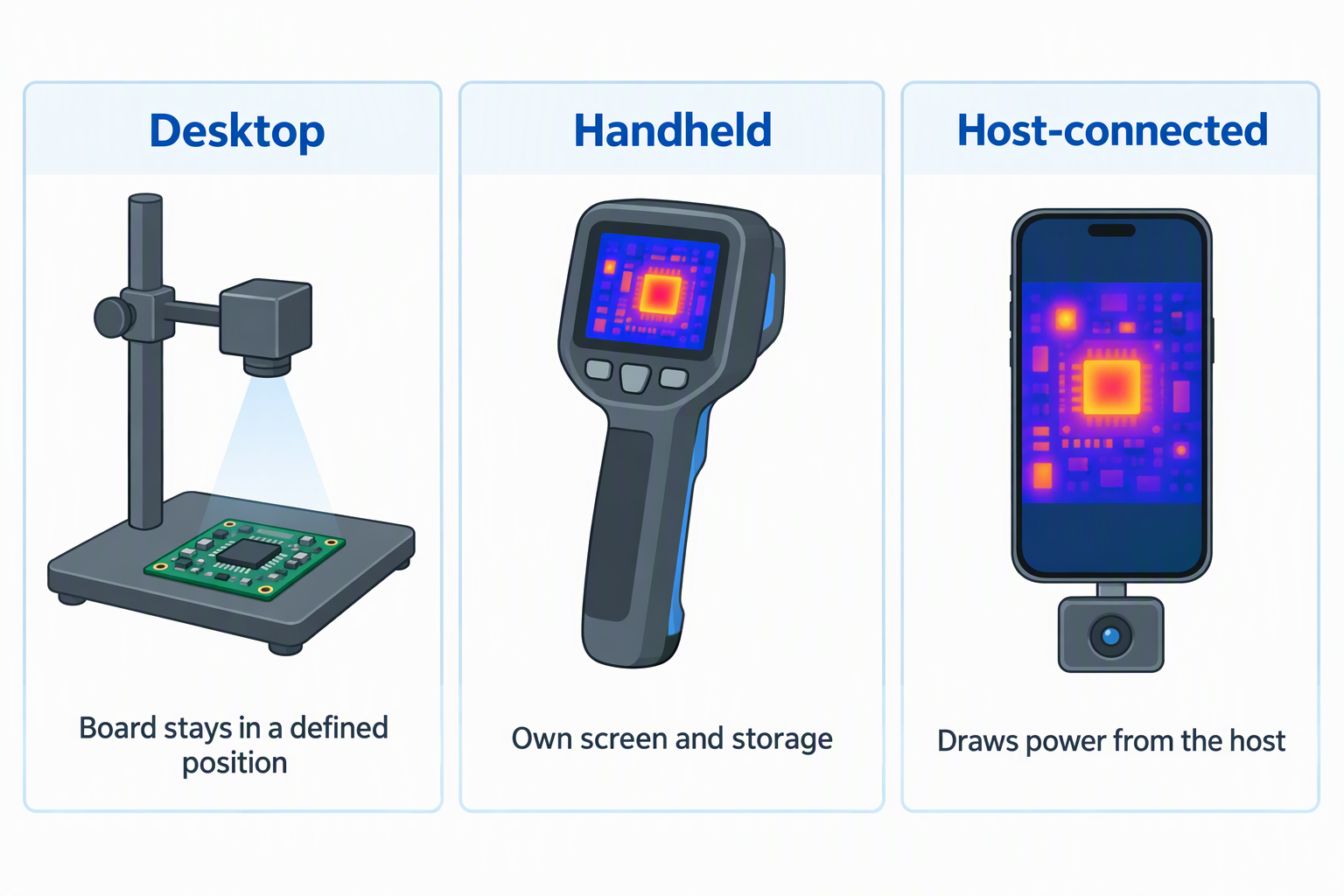
Desktop analyzers are a good fit for repeatable component work. AD16, AD11, AS20 Lite, AS21, and MT-TMA03 are organized around stands, clamps, computer clients, or HDMI output. They fit a bench where the board stays in a defined position and analysis records can be reviewed on a larger screen.
Handheld and USB-C cameras are the portable choice. ET14C and RT280 have 2.8-inch screens and internal storage, while P1 relies on an iOS, Android, or Windows host. A host-connected unit is tiny but draws power from the host. Keep its extension lead away from solder wick and a desoldering pump during hot work.
Compare temperature tools, not just the maximum range
A temperature range is useful only when it includes the expected target. AS21 covers -20 to 550 degrees Celsius, P1 reaches -20 to 600 degrees, and ET14C and RT280 cover -4 to 1022 degrees Fahrenheit. The remaining products do not state a range in the supplied records.
Settings and alarms make measurements easier to interpret. P1 publishes adjustable emissivity, ambient-temperature, and distance controls plus isotherms and alarms. RT280 provides high, low, and center points with high and low alarms. AD11 includes a high-temperature alarm. You still need additional testing to turn a heat pattern into a confirmed electrical diagnosis, whatever feature the camera has.
Keep thermal inspection inside a safe repair workflow
A camera often observes equipment while it is operating, which changes the risk. Follow the service procedure, maintain clearances, and use appropriate ESD controls when working around exposed electronics. An ESD wrist strap needs a confirmed ESD ground and should never be connected to mains power.
Keep loose metal and tools out of the powered area. A magnetic parts tray and USB-C electric screwdriver are useful during disassembly, but you should move them away before a powered thermal observation if the service procedure requires clear space. A removed drive belongs in an appropriate M.2 SATA enclosure outside the powered board area.
Frequently Asked Questions
Can a thermal camera identify a short circuit by itself?
It can reveal an unusual temperature pattern, but that pattern is evidence to investigate rather than a complete diagnosis. LAUREII and Skmiiloy market their analyzers for leakage and short-circuit inspection, and several products provide alarms or comparison tools.
Heat can arise from normal load, a failing part, board layout, nearby components, or the test conditions. Compare the observation with schematics, electrical measurements, a known-good board when available, and the device’s service information before replacing parts.
Is 320 x 240 always better than 256 x 192?
Only when the numbers describe comparable stages of how the image is made. P1’s 320 x 240 value is enhanced from 160 x 120. The RT280 enhances 120 x 90 to 240 x 180 and displays the image on a 320 x 240 LCD. A screen number cannot be compared directly with LAUREII’s 256 x 192 infrared figure.
Close focus, optics, field of view, thermal sensitivity, software, and mounting also affect how useful a camera is at the component level. Read the native or source resolution first, then the enhancement and display figures.
Do I need a macro lens for circuit boards?
Macro support is useful when neighboring components occupy only a small part of the camera’s normal view. ET14C includes a switchable macro camera, Skmiiloy supplies a macro lens, and AS21 publishes a 5 to 25 cm optimal viewing range with adjustable focus.
A camera without a stated macro range may still work at some board distances, but the supplied record does not establish that capability. Confirm the closest focus and field of view for the component sizes on the bench rather than assuming high resolution alone solves the distance problem.
Is a phone-connected camera or handheld camera easier to use?
A phone-connected unit is smaller, while a handheld camera is self-contained. The 17 g P1 works with USB-C iOS, Android, and Windows devices and includes a 50 cm extension. ET14C and RT280 put a 2.8-inch screen and storage in the camera body.
A phone-connected unit uses host power and depends on app compatibility. Handheld models add weight but keep the phone free and let you store inspections. A desktop analyzer is often better when a board stays on one bench for repeated comparison.
Which camera has the best software for reports?
FOXWELL publishes the clearest report feature set. Its Windows software supports point, line, and area analysis, 2D and 3D views, and automatic report generation. It is explicitly not Mac compatible.
Skmiiloy focuses on rectangular temperature history, 3D viewing, and double-board comparison. LAUREII products use dedicated client software, while P1 uses the Thermal Master app. The supplied records do not provide enough detail to call their export formats equivalent.
Final recommendation
The LAUREII AD16 ShortCam III is the best overall electronics-bench pick because its 256 x 192 infrared image, HDMI output, dual-light modes, folding stand, and software clients work together as a board-analysis station. AS21 is the better compact LAUREII option when a clamp, gooseneck, and published 5 to 25 cm viewing range suit the desk.
Choose ET14C for standalone macro inspection and long battery life, P1 for a tiny USB-C phone or computer accessory, RT280 for IP54 handheld field use, or Skmiiloy for side-by-side board comparison. Pick the camera whose optics, mounting, and analysis path fit your exact troubleshooting method.