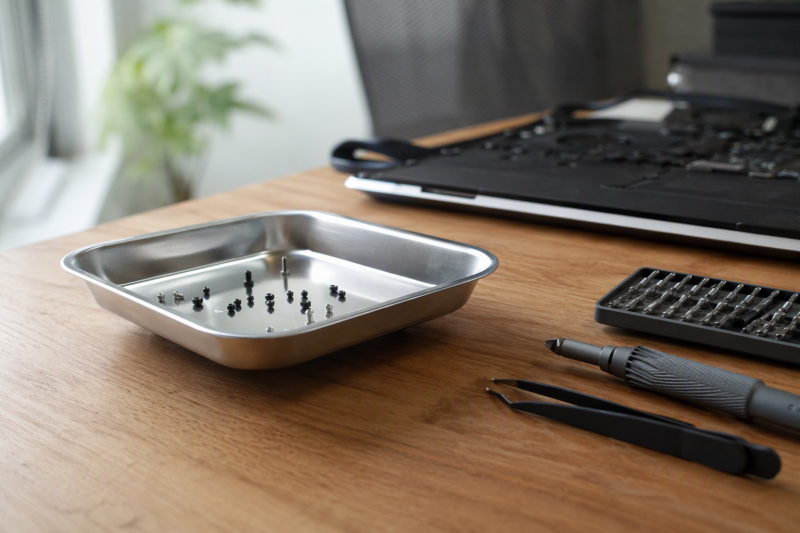
A laptop teardown can stall over one screw that rolls under a mat or gets mixed with a nearly identical fastener from another assembly step. A good parts tray gives those screws a defined place while you work. The useful choice is the tray whose size, divisions, material, and base suit the way you disassemble computers, and that tray is not always the one with the strongest magnet.
For most laptop benches, we would start with a compact divided tray such as the RcThjia LSTP-Blue or Fraizoe RC Magnetic Screw Organizer. Both use three zones in a footprint just under four inches square, which is a sensible balance when a repair produces several screw lengths but the work surface is already crowded. The iFixit Anti-Static Project Tray takes a different route. It is not presented as a magnetic tray, but its 20 small compartments and anti-static PET construction make it the strongest fit here when separation and static-conscious handling take priority over magnetic grip.
The larger stainless dishes suit a different bench. The Titan 11061 is a simple 4-1/4-inch round tray with a covered magnetic base, while the HORUSDY set adds three round trays and one much larger rectangular tray. Those shapes make more sense for tools, brackets, and mixed hardware than for preserving a precise map of a laptop’s screw positions. If the rest of your repair kit is still taking shape, our guides to USB-C electric screwdrivers and M.2 SATA enclosures cover two common tools used beside a parts tray.
| Image | Product | Details | Check Price |
|---|---|---|---|
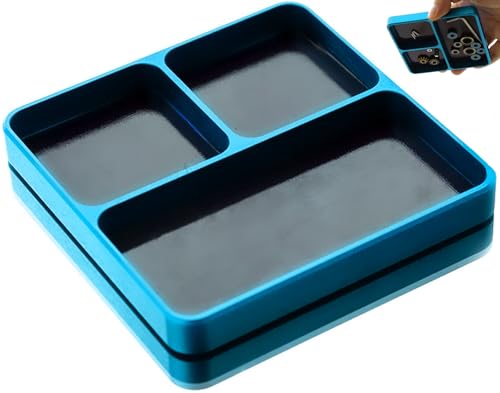 | RcThjia LSTP-Blue | Best fit: Compact divided laptop-repair bench Size: 98.7 x 98 x 11 mm Compartments: 3 Material: Aluminum alloy Magnetic design: Medium hold stated | Check Price on Amazon |
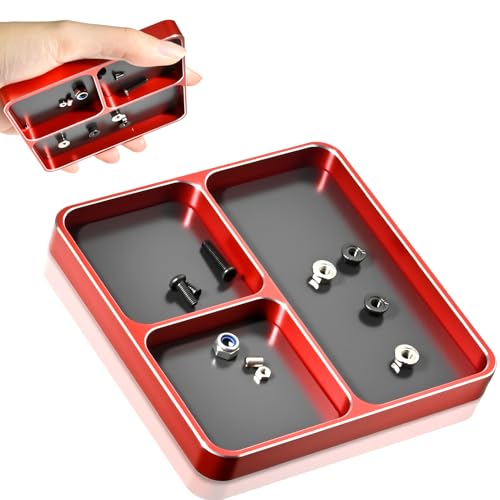 | Fraizoe RC Magnetic Screw Organizer | Best fit: Sorting three screw groups Size: 3.9 x 3.9 x 0.4 inches Compartments: 3 Material: Aluminum alloy Magnetic design: Medium magnets stated | Check Price on Amazon |
 | Huyopu Magnetic Parts Tray | Best fit: Compact divided alternative Size: 3.86 x 3.86 x 0.43 inches Compartments: 3 Material: Aluminum alloy Magnetic design: Built-in magnet | Check Price on Amazon |
 | HOPLEX Universal Aluminium RC Screw Tray | Best fit: Measuring RC-style hardware Size: Not stated Compartments: Not stated Material: Aluminum alloy Extra feature: Screw size and length measurement stated | Check Price on Amazon |
 | Titan 11061 Mini Magnetic Parts Tray | Best fit: Simple round catch dish Size: 4-1/4-inch dish Compartments: Open dish Material: Stainless steel Base: Rubber-covered magnet | Check Price on Amazon |
 | iFixit Anti-Static Project Tray | Best fit: Anti-static compartment organization Compartments: 20 small; 2 large Material: Anti-static PET Magnetic design: Not stated as magnetic Warranty: Lifetime stated | Check Price on Amazon |
 | YGDMD Collapsible Magnetic Parts Tray | Best fit: Mobile and folding repair kits Folded thickness: 0.80 inches Magnetic base: 3.58 x 3.58 inches; double-sided Material: Silicone Compartments: Open tray | Check Price on Amazon |
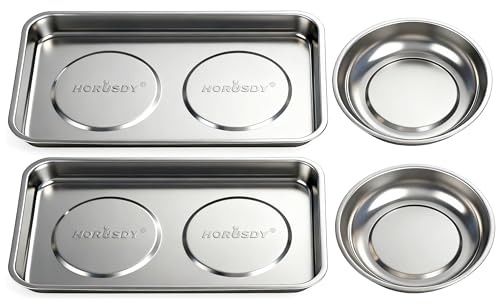 | HORUSDY 4-Piece Magnetic Parts Tray Set | Best fit: Multi-device repair benches Pieces: 4 Round trays: Three; 4.5 x 4.5 inches Rectangular tray: One; 9.5 x 5.5 inches Material: Stainless steel | Check Price on Amazon |
How we chose the best fit
Every product below has a New offer and a stated use for retaining or organizing small repair parts. We favored compact footprints, divided interiors, protected magnetic bases, or explicit electronics-oriented materials because those details directly affect a laptop bench. We did not treat a large automotive dish as automatically better than a small electronics tray.
The list also includes one deliberate non-magnetic alternative. The iFixit tray belongs in this comparison because laptop repair can involve nonferrous pieces and static-sensitive components that a magnetic dish does not organize well. Its role is clearly labeled so buyers looking specifically for magnetic retention can choose one of the other seven products.
1. RcThjia LSTP-Blue — Best Overall for a Compact Laptop Bench
Our take: The RcThjia LSTP-Blue combines a compact square body with three compartments, making it the most balanced choice for a bench where screw separation counts as much as magnetic retention. Its listed dimensions are 98.7 by 98 by 11 mm, so it occupies little more than a four-inch square while still giving you separate zones for different fastener groups.
RcThjia describes an aluminum-alloy body made with CNC machining and says the material is rust resistant. That rigid, low-profile construction is better suited to a fixed repair station than a flexible collapsible bowl. The three sections can keep bottom-cover screws away from internal brackets and heat-sink hardware, although they do not provide enough cells to preserve every teardown step independently.
The listing specifically names cell-phone repair and electronic equipment parts alongside RC work. Those uses are a closer match to laptop screws than a tray intended only for large automotive hardware. The magnet is described as medium strength, so the supported reason to choose this model is its useful combination of holding and sorting. The listing makes no claim that it has the strongest grip in the group.
Pros
- Three compartments separate different screw sizes without consuming much bench space.
- The 98.7 x 98 x 11 mm body fits beside a laptop and driver set.
- Aluminum-alloy construction is listed as rust resistant for repeated bench use.
- Electronics and phone repair are among the uses named by the listing.
Cons
- Three zones cannot preserve the position of every screw in a complex teardown.
- The listing describes medium magnetic holding rather than quantifying pull strength.
2. Fraizoe RC Magnetic Screw Organizer — Best for Sorting Three Screw Groups
Our take: Fraizoe RC’s tray is another three-zone aluminum option, but its listing gives a size that suits a laptop bench, 3.9 x 3.9 x 0.4 inches. That shallow square can sit near the hinge side of a computer without crowding the repair area, and its three compartments provide quick separation for screws, bolts, sockets, and pins.
Fraizoe RC describes anti-roll edges and medium magnets intended to retain micro components during phone disassembly and electronic PCB work. Those stated uses align well with the tiny steel screws found in many notebooks. The company also identifies the aluminum alloy as rust proof and says the CNC-crafted body is intended for long-term use.
This tray is a practical pick when your teardown method needs broad groups rather than a labeled map. You might devote one section to the bottom cover, another to the battery or storage area, and the third to brackets. For a repair with many screw lengths, however, the three sections still demand careful notes or staged reassembly.
Pros
- The 3.9-inch square footprint is compact enough for a crowded laptop bench.
- Three precision compartments help keep broad hardware groups from mixing.
- Anti-roll edges and medium magnets are stated for micro-component handling.
Cons
- The three-zone layout is less granular than a many-compartment organizer.
- No magnetic pull-force figure is supplied for comparing grip directly.
- The tray does not provide printed labels for tracking teardown positions.
3. Huyopu Magnetic Parts Tray — Best Compact Divided Alternative
Our take: Huyopu offers nearly the same compact format as the leading divided picks, with a listed size of 3.86 x 3.86 x 0.43 inches and three separate compartments. It is a good alternative when you want a rigid, portable organizer that can move between a workbench and a toolbox without taking up much room.
The listing describes a built-in powerful magnet for screws, nails, bolts, sockets, and pins. Its aluminum-alloy body is presented as impact resistant, resistant to bending and deformation, wear resistant, and rust proof. These qualities come from the seller, not from measured durability results, but they establish the intended use better than a generic plastic sorting dish would.
Huyopu explicitly names cell-phone disassembly and electronic-device repair among its applications. The three compartments can keep washers and pins away from common screws, and the rigid walls give each group a clear boundary. Skip this tray if you need a layout that mirrors every laptop component, since three broad zones remain its organizing limit.
Pros
- A 3.86 x 3.86-inch footprint leaves most of the bench open for the laptop.
- Three compartments separate bolts, washers, pins, or different screw groups.
- The aluminum-alloy body is listed as wear resistant and rust proof.
- Electronics maintenance is an explicitly stated application.
Cons
- Only three compartments are available for tracking a multi-stage repair.
- The claimed powerful magnet has no published holding-force value.
4. HOPLEX Universal Aluminium RC Screw Tray — Best for Measuring RC-Style Hardware
Our take: The HOPLEX tray stands out because its listing says the tray can measure screw size and length as well as hold small metal parts. That feature can be useful when a bench handles mixed repair work and you need to compare similar fasteners before returning them to a device.
HOPLEX describes a strong magnetic attachment for screws, nuts, drill bits, nails, and washers. It also says the aluminum-alloy tray has high hardness and resists deformation or damage. The primary stated use is maintenance of RC vehicles, airplanes, helicopters, ships, and tanks, so its fit for laptop work comes from the small-hardware functions rather than an electronics-specific design claim.
Amazon lists the tray at 5.9 x 5.5 x 1.9 inches but does not explain the scale markings in detail. That missing scale information makes it harder to judge how precisely it can distinguish laptop screw lengths before purchase. Choose it for the stated measurement feature, but keep a separate teardown map when screw location is critical.
Pros
- The tray is stated to help measure both screw size and screw length.
- Strong magnetic attachment is listed for several types of small steel hardware.
- Aluminum-alloy construction is described as hard and resistant to deformation.
Cons
- Amazon lists dimensions, but the supplied product details do not explain the usable interior layout.
- The listing focuses on RC maintenance rather than laptop-specific workflows.
- Details about the measurement markings and their precision are not supplied.
5. Titan 11061 Mini Magnetic Parts Tray — Best Simple Round Dish
Our take: Titan’s 11061 is the uncomplicated choice: a 4-1/4-inch stainless steel dish with a rubber-covered magnetic base. There are no internal dividers or specialized electronics features. It is simply a compact place to drop screws, hardware, and fasteners while the magnet helps keep them in the dish.
The covered base is a meaningful detail for a repair bench because Titan says it prevents scratching. The magnet also lets the dish attach to a ferrous metal surface, including upside down. On a laptop desk, the magnet can allow placement on the side of a steel tool cabinet, although the most predictable arrangement is still a stable, visible spot on the work surface.
The round open dish favors speed over classification. It works well for a short job with one common screw type or as a temporary landing place for a removed bracket. It is a weaker choice for a full teardown with several screw lengths because every piece shares the same undivided bowl.
Pros
- The 4-1/4-inch stainless dish has a simple, compact bench footprint.
- A rubber-covered magnetic base is intended to prevent scratches.
- The tray can attach to ferrous surfaces sideways or upside down.
- Its open shape accepts small tools as well as loose fasteners.
Cons
- The undivided dish allows different screw groups to mix together.
- Stainless construction is not presented as an anti-static electronics material.
6. iFixit Anti-Static Project Tray — Best Anti-Static Compartment Alternative
Our take: The iFixit Anti-Static Project Tray is the outlier in this guide because its listing does not claim magnetic retention. Instead, it uses anti-static PET and provides 20 small compartments plus two large compartments. It is the better fit when a repair requires many labeled groups or when you prefer a static-conscious organizer over a magnetized dish.
The 20 small cells can separate screws by teardown stage far more precisely than the three-zone aluminum trays. The two larger spaces are intended for tools, screwdrivers, and smartphones, and they can also hold a removed laptop bracket or small module if it fits. iFixit presents the tray as suitable for electronic and DIY repairs and backs it with a lifetime warranty.
Buy this model only with its role clear. It does not offer magnetic retention the way the other products do, and loose steel screws are retained by compartment walls rather than magnetic force. For methodical laptop repair, however, that trade can pay off because separation often counts for more than attaching the tray to a toolbox.
Pros
- Twenty small compartments support detailed screw grouping across a long teardown.
- Anti-static PET is specifically intended to resist static charging.
- Two large compartments hold tools or larger removed parts beside the screws.
Cons
- The listing does not claim any magnetic retention for steel fasteners.
- Its larger compartment layout occupies more space than a four-inch mini tray.
- Parts can still spill if the open tray is tipped during a repair.
7. YGDMD Collapsible Magnetic Parts Tray — Best Foldable Tray for Mobile Repairs
Our take: YGDMD’s silicone tray is the portable option in this group. The listing says it folds to 0.80 inches thick, which makes it easier to store in a mobile repair kit than a rigid metal dish. When expanded, it provides a container for nuts, bolts, small tools, and other metal parts.
The base uses a double-sided magnetic area listed at 3.58 x 3.58 inches. YGDMD says it can attach to metal surfaces such as toolboxes while holding small hardware. The silicone body is described as abrasion resistant and able to withstand drops, oil exposure, and heavy-duty tool use without cracking, while reinforced edges are intended to resist deformation.
For laptop repair, the flexible bowl is best treated as a general catch tray rather than a screw map. It has no listed interior divisions, so several lengths can mix. The bright green color is described as easier to see in dim work areas, a practical advantage when the tray travels to on-site jobs or temporary benches.
Pros
- The tray folds to a listed thickness of 0.80 inches for easier kit storage.
- A 3.58 x 3.58-inch double-sided magnetic base secures it to metal surfaces.
- Bright green silicone makes the tray easier to spot around a busy work area.
- The silicone build is described as abrasion resistant and drop tolerant.
Cons
- The open interior provides no separate zones for different laptop screws.
- Amazon lists the expanded tray at 4.5 x 4.5 x 2.0 inches.
8. HORUSDY 4-Piece Magnetic Parts Tray Set — Best for a Multi-Device Repair Bench
Our take: HORUSDY’s four-piece set makes sense when one bench handles laptops, peripherals, and larger equipment at the same time. It includes three 4.5-inch round trays and one 9.5 x 5.5-inch rectangular tray, giving you independent dishes for separate jobs or component groups.
All four trays are stainless steel, and HORUSDY describes their magnets as strong enough for sideways or upside-down use. Rubber magnet covers are intended to prevent scratches on the supporting surface. The larger rectangular tray can hold tools and brackets that overwhelm a mini dish, while the round trays remain convenient for screw groups.
This set needs more storage space than a single compact organizer, and none of the trays has internal dividers. Its advantage is physical separation across four containers. On a shared bench, one tray can stay with each machine; on a single complex repair, you can assign them to the cover, battery area, cooling assembly, and miscellaneous hardware.
Pros
- Four separate trays let a bench isolate jobs or broad component groups.
- Three 4.5-inch rounds handle screws while the 9.5 x 5.5-inch tray holds larger parts.
- Rubber magnet covers are intended to protect the supporting equipment from scratches.
Cons
- The full four-piece set consumes more bench and storage space than one mini tray.
- Each dish is undivided, so screws can still mix within an assigned group.
- The stainless trays are not described as anti-static electronics organizers.
Buying Guide: Choosing a Parts Tray for Laptop Repair
Decide whether retention or detailed separation comes first
Magnetic retention is most useful when the immediate problem is rolling steel hardware. The Titan 11061, YGDMD collapsible tray, and HORUSDY dishes all use open interiors that make it quick to drop parts into one place. Their magnets also support attachment to suitable ferrous surfaces. These designs fit short repairs, broad hardware groups, or benches where the tray may sit on a metal cabinet.
Compartment count becomes the deciding factor when screw position changes across the teardown. RcThjia, Fraizoe RC, and Huyopu each provide three sections, while the iFixit tray has 20 small compartments and two large ones. A divided tray does not document the repair for you, but it reduces the chance of mixing visibly similar screws from different areas. Pair the tray with notes or a screw map on any unfamiliar machine.
Match the footprint to the clear space beside the laptop
A tray near four inches square or round is easier to keep within reach. RcThjia lists 98.7 x 98 x 11 mm, Fraizoe RC lists 3.9 x 3.9 x 0.4 inches, Huyopu lists 3.86 x 3.86 x 0.43 inches, and Titan uses a 4-1/4-inch dish. Those dimensions suit a bench where the laptop, mat, driver bits, and cables already occupy most of the surface.
Larger trays earn their space only when they hold larger parts or separate jobs. HORUSDY includes a 9.5 x 5.5-inch rectangular tray as well as three smaller rounds, while iFixit’s 22 total compartments create a more expansive project layout. If a bench also handles drive migration, a compact USB-C hard-drive dock or four-bay DAS enclosure will compete for the same work area, so measure the free surface rather than the full desktop.
Treat electronics material claims carefully
Anti-static and magnetic describe different functions. iFixit identifies its PET tray as anti-static and says it resists static charging, but it does not describe the tray as magnetic. The aluminum and stainless products use magnets to retain steel parts, yet their listings do not present those dishes as anti-static work surfaces. Choose based on the hazard and organization problem your bench actually needs to address.
A parts tray does not replace a complete electrostatic-discharge setup. Keep static-sensitive components on the work surface and handling system specified for the repair rather than assuming a metal dish provides protection. The tray should hold fasteners and suitable small hardware. When working around exposed storage, our guide to M.2 SATA enclosures can help keep an older removed drive useful without changing the tray’s role.
Choose rigid metal or folding silicone for the way you work
Rigid aluminum and stainless trays keep a consistent shape on a fixed bench. RcThjia, Fraizoe RC, Huyopu, and HOPLEX use aluminum-alloy constructions, while Titan and HORUSDY use stainless steel. Their walls do not collapse for transport, but the stable form makes their working area predictable and lets divided models preserve clear boundaries.
Folding silicone favors a technician who carries tools between locations. YGDMD states that its tray folds to 0.80 inches thick, and the bright green body is meant to remain visible in dim areas. Its open bowl gives up compartment-level sorting, so it works best when portability is the deciding factor and each repair produces only a few hardware groups.
Check the base before placing a magnetic tray
A covered magnetic base reduces contact between the magnet and the mounting surface. Titan says its rubber-covered base prevents scratches, and HORUSDY also lists rubber magnet covers. YGDMD uses a silicone build around its double-sided magnetic base. Those details are preferable when the tray will attach to a painted toolbox or sit on a finished metal surface.
Keep the tray away from items whose maker warns against magnets. A magnetic base is helpful for screws, but it does not belong on every device, drive, or accessory on the bench. Give the tray a consistent location away from sensitive equipment and cables. The same planning helps when testing a repaired laptop with a Thunderbolt 5 dock or a USB4 cable, since neither should become an improvised mounting surface.
Frequently Asked Questions
Will every laptop screw stick to a magnetic parts tray?
No magnetic tray can retain a screw that is not attracted to its magnet. The seven magnetic products here are intended for steel hardware such as screws, nuts, bolts, and washers, but a laptop can also contain nonferrous pieces. Check an unfamiliar fastener gently rather than assuming every removed item will stay attached.
Use the tray walls and compartments as the second layer of containment. The iFixit organizer relies entirely on its compartments, while the divided aluminum models combine walls with magnetic holding. A labeled compartment is also useful when a metal part is too large, too light, or not magnetically responsive.
Is a magnetic tray safe next to laptop components?
Use it as a fastener holder, not as a surface for circuit boards, drives, batteries, or displays. The listings support holding small metal parts; they do not establish universal safety beside every laptop component. A fixed location at the edge of the repair area keeps the workflow clear and reduces accidental contact.
If static control is the main concern, iFixit specifically lists anti-static PET that resists static charging. The anti-static material does not turn the tray into a full protective workstation, but the iFixit tray is the only product here with an explicit anti-static material statement. Follow the service guidance for the device and parts being handled.
How many compartments are enough for a laptop teardown?
Three compartments are adequate for broad groups but cannot give a full positional map. RcThjia, Fraizoe RC, and Huyopu can separate cover screws, internal screws, and brackets, for example. That simple system works best on a familiar laptop with relatively few fastener types.
The iFixit tray’s 20 small compartments provide much finer separation for an unfamiliar or complex teardown. HORUSDY achieves a coarser version of the same idea with four separate dishes. Whichever format you use, label groups and keep notes when two screws look similar but belong at different depths.
Is a round dish or a square divided tray better?
A round open dish is faster for one hardware group, while a divided square tray is safer for several groups. Titan’s 4-1/4-inch dish is easy to reach into and accepts small tools, but it cannot keep different screws apart. The roughly four-inch RcThjia, Fraizoe RC, and Huyopu trays use their footprint for three separate zones.
Choose based on the repair rather than the outline alone. A battery replacement with one cover-screw pattern may need only Titan’s open dish. A cooling-service job with cover, fan, and heat-sink fasteners benefits from compartments or several independent HORUSDY trays.
Can one tray support several repairs at once?
One undivided tray is a poor place to combine hardware from different computers. Even if its magnet holds every screw, it cannot show which machine each fastener belongs to. Use physically separate trays or a compartment system with unmistakable labels whenever more than one repair is open.
The HORUSDY set provides four independent dishes and is the clearest fit for a multi-device bench. The iFixit organizer supplies many cells inside one larger tray, while the three-zone products suit one repair divided into broad stages. For a bench that also validates storage devices after reassembly, keep the parts area separate from a desktop hard-drive enclosure and its cabling.
Final recommendation
The RcThjia LSTP-Blue is our best overall fit for most laptop repair benches because its three sections, compact 98.7 x 98 mm footprint, and electronics-oriented listing address both retention and basic screw separation. Fraizoe RC and Huyopu offer closely related formats, while Titan is the cleaner choice for buyers who only want a small open magnetic dish.
Choose iFixit when 20 compartments and anti-static PET are more important than magnetic grip, YGDMD when folded storage drives the decision, and HORUSDY when one bench needs multiple independent trays. No tray replaces a teardown map, but the right format makes that map much easier to follow.