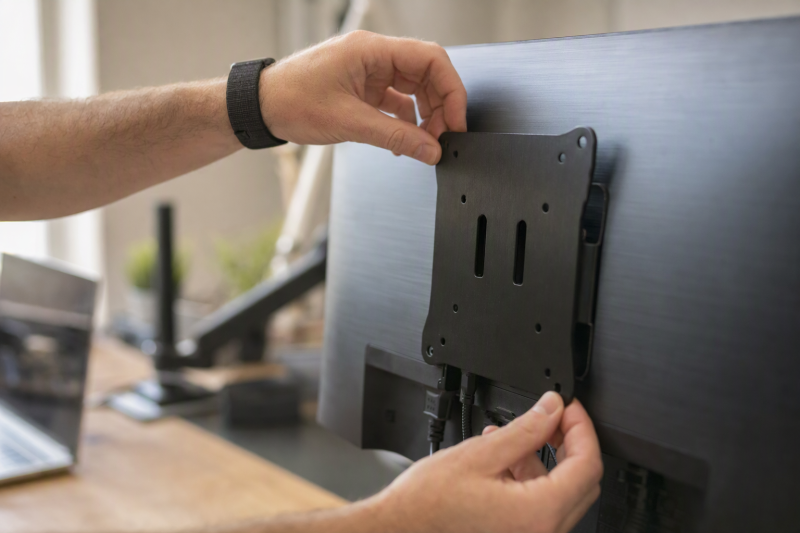
A VESA adapter lets a monitor without factory mounting holes connect to a compatible desk arm, stand, or wall mount. The adapter does not replace the mount itself. It creates either a 75 x 75 mm or 100 x 100 mm interface by gripping the monitor edges or bonding a plate to a sufficiently large, flat rear surface.
The right choice depends on monitor size, weight, thickness, rear-shell shape, surface texture, and the VESA pattern on the arm. Measure all of those before ordering. Adhesive plates need the stated flat area and full cure time, while clamp-style brackets need compatible bezel height and screen thickness.
Confirm the monitor’s weight, rear geometry, required VESA pattern, and the arm’s capacity before choosing an adhesive plate or adjustable steel bracket.VESA Adapters for Non-VESA Monitors Compared
| Image | Product | Details | Check Price |
|---|---|---|---|
 | Cozycomfo Adhesive VESA Adapter | Monitor size: 13 to 27 inches VESA pattern: 75 x 75 mm Capacity: Up to 24 pounds Required surface: 6.6 x 5.8-inch flat area | Check Price on Amazon |
 | Mount-It! MI-780 | Monitor size: 13 to 27 inches VESA pattern: 75 x 75 or 100 x 100 mm Capacity: Up to 17.6 pounds Mounting: Adjustable steel arms | Check Price on Amazon |
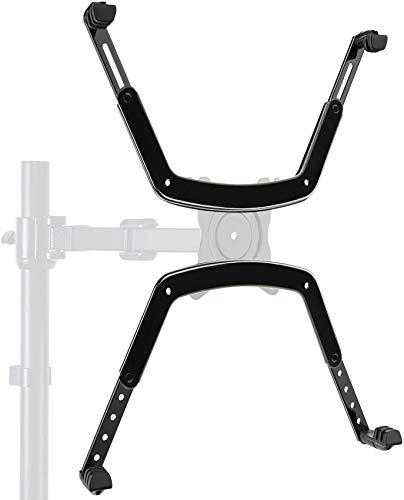 | HUANUO HNMUA4 | Monitor size: 17 to 27 inches VESA pattern: 75 x 75 mm Thickness: 1.18 to 2.95 inches Mounting: Adjustable steel bars | Check Price on Amazon |
 | NOBER nummak101 | Monitor size: 13 to 27 inches VESA pattern: 75 x 75 mm Capacity: Up to 16 pounds Mounting: Adjustable adhesive pieces | Check Price on Amazon |
 | WEARSON Two-Pack Adhesive Adapter | Quantity: 2 adapters VESA pattern: 100 x 100 mm Capacity: 11 to 22 pounds each Required surface: 5.8 x 6.6-inch flat area | Check Price on Amazon |
 | TABLIKE 75 x 75 mm Adapter | Monitor size: 17 to 22 inches VESA pattern: 75 x 75 mm Capacity: Up to 8 kg Required surface: 6.6 x 5.8-inch flat area | Check Price on Amazon |
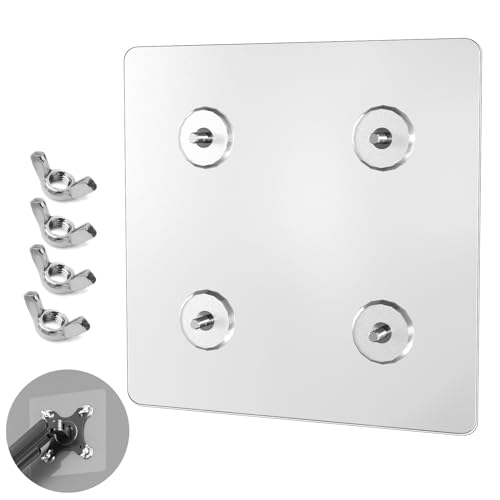 | WEARSON Non-Vesa-100 | Monitor size: 24 to 32 inches VESA pattern: 100 x 100 mm Capacity: 11 to 22 pounds Required surface: 7.8 x 7.8-inch flat area | Check Price on Amazon |
1. Cozycomfo Adhesive VESA Adapter — Best 75 x 75 mm Adhesive Pick
The Cozycomfo adapter creates a 75 x 75 mm mounting pattern on a non-VESA flat monitor. It is stated for 13 to 27-inch displays weighing up to 24 pounds, but screen diagonal is only the first check. The rear shell must provide a flat 6.6 by 5.8-inch surface where the full adhesive plate can bond.
Installation is simple but not immediate. The user peels away the protective film, presses the adapter onto the clean flat surface, and waits 24 hours before attaching the monitor arm or stand.
This plate avoids the visible arms used by clamp-style adapters and has the highest stated weight limit in this group. The tradeoff is dependence on the rear material and surface geometry. A textured, ridged, curved, vented, or small back panel is not the flat bonding surface the listing requires.
Choose Cozycomfo only when the monitor provides a continuous 6.6 by 5.8-inch flat rear area and the mount accepts a 75 x 75 mm pattern. Our TakeBuy the Cozycomfo adapter for a flat-backed 13 to 27-inch monitor that weighs no more than the stated 24 pounds and needs a clean 75 x 75 mm interface. Its hidden adhesive form looks simpler than edge clamps. Do not use it when vents, texture, curves, or ridges interrupt the required bonding area.
- Stated capacity up to 24 pounds.
- Creates a 75 x 75 mm VESA interface.
- No visible arms around the monitor edges.
- Requires a 6.6 by 5.8-inch flat bonding area.
- Needs a full 24-hour wait before mounting.
2. Mount-It! MI-780 — Best Overall Clamp-Style Adapter
The Mount-It! MI-780 uses adjustable powder-coated steel arms instead of adhesive. It supports both common small-monitor VESA patterns, 75 x 75 mm and 100 x 100 mm, so it pairs with more arm plates than the single-pattern products. The listing targets non-VESA LCD and LED monitors from 13 to 27 inches.
The fit limits go beyond screen size. The monitor can be up to 2.75 inches thick, with a bezel height from 10.5 to 16.25 inches, and must weigh no more than 17.6 pounds. The adjustable arms grip the display and can accommodate several shapes while keeping it centered. The listing says it is not recommended for curved monitors.
All required screws, spacers, and assembly hardware are included. Because the bracket mechanically captures the monitor, it does not depend on a broad adhesive surface or curing period. Its arms remain visible around the screen edges, and users should position them so they do not cover buttons, ports, speakers, or the active image.
The MI-780 has the broadest mechanical fit here, but it requires a flat monitor within its stated thickness, height, and 17.6-pound limits. Our TakeBuy the Mount-It! MI-780 when you want a steel clamp-style adapter with both 75 x 75 and 100 x 100 mm mounting patterns. It is the best overall option for a compatible flat 13 to 27-inch screen because it avoids adhesive and publishes useful fit limits. Avoid it for curved displays or monitors above 17.6 pounds.
- Supports both 75 x 75 and 100 x 100 mm patterns.
- Powder-coated steel adjustable arms.
- Detailed thickness, bezel-height, and weight limits.
- Not recommended for curved monitors.
- Adapter arms remain visible around the display.
3. HUANUO HNMUA4 — Best 75 x 75 mm Steel Adapter
The HUANUO HNMUA4 is another mechanical adapter made from powder-coated steel. It converts a compatible non-VESA monitor to a 75 x 75 mm pattern and is stated for 17 to 27-inch LCD, LED, and OLED flat panels. Adjustable bars extend to fit different monitor sizes and shapes.
Its standout specification is screen thickness. The adapter is rated to support monitors from 1.18 to 2.95 inches thick. That upper limit is slightly larger than the Mount-It! figure, so HUANUO is one to consider for a bulky but otherwise compatible flat monitor. The supplied record does not state a weight capacity or bezel-height range, so those details require confirmation before purchase.
The kit includes the manual, screws, and related parts for assembly. It fits stands with 75 x 75 mm plates, not the larger 100 x 100 mm pattern unless another compatible interface is involved. Check the arm plate itself instead of assuming every monitor arm accepts both standards.
Buy the HUANUO HNMUA4 for a 17 to 27-inch flat monitor within its stated thickness range when the arm uses a 75 x 75 mm plate. Its adjustable steel bars are a practical alternative to adhesive. Confirm the monitor’s weight because the supplied record does not provide a load limit.
- Powder-coated steel construction.
- Fits stated monitor thicknesses from 1.18 to 2.95 inches.
- Adjustable bars and installation hardware included.
- Only a 75 x 75 mm conversion is stated.
- No weight capacity is supplied in the product record.
4. NOBER nummak101 — Best Adjustable Adhesive Kit
The NOBER nummak101 converts a compatible non-VESA display to a 75 x 75 mm mounting pattern. It is stated for most flat-backed monitors from 13 to 27 inches that weigh 16 pounds or less. Unlike a single rigid plate, the listing describes split-type and one-piece components that can be arranged in different positions for varying monitor shapes.
The adapter uses high-strength nano-adhesive rather than steel arms gripping the bezel. The adhesive keeps the front of the monitor clear, but the rear surface must be flat and suitable for bonding. The supplied record does not state the minimum bonding-area dimensions or a cure time, so installation should follow the current manual rather than assumptions based on other adhesive products.
Screws and related parts are included, and the listing describes assembly as taking minutes. That assembly estimate does not establish when an adhesive bond is ready to carry the monitor. Confirm the live instructions, bonding surface, and waiting period before loading the arm.
NOBER offers flexible adhesive placement for a light flat-backed monitor, but the missing bonding-area and cure-time details need confirmation in the current manual. Our TakeBuy the NOBER nummak101 when a monitor under the stated 16-pound limit needs a 75 x 75 mm pattern and its flat back suits the adjustable adhesive pieces. The split and one-piece layout adds placement flexibility. Choose a product with published bonding dimensions if the rear space is tight or interrupted.
- Stated for 13 to 27-inch monitors up to 16 pounds.
- Split and one-piece parts allow adjustable placement.
- Creates a 75 x 75 mm interface.
- Required flat bonding area is not stated.
- Cure time is not supplied in the product record.
5. WEARSON Two-Pack Adhesive Adapter — Best Two-Monitor Kit
This WEARSON package contains two adhesive adapters, so it is the only clearly stated two-monitor set in the group. Each unit creates a 100 x 100 mm VESA interface for a flat-panel monitor from 24 to 32 inches. The listed load range is 11 to 22 pounds.
Each monitor needs a flat 5.8 by 6.6-inch area for the adhesive. The surface cannot be textured or ridged. Installation involves peeling the protective film, bonding the adapter, and waiting 24 hours before attaching the arm or bracket. A special nut design is stated to allow tool-free mounting after the bond is ready.
The listing describes non-marking adhesive that leaves no residue after removal. Treat the non-marking description as a product claim rather than a reason to skip surface checks, because monitor plastics and finishes vary. Both the adapter and the selected dual-monitor arm must independently support the weight and pattern of each screen.
The two-pack is useful for matching monitors only when both backs provide the required 5.8 by 6.6-inch smooth, flat bonding areas. Our TakeBuy the WEARSON two-pack for a pair of 24 to 32-inch flat monitors weighing 11 to 22 pounds each when the arm expects 100 x 100 mm mounting. The included pair keeps a dual setup consistent. Avoid textured or ridged rear shells and observe the full 24-hour wait.
- Two adapters for a dual-monitor setup.
- Creates a 100 x 100 mm pattern.
- Stated load range of 11 to 22 pounds each.
- Requires a smooth 5.8 by 6.6-inch flat area.
- Not suitable for textured or ridged surfaces.
6. TABLIKE 75 x 75 mm Adhesive Adapter — Best for Smaller Flat Monitors
The TABLIKE adapter targets smaller flat-panel monitors from 17 to 22 inches. It creates a 75 x 75 mm mounting pattern and supports a stated load of up to 8 kg, or roughly 17 pounds. A 6.6 by 5.8-inch flat rear area is required, which may be a demanding footprint on a compact monitor.
Installation is tool-free at the adhesive stage. You remove the film, press the adapter onto the monitor back, and allow 24 hours for the bond to cure before attaching an arm or stand. The listing describes non-marking adhesive intended to leave no sticky residue upon removal.
Split-type and one-piece components can be positioned to suit the monitor shape. Even with that flexibility, the full required contact area must remain flat and uninterrupted. Measure around stand mounts, vents, ports, and rear bulges before assuming a smaller screen has enough space.
A 17 to 22-inch screen may still lack the required 6.6 by 5.8-inch rear area, so measure the back rather than relying on diagonal size. Our TakeBuy the TABLIKE adapter for a small 17 to 22-inch flat monitor under the stated 8 kg limit when a 75 x 75 mm mount is required. Its adhesive design keeps clamps off the bezel. Confirm that the compact monitor still has the full flat bonding footprint and wait 24 hours before loading it.
- Designed for smaller 17 to 22-inch monitors.
- Stated capacity up to 8 kg.
- Split and one-piece placement options.
- Large bonding footprint relative to a small monitor.
- Only a 75 x 75 mm interface is stated.
7. WEARSON Non-Vesa-100 — Best 100 x 100 mm Adhesive Plate
The WEARSON Non-Vesa-100 is a single 100 x 100 mm adhesive adapter for 24, 27, and 32-inch flat-panel monitors. It carries a stated load from 11 to 22 pounds. This plate is the direct choice when only one larger monitor needs conversion and the arm’s plate uses the 100 x 100 mm pattern.
Its main requirement is a large flat bonding area of 7.8 by 7.8 inches. The area is larger than the area stated for the WEARSON two-pack and the 75 x 75 mm options. Many sculpted backs with vents, curves, ridges, or recessed stand connections will not meet that requirement.
Installation uses the same peel, bond, and wait process, with a stated 24-hour cure before the arm is attached. A special nut allows tool-free connection. The listing describes non-marking adhesive and no trace after removal, but the actual monitor finish should still be checked against current instructions.
Buy the WEARSON Non-Vesa-100 when one 24 to 32-inch flat monitor weighs 11 to 22 pounds, needs a 100 x 100 mm pattern, and has the large stated bonding area. It is simpler than buying the two-pack for one screen. The flat 7.8-inch square surface requirement is the deciding fit test.
- Single adapter for one larger monitor.
- Creates a 100 x 100 mm VESA interface.
- Stated load range from 11 to 22 pounds.
- Requires a large 7.8 by 7.8-inch flat area.
- Needs 24 hours before the mount is loaded.
Buying Guide
1. Identify the mount-side VESA pattern
Measure the center-to-center spacing between the mounting holes on the arm plate. These adapters use either 75 x 75 mm, 100 x 100 mm, or both patterns. The MI-780 supports both, while Cozycomfo, HUANUO, NOBER, and TABLIKE state 75 x 75 mm.
Do not assume the arm plate accepts the adapter merely because both products mention VESA. Pattern, fastener size, hardware clearance, and plate shape must work together. If you are also choosing the support, compare compatible monitor arms before committing to an adapter.
2. Weigh the monitor without its original stand
Use the display weight without the removable desktop stand when the manufacturer publishes it. The adapter and arm must each support the monitor independently. The lower capacity is the practical system limit, not the higher number printed on one component.
Cozycomfo states 24 pounds, MI-780 states 17.6 pounds, NOBER states 16 pounds, and the adhesive WEARSON products state defined ranges. HUANUO provides no weight limit in the supplied record, so confirm it before installation rather than estimating from screen size.
3. Measure rear geometry before choosing adhesive
An adhesive adapter needs continuous contact across its required footprint. Flat area dimensions are a better guide to adhesive fit than screen diagonal. Vents, labels, stand recesses, cable channels, textures, and decorative ridges can all interrupt the bond.
The single WEARSON 100 x 100 mm plate needs 7.8 by 7.8 inches, while several 75 x 75 mm products need about 6.6 by 5.8 inches. Do not bridge a gap or cover ventilation to make the plate fit. Choose a clamp-style bracket when the rear shell lacks a suitable surface.
4. Check clamp dimensions and bezel clearance
Mechanical adapters grip the display rather than bonding to its back. Measure thickness and bezel height against the bracket’s stated ranges. The MI-780 allows up to 2.75 inches of thickness and a 10.5 to 16.25-inch bezel height, while HUANUO states 1.18 to 2.95 inches of thickness.
Position arms away from buttons, ports, speakers, and the visible image. A secure grip should not press on fragile controls or active panel area. Clamp adapters add visible hardware, but they may be preferable when adhesive cannot safely contact the case.
5. Respect adhesive preparation and cure time
The bonding surface needs to be clean, dry, smooth, and compatible with the adhesive. A 24-hour wait is explicitly required by Cozycomfo, both WEARSON listings, and TABLIKE. Keep the monitor supported during that time and do not use the arm to test an uncured bond.
Room conditions and monitor materials can affect adhesion. Follow the exact current instructions rather than transferring steps between brands. NOBER does not state a cure time in the supplied record, so its manual must provide the waiting period.
6. Treat the adapter and arm as one system
An adapter provides the mounting holes the monitor lacks but does not make every arm suitable. Check arm capacity, tilt tension, plate pattern, fasteners, and desk or wall attachment along with the adapter. A heavy display can cause an under-rated arm to sag even when the adapter holds.
After installation, support the monitor while testing tilt and rotation. Increase movement gradually and inspect every connection before releasing the screen. For two displays, a dual-monitor stand must support the combined arrangement without forcing either adapter outside its limits.
FAQ
Can I mount a monitor that has no VESA holes?
Yes, if a compatible adapter can safely grip the monitor or bond to a suitable flat rear surface. The adapter creates a standard mounting interface that the original monitor lacks.
It does not guarantee compatibility with every arm. Weight, VESA pattern, monitor geometry, and mounting hardware all still need to match.
Are adhesive VESA adapters safe?
They can be suitable when the monitor meets every stated surface, weight, preparation, and cure requirement. A smooth uninterrupted bonding area is essential, and several listings require 24 hours before mounting.
Avoid textured, ridged, curved, vented, or undersized surfaces. Choose a mechanical adapter when the rear shell cannot provide the specified contact area.
Is 75 x 75 mm compatible with 100 x 100 mm?
Not automatically, because the hole spacings are different. The arm plate and adapter must share a pattern, unless one component explicitly supports both.
The Mount-It! MI-780 states both patterns. Most other products here specify only one, so verify the arm plate before ordering.
Can these adapters hold a curved monitor?
The Mount-It! MI-780 is explicitly not recommended for curved monitors, and the other records do not clearly approve curved displays. Treat this group as products for flat monitors unless the exact current listing says otherwise.
Curves complicate both rear bonding and edge gripping. Do not force a flat adhesive plate or bracket onto an incompatible curved housing.
Do I use monitor weight with or without the stand?
Use the weight of the display alone when the original stand is removed and the manufacturer supplies that figure. The adapter carries the monitor body rather than the detached desktop stand.
Do not guess if only packaged weight is available. Confirm the display weight and stay within both adapter and arm limits.
Can I remove an adhesive adapter later?
Some listings describe non-marking adhesive and no residue, but removal results can depend on the monitor material and installation. Follow the product’s current removal instructions and support the monitor throughout the process.
Never pry against the display panel. If future removal is a major requirement, a compatible clamp-style adapter is the clearer choice.
Bottom Line
The Mount-It! MI-780 is the best overall mechanical adapter because it supports both 75 x 75 and 100 x 100 mm patterns with clear fit limits. Choose HUANUO for a thicker flat monitor on a 75 x 75 mm arm, Cozycomfo for a high-capacity adhesive 75 x 75 mm plate, NOBER for adjustable adhesive placement, the WEARSON two-pack for matching 100 x 100 mm monitors, TABLIKE for a smaller screen, or WEARSON Non-Vesa-100 for one large flat-backed monitor.