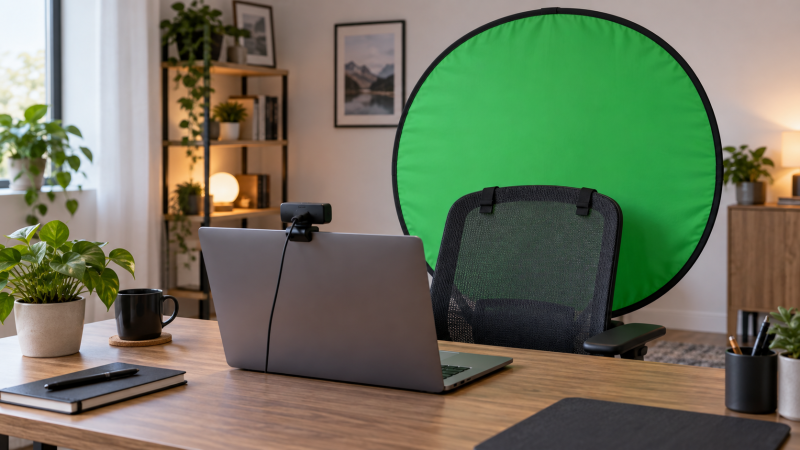
A webcam crop can make a small backdrop feel big until you lean sideways or move your chair. A foldable green screen has a different job from a permanent studio wall. It must cover the camera frame, set up in a shared room, and disappear when the call or stream ends. Choose by mount and camera framing first, then by how small the screen stores.
These five exact products had active New Amazon US offers when checked. They include chair-mounted discs, a combined chair/stand format, a wide pull-up screen and a reversible pop-up panel. Dimensions and setup descriptions below are seller-stated, not our measurements. A green screen also needs suitable software and reasonably even light, and none of these products can fix an exposed room edge by itself.
Before ordering, mark your usual chair position and webcam field of view. A panel that is wide enough while you sit still may show room edges when you turn, recline or lift your arms.Foldable Green Screens Compared
| Image | Product | Details | Check Price |
|---|---|---|---|
 | CoosBonfik 56-Inch Chair Screen | Best fit: Seated webcam calls Format: Chair-mounted circular panel Width: 56 in stated Color: Green Storage: Collapsible | Check Price on Amazon |
 | Cosmos 43-Inch Chair Screen | Best fit: Tight webcam framing Format: Chair-mounted circular panel Width: 43 in stated Color: Green Storage: Carry bag included | Check Price on Amazon |
 | Portable Chair-and-Stand Screen | Best fit: Flexible seated framing Format: Chair panel plus stand setup Size: 60 x 60 in panel stated Color: Green Storage: Collapsible | Check Price on Amazon |
 | RAUBAY Pull-Up Screen | Best fit: Wide creator framing Format: Retractable floor case Size: 78.7 x 82.7 in stated Color: Green Storage: Retracts into case | Check Price on Amazon |
 | NEEWER Reversible Pop-Up | Best fit: Green or blue keying Format: Reversible spring-frame panel Size: 5 x 6.5 ft stated Color: Green and blue Storage: 25.6 in folded disc stated | Check Price on Amazon |
1. CoosBonfik 56-Inch Chair Screen — Best for Seated Calls
The 56-inch circular backdrop attaches to a chair back with elastic sleeves, according to the listing. The panel stays behind a seated presenter without a separate floor stand taking up space in a small room. The seller calls the material thick polyester and describes a spring-steel perimeter that helps the screen open into shape. It is a practical format when the webcam is fixed above a laptop and the chair stays roughly in one place.
Chair mounting is also the main limit. When the chair turns, the backdrop turns, and the camera may then see an uncovered edge. Check the chair’s backrest shape against the listing pictures before assuming the elastic attachment will fit. The stated diameter does not tell you how much usable green remains behind your head at your actual camera distance. Leave room around hair, shoulders and gestures rather than framing to the panel’s edge.
A chair screen follows your seat, but its visible coverage changes whenever the chair rotates.Our Take Choose CoosBonfik for seated webcam calls or a tight creator crop when a floor stand would clutter the room. For standing shots or a second person, use a larger independent screen.
- 56-inch seller-stated circular panel.
- Chair attachment needs no separate stand.
- Collapsible spring-frame format stores away.
- Backdrop moves with the chair.
- Coverage may narrow when the camera is wide.
2. Cosmos 43-Inch Chair Screen — Best for Tight Framing
Cosmos lists a 43-inch diameter and hook-and-loop straps that attach the screen to a chair back. A smaller disc may be easier to carry and store than a large panel, especially for someone who only shows head and shoulders on calls. The listing includes a carry bag and says no separate bracket is required for the chair-mounted setup. It suits a narrow, predictable webcam crop, not a full scene.
The small size is the tradeoff. A webcam placed far from the chair sees more of the room, so a 43-inch panel can lose edge coverage quickly. Move the camera or tighten the crop before concluding the screen is too small. Verify the chair-back attachment points, because the listing does not make every office chair compatible. If you often lean back or swivel, a fixed floor screen offers a more stable background position.
Our Take Pick Cosmos for a compact, seated head-and-shoulders frame and limited storage space. Step up to a wider panel if you show hands, instruments or a broad desk view.
- Compact 43-inch seller-stated diameter.
- Chair straps and carry bag listed.
- Little margin for broad camera framing.
- Chair shape affects attachment fit.
- Not a standing-shot backdrop.
3. Portable Chair-and-Stand Screen — Best for Flexible Seated Framing
This seller describes a combined screen that can be separated into chair and stand arrangements. The Amazon listing specifies a roughly 60-by-60-inch chair panel size and describes a larger combined backdrop. The flexibility is useful when one session uses a tight laptop webcam and another needs more background area behind a creator. It also comes with a bag for storage after the session.
Read the exact listing diagrams before relying on a particular layout. The seller’s title and bullets describe more than one configuration, but they do not establish how quickly the pieces change over or how steady the setup is on your floor. The larger arrangement needs physical room behind the desk as well as a larger camera crop. Keep cables and chair wheels clear of the backdrop’s support area, and do not assume the quoted combined size is the usable green area visible to the webcam.
Our Take Consider this screen when one workstation alternates between a close seated crop and a broader recording setup. Choose a simple chair disc when every session uses the same camera position.
- Chair and larger combined arrangements described.
- Collapsible format with carry bag.
- More framing options than a small disc.
- More setup decisions and space required.
- Published dimensions need layout-specific checking.
4. RAUBAY Pull-Up Screen — Best for Wide Framing
RAUBAY lists a 78.7-by-82.7-inch screen that rises from a floor case. A pull-up screen does a different job from a chair-mounted disc. The backdrop stays in one place even if the chair moves, and the wide surface can suit a broader upper-body crop or two seated people. The seller describes polyester fabric and retracting the screen back into its hard case for storage. It is useful when a fixed recording position is more important than minimal footprint.
The case still needs floor clearance behind the desk. Check its support-leg layout and the available distance from your camera before ordering, because a large screen close to the chair may still show edges with a very wide lens or broad gestures. The listing’s dimensions describe the screen, not the usable space in every room. Raise it fully and light the surface evenly before judging the key. If floor space is scarce, a chair panel may be easier to live with.
Our Take Pick RAUBAY for a broader webcam scene or a consistent creator corner where the case can stand behind the desk. Skip it if the floor behind the chair must stay clear.
- Large seller-stated screen dimensions.
- Independent backdrop position.
- Retracts into its storage case.
- Needs floor area behind the desk.
- More screen to light evenly.
5. NEEWER Reversible Pop-Up — Best for Green or Blue Keying
NEEWER’s spring-frame panel offers green on one side and blue on the other. The seller lists an unfolded area of about 5 by 6.5 feet and a folded disc of about 25.6 inches, plus a carry bag. Two colors are useful when clothing, props or the intended scene makes one key color a poor choice. It is also a portable backdrop for a creator who records in more than one room.
Unlike a chair-mounted screen, the panel’s final position depends on how you support it. Check the current listing’s package contents. The cited offer lists the backdrop and bag, not an independent floor stand. Plan a safe support method before buying rather than assuming it can stand by itself. The blue side does not automatically key better, but it is an alternative when green collides with foreground colors. Keep folds and harsh shadows out of the part of the panel seen by the camera.
The two colors add flexibility, but the panel still needs a support plan and sufficient lit coverage for your camera frame.Our Take Choose NEEWER when portability and a blue alternative are important. A pull-up case is simpler for a permanent desk setup if you have room behind the chair.
- Green and blue sides in one panel.
- Large stated unfolded surface.
- Compact folded disc and bag listed.
- Separate support may be necessary.
- Spring-frame folding needs practice.
Buying Guide
1. Measure the camera frame before the backdrop
A webcam field of view determines how much green must remain around your shoulders and chair. Put the camera at the height and distance you actually use. Then note the visible left, right and top edges when you lean, turn and gesture. A small circular screen can work for head-and-shoulders calls, but a broad camera view can reveal the room on either side. Do not choose by panel diameter alone.
The distance between person and backdrop is also a factor. A chair-mounted disc stays close to the presenter and moves with the chair, while a floor-standing panel can remain fixed farther back. Both can work, but each changes how much green the camera sees. If you are also selecting a 4K webcam with auto-framing, check its widest framing mode as well as your usual crop. Auto-framing can expose the panel edge when it follows movement.
2. Match the mount to the room
A chair-mounted screen is quick to remove from a shared room and does not need a floor stand. It works best when the chair stays in a predictable position. Check backrest width and attachment points before ordering. Elastic sleeves or hook-and-loop straps may fit one chair better than another, and a tall headrest can change where the screen sits. A chair screen is not a full-room backdrop.
A pull-up case or supported spring-frame panel makes more sense when the creator moves independently of the chair. It needs a safe place behind the workstation and usually more storage length than a small disc. Confirm the product package includes the support hardware you intend to use. A flat LED key light may help illuminate a face, but the green surface also needs even light, and one bright face light does not guarantee a clean backdrop.
3. Plan lighting and storage together
Uneven illumination makes one area of green appear different from another in the camera feed. Keep the backdrop reasonably smooth and avoid casting a strong shadow directly behind your head. Give yourself some separation from the surface where room depth allows. Do not interpret a seller’s “wrinkle-resistant” wording as proof that a folded panel never needs smoothing or careful light placement.
Folded size and setup time can decide whether the screen gets used. A chair disc and a reversible spring-frame panel fold into round bags, while a pull-up screen retracts into a long case. Measure the storage spot and the doorway or closet path as well as the open panel. If you share the room, rehearse setting it up and packing it away before committing to a permanent camera position.
Frequently Asked Questions
Do I need a green screen for ordinary video calls?
No. Many video-call apps offer background blur or replacement without a physical screen. A physical green surface is useful when software keying is part of a creator workflow or when a consistent, controllable background is important. It also introduces setup, storage and lighting work.
If your calls look acceptable without one, spend time on camera position and lighting first. A screen is not a substitute for a clear microphone, suitable light or a quiet room. Check the background feature in the exact app you use before buying hardware for it.
Is a 43-inch chair screen wide enough?
It can be for a tight seated head-and-shoulders crop. It is less forgiving for a wide-angle webcam, sideways movement or hand gestures. The screen’s quoted diameter is not the same as the green area visible around you after the chair and your body occupy the middle.
Test with a temporary sheet or tape marks at the planned screen position. Watch the actual camera preview while you move naturally. If any room edge appears, choose a wider panel or tighten the camera framing rather than relying on software to invent missing green.
When would I use blue instead of green?
A blue key background can help when a person or prop contains green that you do not want removed. The NEEWER panel gives both colors, so you can choose before recording. The right choice depends on foreground colors, the software settings and the lighting on the backdrop.
Changing colors is not an automatic quality upgrade. Each side still needs even illumination and enough screen area behind the subject. Confirm your software’s chroma-key controls support the color you plan to use and check the camera preview before a live session.
Can a large pull-up screen replace a studio wall?
It can cover a wider desk-camera scene than a small chair disc, but it remains a finite rectangle. A second person, standing movement or an extreme wide lens may still expose the edges. The case also needs floor space and a safe position away from cables and chair wheels.
Mark the intended screen location and run the camera at its widest intended framing. If the panel does not fill the frame with margin, a larger supported backdrop or a tighter shot is the better choice. Do not buy solely from the published open dimensions.
Bottom Line
For a seated laptop webcam, begin with the mount and actual camera crop. The CoosBonfik and Cosmos discs suit compact chair setups, and the chair-and-stand format adds flexibility. RAUBAY is the wider independent option, while NEEWER offers green or blue in a portable panel. Buy the screen that leaves green around your actual movement, and plan its lighting and support before relying on it for a stream.