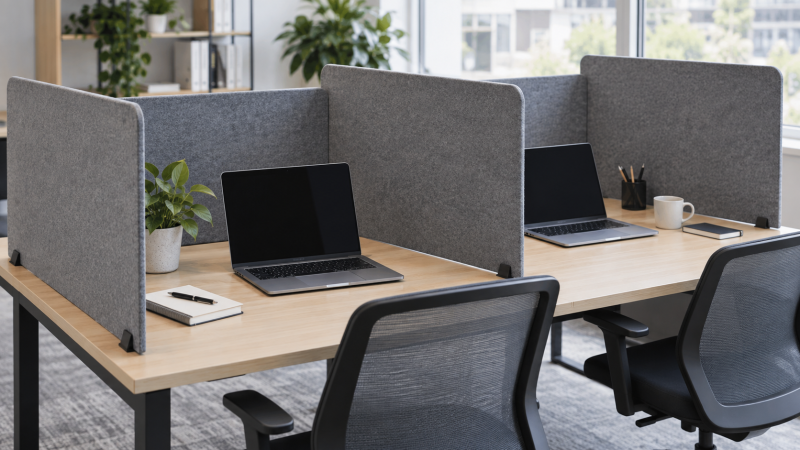
A felt desk divider can make a shared laptop table feel more defined. It blocks some direct sightlines and may soften nearby reflected sound, but an open-top panel does not create a soundproof booth or stop a conversation carrying across the room. For a laptop worker, the practical questions are where the screen sits, whether it leaves the display and cables usable, and whether its feet or clamps fit the desk.
These six active New choices include freestanding sets, clamp-on panels and a foldable wraparound screen. A classroom-size multipack may be excessive for one person, while one panel may not cover a row of shared workstations. Decide the number of seats and sides to separate before comparing materials. Seller promises about eliminating noise are not measured acoustic results for your office.
Sketch each workstation from above. Mark laptop display angle, chair movement, charging cable and any monitor or lamp. Then choose a divider height and attachment that interrupts the unwanted sightline without blocking the work itself.Acoustic Desk Dividers Compared
| Image | Product | Details | Check Price |
|---|---|---|---|
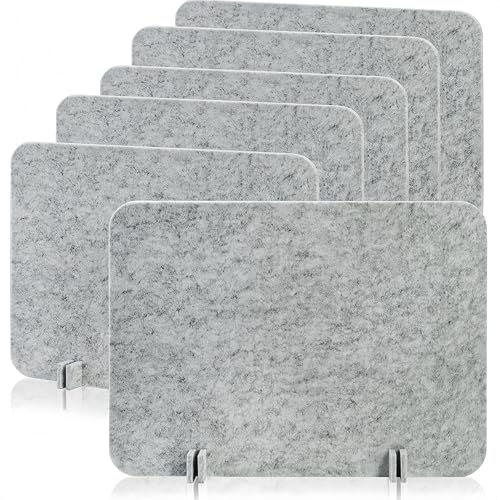 | Eorbow Six-Pack | Panels: 6 Size: 24 × 16 in Mount: Freestanding feet Best fit: Temporary small stations | Check Price on Amazon |
 | AMUSIGHT Four-Pack | Panels: 4 Size: 24 × 20 in Mount: Freestanding feet Best fit: Tackable four-seat set | Check Price on Amazon |
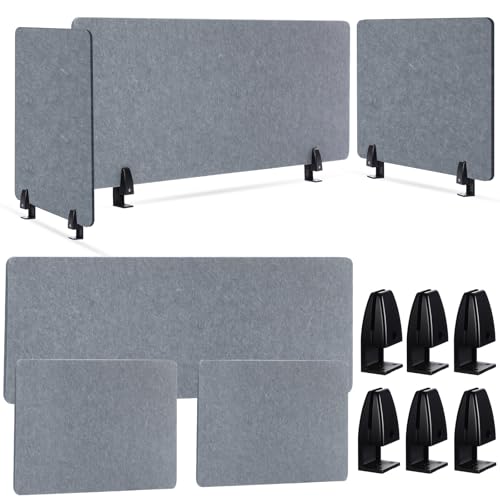 | AceOrbit Three-Panel | Panels: 3 Size: 47 × 24 + two 24 × 24 in Mount: Clips, <=0.41 in stated Best fit: Three-sided station | Check Price on Amazon |
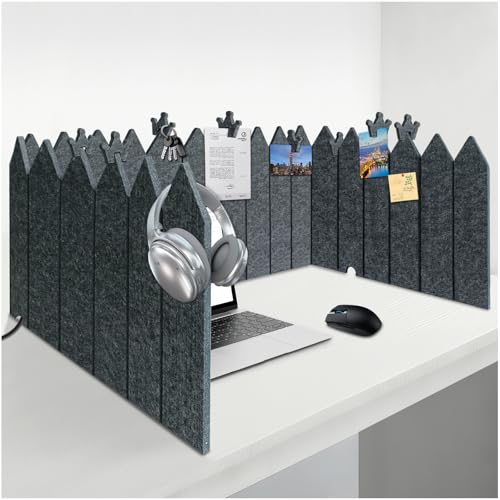 | BXI Foldable | Panels: 1 flexible Size: 86 × 16.5 in Mount: Freestanding fold Best fit: Portable wraparound | Check Price on Amazon |
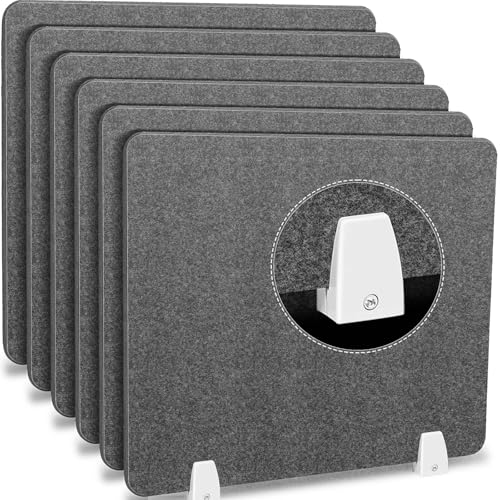 | Henoyso Gray Six-Pack | Panels: 6 Size: 20 × 24 in Mount: Aluminum clamps Best fit: Clamp-on seat row | Check Price on Amazon |
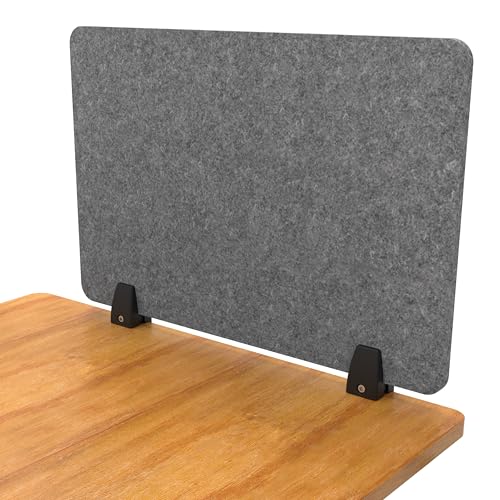 | ReFocus Raw | Panels: 1 Size: 24 × 16 in Mount: Clamp <=1 in Best fit: Single boundary trial | Check Price on Amazon |
1. Eorbow Six-Pack — Best Freestanding Small-Panel Set
Eorbow’s exact package contains six freestanding 24-by-16-inch panels with support feet. The bullets describe polyester felt and a 0.35-inch thickness. The feet slot into the panels, so there is no need to drill a shared table. Six pieces can mark several small laptop stations or make a more enclosed shape around fewer seats, provided the table has enough depth for the feet and laptop.
The seller calls the panels soundproof in its title while describing them as noise-reducing in the bullets. Neither wording establishes a measured reduction in voices across a room. The physical benefit is a visual barrier and some felt surface near the worker. Because the panels rest on a tabletop, check whether a bump to the table shifts them and whether a laptop lid can open fully beside a 16-inch screen.
Our Take Choose Eorbow when you need several temporary stations without clamps. Check the support-foot footprint and do not expect an open felt panel to isolate speech.
- Six panels in the exact offer.
- 24-by-16-inch size stated.
- Feet can be removed for storage.
- Feet occupy work surface.
- No measured speech isolation.
2. AMUSIGHT Four-Pack — Best Tackable Set
AMUSIGHT lists four 24-by-20-inch freestanding dividers and 20 pushpins. The features describe recycled-polyester felt and support feet that slot into the panels. A tackable surface can hold a calendar or reminder outside the laptop’s display area. The taller 20-inch dimension may give more visual separation than a 16-inch panel, but it can also obscure a neighboring monitor or the user’s view across a collaborative table.
The seller claims the panels resist tipping and reduce sound. Neither claim is an independent stability or acoustic measurement. If a team frequently rearranges seating, freestanding feet make the set easy to reposition, but a crowded table must still leave room for cables and papers. Put pins where they cannot be knocked into a keyboard or electrical connector, and do not rely on the panel to secure heavy items.
Our Take Pick this four-seat starting point when note display counts as much as a visual boundary. Measure sightlines and tabletop space before favoring its extra height.
- Four 24-by-20-inch panels.
- 20 pushpins included.
- Freestanding feet allow rearrangement.
- Taller screen can interrupt collaboration.
- Stability and noise claims are unmeasured.
3. AceOrbit Three-Panel — Best Wraparound Clamp Set
AceOrbit combines one 47-by-24-inch panel and two 24-by-24-inch panels with six table clips. That size mix can place a long screen behind a shared laptop position and smaller panels at its sides. The listing describes polyester construction and screw-tightened clips. It also gives a narrow 0.41-inch maximum tabletop thickness for the clips. Verify this against your exact desk before relying on the set.
A clamp-on layout frees the working surface from support feet, but it needs accessible table edges. A desktop with a thick lip, under-desk rail or cable tray may not accept the clips even if the top itself is thin. Do not use the seller’s acoustic wording as a sound-blocking rating. With a 24-inch-high panel, check whether the screen blocks necessary communication or camera sightlines when seated.
Our Take Pick this three-sided physical boundary if the clamps fit your table. Check the stated 0.41-inch limit before ordering, not after delivery.
- One long and two side panels.
- Six clips listed.
- Leaves tabletop free of feet.
- 0.41-inch stated clamp limit is restrictive.
- Large panels may block sightlines.
4. BXI Foldable — Best Portable Wraparound Screen
BXI lists a 16.5-inch-high by 86-inch-wide foldable felt screen, 0.5-inch thickness and 3-pound weight. The features describe three bottom cable cutouts and eight clips for notes or small items. Rather than several separate panels, one flexible piece can bend around a desk corner and then roll for storage. The flexible format may suit a shared laptop table whose seating arrangement changes through the week.
An 86-inch screen still needs a route along the desktop, and a loosely curved panel can occupy valuable space behind the laptop. The seller says it resists tipping and partly reduces sound, but no test of stability or speech isolation is supplied. Check the cutout positions against charging and display cables. The feature bullets mention trim grooves. Confirm the current offer before cutting a product that may no longer suit another desk.
Our Take Pick this for a movable wraparound boundary with cable gaps and note clips. The wide format needs a measured desk plan, even though it folds away.
- 86-inch flexible width.
- Three cable cutouts and eight clips listed.
- Rollable for storage.
- Wide screen can crowd a shallow desk.
- Tipping and acoustic claims unmeasured.
5. Henoyso Gray Six-Pack — Best Clamp-On Row
Henoyso’s gray offer contains six 20-by-24-inch felt panels with aluminum clamps. Unlike a freestanding panel, a clamp attaches at the desk edge and can leave more surface available for laptops, notebooks and mice. Six pieces can divide a row of workstations, though each seat may need more than one panel for the desired side and rear sightlines. The listing calls them acoustic felt, but does not provide a tested absorption rating.
The features say the clamps install without drilling and can be repositioned. They do not give a specific desk-thickness range, so check the listed clamp opening against the actual table edge. A privacy screen may also restrict access to power outlets or shared peripherals, so map that path before installation. This offer is the exact gray listing, so do not assume another color has the same availability or package contents.
Our Take Pick this clamp-on multipack for several shared seats. Confirm each desk edge and avoid treating felt construction as proof of soundproofing.
- Six 20-by-24-inch panels.
- Aluminum clamps named.
- No-drill repositioning described.
- Clamp opening not quantified in returned bullets.
- Six panels may exceed a one-desk need.
6. ReFocus Raw — Best Single Clamp Panel
The ReFocus Raw exact variant is a single 24-by-16-inch recycled-PET felt panel. Its bullets specify an aluminum-bracket clamp for desks up to 1 inch thick, with no drilling. A single panel is a sensible first purchase if you want to block one side of a shared laptop desk before committing to a room-wide set. The small footprint leaves more room to observe whether a divider actually helps the working pattern.
The listing mentions 48- and 60-inch sizes elsewhere in the range, and neither is a dimension of this exact 24-by-16-inch variant. Its acoustic claims do not establish how much speech will be reduced at another seat. Check the desk lip and the path of a laptop charging cable before clamping. If the edge is thicker than 1 inch, choose a different mounting route instead of overtightening the bracket.
Our Take Pick this one-panel trial for a specific sightline. The stated 1-inch clamp limit makes fit easier to screen than listings with no opening dimension.
- Single exact 24-by-16-inch panel.
- Up-to-1-inch clamp range listed.
- Recycled-PET felt described.
- One panel covers one boundary.
- Other listed sizes are separate variants.
Buying Guide: Define Privacy Without Blocking Work
Choose the sightline and number of seats
Start with the direction of the distraction. A side panel may block glances from the next seat, while a rear panel may hide the laptop screen from a walkway. A wraparound screen can do both, but it can also make a shared table harder to use collaboratively. Mark where people need to speak, pass papers or view a common monitor before raising a tall barrier.
Count seats and panel sides separately. A six-pack does not automatically create six fully screened desks. The Eorbow set may supply one panel per seat. The AceOrbit set is arranged for a larger three-sided station. Buy for the actual layout, not simply the largest panel count.
Check feet, clamps and laptop clearance
Freestanding feet need flat tabletop area. Clamps need a compatible edge with room below it for the bracket. The AceOrbit listing’s 0.41-inch limit is much narrower than the ReFocus listing’s 1-inch maximum, while other clamp listings do not quantify an opening in their bullets. Measure the full table edge, including any lip, before buying.
Open the laptop to the normal working angle and trace charging, display and peripheral cables. A panel can block a hub or crowd a second display. If you are reorganizing the same surface, our USB-C laptop-stand guide covers a different space-saving decision. Divider feet and clamps should not press on cables or make a charging plug inaccessible.
Treat acoustic wording as a limited claim
Felt or PET panels may absorb some nearby reflected sound, but an open-top divider does not isolate a laptop station from voices, calls or keyboard noise across the room. None of these six exact listings supplied a verified in-room speech-reduction measurement in the evidence used here. A tall panel can make a person feel more visually private without making their conversation private to others.
For confidential work, focus on screen visibility and call behavior as well as furniture. A divider is only one layer, and it cannot substitute for careful placement or a laptop’s own privacy controls. Our hardware-webcam-shutter laptop guide covers an adjacent device choice. Test the shared desk with normal conversations before relying on acoustic marketing.
Frequently Asked Questions
Will an acoustic desk divider stop nearby conversation?
No reliable promise of that kind follows from these listings. An open felt screen may change some local reflections and block sightlines, but speech can travel over and around it. The seller terms “soundproof” and “noise reducing” are not interchangeable with measured isolation in your workspace.
If calls are the main disruption, rearrange seating, set call zones or use suitable headphones before expecting a thin tabletop panel to fix the room. A short trial in the intended desk position is more useful than a broad listing claim. Keep sensitive calls in an appropriate private space.
Is freestanding or clamp-on better for a shared table?
It depends on whether you can sacrifice tabletop area or access the edge. Freestanding feet are easier to reposition and do not rely on a clamp opening. Clamp-on panels keep more surface clear but may not fit a thick lip or an under-desk cable tray. Both need to remain stable around laptops and people moving past.
Measure the edge and plan the cable path before deciding. If the table layout changes daily, a foldable or freestanding option may be easier to store. If the stations remain fixed and the edge fits, a clamp-on row can create a repeatable boundary without drilling.
How tall should a divider be beside a laptop?
There is no universal height. A 16-inch screen may interrupt a neighboring seated sightline while leaving a more open view across the room. A 20- or 24-inch panel can provide more visual separation but may block collaboration or a raised monitor. Check the seated eye line and laptop screen angle instead of choosing by height alone.
Also account for a stand, external display, webcam and lamp. A divider placed behind the laptop can show in a video-call background or hide an item you need to reach. Tape a temporary cardboard outline at the proposed height and work for a few minutes before ordering a multi-panel set.
Source boundary: Product identity, panel counts, dimensions, materials and mounting details come from six exact Amazon US listings checked for active New offers at the time of research. We did not measure acoustic absorption, speech isolation, tipping resistance or clamp fit. The featured image is illustrative, not a listed model. Confirm the selected offer and desk dimensions before buying.