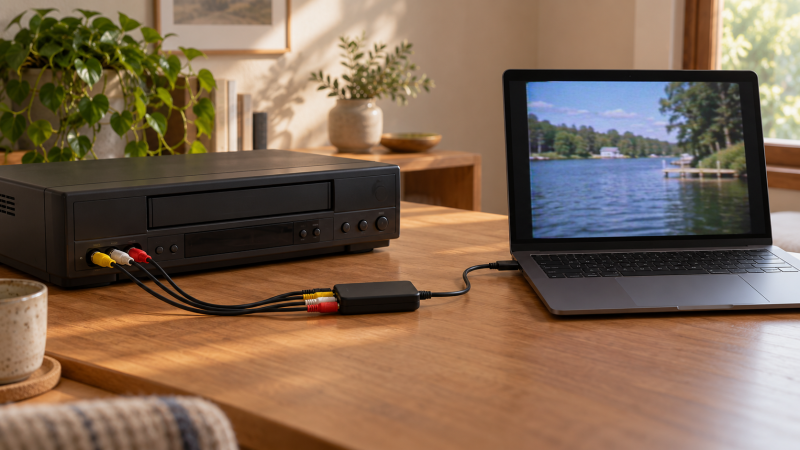
A VHS tape cannot plug straight into a laptop. You need a working VCR and an analog video capture device that accepts the deck’s composite RCA or S-Video output, carries its audio, and presents a recordable signal over USB. The capture box is only one link in the chain. Tape condition, deck tracking, cables, computer recognition and recording settings still decide whether the saved file is usable.
The six devices here are New-offer choices, and all list analog RCA/composite capture rather than HDMI-only input. Some add S-Video, USB-C, an HDMI preview output or bundled cables. Several manufacturers advertise 720p or 1080p output. Those figures describe digital output or scaling, not new detail recovered from standard-definition VHS. Choose the connectors and workflow you need before choosing the largest resolution number.
For VHS, connect the VCR’s yellow composite video plus red/white audio outputs to the capture device, then USB to the laptop. If both devices offer S-Video, use that for picture and keep the red/white audio leads. Record a short test and listen back before running a whole tape.Analog Video Capture Devices Compared
| Image | Product | Details | Check Price |
|---|---|---|---|
 | ClearClick Video to USB | Analog input: Composite / S-Video Computer: USB-C; USB-A adapter Extra: HDMI input Best fit: Mixed source desk | Check Price on Amazon |
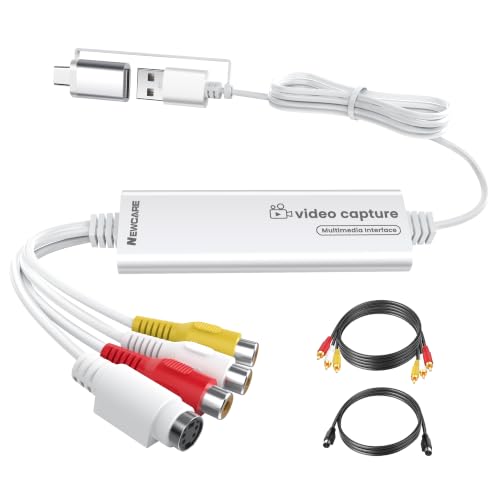 | NEWCARE 2-in-1 | Analog input: Composite / S-Video Computer: USB-A / USB-C Extra: RCA and S-Video cables Best fit: Cable-ready laptop kit | Check Price on Amazon |
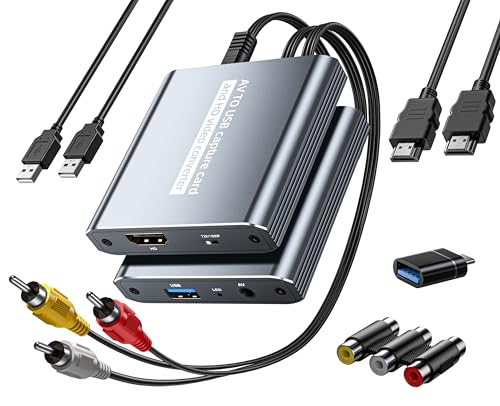 | Fulfalic Loop-Out | Analog input: RCA AV Computer: USB capture Extra: HDMI preview out Best fit: Watch while capturing | Check Price on Amazon |
 | Oassuose USB-A/USB-C | Analog input: RCA / S-Video Computer: USB-A / USB-C Extra: 1080p30 output claimed Best fit: Basic dual connector | Check Price on Amazon |
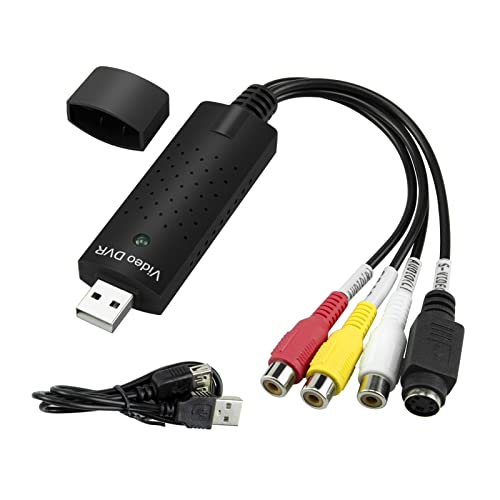 | Little World USB 2.0 | Analog input: RCA / S-Video Computer: USB 2.0 Extra: NTSC/PAL SD dimensions Best fit: Clear SD capture boundary | Check Price on Amazon |
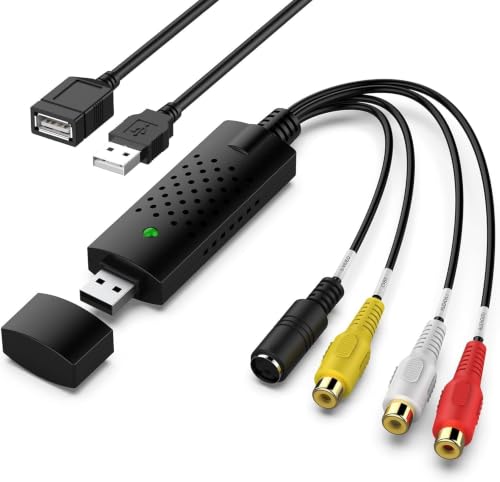 | VIXLW RCA to USB | Analog input: RCA; S-Video claimed Computer: USB Extra: 720p output claimed Best fit: Conditional composite grabber | Check Price on Amazon |
1. ClearClick Video to USB — Best Mixed Analog Source Desk
ClearClick lists composite AV/RCA and S-Video inputs for VHS decks and camcorders, plus an HDMI input for a separate digital source. The wider input range helps if the archive includes both VCR tapes and other home-video equipment. The product’s output goes to a laptop over USB-C, and the listing says a full-size USB-A adapter is included. Connect the VCR’s audio too, because an S-Video cable alone only carries the picture.
The seller says analog video is automatically upscaled to HD output. The upscaled output should not be described as true HD source quality. ClearClick also lists included capture/live-stream software and Windows, macOS and Ubuntu compatibility, but the exact computer still needs a short recording test. It expressly excludes copyrighted or content-protected HDMI sources. The restriction concerns its HDMI input and does not make it a tool for bypassing protected media.
Our Take Buy ClearClick when one desk must capture several source types, especially composite and S-Video. Its upscaled output is a convenience for file handling, not a promise to restore VHS detail.
- Composite, S-Video and HDMI inputs listed.
- USB-C with USB-A adapter.
- Capture software and instructions listed.
- Analog-to-HD output is upscaling.
- Protected HDMI sources are excluded.
- Specific laptop compatibility still needs testing.
2. NEWCARE 2-in-1 — Best Cable-Ready USB-C Laptop Kit
NEWCARE describes a capture unit with composite RCA and S-Video inputs, USB-A and USB-C connectors on a built-in 3.3-foot cable, and included RCA and S-Video leads. The package covers the common VCR connections without needing a separate capture cable purchase. The listing also names NTSC/PAL support and Windows/macOS recording applications. Check that the laptop presents it as both video and audio sources before starting a full transfer.
The seller lists MJPEG and YUV422 output up to 1920 × 1080 at 30 Hz, but the incoming VHS image remains analog standard definition. A large digital frame may simply contain scaled tape video. The most important limit is that the listing says the device is not compatible when used through a docking station. Plug it directly into the laptop during the first test, especially if your normal desk route goes through a USB-C dock.
Our Take Buy NEWCARE as a first kit for a laptop with USB-C and a VCR whose cables are missing. Its need to plug straight into the laptop counts for more than the 1080p output claim.
- RCA and S-Video cables listed in box.
- USB-A and USB-C connectors.
- NTSC/PAL and two output formats listed.
- Docking-station use excluded.
- 1080p output does not add VHS detail.
- Built-in cable fixes the laptop reach.
3. Fulfalic Loop-Out — Best HDMI Preview While Capturing
Fulfalic’s listing describes RCA/AV input to USB computer capture with an HDMI output for live preview on a TV or monitor. The HDMI output can let someone watch the tape on a larger screen while the laptop records, which is useful for checking cuts and visual dropouts. It is not an HDMI-input-only capture card, because the analog VCR signal enters through the AV side. The seller includes an HDMI cable, USB cable, USB-C adapter and AV connection pieces.
The listing states a switchable 720p/1080p HDMI preview and 1080p30 digital capture language. Again, both modes describe the output, not a change in tape resolution. The product copy also claims it can “restore” faded video, but no restoration test or mechanism is provided by the returned evidence, so do not budget for an automatic repair feature. The seller says OBS/PotPlayer or similar capture software is needed and notes that OBS may need a restart after audio setup.
Our Take Buy Fulfalic when you want a TV preview during the USB capture. Treat the HDMI connection as a monitoring output and verify both video and audio in the saved laptop file.
- HDMI preview while USB captures.
- Analog AV input listed.
- Several connection pieces included.
- Capture software required.
- HDMI preview is scaled output, not source restoration.
- OBS audio setup may need a restart.
4. Oassuose USB-A/USB-C — Best Simple Dual-Connector Grabber
Oassuose lists an RCA or S-Video input path into a PC or Mac through USB-A or USB-C. The RCA and S-Video input suits older VCRs, and USB-A or USB-C avoids committing to one computer connector. The seller names NTSC and PAL signals and says separate acquisition software is required, recommending applications such as OBS or QuickTime. The listed plug-and-play claim is not a substitute for confirming the computer shows the chosen audio and video devices.
Its title and bullets advertise 1080p at 30 fps output. Composite VHS will not become a native 1080p recording just because the USB device wraps or scales it that way. The returned features do not state bundled RCA/S-Video cables as clearly as NEWCARE’s listing, so check the package if the VCR has no usable leads. Make a short capture with both moving picture and spoken audio, because a frozen preview or silent file is not an acceptable archive.
Our Take Buy Oassuose for a basic analog capture setup that needs either USB-A or USB-C. Judge it on its RCA/S-Video input and laptop fit, not the 1080p marketing figure.
- RCA and S-Video input claims.
- USB-A and USB-C computer options.
- NTSC/PAL listed.
- Separate capture software required.
- Cable bundle not clear from returned bullets.
- 1080p output is not native VHS detail.
5. Little World USB 2.0 — Best Native-SD Output Boundary
Little World’s USB 2.0 capture adapter lists RCA or S-Video inputs for a VHS deck and sends video and audio to a computer without external power. Its returned bullets state NTSC 720 × 480 at 30 fps and PAL 720 × 576 at 25 fps. The NTSC and PAL figures are useful because they describe standard-definition capture dimensions rather than implying that a 1080p file makes a VHS tape sharper. The actual recording application still sets the saved file format.
The product lists several Windows releases through Windows 11 and Mac compatibility as seller claims, not as a test of your laptop. Its notes discourage a USB extension cable or hub splitter, so begin with a direct port connection. The seller recommends OBS or another recording application if the computer lacks a CD drive. Test audio alongside video, because a working picture alone does not establish that both stereo channels were captured.
Our Take Buy Little World when you want a straightforward standard-definition capture route and do not need an advertised upscale. Start with a direct laptop port and confirm software recognition.
- NTSC/PAL capture dimensions stated.
- RCA and S-Video input listed.
- No external power listed.
- Hub/extension use discouraged.
- OS compatibility is seller-stated.
- Software setup still needed.
6. VIXLW RCA to USB — Best Basic Composite Capture
VIXLW’s listing describes analog RCA composite input to USB, with audio capture and a claim that it can also work with S-Video sources. The composite input covers the basic VCR-to-laptop route without adding an HDMI feature that may not be needed for tapes. The seller says no external power is needed and mentions NTSC/PAL support plus brightness and contrast controls. Any control in software will depend on the capture application and device driver actually exposing it.
Its product copy calls the USB output 720p and recommends OBS/PotPlayer on Windows or QuickTime on Mac. A 720p file still comes from a standard-definition tape signal, so compare the image and audio against a short direct deck playback before committing the archive. The title includes “Vista compatible” while the bullets make broader Windows/Mac claims, but no exact current OS matrix is established. Avoid assuming a current laptop will recognize it until you run a test.
Our Take Buy VIXLW when you have a working VCR and a laptop with tested capture software and want plain composite-to-USB capture. Its sparse OS information and 720p marketing make it a conditional pick.
- Composite video and audio to USB.
- S-Video source support stated.
- No external power listed.
- Current OS fit is not clearly specified.
- 720p output adds no tape detail.
- Software control behavior needs checking.
Buying Guide: Make the VCR-to-File Chain Work End to End
Start with the VCR’s actual analog outputs
Composite RCA is the common baseline. Connect yellow from the VCR to the video input and red/white from the VCR to the capture device’s audio inputs. A capture dongle cannot read a VHS cassette by itself. If your deck offers S-Video and the converter supports it, S-Video can keep picture information on a separate video lead, but it still needs red/white RCA for sound. Confirm the VCR plays the tape properly on a display before blaming the USB adapter for a blank preview.
Do not confuse an HDMI product with an analog converter. ClearClick includes HDMI input alongside analog inputs, and Fulfalic sends its analog picture out to HDMI for preview. An HDMI switch only selects among HDMI sources and does not digitize composite VHS. Buy the box with the connector that matches the VCR’s output, then verify the signal reaches the chosen laptop application.
Treat output resolution as a file setting
A 1080p output is not a 1080p source. VHS is standard-definition analog material, and a capture device may scale it into a larger digital frame. NEWCARE, Oassuose, Fulfalic and ClearClick advertise high-definition output or preview modes. Little World states NTSC/PAL capture dimensions directly. None of those claims establishes extra detail in the original tape. Spend more attention on stable playback, correct aspect ratio, synchronized audio and a clean recording than on a single resolution number.
Capture a short test with audio before a whole side. Choose the device as both video and audio input in your recording application, make a one-minute file, then play the saved file. Look for stretched 4:3 video, missing color, black borders, clipping and sound drift. If the preview is good but the file is silent, check the audio source selection. If a tape is physically damaged, do not keep rewinding it through a suspect deck merely to try another USB capture setting.
Match software and computer ports to the desk
Direct USB is a useful first test. NEWCARE says its unit is not compatible through a docking station, and Little World advises against a hub or extension. Connect directly to the laptop when diagnosing recognition problems. USB-A and USB-C are connector options on the computer side for some products, not guarantees of faster tape capture. A capture application’s input list is the simplest proof that the connection is usable.
Know what the software actually saves. Several listings recommend OBS, PotPlayer or QuickTime, but their support language is vendor copy, not an installed-software test. Save a short clip, verify its file format and location, and back it up before moving to the next tape. For an audio-only cassette collection, our USB cassette converter guide covers a different route from player to laptop without video.
Frequently Asked Questions
Will a 1080p USB capture card make VHS look like HD?
No. The digital output can be 1080p while the source remains VHS. The device may enlarge or process a standard-definition analog picture, but it cannot recover fine detail that is absent from the tape. A higher output frame size can still fit a modern editor or preview screen, but do not pay for it as if it were a service that restores images.
Compare a short captured file at the correct aspect ratio with the VCR’s direct playback. If it looks worse, inspect deck tracking, cable connection, input format and software settings before buying another capture card solely for a larger resolution number.
Do I need S-Video, or are yellow/red/white RCA cables enough?
For a VCR with only composite video, yellow/red/white RCA is enough for a basic transfer, with yellow for picture and red and white for stereo audio. If both the deck and capture device offer S-Video, you can use that picture connection while retaining red/white RCA for sound. An S-Video plug by itself cannot carry the tape’s audio.
The practical test is the saved file, not the cable label. Record a short moving scene with spoken sound, then inspect it for missing color, poor aspect ratio and one silent channel. Use whichever supported source path behaves better on your actual deck.
Can I capture a VHS tape with only this USB device?
No. You also need a functioning VCR or another player that outputs the tape’s picture and sound. The USB device converts that external signal into something a computer can record, and it has no VHS transport. A video file also needs capture software and enough laptop storage for the full tape.
Before tackling a unique family tape, test the deck with a non-critical cassette and inspect its output. If the deck chews or drags tape, stop. A better capture device cannot protect a fragile recording from a failing transport.
Bottom Line
ClearClick Video to USB covers the widest mix of analog and digital inputs. NEWCARE 2-in-1 suits a direct USB-C laptop connection with analog cables included. Fulfalic Loop-Out is for a separate TV preview during recording, while Little World USB 2.0 gives a clearer standard-definition output boundary. Choose by VCR connector and capture workflow, then verify a saved file before archiving the full tape.