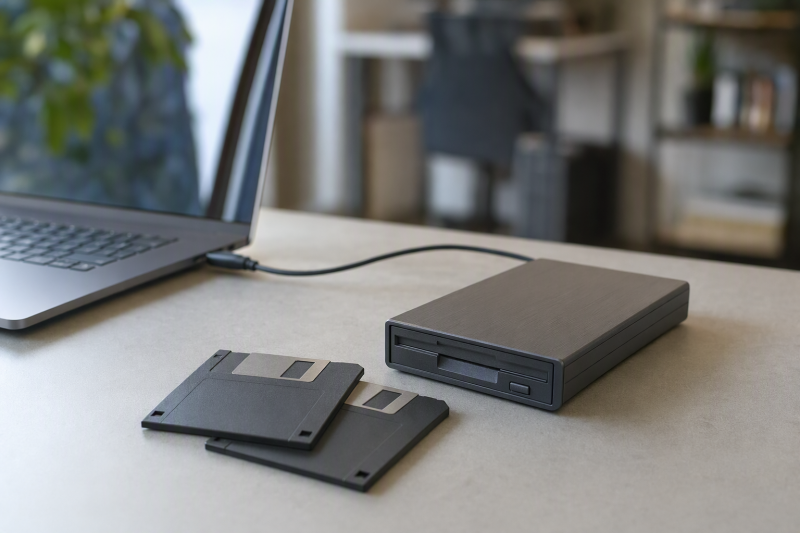
The document you need may be on a 3.5-inch floppy disk, while your current laptop has no floppy drive at all. A small USB reader can add the missing drive, but it cannot repair a damaged disk or make obsolete software run. Identify the disk capacity and the computer that created it before buying. A standard 1.44 MB PC disk is a different job from a 720 KB disk, a 5.25-inch disk, or an older Mac-specific format.
These six external 3.5-inch readers differ in connector choice, seller-stated disk formats, OS claims, and whether a carrying case is included. A listing cannot establish recovery success on an aging disk or compatibility with every computer on a seller’s list. For irreplaceable files, make a copy from a healthy disk before attempting edits.
Start with one known disk. Read its label, check for visible damage, and decide whether you need a plain 1.44 MB PC reader or a specialist recovery method.USB Floppy Drives Compared
| Image | Product | Details | Check Price |
|---|---|---|---|
 | RAAYOO Type A/C | Media claim: 3.5-inch 1.44 MB Connector: USB-A/C OS claim: Windows; no Mac Best fit: Mixed-port Windows laptop | Check Price on Amazon |
 | YEY FDD-001 | Media claim: 3.5-inch 1.44 MB Connector: USB OS claim: Windows; Linux stated Best fit: Linux host to verify | Check Price on Amazon |
 | Tendak USB Floppy | Media claim: 3.5-inch 720 KB/1.44 MB Connector: USB 1.1/2.0 claim OS claim: Older Windows list Best fit: 720 KB claim to verify | Check Price on Amazon |
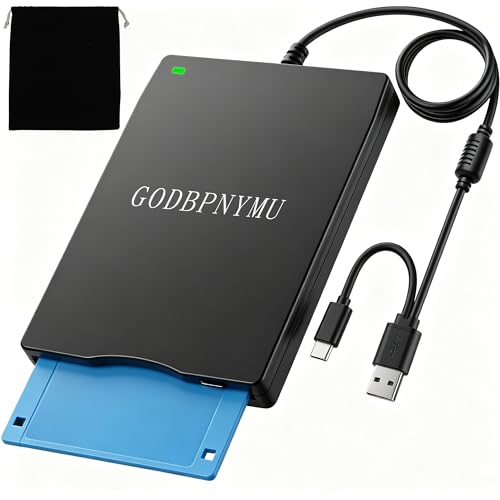 | GODBPNYMU RQ02 | Media claim: 3.5-inch 1.44 MB; no 720 KB Connector: USB-A/C OS claim: Windows/Mac/Linux stated Best fit: Explicit 1.44 MB-only | Check Price on Amazon |
 | Chuanganzhuo CAZED-006 | Media claim: 3.5-inch 1.44 MB Connector: USB-A/C OS claim: Windows; no Mac/Chrome Best fit: Direct-USB Windows use | Check Price on Amazon |
 | Wbacon USB Floppy | Media claim: 3.5-inch floppy Connector: USB-A/C stated OS claim: Windows listed Best fit: Included carrying case | Check Price on Amazon |
1. RAAYOO Type A/C — Best Dual-Connector Windows Pick
The RAAYOO listing calls the product a 3.5-inch, 1.44 MB floppy reader with USB-A and USB-C connection options. The two connectors help when an older desktop has only USB-A and the laptop used to copy its files has only USB-C. The seller lists Windows 11 through older Windows releases, and says the drive gets its power over USB without a separate adapter. Connect directly to the computer while diagnosing a failed read, because a hub is another power and compatibility variable.
RAAYOO says the drive is not compatible with Mac. Its description does not establish support for 720 KB, 5.25-inch, or unusual disk formats, so treat 1.44 MB PC floppies as the documented target. The listing’s “plug and play” wording describes recognition of the USB device, not a guarantee that an aging disk or the files on it can be read. Copy files to another location and verify them before doing anything that writes to the original.
Our Take Choose RAAYOO if you have ordinary 1.44 MB PC disks and a Windows computer with USB-A or USB-C. It is the wrong choice if the source disks are Mac-specific or an unconfirmed lower-density format.
- USB-A and USB-C connection options stated.
- 1.44 MB target is explicit.
- Bus-powered setup.
- Seller excludes Mac.
- No established 720 KB support.
2. YEY FDD-001 — Best Linux Listing to Check
YEY’s checked offer identifies a USB 3.5-inch, 1.44 MB external floppy drive. It lists Windows 11, 10, 8, 7, and XP, and explicitly mentions Linux. The Linux mention makes it a candidate for a Linux-based intake computer, but the listing gives no distribution, kernel, or filesystem detail. Verify the exact host configuration before relying on it for a large archive.
The drive is bus-powered and described as compact, with no external power adapter required. Its listing does not claim USB-C, 720 KB, or Mac compatibility. A USB-A-to-C adapter may physically connect it to a newer laptop, but the adapter does not confirm that the device, filesystem, or disk can be read. Start with a noncritical known-good 1.44 MB disk to separate a drive problem from a damaged source disk.
Our Take Choose YEY if Linux is part of your intake workflow, since its seller names Linux. Its 1.44 MB format claim is narrow, so it is easy to check against your disks.
- Linux is explicitly mentioned.
- Standard 1.44 MB media role is clear.
- No distribution-specific Linux detail.
- USB-C and 720 KB support are not stated.
3. Tendak USB Floppy — Best 720 KB Claim to Verify
Tendak is the one selected listing that explicitly names both 720 KB and 1.44 MB 3.5-inch disks as supported. If an archive includes double-density PC media, that claim gives you a concrete question to check with the seller and your host OS. It is not proof that every 720 KB disk or non-PC format will mount, and it does not turn a USB drive into a specialist flux-level reader. The seller also lists older Windows versions, not a clear current Windows 11 or Mac support statement.
Read the compatibility notes before buying. Tendak says it uses USB 1.1/2.0 and does not support USB 3.0, and recommends a rear USB port on a desktop. A modern USB-C-only laptop may need a suitable adapter or hub, which the listing does not validate. If your task is specifically a 720 KB archive, ask about the exact operating system and test one disposable disk before trusting the setup with an irreplaceable original.
Our Take Choose Tendak if your pile includes 720 KB PC disks and you will ask the seller about them first. It is a research lead, not a guaranteed recovery tool, and its older USB and Windows guidance is a purchase constraint.
- Seller explicitly mentions 720 KB and 1.44 MB.
- No external power adapter listed.
- Seller says no USB 3.0 support.
- Current Windows 11 and Mac compatibility are not established.
- Disk-format claim needs host-specific confirmation.
4. GODBPNYMU RQ02 — Best Explicit 1.44 MB Limit
This GODBPNYMU listing describes a dual USB-A/USB-C 3.5-inch reader/writer for 1.44 MB high-density disks. Its clearest useful detail is a warning that 720 KB low-density disks are unsupported. The exclusion makes the model easier to rule out when your box of disks contains mixed capacities. The seller claims Windows, Mac, and Linux compatibility. The broad OS claims are not independently tested here and should be verified against the precise computer and disk format.
The seller also advises connecting directly to a native computer USB port rather than a hub or dock because of power concerns. The advice is sensible troubleshooting guidance, not evidence that every direct port will work. Its description mentions industrial equipment, but the drive’s ability to read a standard PC floppy does not prove it can decode an embroidery, CNC, or other proprietary file format. Keep the source disk unchanged until a valid copy is confirmed.
Our Take Choose RQ02 if you only have 1.44 MB disks and want both USB-A and USB-C options. Because the seller names the 720 KB exclusion, it is easy to rule out before you buy.
- USB-A and USB-C stated.
- 720 KB exclusion is explicit.
- Seller names Windows, Mac, and Linux.
- Cannot serve a 720 KB archive.
- Broad OS claims need local verification.
5. Chuanganzhuo CAZED-006 — Best Direct-USB Windows Setup
Chuanganzhuo’s CAZED-006 listing specifies a 1.44 MB 3.5-inch reader with USB Type-A/C connectivity. It gives a Windows 11/10 troubleshooting path. If the floppy icon is not visible in File Explorer, the seller suggests checking the device in Windows’ Devices and Printers view. That instruction can help distinguish a hidden or unmounted drive from an absent USB device, though menu names may vary by Windows release.
The seller excludes Mac and ChromeOS and warns that a USB hub or extension can leave the drive short of power. It also notes that an old, dusty, or moldy disk can fail or contaminate the mechanism. Inspect the disk before inserting it. Do not repeatedly feed visibly damaged media through any reader. Its broad warranty copy is not evidence about archive success, and its product description does not substantiate 720 KB support.
Our Take Choose CAZED-006 if you want USB-A and USB-C options on Windows and want concrete steps when the drive icon does not appear. It still needs a healthy standard disk and a compatible host.
- USB-A/C and 1.44 MB stated.
- Windows device-visibility guidance in listing.
- Mac and ChromeOS excluded.
- No 720 KB claim.
6. Wbacon USB Floppy — Best Included Carrying Case
Wbacon’s checked offer includes a carrying case for the compact 3.5-inch external drive and lists USB/Type-C compatibility for Windows 11 through older Windows versions. A case is a modest practical benefit if the reader lives in a drawer or travels between an archive and a laptop. The case does not protect aging disks or improve their chance of being readable.
The listing advertises “USB 3.0 speed,” but floppy media itself is the limiting technology. Do not interpret that interface phrase as faster recovery or broader disk-format support. The seller gives Windows device-visibility guidance and a warning about dusty or moldy disks. It does not establish 720 KB, Mac, or Linux support in the checked details. If your main need is nonstandard media, the included case is not a substitute for format evidence.
Our Take Choose Wbacon if you open archives occasionally on Windows and want the reader stored with a case. Buy for the disk and OS match, not the USB speed headline.
- Carrying case included.
- Windows troubleshooting guidance stated.
- USB-A/C compatibility listed.
- USB 3.0 label does not speed the disk.
- No confirmed 720 KB or Mac support.
Buying Guide: Match the Disk Before the Drive
Identify the physical disk and recording format
The six drives here accept 3.5-inch floppy media, not 5.25-inch disks. Most checked listings target 1.44 MB PC high-density disks. GODBPNYMU explicitly excludes 720 KB, while Tendak explicitly claims it. A 720 KB claim still needs verification with the host and a known-good sample. If a disk came from an older Macintosh, instrument, or industrial controller, the data may use a different physical encoding or filesystem even when the plastic shell fits.
Do not reformat a disk to make it mount. Reformatting would overwrite the data you are trying to save. For unusual formats or a unique disk that a standard USB reader cannot access, a specialist imaging service or appropriate vintage hardware may be safer. The Floppydisk.com explanation of 720 KB and 1.44 MB media is useful background, but it does not certify any of these exact products.
Check the laptop port, OS, and power route
USB-A and USB-C are connector choices, not disk-format guarantees. RAAYOO, GODBPNYMU, and Chuanganzhuo list dual connector paths, whereas YEY describes a basic USB reader. Confirm the exact plug on the offer you buy, especially when a seller bundles a separate adapter. Our USB-C hub guide covers portable port expansion, while the USB-C docking station guide covers fixed desks. Neither guarantees enough drive power.
Several sellers recommend a direct host USB port to rule out insufficient hub power. Their OS claims also differ. RAAYOO and Chuanganzhuo exclude Mac, YEY mentions Linux, and GODBPNYMU names multiple platforms without detailed tests. Even a recognized drive can show no files if the disk is damaged or uses an unsupported filesystem. Test the host path with a disposable known-good disk before touching the only copy of an important document.
Copy cautiously and verify the archive
Visually inspect old disks for mold, dust, warped shutters, and damaged labels. A contaminated disk can foul a drive and put the next disk at risk. If a disk makes repeated unusual sounds or fails to read, stop rather than cycling it indefinitely. A standard USB reader is intended for ordinary healthy media, not forensic recovery from deteriorated magnetic surfaces.
Once files are visible, copy them to a working folder without changing the original, then verify representative documents open. Preserve filenames and folder structure, because older projects may refer to relative paths. Put a second copy on independent storage and note which original disk it came from. If a document requires obsolete software, copying the files and being able to open the document are separate steps.
Frequently Asked Questions
Can these drives read a 5.25-inch floppy or every 3.5-inch disk?
No. All six are 3.5-inch external drives, so a 5.25-inch disk will not fit. Among 3.5-inch media, capacity and encoding still need to match the drive. The dominant listed target is 1.44 MB PC high-density media. GODBPNYMU says no 720 KB, while Tendak claims 720 KB support.
An older Mac disk or proprietary equipment disk may need different hardware or software even if it looks identical. Identify the originating machine and format before purchasing. Do not insert a rare original merely to see what happens in an unverified setup.
Why does Windows see the USB drive but not my document?
Device recognition is only the first step. The disk may be damaged, use an unsupported density, or contain a filesystem the current computer cannot interpret. The document itself might need an old application after its bytes are copied. Some sellers also describe a Windows drive icon that is hidden until you inspect the device view.
Try a known-good standard disk on a direct computer port to isolate the hardware path. Never choose a Windows prompt to initialize or format the archival disk. If the original is unique or physically deteriorated, stop and consider specialist help rather than repeated attempts.
Is USB 3.0 faster for recovering floppy files?
Not in a meaningful way for standard floppy media. The disk mechanism and magnetic media limit the read, far below the bandwidth of ordinary USB ports. A listing’s USB 3.0 wording may describe its host plug or marketing, not a faster floppy transfer or better damaged-disk handling.
Connection stability and supported disk format are the better things to compare. A direct USB port can simplify power troubleshooting, and a backup with file verification protects the recovered result. Do not select a reader solely by a USB speed claim.
Bottom Line
Choose RAAYOO for ordinary 1.44 MB PC disks on Windows with either USB plug, YEY as a candidate if the seller’s Linux claim fits your workflow, and Tendak for double-density disks, since it is the only selected listing that names 720 KB as supported. Treat every compatibility claim as something to verify against the actual disk and host before relying on it for unique documents.