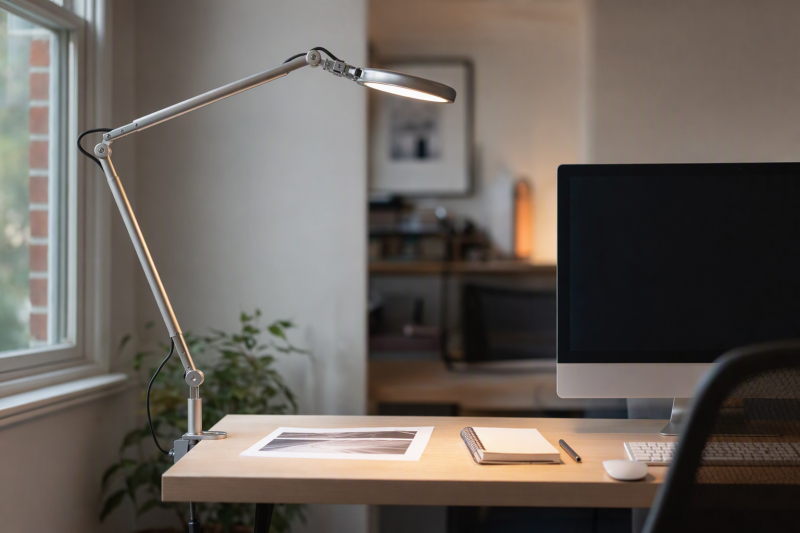
A sheet of paper beside a bright display often needs its own light. An adjustable architect-style task lamp can aim a beam at notes, forms, or a drawing without depending on a bar clipped to the monitor. The key is lighting the page without reflecting the lamp in the screen or occupying all the remaining desk space.
This guide covers six independently mounted Amazon US lamps with active New offers. They differ in clamp versus base mounting, arm reach, controls, and whether the light source can be replaced. Listing specifications do not establish measured brightness, flicker, color rendering, or eye-health outcomes. The sellers’ “eye-caring” phrases are not a test result. Plan where the paper sits and where the lamp can actually mount before choosing a model.
Aim the light at the document from the side, then check the screen for reflection at the angle you normally work.Architect Desk Lamps Compared
| Image | Product | Details | Check Price |
|---|---|---|---|
 | Micomlan 24W clamp lamp | Mount: Desk-edge clamp Light: Three bars; 3000-6500K claim Control: Touch; stepless dimming and sensor Best fit: Wide page and keyboard coverage | Check Price on Amazon |
 | Pzloz 24W swing-arm lamp | Mount: Desk-edge clamp Light: 3000-5500K; five levels claim Control: Wireless remote Best fit: Remote adjustment across a desk | Check Price on Amazon |
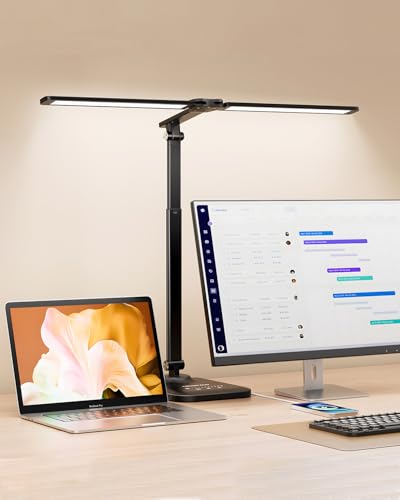 | CHARYJOD adjustable lamp | Mount: Desk base per listing Reach: 15.55-22.83 in height claim Control: Touch; 10 brightness and 5 colors Best fit: Foldable base-mounted task light | Check Price on Amazon |
 | Motumen dual-head clamp lamp | Mount: Desk-edge clamp Light: Dual head; 3000-6500K claim Control: Remote or on-lamp button Best fit: Flexible beam with timer | Check Price on Amazon |
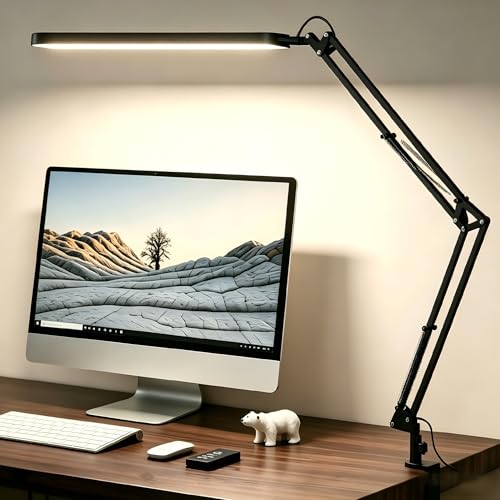 | SKYLEO swing-arm lamp | Mount: Independent desk mount; check exact listing Light: Five colors; 11 brightness levels Power: USB; adapter requirements to check Best fit: Memory setting for repeated work | Check Price on Amazon |
 | Bostitch VLF100D metal lamp | Mount: Flat desk base Reach: 36 in claim Bulb: Replaceable LED included Best fit: Long-reach conventional task head | Check Price on Amazon |
1. Micomlan 24W Clamp Lamp — Best Wide Paper Coverage
Micomlan’s listing describes seven adjustable joints and three LED light bars on a desk-edge clamp. The side bars can point down over a broad page spread or turn upward for room light. That arrangement gives more coverage than a single small head when paperwork and keyboard sit side by side. The seller lists 24W, a 3000K-to-6500K color range, stepless dimming from 20 to 100 percent, and an automatic brightness sensor. These figures are the seller’s specification claims, not measurements we verified.
Its main light is described as angled away from the screen. Angling away from the screen may help with reflection, but glare depends on your monitor finish and exact lamp position. Clamp placement also needs a clear desk lip and room behind the monitor arm or wall. The seller claims CRI above 90 and eye protection. We did not test color accuracy, flicker, or health effects. If the controls group multiple light bars together, consider whether you need independent paper and background lighting.
Our Take Choose Micomlan if you want the broadest aiming flexibility among these lamps. Judge it by its clamp fit and the reflections on your own desk, not by its unverified eye-protection language.
- Three bars and many joints for beam placement.
- Color and dimming ranges are stated.
- Clamp leaves the desk surface open.
- More joints and controls to position.
- CRI and eye-health promises unverified.
2. Pzloz 24W Swing-Arm Lamp — Best Remote Control
Pzloz lists a 24W clamp lamp with a swing arm, rotating head, and wireless remote. The seller offers five color temperatures between 3000K and 5500K and five brightness levels, described as 25 combinations. A remote is handy when the lamp clamps behind a monitor and its own controls are hard to reach. The remote is also one more small object to keep near the paperwork, so check whether the setup still works for your everyday routine.
The listed arm rotates and folds, allowing you to place the head at the side of a document. Side access is more important than maximum power when the goal is readable print without a bright reflection in a glossy display. The listing claims flicker-free, glare-free, blue-light-safe illumination. These effects were not independently measured. Seller notes also acknowledge remote problems and offer replacement, so do not make the remote your only practical way to control the light if manual access is important.
Our Take Choose Pzloz if your clamp spot is behind the screen and remote adjustment is convenient there. Verify the beam and control accessibility at your desk.
- Remote changes brightness and color.
- Articulating arm and head.
- Remote is another item to manage.
- Flicker and eye-safety claims unverified.
3. CHARYJOD Adjustable Lamp — Best Foldable Base-Mounted Light
CHARYJOD describes a dual-head task lamp with a listed 15.55-to-22.83-inch height range, swiveling arms, and a foldable form. Its listing mentions ten brightness levels and five color settings from 3000K to 6500K. Unlike a monitor bar, it sits independently at the desk and can be moved when paperwork shifts to the other side. Check the actual base footprint and whether the head can be aimed without crossing in front of the display.
The seller says it includes a USB adapter and mentions USB charging. The seller also warns that simultaneous lamp and charging use needs a 5V/3A or stronger adapter to avoid flicker. Verify the included adapter and power requirements before buying, especially if you hoped to power it from a weak monitor USB port. The seller’s CRI, flicker-free, and “eye-caring” claims were not tested. A foldable light can be easier to store, but hinge longevity and full-extension stability remain unknown.
Our Take Choose CHARYJOD if a clamp will not fit and you want a flexible, independently placed light. Power the lamp according to its stated requirements and verify the base footprint.
- Listed height range and foldable arm.
- Many brightness and color settings.
- Base uses desk surface.
- Simultaneous charging has a power caveat.
4. Motumen Dual-Head Clamp Lamp — Best Timed Side Light
Motumen lists a dual-head LED clamp lamp with a flexible gooseneck rather than a traditional spring-balanced metal arm. It offers five color settings from 3000K to 6500K, five brightness levels, and a memory function. A remote and an on-lamp button are described, so the button is the alternative if the remote is not at hand. The one-hour shutoff timer is useful if you often finish paperwork and leave the desk without switching the task light off.
The listing says the remote reaches up to 32.8 feet. That range is not important at a desk and was not tested here. More relevant is whether the gooseneck holds each head where it lights the paper without spilling onto a monitor. The seller claims even, flicker-free light and reduced eye strain, none independently verified. Check clamp depth against the desk edge and leave room for any existing monitor arm clamp.
Our Take Choose Motumen if you want a clamp light with remote or button control and a timer. The gooseneck suits task lighting, though it is not a classic architect-arm shape.
- Remote and on-lamp controls.
- One-hour timer and memory claim.
- Gooseneck may not suit a traditional arm preference.
- Light-quality and eye-strain claims untested.
5. SKYLEO Swing-Arm Lamp — Best Remembered Setting
SKYLEO describes an adjustable swing arm and rotating head with five color modes and 11 brightness levels. The lamp remembers its last setting and includes a 45-minute timer. The memory is useful when your page and monitor layout stays constant between work sessions. You aim it once, then restore the same brightness without cycling through modes. The listing says it is USB-powered, so check whether a suitable USB adapter is included or must be supplied separately.
The checked listing bullets do not clearly specify the mounting footprint or the arm’s numeric reach. Confirm both on the exact product page before buying, because an independently mounted lamp can still crowd a narrow desk or conflict with a rear cable tray. The seller says its light reduces eye strain, but we did not measure eye strain. A rotating head helps you experiment with glare control. The screen, room lighting, and page position will decide whether it works.
A remembered brightness setting saves clicks, but the mount and reach must still fit your actual desk.Our Take Choose SKYLEO if your desk layout stays the same and you want simple daily controls. Resolve its mount and reach from the exact listing before making it your pick.
- Memory and 45-minute timer listed.
- Eleven brightness levels.
- Checked bullets omit mount footprint and reach.
- USB adapter details need verification.
6. Bostitch VLF100D Metal Lamp — Best Replaceable Bulb
Bostitch’s VLF100D is the conventional option here. It has an all-metal swing arm, a flat desktop base and a listed 36-inch reach. An LED bulb is included and described as replaceable. A replaceable bulb is useful if you want to change the light source later or avoid discarding the whole lamp when an integrated LED fails. The long arm can reach around a monitor to illuminate paper beside it, provided the base has enough desk space and remains stable at the intended extension.
The listing does not give detailed dimming or color-temperature modes for this model. Any dimming or color options would depend on the compatible bulb and controls. Do not assume the included bulb’s output or color is the same as the multi-mode integrated lamps. A wide reach also makes it more important to place the base where it will not be knocked or tip. We did not measure actual extension, bulb compatibility, stability, or the quality of the included light.
Our Take Choose Bostitch if a replaceable bulb and long reach are more important to you than touch controls. Budget desk area for its base.
- Replaceable LED bulb included.
- 36-inch reach and metal arm claimed.
- Flat base occupies desk area.
- No stated integrated dimming range in checked bullets.
Buying Guide: Light the Page, Not the Screen
Position the beam before comparing controls
Put a sheet where paperwork normally sits, then imagine the light coming from the side or slightly behind your writing hand. The useful requirement is page illumination without a bright screen reflection. A glossy screen can reflect a lamp that looks harmless on a matte one. An angled head and an arm that can hold its position are more important than a high wattage claim if the beam goes in the wrong direction.
Measure the distance from mount to page, including any monitor stand or shelf between them. A clamp light saves desktop footprint but needs a clear lip and enough clearance beside an existing arm clamp. A base lamp is movable but takes up surface area. For tradeoffs in desk space, our monitor arms with laptop stands guide covers a different way to free the area beside a display.
Choose clamp or base, then check power
A clamp should match the desk-edge thickness and shape. A bevel, cable tray, or thick rear apron can prevent a clamp from seating securely. Do not tighten a clamp onto fragile glass or an unsupported surface without the maker’s approval. Base-mounted lamps avoid that constraint, but the footprint and long-arm stability still need checking. The same lamp may feel different when fully extended over a document than when tucked beside the screen.
The integrated LED lamps here offer multiple color and brightness settings. Bostitch instead lists a replaceable bulb. A replaceable bulb is a meaningful maintenance choice, not proof of better light quality. Check whether a power adapter is included and whether USB power is adequate. CHARYJOD’s listing specifies a 5V/3A source when lamp and USB charging run together. If a monitor’s USB port is weak, a separate suitable supply may be necessary.
Treat light-quality and health claims carefully
Color-temperature ranges tell you the available settings, but not the actual illumination on the page, flicker behavior, or color accuracy. Claims such as CRI above 90, glare-free, and eye-caring come from sellers here and were not independently measured. If color matching on paper is important to you, seek credible measured data for the exact lamp. If you mostly read forms, prioritize a comfortable, adjustable beam and manageable screen reflection.
Dim the task lamp when ambient light is bright and increase it when the paper is difficult to read, without shining into your eyes. The American Academy of Ophthalmology discusses glare as one consideration for screen comfort, but a lamp cannot promise to prevent eye strain. Adjust the screen, room lighting, and break routine as needed. For a different USB-C desk setup, our docking station guide addresses device connections, not lighting quality.
Frequently Asked Questions
Is a desk lamp better than a monitor light bar for paperwork?
An independently mounted lamp is easier to aim at paper beside or away from the screen. A monitor light bar follows the display and usually aims at the area directly in front of it. Neither form is universally better. The document location, monitor finish, and available mounting points decide.
If the paper moves around the desk, an articulating arm may follow it more easily. If your desk has no clear edge or space for a base, a monitor bar could be more convenient. We excluded monitor-mounted bars from this roundup so the comparison stays focused on separately mounted task lights.
Does a high CRI or flicker-free claim guarantee less eye strain?
No. The claims describe seller-stated light characteristics, not an independently verified medical outcome. Micomlan claims CRI above 90 and several sellers describe flicker-free output, but we did not measure those lamps. Brightness, screen glare, reading distance, and room light also affect comfort.
Use claims as questions to verify, not a promise that a lamp will solve discomfort. Position the head to avoid reflections, choose a comfortable setting, and seek professional advice if symptoms persist. A replaceable bulb gives another way to choose a light source, but it does not automatically solve glare.
Should I choose a clamp or a desk base?
Choose a clamp when the desk edge is clear, thick enough for the maker’s mounting range, and you want the work surface free. Micomlan, Pzloz, and Motumen specify clamp mounts in their listings. Measure around any monitor-arm mount or under-desk cable tray so the parts do not collide.
Choose a base when you want to move the lamp, cannot clamp the desk, or need to reach a paper stack in several places. Bostitch specifies a flat base, and CHARYJOD is designed for independent placement. A long-reach base arm needs enough stable surface, especially when extended to one side.
Bottom Line
For broad lighting over papers and keyboard, Micomlan gives the most adjustable bars on this list. Pzloz is useful when a remote helps at a clamp behind the monitor, while Bostitch is the pick for a traditional arm and replaceable bulb. First make sure the beam reaches the document without reflecting into the display.