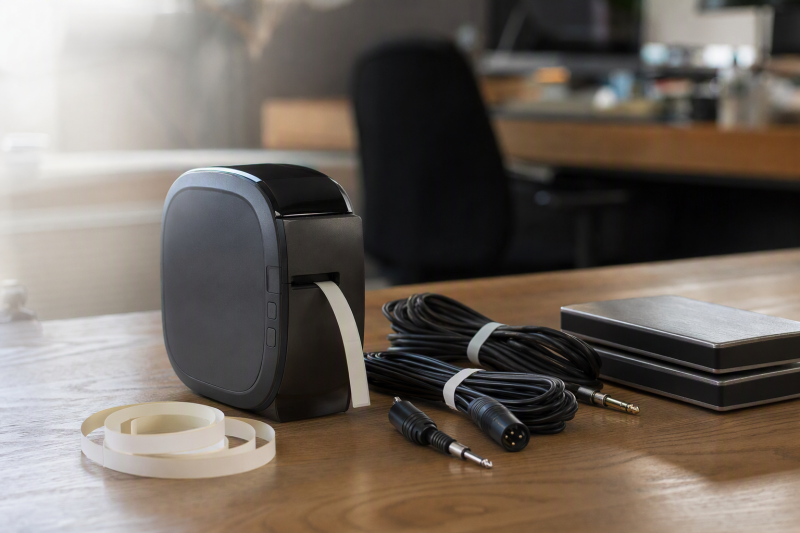
An unlabeled drive or mystery cable wastes studio time. A printer for flat drive stickers does not automatically accept cable-wrap or cable-flag media. Choose the stock before the printer.
These six active-New products split between Brother’s explicit cable formats and smaller printers for cases and bins unless cable stock is confirmed. Adhesive life and abrasion were not independently tested. For the drives themselves, see our external drive guide.
For a cable jacket, verify a compatible wrap, flag or heat-shrink cartridge. For an archive-drive case, check label width, surface and long-term inventory plan.Portable Label Makers Compared
| Image | Product | Details | Check Price |
|---|---|---|---|
 | Brother PT-E110BP | Input: Built-in keyboard Label path: Cable wrap, flag and faceplate keys Media: 3 tapes bundled; exact use must be checked Best fit: Portable cable identification | Check Price on Amazon |
 | Brother PT-E510 | Input: Built-in controls or USB-C computer design Label path: Wrap, flag, heat-shrink, patch panel Media: 3.5-24 mm laminated/heat-shrink, per listing Best fit: Mixed studio and patch-bay inventory | Check Price on Amazon |
 | Brother P-touch CUBE Plus | Input: Bluetooth phone or desktop app Label path: TZe tape up to 24 mm Media: Two starter tapes listed Best fit: Drive cases and general equipment | Check Price on Amazon |
 | SUPVAN T50M Pro | Input: App editing Label path: Cable and file labels listed Media: 3/4-2 inch range, per listing Best fit: Wide drive-case and cable labels | Check Price on Amazon |
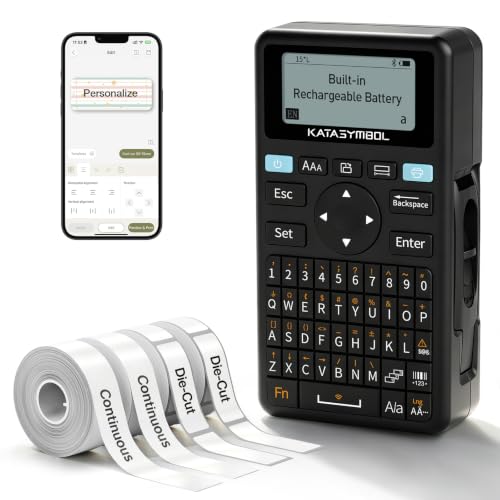 | SUPVAN E11 | Input: Keyboard or Bluetooth app Label path: Continuous and die-cut labels Media: Four tapes bundled, type must be checked Best fit: Quick equipment-case labels | Check Price on Amazon |
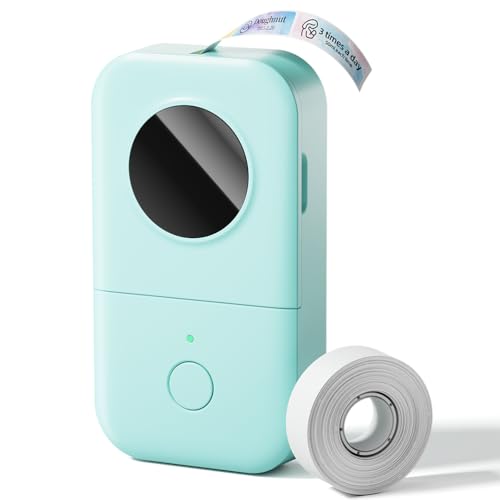 | Phomemo D30 | Input: Bluetooth phone app Label path: Continuous or fixed-length labels Media: Direct thermal, per listing Best fit: Small archive-drive labels | Check Price on Amazon |
1. Brother PT-E110BP — Best Portable Cable-Label Starter
When the studio has patch leads, microphone lines and power cords to identify, the PT-E110BP has a clearer job than a general sticker printer. Its listing names quick application keys for cable wrap, cable flag and faceplate formats, plus 3.5- to 12-millimeter label widths. It is a portable unit with its own keyboard, so a phone does not have to be available at the rack. Not needing a phone helps when labels are being applied while equipment is disconnected.
The kit lists three tapes, a carrying case and wrist strap. Do not assume each included tape suits every cable surface. Match the exact cartridge to the jacket material and label format before printing a batch. The listing calls for AAA batteries, which are not included. For drive cases with larger text or barcodes, the PT-E510 and wider-format units below may be easier to read. Our Thunderbolt external-drive guide shows why an archive inventory should identify interface and capacity as well as a nickname.
Our Take Choose PT-E110BP when the main job is labeling studio cables in place with a compact keyboard printer. Its 12-millimeter width ceiling is narrower than the PT-E510’s, so check the cartridge and print size before using it on a large drive case.
- Dedicated wrap, flag and faceplate keys address real cable-label workflows.
- A keyboard works without opening a phone app at the rack.
- Three tapes and a carry case are named in this exact kit.
- Its 12-millimeter maximum is limited for larger case labels.
- AAA batteries are required but not included.
2. Brother PT-E510 — Best for Cables and Patch Bays
A room with cable looms, patch panels and archive-drive shelves needs more than one label shape. The PT-E510 listing names laminated labels and heat-shrink tubes from 3.5 to 24 millimeters, with quick formats for cable wrap, flag, patch panel, punch block and faceplate. It also names QR and linear barcode printing. Those options make it the broadest specialist here, provided you buy the exact compatible stock for each surface.
Brother describes USB-C connection to a computer for design and printing, plus a dual auto-cutter. The computer connection can help prepare many identifiers from an inventory rather than typing each one at the rack. It is more equipment than a phone-sized printer if your only job is a few flat drive-case stickers. A readable label does not replace a verified copy of the file. Our Thunderbolt 5 external SSD guide explains why fast portable storage is not itself a backup plan.
Heat-shrink tubing, laminated tape and an ordinary flat sticker are different media. Match each to the cable or case before ordering cartridges.Our Take Pick PT-E510 when cables, patch bays and archive cases all belong to one organized inventory. It earns its larger format range only if those specialist labels will be used. PT-E110BP is the simpler portable cable choice for smaller jobs.
- Dedicated cable, patch-panel and faceplate formats span several studio surfaces.
- Its listing names laminated labels and heat-shrink tubes up to 24 millimeters.
- USB-C computer design and barcode options support repeatable inventory work.
- The broader cartridge system is unnecessary for a few plain drive-case labels.
- Each specialty media type needs its own compatibility and size check.
3. Brother P-touch CUBE Plus — Best for Drive Cases
For drives that move between a studio and archive shelf, a consistent flat label with project name, date and drive ID is useful. The P-touch CUBE Plus prints TZe tapes up to 24 millimeters, according to the exact listing, and supports design from phone or desktop software. The kit names two starter tapes and a rechargeable battery. The wider tape family is an advantage for case labels, but the included glitter and white starter tapes are not proof of a cable-wrap cartridge.
Brother’s product pages describe its TZe tape family. Check an exact cartridge’s material and fit before trying to wrap a narrow cable. A flat laminated strip may lift where the jacket bends. For a drive inventory, the label should point to a separate catalog that tracks the backup copies and last verification date. Our external SSD for Mac guide discusses a different part of that storage choice.
Use a stable drive ID on the case, then store the current project and backup details in a separate inventory that can be updated.Our Take Choose CUBE Plus for app-designed equipment and drive-case labels using confirmed TZe stock. It is not the safest cable-wrap recommendation until an exact compatible cable cartridge is identified. PT-E110BP and PT-E510 explicitly support that job.
- Phone and desktop design paths suit repeatable archive naming.
- Up-to-24-millimeter TZe tape gives room for a legible case identifier.
- Two starter tapes, battery and USB cable are listed with this kit.
- The supplied tapes do not establish a cable-wrap format.
- Design depends on a supported phone or desktop software path.
4. SUPVAN T50M Pro — Best for Wide Case and Cable Labels
T50M Pro explicitly names cable and file labels and a 3/4- to 2-inch width range. Wide stock suits a case better than a thin audio lead. Verify the exact cable media. Not every roll wraps securely around a jacket.
SUPVAN describes app-based editing with text, graphics and automatic label-size recognition. A phone-led workflow can save repeated archive-drive templates, but it makes the app and compatible rolls part of the purchase. Compared with the Brother industrial units, this listing does not show dedicated on-device wrap or flag keys. For larger external-drive shelving, our RAID storage guide covers the hardware side of an archive system.
Our Take Pick T50M Pro when large drive-case labels and a verified compatible cable-label roll will both be used. Choose a Brother industrial unit if wrap and flag formats must be available on the printer itself without app ambiguity.
- The exact listing names both cable and file labels.
- A wide stated label range suits cases and storage bins.
- App editing can reuse a common archive-drive format.
- No dedicated cable-wrap or flag hardware key is documented.
- Compatible media and phone app behavior must be checked before a cable job.
5. SUPVAN E11 — Best Keyboard and App Combination
The E11 lets a user type at the printer or design with a Bluetooth app. That flexibility is useful when a studio assistant needs one quick drive-case ID on site, while an archive manager wants a prepared set of labels later. The exact listing names continuous and die-cut labels, four tapes in the package, and a rechargeable battery. Continuous stock is not automatically cable-wrap stock, so check the roll type before applying it to a cord.
The seller’s small body makes it easier to carry between rooms than the PT-E510, but no independent print or adhesive test is available. Choose the keyboard for short consistent IDs and the app only if its current device compatibility suits the team. Our USB-C SSD enclosure guide illustrates why the ID should include the actual drive or enclosure type, not merely a project nickname.
Our Take Choose E11 for case and bin labels when you want a built-in keyboard. Do not buy it as a cable-wrap specialist without confirming a compatible cartridge and suitable layout first. PT-E110BP is the clearer cable-first choice.
- A keyboard can print a quick ID without a phone nearby.
- Bluetooth app design supports saved templates for repeated case labels.
- Continuous and die-cut media options are named in the listing.
- The included tapes are not shown to be cable-wrap stock.
- App features depend on current phone compatibility.
6. Phomemo D30 — Best Small Archive-Drive Stickers
The D30 is a palm-sized direct-thermal printer for quick labels driven from a phone app. Its listing names both continuous and fixed-length media, barcodes and QR codes, with office examples including USB-drive marks. The media options, coded labels and USB-drive examples make it a sensible candidate for small drive cases, drawers and archive bins where a narrow identifier can refer to a fuller inventory record.
Direct thermal output and a generic office sticker are not the same as a protected wrap around a cable that gets coiled repeatedly. The listing does not establish a suitable cable stock for this exact job, so treat D30 as an archive-surface choice, not a cable recommendation. If the archive also uses high-speed SSDs, our Thunderbolt 5 external drive guide covers the storage purchase itself.
Put a short durable ID on the drive; do not squeeze the only copy of its project and backup history onto a tiny sticker.Our Take Pick D30 for compact drive-case and shelf labels when phone-based design is acceptable. Skip it for cable jackets unless a compatible cable-specific label is established. The Brother industrial options are safer starting points for that branch.
- Small body suits a portable archive-label kit.
- The listing supports continuous or fixed-length labels and coded IDs.
- USB-drive marking is an explicit seller example.
- No cable-wrap media for this exact model is established here.
- Phone app and compatible thermal rolls are required for the intended workflow.
Buying Guide
1. Separate Cable Wraps From Flat Drive Labels
A flat case gives an adhesive strip a stable surface. A cable flexes and may be coiled or pulled past equipment, so a generic sticker can lift or become unreadable. Choose the label format before the printer: wrap, flag and heat-shrink are distinct ways to mark cables. The Brother PT-E110BP and PT-E510 listings explicitly name cable-specific layouts. The PT-E510 also lists heat-shrink media.
For a drive case, place an ID where it will not cover a connector, vent or serial number. Keep an inventory outside the label with the drive’s purpose and backup status. Our external-drive guide helps distinguish the storage media itself, while the label is only a way to find it later.
2. Verify Cartridge Width and Surface Compatibility
The printer’s maximum width does not tell you which tape comes in the box or how a particular adhesive behaves. PT-E110BP tops out at 12 millimeters. PT-E510 and CUBE Plus list up to 24 millimeters. SUPVAN T50M Pro lists wider labels. Check the exact cartridge code, width and intended application against cable diameter or case size before ordering a dozen rolls.
Adhesion and readability depend on surfaces and handling, but none of these exact products was tested here over years in a studio. Print a short trial label on the actual material, then inspect it after normal bending or storage. For important backups, the label is not a substitute for a verified second copy, as our external SSD guide explains.
3. Pick a Keyboard or App Workflow
A keyboard-equipped printer can make a short cable or drive ID while standing at a rack. PT-E110BP and SUPVAN E11 support that route. PT-E510 adds a computer design path for larger jobs. Count how often labels will be created away from a phone or laptop before choosing a phone-only mini printer for a working studio.
Apps are more useful when a shared template, barcode or consistent naming format is part of the archive. CUBE Plus, T50M Pro and D30 use software for design. Check current app and computer support for the devices your team actually owns. Our Thunderbolt RAID storage guide covers a larger archive where consistent identifiers become more valuable.
FAQ
Can an ordinary adhesive label wrap around an audio cable?
It can be stuck there, but the listing does not establish that it will stay readable after repeated coiling. Use a compatible cable-wrap, flag or heat-shrink medium when the job is identifying a cable. PT-E110BP and PT-E510 explicitly name those applications. Verify the matching cartridge for each.
A flat sticker is better supported on a drive case or shelf. If you must use a non-specialist printer, test the exact roll on a spare cable before labeling every live lead. Do not assume every roll accepted by a printer suits cable jackets.
Do I need a phone to print studio labels?
No. PT-E110BP has a built-in keyboard. E11 combines a keyboard with Bluetooth app editing. PT-E510 offers on-device controls and a computer path. A phone-only design workflow is a choice, not a requirement of all portable label makers.
If many people print labels in different rooms, decide who maintains the naming format and where templates live. A label that uses a stable inventory ID is more useful than several incompatible project nicknames.
Will a label protect an archive drive’s contents?
No. A label identifies hardware but does not back up, verify or preserve its files. Keep a separate verified copy of anything irreplaceable, and record which physical ID holds each copy. Avoid covering the drive’s factory serial or connector when applying the label.
The printer choice should follow that inventory system. A QR code or barcode can make lookup easier if the database stays available, but it cannot replace a backup. Our Thunderbolt external storage guide covers the drive category itself.
Bottom Line
Start with PT-E110BP for portable cable wraps and flags, or PT-E510 when cables, patch bays and cases need one broader labeling system. CUBE Plus, E11 and D30 make more sense for flat archive-drive and equipment surfaces until their exact cable media is verified. Match label stock to the job before comparing app templates or the number of included rolls.