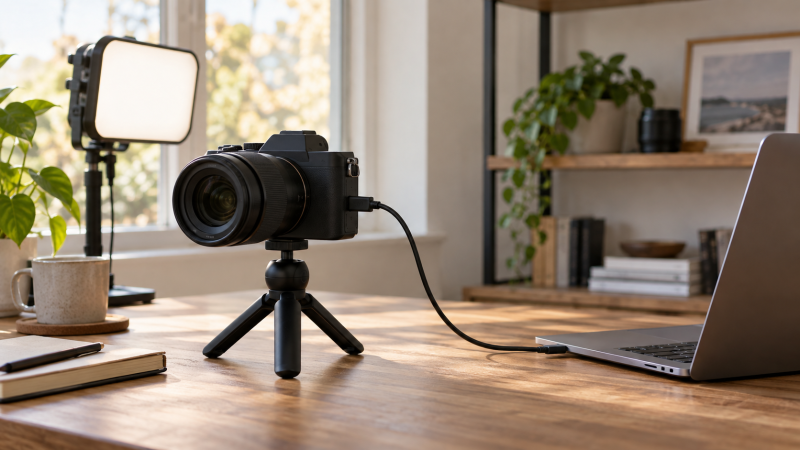
A mirrorless camera can give a laptop stream more lens choice and framing control than a built-in webcam. But the connection method is more important than the camera’s headline recording resolution. Some bodies present a USB webcam feed directly, and others need camera software. If your workday depends on OBS or video meetings, check that route before buying a body or lens.
These six cameras were selected from Amazon US listings with active New offers. Each has a documented laptop path. Output quality, heat and app compatibility were not independently tested. A listed 4K recording mode does not mean 4K USB webcam output.
Start with the USB streaming route your laptop and app can use, then choose the camera system.Mirrorless Cameras for Laptop Streaming Compared
| Image | Product | Details | Check Price |
|---|---|---|---|
 | Fujifilm X-S20 | Laptop route: USB-C webcam Camera type: APS-C body Main catch: Lens sold separately Buyer fit: Fujifilm desk hybrid | Check Price on Amazon |
 | Canon EOS R50 | Laptop route: UVC/UAC over USB Camera type: APS-C body Main catch: Full HD 30 fps webcam mode Buyer fit: Simple direct USB setup | Check Price on Amazon |
 | Fujifilm X-M5 | Laptop route: USB WEBCAM mode Camera type: APS-C body Main catch: Set connection mode first Buyer fit: Compact Fujifilm setup | Check Price on Amazon |
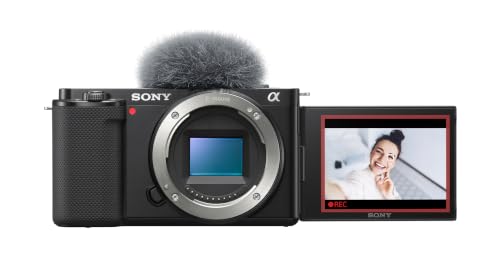 | Sony ZV-E10 | Laptop route: USB Streaming mode Camera type: APS-C body Main catch: Older streaming implementation Buyer fit: Sony lens system | Check Price on Amazon |
 | Canon EOS R10 Lens Kit | Laptop route: EOS Webcam Utility Pro Camera type: APS-C lens kit Main catch: Requires Canon software Buyer fit: Stills and streams | Check Price on Amazon |
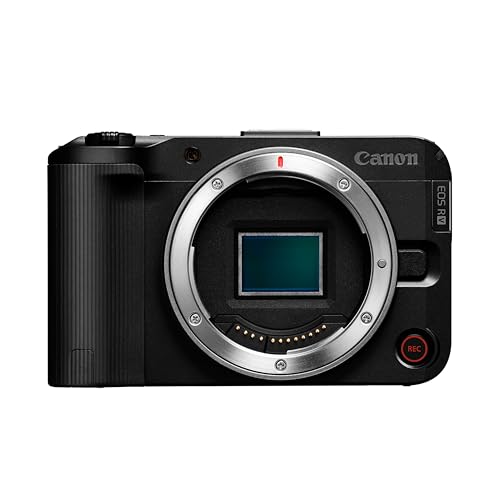 | Canon EOS R50 V | Laptop route: UVC/UAC over USB Camera type: Video-first APS-C body Main catch: Lens sold separately Buyer fit: Video-oriented Canon setup | Check Price on Amazon |
1. Fujifilm X-S20 — Best Fujifilm Desk Hybrid
Fujifilm says the X-S20 can serve as a webcam when connected to a computer by USB Type-C, with shooting settings such as aperture and film simulation adjustable. Its product specifications list an APS-C sensor and a vari-angle display. For a desk where the same camera also takes photos or records video, that range of controls is a reason to consider the X-S20 rather than buying only for webcam use.
The exact Amazon offer is a body, so budget separately for an X-mount lens, a stable mount, suitable lighting and a data-capable cable. Fujifilm’s recording formats are separate from what a laptop app receives through webcam mode. Select the camera in your software and check the feed before a live session. The body may be more camera than a simple video-call setup needs.
Our Take Choose the X-S20 if you want the Fujifilm lens system and its USB webcam route in the same camera. Verify the webcam feed in your laptop app. Do not translate its recording specifications into stream specifications.
- Fujifilm documents direct USB-C webcam use.
- Camera settings remain adjustable while used as a webcam.
- Vari-angle display helps frame a desk shot.
- Body-only listing requires a compatible lens.
- Recording resolution is not the USB webcam output specification.
2. Canon EOS R50 — Best Direct USB Canon Starter
Canon specifies UVC/UAC support for the EOS R50. Connect it by USB and select it in compatible video-call software without installing a separate webcam utility. Canon describes that webcam route as Full HD at a fixed 30 fps. The direct route is a clean buying distinction if you want a Canon interchangeable-lens camera to appear as a laptop camera with fewer software steps.
The exact listing is body only. A suitable RF or RF-S lens, USB cable and camera support are separate purchase decisions. Check whether your preferred meeting or streaming application recognizes its video and audio, and keep a fallback webcam ready for an important call.
A 4K recording claim does not raise Canon’s stated Full HD 30 fps UVC webcam mode.Our Take Buy the R50 for a documented direct USB camera path when you also want Canon lenses. Get the lens and mount right before treating the body price as the complete stream setup.
- UVC/UAC route avoids a separate webcam utility.
- Canon states a specific Full HD 30 fps webcam mode.
- Body-only offer needs a lens.
- Fixed webcam mode is not its full internal video feature set.
- USB cable and desk support still need checking.
3. Fujifilm X-M5 — Best Small Fujifilm Body
The X-M5 manual gives a concrete webcam setup. Choose USB WEBCAM as its connection mode, connect the camera to the computer by USB and select it in the app. That explicit menu path is helpful when a camera is moved between file transfer and streaming. The exact Amazon listing is a black X-M5 body, not a lens kit.
Do not assume any USB-C cable will carry the image. Fujifilm says to use a data-capable cable and describes a length limit in its connection instructions. A body-only purchase needs a lens and stable support. Before going live, confirm the camera is in webcam mode rather than card-reader mode and check that your application sees it.
If the laptop sees storage instead of video, check the X-M5 connection mode before changing cables or apps.Our Take Choose the X-M5 when you want the Fujifilm system in a compact body and are happy to set its USB webcam mode. Buy a lens and verify the exact connection before a scheduled stream.
- Official manual gives a specific USB WEBCAM setup.
- Compact body suits a space-limited desk.
- Body-only listing needs a lens.
- Wrong USB mode can leave the app without a camera feed.
4. Sony ZV-E10 — Best Sony USB Route
Sony documents a USB Streaming function for the original ZV-E10 that sends camera video to a computer without a separate Imaging Edge Webcam installation. Its exact Amazon body listing names a 24.2 MP APS-C sensor and a subject-to-object focus setting. If you already own Sony E-mount lenses, the ZV-E10 may be the shortest route into a dedicated camera stream without buying another lens system.
The specific listing is body only. Sony’s help page says to enter the camera’s USB Streaming mode, then select the correct camera in the conferencing or streaming software. USB feed behavior varies by camera and connection. Do not promise the body’s advertised internal 4K movie setting as the laptop feed. Test autofocus, audio selection, and stable power over the duration you need.
A teleprompter for laptop video changes lens placement and the presenter sightline. Plan the camera, lens and screen together rather than buying a body in isolation.
Our Take Pick the original ZV-E10 if Sony lens compatibility is already valuable to you and USB Streaming meets your app’s needs. Test the feed and power path before using it for a paid live session.
- Sony documents USB Streaming without Imaging Edge Webcam.
- E-mount makes an existing compatible lens useful.
- Listing names subject-to-object focus control.
- Body-only listing requires a lens.
- Internal 4K recording does not prove 4K USB output.
5. Canon EOS R10 Lens Kit — Best Stills-First Canon Hybrid
Canon lists the EOS R10 among cameras compatible with EOS Webcam Utility Pro. The R10 route goes through software on the laptop instead of the R50’s direct UVC/UAC path. The exact Amazon offer is a lens kit, which may be useful if you are starting without RF lenses. Its listing also identifies an APS-C camera aimed at stills and video use.
Check the exact kit lens in the Amazon offer before ordering. A generic kit title does not establish a specific focal range or included accessory set. Install and test Canon’s webcam software on your laptop before relying on this camera for work. If you cannot use the utility on your managed computer, the R50’s direct UVC route is easier to justify.
Our Take Choose the R10 kit when you want still photography and a bundled lens alongside streaming, and Canon’s webcam software works on your laptop. For minimum setup friction, prefer a documented UVC body.
- Exact offer is a camera-and-lens kit.
- Canon lists R10 support for Webcam Utility Pro.
- Not a direct UVC webcam path.
- Kit lens specifics need exact-offer confirmation.
- Utility support depends on the laptop environment.
6. Canon EOS R50 V — Best Video-First Canon Body
Canon’s EOS R50 V support page lists UVC video over USB for computer software and an HDMI streaming route. Canon introduced it as a member of the R50 family aimed at video, with multiple streaming methods. The direct webcam route is a straightforward first setup for a laptop user, while the HDMI route is an option if the production grows into capture hardware.
This exact Amazon listing is body only, so confirm a compatible lens and every cable or capture device separately. Canon’s support page also distinguishes UVC streaming from a different USB mode for computer communication that does not live-stream. Read the camera’s connection setting, not just its connector shape. App-specific audio handling and sustained powered runtime were not independently verified.
A wireless mic kit may serve two speakers, but its laptop audio route needs a separate check.
R50 V has several streaming paths. Confirm which mode feeds the laptop and which extra hardware each path needs.Our Take Buy the R50 V when video production is the main job and you want direct USB now with an HDMI option later. Do not count the body-only offer as a complete streaming kit.
- Canon documents UVC and HDMI streaming routes.
- Video-oriented controls distinguish it from the basic R50.
- Body-only offer needs a lens.
- Connection modes are easy to confuse.
- HDMI path needs separate capture equipment.
Buying Guide
1. Choose USB webcam or utility software first
A direct USB webcam route is the least complicated starting point. Canon documents UVC/UAC for the R50 and UVC for the R50 V. Fujifilm documents USB webcam modes on the X-S20 and X-M5. Sony documents USB Streaming for the ZV-E10. In each case, select the camera in your app and test the feed rather than assuming every USB connection automatically presents video.
The EOS R10 is a different software decision. It is on Canon’s Webcam Utility Pro compatibility list, so verify the utility works with your operating system and the streaming app you use. On a work laptop with restricted installs, a software install may be harder than buying a cable. Our camera-to-streaming-encoder guide explains a different route that bypasses a laptop, not a shortcut for this USB decision.
2. Separate camera recording specs from laptop output
The stream is limited by the selected connection mode. A camera may record 4K internally yet present a lower-resolution USB webcam feed. Canon states Full HD 30 fps for the R50’s UVC webcam mode. Avoid making a 4K purchasing decision from the camera’s recording headline unless you have checked the exact USB or capture output specification for your workflow.
An HDMI capture route is a separate system. It can add a capture device, cable, power requirements and software settings. The added gear may be justified for a more complicated production, but it also adds failure points. If you intend to move beyond one camera, our hardware switcher roundup helps you plan the larger system. A basic meeting setup rarely needs a larger system first.
3. Budget for the lens, support and light
Five of these exact offers are body-only listings. Only the R10 listing is labeled as a lens kit, and its exact included lens needs confirmation. A compatible lens determines field of view at your desk. A tight portrait may look fine on a broad table but be too narrow in a small room. Verify lens mount, minimum focus distance and framing at your camera position.
A steady mount and useful light change the result you see. A tripod kit can hold the camera at eye level. A compact fill light can fill shadows, while a larger COB-and-softbox setup needs more space. None is included with a body listing.
4. Rehearse the complete laptop signal path
Test a full-length rehearsal, not a five-second preview. Connect the data cable you will use, select the camera’s USB streaming mode and check the right video and audio devices in the intended app. Keep the room lighting and laptop power arrangement close to the live event. If the camera becomes storage rather than a video source, inspect its connection mode before blaming the computer.
Plan a fallback when the session matters. A laptop’s built-in camera can rescue a call even if it is less flexible. Check cable strain, camera power, app updates and an alternate microphone. A hardware encoder can remove the laptop from a different kind of live production chain, but it is not a required accessory for these USB webcam setups.
FAQ
Do I need an HDMI capture card for these cameras?
Not for the documented USB webcam routes. The R50, R50 V, X-S20, X-M5 and ZV-E10 each have a USB video path described by the manufacturer. The R10 appears on Canon’s Webcam Utility Pro compatibility list, which means its USB route depends on that software rather than direct UVC operation.
HDMI capture is an alternative when you need a particular output or production setup. It requires checking camera HDMI behavior, a compatible capture device, cables and app settings. Do not buy one simply because a camera listing advertises 4K recording.
Will a body-only camera work for a stream without a lens?
No. A body-only listing does not include a usable lens for a framed camera image. Confirm the correct lens mount and the field of view at your desk before buying. The R10 entry here is a lens kit, but its generic title does not establish which exact lens is included.
Also budget for a stable mount, a data-capable cable and lighting. A camera body that arrives without the lens or support you planned around cannot serve as a complete laptop streaming setup that day.
Can I assume 4K video recording means 4K USB streaming?
No. Recording formats describe files made inside the camera, while USB webcam output is a separate mode. Canon specifically describes the R50’s UVC webcam route as Full HD 30 fps. Other bodies have their own USB behavior and requirements.
Check the manufacturer’s webcam instructions for the exact model, then confirm what your laptop app receives. Finish both checks before spending extra on a body because of a recording resolution that may not reach viewers over the chosen path.
Bottom Line
Choose Canon EOS R50 for its stated direct UVC webcam path, Fujifilm X-S20 if the camera also serves a Fujifilm workflow for photos and video, or Canon EOS R50 V if video production drives the purchase. Sony ZV-E10 and Fujifilm X-M5 offer their own USB routes. Canon R10 makes most sense when the lens kit and Webcam Utility path both fit. Check lens, connection mode and app together.