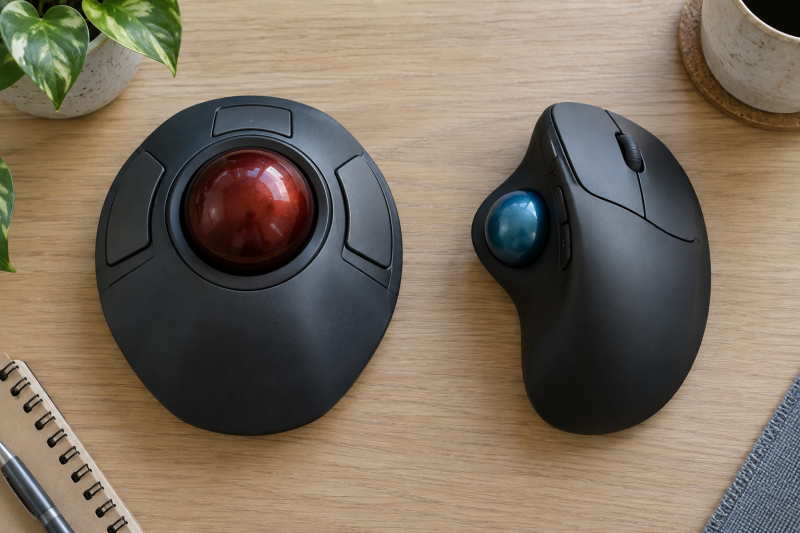
A trackball can stay put on a crowded desk while the pointer moves, but how you use your whole hand depends on where the ball sits. A finger ball sits under the index or middle fingers, and a thumb ball sits beside a grip shaped like a mouse. Before buying either, check which digit moves the ball, which fingers click, and where the scroll control sits. Those choices affect your editing workflow more than the word “ergonomic” on a box does.
Choose the layout your hand can operate comfortably, not the shape that looks most familiar in a product photo.See which digit controls the pointer
On a finger-operated trackball, the ball usually sits near the center or front of the device. Your index and middle fingers roll it while the thumb and other fingers use buttons or a scroll ring. Kensington’s Expert Mouse page identifies its large ball as finger-operated and pairs it with a surrounding scroll ring. Other finger models can place buttons and scrolling differently, so check the exact layout instead of assuming every model matches this example.
On a thumb-operated trackball, the ball is off to one side of a contoured body. The index and middle fingers commonly retain familiar click and wheel roles while the thumb rolls the ball. Logitech’s MX ERGO page explicitly describes thumb control and an adjustable 0 or 20-degree tilt on that model. The tilt is a feature of that model, and not all thumb trackballs have one.
Precision has no universal winner between the two layouts. Kensington’s hand-position guide suggests finger control for some precise tasks and thumb control for familiar general use, but it is the manufacturer’s guidance and not a measured comparison of every user or device. The useful question is which motion you can repeat for your own cursor work without straining to reach the next control.
Check button reach with your real hand position
Place your hand over the product diagram or, better, try a physical unit. Keep the palm where it would rest during a long edit. Check whether you can roll the ball without lifting the hand to click, and whether you can reach the primary and secondary buttons without stretching the thumb across the body or curling the ring finger awkwardly. A comfortable pointer action is not much use if every edit command makes you reposition your hand.
If you use timeline scrubbing or frequent modifier clicks, test those actions together: move the pointer, hold a button, scroll, and release. Some finger-ball layouts have the thumb handle clicking while the index and middle fingers move the ball. A thumb-ball layout often has clicking closer to a conventional mouse pattern. Neither description is a substitute for the model’s button map, and remappable software cannot move a button your hand cannot reach.
Check handedness before software. A symmetric finger-ball chassis may be usable from either side, but a right-handed sculpted thumb-ball chassis does not become left-handed when you reverse the click assignments. Kensington names ambidextrous models in its hand-position guide. If you need left-hand use, confirm the exact model’s physical symmetry, button access and driver support rather than treating the word “trackball” as an ambidextrous feature.
Measure the desk footprint and scrolling space
The device itself normally stays in place, so a trackball can free the sweep area a mouse needs. The saved sweep area does not mean every trackball has a tiny footprint. A large central-ball unit can take more fixed desk width than a compact thumb model. Measure the space between your keyboard, pen tablet, controller and desk edge, then compare it with the candidate’s published dimensions.
Leave room for the hand as well as the plastic shell. If the ball sits beside a keyboard, check that the index fingers can reach it without twisting the wrist. If a thumb model is wedged against a monitor stand, check that you can still lift the ball for cleaning. A desk photo that shows a tidy device can hide blocked buttons or a cramped forearm path.
Scrolling is another separate decision. A ring around the ball, a center wheel, and a touch or thumb scroll control each use a different motion. For long spreadsheets or editing timelines, test horizontal scrolling or your application shortcut rather than assuming a scroll ring is enough. The hardware control and its software mapping both have to fit the task.
Try the tasks you actually repeat
Give each layout a short task trial: select a small target, drag a window, scrub a timeline, scroll a long document, then click a frequent shortcut while positioning the pointer. Write down which action makes you move the hand or shift grip. The trial is a personal fit check, not a standardized speed or medical test.
If you are considering a trackball because mouse movement is uncomfortable, avoid treating either design as a guaranteed treatment. Position the keyboard and device so your forearm has support, reduce unnecessary reach, and take breaks. You should get appropriate professional advice for persistent pain. Swapping the ball from one digit to another is not a diagnosis.
The two linked buyer guides are for different desks. Start with our finger-operated trackball picks when you want central-ball control and can make space for the body. Open our thumb-operated trackball picks when you want the click layout of a mouse and the ball on the thumb side. Both guides identify products. This page is for choosing which layout category to shop.
Frequently asked questions
Is a finger trackball always more precise than a thumb trackball?
No universal result follows from ball position alone. Ball size, sensor behavior, software settings, hand fit and the task all affect the result. Kensington describes some finger designs as useful for precise control, but the description is a claim about a product family, not proof that every finger model beats every thumb model for every user.
Try selecting a small target and dragging in your own software. If one device makes it hard to click without disturbing the ball, button placement may count for more than nominal pointer sensitivity.
Can a right-handed thumb trackball work left-handed?
Only if its physical shape and ball and button placement permit it, which many right-handed sculpted models do not. Swapping left and right click in software changes which button does what, but the thumb ball stays on the same side.
If left-hand use is required, look for an explicitly left-handed design or an ambidextrous finger-ball model, and verify the exact button and scroll access before purchase.
Do trackballs need cleaning?
Yes. The ball and contact points can collect dust and skin oils, changing the feel of motion. Check the manufacturer’s instructions for removing and cleaning the ball without scratching the sensor or bearing surfaces.
Include that routine in the fit decision. If a device is tightly boxed into a desk corner, ball access may be awkward even though it works well on day one.
Bottom line
The meaningful difference is who moves the ball and who operates the buttons. Try those motions together, check handedness and desk fit, then choose the finger or thumb buyer guide that matches the layout your hand can use.