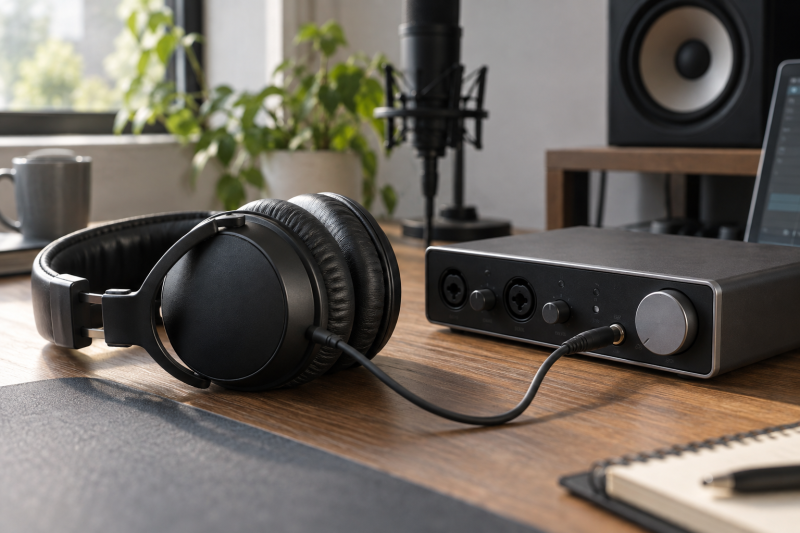
A tracking headphone has two jobs, which are to let the performer hear the cue mix clearly and to keep that mix from spilling back into the microphone. The interface’s headphone socket has a different job, which is to provide enough clean level for that headphone and a usable cue feed. A good match depends on both devices and the recording situation, not an impedance number in isolation.
Check the interface output, the headphone’s sensitivity and fit, and the cue-mix route before buying another pair.Start with the output you will actually use
Find the exact interface model and revision, then locate its headphone output specifications in the manufacturer’s manual. Note the connector size, output impedance, and any stated power or recommended headphone load. Do not use the line output or speaker output specifications as substitutes, because they are different circuits even when they share the same interface chassis.
The interface maker’s own advice can be more useful than a generic internet cutoff. Focusrite’s headphone-impedance guide lists different recommended limits for different Scarlett generations and its Clarett/Red ranges. It also says headphone impedance does not need to equal the interface’s output impedance. Those limits belong to Focusrite’s named models, so do not apply a Scarlett value to an unrelated interface.
Check the physical plug before judging electrical fit. Many studio headphones terminate in a small stereo plug and include a larger screw-on or snap-on adapter. A headphone socket is typically a stereo output, not a microphone input. Focusrite’s headset guidance distinguishes ordinary stereo headphone plugs from TRRS headset plugs that also carry a microphone. If the plug’s contacts do not match the socket’s intended role, you cannot repair a wiring mismatch by changing volume settings.
Read impedance and sensitivity together
Impedance is the electrical load the headphones present. It is one part of the answer, but it cannot by itself tell you the final listening level. Sensitivity is how much sound a headphone produces for a stated electrical input. The published unit is important too, because dB per milliwatt and dB per volt are not the same reference. Shure’s explanation of headphone specifications covers why those fields must be read together.
The interface also needs enough usable output for the cue mix. An interface may list output power at one test load and a headphone maker may list a different impedance. Those figures are not a guarantee of loudness for a particular person, cue balance, or recording room. Focusrite explicitly cautions that source material and listening environment affect whether a given pairing is loud enough. Treat a published output figure as evidence to compare, not as a promise about your own ears.
Avoid the common mistake of turning the volume knob all the way up to compensate for a poor fit. First verify that the DAW and interface mixer are sending a healthy cue signal, that the correct headphone socket is active, and that the performer can hear the reference material without distortion. If the pair still cannot provide comfortable level while other headphones known to work can, inspect the interface and headphone specifications together before considering a separate headphone amplifier.
Prioritize isolation at the microphone
For vocal and close-mic tracking, closed-back cups help keep the click, guide vocal or backing track out of the microphone. Focusrite recommends closed-back headphones for performers near mics, while open and semi-closed designs better suit other monitoring situations. Focusrite’s advice is a distinction by use case, not a measured leakage ranking of every headphone model.
Fit can change the result. A gap around glasses, hair, or the jaw can reduce a pad’s seal. A cup that slips when the performer moves can change both isolation and perceived bass. The right check is a short rehearsal with the intended mic, cue level and performer. Listen to a quiet gap in the recording with the cue still playing. If you hear the click or guide track in the mic, reduce the cue level, adjust the fit, or try a more isolating pair before assuming that the interface needs more power.
Our closed-back tracking headphone guide compares available pairs by recording role. Use it to choose a shortlist, then check the shortlisted headphone’s exact sensitivity, impedance, plug, pad fit and replacement-cable arrangement against your own interface. The list is a buying aid, not a substitute for testing leakage in your room.
Check the cue-mix path before replacing headphones
The performer must hear the right blend of live input and playback. If the cue is late or missing, buying different headphones will not fix the route. Inspect your interface’s mixer or direct-monitor settings, DAW output bus, headphone level control, and any independent headphone mix option. A single headphone knob does not necessarily mean the socket has its own independently routable stereo bus.
For a singer recording to a backing track, start with the microphone input reaching the cue bus and the backing track reaching the same headphone output. If you use direct monitoring, determine whether the live input is heard through the interface mixer rather than the DAW return. Accidentally monitoring both paths can make the voice sound doubled. Change one routing control at a time and verify the result at the headphone jack.
If two performers need different balances, check whether the interface offers two independent headphone mixes or merely two jacks fed by one mix. A separate distribution amplifier can duplicate a mix to more listeners, but it does not create independent DAW buses. The electrical headphone match and the number of independent mixes are related but different purchasing decisions.
Keep a safe level while you compare
Start a new pairing at a low headphone level, play representative program material, and raise it only until speech, click and reference are clear. A recording session can be long, so the goal is intelligibility rather than proving how loud the interface can go. The World Health Organization’s safe-listening guidance explains that allowable listening duration falls as level rises. A headphone knob position cannot tell you the sound pressure at the ear.
If you need to raise the cue every few minutes, look for the cause, because inadequate isolation, a weak cue mix, or a noisy room can all be the reason you raise it. Solve the path rather than treating louder headphones as the default answer. An amplifier is useful only when the existing headphone output is the limiting component and the rest of the cue chain is correct.
A quick pairing checklist
Before ordering, record four things: the exact interface model and its headphone output guidance, the candidate headphone’s impedance and sensitivity with units, the plug and any required adapter, and whether the headphone’s closed-back fit suits your microphone position. If the maker omits the output or sensitivity data you need, do not make up a compatibility number from other products.
Once the pair is in hand, listen through the intended interface, not a phone or laptop socket. Rehearse a take at a comfortable level, confirm the cue mix, and inspect the mic track for bleed during a quiet passage. Those checks are a more direct answer to the tracking question than a comparison of spec sheets alone.
Frequently asked questions
Must the headphone impedance match the interface output impedance?
No. The two numbers do not need to be equal. Use the interface maker’s headphone load guidance and the headphone’s sensitivity alongside impedance. The same ohm rating can belong to headphones with different loudness at the same input.
If a model is outside your interface’s published recommendation, ask the maker or test the exact pair at a safe level rather than guessing. A separate amplifier is an option only after the cue signal and connection are correct.
Will closed-back headphones eliminate all click bleed?
Not necessarily. Closed-back cups are a sensible starting point near a microphone, but pad seal, cue level, mic position and the room also affect leakage. A short test recording with your performer and cue is the useful check.
If a click is audible in a quiet recorded passage, reduce its headphone level and adjust fit first. Some sessions can also use a less intrusive click sound or a different cue balance.
Can a headphone splitter give two performers different mixes?
A passive splitter ordinarily copies one stereo signal and does not create a second independently balanced cue. The same applies to a distribution amplifier fed by only one stereo mix, even if each listener can adjust their own level.
For independent mixes, trace separate buses through the DAW and interface outputs to the headphone feed. Count the independently routed channels before buying more headphone sockets.
Bottom line
Match the headphone to your interface output and your tracking room. Check impedance and sensitivity together, choose a closed-back fit that controls bleed at the mic, and verify the cue bus before spending money on a louder output.