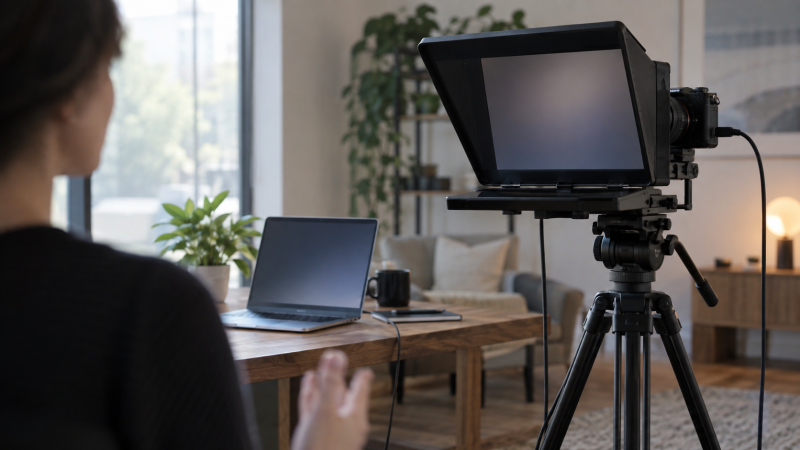
Reading a script just below the lens can make a laptop-led presentation feel more direct. Hardware teleprompters put text on a screen reflected in front of the camera, so your eyes stay nearer the lens. The first choice is the script display: a built-in screen driven by the laptop, or a phone or tablet you already own. After that, match the glass, camera, mount and reading distance.
These five exact Amazon US models had active New offers on September 29, 2026. Two use a separate phone or tablet. Three have built-in displays. They suit different desk depths and budgets rather than one universal setup. We have not independently measured glass quality, software reliability or reading distance. Check the exact camera and laptop connection before ordering.
Choose the script-screen route first. A good teleprompter is the one you can connect, mount and read comfortably from your actual speaking position.Teleprompters Compared
| Image | Product | Details | Check Price |
|---|---|---|---|
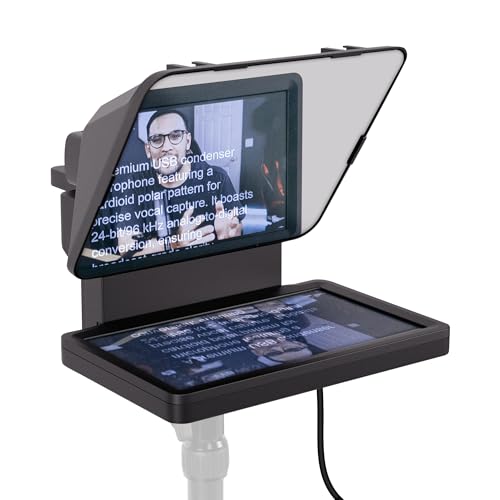 | Elgato Prompter | Display: Built-in 9-inch listed Script source: Laptop external display / Camera Hub Camera fit: Webcam or camera, adapter check Buyer fit: Compact laptop-led station | Check Price on Amazon |
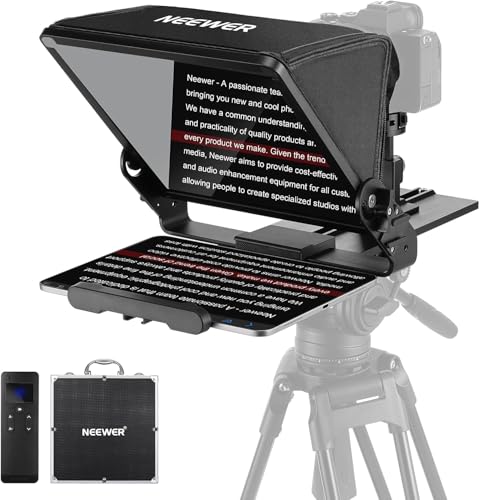 | NEEWER X12II | Display: Your own tablet or phone Script source: App and RT113 remote Camera fit: Arca-type plate; 12-inch glass Buyer fit: Remote-driven tablet rig | Check Price on Amazon |
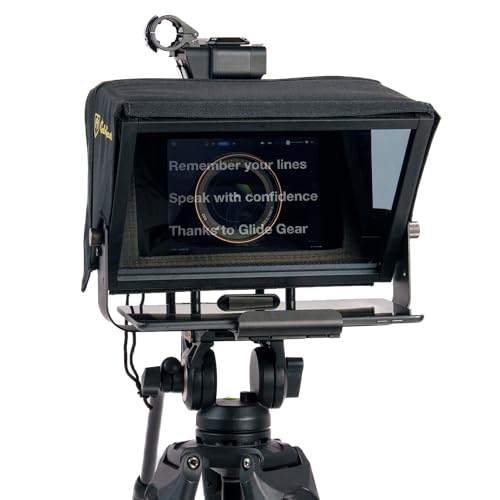 | Glide Gear TMP100 | Display: Your own phone or tablet Script source: Mirror-text app separately Camera fit: 12-inch glass; tablet tray limit Buyer fit: Simple transportable glass | Check Price on Amazon |
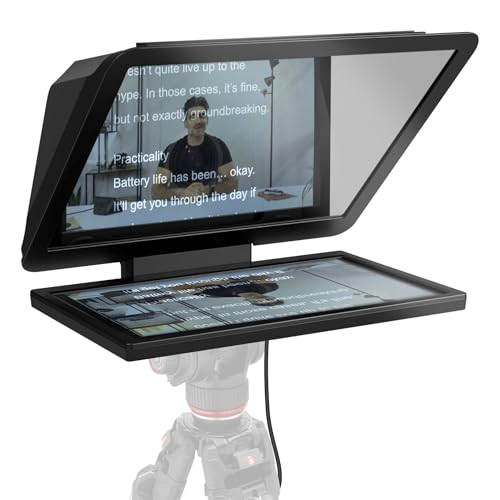 | Elgato Prompter XL | Display: Detachable 15.6-inch Full HD listed Script source: Laptop external display Camera fit: DSLR, mirrorless, studio listed Buyer fit: Longer-distance fixed station | Check Price on Amazon |
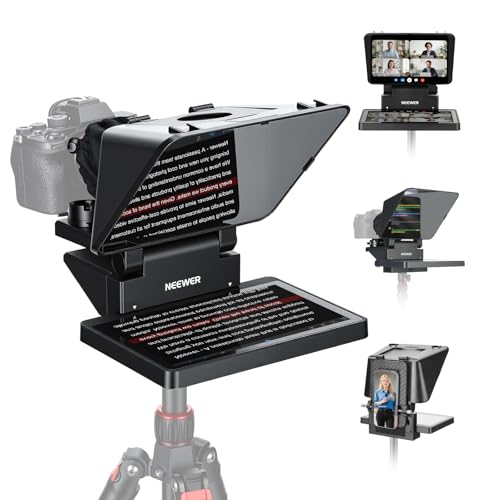 | NEEWER X11 | Display: Built-in 9-inch 1024x768 listed Script source: USB-C / computer, conditions apply Camera fit: 11-inch glass; 2kg plate listed Buyer fit: Alternative integrated screen | Check Price on Amazon |
1. Elgato Prompter — Best Compact Laptop Display
Elgato Prompter puts a built-in nine-inch display behind the reflecting glass. The exact listing says you can drag a window onto it as a second screen, display a script or live chat, and use Camera Hub for text appearance. The built-in screen removes the need to charge and mount a separate tablet. For a presenter sitting close to a laptop and webcam, it is a tidy way to keep script and camera in one sightline.
Do not confuse a built-in display with a self-contained computer. The laptop still drives the screen. The listing states that Mac setup requires DisplayLink software, so include software installation in your preflight if you use macOS. Elgato advertises broad camera compatibility, but verify the actual adapter, lens and support for your camera. A wide lens may show the edges of the prompter glass. Test the framed shot before a live call.
The compact screen is best read near the desk. If you present while standing farther back, Elgato Prompter XL offers a larger display. A webcam desk key light can light your face without putting a lamp directly beside the glass, where it might create reflections.
Our Take Choose Elgato Prompter for a compact laptop-driven setup. Confirm DisplayLink, the camera adapter and the lens framing before treating the clean-looking desk layout as ready to record.
- Built-in display needs no tablet.
- Can show scripts or a laptop window.
- Compact fit for a close desk presentation.
- Mac setup requires DisplayLink software.
- Small display is less suited to long reading distances.
2. NEEWER X12II — Best Tablet Rig with a Remote
The X12II is a 12-inch-glass prompter for a phone or tablet you supply. The exact listing names a four-sided Arca-type camera plate, adjustable camera position, hard case and RT113 remote. That remote lets a presenter pause, change scroll speed or turn pages without walking back to a device. A tablet-based prompter also avoids tying up an extra laptop display connection.
The package still needs a supported tablet or phone, and the app/remote pairing must be tested. NEEWER says the remote’s AAA batteries are not included. Check that your exact camera and lens clear the glass and that the stand or tripod can carry the camera, prompter and screen together. The listing’s camera-plate load claim is not a rating for every tripod you might put under it.
Compared with Glide Gear TMP100, X12II adds a named remote and quick-release camera route. For a mirrorless camera rig, keep camera-light mounts out of the hood and reflection path. If you already use a tablet and want physical script control, the remote is a good reason to accept the extra setup.
Our Take X12II suits a presenter who already has a suitable tablet and wants a hand-held control. Its value depends on camera, tripod and app fit, not just the 12-inch glass size.
- Remote and Arca-type camera plate are listed.
- 12-inch glass suits a tablet-based station.
- Hard case supports moving the kit.
- Requires your own screen and app setup.
- Remote batteries are not included.
3. Glide Gear TMP100 — Best Simple Tablet Glass
Glide Gear TMP100 takes a simple approach with 12-inch beamsplitter glass and a tray for a phone or tablet. The exact listing includes a collapsible hood and carry bag, plus quarter-inch and three-eighths-inch support threads. It works with a prompting app that can mirror text. The hardware does not force a specific laptop output route, which may appeal if you want to reuse an existing tablet.
Check the tray dimensions before relying on the word tablet. The exact listing gives a maximum of 10.5 by 8 inches and specifically says it does not fit iPad Pro. A mirror-text app is not included. You also need to position the camera behind the glass without seeing the hood edge. A tripod or desk support must safely carry the prompter, camera and tablet as one assembly.
The TMP100 is the less software-specific choice beside Elgato Prompter, but it takes more separate pieces. The video microphone guide covers another part of a spoken presentation. Choose audio and prompting mounts together so cables stay clear of the script tray.
The TMP100’s tablet tray has a stated size limit. Do not assume a large tablet, especially an iPad Pro, will fit.Our Take TMP100 is a straightforward glass-and-tray option if your existing device fits. Its appeal is mechanical simplicity, but your app, screen and support are separate decisions.
- 12-inch glass and carry bag are listed.
- Can use a compatible mirror-text app.
- Multiple support-thread sizes.
- Tablet size limit excludes iPad Pro in the listing.
- No included prompting app or display.
4. Elgato Prompter XL — Best Large Fixed Station
Prompter XL is the larger fixed-station route. Its exact listing names a detachable 15.6-inch Full HD display and says it can serve as an external monitor when not prompting. The larger display gives a standing presenter or a camera placed farther from the desk more text area than the smaller Prompter. It also avoids a separate tablet if the laptop connection suits your workflow.
The extra size is not free. Plan room for the glass, hood and support in front of the camera. Verify that the stand and camera mounting path can carry the assembly. The listing mentions Voice Sync but restricts that feature to an NVIDIA RTX GPU or Apple M1 or better. Do not assume voice-following works on every laptop. A basic scroll path should be tested even if you intend to use the advanced feature.
At a close desk, the smaller Elgato Prompter may be easier to place. XL earns its space when the speaker stands back or uses a larger camera. A studio monitor can help review the recorded image afterward, but it does not replace checking whether you can comfortably read the prompter at the actual distance.
Our Take Buy Prompter XL for a permanent, longer-distance station. If your speaker sits close to the camera, the extra screen may be unnecessary weight and desk clutter.
- Large listed Full HD display.
- Built-in screen doubles as an external monitor.
- More text area for a farther speaker.
- Takes more support and space than a desk-size unit.
- Voice Sync has hardware requirements.
5. NEEWER X11 — Best Alternative Integrated Screen
The X11 pairs 11-inch beamsplitter glass with a listed nine-inch 1024 by 768 LCD. The built-in LCD gives you an integrated-screen route without using a tablet. The exact listing describes USB-C computer connection and another USB-A/HDMI path with conditions. It also names an adjustable Arca-type holder, quarter-inch and three-eighths-inch base threads, and a two-kilogram camera-plate limit.
Read the connection fine print before buying. The USB-A/HDMI route requires a driver in the listing, and some phone-mirroring paths need a DP-capable device. The X11 is not universal plug-and-play through any laptop port. The seller says voice sync is unsupported. The camera-plate limit is also a firm boundary. Check the body and lens together, then confirm the base support separately.
Compared with Elgato Prompter, X11 trades a different connection and camera-mount path for a similar screen-size class. Choose by port, OS, camera weight and desk support, not by assuming every nine-inch prompter is interchangeable. A USB-C hub can expose ports, but it cannot make an incompatible display protocol work.
Check the exact X11 cable route. USB-C, USB-A/HDMI and phone mirroring have different conditions in the listing.Our Take Consider the X11 when its stated ports and camera mount fit your station. Verify the driver and display path on your actual laptop before a scripted session.
- Integrated display removes the tablet tray.
- Adjustable camera holder and base threads listed.
- Can act as a computer display on supported paths.
- Some connection paths require a driver or DP support.
- Voice sync is not supported.
- Camera plate has a stated two-kilogram limit.
Buying Guide
1. Choose an integrated screen or your own tablet
An integrated screen is easiest when the laptop stays in the setup. Elgato Prompter, Prompter XL and NEEWER X11 behave like extra displays on supported connection paths. They save the step of charging and fitting a tablet, but take a video/data connection and may require software. Check the laptop’s ports and operating system before buying.
A tablet rig can travel without depending on a laptop display output. X12II and TMP100 rely on a suitable phone or tablet and a mirrored-script app. Confirm the tray size, app, power and remote before a client call. A tablet’s screen brightness and battery condition can affect readability. Test the full run rather than assuming it will be fine.
2. Measure reading distance and lens clearance
Stand where you will present and read sample text at that distance. A nine-inch display can be comfortable near a desk but less useful across a room. Bigger glass or a larger screen helps only if the text size and mount position are right. Prompter XL exists for a different room geometry than a compact webcam station.
Frame the camera through the actual hood. Wide lenses can show the glass edge or the device tray. Move the camera, change the supported adapter or adjust focal length while checking the live image. Do not assume a prompter’s advertised camera compatibility covers every lens and filter stack. A mirrorless-rig light should also stay out of the reflection path.
3. Verify the mount as a system
The weakest support determines the usable rig. Add up the camera, lens, prompter, screen and accessories. The X11’s camera plate has a listed two-kilogram limit, but that is not a rating for the tripod below it. X12II has an Arca-type camera route. TMP100 offers support threads. Verify each mechanical link before leaving an assembled rig unattended.
Leave access to controls and cables. A prompter can hide camera buttons and crowd a laptop desk. Plan where the presenter will pause the script, how audio and power cables exit, and whether the hood blocks a nearby light. Set up a short test recording, then adjust the sightline rather than reading from text placed far off to one side.
4. Rehearse the script-control path
Scroll speed should follow the speaker, not force the speaker to race. Use short lines, generous text size and visible section breaks. X12II’s listed remote can pause or change speed. Software-driven models may offer app controls. The XL’s advertised Voice Sync has hardware conditions, and X11 does not support voice sync. Practice a manual fallback.
Check the recorded result, not just the prompt. Eye contact can look artificial when your eyes sweep over long lines. Put only a few words on each line, pause naturally and verify audio. A USB-C studio microphone can improve intelligibility, but it will not rescue a delivery that is paced by a scroll that runs too fast.
FAQ
Can I use a teleprompter with my laptop webcam?
Often, but the prompter must physically place its glass in front of the webcam without blocking the display you need. Some rigs are easier with a separate webcam or mirrorless camera. Check the exact mount and sightline, not just the word webcam in a listing.
For a built-in-screen model, also verify how your laptop drives the display. Elgato Prompter lists DisplayLink software for Mac. NEEWER X11 lists different conditions for different cable paths. Test a recorded call before relying on it live.
Is a built-in screen better than a tablet teleprompter?
It is simpler when a supported laptop stays connected and you do not want a separate tablet. Elgato Prompter and X11 keep the script hardware together. The combined hardware can reduce setup pieces on a desk.
A tablet model may be better when you already own a suitable screen or need to move the prompting rig independently. X12II adds a remote. TMP100 stays mechanically simple. Include the cost and fit of the tablet, app and mount in the comparison.
Will voice-following scroll work on any computer?
No. The Elgato Prompter XL listing restricts Voice Sync to an NVIDIA RTX GPU or Apple M1 or better. The NEEWER X11 listing says voice sync is not supported. Other script apps have their own requirements.
Use a manual scroll or remote fallback even if a voice-following feature is advertised. Rehearse a complete presentation with your actual microphone, room noise and speaking pace before recording the final take.
Bottom Line
Choose Elgato Prompter for a close laptop desk, NEEWER X12II if you already use a tablet and want remote control, or Elgato Prompter XL for a farther speaker. TMP100 is a simple glass-and-tray route. X11 is another integrated display with more connection conditions. The best prompter is the one that fits your camera, screen and speaking distance together.