Running 4K at 144Hz over a single USB-C cable is not automatic. The connector has to support DisplayPort Alt Mode at a high enough bandwidth, the monitor has to accept that signal, and the cable in between has to be rated for it. Get any one of those wrong and you either lose refresh rate, lose resolution, or lose the picture entirely.
This roundup covers five listings pulled from current Amazon data: four 4K gaming monitors from ASUS and MSI, all rated well above the 144Hz floor, plus one item that is not a monitor at all. DteeDck’s USB-C monitor cable is included because a monitor that supports 4K at 144Hz over USB-C is only as good as the cable feeding it, and we would rather tell you that up front than pretend it belongs in the same category as the displays below.
Quick Picks
- Best budget-friendly USB-C 144Hz cable: DteeDck, a 6-foot cable listed for 4K at 144Hz video, 20Gbps data, and 100W charging.
- Best confirmed USB-C 4K gaming monitor: ASUS ROG XG27UCG, a 27-inch 4K panel listed at 160Hz with USB-C and G-SYNC named directly in the listing.
- Best QD-OLED for motion clarity: ASUS ROG PG32UCDM, a 32-inch 4K QD-OLED panel listed at 240Hz.
- Best glossy-finish OLED alternative: ASUS ROG XG32UCWMG, a 32-inch 4K Glossy OLED panel listed at 240Hz with G-SYNC.
- Best fully documented spec sheet: MSI MPG 321CURX QD-OLED, a curved 32-inch 4K QD-OLED panel with USB-C 98W Power Delivery named directly in the listing.
Comparison at a Glance
| # | Product | Type | Size | Resolution | Refresh Rate | Panel | USB-C in Listing |
|---|---|---|---|---|---|---|---|
| 1 | DteeDck USB-C Monitor Cable | Cable, not a monitor | N/A | Up to 4K (pass-through) | Up to 144Hz (pass-through) | N/A | Yes (the cable itself is USB-C) |
| 2 | ASUS ROG XG27UCG | Gaming monitor | 27-inch | 4K | 160Hz | Not stated in title | Yes, named in title |
| 3 | ASUS ROG PG32UCDM | Gaming monitor | 32-inch | 4K | 240Hz | QD-OLED | Not confirmed in title |
| 4 | ASUS ROG XG32UCWMG | Gaming monitor | 32-inch | 4K | 240Hz | Glossy OLED | Not confirmed in title |
| 5 | MSI MPG 321CURX QD-OLED | Gaming monitor | 32-inch, 1700R curve | 3840×2160 | 240Hz | QD-OLED | Yes, 98W PD named in title |
Key Takeaway: Every monitor in this list is rated at 160Hz or higher, so all four comfortably clear the 144Hz floor this roundup targets. USB-C is directly confirmed in the retrieved listing data for products 2 and 5. For products 3 and 4, confirm the exact port list on the current Amazon listing before buying, since the retrieved title data does not state USB-C for those two.
1. DteeDck 4K 144Hz USB-C Monitor Cable (6 ft)
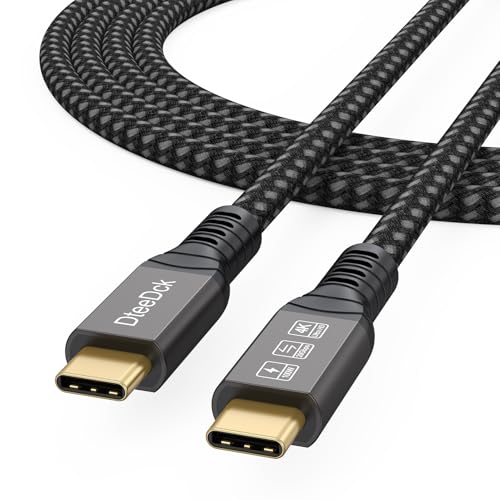
This is a cable, not a monitor, and it is the one item on this list that does not belong in the same category as the four displays below it. The listing rates it for 4K video at 144Hz, 20Gbps of data throughput, and 100W of USB-C Power Delivery over a 6-foot length. It exists here because the video bandwidth a cable can carry directly limits whether a monitor further down this list can actually hit its rated refresh rate over USB-C.
Our Take: If you already own or are buying one of the monitors below, a cable rated for the same resolution and refresh rate is not optional. This listing states the numbers this roundup needs, but DteeDck is not a monitor brand we can cross-reference against a manufacturer spec sheet, so treat the rating as a listing claim rather than an independently confirmed figure.
- Rated by the listing for 4K video at 144Hz over a single USB-C cable, matching the video bandwidth every monitor in this roundup targets.
- Listed at 20Gbps data throughput, above a basic USB-C charging cable, useful if you route a hub or external storage through the same port.
- Listed for 100W USB-C Power Delivery, enough to charge many USB-C laptops through the same cable that carries the video signal.
- It is a cable, not a monitor, and only useful if you already own or are buying a 4K 144Hz USB-C display separately. It does nothing on its own.
- DteeDck is not an established monitor or cable brand with a public spec sheet available to this pass, and no independent test data was retrieved to confirm the rated 4K@144Hz, 20Gbps, or 100W figures under real-world use.
2. ASUS ROG XG27UCG (27-Inch 4K 160Hz USB-C Gaming Monitor)
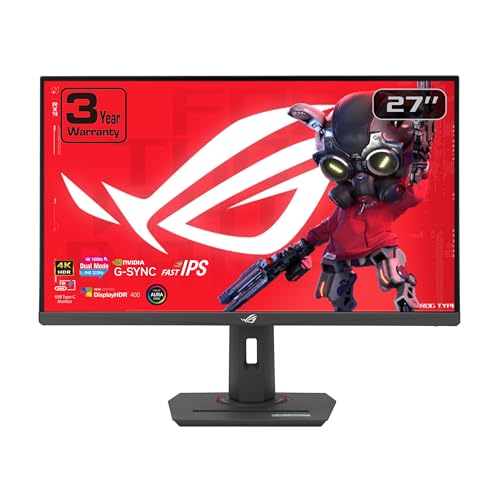
ASUS lists the ROG XG27UCG as a 27-inch 4K panel running at 160Hz, which clears the 144Hz floor this roundup targets with room to spare. USB-C is named directly in the product title, making this one of only two monitors here where that connection type is explicitly confirmed by the retrieved listing data rather than inferred. The listing also names G-SYNC support, relevant if you are pairing this display with an NVIDIA GPU.
Our Take: This is the most straightforwardly confirmed USB-C pick in the group at 27 inches, a size that keeps 4K text legible without needing scaling adjustments on most desktops. It sits below the two 32-inch QD-OLED options further down for panel technology.
- Confirmed 4K resolution at 160Hz directly in the product title, exceeding the 144Hz floor this roundup is built around.
- USB-C connectivity named directly in the listing, one of only two monitors here where that is explicitly confirmed rather than inferred.
- G-SYNC support named in the listing, relevant for readers building around an NVIDIA GPU.
- The retrieved PAAPI title does not state a USB-C Power Delivery wattage, panel type, or color gamut coverage, so confirm those on the current Amazon listing before buying.
- No manufacturer spec sheet was retrieved for this pass, so response time, HDR certification, and exact port count beyond USB-C are unconfirmed here.
3. ASUS ROG PG32UCDM (32-Inch 4K 240Hz QD-OLED Gaming Monitor)

ASUS lists the ROG PG32UCDM as a 32-inch 4K panel built on QD-OLED technology and rated at 240Hz, well above the 144Hz floor this roundup targets. QD-OLED is a self-emissive panel type generally associated with high per-pixel contrast and fast pixel response, a fit for the high-refresh gaming use case this monitor is built around.
Our Take: The 240Hz QD-OLED spec makes this one of the strongest panels here on paper, but the retrieved PAAPI title for this specific listing does not state USB-C anywhere in it. Since this roundup is built around USB-C monitors, that gap matters more here than it would in a general 4K gaming roundup, and it should be confirmed directly before this model is treated as a USB-C purchase.
- Listed at 4K resolution and 240Hz, well above the 144Hz floor this roundup targets.
- QD-OLED panel technology named directly in the product title, a self-emissive panel type known for high contrast and fast pixel response.
- Part of the ASUS ROG line, targeting the same high-refresh gaming use case as the other monitors in this list.
- The retrieved PAAPI title for this listing does not explicitly state USB-C connectivity, even though this roundup’s topic is 4K 144Hz monitors with USB-C. Confirm the exact port list, including whether any USB-C port carries video or power delivery, on the current Amazon listing before buying.
- No manufacturer spec sheet data was pulled into this pass, so HDR certification, color gamut coverage, and USB-C wattage, if present, are unconfirmed here.
4. ASUS ROG XG32UCWMG (32-Inch 4K 240Hz Glossy OLED Gaming Monitor)
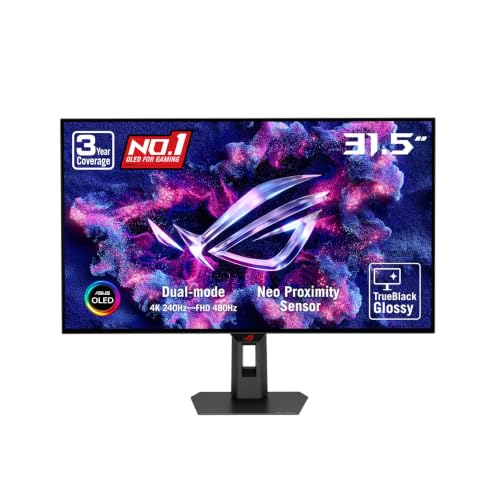
ASUS lists the ROG XG32UCWMG as a 32-inch 4K panel with a Glossy OLED finish, rated at 240Hz, matching the ASUS ROG PG32UCDM above on resolution and refresh rate while using a glossy rather than matte coating. The listing also names G-SYNC support. Like the PG32UCDM, this is a 32-inch OLED pick from the same ASUS ROG line rather than the 27-inch ASUS ROG XG27UCG.
Our Take: A glossy OLED coating is a real, meaningful difference from a matte finish for some buyers, since it changes how the panel handles ambient light and color saturation. As with the PG32UCDM above, the retrieved title data here does not confirm USB-C, so verify that directly before assuming it fits this roundup’s connection requirement.
- Listed at 4K resolution and 240Hz, well above the 144Hz floor this roundup targets.
- Glossy OLED panel finish named in the title, a coating some readers prefer over matte OLED for color saturation and black depth.
- G-SYNC support named in the listing, relevant for readers building around an NVIDIA GPU.
- Like the ASUS ROG PG32UCDM above, the retrieved PAAPI title does not explicitly confirm USB-C connectivity. Verify the exact port list and whether any USB-C port carries video or power delivery before buying.
- No manufacturer spec sheet was retrieved this pass, so HDR certification and color gamut coverage are unconfirmed here.
5. MSI MPG 321CURX QD-OLED (32-Inch 4K 240Hz Monitor with USB-C 98W PD)

MSI’s listing for the MPG 321CURX is the most fully specified item in this roundup. It states a 32-inch QD-OLED panel at 3840×2160 (4K UHD) resolution, a 1700R curve, a 240Hz refresh rate, and a 0.03ms response time. It also names DisplayHDR True Black 400 certification, G-SYNC Compatible support, HDMI 2.1 and DisplayPort 1.4a inputs, a height-adjustable stand, and, notably for this roundup, USB-C with 98W Power Delivery stated directly in the title.
Our Take: Unlike the two ASUS 32-inch OLED entries above, USB-C is explicitly confirmed here, and MSI’s listing pairs it with a stated 98W Power Delivery figure, useful for laptop owners who want one cable to handle both video and charging. The 1700R curve and height-adjustable stand point this monitor toward a dedicated single-user desk setup rather than a shared display.
- 3840×2160 (4K UHD) resolution at 240Hz on a QD-OLED panel, well above the 144Hz floor this roundup targets.
- USB-C connectivity with 98W Power Delivery stated directly in the title, letting a compatible laptop charge from the same cable carrying video.
- MSI states a 0.03ms response time and DisplayHDR True Black 400 certification in the listing, alongside HDMI 2.1 and DisplayPort 1.4a inputs in addition to USB-C.
- The 1700R curved panel and height-adjustable stand suit a single dedicated desk setup better than a shared or frequently repositioned display; confirm desk clearance before buying.
- The listing states G-SYNC Compatible rather than a native G-SYNC hardware module, so variable refresh rate behavior on an NVIDIA GPU can differ from the native G-SYNC support named on the ASUS ROG XG27UCG and ASUS ROG XG32UCWMG above; check current driver support if that distinction matters to you.
Buying Guide: What Actually Matters for 4K 144Hz Monitors With USB-C
USB-C Bandwidth Is the Real Limit, Not the Monitor
A USB-C port only carries 4K at 144Hz if it supports DisplayPort Alt Mode at a high enough bandwidth, and the cable connecting it has to match that rating. This is a general limitation of how USB-C video works, independent of any specific monitor’s marketing claims. Both ends of the connection, the port and the cable, need to support the same standard for the full refresh rate to actually reach the screen. The DteeDck cable above is listed at 20Gbps, which is the kind of figure worth checking against whatever cable currently ships with a monitor before assuming it will hit the panel’s full rated refresh rate.
Confirm the USB-C Claim Before You Buy
Not every listing in a given search result names USB-C in its title, and title data alone is not always a complete picture of a monitor’s port list. In this roundup, only the ASUS ROG XG27UCG and the MSI MPG 321CURX QD-OLED state USB-C directly in their retrieved titles. The 240Hz ASUS ROG PG32UCDM and ASUS ROG XG32UCWMG do not, at least in the data pulled for this article. That does not necessarily mean the port is absent, but it does mean it was not confirmed here, so check the current listing’s full spec section rather than relying on the title alone.
Key Takeaway: A title without USB-C mentioned is not proof a monitor lacks USB-C, but it is also not proof it has it. Treat an unconfirmed port the same way you would treat an unconfirmed price: verify it directly before buying.
Power Delivery Wattage Decides What USB-C Can Charge
USB-C Power Delivery over a monitor’s video-carrying port is a separate spec from the video signal itself, and it is stated in watts. The MSI MPG 321CURX states 98W, a figure that covers a large share of USB-C laptops on the market but not every high-draw gaming laptop. The DteeDck cable separately states 100W. A higher wattage rating generally means a wider range of laptops can charge fully from that single connection instead of needing a separate charger plugged in alongside the video cable.
QD-OLED, Glossy OLED, and What the Difference Actually Means
Three of the five products here use OLED-family panels: the ASUS ROG PG32UCDM and the MSI MPG 321CURX both use QD-OLED, while the ASUS ROG XG32UCWMG is listed with a Glossy OLED finish. Both are self-emissive panel types, generally associated with per-pixel black levels and fast pixel response, which is why all three are rated at 240Hz rather than the 160Hz seen on the non-OLED ASUS ROG XG27UCG. A glossy coating changes how the panel reflects ambient light compared with a matte one, which is worth weighing against the lighting conditions at your desk.
Curved vs Flat, and Desk Space
The MSI MPG 321CURX is the only monitor in this list listed with a curve, specifically 1700R, alongside a height-adjustable stand. A curved panel at that radius is built for a single viewer sitting roughly centered in front of it, and it takes up more desk depth than a flat 32-inch panel. The other three monitors here are not listed as curved, which can matter if the display needs to sit against a wall-mounted arm or be shared by more than one person at a time.
FAQ
Does USB-C actually carry 4K at 144Hz, or is that marketing?
It can, but only when the port, the cable, and the monitor all support a matching bandwidth.
A USB-C port rated for a lower DisplayPort Alt Mode bandwidth will not deliver the full 144Hz at 4K even if the monitor itself is capable, which is why the cable rating matters as much as the monitor’s own spec sheet.
What is the difference between native G-SYNC and G-SYNC Compatible?
Native G-SYNC uses a dedicated NVIDIA hardware module inside the monitor, named directly in the listings for the ASUS ROG XG27UCG and ASUS ROG XG32UCWMG above.
G-SYNC Compatible, the term MSI uses for the MPG 321CURX, means the monitor was validated to work with variable refresh rate over standard Adaptive-Sync rather than a dedicated module. Behavior can differ between the two depending on current NVIDIA driver support.
Do I need a special cable to hit 4K at 144Hz over USB-C?
Yes. A generic USB-C charging cable is not built for the video bandwidth 4K at 144Hz requires.
The DteeDck cable above is listed specifically for that combination, at 20Gbps of data throughput, which is the kind of rating to look for regardless of which cable you end up buying.
How much USB-C Power Delivery wattage do I actually need?
It depends on your laptop’s own charging requirement, which is usually printed on its original charger.
The MSI MPG 321CURX states 98W, enough for a large share of USB-C laptops, but a high-draw gaming laptop can require more than a monitor’s USB-C port supplies, in which case it will charge more slowly or not at all through that connection.
Why does this roundup include a cable instead of five monitors?
Because a cable rated below 4K at 144Hz will bottleneck any monitor on this list regardless of what the display itself supports.
The DteeDck cable is listed for exactly the bandwidth this roundup’s monitors need, and leaving it out would have left an unstated assumption that any USB-C cable works, which is not accurate.
Final Word
Four of the five products here are genuine 4K gaming monitors rated well past the 144Hz floor this roundup targets, led by the 240Hz QD-OLED panels on the ASUS ROG PG32UCDM and MSI MPG 321CURX, with the 160Hz ASUS ROG XG27UCG as the smaller, more desk-friendly option. USB-C is directly confirmed in the retrieved listing data for the XG27UCG and the MSI panel; confirm it directly on the current listing before buying either 32-inch ASUS OLED model. The fifth product, the DteeDck cable, is not a monitor, but it is the component that decides whether any of the four displays above it actually reach their rated refresh rate over a USB-C connection.