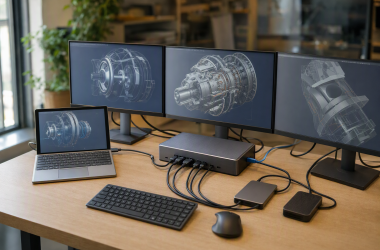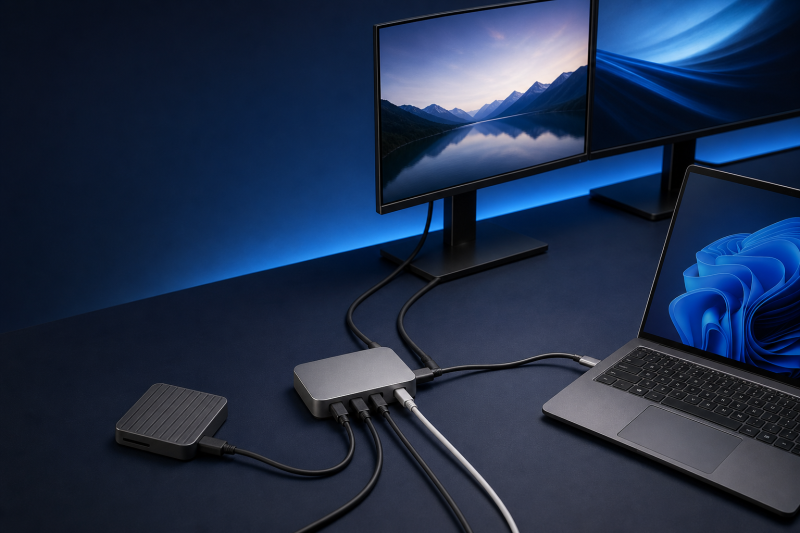
The CalDigit Element 5 Hub is the right buy when one computer port needs to become three downstream Thunderbolt 5 branches plus five 10Gbps USB ports. It is a focused desktop hub for storage, displays, and USB peripherals, not a full dock. Buy it only if your host supports the paths you need and up to 90W is enough for your laptop.
Choose the OWC Thunderbolt 5 Hub instead when you want the closest branch-hub rival with dynamic host power up to 140W. Choose the SABRENT HB-TBT4 when a 40Gb/s Thunderbolt 4 branch hub and up to 60W are enough. Choose the OWC Thunderbolt 5 Dock when your desk needs 2.5Gb Ethernet, card readers, or audio in the same box.
We based this guide on current manufacturer documentation and named independent reviews, not a ThunderboltLaptop hands-on test of the hardware.
Direct verdict
The E5 solves a specific shortage well: too few high-bandwidth branches and too few ordinary USB ports. Its three downstream TB5 ports can split storage, monitor, and daisy-chain routes, while three USB-A and two USB-C data ports keep ordinary peripherals from consuming those branches.
The limit is just as clear. It has no Ethernet, card reader, audio jack, HDMI, or DisplayPort. If those are your missing connections, buying adapters around the E5 works against its focused design. Our dock-versus-hub guide explains that category decision, while the best Thunderbolt hubs roundup covers the broader comparison.
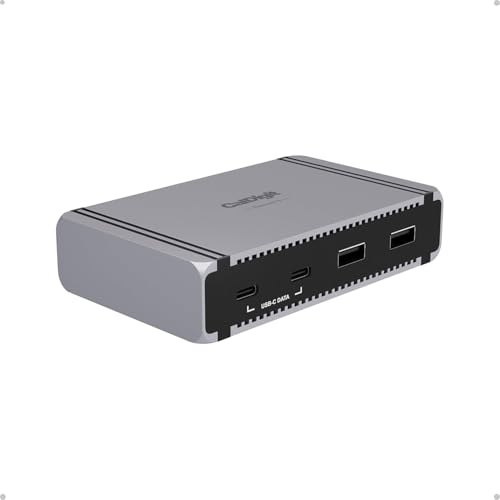
Exact identity and quick facts
The product is the CalDigit Element 5 Hub, also called E5. The current US new-retail SKU is TBT5-Element5-US-AMZ, and the Amazon listing is ASIN B0DX8FS8KC. The listing shows the matching E5 title, CalDigit brand, and CalDigit manufacturer, but its model and part-number fields are not published. Do not substitute the CalDigit shop SKU into those Amazon fields.
The marketed nine-port count includes the upstream connection to your computer. You get eight ports for downstream devices.
| Purchase question | Current E5 answer | Why it changes the decision |
|---|---|---|
| Product class | Powered TB5 / USB4 v2 branch hub | It expands branches and USB, not full-dock I/O |
| Host connection | 1 upstream TB5 / USB4 v2 | The host port is consumed by the computer |
| High-bandwidth branches | 3 downstream TB5 / USB4 v2 | Storage, displays, and chains share one host link |
| Ordinary USB | 3 USB-A plus 2 USB-C, all 10Gbps | Five peripherals need not consume TB branches |
| Host power | Up to 90W | Higher-power laptops can still need their charger |
| Native video and desk I/O | No HDMI, DP, Ethernet, cards, or audio | Adapters or a full dock may be the better purchase |
| Amazon model / part | Not published | Confirm the exact ASIN and US SKU instead |
Our Take
The E5 earns a recommendation when the host supports the branches and USB ports you need. It does not earn one just because 90W, 120Gb/s, or a large display ceiling appears in the specifications.
- Three downstream Thunderbolt 5 branches
- Five ordinary 10Gbps USB ports
- Fixed downstream power allocations are published
- Compact reversible body and included 0.8m TB5 cable
- No Ethernet, cards, audio, HDMI, or DisplayPort
- TB3 Windows PCs are not supported
- Host charging stops at 90W
Who should buy the E5 and who should skip it
Buy the E5 if your computer exposes a suitable Thunderbolt 5, Thunderbolt 4, or USB4 path and your desk needs several independent physical branches. A common fit is one branch for fast storage, one for a compatible monitor route, and one for another Thunderbolt chain, with the five ordinary USB ports handling input devices, controllers, and external USB drives.
It also fits a mixed Windows and macOS workspace when each computer meets CalDigit’s current OS and host requirements. The same connector does not mean the same result, so evaluate each machine separately.
Two buyer profiles show the boundary. A creator with a capable TB5 laptop, two Thunderbolt storage devices, a USB-C monitor, and several 10Gbps USB peripherals can use all three branch roles without buying duplicate networking or card hardware. A mobile workstation user who expects one cable to replace a high-output charger, wired network, memory cards, audio, and two HDMI leads needs a dock instead. Both buyers may want Thunderbolt 5, but only the first has the problem the E5 was designed to solve.
Skip the E5 when:
- the Windows computer has Thunderbolt 3, which CalDigit does not support here;
- the laptop needs more than 90W to sustain a demanding workload;
- the buying list starts with Ethernet, SD, microSD, audio, HDMI, or DisplayPort;
- the display plan depends on an unverified count, refresh rate, or adapter;
- a Thunderbolt 4 or ordinary USB-C host is expected to become an 80Gb/s TB5 host;
- the supplied 0.8m cable cannot reach the intended placement.
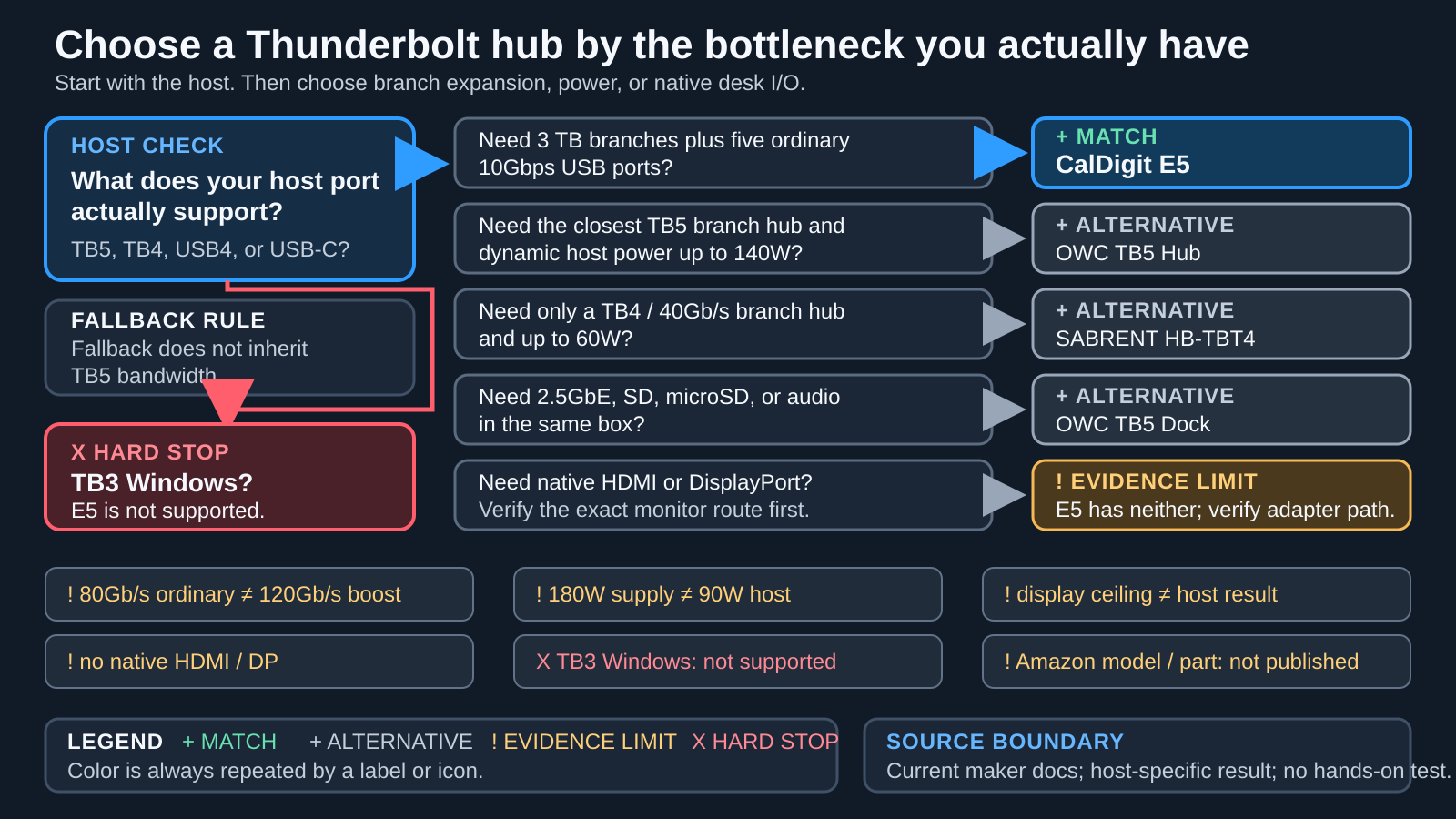
The decision map starts with the host because every downstream result inherits that first constraint. It then separates branch expansion from full-dock I/O.
Port roles and bandwidth
The E5 has four Thunderbolt 5 / USB4 v2 ports, not five. One is upstream and connects to the computer. The other three are downstream. The remaining five data ports are three USB-A and two ordinary USB-C connections, each rated by CalDigit at 10Gbps.
The distinction prevents two checkout mistakes. First, the upstream port is part of the advertised nine, so only eight ports remain for devices. Second, the two USB-C data ports are not additional Thunderbolt branches. They suit 10Gbps USB devices, but they do not inherit the display and daisy-chain role of the downstream TB5 ports.
80Gb/s ordinary path is not 120Gb/s Bandwidth Boost
On a compatible TB5 path, CalDigit publishes up to 80Gb/s bidirectional operation. Bandwidth Boost can allocate up to 120Gb/s in the display-heavy direction while reducing the other direction to up to 40Gb/s. The 120Gb/s number is not ordinary bidirectional storage bandwidth.
All three downstream branches also converge on one upstream link. Their labels do not create three simultaneous, additive 120Gb/s allowances. Actual device performance still depends on the host controller, peripheral, protocol overhead, cable, workload, and traffic from the other branches.
Branching still has practical value. Three physical outputs let you separate devices that would otherwise sit in one long daisy chain, and disconnecting one branch need not remove devices attached to another. The branches are a topology benefit, not extra upstream bandwidth. If two fast storage devices and a display are busy together, they still compete within the host path and its current allocation.
Our Thunderbolt 5 specification guide goes deeper on the 80Gb/s and asymmetric boost modes. The purchase consequence is simple. Buy the E5 for topology and a capable shared link, not to multiply the headline number.
Older hosts fall back
A Thunderbolt 4, USB4, USB4 v2, or generic USB-C host cannot inherit capabilities it does not expose. A USB4 v2 host can be a strong match, while ordinary USB-C may be limited by its data, display, and charging features. Read what USB4 means before assuming the connector shape answers the protocol question.
Charging and power allocation
The included 180W supply powers the entire hub system. It does not deliver 180W to the laptop. CalDigit rates the host path at up to 90W when the computer supports the required USB Power Delivery behavior.
| Power destination | Published ceiling | Checkout consequence |
|---|---|---|
| External power source | 180W | Runs the hub, host path, and downstream allocations |
| Host computer | Up to 90W | May be insufficient for a higher-power mobile workstation |
| Each downstream TB5 port | 15W | Useful for compatible bus-powered peripherals |
| Each USB-A port | 7.5W | Enough only within the attached device’s requirement |
| Each USB-C data port | 7.5W | Not a high-power laptop-charging output |
The E5 cannot operate as a bus-powered hub. Plan for its power brick and an outlet. A laptop that ships with a higher-output adapter may charge more slowly through the E5 or draw down its battery during sustained CPU/GPU work. CalDigit recommends using the laptop’s own charger when intensive work needs more than the hub path can provide.
Charging remains a negotiation. A proprietary charging scheme or a host port without compatible USB PD does not gain guaranteed 90W behavior. Offline charging is published, but no universal charging speed is established.
The fixed downstream ceilings also help with planning. A bus-powered SSD that fits a 15W TB5 branch has a different requirement from a phone or laptop expecting a larger USB PD source. The 7.5W USB-C data ports should be treated as peripheral connections, not spare host chargers. Check each attached device’s input before assuming the 180W brick removes every power constraint.
Display routes and host-specific limits
The E5 has no native HDMI or DisplayPort socket. A compatible Thunderbolt or USB-C monitor can connect directly to a downstream branch. An HDMI or DisplayPort monitor needs a separately purchased USB-C video adapter or cable, and that component becomes part of the compatibility chain.
Use this formula before ordering:
host GPU + host port + OS + hub + cable + adapter + display + DSC
A published ceiling describes what the link can carry under stated conditions. It does not guarantee that a specific computer exposes the display streams, color path, resolution, or refresh rate. So a display ceiling is not the same as the result on your computer.
Before using any headline format, write down four facts: the computer model and GPU, the output protocol of the chosen host port, the monitor input and target mode, and the exact cable or adapter between them. Then check whether DSC is required at that mode. If one field is unknown, the display result remains unverified even when every component has a USB-C connector.
Windows display paths
CalDigit describes as many as three displays from a capable Thunderbolt 5 Windows host. For a Thunderbolt 4 Windows host, it describes as many as two when the PC supports the route. Neither number is universal.
The GPU and computer maker’s matrix control first. Then check Windows version, system firmware, cable, adapter, monitor input, resolution, refresh rate, and DSC. Thunderbolt 3 Windows is a separate hard stop, not a reduced-display fallback.
The strongest independent evidence here is configuration-specific. Windows Central reviewer Cale Hunt reported no problem using an ASUS ROG Strix SCAR 18 G835L with one 4K120 monitor and one 3.4K ultrawide at 144Hz. He did not test triple 4K. He also reported that high-resolution displays could reduce storage bandwidth, while ordinary USB-C external drives did not show a compromise in that stated two-monitor setup.
The Windows Central result is useful because the host and monitors are named. It does not prove the same output for another GPU, two other monitors, or a different adapter chain.
macOS display paths
CalDigit’s current US shop media gives dual 6K60 or dual 4K144 as Mac-oriented ceilings. The exact Mac generation still controls. CalDigit says an M4 Thunderbolt 5 Mac does not support three displays from one TB5 connection, while its newer product guidance describes model-specific triple-display and four-display routes for M5 Pro and M5 Max systems.
The M5 paths cannot be reduced to “every Mac supports three or four displays.” The M5 Max four-display example requires a special arrangement with at least one daisy-chain-capable Thunderbolt display and remains configuration-dependent. Base M1, M2, and M3 Macs generally keep their one-external-display design limits.
The adapter route is a separate limit. CalDigit limits M1, M2, M3, and M4 Macs using an HDMI adapter through this path to HDMI 2.0b and 4K60. A higher-refresh Mac setup should use a compatible USB-C or DisplayPort route instead of assuming any HDMI adapter is equivalent.
DSC, high refresh, and dual 5K
CalDigit publishes ceilings that include three 4K60 displays, dual 4K240, and dual 6K60 under suitable conditions. Formats at 6K or 8K and some high-refresh paths can require Display Stream Compression from both the GPU and monitor. DSC and link allocation can also affect the practical bit depth and color route.
Dual 5K has a monitor-family boundary. CalDigit specifies Thunderbolt 4 or Apple Studio Display routes and says dual LG UltraFine 5K is not supported except under its stated M5 Max condition. A generic “dual 5K” checkbox therefore hides a purchase-changing distinction.
If a direct monitor is preferable, start with the connection types in our Thunderbolt monitor guide. For a separate video route, compare the connector and resolution limits in our USB-C to DisplayPort cable and adapter guide. The exact adapter still needs to match the host and display.
Compatibility, setup, software, and firmware
CalDigit currently lists macOS 15 or later and Windows 11 or later. It also lists current iPadOS and ChromeOS support. Those labels do not make every feature identical across device classes.
| Host path | E5 status | What you should expect |
|---|---|---|
| Thunderbolt 5 | Supported | Highest path still needs an 80Gb/s-capable host and suitable cable |
| Thunderbolt 4 | Supported | Falls to 40Gb/s-class host limits and host display support |
| Thunderbolt 3 Mac | Supported with reduced function | Verify the exact Mac and OS path |
| Thunderbolt 3 Windows | Not supported | Do not buy E5 for this host |
| USB4 / USB4 v2 | Supported | Bandwidth, displays, and charging follow host features |
| Generic USB-C | Reduced | Data, DP Alt Mode, and USB PD must be checked separately |
Our Thunderbolt 3, 4, and 5 comparison helps identify the host generation, but the computer maker’s exact port specification remains the final check.
On first connection, macOS or Windows can ask you to approve the Thunderbolt device. CalDigit’s manual does not require a separate base driver for ordinary operation. You still need current OS, computer firmware, the security approval, correct display settings, and any driver a separate adapter requires.
CalDigit offers a macOS Docking Station Utility to help safely eject attached storage. It is optional for that workflow, not an E5 firmware updater. The E5 firmware version and updater path are not published, so do not borrow one from a full dock or an older Element generation.
Cable capability matters on every host. The supplied 0.8m TB5 cable is the first choice. If you need a replacement or longer run, use the protocol and power checks in our Thunderbolt 5 cable guide. A Thunderbolt 4 cable can be appropriate for a 40Gb/s fallback path, but it should not be presented as proof of the full TB5 route.
Package, physical design, support, and warranty
The current US new-retail package contains the Element 5 Hub, a 0.8m Thunderbolt 5 cable, a 180W power supply, a power cord, and two rubber-feet strips. Verify TBT5-Element5-US-AMZ and ASIN B0DX8FS8KC at checkout. The EU, Japan, US open-box, and reseller listings are separate identities with potentially different package details.
CalDigit lists the body at 114 x 70 x 25.5 mm and 0.20 kg / 0.44 lb. The attachable rubber strips let the body rest in either orientation. That helps with port direction, but the short host cable and external power supply still determine practical placement.
The exact E5 product page states a two-year warranty, and the serial number is on the side. CalDigit’s general 12-to-24-month language does not replace that exact term. Warranty length is not evidence of failure rate or service quality.
The manual gives a safe operating range of 10 to 35 degrees C. The range is not a measured chassis temperature. CalDigit does not publish whether the E5 is fanless, so fan and noise behavior are not established.
Three exact alternatives
The three alternatives solve different bottlenecks. They are not a ranked list.
| Exact product | Choose it for | Accept this tradeoff |
|---|---|---|
| CalDigit E5 | Three TB5 branches plus five ordinary USB ports | Up to 90W host and no native dock I/O |
| OWC TB5 Hub | Closest TB5 branch hub with a higher dynamic host-power path | Only one ordinary USB port and no established universal display maximum |
| SABRENT HB-TBT4 | A 40Gb/s host and up to 60W requirement | No TB5 path and condition-dependent display ceilings |
| OWC TB5 Dock | Ethernet, cards, audio, and three TB5 branches | Supply wattage not established and still no native HDMI or DP |
OWC Thunderbolt 5 Hub: closest branch-hub alternative

Choose the OWCTB5HUB5P when you still want one host TB5 port and three downstream TB5 branches, but only need one ordinary USB-A 10Gbps port. OWC uses a different power strategy. Host delivery can rise to 140W and reduce toward 100W as downstream devices use the 180W supply.
It remains a branch hub. There is no native Ethernet, card reader, audio, HDMI, DisplayPort, or internal storage, and TB3 Windows is not supported. The current manual says up to two displays in one place while showing three-display examples elsewhere. A universal OWC display maximum is therefore not established. Exact chassis dimensions, weight, and firmware updater path are not published.
SABRENT HB-TBT4: for a 40Gb/s host

Choose the HB-TBT4 when the computer and devices are in the Thunderbolt 4 class and up to 60W host power is enough. It provides one upstream TB4 connection, three downstream TB4 branches, and one USB-A 10Gbps port. It is a 40Gb/s-class option, not a cheaper route to TB5 behavior.
SABRENT’s conservative display path is dual 4K60 or single 8K30, with 8K60 under its stated DSC condition. Its broader display highlights vary, so they should not be combined into one universal maximum. Generic USB-C display use also requires DP Alt Mode. The body is listed at 4.5 x 2.8 x 0.6 inches and 7 ounces. Two-year extended coverage requires registration within 90 days, while included cable length and an exact firmware updater are not published.
OWC Thunderbolt 5 Dock: for native desk I/O
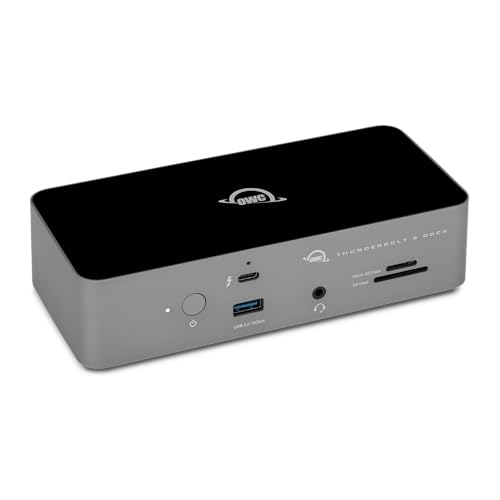
Choose the OWCTB5DOCK11P when the missing resources are 2.5Gb Ethernet, UHS-II SD and microSD, 3.5mm combo audio, and three ordinary USB-A ports. It also has one upstream and three downstream TB5 ports, up to 140W host delivery, and an included 1.0m TB5 cable.
It is the full-dock alternative, but it still has no native HDMI or DisplayPort and no internal storage. Windows Ethernet requires the Realtek RTL8156B driver. The current manual’s 21V / 8.58A input and separate 140W adapter label do not converge, so external supply wattage is not established. TB3 Windows is not supported, and exact dimensions, weight, and firmware updater path are not published.
Compare this class in our Thunderbolt 5 dock guide when native networking, cards, and audio matter more than the E5’s five ordinary USB ports.
Frequently asked questions
Is E5 a dock or a hub?
It is a powered Thunderbolt 5 / USB4 v2 branch hub. It expands one host connection into three downstream TB5 branches and five ordinary 10Gbps USB ports. It lacks the Ethernet, card, audio, and native video connections that normally make a full dock useful.
Does it work with Thunderbolt 4?
Yes, CalDigit lists Thunderbolt 4 support. The E5 then operates within the host’s 40Gb/s-class bandwidth, display, and charging limits. Buying a TB5 hub does not upgrade the controller in a Thunderbolt 4 computer.
Does it work with Thunderbolt 3 Windows PCs?
No. CalDigit explicitly lists Thunderbolt 3 Windows as unsupported. Thunderbolt 3 Macs have a reduced-function path, but that Mac exception must not be transferred to a Windows computer with the same connector shape.
Is 120Gb/s available for ordinary storage traffic?
No. CalDigit’s ordinary compatible TB5 path is up to 80Gb/s bidirectional. Bandwidth Boost can allocate up to 120Gb/s in the display-heavy direction while reducing the other direction. It is not a general bidirectional storage mode or a per-port allowance.
Can it run multiple displays?
Yes, with a compatible host and complete display route. CalDigit publishes Windows and Mac ceilings, but the exact GPU, computer model, OS, cable, adapter, monitor input, resolution, refresh rate, and DSC support determine the result. Do not purchase from the display count alone.
Does it include HDMI or DisplayPort?
No. Use a compatible Thunderbolt or USB-C monitor directly, or add the exact USB-C-to-HDMI or USB-C-to-DisplayPort adapter or cable required by the host and display. That adapter consumes a downstream branch and can add its own ceiling.
Can it provide more than 90W to a laptop?
No. The external supply is 180W, but CalDigit rates host delivery at up to 90W. A laptop that expects more can charge more slowly or need its own adapter during a sustained workload.
Does it require drivers or firmware?
The CalDigit manual does not require a separate base driver, though first connection can require Thunderbolt approval and the host still needs current OS and firmware. The macOS utility is optional for safe eject. An exact E5 firmware version/updater path is not published.
Checkout checklist
Before ordering, confirm:
- The new US identity is
TBT5-Element5-US-AMZand ASINB0DX8FS8KC. - The exact host port is TB5, TB4, USB4, USB4 v2, or a USB-C path with the needed features.
- Windows is version 11 or later or macOS is version 15 or later, and the machine is not TB3 Windows.
- Up to 90W matches the laptop’s real sustained power requirement.
- Every display has a verified host, cable, adapter, monitor-input, and DSC route.
- The 0.8m supplied cable reaches the intended desk position.
- The package includes the hub, cable, 180W supply, power cord, and two rubber strips.
- Ethernet, cards, audio, HDMI, and DisplayPort are not required natively.
Conclusion
The CalDigit E5 is a strong branch hub when its topology matches the bottleneck: three downstream TB5 branches, five 10Gbps USB ports, and up to 90W to a compatible host. Its value disappears when the actual need is native dock I/O, more host power, or a display result the computer cannot expose.
Buy from the host and port checklist, not from the largest bandwidth or display number. The difference is between using all nine connections well and paying for capabilities that stay behind a host limit.