



A 100W USB-C charger is a good match for a laptop that accepts USB Power Delivery at that level, but the headline number is usually a single-port ceiling. If you charge a laptop and phone together, check the maker’s allocation chart before expecting the laptop to receive the same wattage.
The Anker Prime A2688 is our pick for a compact three-device kit, while the UGREEN Nexode suits a four-device wall setup. Choose a one-port model such as the Anker 317 or Belkin BoostCharge when the laptop is the whole job and an included cable is useful.
Buy by the wattage available to your laptop port after every other device is connected, not by the largest number on the charger body.Table of Contents
Best 100 Watt USB-C Chargers Compared
| Image | Product | Details | Check Price |
|---|---|---|---|
 | Anker Prime Charger 100W A2688 | Best fit: Compact three-device carry Ports: 2 USB-C and 1 USB-A Single-port maximum: 100W on either USB-C Shared output: 100W max with two ports in use; 89W max with three Size and weight: 1.7 x 1.1 x 2.7 in; 6 oz | Check Price on Amazon |
 | UGREEN Nexode 100W 4-Port 40737 | Best fit: Four-device wall charger Ports: 3 USB-C and 1 USB-A Single-port maximum: 100W via USB-C Shared output: 100W total across its ports Size and weight: 2.7 x 2.7 x 1.3 in; about 8.3 oz (Amazon listing) | Check Price on Amazon |
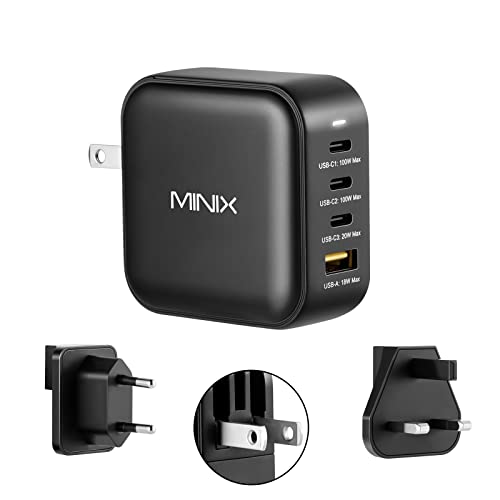 | MINIX NEO P3 100W | Best fit: International travel kit Ports: 3 USB-C and 1 USB-A Single-port maximum: 100W on USB-C1 or USB-C2 Shared output: 100W total; allocation depends on connected devices Size and weight: 60 x 60 x 27 mm; 197.8 g | Check Price on Amazon |
 | Satechi 100W Compact GaN ST-TC100GM | Best fit: Three-port wall charging Ports: 2 USB-C and 1 USB-A Single-port maximum: Up to 100W on either USB-C Shared output: 60W plus 30W plus 12W with all ports Size and weight: 3.75 x 2.5 x 1.25 in; 11.2 oz | Check Price on Amazon |
 | Anker 317 Charger 100W A2672 | Best fit: One laptop with an included long cable Ports: 1 USB-C Single-port maximum: 100W at 20V/5A Shared output: One-device charger Size and weight: Not listed by Anker | Check Price on Amazon |
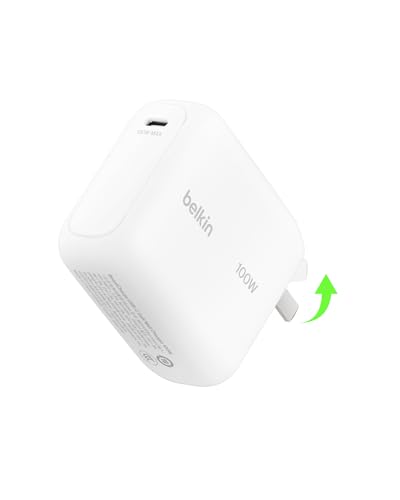 | Belkin BoostCharge 100W WCH025 | Best fit: Single-port charger with a 5-foot cable Ports: 1 USB-C Single-port maximum: Up to 100W Shared output: One-device charger Size and weight: 3.2 x 2.4 x 1.21 in; folded 2.6 x 2.4 x 1.2 in | Check Price on Amazon |
1. Anker Prime Charger 100W A2688 — Best Compact Three-Device Charger
Anker’s A2688 is the pick when one wall charger needs to cover a laptop, phone, and an older USB-A accessory without taking over a bag. Anker specifies two 100W USB-C ports and one 22.5W USB-A port in a 1.7 by 1.1 by 2.7-inch body that Anker describes as more compact than a credit card, and Anker lists the weight at 6 ounces.
Anker’s output table lists a 100W maximum with two ports in use and an 89W maximum with three ports in use. Put a laptop on the upper USB-C port, as Anker advises, and use the other connections for lower-power gear. The Anker Prime is a better fit than the one-port Anker 317 when you often bring a phone, but it does not include a cable.
Our Take Buy the Anker Prime A2688 if a small three-port charger is more useful than a cable in the box. Its published 100W and 89W maximums for two and three occupied ports give a laptop-and-phone kit a clear starting point, while the UGREEN has one extra connection for a fuller desk kit.
- Anker gives either USB-C port a 100W one-device ceiling for a compatible laptop.
- Anker states the combined limits for occupied ports, a 100W maximum for two and an 89W maximum for three.
- Anker lists a 6-ounce weight and describes the charger as suited to travel.
- Anker lists 89W as the maximum with three ports in use, below the 100W it lists for two.
- Anker does not include a USB-C cable with the A2688 charger.
2. UGREEN Nexode 100W 4-Port 40737 — Best Four-Port Wall Charger
The UGREEN Nexode 40737 makes sense for a hotel room or shared outlet where four cables are more useful than the smallest charger. UGREEN identifies three USB-C ports and one USB-A port with a 100W total budget, and UGREEN describes up to 100W for a single USB-C device. The Amazon listing gives 2.7 by 2.7 by 1.3 inches and about 8.3 ounces, which is larger than the Anker Prime’s, and the extra port is the trade.
Because this is one 100W pool, use it for a laptop plus smaller devices rather than treating every outlet as a 100W outlet. A laptop gets the strongest case when it is the only USB-C load. UGREEN publishes a charging guide for its port combinations, so check it against your own devices before you buy.
Put the laptop on a USB-C port first, then add phone and accessory cables after you know the laptop’s required wattage.Our Take Pick the UGREEN Nexode when four physical ports solve the problem at one wall outlet. The MINIX has the same three USB-C and one USB-A layout, so choose the UGREEN for its published charging guide and the MINIX for its travel plugs.
- UGREEN supplies three USB-C ports and one USB-A port in one wall charger.
- UGREEN states up to 100W for a single USB-C device and 100W total output.
- UGREEN lists PD 3.0 and PPS protocol support for its USB-C ports.
- UGREEN publishes a charging guide that shows how power divides across port combinations.
- UGREEN’s 100W total is shared when several devices charge together.
- The Amazon listing gives about 8.3 ounces for the four-port Nexode, heavier than the Anker Prime’s 6 ounces.
3. MINIX NEO P3 100W — Best International Travel Kit
The MINIX NEO P3 is the travel-focused choice because the maker supplies US, EU, and UK plug pieces plus a pouch. MINIX specifies 100W PD 3.0 on USB-C1 or USB-C2, a 20W USB-C3, USB-A up to 18W, and 100W total across its four ports. The two 100W-rated USB-C ports give a traveler two laptop-capable positions, although only one device should be expected to take the full 100W from the shared budget.
At 60 by 60 by 27mm and 197.8g, the MINIX is a compact four-port kit with interchangeable plugs for travel. Choose the Anker Prime if a three-port body that Anker lists at 6 ounces is enough.
The interchangeable plug pieces help with outlets abroad, but they do not change the USB-C cable rating your laptop needs.Our Take Choose the MINIX NEO P3 when an international plug kit has more value than the lightest body. Its two 100W-capable USB-C ports and four-port layout make it more flexible than the single-port cable bundles here.
- MINIX includes US, EU, and UK plug pieces plus a pouch for travel packing.
- MINIX lists USB-C1 and USB-C2 at 100W PD 3.0 each as a one-port maximum.
- MINIX lists three USB-C ports and one USB-A port for a laptop, phone, and accessories.
- MINIX’s 100W total output is shared when more than one device is attached.
- MINIX lists the USB-C3 port at 20W, below the 100W on USB-C1 and USB-C2.
4. Satechi 100W Compact GaN ST-TC100GM — Best Three-Port Wall Charger
Satechi’s ST-TC100GM is a three-port wall charger for a laptop, a second USB-C device, and a USB-A accessory. Satechi specifies up to 100W with one USB-C device connected, up to 60W plus 30W across both USB-C ports, and up to 12W on the USB-A port. The published split makes the Satechi one of the clearest choices when you need to plan a laptop plus tablet and phone setup.
The trade is size. Satechi lists 3.75 by 2.5 by 1.25 inches and 11.2 ounces, while Anker lists the Prime at 6 ounces, so the Satechi is not the bag-first choice.
Our Take Choose the Satechi when a laptop, a second USB-C device, and a USB-A accessory need clear shared power information. The Anker Prime is much lighter for travel, while the Satechi makes the three-device arrangement easier to understand before you plug it in.
- Satechi specifies up to 100W with one USB-C device connected.
- Satechi lists up to 60W plus 30W across its two USB-C ports for planning a laptop and a second USB-C device.
- Satechi specifies up to 12W on its USB-A port alongside the USB-C allocation.
- Satechi lists the ST-TC100GM at 11.2 ounces, heavier than the 6 ounces Anker lists for the Prime.
- Satechi lists the E-Mark cable needed for 100W charging as sold separately.
5. Anker 317 Charger 100W A2672 — Best One-Port Charger With a Long Cable
The Anker 317 removes the allocation question because it has one USB-C port. Anker specifies 20V at 5A for 100W maximum and PPS from 3.3V to 21V at up to 5A. For a spare laptop kit, Anker includes a 1.5m USB-C to USB-C cable.
There is no second port for a phone, watch, or tablet, which is a limitation rather than a hidden power-sharing compromise. Use it for one compatible USB-C laptop, a meeting-room backup, or a simple travel kit. Move to the Belkin if its 5-foot cable and published folded dimensions suit your bag, or to Anker Prime for several devices.
A one-port charger is simple because the laptop does not compete with a phone for the same 100W budget.Our Take The Anker 317 is our uncomplicated laptop pick because it combines one 100W USB-C port with an included USB-C cable. It is not a replacement for a multi-port charger when you want to charge accessories beside the laptop.
- Anker specifies 20V at 5A, giving one compatible USB-C device a 100W ceiling.
- Anker includes a 1.5m USB-C to USB-C cable with the 317.
- Anker states PPS support from 3.3V to 21V at up to 5A.
- The single USB-C port cannot charge a phone beside the laptop.
- The Anker 317’s single port gives up the extra ports of the UGREEN, MINIX, and Satechi chargers.
6. Belkin BoostCharge 100W WCH025 — Best Belkin One-Port Cable Bundle
Belkin’s WCH025 is another straightforward one-port option, with an up to 100W USB-C output and a 5-foot USB-C to USB-C cable in the maker’s box contents. The maker lists a 3.2 by 2.4 by 1.21-inch body, folding down to 2.6 by 2.4 by 1.2 inches, which gives a buyer a useful packed-size figure before choosing between it and the Anker 317.
The WCH025 makes sense for a laptop kit where you want a supplied cable and one charging job. It is not a multi-port alternative, and the cable does not mean every laptop will draw 100W. The laptop, cable, battery condition, and USB-PD negotiation decide the power level in use.
Choose the Belkin for one device and its cable bundle, not for a laptop plus phone setup.Our Take Buy the Belkin BoostCharge WCH025 if its one-port layout and included 5-foot cable are the right fit for your laptop bag. The Anker 317 covers the same simple job with PPS details from Anker, while the multi-port models suit people with more cables.
- Belkin specifies one USB-C output of up to 100W for a compatible laptop or tablet.
- Belkin includes a 5-foot USB-C to USB-C cable in the box.
- Belkin publishes both unfolded and folded dimensions for bag planning.
- The single USB-C port leaves no connection for a phone or other accessory.
- Its 100W figure does not override a laptop or cable that negotiates a lower level.
Buying Guide
1. Match the laptop’s USB-C input before buying
Start with the charger that shipped with your laptop or the maker’s support page, then match its USB-C PD input rating. A laptop designed around 65W can use a 100W charger, but it will request only the profile it supports. A laptop that expects 100W can use a 65W charger too, but may charge more slowly or lose charge under a demanding load.
The Anker 317 specifies 20V at 5A, and the Belkin gives one USB-C port a 100W maximum, so neither has a sharing question. Multi-port models can deliver the same one-port figure, but their published split becomes the next decision once you attach more hardware.
2. Read the shared-power chart, not just the large wattage
A multi-port charger divides one total output budget among active connections. The Anker Prime is easy to plan because Anker lists a 100W maximum with two ports in use and an 89W maximum with three. Satechi is similarly explicit with up to 60W plus 30W on its two USB-C ports plus up to 12W on USB-A.
UGREEN and MINIX offer more connections, but their 100W total is shared rather than four independent 100W supplies. Connect the laptop first, then use lower-power accessories where their demand leaves enough budget. A buyer who runs two larger USB-C devices should favor the maker page with an allocation figure for that exact combination.
3. Treat the cable as part of the power path
The charger cannot push 100W through a cable that does not support 5A or 100W charging. A 100W or 5A-marked USB-C cable is the practical baseline here, while a 240W-rated cable can also carry 100W when the charger and the laptop agree on that level. The guide to USB-C cables can help when a replacement cable is the missing piece.
Anker includes a 1.5m cable with the 317 and Belkin includes a 5-foot cable with the WCH025, which is useful when you want a cable in the box. Anker says the A2688 does not include one, and Satechi says an E-Mark cable is needed for 100W. Cable inclusion is convenient, but it does not guarantee a particular laptop charge rate.
4. Know what PD 3.1 and PPS change
USB Power Delivery is the negotiation system that lets a charger and device agree on voltage and current. PD 3.1 adds higher fixed power ranges above 100W, while these 100W chargers commonly use the 20V at 5A level associated with PD 3.0-era laptop charging. A PD 3.1 label is useful for higher-wattage equipment, but it is not required for a 100W laptop connection.
PPS lets a compatible device request smaller voltage adjustments inside a stated range, which often helps compatible phones. Anker states PPS for the A2672, UGREEN lists PPS support for its USB-C ports, and the MINIX Amazon listing states PD 3.0 with PPS. Use our USB-C charger guide for broader wattage options, but buy PPS only when your particular phone calls for it.
5. Choose the body and plug arrangement for where it lives
For a daily bag, the smallest useful port layout is usually better than the highest port count. Anker lists the Prime at 6 ounces and describes it as more compact than a credit card, and the one-port Belkin publishes folded dimensions. The MINIX adds interchangeable plugs for US, EU, and UK outlets, which may be more useful than a few ounces saved.
If one outlet must serve several devices, the UGREEN and MINIX each list three USB-C ports and one USB-A port, while the Satechi lists two USB-C ports and one USB-A port. If your laptop reports a low charge rate, check USB-C charging wattage in Windows 11 before buying another adapter.
FAQ
Can a 100W USB-C charger charge a laptop safely?
Yes, a compliant USB-C PD charger and laptop negotiate a supported power level before charging. A 100W charger advertises a ceiling, not a command that forces 100W into every device.
Use a laptop port that accepts charging and a suitable cable. The laptop may request less power than the charger can provide, especially as its battery fills or when its own charging limit is lower.
Does a 100W charger give 100W to every port?
No, a multi-port 100W charger normally shares a total budget. The 100W number commonly describes one USB-C port with no competing load.
Anker lists a 100W maximum with two ports in use and an 89W maximum with three for the Anker Prime, and Satechi lists up to 60W plus 30W for its two USB-C ports. UGREEN publishes a charging guide for its port combinations. Use such a chart before adding a second laptop or a tablet.
Do I need a 100W or 5A USB-C cable?
Yes, use a cable rated for the power you want to carry. A cable limited to 60W can limit a 100W charger and laptop combination to that lower ceiling.
Anker includes a 1.5m cable with the 317 and Belkin includes a 5-foot cable, but check any cable you buy separately for its 100W or 5A rating. A 240W cable can also carry 100W when the connected equipment negotiates that amount.
Is PPS important for laptop charging?
PPS is more often a phone-charging feature than a laptop requirement. It lets compatible equipment request adjustable voltage steps inside the charger’s supported range.
Check the charger’s maker page for a PPS listing if your phone calls for one. The key laptop feature is USB-PD support at the wattage your laptop accepts.
Should I buy a one-port or multi-port 100W charger?
Buy a one-port charger when the laptop is the only device and an included cable helps. The Anker 317 and Belkin WCH025 avoid any multi-device allocation question.
Buy multi-port when your phone, tablet, or accessory shares the outlet. Anker Prime, Satechi, and UGREEN each publish allocation information, and UGREEN and MINIX each add a fourth port for mixed kits.
Bottom Line
The Anker Prime A2688 is our compact multi-port choice because Anker publishes a 100W maximum with two ports in use and an 89W maximum with three. Take the UGREEN Nexode when four ports are the priority, MINIX when interchangeable travel plugs are useful, and Satechi when a three-port wall charger with a documented 60W plus 30W plus 12W split fits the setup. For one laptop, the Anker 317 and Belkin WCH025 include a USB-C cable with 100W charging.



How about the HUWDER 150W PD charger? I’m looking for a charger that can charge my multiple devices at the same time.