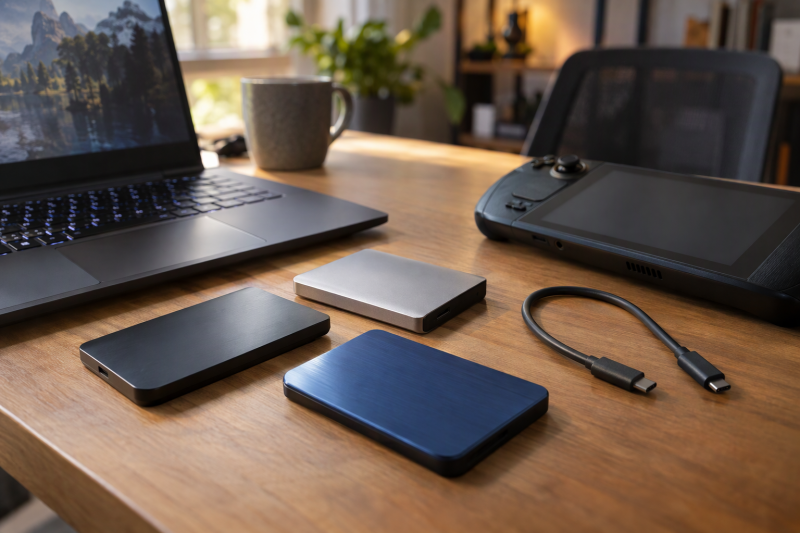
An external SSD can hold a game library without opening a laptop or handheld, but reaching its listed peak speed depends on the connection and the software that uses it. Not every USB-C port is equally fast, even with a fast USB-C drive, and an external game library may need a suitable file system and power arrangement. The six drives below cover different interfaces, capacities and portability needs.
| Image | Product | Best fit | Capacity | Interface | Listed peak | Watch-outs | Check Price |
|---|---|---|---|---|---|---|---|
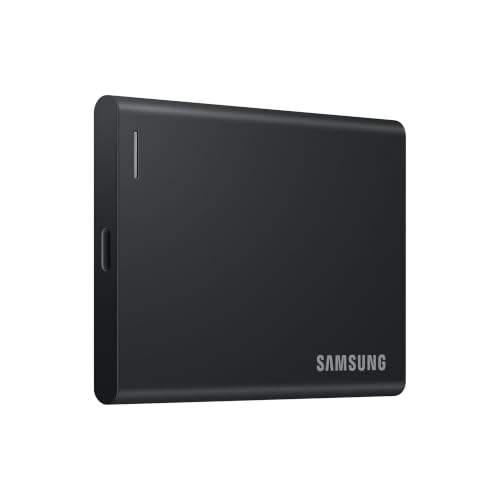 | Samsung P7 1TB | USB4 laptop transfers | 1TB | USB 4 Gen 3x2 | Up to 4,000 / 3,700 MB/s per Amazon | Samsung and listing differ on write speed | Check Price on Amazon |
 | Samsung T9 2TB | 20 Gbps laptop port | 2TB | USB 3.2 Gen 2x2, 20Gbps | Up to 2,000 MB/s | Host must support Gen 2x2 | Check Price on Amazon |
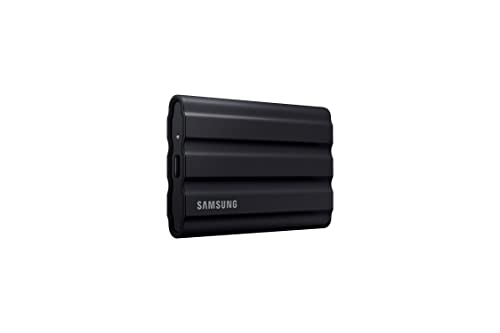 | Samsung T7 Shield 1TB | Dust and splash resistance | 1TB | USB 3.2 Gen 2 | Up to 1,050 / 1,000 MB/s | Samsung lists Gen 2, not Gen 2x2 | Check Price on Amazon |
 | Lexar ES3 1TB | Compact laptop storage | 1TB | USB 3.2 Gen 2 | Up to 1,050 / 1,000 MB/s | Listing part code differs from Lexar page | Check Price on Amazon |
 | Gigastone Dual-Interface 1TB | USB-A and USB-C hosts | 1TB | USB 3.2 Gen 2; dual interface | Up to 1,050 MB/s | PS5 games cannot play directly | Check Price on Amazon |
 | fanxiang PS2000W 2TB | 2TB and dual connector cable | 2TB | USB 3.2 Gen 2x2 | Up to 2,000 / 1,800 MB/s | fanxiang page text differs on USB generation | Check Price on Amazon |
1. Samsung P7 1TB — Best for a USB4 Gaming Laptop
Samsung’s product page names the P7 MU-PF1T0G/AM as a 1TB drive on USB 4 Gen 3×2 with read and write speeds of up to 4,000 and 3,800 MB/s. The Amazon listing for the same part number gives 4,000 MB/s read and 3,700 MB/s write, so Samsung and the listing differ by 100 MB/s on writes. Samsung’s page also lists capacities from 1TB to 8TB.
The Amazon listing says the drive withstands drops up to 6.5 feet and works with Windows PCs, smartphones, tablets, cameras, TVs and gaming consoles. It describes Samsung Magician as optimization tools with health monitoring. It also gives the body as about 3.5 by 2.6 by 0.3 inches at 0.22 pounds. The listing does not name handheld PCs, so check a handheld’s port and operating system separately.
Limit: Samsung’s page and the Amazon listing disagree on write speed, 3,800 MB/s against 3,700 MB/s, so plan around the lower figure.Our Take Choose the P7 when a gaming laptop has a USB4 port and you move large files often.
- With USB 4 Gen 3×2 named on Samsung’s page, the 1TB P7 suits a gaming laptop with a USB4 port.
- Buyers get one P7 read figure to plan around, since the Amazon listing and Samsung’s page both give up to 4,000 MB/s.
- A P7 owner gets drop resistance up to 6.5 feet and Samsung Magician health monitoring, according to the Amazon listing.
- Plan around the lower write speed, because Samsung’s page gives 3,800 MB/s and the Amazon listing gives 3,700 MB/s.
- Check a handheld’s port and operating system separately, since the Amazon listing names gaming consoles for the P7 but does not name handheld PCs.
2. Samsung T9 2TB — Best for a 20 Gbps Laptop Port
Samsung’s page names the T9 MU-PG2T0B/AM as a 2TB drive on USB 3.2 Gen 2×2 (20Gbps) with sequential reads of up to 2,000 MB/s. The Amazon listing gives the same 2,000 MB/s and describes Dynamic Thermal Guard as a thermal solution that controls heat during heavy use. Samsung also lists AES 256-bit hardware encryption, drop resistance up to 9.8 feet, and a body of 3.5 by 2.4 by 0.6 inches at 4.3 ounces.
Samsung lists Windows, macOS and Android, and the Amazon listing names desktops, cameras and gaming consoles. Valve’s Steam Deck tech specs list external connectivity as USB3 gen 2, which is not the Gen 2×2 mode Samsung names for the T9, so do not buy the drive expecting 20Gbps from that handheld. The Amazon listing says Samsung Magician provides firmware updates, extra encryption and drive health monitoring.
Limit: Samsung’s 20Gbps rating belongs to a Gen 2×2 interface, and a USB-C connector alone does not tell you whether a port supports it.Our Take Pick the T9 for a 2TB library when your laptop’s port is listed as Gen 2×2.
- Samsung’s page names USB 3.2 Gen 2×2 at 20Gbps for the T9, the mode to look for in your laptop’s port specifications.
- T9 buyers get sequential reads up to 2,000 MB/s and drop resistance up to 9.8 feet in Samsung’s figures.
- For encrypted storage, Samsung lists AES 256-bit hardware encryption on the T9, along with Samsung Magician software.
- Valve lists Steam Deck external connectivity as USB3 gen 2, so don’t buy the T9 expecting Samsung’s Gen 2×2 mode from that handheld.
- The Amazon listing names desktops, cameras and gaming consoles for the T9 but does not name handheld PCs, leaving handheld support unconfirmed.
3. Samsung T7 Shield 1TB — Best for Travel Protection
Samsung’s page lists the T7 Shield MU-PE1T0S/AM as a 1TB drive on USB 3.2 Gen 2 with up to 1,050 MB/s read and 1,000 MB/s write, an IP65 rating and drop resistance up to 9.8 feet. The Amazon listing describes the IP65 rating as water and dust resistance, calls the drive palm-sized and lists capacities from 1TB to 4TB.
The Amazon listing names PC, Mac, Android devices and gaming consoles as compatible, and gives the body as about 3.4 by 2.2 by 0.5 inches. The listing says Samsung Magician monitors drive health and delivers updates. Keep a separate copy of saves and files you cannot replace, especially when the drive travels.
Limit: Samsung lists up to 1,050 MB/s read for the T7 Shield, against the 2,000 MB/s Samsung lists for the T9.Our Take Choose the T7 Shield for a portable library when water, dust and drop resistance rank above Gen 2×2 speed.
- For a library that travels, Samsung’s page lists the T7 Shield with an IP65 rating and drop resistance up to 9.8 feet.
- Samsung gives T7 Shield buyers both transfer figures, up to 1,050 MB/s read and 1,000 MB/s write.
- Buyers with mixed hardware get PC, Mac, Android device and gaming console compatibility, as the Amazon listing says for the T7 Shield.
- For speed shoppers, Samsung lists USB 3.2 Gen 2 for the T7 Shield, not the Gen 2×2 Samsung lists for the T9.
- Handheld PC owners will not find their device type named among compatible hardware in the T7 Shield’s Amazon listing.
4. Lexar ES3 1TB — Best for a Small Portable Drive
Lexar’s ES3 page lists a 1TB capacity, USB 3.2 Gen 2, up to 1,050 MB/s read and up to 1,000 MB/s write, and one cable with both USB-C and USB-A ends. The Amazon listing for the Lexar ES3 1TB gives the same speeds, says the body weighs 42 g and is 10.5 mm thick, and says Lexar DataShield 256-bit AES encryption software is included.
The part codes differ. The Amazon listing gives the model as LES3XXX001T-RNSAU, while Lexar’s page lists the 1TB part as LES3XXX001T-RNSNG under Global, so the page covers the ES3 line rather than that exact part code. The Amazon listing also calls the cable Type-C. Lexar’s page rates the drive 2-meter anti-drop and says its speeds come from internal testing and may vary by host device.
The Amazon listing names laptops, cameras, Android devices and Xbox X|S, PS4 and PS5 consoles. Lexar’s page lists Windows, Mac OS, iOS and Android and does not name handheld PCs.
Limit: Lexar lists USB 3.2 Gen 2 with up to 1,050 MB/s read, below the 2,000 MB/s Samsung lists for the T9.Our Take Consider the ES3 for a small, light drive that comes with a USB-C cable.
- For a small, light drive, the Amazon listing gives the ES3 a 42 g body that is 10.5 mm thick.
- Lexar lists up to 1,050 MB/s read and 1,000 MB/s write for the ES3 and includes DataShield 256-bit AES software for encrypting files.
- Lexar’s page lists one ES3 cable with both USB-C and USB-A ends for either type of port.
- Check ES3 speed expectations against your host, because Lexar says its speeds come from internal testing and may vary by host device.
- Lexar’s page does not cover the Amazon listing’s exact part code, which ends -RNSAU, and lists -RNSNG for the 1TB.
5. Gigastone Dual-Interface 1TB — Best for USB-A and USB-C Hosts
The Amazon listing for the Gigastone USB-C External SSD 1TB, model GS-A+C-PSSD-1446-1000-1TB-1PK-B, describes a USB-C plus USB-A dual-interface design and USB 3.2 Gen2 at a maximum 1,050 MB/s. No Gigastone product page was located, so every figure for the drive comes from that listing. The two connectors let one drive plug into a USB-C laptop and a USB-A computer, provided each host can read the drive’s file system.
The listing says the drive must be formatted on the PS4 or PS5 before console use and connected to a SuperSpeed port. It also says PS5 games cannot be played directly from the drive and must be copied back to the console’s internal storage, while the PS5 can play PS4 games directly from it. The listing gives its formatting, port and game rules for consoles and does not mention Windows handhelds or SteamOS.
Limit: The Gigastone listing says PS5 games cannot be played directly from the external drive.Our Take Choose the Gigastone when you need both a USB-A and a USB-C connection on one drive.
- Gigastone’s listing describes a USB-C and USB-A dual-interface design for buyers who need both connections on one drive.
- Gigastone’s listing states a maximum 1,050 MB/s over USB 3.2 Gen2, a published figure for comparing drives.
- Console players learn from Gigastone’s listing how PS5 and PS4 games work from external storage.
- PS5 players face a copy step, since Gigastone’s listing says PS5 games must be copied back to internal storage before play.
- Plan a formatting step, because Gigastone’s listing says the drive must be formatted on the PS4 or PS5 before console use.
6. fanxiang PS2000W 2TB — Best for a Dual-Connector Cable
fanxiang’s product page for the PS2000W lists up to 2,000 MB/s read and 1,800 MB/s write, capacities of 500GB, 1TB and 2TB, an aluminum alloy and plastic body of 85 by 50 by 8.6 mm, and a weight of about 45 g. The Amazon listing for the PS2000W 2TB gives the same speeds and size and says a 2-in-1 data cable (USB Type C-to-C and Type C-to-A) comes with the drive.
fanxiang’s own pages disagree on the USB generation. Its specification table gives USB 3.2 Gen2x2 20Gbps and the Amazon listing says USB 3.2 Gen 2×2, but the product page’s feature text and the collection title say USB 3.2 Gen 2. Confirm the interface before buying for a 20Gbps port.
fanxiang’s page lists Windows 7 to 11, Mac OS 10.9 and later, and Android 4.4 or higher. The Amazon listing adds gaming consoles and Windows to Go support. Neither fanxiang’s page nor the Amazon listing names SteamOS.
Limit: fanxiang’s specification table says Gen2x2 while its feature text says Gen 2, so confirm the interface before relying on 20Gbps.Our Take Pick the PS2000W when you want a 2TB drive with one cable for USB-C and USB-A hosts and can confirm its Gen 2×2 mode.
- fanxiang’s specification table lists USB 3.2 Gen2x2 20Gbps, the mode to confirm before you buy for a faster port.
- PS2000W buyers get fanxiang figures of up to 2,000 MB/s read and 1,800 MB/s write.
- fanxiang lists an aluminum alloy and plastic body of 85 by 50 by 8.6 mm, and the Amazon listing says a 2-in-1 USB-C and USB-A data cable comes with it for either host.
- Confirm the PS2000W interface, because fanxiang’s specification table says Gen2x2 while its feature text and collection title say Gen 2.
- For a Steam Deck, support is unconfirmed, as fanxiang’s page and the Amazon listing do not name SteamOS.
Buying Guide: Choosing a Portable Gaming SSD
Match interface speed to the computer
Samsung’s page names USB 4 Gen 3×2 for the P7 and USB 3.2 Gen 2×2 at 20Gbps for the T9, and each needs a host with the matching port. Check the laptop’s port specifications and the cable, not just whether the connector is USB-C. A backward-compatible connection can work at a lower mode without reaching the drive’s advertised maximum.
Valve’s Steam Deck tech specs list external connectivity as USB3 gen 2. On that handheld, you should not assume the faster interface of a USB4 or Gen 2×2 drive is available. Other handhelds differ, so identify the exact model before making the same comparison.
Decide how much space your games need
The P7, T7 Shield, ES3 and Gigastone listings give 1TB capacities, while the T9 and PS2000W are 2TB. Game sizes, updates, screenshots and other files all use space. Lexar’s page says actual usable storage may be less than stated because of system formatting, and it counts 1GB as 1 billion bytes.
A larger external library helps with storage planning, but it does not replace copies of saves or other important files. Keep a separate backup and leave enough free space for updates and the way your game launcher manages installed titles.
Compare the complete cable and power setup
The Gigastone listing describes USB-A and USB-C interfaces, and the PS2000W comes with a 2-in-1 data cable according to the Amazon listing. Lexar’s page describes one ES3 cable with USB-C and USB-A ends, while the Amazon listing calls it Type-C. Verify the connection on your host and the cable’s supported speed before expecting the drive to reach a published transfer maximum.
A handheld with a single USB-C port may need a compatible powered hub or dock to connect an SSD and charge at the same time. Check the hub’s data speed, power delivery and physical fit. A charger-only adapter is not necessarily a data connection.
Check file systems and launcher behavior
The operating system using the drive must be able to read and write its file system. Windows handhelds and SteamOS devices do not necessarily use the same game-library setup. Confirm the device maker’s instructions and the game launcher’s requirements before formatting or moving a library.
Formatting can erase existing files. Copy anything important elsewhere first, then follow the device’s instructions. A drive that mounts for ordinary files is not automatically configured for every game launcher or protected game.
Account for portability and backups
Samsung’s page lists an IP65 rating and drop resistance up to 9.8 feet for the T7 Shield. The rating covers water and dust resistance, not data loss. Disconnect carefully, avoid pulling on the connector and keep a separate backup of files you cannot replace.
If you want storage without a cable, compare microSD cards for handheld gaming PCs or 2230 NVMe SSDs for handheld PCs. An internal SSD requires installation, while a card or external drive can be removed.
Frequently Asked Questions
Can I use a portable SSD with a gaming laptop?
A laptop with a compatible USB data port can use an external SSD for ordinary storage. Reaching the drive’s maximum speed also depends on the laptop port, cable and workload, so compare the actual interface rather than the connector shape alone.
For game libraries, check the launcher and file-system requirements on that laptop. Some games or launchers may have their own rules about where they can run and how a library is moved.
Will a 20 Gbps SSD run at full speed on Steam Deck?
Valve’s Steam Deck tech specs list external connectivity as USB3 gen 2, rather than the Gen 2×2 mode Samsung names for the T9. A drive can connect at a supported lower mode, but you should not assume the 20Gbps maximum is available from that host.
A dock or hub also has its own data limit. Check the entire connection from handheld through hub and cable to SSD, and confirm the drive’s file system works for the intended library.
Is USB4 the same as a USB-C connector?
USB-C describes a connector shape, while USB4 describes an interface capability. Two devices with similar-looking ports can support different data rates and features.
Samsung’s page names USB 4 Gen 3×2 for the P7, and the drive needs a suitable host and cable to reach its stated maximum. Consult the device specifications when comparing it with a Gen 2 or Gen 2×2 SSD.
Can I charge a handheld and use an SSD at the same time?
Some handhelds have a single USB-C port shared by data and charging. A suitable powered hub or dock can provide separate connections, but the hub must support the required data mode and power arrangement for that device.
Check the charger capacity and the dock’s power consumption as well as its data ports. Confirm that cables do not put strain on the handheld, especially during portable play.
Can PS5 games run directly from an external SSD?
The Gigastone listing says PS5 games cannot be played directly from the external SSD and must be copied back to the console’s internal storage before play. It also says the PS5 can play PS4 games directly from external storage.
The listing gives that rule for consoles and does not mention a Windows or SteamOS game library. Check the device maker’s instructions for each platform and back up files before any formatting step.