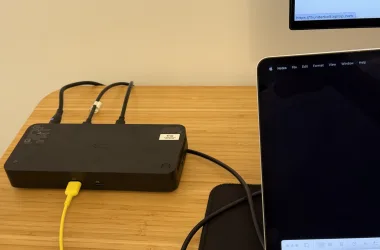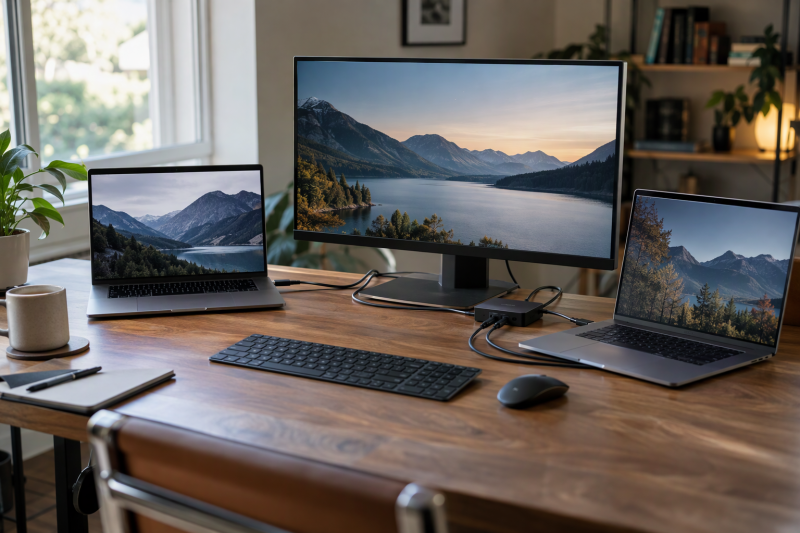
An HDMI KVM switch lets two laptops or PCs share a monitor, keyboard and mouse without moving cables each time. The video connection is only half the setup. Each computer also needs the USB data connection the switch requires before the shared peripherals respond.
The five switches here differ in shared USB ports, included cables, video ceilings and switching controls. Each is described for two computers and one HDMI monitor. Check both computers’ ports before buying, especially if either laptop has USB-C ports but no HDMI or USB-A.
HDMI KVM Switches Compared
| Image | Product | Best fit | Host and display | Video ceiling | Shared connections | Watch-outs | Check Price |
|---|---|---|---|---|---|---|---|
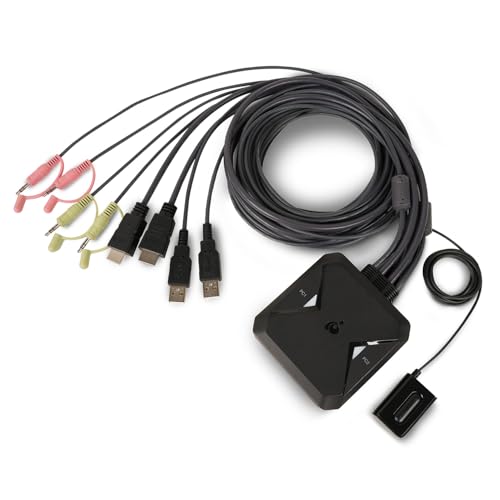 | IOGEAR GCS92HU | Attached cables and analog audio | 2 computers, 1 HDMI monitor | Up to 4096 x 2160 at 60 Hz | USB keyboard and mouse; 3.5 mm audio | Fixed 4-foot host cables | Check Price on Amazon |
 | UGREEN 15166A | Included HDMI and USB cables | 2 computers, 1 HDMI monitor | Up to 4K at 60 Hz | Four USB 2.0 ports | No hotkeys or EDID emulation; no docking station | Check Price on Amazon |
 | Hearvo S7232H | USB-C peripheral port and adaptive EDID | 2 computers, 1 HDMI monitor | Up to 4K at 60 Hz | Three USB-A and one USB-C, USB 3.0 | Two USB cables included; check HDMI cables | Check Price on Amazon |
 | BENFEI BNF-KVM-0355G | High-resolution HDMI and clamp mount | 2 computers, 1 HDMI monitor | Up to 8K at 60 Hz | Four USB-A 3.0 ports | Clamp fits 5-36 mm surfaces | Check Price on Amazon |
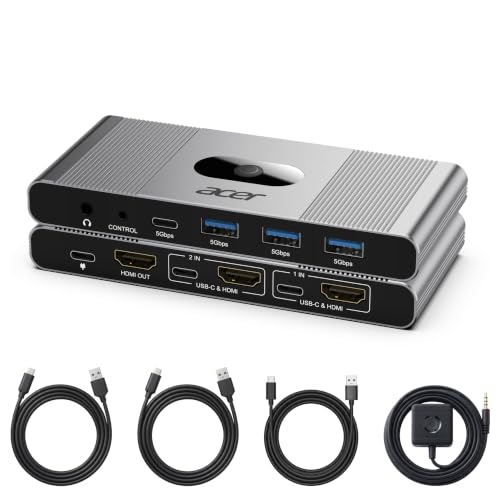 | Acer ODK6M3-DG | Mixed USB-A and USB-C peripherals | 2 computers, 1 HDMI monitor | Up to 4K at 60 Hz | Three USB-A and one USB-C, USB 3.0 | No hotkeys or EDID; some setups need adapters | Check Price on Amazon |
1. IOGEAR GCS92HU — Best Attached-Cable KVM With Audio
The GCS92HU connects two HDMI computers to one monitor and a shared USB keyboard and mouse. IOGEAR’s product page states up to 4096 x 2160 at 60 Hz and up to 2560 x 1440 at 144 Hz. The Amazon listing says the host cables are attached and four feet long. IOGEAR’s specifications give the same length as 48 inches.
IOGEAR describes a remote push-button on a 6 ft cable for choosing the active computer. IOGEAR also lists a 3.5 mm audio jack and a 3.5 mm microphone jack on the console side, with digital audio carried over HDMI. IOGEAR calls the switch USB powered but says it may need external power through its Micro-B port. The Amazon listing says the USB cable and power adapter for that port are not included. IOGEAR’s requirements list an HDMI port and a USB Type-A port on each computer, and a wired USB keyboard and mouse for the console.
Decision point: choose the GCS92HU when four-foot attached host cables reach both computers and you want 3.5 mm audio and microphone jacks. Our TakeIOGEAR calls the GCS92HU one of its most compact KVMs. Measure the distance from the switch to each computer against the four-foot attached cables, and check whether your peripherals call for the optional Micro-B power.
- The Amazon listing says the IOGEAR GCS92HU includes attached four-foot host cables, a fit when both computers sit within reach of them.
- IOGEAR specifies up to 4096 x 2160 at 60 Hz and up to 2560 x 1440 at 144 Hz for the GCS92HU.
- IOGEAR lists 3.5 mm audio and microphone jacks on the console side of the GCS92HU, alongside audio over HDMI.
- IOGEAR describes a remote push-button on a 6 ft cable for choosing the active computer.
- The IOGEAR GCS92HU has attached four-foot host cables, so measure the distance to both computers first.
- IOGEAR says the GCS92HU may need external power through its Micro-B port, and the Amazon listing says the cable and adapter for that port are not included.
2. UGREEN 15166A — Best for Included Connection Cables
The UGREEN 15166A shares one HDMI monitor and four USB 2.0 ports between two computers. The Amazon listing states up to 4K at 60 Hz. Its package list names two HDMI cables, two USB-A-to-B cables, a desktop controller and a user guide. The listing also says both USB-A-to-B cables must be connected for power and data transfer, so connecting video alone does not make the keyboard and mouse work.
The listing’s notes say the switch does not support EDID emulation or hotkey switching and supports one monitor. The notes also say it is not supported for use with a docking station. The listing asks for HDMI cables of no more than 5 m (16 ft) for 4K at 60 Hz, and for matching resolutions on the two inputs and the output. For a wireless keyboard and mouse, the listing gives an operating range of within 1 m for one USB device and within 0.3 m for several.
The UGREEN listing states the docking-station and hotkey limits in its notes, so check them against your desk before ordering. The package it names includes the desktop controller.
- The UGREEN listing names two HDMI cables and two USB-A-to-B cables in the package for connecting the two computers.
- UGREEN’s listing gives two ways to change the active computer, a one-button switch and the desktop controller.
- The UGREEN listing names four USB 2.0 ports for a keyboard, mouse and printer.
- The UGREEN listing says the 15166A is not supported for use with a docking station, so check your desk setup before ordering.
- The UGREEN listing says the 15166A does not support EDID emulation or hotkey switching.
- The UGREEN listing names USB 2.0 ports, while the Hearvo, BENFEI and Acer listings name USB 3.0 ports.
3. Hearvo S7232H — Best for Adaptive EDID and USB-C Peripherals
The Hearvo S7232H shares one HDMI monitor between two computers and has three USB-A and one USB-C shared ports. Hearvo’s page and the Amazon listing both give those ports as USB 3.0 with up to 5 Gbps. Both also state up to 4K at 60 Hz, HDCP 2.2 and adaptive EDID. Hearvo also says the switch needs no power supply or driver software.
Hearvo’s page names two ways to switch, a button on the switch and a wired remote, and says the remote lets the switch sit in a hidden or distant spot. The Amazon listing’s package list names two USB 3.0 cables and one wired remote switch. Hearvo’s own package list names the two USB 3.0 cables but not the remote, and neither list names HDMI cables, so plan HDMI cables for both computers separately.
Decision point: choose the S7232H for a shared USB-C port and adaptive EDID, and bring your own HDMI cables. Our TakeHearvo’s page and the Amazon listing agree on the port mix, the USB 3.0 speed and adaptive EDID. They differ on whether the wired remote is in the box, so confirm the remote before ordering.
- Hearvo gives the S7232H three USB-A ports and one USB-C port for shared peripherals.
- Hearvo and the Amazon listing both state USB 3.0 with up to 5 Gbps on the shared ports.
- Adaptive EDID, up to 4K at 60 Hz and HDCP 2.2 are all stated by Hearvo for the S7232H.
- Hearvo describes a wired remote that lets the switch sit in a hidden or distant spot.
- Neither package list names HDMI cables, and Hearvo’s list also omits the wired remote that the Amazon listing’s list names.
- Hearvo describes the S7232H for one shared monitor, so it is not a dual-monitor KVM.
4. BENFEI BNF-KVM-0355G — Best High-Resolution Clamp-Mount Switch
The BENFEI BNF-KVM-0355G shares one HDMI monitor and four USB-A 3.0 ports between two computers. The Amazon listing states up to 8K at 60 Hz, backward-compatible 4K at 240 Hz, HDMI 2.1, HDCP 2.2, CEC and HDR, and says the four USB ports reach up to 5 Gbps. The 8K at 60 Hz figure is the highest video ceiling stated by any of the five listings and maker pages cited here. A ceiling is a limit rather than a promise for a given computer, cable and monitor.
The listing describes an adjustable screw clamp for a monitor or desk edge 0.19 to 1.41 inches (5 to 36 mm) thick, with a rubber cover on the screw. BENFEI’s product page repeats the same wording. The listing does not say how you switch between the two computers.
Decision point: consider the BENFEI when your desk or monitor has an edge between 5 and 36 mm thick and you want the highest stated video ceiling. Our TakeThe BENFEI listing states the highest video ceiling of the five switches and describes a clamp mount. It names USB-A ports only and does not describe the switching control, so check the ports and the switching control before ordering.
- The BENFEI listing states up to 8K at 60 Hz and 4K at 240 Hz for the BNF-KVM-0355G.
- The BENFEI listing names four USB-A ports at USB 3.0 speeds of up to 5 Gbps.
- The BENFEI listing describes an adjustable clamp for edges from 5 to 36 mm thick.
- The BENFEI listing names HDMI 2.1, HDCP 2.2, CEC and HDR support.
- The BENFEI listing names four USB-A ports, does not list a USB-C port and does not describe a switching control.
- The BENFEI listing gives the clamp a 5 to 36 mm range, so measure the desk or monitor edge first.
5. Acer ODK6M3-DG — Best Mixed-Port Switch With a 1.5 m Wired Remote
The Amazon listing for the Acer ODK6M3-DG describes one HDMI monitor shared by two computers at up to 4K at 60 Hz and 1080p at 144 Hz, with three USB-A and one USB-C USB 3.0 ports at up to 5 Gbps. It names the panel button and an included 1.5 m wired remote as the two ways to switch, and describes an aluminum shell. The figures here come from the Amazon listing. Acer’s own page for this model code was not found.
The listing says both computers need the included data cables for the keyboard and mouse to work, and that a laptop with only USB-C ports needs a basic USB-C to USB-A adapter for that cable. It asks for a 5V power adapter, which it says is not included, when high-drain USB devices are connected. It also says the switch does not support hotkey switching or EDID emulation, supports one monitor, and is an HDMI switch rather than a DisplayPort one.
The Acer listing sets out its adapter and power requirements before you buy. It names the same three-USB-A, one-USB-C layout as the Hearvo listing and gives its wired remote’s cable as 1.5 m.
- The Acer listing names three USB-A and one USB-C USB 3.0 ports at up to 5 Gbps.
- The Acer listing states up to 4K at 60 Hz and 1080p at 144 Hz over HDMI.
- The Acer listing names a 1.5 m wired remote and a panel button for choosing the active computer.
- The Acer listing states its adapter, power and one-monitor notes up front, so check them against your desk before ordering.
- The Acer listing says a laptop with only USB-C ports needs a separate USB-C to USB-A adapter for the data cable.
- The Acer listing asks for a 5V adapter with high-drain USB devices and says it is not included.
- The Acer listing says the ODK6M3-DG does not support hotkey switching or EDID emulation.
Buying Guide: Choose a KVM for Two Computers
Count the video and data connections
Every switch here is described for two computers and one HDMI monitor, and each computer also needs a USB data connection for the shared keyboard and mouse. The UGREEN 15166A Amazon listing names two HDMI cables and two USB-A-to-B cables in its package. The Hearvo S7232H Amazon listing and Hearvo’s page both name two USB 3.0 cables, and neither package list names HDMI cables.
Check the ports on both laptops before you choose cables. IOGEAR’s requirements list an HDMI port and a USB Type-A port on each computer, and the Acer ODK6M3-DG listing says a laptop with only USB-C ports needs a USB-C to USB-A adapter for its data cable. The Hearvo and Acer listings describe the shared USB-C port for peripherals and do not describe it as a laptop video input, so treat any video adapter as a separate decision.
Two PCs, a PC and a laptop, or two laptops use a switch the same way when each one offers the connections that switch asks for. Make a cable list before you disconnect an existing setup, and check the connectors and video support of any adapter the laptops depend on.
Match the monitor resolution and refresh rate
The UGREEN, Hearvo and Acer listings each state up to 4K at 60 Hz. IOGEAR’s page specifies up to 4096 x 2160 at 60 Hz and 2560 x 1440 at 144 Hz for the IOGEAR GCS92HU, and the BENFEI listing states up to 8K at 60 Hz and 4K at 240 Hz. Each figure is a ceiling stated by the maker or the listing, not a result for your equipment.
Confirm that the computer output, HDMI cable and monitor all support the mode you want. The UGREEN listing asks for matching input and output resolutions and for HDMI cables of no more than 5 m (16 ft) for 4K at 60 Hz. Compare that cable length against your desk distances before you count on the headline figure.
Choose shared ports for your peripherals
The Hearvo and Acer listings each name three USB-A and one USB-C shared ports at USB 3.0 speeds of up to 5 Gbps. The BENFEI listing names four USB-A 3.0 ports, and the UGREEN listing names four USB 2.0 ports. IOGEAR lists one USB Type-A keyboard port and one USB Type-A mouse port on the GCS92HU console and says a USB hub can add peripheral ports. Count the keyboard receiver, mouse, webcam and other devices you plan to share rather than judging only the total number of ports.
IOGEAR, Acer and Hearvo describe power differently. The Acer listing asks for a 5V power adapter, which it says is not included, with high-drain USB devices. IOGEAR says the GCS92HU may need external power through its Micro-B port, and the Amazon listing says the cable and adapter for that port are not included. Hearvo’s page says the S7232H needs no power supply.
Decide how you want to switch
IOGEAR’s page describes a remote push-button on a 6 ft cable for the GCS92HU. The Hearvo and Acer listings each name a button on the switch and a wired remote, and the Acer listing gives its remote’s cable as 1.5 m. Hearvo’s page says its wired remote lets the switch sit in a hidden or distant spot. The UGREEN listing names a one-button switch or a desktop controller, and the BENFEI listing does not describe how to switch between the computers.
A button is not the same as keyboard hotkeys. The UGREEN and Acer listings each say the switch does not support hotkey switching, and each also says it does not support EDID emulation. Hearvo states adaptive EDID instead, so compare the wording against what your monitor setup needs.
Plan for the desk rather than just the switch
IOGEAR gives the GCS92HU’s attached host cables as four feet, so measure from the planned switch position to each computer. The BENFEI listing gives its clamp a 5 to 36 mm range, which makes the desk or monitor edge a second measurement.
A KVM and a dock handle different jobs. The UGREEN listing says the 15166A is not supported for use with a docking station, so connect it directly to the computers. For related decisions, compare docks and hubs or see the USB-C KVM guide if the computers’ available ports make a different interface a better fit.
Frequently Asked Questions
Can two laptops share one monitor with these switches?
The IOGEAR page and the UGREEN, Hearvo, BENFEI and Acer listings each describe two computers and one HDMI monitor, so two laptops, two PCs or one of each can share a screen. IOGEAR’s page, the UGREEN listing and the Acer listing also call for a USB data connection from each computer. A video cable on its own does not carry the keyboard and mouse connection.
Check the ports on both machines before buying. The Acer listing says a laptop with only USB-C ports needs a USB-C to USB-A adapter for its data cable, while the UGREEN listing includes two USB-A-to-B data cables.
Does an HDMI KVM also switch the keyboard and mouse?
Yes. The IOGEAR page and the UGREEN, Hearvo, BENFEI and Acer listings each describe sharing a keyboard and mouse along with the monitor. The UGREEN listing names four USB 2.0 ports, the BENFEI listing names four USB-A 3.0 ports, and the Hearvo and Acer listings name three USB-A and one USB-C USB 3.0 ports.
Connect each computer’s USB data cable as well as its HDMI cable. The UGREEN and Acer listings both say the data cables must be connected for the keyboard and mouse to work.
Do these switches support two monitors?
No. IOGEAR, UGREEN, Hearvo, BENFEI and Acer each describe their switch for one shared HDMI monitor, and the UGREEN and Acer listings say the switch supports one monitor only. A second display does not turn a single-output KVM into a dual-monitor switch.
If two displays are the main requirement, check each computer’s video outputs and look at a dedicated multi-display setup. The site’s dual-monitor docking guide covers the dock side of that decision.
What does the extra power connection do?
IOGEAR says the GCS92HU may need external power through its Micro-B port, and the Amazon listing says peripherals that do not receive enough power can draw on that port. The listing also says the USB cable and power adapter for it are not included.
The Acer listing asks for a 5V power adapter with high-drain USB devices and says the adapter is not included. Hearvo’s page says the S7232H needs no power supply, so check each switch’s own instructions for the accessories your peripherals call for.
Is a higher advertised resolution always better?
A higher ceiling helps only when the computer, HDMI cable and monitor all support the mode. The BENFEI listing states up to 8K at 60 Hz, the UGREEN, Hearvo and Acer listings state up to 4K at 60 Hz, and IOGEAR specifies up to 4096 x 2160 at 60 Hz.
For a monitor that tops out at 4K at 60 Hz, compare the included cables, the shared USB port mix and the switching control instead, since all five switches state a ceiling at or above that mode.