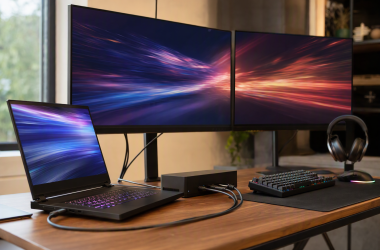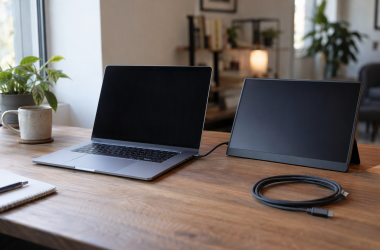
MSI’s USB-C monitors fall into two groups. The PRO models are office screens with a USB hub and a KVM switch, and the MAG and MPG QD-OLED models are gaming screens. MSI’s specification pages list USB-C video (DisplayPort Alternate Mode) on all five monitors here, and they list USB-C power output anywhere from 15W to 98W.
MSI lists 98W on the PRO MP341CQPHG E12, a 34-inch ultrawide, and 90W on the MPG 271QRX, a 360Hz gaming screen. The PRO MP275PHGN E14 is an office model with four USB-A ports for accessories such as a keyboard.
USB-C on a monitor can mean video alone, video with charging, or video with a USB hub. Check the power figure MSI lists before planning a desk that runs on one cable.MSI USB-C Monitors Compared
| Image | Product | Details | Check Price |
|---|---|---|---|
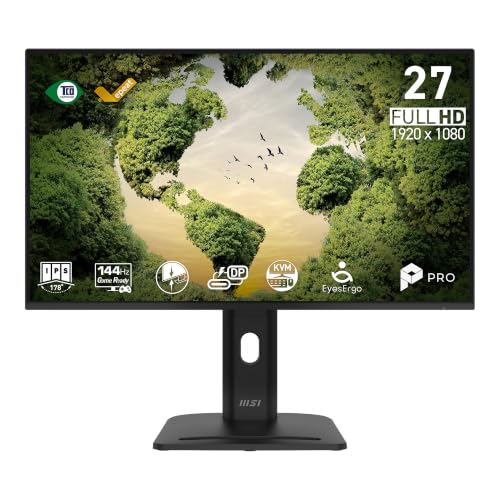 | MSI PRO MP275PHGN E14 | Best fit: 27-inch office screen with USB-A ports Panel: 27-inch IPS, 1920 x 1080 Refresh rate: 144Hz USB-C: Video plus 15W power Extra ports: HDMI, DisplayPort, 4 USB-A, 1 USB-B, KVM | Check Price on Amazon |
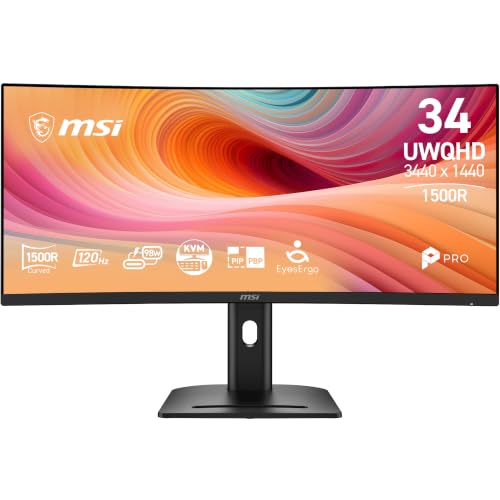 | MSI PRO MP341CQPHG E12 | Best fit: 34-inch ultrawide with 98W USB-C Panel: 34-inch VA, 3440 x 1440 Refresh rate: 120Hz over DisplayPort USB-C: Video plus 98W power Extra ports: HDMI, DisplayPort, 4 USB-A, 1 USB-B, KVM | Check Price on Amazon |
 | MSI MPG 271QRX QD-OLED | Best fit: 360Hz gaming display with 90W USB-C Panel: 26.5-inch QD-OLED, 2560 x 1440 Refresh rate: 360Hz USB-C: Video plus 90W power Extra ports: 2 HDMI 2.1, DisplayPort, 2 USB 2.0 Type-A, 1 USB 2.0 Type-B | Check Price on Amazon |
 | MSI MAG 271QPX QD-OLED | Best fit: 360Hz OLED with two HDMI 2.1 ports Panel: 26.5-inch QD-OLED, 2560 x 1440 Refresh rate: 360Hz USB-C: Video plus 15W power Extra ports: 2 HDMI 2.1, DisplayPort | Check Price on Amazon |
 | MSI MAG 321UPX QD-OLED | Best fit: 4K 240Hz OLED over USB-C Panel: 31.5-inch QD-OLED, 3840 x 2160 Refresh rate: 240Hz USB-C: Video plus 15W power Extra ports: 2 HDMI, DisplayPort | Check Price on Amazon |
1. MSI PRO MP275PHGN E14 — Best 27-Inch Office Screen With a USB Hub
MSI’s specification page lists the PRO MP275PHGN E14 as a 27-inch flat IPS panel at 1920 by 1080 and 144Hz. Its ports are HDMI 2.0, DisplayPort 1.2a and a USB Type-C port with DisplayPort Alternate Mode video. MSI lists 1920 by 1080 at up to 144Hz over DisplayPort and HDMI and gives no separate figure for USB-C, and the USB-C port has 15W of power output.
The office features are in the ports and the stand. MSI lists four USB 3.2 Gen 1 Type-A ports and one Type-B upstream port, and both MSI’s notes and the Amazon listing name KVM. The stand adjusts 150 mm in height, pivots 90 degrees either way and includes a mini PC mount. MSI packs a USB-C to USB-C cable and a DisplayPort cable in the box.
Our Take Buy the MP275PHGN E14 for a desk where the keyboard, mouse and USB accessories plug into the monitor and one USB-C cable links the monitor to the laptop. Plan on a separate charger for any laptop that draws more than 15W.
- MSI lists four USB 3.2 Gen 1 Type-A ports and one Type-B port on the MP275PHGN E14, so a keyboard and mouse plug into the monitor.
- MSI lists a stand for the MP275PHGN E14 with 150 mm of height adjustment, 90 degrees of pivot each way and an integrated mini PC mount.
- MSI packs a USB-C to USB-C cable in the box with the MP275PHGN E14 for the laptop connection, along with a DisplayPort cable.
- MSI lists 1920 by 1080 on the 27-inch MP275PHGN E14, a lower pixel count than the 2560 by 1440 and 3440 by 1440 models here.
- MSI lists 15W of USB-C power output for the MP275PHGN E14, so a laptop that draws more needs a separate charger.
2. MSI PRO MP341CQPHG E12 — Best 34-Inch Ultrawide With 98W USB-C
MSI’s specification page lists the PRO MP341CQPHG E12 as a 34-inch VA panel with a 1500R curve, 3440 by 1440 resolution in a 21:9 shape, 10-bit color (8-bit plus FRC), 300 nits and a 3500:1 contrast ratio. Its USB Type-C port carries DisplayPort Alternate Mode video and 98W of power output, the highest figure among these five.
The refresh rate depends on the input. MSI lists 3440 by 1440 at up to 120Hz over DisplayPort and up to 100Hz over HDMI, and MSI gives no separate refresh figure for USB-C. The ports also include HDMI 2.0b, DisplayPort 1.4a, four USB 3.2 Gen 1 Type-A ports and one Type-B port, with KVM 1.0 and PIP/PBP. The box holds a USB-C to USB-C cable.
MSI lists the monitor at 809 mm wide without the stand, about 31.9 inches, so the desk needs room for it. MSI’s page names no laptop models for the 98W output.
MSI lists USB-C video with 98W of power output, KVM 1.0 and four USB-A ports on the same monitor.Our Take Pick the MP341CQPHG E12 when one cable should carry video and charging and the desk has width for a 34-inch curve. Compare your laptop charger’s rating with 98W before buying.
- MSI lists a 34-inch 3440 by 1440 panel in a 21:9 shape for this monitor, which needs a desk with room for the width.
- MSI lists 98W of USB-C power output with DisplayPort Alternate Mode video, the highest figure among the five.
- MSI lists KVM 1.0 and PIP/PBP for this monitor, along with four USB 3.2 Gen 1 Type-A ports and one Type-B port.
- MSI lists up to 100Hz over HDMI, below the up to 120Hz MSI lists over DisplayPort, and gives no separate refresh figure for USB-C.
- MSI lists the MP341CQPHG E12 at 809 mm wide without the stand, against 612 mm for the PRO MP275PHGN E14, so the desk needs more room for it.
3. MSI MPG 271QRX QD-OLED — Best 360Hz Gaming Display With 90W USB-C
MSI’s specification page lists the MPG 271QRX QD-OLED as a 26.5-inch flat QD-OLED panel at 2560 by 1440, 360Hz and 0.03ms GtG, with DisplayHDR True Black 400 and AMD FreeSync Premium Pro. The Amazon title calls it a 27-inch monitor. MSI lists DisplayPort 1.4a, two HDMI 2.1 ports and a USB Type-C port with DisplayPort Alternate Mode and 90W of power output.
MSI’s notes give 2560 by 1440 at up to 360Hz over USB-C, DisplayPort and HDMI alike. The Amazon bullets add KVM and an HDMI 2.1 console mode at 48 Gbps. They name USB Type-C without a wattage, so the 90W figure comes from MSI’s page. MSI also lists two USB 2.0 Type-A ports and one USB 2.0 Type-B port.
Our Take Buy the MPG 271QRX for a 360Hz OLED that a laptop can feed and charge over one USB-C cable. A laptop that draws more than 90W will need its own charger.
- MSI lists 90W of power output on the MPG 271QRX USB-C port, the second-highest figure among the five.
- MSI lists the same 2560 by 1440 at up to 360Hz over USB-C as over DisplayPort and HDMI 2.1.
- MSI lists USB 2.0 hub ports on the MPG 271QRX, not the USB 3.2 Gen 1 ports MSI lists on the PRO models.
- MSI lists 2560 by 1440 for this monitor, a lower pixel count than the 3840 by 2160 MAG 321UPX.
4. MSI MAG 271QPX QD-OLED — Best 360Hz OLED With Two HDMI 2.1 Ports
MSI’s specification page lists the MAG 271QPX QD-OLED with a 26.5-inch 2560 by 1440 QD-OLED panel, 360Hz refresh and 0.03ms GtG response, the same figures as the MPG 271QRX, plus DisplayHDR True Black 400. The ports are DisplayPort 1.4a, two HDMI 2.1 and one USB Type-C with DisplayPort Alternate Mode and 15W of power output.
MSI’s notes give 2560 by 1440 at up to 360Hz over USB-C, DisplayPort and HDMI. The same page lists PIP/PBP support and AMD FreeSync, and it lists no USB hub ports. The Amazon bullets name OLED Care 2.0 and an HDMI 2.1 console mode at 2560 by 1440 and 360Hz, and they name no KVM switch.
MSI lists 2560 by 1440 at up to 360Hz over DisplayPort, HDMI 2.1 and USB-C on a 26.5-inch QD-OLED panel.Our Take Choose the MAG 271QPX when a console and a PC take the HDMI inputs and the laptop needs a display link with a small amount of power. Pick the MPG 271QRX or the PRO MP341CQPHG E12 if the laptop should charge from the monitor.
- MSI lists the MAG 271QPX at 2560 by 1440 and up to 360Hz over USB-C, DisplayPort and HDMI 2.1.
- MSI lists two HDMI 2.1 ports for this monitor, which leaves room for a console and a PC, plus one DisplayPort 1.4a input.
- MSI lists PIP/PBP support and AMD FreeSync on the MAG 271QPX.
- MSI lists 15W of USB-C power output for the MAG 271QPX, so a laptop that should charge from the monitor needs one of the models that list more power.
- MSI’s page lists no USB hub ports for the MAG 271QPX, and the Amazon listing names no KVM switch.
5. MSI MAG 321UPX QD-OLED — Best 4K 240Hz OLED Over USB-C
MSI’s specification page lists the MAG 321UPX QD-OLED as a 31.5-inch flat QD-OLED panel at 3840 by 2160, 240Hz and 0.03ms GtG, with DisplayHDR True Black 400 and Adaptive-Sync. The Amazon title calls it a 32-inch monitor. MSI lists DisplayPort 1.4a, two HDMI ports at 4K and 240Hz, and a USB Type-C port with DisplayPort Alternate Mode and 15W of power output.
MSI’s notes give 3840 by 2160 at up to 240Hz over USB-C, DisplayPort and HDMI, and this model is the one 4K monitor among these five. MSI lists the panel at 717 mm wide without the stand, against about 610 mm for the MPG 271QRX. MSI’s page lists no USB hub ports.
Our Take Choose the MAG 321UPX when a 4K 240Hz OLED is the goal and the laptop already has its own charger. A 4K signal at 240Hz over USB-C also depends on what the laptop’s USB-C port can send.
- MSI lists 3840 by 2160 at up to 240Hz over USB-C, DisplayPort and HDMI for the MAG 321UPX, the highest resolution among the five.
- MSI lists a 31.5-inch flat QD-OLED panel with DisplayHDR True Black 400 for this monitor.
- MSI lists this monitor’s USB-C port at 15W of power output, well below the 98W MSI lists for the PRO MP341CQPHG E12, so the laptop needs its own charger.
- At 717 mm wide without the stand, MSI lists the MAG 321UPX as wider than the MPG 271QRX, which MSI lists at about 610 mm.
Buying Guide
1. Start with laptop power, not the USB-C label
MSI lists three USB-C power levels across these five monitors. The output is 98W for the PRO MP341CQPHG E12, 90W for the MPG 271QRX, and 15W for the PRO MP275PHGN E14, MAG 271QPX and MAG 321UPX. MSI’s pages list USB-C video through DisplayPort Alternate Mode on all five.
Compare the monitor’s output with your laptop charger’s rating. If the charger is rated higher than the monitor’s output, keep the charger on the desk. MSI names no laptop models on these pages, so the laptop maker’s USB-C charging notes are the other half of the check.
2. Decide whether the screen is for office work or gaming speed
The PRO monitors suit office work. MSI lists up to 144Hz at 1920 by 1080 for the MP275PHGN E14 and up to 120Hz at 3440 by 1440 for the MP341CQPHG E12, and MSI lists KVM 1.0 and USB 3.2 Gen 1 Type-A ports for both.
The MPG and MAG models list gaming figures. MSI lists 360Hz and 0.03ms for the MPG 271QRX and MAG 271QPX, and 240Hz and 0.03ms for the MAG 321UPX. The laptop has to send that signal as well, so check the laptop’s video output before counting on a refresh rate.
3. Read resolution together with screen size
MSI lists four resolutions across the five monitors: 1920 by 1080, 2560 by 1440, 3440 by 1440 and 3840 by 2160. The MAG 321UPX is the 4K model at 31.5 inches, and the MP341CQPHG E12 puts 3440 by 1440 on a 34-inch ultrawide.
Amazon titles round the QD-OLED sizes up. MSI lists 26.5 inches for the MPG 271QRX and MAG 271QPX and 31.5 inches for the MAG 321UPX, where the Amazon titles say 27 and 32. Use MSI’s panel sizes when checking desk space.
4. Use KVM and USB hubs for the devices you own
MSI lists four USB 3.2 Gen 1 Type-A ports, one Type-B port and KVM 1.0 for both PRO models. MSI lists two USB 2.0 Type-A ports and one USB 2.0 Type-B port for the MPG 271QRX, and the Amazon listing names KVM for it. MSI’s pages for the MAG 271QPX and MAG 321UPX list no USB hub ports, and the Amazon bullets name no KVM.
Use a dock when the monitor has no hub. A USB-C dock guide can help you plan the keyboard, mouse and drive connections when the monitor has none of its own.
5. Plan the video chain as one system
MSI lists refresh limits by input. For the MP341CQPHG E12, MSI lists up to 120Hz over DisplayPort and up to 100Hz over HDMI at 3440 by 1440. For the MAG 321UPX, MSI lists up to 240Hz at 3840 by 2160 over USB-C, DisplayPort and HDMI.
Cable and laptop limits can change the result. Use the USB-C monitor guide to identify the connection type, then check the laptop’s display support, the cable and the monitor’s input together. A USB-C connector does not set a resolution and refresh combination by itself.
FAQ
Which MSI monitor here has the highest USB-C charging power?
MSI lists 98W of USB-C power output for the PRO MP341CQPHG E12, 90W for the MPG 271QRX and 15W for the other three. The laptop must also accept that power arrangement, and MSI names no laptop models.
The Amazon bullets for the MPG 271QRX name USB Type-C without a wattage, so its 90W figure comes from MSI’s specification page.
Which monitor has the widest workspace?
The PRO MP341CQPHG E12 is the widest. MSI lists a 34-inch, 3440 by 1440, 21:9 panel with a 1500R curve. The MAG 321UPX has the highest resolution, 3840 by 2160 on a 31.5-inch 16:9 panel.
A wider format and a higher pixel count are different choices, so compare them against the windows you keep open together.
Which monitors list 360Hz?
MSI lists 360Hz and 0.03ms GtG on a 26.5-inch 2560 by 1440 QD-OLED panel for both the MPG 271QRX and the MAG 271QPX.
For the MPG 271QRX, MSI lists 90W of USB-C power and USB 2.0 hub ports, and the Amazon bullets add KVM. For the MAG 271QPX, MSI lists 15W, PIP/PBP and no USB hub ports.
Does every MSI USB-C monitor here include a KVM?
No. MSI lists KVM 1.0 for both PRO models, and the Amazon listing names KVM for the MPG 271QRX. The Amazon bullets for the MAG 271QPX and MAG 321UPX name no KVM.
If one keyboard and mouse must move between a laptop and another machine, choose from the models that list KVM. A USB-C port alone does not provide that switching.
Can I run 4K at 240Hz from the MAG 321UPX over USB-C?
MSI lists 3840 by 2160 at up to 240Hz over the MAG 321UPX‘s USB-C port, so the monitor side supports it. The Amazon bullets also state HDMI 2.1 at 4K and 240Hz.
The laptop’s USB-C output, the cable and the source mode must also support that signal. Check each part of the connection before relying on the monitor’s maximum.
Bottom Line
MSI’s specification pages list USB-C video on all five monitors. The PRO MP341CQPHG E12 is the pick for charging a laptop at 98W, the MPG 271QRX is the gaming pick that also lists 90W, and the PRO MP275PHGN E14 is the office pick with four USB-A ports. MSI lists 15W for the MAG 271QPX and MAG 321UPX, which suit a laptop that has its own charger.