A Philips USB-C monitor can cut a laptop desk down to one cable, but the five models here differ in screen shape, resolution, charging power, Ethernet and extras such as a webcam. A wide curved panel suits some work and not others, and a monitor’s charging figure only helps a laptop whose USB-C port accepts it and can also output video.
Pick the screen shape and resolution first, then check that your laptop’s USB-C port supports DisplayPort Alt Mode and accepts the monitor’s power delivery.Philips USB-C Monitors Compared
| Image | Product | Details | Check Price |
|---|---|---|---|
 | Philips 346E2CUAE 34-inch UltraWide | Best fit: Wide screen without a webcam Panel: 34-inch 3440 x 1440 curved VA USB-C PD: Up to 65W Refresh: 100Hz on HDMI or DisplayPort Extras: 4 USB 3.2 downstream, 5W x 2 speakers | Check Price on Amazon |
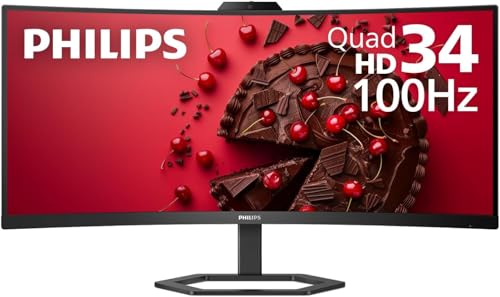 | Philips 34E1C5600HE 34-inch UltraWide | Best fit: Wide screen with a webcam Panel: 34-inch 3440 x 1440 curved VA USB-C PD: Up to 65W Refresh: 100Hz on HDMI or DisplayPort Extras: 5MP Windows Hello webcam, noise-canceling mic, 4 USB-A | Check Price on Amazon |
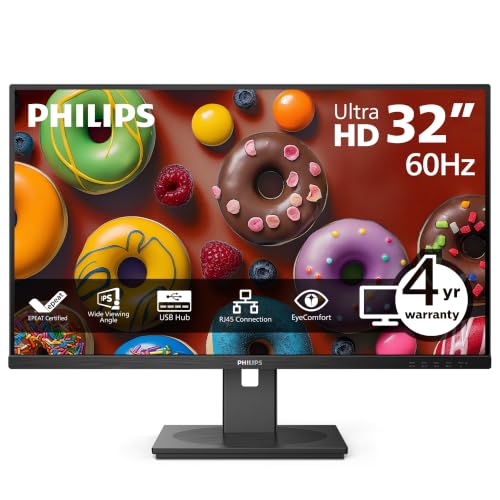 | Philips 32B1U3900 32-inch 4K | Best fit: 4K with Ethernet and 90W Panel: 32-inch 3840 x 2160 VA USB-C PD: Up to 90W Refresh: 4K at 60Hz Extras: RJ-45 Ethernet, 4 USB-A | Check Price on Amazon |
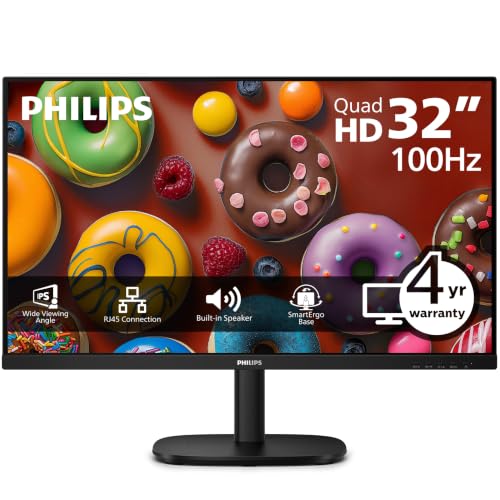 | Philips 32B2U3601 32-inch QHD | Best fit: Large QHD with Ethernet Panel: 32-inch 2560 x 1440 IPS USB-C PD: Up to 90W Refresh: Up to 100Hz Extras: RJ-45 Ethernet, 4 USB-A | Check Price on Amazon |
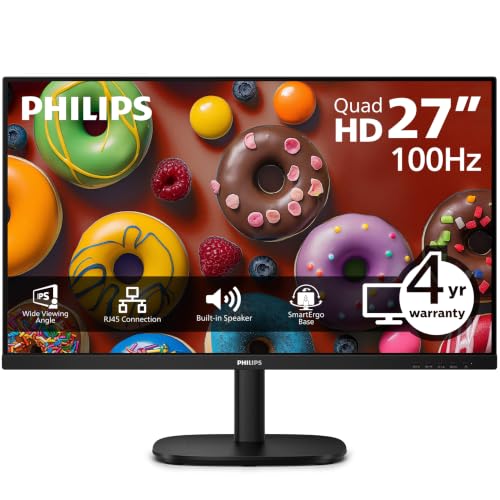 | Philips 27B2U3601 27-inch QHD | Best fit: 120Hz QHD with Ethernet Panel: 27-inch 2560 x 1440 IPS USB-C PD: Up to 90W (Philips page) Refresh: Up to 120Hz Extras: RJ-45 Ethernet, SmartKVM, 3 USB-A and 1 USB-C data | Check Price on Amazon |
1. Philips 346E2CUAE 34-inch UltraWide — Best Wide Laptop Workspace
The 346E2CUAE is a 34-inch curved ultrawide. Its Amazon listing states a 3440 by 1440 VA panel with 1500R curvature, 100Hz, 1ms MPRT, Adaptive-Sync, HDMI, DisplayPort, built-in speakers and height adjustment. Philips states the 100Hz maximum for HDMI or DisplayPort input. It lists one USB-C input with DisplayPort Alt Mode, data and up to 65W power delivery, plus four USB 3.2 downstream ports, one with fast charge, and 5W stereo speakers. Philips also lists HDMI, DisplayPort and USB-C to USB-C cables in the box.
It suits a laptop owner who wants two documents side by side on one screen. Philips lists 110 PPI for the 346E2CUAE and 140 PPI for the 32B1U3900, so text is less dense than on the 4K model. Philips lists the stand at 100mm of height adjustment and tilt. Philips says the laptop must support USB-C DisplayPort Alt Mode for video and USB Power Delivery for charging.
Our Take Choose the 346E2CUAE for one wide screen when side-by-side documents are the priority and you do not need a built-in camera. Check the laptop’s USB-C video and charging support before counting on a single cable.
- Philips lists one USB-C input with DisplayPort Alt Mode, data and up to 65W power delivery.
- Philips lists four USB 3.2 downstream ports, one of them a fast-charge port.
- The Amazon listing states a 100Hz refresh rate, 1ms MPRT and Adaptive-Sync.
- Philips lists HDMI, DisplayPort and USB-C to USB-C cables in the box.
- Philips states 3440 by 1440 at 100Hz for HDMI or DisplayPort input and does not state it for USB-C.
- Philips lists the 346E2CUAE at 807mm wide with the stand and the 27B2U3601 at 615mm, so it takes more desk width.
2. Philips 34E1C5600HE 34-inch UltraWide — Best Ultrawide With a Webcam
The 34E1C5600HE is the ultrawide with a webcam. Its Amazon listing states a 5MP webcam with Windows Hello facial recognition, a noise-canceling microphone and speakers. Philips’s page lists a 5.0 megapixel camera with a microphone and LED indicator, noise cancellation, 5W x 2 speakers and 130mm of height adjustment. The Amazon listing states a 34-inch 3440 by 1440 curved VA panel, and Philips lists the same 34 inches and 3440 by 1440 for the 346E2CUAE. Philips lists 100Hz for HDMI or DisplayPort input.
Philips lists one USB-C port with DisplayPort Alt Mode, data and up to 65W power delivery, plus four USB 3.2 Gen 1 USB-A downstream ports. Philips adds that the laptop must support USB Power Delivery for charging and DisplayPort Alt Mode for video. According to the Amazon listing, Windows Hello signs you in to Windows devices.
The Amazon listing states a 5MP Windows Hello webcam and noise-canceling microphone, and Philips lists the camera, microphone and 5W x 2 speakers in the monitor.Our Take Pick the 34E1C5600HE for an ultrawide desk with frequent video calls, where the camera, microphone and speakers can stay inside the display. Pick the 346E2CUAE if you already own a webcam.
- The Amazon listing states a 5MP webcam with Windows Hello and a noise-canceling microphone.
- Philips lists 5W x 2 speakers and four USB 3.2 Gen 1 USB-A downstream ports.
- Philips lists 130mm of height adjustment, more travel than the 100mm it lists for the 346E2CUAE.
- Philips lists USB-C with DisplayPort Alt Mode, data and up to 65W power delivery.
- Philips lists up to 65W USB-C power delivery, below the 90W it lists for the 32B1U3900, 32B2U3601 and 27B2U3601.
- Philips does not state 3440 by 1440 at 100Hz for USB-C input and states it for HDMI or DisplayPort.
- Philips lists the 34E1C5600HE at 808mm wide with the stand and the 27B2U3601 at 615mm, so it takes more desk width.
3. Philips 32B1U3900 32-inch 4K — Best 4K Monitor With Ethernet and 90W
Philips lists the 32B1U3900 as a 4K monitor. Its Amazon listing states a 32-inch 3840 by 2160 VA panel at 350 cd/m2, USB-C that carries 4K video, data and up to 90W power delivery, and RJ-45 Ethernet over USB-C. Philips lists the panel at 31.5 inches, 4K at 60Hz, HDMI 2.0 x 2, DisplayPort 1.4 and four USB-A downstream ports.
Philips lists Ethernet up to 1G and says the speed depends on the USB port in use, with 10M/100M on USB 2.0 and up to 1G on USB 3.2. It lists 180mm of height adjustment with swivel, pivot and tilt, and 3W x 2 speakers. Philips also says 10-bit color at 4K is available only at 60Hz over DisplayPort. The Amazon buy-box seller is PCNation, not Amazon.com.
Our Take Pick the 32B1U3900 when a one-cable desk needs 4K, laptop charging, wired Ethernet and several USB-A ports. Pick the 32B2U3601 when QHD on an IPS panel is enough.
- The Amazon listing states USB-C with 4K video, data and up to 90W power delivery, and Philips lists the same 90W maximum.
- Philips lists RJ-45 Ethernet up to 1G and four USB-A downstream ports.
- Philips lists the stand with 180mm of height adjustment, swivel, pivot and tilt.
- Philips lists 4K at 60Hz for the 32B1U3900, below the 100Hz it lists for the 34-inch ultrawides and the 32B2U3601 and the 120Hz it lists for the 27B2U3601.
- Philips says 10-bit color at 4K needs a DisplayPort connection at 60Hz.
- The Amazon buy-box seller is PCNation, so check the seller’s terms before ordering.
4. Philips 32B2U3601 32-inch QHD — Best 32-inch QHD Monitor With Ethernet
The 32B2U3601 trades 4K for a large QHD screen. Its Amazon listing states a 32-inch 2560 by 1440 IPS panel at 350 cd/m2 with 10-bit color, SoftBlue, Eyesafe, Flicker-Free and EasyRead eye-comfort modes, Adaptive-Sync, and USB-C with video, data, up to 90W power delivery and RJ-45 Ethernet. Philips lists 2560 by 1440 at up to 100Hz over HDMI, DisplayPort or USB-C, four USB-A downstream ports and 2W x 2 speakers.
The Amazon listing describes a SmartErgoBase stand with height, swivel, pivot and tilt, and Philips lists 180mm of height adjustment. Philips lists Smart Link Sync for daisy-chained Philips monitors, and all of them need to be Smart Link compatible. Philips says Ethernet reaches 1G when the on-screen menu is set to USB 3.0 or higher. The Amazon buy-box seller is Technology Galaxy, not Amazon.com.
Our Take Choose the 32B2U3601 for a large QHD work screen with USB-C charging, Ethernet and a fully adjustable stand. Choose the 32B1U3900 when 4K is a requirement.
- The Amazon listing states USB-C with video, data, up to 90W power delivery and RJ-45 Ethernet.
- Philips lists 2560 by 1440 at up to 100Hz over HDMI, DisplayPort and USB-C.
- Philips lists four USB-A downstream ports.
- The Amazon listing states SoftBlue, Eyesafe, Flicker-Free and EasyRead eye-comfort features.
- Philips lists 2560 by 1440, fewer pixels than the 3840 by 2160 it lists for the 32B1U3900.
- The Amazon buy-box seller is Technology Galaxy, so check the seller’s terms before ordering.
5. Philips 27B2U3601 27-inch QHD — Best 120Hz QHD Monitor With Ethernet
The 27B2U3601 is the 120Hz model. Its Amazon listing states a 27-inch 2560 by 1440 IPS panel at up to 120Hz over HDMI, DisplayPort or USB-C, with 350 cd/m2 brightness, 1500:1 contrast, and a stand with 150mm of height adjustment, swivel, pivot and tilt. Philips adds that its USB-C High Resolution mode is what enables 2560 by 1440 at 120Hz.
The listing states a USB-C input with DisplayPort Alt Mode, data and Power Delivery, and RJ-45 Ethernet with PXE, Wake-on-LAN and MAC Address Pass-Through, but gives no wattage. Philips lists up to 90W, three USB-A downstream ports and one USB-C data port. Philips also lists SmartKVM, which the Amazon listing does not mention. The Amazon listing states Smart Link Sync for matching brightness and color across daisy-chained Philips displays. The Amazon buy-box seller is IT Devices US, not Amazon.com.
Our Take Pick the 27B2U3601 for a 27-inch QHD screen when 120Hz, Ethernet and a fully adjustable stand are the priorities. Philips lists SmartKVM for it and for none of the other four.
- Philips lists 2560 by 1440 at 120Hz over HDMI, DisplayPort and USB-C, the highest refresh rate of the five.
- Philips lists RJ-45 Ethernet with PXE, Wake-on-LAN and MAC Address Pass-Through on compatible systems.
- Philips lists three USB-A downstream ports and one USB-C data port.
- Philips lists SmartKVM, and none of the other four Philips pages list it.
- The Amazon listing gives no USB-C power delivery wattage, and Philips lists up to 90W.
- Philips ties 120Hz over USB-C to its USB-C High Resolution mode.
- The Amazon buy-box seller is IT Devices US, so check the seller’s terms before ordering.
Buying Guide
1. Start with the laptop’s USB-C capabilities
Philips says video over USB-C needs a laptop with DisplayPort Alt Mode, and charging needs a laptop that supports USB Power Delivery. Philips’s pages for the 346E2CUAE, 34E1C5600HE, 32B1U3900 and 32B2U3601 carry both notes. Once you know those limits, use the MacBook monitor guide to narrow the choice for your laptop.
Philips lists up to 65W for the 346E2CUAE and 34E1C5600HE, and up to 90W for the 32B1U3900, 32B2U3601 and 27B2U3601. Philips says the 90W on the 32B1U3900 is a maximum and that the power delivered depends on the laptop. Check the laptop manual and the original adapter’s rating before choosing on wattage.
2. Choose screen shape from the work layout
Amazon’s listings describe the two 34-inch models as 21:9 curved screens at 3440 by 1440. Philips lists them at 807mm and 808mm wide with the stand, against 714mm for the 32B1U3900 and 32B2U3601 and 615mm for the 27B2U3601. The 346E2CUAE has no webcam, and the 34E1C5600HE has one.
The other three are 16:9. Philips lists 140 PPI for the 32B1U3900 and 110 PPI for the 346E2CUAE, so the 4K model shows smaller, denser text. The 32B1U3900 and 32B2U3601 are 31.5 inches on Philips’s pages, and the 32B2U3601 is QHD rather than 4K. For the wider cross-brand context, see the USB-C monitor guide.
3. Keep resolution and refresh rate separate
Philips lists 4K at 60Hz for the 32B1U3900. It lists 3440 by 1440 at 100Hz on HDMI or DisplayPort for the 346E2CUAE and 34E1C5600HE, 2560 by 1440 at up to 100Hz for the 32B2U3601, and 2560 by 1440 at 120Hz for the 27B2U3601. Philips ties the 27B2U3601’s 120Hz over USB-C to its USB-C High Resolution mode.
Philips tells buyers to confirm the graphics card can reach the display’s maximum resolution and refresh rate, a note on the 346E2CUAE and 34E1C5600HE pages. The laptop, cable and input must all support the mode you want.
4. Decide whether the monitor must be a dock
The 32B1U3900, 32B2U3601 and 27B2U3601 are the three with Ethernet. Philips lists four USB-A downstream ports on the first two and three USB-A plus one USB-C on the 27B2U3601. None of the Amazon listings or Philips pages for the 346E2CUAE or 34E1C5600HE list Ethernet, and Philips lists four downstream USB ports on each.
Philips lists SmartKVM only for the 27B2U3601 among these five. Philips says Ethernet speed depends on the USB port in use, with 1G needing USB 3.0 or higher. Count the peripherals, Ethernet and charging needs before calling any one-cable display a full dock.
5. Treat ergonomics and camera hardware as purchase features
Philips lists 180mm of height adjustment with swivel, pivot and tilt for the 32B1U3900 and 32B2U3601, and 150mm with the same set for the 27B2U3601. It lists 130mm for the 34E1C5600HE and 100mm for the 346E2CUAE. Philips’s pages for the 346E2CUAE and 34E1C5600HE list height adjustment and tilt and do not list swivel or pivot.
The 34E1C5600HE is the only one of the five with a webcam in the Amazon listings or on Philips’s pages. Its listing states a 5MP camera with Windows Hello and a noise-canceling microphone. A buyer who already owns a camera may get more from the 4K, Ethernet or refresh-rate differences.
FAQ
Can one USB-C cable power my laptop and run a Philips monitor?
Yes, when the laptop supports USB-C DisplayPort Alt Mode and USB Power Delivery. Philips lists up to 65W for the 34-inch ultrawides, and up to 90W for the 32B1U3900, 32B2U3601 and 27B2U3601.
Philips says the power a monitor delivers depends on the laptop. Check the laptop’s accepted USB-C charging input and its original adapter before relying on a monitor for daily charging.
Which Philips monitor here has a webcam?
The 34E1C5600HE. Its Amazon listing states a 5MP Windows Hello webcam and a noise-canceling microphone, and Philips lists a 5.0 megapixel camera with a microphone and noise cancellation.
None of the other four Amazon listings or Philips pages list a webcam. Choose it when the built-in camera and microphone replace separate desk accessories.
Is QHD or 4K better for a 32-inch Philips monitor?
Philips lists the 32B1U3900 at 4K and 60Hz and the 32B2U3601 at QHD and up to 100Hz, both on 31.5-inch panels. The 4K panel shows more pixel detail, while the QHD model has the higher refresh rate, and Philips lists Ethernet and up to 90W for both.
Neither resolution wins without the work in mind. Confirm the laptop’s output mode before choosing.
Which Philips monitors here have Ethernet built in?
The 32B1U3900, 32B2U3601 and 27B2U3601. Philips lists Ethernet on all three, and the Amazon listings state RJ-45 over USB-C for each. Philips lists up to 90W for all three, though the 27B2U3601 listing gives no wattage.
Philips says Ethernet speed depends on the USB port in use, with 1G needing USB 3.0 or higher. The monitor’s RJ-45 port also needs the laptop’s USB-C connection to carry data.
Can a Philips USB-C monitor replace a separate dock?
It can reduce separate accessories when its listed ports match the desk. Philips lists RJ-45, four USB-A ports and up to 90W for the 32B1U3900, and four USB 3.2 ports with up to 65W for the 346E2CUAE.
A monitor cannot add a display mode or charging behavior the laptop does not support. Count the peripherals, external displays, Ethernet and laptop power needs before deciding.
Bottom Line
According to Philips and the Amazon listings, the 346E2CUAE is the wide screen without a camera, the 34E1C5600HE adds a webcam, the 32B1U3900 pairs 4K with Ethernet and laptop charging, the 32B2U3601 is the large QHD model with Ethernet, and the 27B2U3601 is the 120Hz QHD model with SmartKVM. Match the monitor to the laptop’s USB-C support, charging input, desk size and the peripherals that must stay connected.