Five 15.6-inch laptops can differ a lot on the spec sheet. The five Amazon listings here state HD and Full HD screens, touch and non-touch panels, and processors from the Intel Core 3 100U to the Core i7-1355U. The Dell 15.6 Laptop lists Full HD with Dell onsite service, the HP 15.6-inch Laptop a Ryzen 5 touchscreen, and the Acer Aspire Go 15 two USB-C ports with DisplayPort. The ASUS Vivobook 15 lists Full HD with three USB-A ports, and the Dell Inspiron 15 3530 a Core i7 with a 1TB SSD.
If you need Thunderbolt, none of the five names it. The Thunderbolt laptops list covers laptops that do, and the USB-C DisplayPort Alt Mode guide explains how to check a USB-C port for video.
All five listings give a 15.6 screen size, and the screens, ports and storage differ more than the size does.Laptops in the 15.6-Inch Class Compared
| Image | Product | Details | Check Price |
|---|---|---|---|
 | Dell 15.6 Laptop | Best fit: Full HD anti-glare with Dell onsite service Screen: 15.6 Full HD anti-glare IPS WVA, 250 nits Processor: Intel Core 3 100U Listed connections: None named Memory and storage: 8GB DDR4 and 512GB SSD named in the title, possibly seller configuration | Check Price on Amazon |
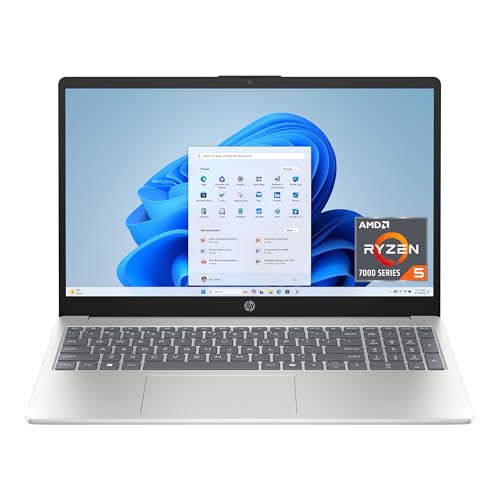 | HP 15.6-inch Laptop | Best fit: Ryzen 5 touchscreen Screen: 15.6-inch HD touchscreen, 1366 x 768 Processor: AMD Ryzen 5 7520U Listed connections: None named Memory and storage: 8GB LPDDR5, 512GB PCIe NVMe SSD | Check Price on Amazon |
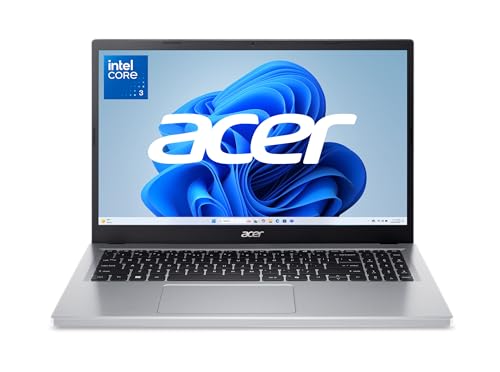 | Acer Aspire Go 15 | Best fit: Two USB-C ports with DisplayPort Screen: 15.6-inch Full HD 1920 x 1080 IPS Processor: Intel Core 3 N355 Listed connections: 2 USB-C (10 Gbps, DisplayPort, 45W charging), 2 USB-A 3.2 Gen 1, HDMI 2.1 Memory and storage: 8GB DDR5, 128GB UFS | Check Price on Amazon |
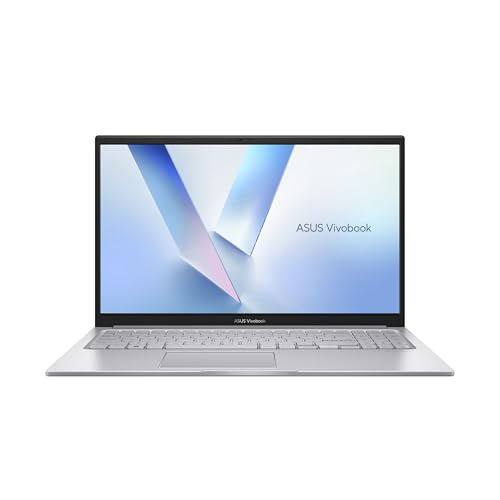 | ASUS Vivobook 15 | Best fit: Full HD with three USB-A ports Screen: 15.6-inch Full HD 1920 x 1080, 60Hz Processor: Intel Core 3 100U Listed connections: 1 USB-A 2.0, 2 USB-A 3.2 Gen 1, USB-C 3.2 Gen 1, HDMI 1.4 Memory and storage: 8GB RAM, 256GB SSD | Check Price on Amazon |
 | Dell Inspiron 15 3530 | Best fit: Full HD touch, Core i7, 1TB SSD Screen: 15.6-inch Full HD 1920 x 1080 anti-glare touchscreen Processor: Intel Core i7-1355U Listed connections: USB-A 2.0, USB-A 3.2 Gen 1, USB-C 3.2 Gen 1, HDMI 1.4, SD card reader Memory and storage: 16GB RAM, 1TB PCIe NVMe SSD | Check Price on Amazon |
1. Dell 15.6 Laptop — Best Full HD With Dell Onsite Service
The Amazon title for the Dell 15.6 Laptop (DC15250) gives a 15.6 Full HD screen with an anti-glare IPS WVA panel at 250 nits. It also lists an Intel Core 3 100U with Intel UHD Graphics, Windows 11 Home, and Wi-Fi 6 with Bluetooth. The title writes 15.6 without the word inch, and Amazon’s product details list a body of 14.11 by 9.27 by 0.75 inches, which fits a 15.6-inch laptop.
The title names 8GB of DDR4 RAM and a 512GB SSD, but the bullets repeat neither figure, so both are possibly the seller’s configuration. The bullets add Dell ComfortView software, Express Charge, a separate numeric keypad and lifted hinges. A Dell Services bullet states 1 Year Onsite Service for issues under the Limited Hardware Warranty that cannot be resolved remotely. Amazon’s product details list the Dell at 4.19 pounds.
The Dell bullets name no ports, so confirm the USB-C, HDMI and card-reader layout on Dell’s product page before ordering.Our Take Choose the Dell 15.6 Laptop if you want a Full HD anti-glare screen from a listing that states Dell onsite service, and you will confirm the ports and memory before ordering.
- Dell’s Amazon title states a 15.6 Full HD screen with an anti-glare IPS WVA panel at 250 nits.
- Dell’s Services bullet states 1 Year Onsite Service for issues covered by the Limited Hardware Warranty.
- Dell’s title names the Intel Core 3 100U processor, Windows 11 Home, and Wi-Fi 6 with Bluetooth.
- At 4.19 pounds in Amazon’s product details, the Dell is the heaviest of the five.
- The Dell listing leaves USB-C, HDMI and card-reader support unstated, because its bullets name no ports.
2. HP 15.6-inch Laptop — Best Ryzen 5 Touchscreen
The Amazon listing for the HP 15.6-inch Laptop (15-fc0499nr) states a 15.6-inch HD touchscreen at 1366 x 768, an AMD Ryzen 5 7520U, AMD Radeon graphics, 8GB of LPDDR5 memory, a 512GB PCIe NVMe SSD and Windows 11 Home. It is the only one of the five with a Ryzen processor, and Amazon’s product details list 3.52 pounds, the lightest of the five.
The 1366 x 768 resolution is lower than the Full HD screens in the Dell, Acer, ASUS and Inspiron listings. An HD touchscreen and a Full HD touchscreen are different purchases, so compare this HP with the Inspiron on resolution before comparing them on touch.
The listing names no ports, so USB-C, HDMI and card-reader support are not stated.Our Take Choose the HP 15.6-inch Laptop if you want a touchscreen with a Ryzen 5 7520U and the lowest listed weight, and an HD screen is acceptable.
- HP’s listing states a 15.6-inch HD touchscreen.
- HP pairs an AMD Ryzen 5 7520U with AMD Radeon graphics, the only Ryzen processor among the five.
- HP’s listing states 8GB of LPDDR5 memory and a 512GB PCIe NVMe SSD.
- The HP is the lightest of the five at 3.52 pounds in Amazon’s product details.
- HP’s listing gives a 1366 x 768 resolution, lower than the Full HD screens in the Dell, Acer, ASUS and Inspiron listings.
- The HP listing leaves USB-C, HDMI and card-reader support unstated, because it names no ports.
3. Acer Aspire Go 15 — Best Two USB-C Ports With DisplayPort
The Amazon listing for the Acer Aspire Go 15 (AG15-32P-352Z) states a 15.6-inch Full HD 1920 x 1080 IPS display, an Intel Core 3 N355, 8GB of DDR5 memory, 128GB of Universal Flash onboard storage, Wi-Fi 6 and Windows 11 Home in S mode. Amazon’s product details list 3.81 pounds.
Its bullets name the ports: two USB-C ports at USB 3.2 Gen 2 (up to 10 Gbps) with DisplayPort over USB-C and USB charging up to 45W, two USB 3.2 Gen 1 ports, one HDMI 2.1 port with HDCP support, a headphone jack, a Kensington lock slot and a DC-in jack. The 128GB of storage is smaller than the ASUS 256GB SSD and the 512GB and 1TB SSDs named for the Dell, HP and Inspiron listings. The listing states Windows in S mode and does not say whether it can be switched out of that mode.
Our Take Choose the Acer Aspire Go 15 if you plan to use USB-C for video or charging and can work within 128GB of onboard storage and Windows in S mode.
- Acer’s listing states a 15.6-inch Full HD display, 1920 x 1080 on an IPS panel.
- Acer’s listing names two USB-C ports at USB 3.2 Gen 2 with DisplayPort and USB charging up to 45W.
- The Acer listing also names an HDMI 2.1 port with HDCP support and two USB 3.2 Gen 1 ports.
- Acer’s listing states 128GB of onboard storage, smaller than the 512GB and 1TB SSDs named for the Dell, HP and Inspiron listings.
- Acer’s listing states Windows 11 Home in S mode and does not say whether it can be switched out of that mode.
4. ASUS Vivobook 15 — Best Full HD With Three USB-A Ports
The Amazon listing for the ASUS Vivobook 15, model F1504VA-PS34, states a 15.6-inch Full HD 1920 x 1080 screen with a 16:9 aspect ratio and 60Hz refresh rate. It lists an Intel Core 3 100U processor, 8GB of RAM, a 256GB SSD, Windows 11 Home and a Cool Silver finish. The bullets give a weight of 3.75 pounds and a thickness of 0.70 inches, while Amazon’s product details list 3.59 pounds.
The bullets describe a slim-bezel NanoEdge display with wide viewing angles and TÜV Rheinland eye-care certification that it says helps reduce eye strain, a SonicMaster-tuned sound system that it says delivers wider and deeper sound, and an ErgoSense keyboard designed for key bounce and travel with numeric keys. They also state single-touch unlocking, a sliding webcam cover, a lay-flat hinge and fast charging to 60 percent in as little as 49 minutes. The port list names one USB 2.0 Type-A port, two USB 3.2 Gen 1 Type-A ports, one USB 3.2 Gen 1 Type-C port, HDMI 1.4, a 3.5mm combo audio jack and DC-in. The listing does not say that the Type-C port carries video or charging. Its 256GB SSD is smaller than the 512GB and 1TB SSDs named for the Dell, HP and Inspiron listings.
Our Take Choose the ASUS Vivobook 15 if you want a Full HD screen, numeric keys and three listed USB-A ports. Choose the Acer instead if you need the listing to state DisplayPort over USB-C or charging through USB-C.
- ASUS states a 15.6-inch Full HD 1920 x 1080 screen with a 60Hz refresh rate in its listing.
- ASUS’s listing names one USB 2.0 Type-A port and two USB 3.2 Gen 1 Type-A ports, three USB-A ports in all.
- ASUS’s listing states an ErgoSense keyboard with numeric keys, a sliding webcam cover and a lay-flat hinge.
- ASUS’s listing states a 256GB SSD, smaller than the 512GB and 1TB SSDs named for the Dell, HP and Inspiron listings.
- ASUS’s listing names a USB 3.2 Gen 1 Type-C port but does not say that it carries video or charging.
5. Dell Inspiron 15 3530 — Best Full HD Touch With Core i7 and 1TB SSD
The Amazon listing for the Dell Inspiron 15 3530 states a 15.6-inch Full HD (1920 x 1080) anti-glare touchscreen with a WVA panel. It lists a 13th Generation Intel Core i7-1355U with 10 cores, 12 threads and up to 5.0GHz at maximum turbo, 16GB of RAM, a 1TB PCIe NVMe SSD, and Windows 11 Pro. Amazon’s product details list 3.64 pounds.
The bullets name one USB-A 2.0 port, one USB-A 3.2 Gen 1 port, one USB 3.2 Gen 1 Type-C port and one HDMI 1.4 port, plus an SD card reader, a headphone and microphone jack, a 1080p webcam, stereo speakers, Wi-Fi 6 and Bluetooth. The HDMI version is 1.4, while the Acer listing names HDMI 2.1. The listing names no Thunderbolt port and describes its Type-C port only as USB 3.2 Gen 1, so it does not state video or charging over that port.
The Inspiron is the only listing of the five that states a Core i7, a Full HD touchscreen and a 1TB SSD together.Our Take Choose the Dell Inspiron 15 3530 if you want a Full HD touchscreen with a Core i7, 16GB of RAM and a 1TB SSD, and the port list suits your setup.
- Dell’s Inspiron listing states a 15.6-inch Full HD touchscreen with an anti-glare WVA panel.
- Dell lists a Core i7-1355U with 10 cores and 12 threads for the Inspiron.
- Dell’s Inspiron listing states 16GB of RAM and a 1TB PCIe NVMe SSD.
- Dell’s Inspiron listing names USB-A 2.0 and 3.2 Gen 1 ports, a USB 3.2 Gen 1 Type-C port, HDMI 1.4 and an SD card reader.
- Dell’s Inspiron listing names HDMI 1.4, where the Acer listing names HDMI 2.1.
- Dell’s Inspiron listing names no Thunderbolt port and describes its Type-C port only as USB 3.2 Gen 1, so it does not state video or charging over that port.
Buying Guide
1. Check how each listing states 15.6 inches
Four listings write the size as 15.6-inch or 15.6″ and the Dell DC15250 title writes 15.6 without a unit. Amazon’s product details list a long side of 14.11 to 14.29 inches across the five, and none of those dimensions points to a different size class.
A 15.3-inch or 17.3-inch laptop belongs on a different page, because the screen size changes the body size. Read the size in the title or bullets, and use the product details dimensions as a second check.
2. Match the screen to the work
The Dell, Acer, ASUS and Inspiron listings state Full HD, and the HP listing states HD at 1366 x 768.
Touch is stated for the HP 15-fc0499nr and the Inspiron only. Anti-glare is stated for the Dell and the Inspiron, and IPS for the Dell and the Acer. A listing that names one of these says nothing about the others, so compare them one at a time.
3. Read the port list before planning a monitor or charger
The Acer, ASUS and Inspiron listings name their ports. The Dell and HP listings name none, so look up the maker’s page for that model before you plan a dock, an external monitor or a charger.
The Acer listing states USB-C with DisplayPort and charging up to 45W, while the ASUS and Inspiron listings state a USB 3.2 Gen 1 Type-C port and do not say what it carries. The USB-C DisplayPort Alt Mode guide explains the video check, and the USB-C charger guide covers charging.
4. Read memory and storage by where the figure appears
The Dell title names 8GB of DDR4 RAM and a 512GB SSD that its bullets do not repeat, so treat both as possibly the seller’s configuration. The HP, Acer, ASUS and Inspiron bullets state their memory and storage.
Storage ranges from 128GB on the Acer to 1TB on the Inspiron. The ASUS listing states a 256GB SSD, so compare it with the 512GB and 1TB SSDs named for the Dell, HP and Inspiron listings.
5. Check the operating system
The Dell, HP, Acer and ASUS listings state Windows 11 Home, and the Acer states it in S mode. The Inspiron states Windows 11 Pro.
Match the edition to the software you plan to run. If you need Windows 11 Pro, the Inspiron is the only one of the five that states it.
FAQ
Which listings state a Full HD screen?
The Dell 15.6 Laptop, Acer Aspire Go 15, ASUS Vivobook 15 and Dell Inspiron 15 3530 state Full HD. The Acer, ASUS and Inspiron give the 1920 x 1080 resolution, and the Dell title says FHD.
The HP listing states HD. The HP 15-fc0499nr states 1366 x 768.
Which listings state a touchscreen?
The HP 15-fc0499nr and the Dell Inspiron 15 3530 state a touchscreen. The HP is HD at 1366 x 768 and the Inspiron is Full HD.
The Dell, Acer and ASUS listings do not state touch. Treat touch as absent from those listings until the seller or maker confirms it.
Which listings name their ports?
The Acer Aspire Go 15, ASUS Vivobook 15 and Dell Inspiron 15 3530 name their ports. The Acer lists two USB-C, two USB-A and HDMI 2.1, the ASUS lists one USB-C, three USB-A and HDMI 1.4, and the Inspiron lists two USB-A, one USB-C and HDMI 1.4.
The Dell and HP listings name no ports. None of the five names a Thunderbolt port.
Which listing has the most storage?
The Dell Inspiron 15 3530 states the largest internal drive, a 1TB PCIe NVMe SSD. The Dell and HP 15-fc0499nr titles or bullets name 512GB SSDs, the ASUS names a 256GB SSD, and the Acer names 128GB of onboard storage.
The ASUS listing states a 256GB SSD, so it has more listed internal storage than the Acer’s 128GB and less than the 512GB and 1TB SSDs named for the other laptops.
Is a 15.3-inch laptop the same size as a 15.6-inch laptop?
No. Apple’s 15-inch MacBook Air listing states a 15.3-inch Liquid Retina display, which is 0.3 inch smaller than 15.6 inches.
Match the stated size to the size you want before comparing processors, memory or price.
Bottom Line
Choose the Dell 15.6 Laptop for Full HD with Dell onsite service and the Acer Aspire Go 15 for two USB-C ports with DisplayPort. Choose the Dell Inspiron 15 3530 for a Full HD touchscreen with a Core i7 and 1TB SSD, the HP 15-fc0499nr for a Ryzen 5 touchscreen at HD resolution, or the ASUS Vivobook 15 for Full HD with three listed USB-A ports.