Acer’s Thunderbolt 4 laptops on Amazon split into two portable Swift models, an everyday Aspire 5, a Nitro gaming laptop, and a Predator gaming model. The difference is not only screen size. The five range from a 14-inch touchscreen with Intel Arc graphics to a 16-inch OLED system with a Core Ultra 9 processor and RTX 5060 graphics.
Every laptop below states Thunderbolt 4, but the other ports and hardware differ. The Thunderbolt laptop list is a useful broader reference, while the USB4 laptop list gives additional context for compatible systems. Use the configurations below when deciding between portable work, everyday desk use, gaming, or a creator-oriented OLED display.
Acer Laptops With Thunderbolt 4 Compared
| Image | Product | Details | Check Price |
|---|---|---|---|
 | Acer Swift Go 14 | Best fit: Portable productivity Screen: 14-inch WUXGA touch Processor: Core Ultra 7 155H Ports: 2x Thunderbolt 4 / USB4 Memory and storage: 16GB, 512GB SSD | Check Price on Amazon |
 | Acer Aspire 5 15 | Best fit: Everyday 15-inch work Screen: 15.6-inch FHD IPS Processor: Core i7-1355U Ports: USB4 and Thunderbolt 4 Memory and storage: 16GB, 512GB SSD | Check Price on Amazon |
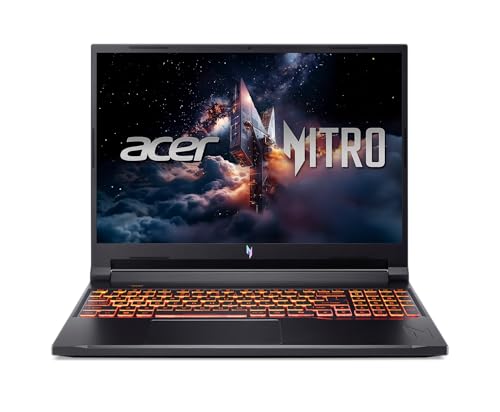 | Acer Nitro V 16 | Best fit: RTX 5060 gaming Screen: 16-inch WUXGA 180Hz IPS Processor: Core 7 240H Ports: Thunderbolt 4, HDMI 2.1 Memory and storage: 16GB DDR5, 512GB SSD | Check Price on Amazon |
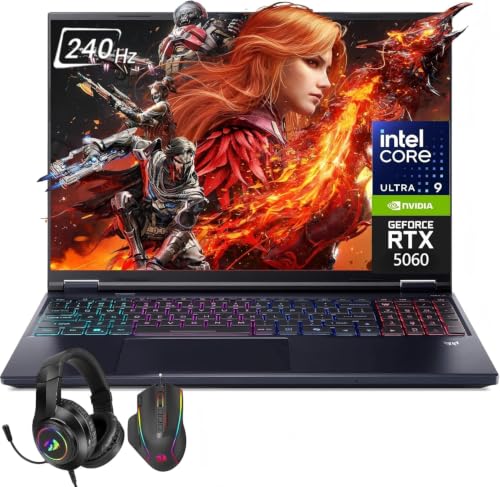 | Acer Predator Helios Neo 16S AI | Best fit: High-refresh OLED gaming Screen: 16-inch 240Hz OLED Processor: Core Ultra 9 275HX Ports: Thunderbolt 4, HDMI 2.1 Memory and storage: 32GB DDR5, 1TB SSD | Check Price on Amazon |
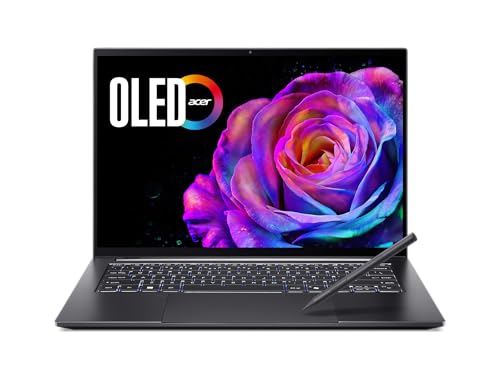 | Acer Swift X 14 | Best fit: Creator-focused OLED Screen: 14.5-inch 3K 120Hz OLED Processor: Core Ultra 7 255H Ports: Thunderbolt 4, HDMI 2.1 Memory and storage: 16GB LPDDR5X, 1TB SSD | Check Price on Amazon |
1. Acer Swift Go 14 — Best Portable Productivity Pick
Amazon lists the Swift Go 14 SFG14-72T-7SEC with a Core Ultra 7 155H processor with Intel Arc graphics, 16GB of memory, a 512GB SSD, and a 14-inch WUXGA touchscreen. The listing describes the memory as upgraded, so it comes from the seller’s configuration. It also lists a 400-nit anti-glare panel at 60Hz with 100% sRGB coverage, a 65Wh battery, and a 2.91-pound weight.
The same listing names two Thunderbolt 4 / USB4 ports at 40Gbps and HDMI 2.1, plus two USB-A ports. The pairing suits a reader who wants two fast ports on a 14-inch laptop and has no use for a gaming panel.
Our Take Choose the Swift Go 14 for the listed 2.91-pound weight, WUXGA touchscreen, Core Ultra 7 processor, and two Thunderbolt 4 / USB4 ports.
- The Swift Go lists two Thunderbolt 4 / USB4 ports and HDMI 2.1, a fit for a reader who wants two fast ports and has no use for a gaming panel.
- The Swift Go has a 14-inch WUXGA touchscreen, and Amazon lists its coverage at 100% sRGB.
- Amazon lists the Swift Go with a Core Ultra 7 155H, 16GB of memory, and a 512GB SSD, and the listing describes that memory as upgraded.
- The Swift Go touchscreen is listed at 60Hz, below the Nitro and Predator screens.
- The Swift Go uses Intel Arc graphics in Amazon’s listing, not an RTX GPU.
2. Acer Aspire 5 15 — Best Everyday 15-Inch Pick
Amazon lists the Aspire 5 15 model NX.KHFAA.001 with a Core i7-1355U processor with Intel Iris Xe graphics, 16GB of memory, a 512GB SSD, and a 15.6-inch Full HD IPS display. It is the traditional work and general-use configuration of the five, with no high-refresh gaming panel, and the only one with a 15.6-inch screen.
The listing’s port line states one USB-C port with USB4 at up to 40Gbps and Thunderbolt 4, plus HDMI 2.1 and two USB 3.2 Gen 1 ports. The everyday model has a clear high-speed connection without an RTX graphics configuration.
Our Take Choose the Aspire 5 15 when a 15.6-inch Full HD IPS screen, Core i7-1355U, and USB4 with Thunderbolt 4 fit a conventional desk-and-travel workload.
- The Aspire’s port line states USB4 at 40Gbps with Thunderbolt 4 on its single USB-C port.
- The Aspire has a 15.6-inch Full HD IPS display and no high-refresh gaming panel.
- Amazon lists the Aspire with a Core i7-1355U, 16GB of memory, and a 512GB SSD.
- The Aspire uses Intel Iris Xe graphics in Amazon’s listing, not a discrete RTX GPU.
3. Acer Nitro V 16 — Best 180Hz RTX 5060 Gaming Pick
Amazon lists the Nitro V 16 ANV16-72-70F4 (part NH.U2EAA.001) with a Core 7 240H processor, RTX 5060 graphics, 16GB of DDR5 memory, and a 512GB SSD. Its 16-inch WUXGA IPS panel is listed at 180Hz. It is the straightforward gaming choice for a reader who wants RTX 5060 graphics and a high-refresh screen.
The listing names one Thunderbolt 4 USB-C port, HDMI 2.1, and an Ethernet jack. The Aspire and the two Swift listings give no Ethernet port, so the Nitro and the Predator are the two that pair gaming graphics with a wired network port.
Our Take Choose the Nitro V 16 for its RTX 5060, 180Hz WUXGA screen, Thunderbolt 4 USB-C port, HDMI 2.1, and Ethernet.
- Amazon lists the Nitro with RTX 5060 graphics and a Core 7 240H processor.
- The Nitro has a 16-inch WUXGA IPS display listed at 180Hz.
- The Nitro lists one Thunderbolt 4 USB-C port, HDMI 2.1, and Ethernet, a wired network connection the Aspire and Swift listings do not give.
- The Nitro has an IPS display in Amazon’s listing, not the OLED panel of the Predator and Swift X.
- The Nitro lists a 512GB SSD, half the Predator’s and Swift X’s 1TB.
4. Acer Predator Helios Neo 16S AI — Best 240Hz OLED Pick
Amazon lists the Predator Helios Neo 16S AI with a Core Ultra 9 275HX processor, RTX 5060 graphics, 32GB of DDR5 memory, and a 1TB SSD. Its 16-inch 2560×1600 OLED display is listed at 240Hz. It has the most memory of the five and the only OLED panel with a 240Hz refresh rate.
The bullets state Thunderbolt 4, HDMI 2.1, three USB-A 3.2 ports, two USB-C 3.2 ports, and 2.5G Ethernet. The Predator is a seller-configured listing: the title adds Windows 11 Pro and a headset and mouse set, and Amazon gives no part number, so confirm the configuration against the title before ordering.
Our Take Choose this Predator for 32GB of memory, a 1TB SSD, RTX 5060 graphics, a 240Hz OLED display, and Thunderbolt 4.
- Amazon lists the Predator with a Core Ultra 9 275HX, RTX 5060 graphics, and 32GB of DDR5.
- The Predator has a 16-inch OLED display listed at 240Hz and a 1TB SSD.
- The Predator lists Thunderbolt 4, HDMI 2.1, and 2.5G Ethernet for wired networking.
- Amazon gives the Predator no part number, so the buyer confirms the configuration against the title.
- The Predator’s 16-inch screen is larger than the 14-inch and 14.5-inch Swift screens.
5. Acer Swift X 14 — Best Creator OLED Pick
Amazon lists the Swift X 14 SFX14-73G-71XL (part NX.JSLAA.001) with a Core Ultra 7 255H processor, RTX 5050 graphics, 16GB of LPDDR5X memory, and a 1TB SSD. The 14.5-inch touch OLED display is listed at 3K resolution and 120Hz. It is a smaller OLED screen than the Predator’s, paired with a named RTX GPU.
The ports line lists two USB-C ports that name Thunderbolt 4 and up to 100W charging, plus HDMI 2.1 and two more USB 3.2 Gen 2 ports. The line does not say whether both USB-C ports carry Thunderbolt 4.
Our Take Choose the Swift X 14 for the 14.5-inch 3K 120Hz OLED display, RTX 5050 graphics, 1TB SSD, and Thunderbolt 4.
- The Swift X has a 14.5-inch 3K OLED display listed at 120Hz.
- Amazon lists the Swift X with a Core Ultra 7 255H, RTX 5050 graphics, and a 1TB SSD.
- The Swift X lists Thunderbolt 4, HDMI 2.1, and up to 100W USB-C charging.
- Amazon lists 16GB of LPDDR5X for the Swift X, half the Predator’s 32GB.
- The Swift X has an RTX 5050, a step below the RTX 5060 in the Nitro and Predator.
Buying Guide
1. Pick the Acer line before comparing individual specifications
The Swift Go 14 and Swift X 14 are the compact systems, while the Aspire 5 15, Nitro V 16, and Predator Helios Neo 16S AI use larger screens. Both Swift listings describe touch displays. The Swift X adds RTX 5050 graphics and a 3K OLED panel, while the Swift Go keeps Intel Arc graphics and a lower-resolution WUXGA screen.
The Nitro and Predator are the gaming-led configurations. Choose the line around screen size, graphics, and workflow first, then use the port lists to decide whether it fits the connected desk.
2. Count the stated high-speed ports and adjacent connections
The Swift Go listing states two Thunderbolt 4 / USB4 ports. The Aspire states USB4 at 40Gbps with Thunderbolt 4 on its single USB-C port, while the Nitro, Predator, and Swift X each state Thunderbolt 4.
The gaming listings add wired networking. The Nitro lists HDMI 2.1 and Ethernet, while the Predator lists HDMI 2.1 and 2.5G Ethernet. Read each laptop’s port line before buying a dock or monitor.
3. Match the screen to the work and games being done
The Predator is the only 16-inch OLED panel at 240Hz. The Nitro has a 16-inch WUXGA IPS screen at 180Hz, a different panel type even though both are gaming models.
For portable display work, the Swift X lists a 14.5-inch 3K OLED screen at 120Hz, while the Swift Go lists a 14-inch WUXGA touchscreen at 60Hz. The Aspire’s 15.6-inch FHD IPS panel is the only mid-size screen of the five.
4. Compare graphics and memory independently
The Nitro and Predator both list RTX 5060 graphics, but the Predator lists 32GB of DDR5 memory and a 1TB SSD. The Nitro lists 16GB of DDR5 and a 512GB SSD. The two differ in memory and storage even though the GPU name is the same.
The Swift X lists RTX 5050 graphics with 16GB of LPDDR5X and 1TB of storage. Do not read the Swift, Aspire, Nitro, or Predator name as a memory or graphics specification; check the listing for the configuration you are buying.
5. Keep portability facts in the comparison
The Swift Go 14 lists a weight of 2.91 pounds and a 65Wh battery. The Nitro V 16 lists 5.29 pounds, and the other three listings give no weight. The Swift Go’s 14-inch screen and touchscreen are not substitutes for the larger OLED gaming panels.
The Thunderbolt 4 docking-station guide can help with a desk setup, but it does not change the laptop’s display, memory, or weight. Start with the laptop that fits the carry and screen requirement, then choose accessories around its ports.
FAQ
Which Acer lists more than one Thunderbolt 4 port?
The Swift Go 14 states two Thunderbolt 4 / USB4 ports. It also lists HDMI 2.1, so it is the portable option with the clearest two-port statement.
The Swift X 14 lists two USB-C ports on a line that names Thunderbolt 4, but the line does not say whether both carry it. The Aspire, Nitro, and Predator each list a single Thunderbolt 4 connection.
Which model has the highest refresh rate?
The Predator Helios Neo 16S AI lists a 16-inch OLED display at 240Hz. The Nitro V 16 is next at 180Hz on a WUXGA IPS display.
The Swift X lists a 14.5-inch 3K OLED panel at 120Hz. Choose the screen by size, panel type, and refresh rate rather than by the Acer line name.
Which Acer has RTX 5060 graphics?
The Nitro V 16 and the Predator Helios Neo 16S AI both list RTX 5060 graphics. The Nitro pairs it with a Core 7 240H and 16GB of DDR5, while the Predator lists a Core Ultra 9 275HX and 32GB of DDR5.
The two are different configurations. The Predator also lists a 1TB SSD and a 240Hz OLED display, while the Nitro lists 512GB and a 180Hz IPS panel.
Which Acer combines OLED and RTX graphics?
The Swift X 14 lists a 14.5-inch 3K 120Hz OLED display and RTX 5050 graphics. It also lists a Core Ultra 7 255H, 16GB of LPDDR5X memory, a 1TB SSD, and Thunderbolt 4.
The Predator is the larger alternative with a 16-inch 240Hz OLED panel and RTX 5060 graphics. The right fit depends on whether the smaller 14.5-inch configuration or the larger gaming model suits the workload.
Which model is the everyday 15-inch option?
The Aspire 5 15 lists a 15.6-inch Full HD IPS display, Core i7-1355U, 16GB of memory, and a 512GB SSD. It also states USB4 at 40Gbps with Thunderbolt 4.
The larger Nitro and Predator add RTX graphics and high-refresh screens. The Aspire is the better starting point when the goal is a conventional 15.6-inch work laptop with a fast USB-C port.
Bottom Line
Choose the Swift Go 14 for a small touchscreen and two Thunderbolt 4 / USB4 ports, the Aspire 5 15 for a conventional 15.6-inch USB4 laptop, the Nitro V 16 for RTX 5060 gaming at 180Hz, the Predator for a 240Hz OLED display with 32GB of memory, or the Swift X 14 for a 3K OLED, RTX 5050, and 1TB SSD in a smaller system. Confirm the configuration on the Amazon listing before ordering.