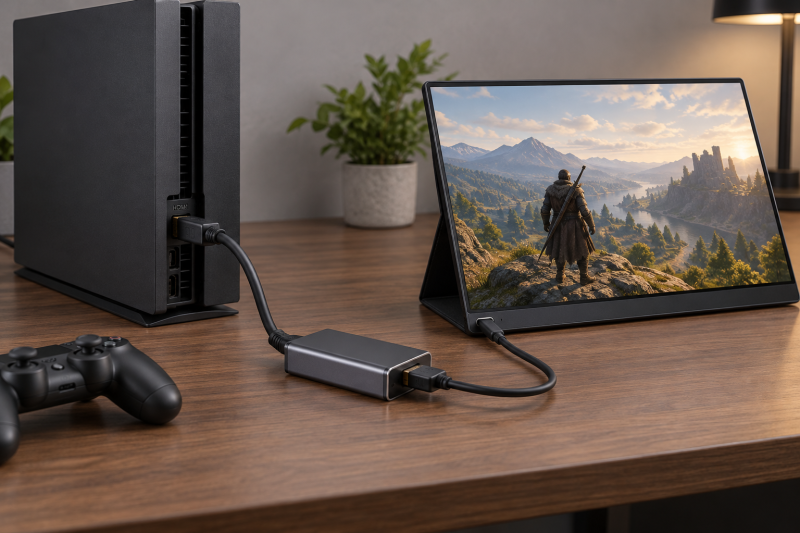
An HDMI source, such as a console, laptop, TV box, or camera, can drive a USB-C display, portable monitor, or compatible pair of AR glasses only through an adapter that converts in that direction. Each adapter here converts HDMI source to USB-C display. None of them turns a USB-C laptop into an HDMI source, and each listing says the conversion is one-way or cannot be reversed.
Power differs by listing. ZIXIAMZ and RUUPRRN state that 4K at 60Hz needs a 5V supply, THANDBLE asks for its supplied cord for the most stable display, and LIVIN and Veeloon list a power port without a 5V requirement. ZIXIAMZ, RUUPRRN, and THANDBLE say that power runs the adapter chip, not the screen or glasses.
For ordinary laptop USB-C-to-HDMI output, see the USB-C to HDMI cable guide. For multiport laptop expansion, a USB-C hub is a separate category.
Start with signal direction: HDMI source in, USB-C display out. Then check the power note and whether the display accepts USB-C video.HDMI to USB-C Adapters Compared
| Image | Product | Details | Check Price |
|---|---|---|---|
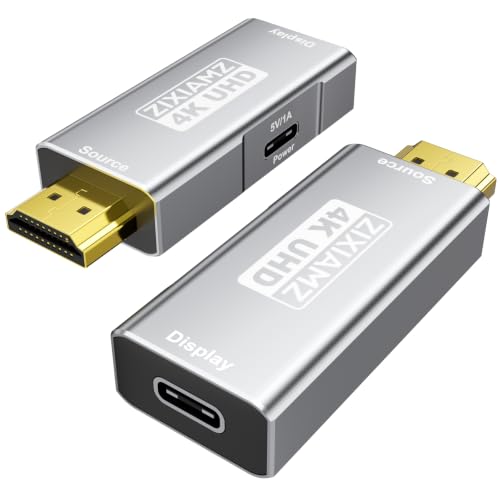 | ZIXIAMZ HDMI to USB-C Adapter | Best fit: Direct plug-in, 2-year warranty Direction: HDMI source to USB-C display only Video: 4K 60Hz with 5V supply Power: 5V runs the chip, no display charging Buyer check: Not for hubs, docks, or KVMs | Check Price on Amazon |
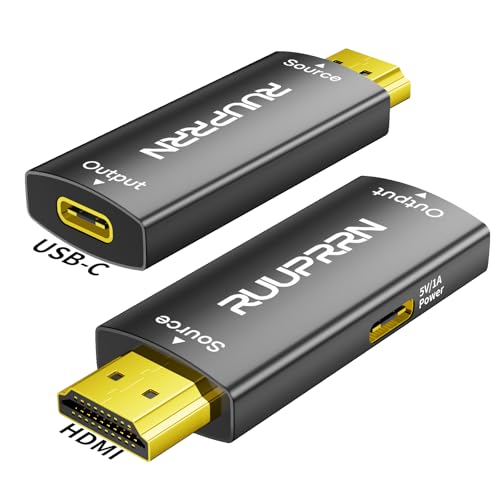 | RUUPRRN HDMI to USB-C Adapter | Best fit: Stable 4K 30Hz mode Direction: HDMI male to USB-C female Video: 4K 60Hz with 5V, 4K 30Hz Power: 5V runs the chip, no device charging Buyer check: Display needs DP Alt Mode | Check Price on Amazon |
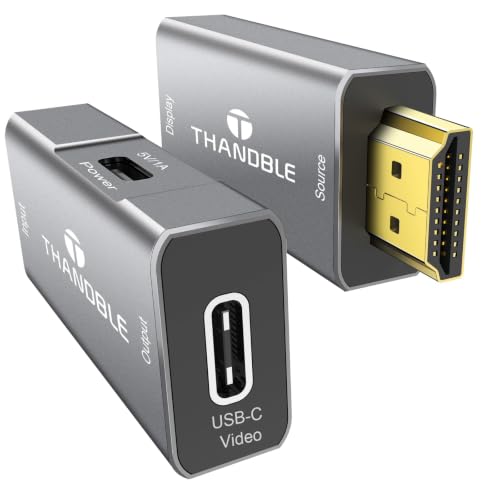 | THANDBLE HDMI to USB-C Adapter | Best fit: Switch 2, power cord included Direction: HDMI source to USB-C display only Video: 4K 60Hz stated Power: Cord supplied, runs the chip only Buyer check: USB4 or Thunderbolt display cable | Check Price on Amazon |
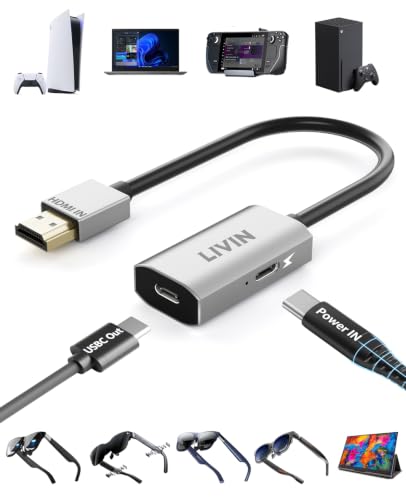 | LIVIN HDMI to USB-C Adapter | Best fit: XREAL One setup steps Direction: HDMI male to USB-C female Video: 4K 60Hz stated Power: Power port, 5V need not stated Buyer check: Not compatible with all Meta glasses | Check Price on Amazon |
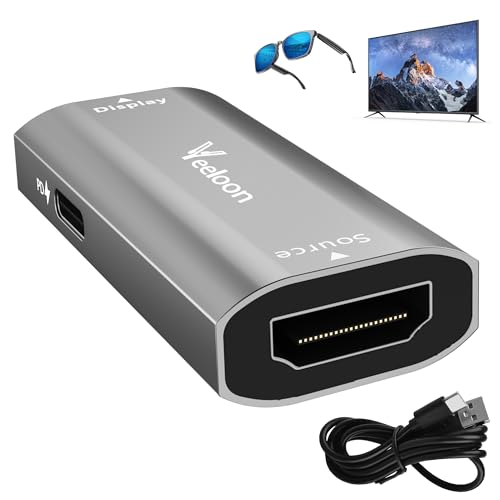 | Veeloon HDMI Female to USB-C Female Adapter | Best fit: Existing HDMI cable Direction: HDMI female to USB-C female Video: 4K 60Hz stated Power: Port can charge glasses, 6 ft cable Buyer check: Package text says HDMI male | Check Price on Amazon |
1. ZIXIAMZ HDMI to USB-C Adapter — Best for Direct Plug-In with a 2-Year Warranty
ZIXIAMZ has an HDMI male plug that connects straight to the source. Its listing states HDMI source to USB-C display only, 4K at 60Hz with an external 5V supply, and a USB4 or Thunderbolt 3/4/5 cable to the display. Amazon’s warranty field lists 2 years from the manufacturer.
ZIXIAMZ says the extra power port feeds the adapter chip and cannot charge connected glasses or a display. It also says the adapter does not work with hubs, docks, KVM switches, or Apple Studio Display.Our Take Choose ZIXIAMZ when a console, laptop, or TV box has an open HDMI port, the display accepts USB-C video, and a 5V supply is available.
- The ZIXIAMZ adapter has an HDMI male plug, so it connects straight to the source.
- ZIXIAMZ states that the adapter converts only from an HDMI source to a USB-C display.
- ZIXIAMZ lists 4K 60Hz when the adapter gets an external 5V supply.
- ZIXIAMZ says its power port feeds the adapter chip and cannot charge a connected display or glasses.
- ZIXIAMZ says the adapter does not work with hubs, docks, KVM switches, or Apple Studio Display.
2. RUUPRRN HDMI to USB-C Adapter — Best for a Stable 4K 30Hz Mode
Amazon lists RUUPRRN as the brand of this adapter. Its listing states one-way HDMI source to USB-C display conversion, 4K at 60Hz with 5V power, 7.1-channel audio passthrough, and use with AR/XR glasses and portable USB-C monitors. RUUPRRN calls 4K at 30Hz stable, while THANDBLE and Veeloon list 4K 30Hz compatibility without that word.
RUUPRRN says the display needs DisplayPort Alt Mode and that a 5V supply on the adapter’s power cable is needed for stable 4K. It says the USB port powers the chipset only and does not charge devices. One RUUPRRN note says its USB-C port is for power only with no data or charging, while its setup text describes a USB-C female port for the display cable. The listing does not say which port the note means.
Our Take Choose RUUPRRN for a display that supports DisplayPort Alt Mode, when its 4K 30Hz mode and 5V power requirement fit the setup.
- RUUPRRN names two video modes, 4K 60Hz with 5V power and a 4K 30Hz mode it calls stable.
- RUUPRRN states 7.1-channel audio passthrough in addition to video conversion.
- RUUPRRN names AR/XR glasses and portable USB-C monitors as the displays it works with.
- RUUPRRN says the display needs DisplayPort Alt Mode to work with the adapter.
- One RUUPRRN note calls a USB-C port power only, and the listing does not say which port it means.
3. THANDBLE HDMI to USB-C Adapter — Best for Switch 2 with a Power Cord Included
Amazon lists THANDBLE as the brand. Its listing states HDMI source to USB-C display one way and 4K at 60Hz. The title names XREAL, RayNeo, and Rokid glasses, a portable monitor, and Switch 2, Switch, Xbox, and PlayStation sources. Amazon’s warranty field lists 2 years.
THANDBLE asks you to plug in the supplied USB power cord for the most stable display and says the cord cannot charge the display. It asks for a USB4 or Thunderbolt 3/4/5 cable on the display side and does not state any Thunderbolt requirement for the HDMI source.Our Take Choose THANDBLE for a Switch 2 or another HDMI source feeding glasses or a portable monitor, when you want the power cord in the box.
- THANDBLE supplies a USB power cord and asks you to plug it in for the most stable display.
- THANDBLE states that its conversion runs one way, from HDMI source to USB-C display.
- THANDBLE’s title names Switch 2, Switch, Xbox, and PlayStation sources and XREAL, RayNeo, and Rokid glasses.
- THANDBLE says the supplied power cord cannot charge the display.
- THANDBLE asks for a USB4 or Thunderbolt 3/4/5 cable on the display side.
4. LIVIN HDMI to USB-C Adapter — Best for XREAL One with Stated Setup Steps
Amazon lists LIVIN as the brand. The title states HDMI male (source) to USB-C female (display) at 4K 60Hz for portable monitors and AR glasses. LIVIN lists a 2.3 by 1.2 by 0.4-inch aluminum case with a 6.1-inch cable, and a power supply port. It does not state whether 4K 60Hz needs power through that port.
LIVIN says the adapter cannot be reversed or connected to other adapters, and is not compatible with all Meta glasses. It asks for the latest firmware on the glasses. If XREAL One shows no picture or sound, LIVIN gives steps to choose DP Mode in the glasses’ sound settings.
Our Take Choose LIVIN when XREAL One is the display, its stated DP Mode steps are useful, and the 6.1-inch cable fits the layout.
- LIVIN lists an aluminum case that measures 2.3 by 1.2 by 0.4 inches and a 6.1-inch cable.
- LIVIN gives steps for choosing DP Mode in the glasses’ sound settings when XREAL One shows no picture or sound.
- LIVIN lists 4K 60Hz and a power supply port, and does not state whether that mode needs power through the port.
- LIVIN says the adapter cannot be reversed or connected to other adapters.
- LIVIN says the adapter is not compatible with all Meta glasses and asks for the latest firmware on the glasses.
5. Veeloon HDMI Female to USB-C Female Adapter — Best for Plugging into an Existing HDMI Cable
Amazon lists Veeloon as the brand, with the model field reading HDMI Female. Veeloon’s title and first feature state HDMI female (source) to USB-C female (display), one way, at 4K 60Hz for AR glasses, portable monitors, and consoles. Its package list reads one HDMI male to USB C female adapter, so confirm the HDMI connector type before ordering.
Veeloon says the power port can charge AR/XR glasses while in use, and that with a monitor or projector the USB-C port can carry audio, video, and power at once. The package list names the adapter, a 6-foot USB-A to USB-C charging cable, and a manual, with no HDMI cable.
Veeloon asks for a USB4 or Thunderbolt 3/4/5 cable on the display side and says to avoid hubs, docks, and KVM switches. Amazon’s warranty field lists 2 years.Our Take Choose Veeloon when an HDMI cable already runs from the source and you can confirm the HDMI connector type before ordering.
- Veeloon’s title and first feature state an HDMI female source input, matching a setup where an HDMI cable already runs from the source.
- Veeloon says its power port can charge AR/XR glasses while in use, and that the USB-C port can carry audio, video, and power at once with a monitor or projector.
- Veeloon’s package list includes a 6-foot USB-A to USB-C charging cable and a manual.
- Veeloon’s package list names an HDMI male adapter, while its title and model field say HDMI female, so confirm the connector type before ordering.
- Veeloon’s package list names the adapter, a charging cable, and a manual, with no HDMI cable.
Buying Guide
1. Verify the direction before buying
HDMI source to USB-C display is the defining direction. The HDMI end connects to the device producing video, while the USB-C end connects to the portable monitor or compatible glasses. A common USB-C-to-HDMI adapter has the opposite job and will not substitute.
Every listing here says the conversion is one-way or cannot be reversed. A laptop USB-C port, dock, or USB-C monitor cannot act as the HDMI source by reversing the cable. ZIXIAMZ, RUUPRRN, THANDBLE, and Veeloon also say the adapter does not work with hubs, docks, or KVM switches.
2. Check the display-side USB-C video input
A USB-C connector does not by itself prove display-video support. ZIXIAMZ and RUUPRRN say the display must support DisplayPort Alt Mode, and Veeloon says a connected USB-C monitor must support video input. The monitor or glasses documentation is the safer compatibility check.
Use a video-capable display cable. ZIXIAMZ, RUUPRRN, THANDBLE, and Veeloon each name USB4 or Thunderbolt 3/4/5 cables between the adapter and the screen. LIVIN names no cable standard and asks only that the connected device supports audio and video. THANDBLE does not state any Thunderbolt requirement for the HDMI source.
3. Plan for power
ZIXIAMZ and RUUPRRN state that 4K at 60Hz needs a 5V supply. THANDBLE supplies a USB power cord and asks for it for the most stable display, and Veeloon includes a 6-foot USB-A to USB-C cable. LIVIN lists a power supply port without saying whether 4K 60Hz needs it. Bring a USB power source when the setup travels.
ZIXIAMZ, RUUPRRN, and THANDBLE say their power input runs the adapter chip and cannot charge the display or glasses. Veeloon says its power port can charge AR/XR glasses while in use, and LIVIN says glasses users never have to worry about power problems because of its power supply port. A portable monitor may need its own power arrangement unless the listing says otherwise.
4. Count the cables in the chain
ZIXIAMZ, RUUPRRN, THANDBLE, and LIVIN list an HDMI male connector, which plugs into the source’s HDMI port without an HDMI cable. Each needs a USB-C display cable, and ZIXIAMZ, RUUPRRN, and THANDBLE ask for a USB power connection.
Veeloon’s HDMI female input takes an HDMI cable from the source, and its package list does not include one. Its package text also names an HDMI male adapter, so confirm the connector type before relying on it.
5. Test the whole signal chain before travel
The adapter, display cable, power lead, source, and glasses work as one chain. Test the exact source mode and screen before a flight, presentation, or console session, so you can fix a missing power connection or an incompatible display mode early.
Check firmware and display settings on smart glasses. LIVIN’s listing asks for the latest glasses firmware and gives DP Mode steps for XREAL One. Use the glasses maker’s instructions for firmware and input mode.
FAQ
Can this connect a PS5 or Xbox to AR glasses?
Potentially, when the glasses accept compatible USB-C display input. ZIXIAMZ, RUUPRRN, THANDBLE, LIVIN, and Veeloon all name consoles and AR glasses on their listings, and ZIXIAMZ lists XREAL, Rokid, RayNeo, VITURE, and Thunderbird AR glasses.
Confirm the exact glasses model, firmware, video mode, and power arrangement. LIVIN says it is not compatible with all Meta glasses.
Does the USB-C power port charge the monitor?
For three listings, no. ZIXIAMZ, RUUPRRN, and THANDBLE say their power input runs the adapter chip and does not charge the display or glasses.
Veeloon says its power port can charge AR/XR glasses while in use, and LIVIN says its power supply port means glasses users never have to worry about power problems. Use the display’s own power arrangement unless the product listing says otherwise.
Can I use this in reverse from USB-C to HDMI?
No. Every pick here converts one way, from HDMI source to USB-C display. Reversing the physical ends does not reverse the video conversion.
For a laptop USB-C output to an HDMI monitor, choose a USB-C-to-HDMI cable or adapter designed for that opposite direction.
Why is 4K 60Hz not guaranteed?
All five listings state 4K 60Hz, and ZIXIAMZ and RUUPRRN tie it to a 5V supply. The HDMI source, display input, cable, and settings all need to support the chosen mode.
ZIXIAMZ and RUUPRRN list backward compatibility with 2K at 120Hz and 60Hz, so a lower mode is available to try first. Then confirm power and cables before assuming the adapter has failed.
Bottom Line
Choose ZIXIAMZ for a direct plug-in with a 2-year warranty, THANDBLE for a supplied power cord, or Veeloon for an existing HDMI cable. Check the signal direction, the display’s USB-C video support, and the power note before ordering.