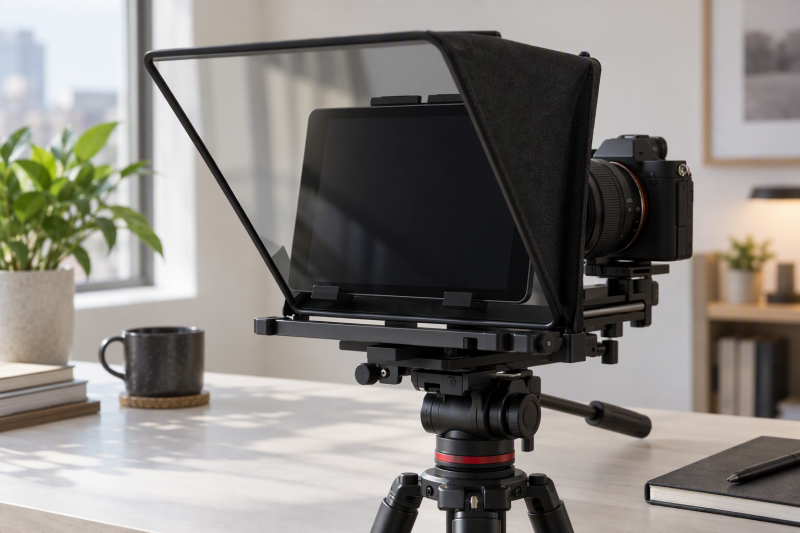
A tablet teleprompter puts the script in front of the lens, and a beamsplitter reflects it toward the speaker. The buying details to compare are the glass size, tablet tray dimensions, reading distance, lens clearance, and the mounting system behind the glass. A larger pane is useful only when the tablet, camera, and desk or rig can use it.
Every model here explicitly lists beamsplitter glass and tablet prompting support. Start with the tablet dimensions, then decide whether a compact phone-and-tablet setup, a 12-inch desk setup, or a rod-mounted camera rig fits your work. The glass percentage and reading-distance claims help compare reflection and working distance, but they do not replace checking the lens and camera layout.
Match the tablet tray and camera rig first, then compare glass size, reading range, and setup hardware.Quick Picks
- Best for large tablets: Moman MT12 supports tablets up to 12.9 inches behind a 12-inch tempered beamsplitter pane.
- Best compact pick: NEEWER X1 Pro II combines a 9-inch pane with a fold-flat all-in-one body.
- Best for camera rigs: NEEWER C12 adds a 15 mm LWS rod clamp and 12-inch HD beamsplitter glass.
Best Beamsplitter Glass Tablet Teleprompters Compared
| Image | Product | Details | Check Price |
|---|---|---|---|
 | Moman MT12 | Best fit: Large-tablet desk recordings Glass: 12-inch tempered beamsplitter Tablet support: Up to 12.9 inches Reading range: Up to 15 feet | Check Price on Amazon |
 | NEEWER X1 Pro II | Best fit: Compact phone-first setups Glass: 9-inch HD beamsplitter Tablet support: Up to 6.9 inches wide Reading range: 6.6 feet | Check Price on Amazon |
 | TELEPROMPTER PAD iLight Pro 12 | Best fit: Durable 12-inch tablet prompting Glass: 4 mm HD 60/40 beamsplitter Tablet support: Up to 7.8 by 10.2 inches Construction: Aluminum | Check Price on Amazon |
 | NEEWER C12 | Best fit: 15 mm rod-rig production Glass: 12-inch HD beamsplitter Tablet support: 5.5 to 9.5 inches wide Reading range: 10 feet | Check Price on Amazon |
 | FEELWORLD TP2A | Best fit: Small portable tablet prompting Glass: 70/30 beamsplitter Tablet support: Up to 8 inches Lens support: Eight adapter rings | Check Price on Amazon |
 | TELEPROMPTER PAD iLight Pro 14 | Best fit: Large-tablet multicamera work Glass: 14-inch beamsplitter Tablet support: Up to 12.2 by 9 inches Included: Remote and hardcase | Check Price on Amazon |
For a camera-facing desk setup, pair the teleprompter with a smartphone teleprompter, camera monitor arm, wireless lavalier system, or shotgun microphone.
1. Moman MT12 — Best for Large-Tablet Desk Recording
A desk presenter who already uses a larger iPad rather than a phone needs a pane and clamp sized for that tablet. Moman lists a 12-inch tempered beamsplitter glass pane and an adjustable clamp for tablets up to 12.9 inches, and the combination suits that presenter. The listing also states a reading range up to 15 feet, which gives a presenter room to place a camera farther from the chair.
The metal structure is stated to support the filming device, while a knob adjusts the reflective angle for sitting or standing sightlines. Moman also lists its Prompter app, a remote, text-size control, scrolling-speed control, and text or background color changes. Choose it when the large tablet is the fixed requirement, not simply because the glass is larger.
- The stated 12-inch tempered beamsplitter pane comes with a clamp sized for large tablets.
- Tablet support up to 12.9 inches suits larger iPad-based desk scripting workflows.
- The stated 15-foot reading range helps when the camera must sit farther from the presenter.
- The adjustable reflection angle covers both seated and standing sightlines with one unit.
- A 12-inch pane requires more desk and camera space than the 9-inch NEEWER X1 Pro II.
- The listing states no 15 mm rod-mount system for shoulder-rig camera work, which the NEEWER C12 provides.
2. NEEWER X1 Pro II — Best for Compact Phone-First Setups
The NEEWER X1 Pro II uses a 9-inch HD beamsplitter with stated 75% light transmission and a 6.6-foot reading range. Its tablet tray accepts an iPad or Android tablet up to 6.9 inches wide, while the included magnetic phone clamp supports horizontal or vertical phone use. The phone clamp makes it the compact choice when a phone may be the script device.
NEEWER states the all-in-one body folds flat into its carry case without assembly. A top-loading Arca-style quick-release mount, 0.8-inch vertical adjustment, and 5.9-inch horizontal adjustment give a small camera setup room to adjust its placement. Pick it for travel or a compact desk, but measure a larger tablet before assuming it fits.
- The 9-inch HD beamsplitter keeps the unit smaller for compact desks and travel cases.
- NEEWER’s stated 75% light transmission gives you a specific figure to compare for camera-facing reading.
- The 6.9-inch-wide tray holds compact tablets, and the supplied magnetic phone clamp handles phones.
- NEEWER says the fold-flat all-in-one body needs no assembly before a portable recording.
- The stated Arca-style top-loading quick-release mount suits compatible cameras.
- The 6.9-inch tray width rules out the larger tablets that the Moman MT12 and NEEWER C12 accept.
- The listed 6.6-foot reading range is shorter than the Moman MT12’s stated 15 feet.
- The 9-inch glass offers less script area than the 12-inch and 14-inch models.
3. TELEPROMPTER PAD iLight Pro 12 — Best for Durable 12-Inch Tablet Prompting
TELEPROMPTER PAD specifies 4 mm HD 60/40 beamsplitter glass in its iLight Pro 12. The listing states tablet and smartphone dimensions up to 7.8 by 10.20 inches, including several iPad sizes. Check those dimensions before the nominal 12-inch label, because they determine whether the actual tablet can sit behind the hood.
The maker lists an angle-adjusting system, collapsible form, aluminum construction, remote, carry bag, and an app for Apple, Android, Mac, and Windows. Choose it when the stated glass thickness and tablet dimensions match a recurring tablet workflow. It is less appropriate when the camera package requires the NEEWER C12’s dedicated 15 mm rod support.
- The stated 4 mm glass thickness and 60/40 ratio give you two glass figures to compare.
- The 7.8-by-10.20-inch tablet limit gives you a concrete size to check your tablet against before buying.
- The collapsible aluminum body can be stored and carried between desk or location shoots.
- The included remote and app control the script without touching the tablet during recording.
- The listed tablet dimensions may exclude devices that fit Moman’s stated 12.9-inch clamp.
- The listing states no 15 mm LWS clamp, so it is less specialized for shoulder-rig production than the NEEWER C12.
4. NEEWER C12 — Best for 15 mm Rod-Rig Production
The NEEWER C12 is the rig-oriented option because it includes a 15 mm LWS rod clamp and two 12.8-inch rods. It also lists a 12-inch HD beamsplitter pane, 75% light transmission, and a 10-foot reading range. Those features suit a camera cage, baseplate, or shoulder-rig workflow more directly than a simple desk stand.
Its tablet holder adjusts from 5.5 to 9.5 inches wide and supports named iPad and Android tablet families. The 501PL-compatible snap-in plate and 10-inch sliding camera adjustment help match the camera to the glass. Choose this model when the rod system solves a mounting problem, and skip it for a simple desk call.
- The 15 mm LWS clamp is aimed at camera cages, baseplates, and shoulder-rig placement.
- NEEWER states a 12-inch HD beamsplitter and 75% transmission for camera work.
- The 10-foot reading range allows more distance between camera and presenter than the compact X1 Pro II.
- The holder adjusts across a defined 5.5-to-9.5-inch width range.
- The 501PL-compatible snap-in plate and sliding camera adjustment help match the camera to the glass.
- The rods and clamp add more rig parts than a fold-flat teleprompter for a simple desk call.
- The listing warns that lenses need more than a 28 mm focal length, limiting some wide-angle use.
- A 12-inch rig can take more space than FEELWORLD’s compact 8-inch option.
5. FEELWORLD TP2A — Best for Small Portable Tablet Prompting
FEELWORLD’s TP2A is built for small devices, with stated support for tablets or smartphones up to 8 inches and a 70/30 beamsplitter glass specification. It suits a small tablet or phone as the prompt device rather than a full-size iPad. The compact format helps when a smaller camera bag is more important than generous script size.
The listing includes eight adapter rings from 49 to 77 mm, three bottom 1/4-20 threads, dual cold shoes, a magnetic smartphone clamp, app support, and a Bluetooth remote. Those camera-facing accessories make it adaptable, but they do not expand the stated 8-inch prompting limit. Choose it for a deliberately small rig, not for a 12.9-inch tablet.
- The stated 70/30 beamsplitter glass gives you a defined specification to compare.
- Support up to 8 inches suits small tablets and phones in a more portable setup.
- Eight adapter rings from 49 to 77 mm cover several stated lens diameters.
- Three 1/4-20 threads and dual cold shoes add stated mounting points for small accessories.
- The 8-inch device limit rules out the large-tablet setups that the 12-inch and 14-inch models support.
- A smaller prompt surface can show fewer lines at once than a large tablet behind wider glass.
6. TELEPROMPTER PAD iLight Pro 14 — Best for Large-Tablet Multicamera Work
The iLight Pro 14 combines a 14-inch beamsplitter glass pane with stated tablet support up to 12.2 by 9 inches. It suits a larger tablet layout and multicamera use where the script needs to stay readable without reducing the tablet to a phone-sized view. The listing also describes German HD optical technology and an adjustable glass angle.
TELEPROMPTER PAD includes a Bluetooth remote, app, hardcase, and compatibility with iOS, Android, Windows, and Mac. The aluminum body and stated leak-proof hood are aimed at repeat use, while the larger glass still requires a measured camera and desk footprint. Choose it after confirming the tablet’s exact width and height, rather than treating 14 inches as a guarantee of universal fit.
- The 14-inch beamsplitter pane gives a stated large reflection area for multicamera presentations with a tablet.
- The 12.2-by-9-inch tablet limit gives you a specific width and height to check before purchase.
- The included hardcase carries the larger glass between production locations.
- The Bluetooth remote and app are listed as compatible with iOS, Android, Windows, and Mac.
- An adjustable glass angle helps match the reflection to camera framing and presenter eye line.
- The larger 14-inch glass requires more camera-bag and desk space than the FEELWORLD TP2A.
- Its listed tablet dimensions should be checked against devices that use unusually wide protective cases.
Buying Guide: Choosing a Beamsplitter Glass Tablet Teleprompter
Match the tray to the actual tablet
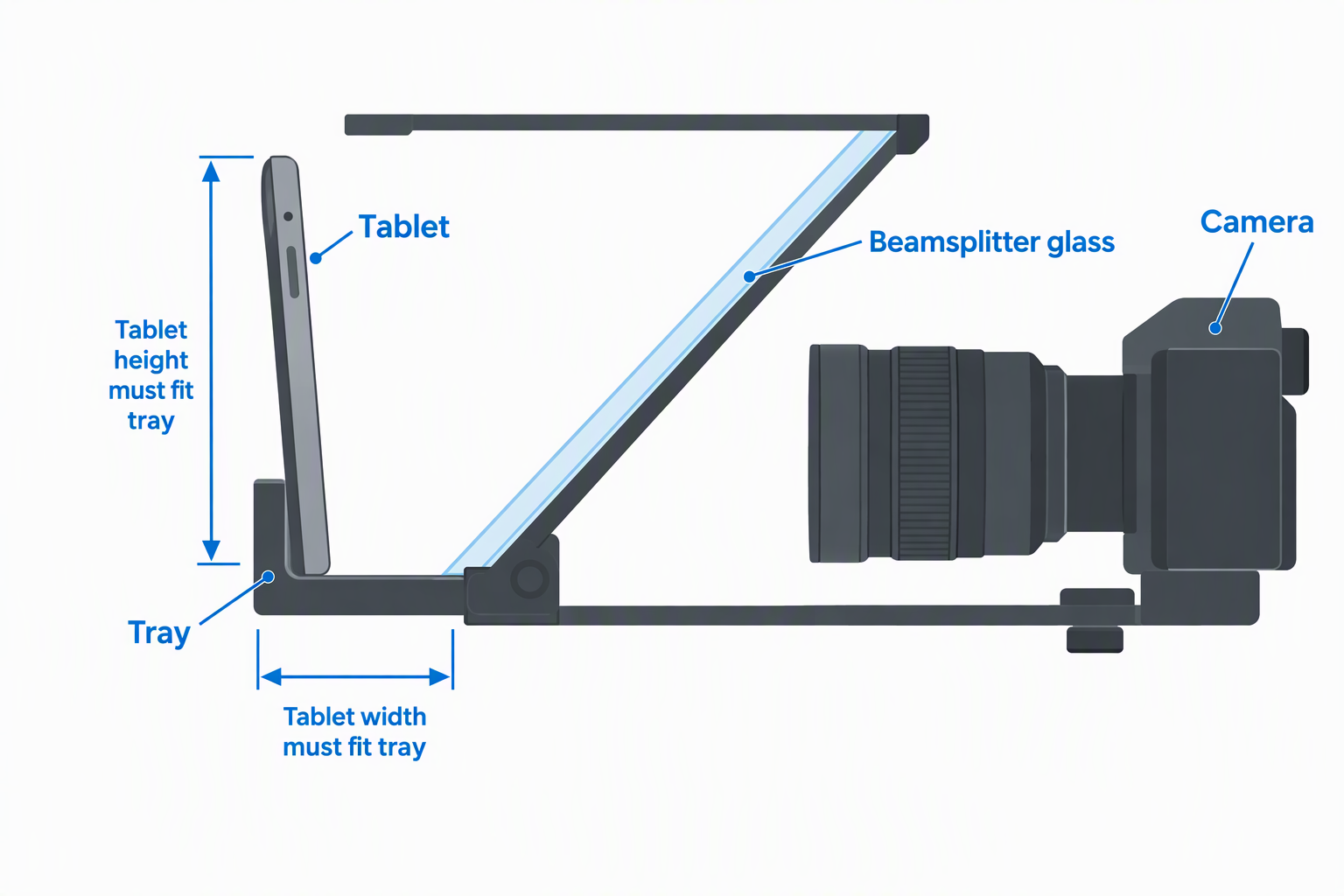
The first decision is tablet fit, not the marketing name of the teleprompter. Moman states support up to 12.9 inches, while the iLight Pro 14 gives a precise 12.2-by-9-inch limit and the iLight Pro 12 specifies 7.8 by 10.20 inches. Measure the tablet with its case if the case stays on during recording.
The other three models list different limits. NEEWER’s X1 Pro II tray is listed for tablets up to 6.9 inches wide, FEELWORLD supports devices up to 8 inches, and the C12 holder adjusts from 5.5 to 9.5 inches. Select the device first, because a larger pane cannot make an incompatible tablet fit.
Choose glass size around camera distance
Glass size affects the view available for the reflected script, but it must fit the camera position. The NEEWER X1 Pro II uses a 9-inch pane and states a 6.6-foot reading range. Moman lists a 12-inch pane and up to 15 feet, while C12 lists 12 inches and 10 feet.
Large glass can be practical for an interview or presentation camera farther from the chair. It is not automatically better for a webcam beside a desk monitor. The iLight Pro 14’s 14-inch glass suits a large-tablet production setup, and FEELWORLD’s smaller format suits a kit where the prompt device and bag must stay compact.
Treat beamsplitter percentages as an optical specification
Some listings give a percentage and others do not. TELEPROMPTER PAD iLight Pro 12 specifies 60/40 glass, FEELWORLD specifies 70/30, and the two NEEWER models state 75% light transmission. Those figures describe each maker’s glass claim, and they do not remove the need to position the glass and camera correctly.
The practical decision is whether the script can be read comfortably while the lens remains centered behind the hood. Test the chosen tablet brightness and script size before a client recording. A specified glass percentage is a buying comparison point, while camera-and-tablet geometry determines whether the prompt remains usable.
Plan camera and lens mounting before the first shoot
Camera hardware can decide the choice. The C12 has a 15 mm LWS rod clamp, two rods, a 501PL-compatible plate, and a stated 10-inch sliding adjustment. The rod system is an advantage for a caged camera or shoulder rig, but it is extra gear for a simple desk camera.
FEELWORLD includes eight rings from 49 to 77 mm and three 1/4-20 threads, while the X1 Pro II lists several 1/4-inch and 3/8-inch threads. The C12 also says the camera lens needs more than 28 mm focal length. Confirm the lens geometry, clamp, and tripod workflow before treating a teleprompter as a universal camera accessory.
Decide how portable the workflow must be
How portable a kit needs to be depends on the shoot. The X1 Pro II folds flat into a carry case without stated assembly, while the iLight Pro 12 is collapsible and lists a carry bag. The iLight Pro 14 includes a hardcase, but its 14-inch glass still occupies a larger kit footprint.
For a lightweight phone or small-tablet rig, FEELWORLD’s 8-inch device limit can be a sensible tradeoff. For a repeat desk presentation, a larger tablet can reduce how often the script has to scroll. Pick the smallest format that supports the actual tablet and camera, then add larger glass only when its script area solves a workflow need.
Frequently Asked Questions
What makes a tablet teleprompter different from a phone teleprompter?
A tablet teleprompter has enough stated tray space and beamsplitter area for a tablet to sit behind the reflective pane. The Moman MT12, C12, and both TELEPROMPTER PAD models list tablet support alongside beamsplitter glass. A phone-only mounting clamp is not enough for this guide.
The tablet’s screen size sets the script layout, so tablet support is part of the choice. A 12.9-inch tablet can display larger text or more lines than the 8-inch device limit FEELWORLD states for the TP2A. Choose the prompt device size first, then find the tray and glass that explicitly support it.
Does a larger beamsplitter pane always make a better teleprompter?
No. A larger pane can give a larger reflected viewing area, but it also takes more camera-bag and desk space. The 14-inch iLight Pro 14 suits a large-tablet configuration, while the 9-inch X1 Pro II has a fold-flat body for a smaller kit.
The best pane is the one that fits the tablet, camera height, and lens position. A small teleprompter can be more useful for a compact phone setup than a large panel that cannot be positioned comfortably in front of the camera.
Can these teleprompters work with a DSLR or mirrorless camera?
Several can, but the mounting hardware differs by model. Moman lists DSLR and camcorder use, C12 provides a 15 mm LWS system, and FEELWORLD includes adapter rings for specified lens diameters. These listings support several camera workflows, not every camera-and-lens combination.
Check lens clearance and focal-length limits before recording. The C12 specifically says it is not compatible with wide-angle lenses and needs a focal length over 28 mm. Consider the exact lens, hood, plate, and mounting hardware together.
Why do tablet dimensions matter more than screen diagonal?
The tray holds a physical rectangle, so width and height determine fit. The iLight Pro 12 lists 7.8 by 10.20 inches and the iLight Pro 14 lists 12.2 by 9 inches. A diagonal number alone does not identify whether a tablet orientation or case will fit.
Measure the tablet with the case, cable, and any clamp clearance in mind. The X1 Pro II’s 6.9-inch width is useful evidence for a compact device, but it is not a substitute for checking the actual hardware before ordering.
Is an app and remote worth prioritizing?
An app and remote are secondary to physical fit, but they keep script controls away from the front of the camera. Moman lists text size, scroll speed, and color settings, while NEEWER’s RT113 controls scrolling, pages, and font size through the app. Those controls can make a solo recording workflow simpler.
Controls should not outweigh the physical fit decision. A remote cannot solve a tablet that does not fit the tray or a lens that cannot sit behind the hood. Buy the correct glass and mount first, then choose the app and remote that match the recording device.
Bottom Line
Choose Moman MT12 for a stated 12.9-inch tablet clamp and long listed reading range. Pick NEEWER C12 when a 15 mm LWS camera rig determines the purchase. For 14-inch glass and a stated width-and-height tablet limit, use TELEPROMPTER PAD iLight Pro 14 after measuring the tablet and camera setup.