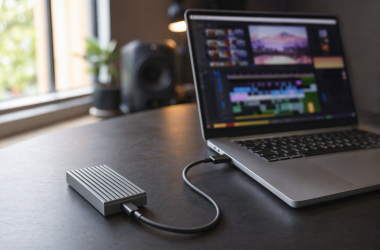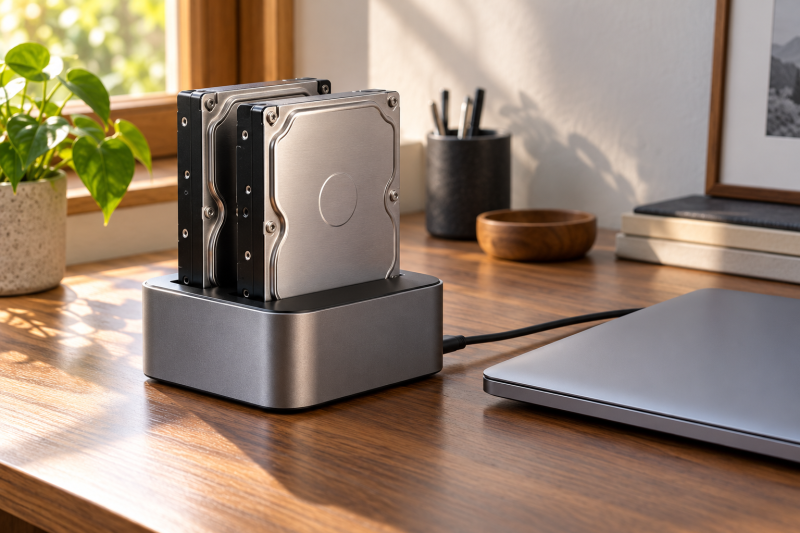
A dual-bay desktop dock lets you connect bare SATA drives without putting them inside a computer case. These open, vertical docks are often called toasters because the drives sit upright. They suit archive disks and recovery work at a desk, while a portable SSD is the better choice for travel.
The key decision is whether you need a dock whose listing explicitly includes offline cloning, or only need two-drive access without cloning. Before you choose, match the host connection, stated drive class, capacity wording, and any adapter requirement to your drives.
Pick a dock by the bare drives you own and the job you need done, then verify the stated connection and cloning function.Dual-Bay Desktop Dock Comparison
| Image | Product | Details | Check Price |
|---|---|---|---|
 | SABRENT EC-CH2B | Best fit: Offline 1-to-1 cloning Listed details: SABRENT Dual-Bay USB-C Hard Drive Docking Station & Cloner (EC-CH2B) | Offline 1-to-1 cloner, 2.5in/3.5in SATA HDD & SSD, USB-C cable included, 5Gbps, Hot-swap, No IDE support | Check Price on Amazon |
 | OWC SATA | Best fit: 10Gb/s dual SATA access Listed details: OWC Drive Dock USB 10Gb/s Dual Bay SATA Drive Solution | Access two 2.5/3.5-inch SATA drives via USB-C or USB-A - Internal power with independent power switches - For Mac and PC | Check Price on Amazon |
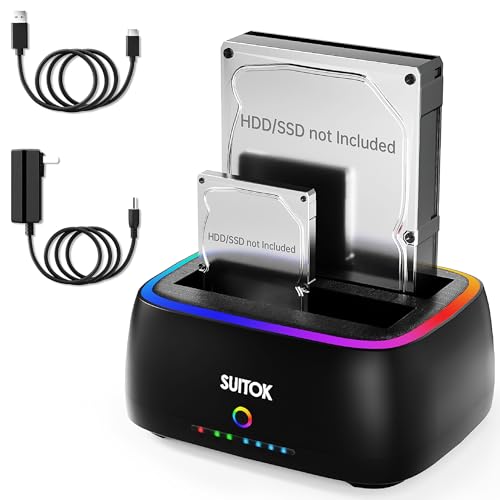 | SUITOK STK11 | Best fit: Stated 40TB and 5Gbps dock Listed details: SUITOK Dual Bay SATA Hard Drive Cloner Dock USB C 5Gbps | 2.5" 3.5" | 40TB | HDD SSD Docking Station, Offline Duplicator External Data Reader Storage Backups Recovery RTL9201DP RGB Light for Laptop PC | Check Price on Amazon |
 | ORICO 2 Bay with Clone | Best fit: Aluminum dual-bay USB-C dock Listed details: ORICO Hard Drive Docking Station with Offline Clone, Aluminum Alloy Dual Bay USB C to SATA Hard Drive Dock Holder for 2.5 or 3.5 Inch HDD 36TB UASP Support,Gray (6626C3-C) | Check Price on Amazon |
| OWC NVMe U.2 + SATA | Best fit: 10Gb/s SATA and U.2 drive access Listed details: OWC Drive Dock USB 10Gb/s Dual Bay SATA/U.2 NVMe Drive Solution | Access two 2.5/3.5-inch SATA, NVMe U.2, and NVMe M.2 (with adapter) drives via USB-C 10Gb/s - Internal power - Mac and PC | Check Price on Amazon |
1. SABRENT EC-CH2B — Offline Clone Pick
SABRENT lists the EC-CH2B as a dual-bay USB-C dock and offline 1-to-1 cloner for 2.5-inch and 3.5-inch SATA HDDs and SSDs. Its listing also names a USB-C cable, hot swapping, 5Gbps, and no IDE support. Choose it when you want the stated cloner and the supplied cable more than a 10Gb/s connection.
SABRENT lists offline 1-to-1 cloning, 5Gbps USB-C, hot swapping, and no IDE support.Our Take Buy this when you need a stated offline SATA cloning function and USB-C cable in one dock.
- The listed offline 1-to-1 cloner gives you a dedicated SATA duplication function.
- Its included USB-C cable and 5Gbps connection suit a workstation with a USB-C port.
- The stated 5Gbps connection is lower than the 10Gb/s figure listed by OWC.
- No IDE support excludes legacy IDE recovery work from this dock’s stated role.
2. OWC SATA — 10Gb/s SATA Access
OWC lists this Drive Dock as a 10Gb/s dual-bay SATA solution for two 2.5-inch or 3.5-inch SATA drives through USB-C or USB-A. Internal power, independent bay switches, and Mac and PC support are also named. The USB-C and USB-A options suit a fixed desk with mixed host connectors.
The listing describes drive access rather than offline cloning. Pair it with a suitable Thunderbolt 4 dock only after confirming the host connection you will use.
This OWC model lists 10Gb/s, USB-C and USB-A access, internal power, and independent bay switches.Our Take Choose this model for two SATA drives when its 10Gb/s and USB-A or USB-C access are the deciding factors.
- The listed 10Gb/s interface is the higher connection figure in this comparison.
- USB-C and USB-A host access help buyers with different workstation ports.
- Independent switches give a buyer a stated control for each SATA bay.
- The title does not name an offline cloning function for this access-focused model.
- It lists SATA drives, not the U.2 NVMe option on the other OWC dock.
3. SUITOK STK11 — 5Gbps RGB Cloner
SUITOK lists the STK11 as a dual-bay SATA cloner with USB-C 5Gbps, a 40TB figure, 2.5-inch and 3.5-inch support, and an offline duplicator. The title also names an RTL9201DP chip and RGB light. Start with the stated interface and clone role, then decide whether the visible lighting suits the desk.
Our Take Choose this if you want listed USB-C 5Gbps cloning and the RGB lighting suits your desk.
- The title combines USB-C 5Gbps, 40TB, and offline duplication in one dock.
- It explicitly names both 2.5-inch and 3.5-inch HDD and SSD support.
- The listed 5Gbps connection trails the 10Gb/s figure specified by OWC.
- RGB lighting does not replace matching the stated drive, capacity, and host port.
4. ORICO 2 Bay with Clone — Aluminum USB-C Dock
ORICO lists the 6626C3-C as an aluminum-alloy USB-C to SATA dock with offline clone, 36TB support, UASP, and bays for 2.5-inch or 3.5-inch HDDs. Choose it for a SATA desk where the aluminum case and UASP are the priority, provided the exact capacity suits both drives.
The listing does not establish every cloning rule. Read the product instructions before copying a disk, and keep a separate backup of any data you can’t replace.
Our Take Buy it when the stated aluminum case, UASP, 36TB figure, and offline clone suit your SATA workflow.
- The listing names aluminum alloy, USB-C to SATA, UASP, offline clone, and 36TB.
- It states support for both 2.5-inch and 3.5-inch HDD form factors.
- The stated 36TB figure needs matching to the two disks you plan to use.
- Cloning details are not in the title, so the instructions are necessary before a copy job.
5. OWC NVMe U.2 + SATA — Mixed-Drive Access
OWC lists this Drive Dock as a 10Gb/s USB-C solution for two 2.5-inch or 3.5-inch SATA drives and U.2 NVMe drives. With an adapter, the title also says it can access M.2 NVMe drives. Internal power and Mac and PC support are part of the stated desk setup.
This dock is the unusual pick when a drive bench includes U.2 NVMe as well as SATA. Check the adapter requirement and the exact connector on the drive. A Thunderbolt NVMe enclosure is a different product class.
OWC lists USB-C 10Gb/s, SATA, U.2 NVMe, optional M.2 access with an adapter, internal power, and Mac and PC support.Our Take Choose it when the listed U.2 NVMe and SATA access count for more than an offline cloning feature.
- The title combines 10Gb/s USB-C access with stated SATA and U.2 NVMe support.
- An adapter is listed for M.2 NVMe access on a mixed-drive bench.
- Internal power and Mac and PC support are stated for this desk setup.
- M.2 NVMe access requires the listed adapter, so confirm it before assuming it is included.
- The product title focuses on drive access and does not name offline cloning.
Buying Guide
1. Decide whether offline cloning is required
Choose a cloner only where the title names it. Both SABRENT docks, SUITOK, and ORICO list offline cloning, while the OWC Drive Dock titles focus on drive access.
A clone button does not define every copy procedure. Read the exact product instructions before a cloning job and keep another backup of data you can’t replace.
2. Match the host connection
The connection is the first hardware check. Both OWC Drive Dock titles list 10Gb/s, while EC-CH2B and SUITOK list USB-C 5Gbps.
OWC SATA lists USB-C and USB-A. Use the connector named by the listing rather than assuming every hub or cable offers the same route.
3. Check the drive class and size
All six listings name SATA support, but their extra drive options differ. EC-HD2B names SATA I, II, and III, while OWC SATA/U.2 adds U.2 NVMe and adapter-based M.2 access.
Physical size is not the complete answer. The listed 2.5-inch and 3.5-inch sizes need checking with the drive documentation before treating a disk as ready to insert.
4. Treat capacity figures as model limits
Capacity figures belong to individual listings. SUITOK lists 40TB and ORICO lists 36TB, while EC-HD2B says 20TB plus.
Do not calculate a per-bay number where a title gives only a total. Match both planned disks to the exact product wording before buying a dock.
5. Separate SATA access from mixed-drive access
OWC SATA is the direct two-SATA-drive pick. OWC SATA/U.2 is the only pick that names U.2 NVMe, and it requires an adapter for listed M.2 access.
A mixed-drive dock needs the correct connector and any named adapter. Do not treat a generic SATA toaster as a U.2 NVMe solution just because both sit on a desk.
FAQ
Can I use these docks with 2.5-inch and 3.5-inch SATA drives?
Yes, all six titles name 2.5-inch and 3.5-inch SATA support. Confirm the drive interface and the dock documentation before inserting an unusual disk.
Physical size is not every compatibility detail. OWC SATA/U.2 separately names U.2 NVMe.
Which picks list offline cloning?
SABRENT EC-CH2B, SUITOK STK11, and ORICO 6626C3-C list offline cloning or an offline duplicator. The two OWC titles do not name it.
Read the relevant product instructions before a copy. Keep another backup when you can’t replace the data.
What differs between the two OWC Drive Docks?
OWC SATA lists two SATA drives through USB-C or USB-A and independent switches. OWC SATA/U.2 lists USB-C, SATA, U.2 NVMe, and M.2 access with an adapter.
Both titles list internal power and Mac and PC support. Choose by the host and drive connector on your desk.
Is 5Gbps or 10Gb/s the better figure?
10Gb/s is the higher listed figure, and both OWC models list it. EC-CH2B and SUITOK list 5Gbps, while EC-HD2B lists USB 3.0.
The cloning need, drive class, and host port can outrank the connection figure. Select the product that names the job you need.
Do these docks include a cable?
Only EC-CH2B explicitly lists an included USB-C cable. The other titles name interface details but do not establish included cables.
A replacement cable needs to match the dock’s stated connection. Do not assume a charging-only cable carries the data connection a dock needs.
Bottom Line
Pick an offline cloner only when that exact function is named, and select an OWC Drive Dock when its stated 10Gb/s access, USB-A option, or U.2 NVMe support is the deciding factor. Match the exact drive, capacity wording, and host port before purchase.