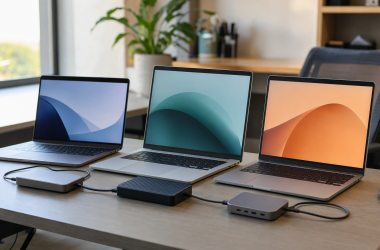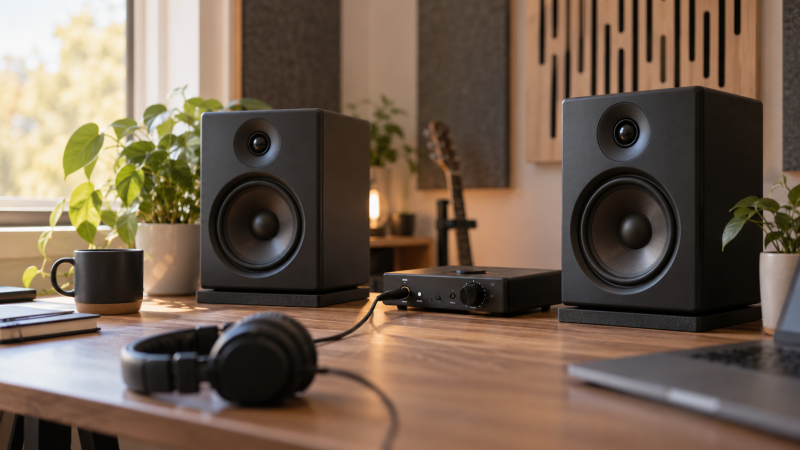
Nearfield monitors are meant to be heard from a short working distance, which makes them a natural fit for a laptop-based mixing desk. Speaker size is only one factor. The inputs your audio interface provides, the controls available for desk placement, and the space around the monitors also affect which pair is practical to connect and use.
This guide compares six Amazon US powered monitor pairs with active New offers. These listings describe features and connections, not independent room or frequency-response measurements. Start with the cable path from the interface, then match the speaker size and controls to the desk you have.
For a home mixing desk, the useful monitor is the pair you can connect properly and position consistently at your normal listening distance.Nearfield Studio Monitors Compared
| Image | Product | Details | Check Price |
|---|---|---|---|
 | PreSonus Eris 3.5 | Best fit: Compact wired desk setup Drivers: 3.5in woofer, 1in tweeter Inputs: TRS, RCA, front aux Controls: High and low tuning | Check Price on Amazon |
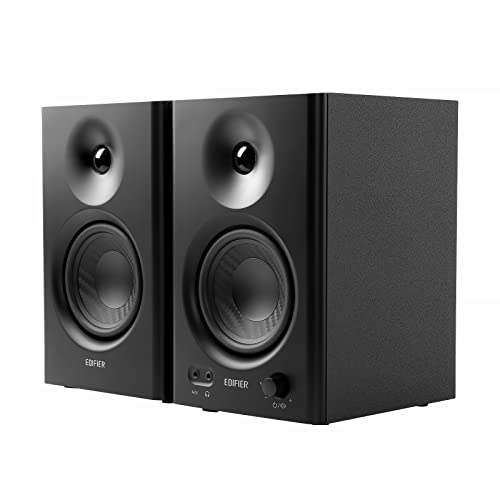 | Edifier MR4 | Best fit: Balanced-input desk Drivers: 4in woofer, 1in tweeter Inputs: TRS, RCA, AUX Modes: Monitor and Music | Check Price on Amazon |
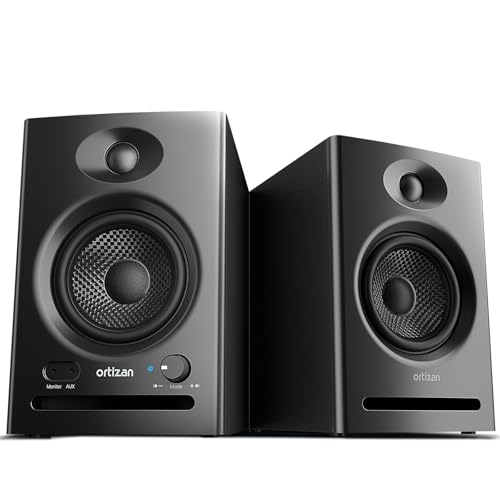 | Ortizan C7 | Best fit: USB and Bluetooth flexibility Drivers: 3.5in driver, 0.75in tweeter Inputs: TRS, RCA, AUX, USB Wireless: Bluetooth 5.3 | Check Price on Amazon |
 | Mackie CR3.5 | Best fit: Desk placement controls Drivers: 3.5in woofers Controls: Tone knob, location switch Included: Pads and cables | Check Price on Amazon |
 | Edifier MR3 | Best fit: Monitor-mode features Drivers: 3.5in drivers, 1in tweeters Inputs: TRS, RCA, AUX Output: 18W x2 RMS | Check Price on Amazon |
 | PreSonus Eris 4.5BT | Best fit: Larger compact woofer Drivers: 4.5in woofers, 1in tweeters Inputs: TRS, RCA, aux Wireless: Bluetooth 5.0 | Check Price on Amazon |
1. PreSonus Eris 3.5 — Compact Wired Desk Setup
On a tight desk, the Eris 3.5’s small cabinet and direct wired inputs are the starting points. PreSonus lists it as a powered pair with 3.5-inch woven-composite woofers and 1-inch silk-dome tweeters. The listing also names 50 watts of built-in amplification and a stated 80Hz to 20kHz range.
Balanced TRS, RCA, and a front-panel aux input are listed, along with a front headphone output and high- and low-frequency tuning controls. Those controls do not correct a room by themselves, but they give a desk listener a clear set of connections and adjustments to inspect before purchase.
Our Take Buy the Eris 3.5 if desk space is limited and you want wired balanced or unbalanced options. The pair is compact and has balanced and unbalanced inputs, but a small speaker still needs sensible placement.
- Lists TRS, RCA, and front aux inputs.
- High- and low-frequency controls are listed.
- 3.5-inch woofer is the smaller size here.
- Placement remains important on a compact desk.
2. Edifier MR4 — Balanced-Input Desk
Edifier lists the MR4 with a 4-inch composite woofer and 1-inch silk-dome tweeter, plus a 1/4-inch balanced TRS input, RCA, AUX, and a front headphone output. Those connections suit a desk where an interface supplies balanced outputs and a consumer device also needs an uncomplicated path.
The listing describes separate high- and low-frequency controls plus Monitor and Music modes. A mode label does not establish how the pair will translate in your room, but the front controls let you compare a more neutral working setting with a casual listening setting.
Our Take Buy the MR4 if a 4-inch compact monitor with balanced TRS input fits your interface. The listed modes and controls make it flexible on a desk, but mix through the connection you intend to keep.
- Lists balanced TRS alongside RCA and AUX.
- Monitor and Music modes are listed.
- Mode names are not independent response tests.
- One listening position still needs setting up carefully.
3. Ortizan C7 — USB and Bluetooth Flexibility
Ortizan lists the C7 powered pair with USB audio, Bluetooth 5.3, RCA, 3.5mm AUX, and a 6.35mm balanced TRS input. The product also lists a 3.5-inch mid-bass driver and 0.75-inch silk-dome tweeter. The input variety suits a mixed-use desk where a computer, interface, and phone all need accessible paths.
The listing calls the USB connection a 24-bit DAC path and describes a front headphone output. The USB DAC path and headphone output are listed features, not proof of conversion or monitoring performance. For mixing, decide which input is the fixed working path instead of switching sources without tracking the level and mode.
Our Take Buy the Ortizan if you need USB, Bluetooth, and wired inputs on one desk. The broad input set is convenient, though a dedicated interface connection remains easier to keep consistent.
- Lists USB, Bluetooth, TRS, RCA, and AUX inputs.
- Front headphone output is listed.
- Multiple inputs can complicate a fixed monitoring path.
- Bluetooth is not the same as a wired interface route.
4. Mackie CR3.5 — Desk Placement Controls
Mackie lists the CR3.5 as a pair with 3.5-inch woofers, a Tone Knob, and a Location Switch for wall or free placement. The listing also says the box includes isolation pads and all cables. The included pads suit a desk buyer who needs a starting surface treatment rather than another accessory purchase.
Placement controls are still only one part of the speaker setup. The cabinet height, distance from the wall, and left-right symmetry affect a home desk. Use the listed switch as a setup feature, not a reason to ignore where the pair will physically sit.
Our Take Buy the Mackie if the listed placement switch and included pads match a simple desk installation. The package is a convenient starter, but it will not make an asymmetrical desk behave like a treated room.
- Lists a location switch for wall or free placement.
- Isolation pads and cables are listed in the box.
- 3.5-inch woofers are compact.
- Desk symmetry is still a separate setup task.
5. Edifier MR3 — Monitor-Mode Features
Edifier lists the MR3 with 3.5-inch mid-low drivers, 1-inch tweeters, 18W x2 RMS output, and a stated 52Hz to 40kHz range. It also lists balanced TRS, RCA, AUX, a headphone output, and Bluetooth multi-point connection. The MR3 suits a laptop desk that must support both a working interface and occasional alternate sources.
Music, Monitor, and Custom modes are listed, with deeper adjustments through the Edifier ConneX app. App adjustment can be useful for a clearly documented setup, but it can also introduce changes you forget. Save or note the working mode before making decisions from a session.
Our Take Buy the MR3 if its listed TRS input and monitor-mode controls fit a compact interface desk. It has broad feature coverage, but keep a stable configuration while you are comparing a mix.
- Lists TRS, RCA, AUX, and a headphone output.
- Monitor and Custom modes are listed.
- App settings need documenting for repeatable use.
- Smaller drivers suit a compact desk best.
6. PreSonus Eris 4.5BT — Larger Compact Woofer
PreSonus lists the Eris 4.5BT with 4.5-inch woven-composite drivers and 1-inch silk-dome tweeters, along with 50W of Class A/B power. Balanced 1/4-inch TRS, RCA, and front 1/8-inch TRS aux inputs are listed, plus Bluetooth 5.0. The 4.5-inch driver is the largest on this page, so it suits a desk with a little more space than the smallest pairs.
Bluetooth can be useful for non-work playback, but a mix comparison benefits from a known wired path. The listing’s input mix gives you choices, so settle on the interface output and gain relationship you will use before you judge material.
Our Take Buy the Eris 4.5BT if a slightly larger compact driver and balanced TRS input are more useful to you than the smallest possible cabinet. Keep the wired interface path as the reference for desk mixing.
- Lists 4.5-inch drivers and balanced TRS input.
- RCA and front aux provide alternate wired paths.
- Larger cabinets need more desk clearance.
- Bluetooth should not replace a fixed reference path.
Buying Guide
Start with the output your desk already owns
Balanced TRS is a useful match for many audio interfaces. The PreSonus Eris 3.5, Edifier MR4, Ortizan C7, Edifier MR3, and PreSonus Eris 4.5BT all list a balanced input option. A balanced input does not make every cable or interface setting interchangeable, but it gives you a direct path to compare against your interface outputs.
Keep one working route stable. A speaker with Bluetooth, USB, RCA, and AUX can be convenient for a multipurpose desk. For a mixing session, choose the input, computer volume, interface level, and speaker control position you intend to use. A fixed route makes later comparisons easier to trust.
Give the pair a real nearfield position
Short listening distance reduces how much of the room you hear, not all of it. Put the speakers where their drivers can face the normal working position, then avoid putting one in a corner and the other in open space when the desk allows. The listing cannot determine the best placement for a particular room.
Desk height and surface contact deserve attention. The Mackie listing includes pads, while separate isolation pads are another route for other pairs. A pad or stand does not guarantee a result, but it can help establish a repeatable speaker position and reduce direct contact with the desk surface.
Choose size and controls for the space, not a generic upgrade ladder
A larger woofer needs more room around the cabinet. The 4-inch MR4 and 4.5-inch Eris 4.5BT are not automatically better than a 3.5-inch pair. They simply take up more space and have their own stated driver arrangements. Check the desk width, depth, and room for the interface before deciding the larger cabinet is usable.
Controls can help you document placement decisions. The Eris 3.5 lists high- and low-frequency controls, the MR4 lists separate high- and low-frequency controls, and the Mackie lists a location switch. Use those features after the speakers are placed, rather than changing controls to compensate for an inconsistent left-right layout.
Frequently Asked Questions
Do I need balanced inputs for a home mixing desk?
No, but balanced TRS inputs are a sensible match when your audio interface provides balanced outputs. They give you a direct cable path that is common on compact studio hardware. Confirm the connectors on the exact interface and monitor before buying cables.
RCA and AUX inputs can be useful for other devices. For critical comparisons, keep the selected source and level stable so a change in playback route does not look like a change in the mix.
Can I use Bluetooth monitors for mixing?
You can use a Bluetooth-equipped pair for listening, but a wired input is easier to keep consistent for a mixing desk. Wireless connection behavior, device routing, and level can differ from the interface path you normally use.
The useful question is whether the pair also has the wired input you need. The C7, MR3, and Eris 4.5BT list several wired options alongside Bluetooth, so you do not need to make wireless the reference path.
Should I choose a 3.5-inch, 4-inch, or 4.5-inch woofer?
Choose the size that fits the desk and listening distance you can actually maintain. Driver diameter alone does not describe room behavior or mix translation. A compact pair may be the more usable solution when a larger cabinet would force uneven spacing or put the drivers too close to a wall.
Compare the listed driver size with the cabinet space, stands or pads, and interface inputs. Once installed, use familiar material and a stable position rather than assuming the larger number resolves the setup.
Bottom Line
For a compact wired desk, PreSonus Eris 3.5 gives you the listed TRS, RCA, and aux paths. For a 4-inch balanced-input alternative, Edifier MR4 is the direct comparison. If the desk has room for a 4.5-inch pair, PreSonus Eris 4.5BT is the larger compact option here.