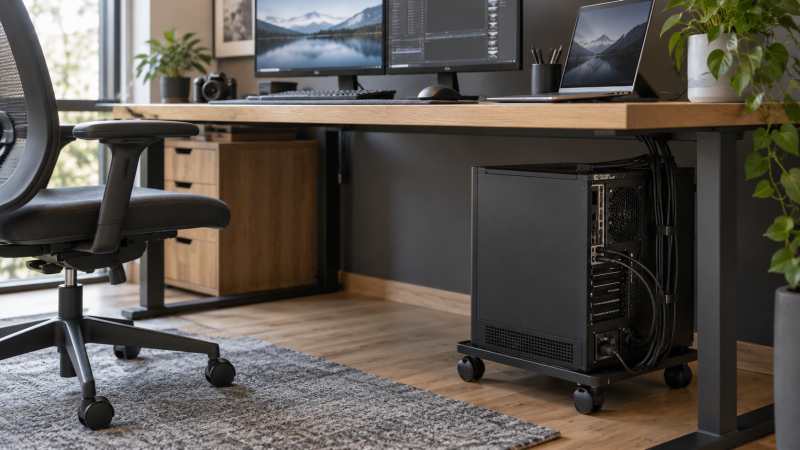
A desktop tower on the floor can be awkward to reach when a cable or drive needs attention. A rolling stand raises the case a little and lets you pull it out, but only if it fits the case and leaves enough slack in every connected cable. Choose by case width, stated load, caster brakes and the space beside your desk, not by the word “universal” in a product title.
These five exact Amazon US tower stands had active New offers when checked. They cover a simple adjustable cradle, a two-tier cart with outlets, a heavy-duty workstation shelf, a broad adjustable frame and a height-adjustable stand. We have not assembled them or load-tested their wheels and rails. All measurements below are listing claims to compare with your own PC case.
Measure the case at its widest point, including feet and side-panel features. Then leave room at the rear for ports and cable bends.Rolling Tower Stands Compared
| Image | Product | Details | Check Price |
|---|---|---|---|
 | Hovadova Adjustable | Best fit: Simple cradle Case fit: 7.87–11.81 in wide Load: 88 lb stated Levels: One Power: None stated | Check Price on Amazon |
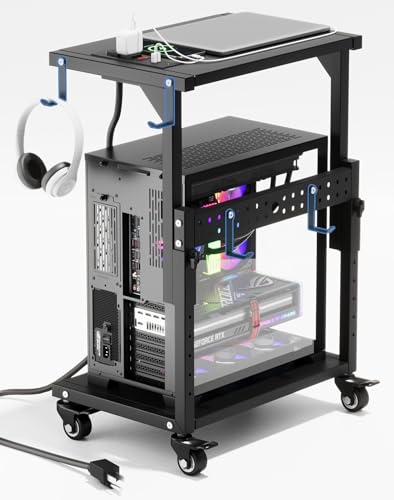 | ZUAVIALA Two-Tier | Best fit: Shelf plus outlets Cart height: 21.34–28.3 in Load: 110 lb lower; 88 lb upper Levels: Two Power: 2 AC; USB; Type-C | Check Price on Amazon |
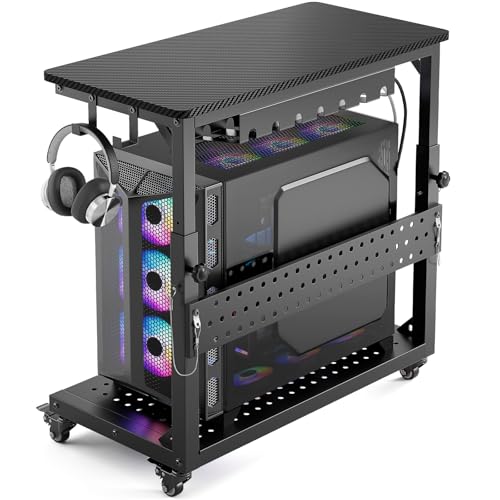 | GreenForest Heavy Duty | Best fit: Large heavy case Inner base: 26.9 x 13.7 in Load: 150 lb lower; 100 lb upper Levels: Two Power: None stated | Check Price on Amazon |
 | Liitrton Adjustable Frame | Best fit: Length and width fit Case fit: 16.93–22.44 L; 9.06–14.57 W in Load: Confirm listing Levels: One Power: None stated | Check Price on Amazon |
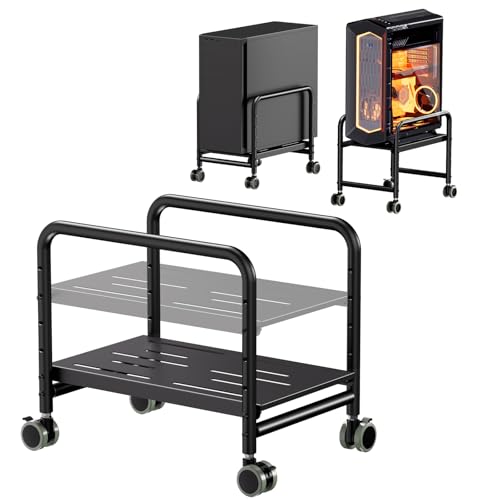 | PUTORSEN Height-Adjustable | Best fit: Raise case for access Case fit: Up to 10 in wide Load: 66 lb stated Levels: One Stand height: 5.2–11.9 in | Check Price on Amazon |
1. Hovadova Adjustable — Best Simple Rolling Cradle
Hovadova uses an open, adjustable-width base rather than a tall shelving cart. The listing gives a width range of 7.87 to 11.81 inches and a 15.75-inch length. The range lets a buyer check fit before ordering, though the case’s feet and side rails also need clearance. The product describes guardrails intended to keep the PC in place as the stand moves.
The seller states an 88-pound load limit, four rolling casters and a perforated panel under the tower. Raising a bottom-intake case can help avoid burying vents against carpet, but this listing is not a measured cooling result. Confirm the case’s bottom intake location and compare stand rails with its feet. Check whether the caster locks are reachable once the PC sits under the desk.
An open frame gives rear-port access only if the desk and wall leave space for the plugs and your hand.Our Take Pick Hovadova for a plain rolling cradle when the case fits its narrow published width range. If you also need shelving for studio equipment, a two-tier cart may use the floor area better.
- Published width and length for fit checks.
- Open rear access and protective side rails.
- Perforated base and rolling casters.
- 11.81-inch listed maximum excludes wider cases.
- One level adds no shelf for other gear.
2. ZUAVIALA Two-Tier — Best Built-In Power Cart
ZUAVIALA combines a lower tower shelf and an upper accessory shelf. The exact listing states 110 pounds for the lower shelf and 88 pounds for the upper. The upper shelf can place a printer, small interface or other gear near the PC without occupying the desktop, but check both the tower’s case height and the shelf clearance before planning the upper level. The cart’s own listed height adjustment is 21.34 to 28.3 inches.
Its built-in strip is listed as two 125V/12A AC outlets plus USB and Type-C ports, with a 6.5-foot supply cord. The strip is a convenience feature, not proof of laptop Power Delivery wattage or a safe power plan for every device. The seller says all four casters have brakes. Verify the current electrical markings and the total connected load, and route the strip’s cord so pulling out the cart does not tug wall wiring.
Our Take Choose ZUAVIALA if tower mobility, an upper shelf and reachable outlets belong in one cart. Skip it when a tall frame would crowd knees or a low desktop.
- Separate lower tower and upper gear shelves.
- Stated load limits for both levels.
- Four locking casters and built-in outlets listed.
- Two-tier height may not fit a low desk.
- Power-strip ratings and cable reach need checking.
3. GreenForest Heavy Duty — Best Large Case and Gear Cart
GreenForest aims at a larger workstation tower. The seller gives an inner base of 26.9 by 13.7 inches and a 150-pound stated lower-shelf load, plus a 100-pound upper-shelf limit. The base size and load limits are unusually large claims within this selection, so compare them with your actual case dimensions and loaded weight. A case that fits the base length may still need extra room for rear cables or a protruding side panel.
The listing describes adjustable cart height from 18.7 to 25.9 inches, a perforated base that lifts the case 3.9 inches, lockable casters, hooks and a cable-management tray. Those additions can organize a workstation, but they also make the unit larger than a bare cradle. We have not measured the claimed airflow, wheel handling or capacity. Check whether the upper shelf blocks top vents or access to case controls.
Do not place a tower under an upper shelf without checking top exhaust clearance and access to its power button and ports.Our Take Pick GreenForest when a large, heavy case and nearby gear need a mobile two-tier cart. A compact mid-tower with little spare floor area does not need this much cart.
- Large published inner base.
- 150-pound lower-shelf claim.
- Adjustable cart height and extra cable storage.
- Bulky footprint for a small desk area.
- Upper shelf may limit case exhaust or access.
4. Liitrton Adjustable Frame — Best Broad Footprint Adjustment
Liitrton publishes both length and width adjustments: 16.93 to 22.44 inches long and 9.06 to 14.57 inches wide. The two ranges give a buyer more ways to fit a case’s bottom footprint than a frame that only changes width. Measure the case feet at their outer edges and leave a margin for the rails. The upper end of the width range suits some larger towers, but the listing does not prove that every case will balance well.
The seller describes four swiveling casters, a steel-and-ABS frame and a textured non-slip support surface. Its feature text says a locking arrangement can keep the bracket still, but is less clear about how the wheels themselves brake than some other listings here. Confirm the exact locking mechanism before using it on a sloped or slick floor. No reliable numerical load rating appears in the feature bullets.
Our Take Choose Liitrton when case length and width both need adjustment. Ask for the current load and brake details before placing an unusually heavy workstation on it.
- Both length and width ranges are published.
- Four swiveling casters.
- Textured support surface described.
- Numerical load rating not established here.
- Wheel-brake detail needs confirmation.
5. PUTORSEN Height-Adjustable — Best Case Height Access
PUTORSEN lists height adjustment from 5.2 to 11.9 inches for the stand and says it fits cases up to 10 inches wide. The extra height can be useful when a tower must clear floor-level obstacles or bring rear ports closer to hand height. Yet every inch added below the case takes an inch of clearance away from the desktop above it. Measure the gap before buying, especially under a fixed-height desk.
The seller states a 66-pound support limit and describes steel construction, side rails and rolling casters. The limit is lower than the published Hovadova, ZUAVIALA and GreenForest figures, so weigh the fully built case rather than an empty chassis. The listing promises improved airflow and less dust. Lifting the case changes its position, but we have not tested cooling or dust accumulation. Verify the rail placement against case feet and side vents.
Our Take Pick PUTORSEN when stand height is the main adjustable dimension and the case is within its listed width and load limits. Choose a broader adjustable cradle for a wide case.
- 5.2-to-11.9-inch stated stand-height range.
- Side rails and steel build described.
- Published 66-pound load limit.
- 10-inch listed case-width limit.
- Raising the case reduces space above it.
Buying Guide
1. Fit the fully built case, not its marketing category
Measure the case’s base length, width and loaded weight. Include protruding feet, rubber pads and rails. Do not rely on “mid-tower” or “full-tower” labels. The table shows which listings publish width, length or load limits, but a stand’s supports must meet actual case contact points. A desktop workstation guide can help frame what gear lives inside the case, yet only the exact chassis dimensions settle fit.
Leave space around vents and ports after the tower is on the stand. A top shelf can intrude on an exhaust vent, while a tight wall can kink display and power cables at the back. If the tower moves out for servicing, test the full rolling path before routing a short USB or video lead to a USB-C dock. A case that fits the cart but cannot be pulled out safely is not a useful mobile setup.
2. Decide whether one level or two are needed
A single-level cradle like Hovadova or Liitrton keeps the stand low and the rear of the tower open. A single level is often enough when the only job is lifting the computer and reaching cables. A taller cart may add storage, but it also occupies the volume under the desk where knees, chair arms or a footrest might travel.
A two-tier cart such as ZUAVIALA or GreenForest adds a gear shelf. Check the load of each level independently and avoid treating a combined marketing number as an upper-shelf allowance. If power outlets come built in, plan the main cord and device ratings as carefully as the physical weight. An under-desk cable tray can keep smaller leads from catching a caster when the cart moves.
3. Check casters against your floor and desk motion
Casters should roll on the actual floor without dragging a rug or leaving the tower crooked. Seller descriptions of all-surface movement do not replace a local test on your carpet or hard floor. Locking wheels help hold a cart in one place, but check which wheels brake and whether you can reach the locks once the computer is installed.
For a sit-stand desk, a floor cart does not rise with the desktop. Leave enough slack in monitor, USB, power and audio cables for the desk’s full range, while keeping loops away from chair wheels. A desktop workstation UPS often has its own place on the floor. Do not add its weight to a PC cart unless the seller expressly supports that arrangement.
FAQ
Does a rolling stand improve PC cooling?
It can change the space below and around a case, especially when the tower would otherwise rest on carpet. Hovadova and GreenForest describe perforated or raised bases. But better airflow and lower temperatures depend on the case’s intake location, filters, fans and the room, and we have not measured any thermal difference.
Check whether a rail or shelf blocks an existing vent. If the PC runs hot after moving it, inspect the full case airflow path rather than assuming the stand itself is the cause or cure.
How much weight capacity do I need?
Compare the fully assembled tower’s measured weight with the lower platform’s seller-stated limit. Include installed drives, cooling hardware and other internal gear. A rating for a top accessory shelf does not automatically apply to the bottom cradle, or vice versa.
Leave a margin rather than selecting a cart exactly at its published maximum. We did not load-test these stands, and a floor transition or uneven carpet may change how a heavy case behaves while rolling.
Can I roll the PC out while it is connected?
Only if every cable has a safe movement path. The power cord, monitor leads, network cable, audio connections and USB devices all need enough slack for the full pull-out distance. A single short cable can tug a rear port before the tower is far enough to service.
Keep the cart’s path clear of a chair, footrest and desk legs. For a major cable change, shut the computer down and disconnect power as the device maker directs rather than relying on the cart alone to make live access safe.
Bottom Line
Start with case dimensions and cable travel. Hovadova is a simple adjustable cradle, and Liitrton adjusts in both floor dimensions. ZUAVIALA adds outlets and a shelf, GreenForest favors large cases, and PUTORSEN changes how high the case sits. The right stand is the one that supports your exact tower while letting you reach its ports without pulling on connected gear.